How a Tampered role_id Gave Me Permanent, Invisible Control Over Other Users’ Organizations
The invite API accepted a tampered role_id value that the UI never offered, letting an attacker assign the Owner role to an invited account. Worse, the victim was added without consent, and the attacker then gained Owner rights over any new organisation the victim created.
 Published on hamzaelgarhy.medium.com
Cybersecuirty
The full write-up lives on its author's site
It belongs to its author, so we link to it rather than copy it. The other two tabs are our own rewrites, checked against it.
Context
The target was a SaaS platform that organises work around organisations. Each organisation has an Owner, and the Owner can invite teammates as Administrator, Editor or Observer. The invite UI only ever offers those three roles: Administrator, Editor and Observer. Owner is not offered through an invite, and the researcher's starting assumption was that Owner is meant to be untouchable from the outside.
The feature under test is the invitation flow: open the organisation, click Invite, pick a role from the dropdown, send it. The researcher's point is that a UI restriction is not a security control, so the question was what the server actually enforced once the dropdown was out of the picture.
Setup
- Two accounts: Account A as the attacker, Account B as the victim.
- A proxy to intercept requests before they leave the browser.
- A fresh organisation created under Account A.
No versions, endpoints, hostnames or parameter names beyond role_id are given in the report.
Finding it
The researcher walked through the invitation flow as a normal user would, then repeated it with the proxy in place and intercepted the request before it left the browser. The question was what happens if the role_id value is changed from 2 to 1.

The report describes the result as the backend adding the victim without their acceptance, accepting the request, and changing the victim from admin to owner in the attacker's organisation.
Exploitation
Step 1: create the attacker organisation
Logged in as Account A (attacker), created a fresh organisation.
Step 2: start the invite
Opened the invite panel and started inviting Account B (victim) as Administrator.
Step 3: tamper with the role
Intercepted the request in flight and changed role_id from 2 to 1.
In the invite UI the only roles on offer are Administrator, Editor and Observer; after the change, Account B was listed as Owner.
Step 4: forward it
Forwarded the modified request. There was no validation error and no rejection: the server accepted it silently.
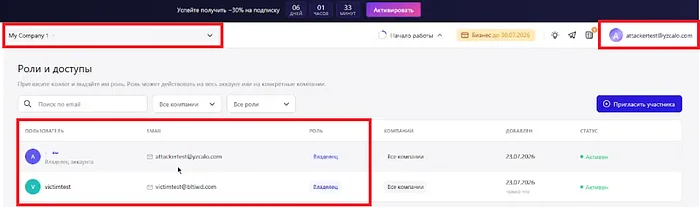
Logging into Account B and checking the membership panel showed Account B listed as Owner of Account A's organisation. A role that does not exist anywhere in the invite UI had been assigned through the API with a one-character edit.
The missing consent
Before the privilege escalation, the researcher found something else: Account B was added as a member without accepting anything. There was no pending invite and no Accept button. The moment the request was sent, Account B was already a member. That is bug #1: any user can be added to an organisation without their consent. Bug #2 is the tampered role_id, which turned that unconsented membership into full Owner access.
Something about how the ownership was tracked felt off: less like "this organisation has an extra owner" and more like "these two accounts are now permanently linked". So the researcher kept going.
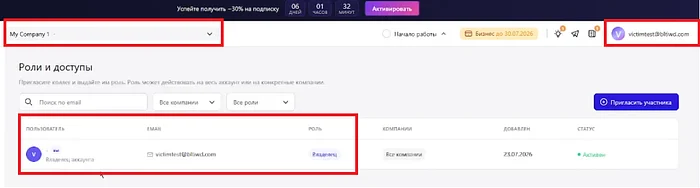
Step 5: create a new organisation as the victim
Still logged in as Account B, created a brand new organisation, completely unrelated to Account A, never shared and never invited to.
Step 6: look at the attacker's dashboard
Logged back into Account A and opened the dashboard.

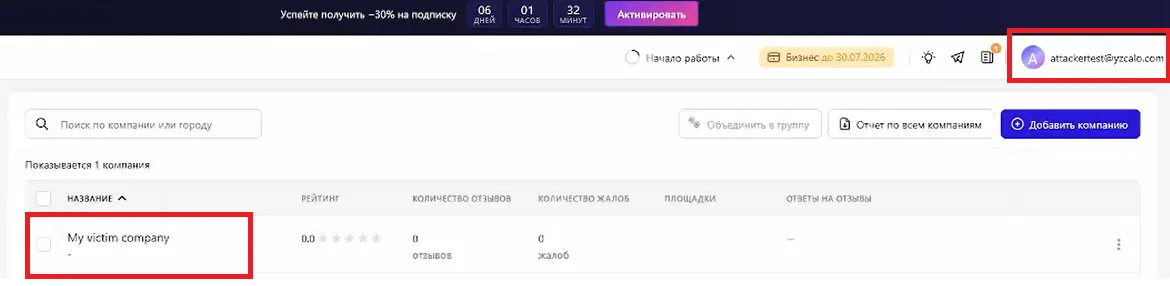
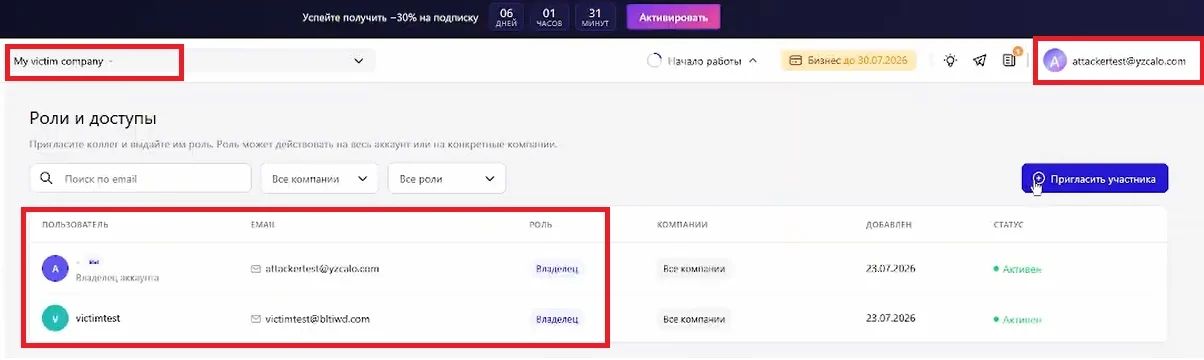
Account B's new organisation was sitting in Account A's organisation list, with Account A holding full Owner privileges over it. No request had been touched for this second organisation and no invitation had been sent. The application had, on its own, decided that because Account A once gave the Owner role to Account B, Account A should inherit Owner rights over anything Account B creates going forward. Account B does not see Account A, or anyone Account A invites to B's organisation.
Root cause
The report does not show server-side code, so the following is inferred from behaviour. The invite endpoint trusted the client-supplied role_id and did not restrict it to the roles the UI offers, so a value of 1 was accepted and mapped to Owner. Separately, the membership was created immediately, with no pending state and no acceptance step, which is why the victim never had to consent.
The persistence across new organisations may indicate the ownership relationship was stored as a link between the two accounts rather than as a role on a single organisation. The dropdown was bypassed entirely by the proxy.
Impact
An attacker who has never been legitimately invited to a victim's organisation can obtain silent, persistent Owner access. According to the report, that includes the ability to:
- Delete the victim's organisation
- Rename the victim's organisation
- Export the organisation's data
- Invite additional members, invisibly from the victim's perspective
- Change organisation settings
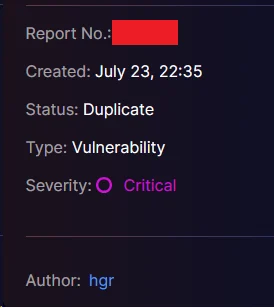
The access is described as invisible from the victim's side: the victim does not see the attacker or anyone the attacker invites to the victim's organisation. The report does not state a severity, CVSS score or bounty.
Fix
Based on the behaviour shown, the server should validate role_id against the set of roles permitted for an invite, rather than trusting the client, and membership should require the invitee's acceptance before it becomes active. The cross-organisation inheritance should also be reviewed so that a role granted in one organisation does not confer rights over organisations the other account creates later.
Variants to test
- Role identifier tampering on other invite or member endpoints. Send the lowest numeric or otherwise privileged role value in place of the one the UI offers. A positive result is a member listed with a role the UI never exposes.
- Invite without acceptance. Send an invite and check the victim's membership panel without accepting anything. A positive result is the victim already listed as a member, with no pending invite.
- Inheritance across new resources. After the tampered invite, have the victim create a new organisation or workspace and check the attacker's dashboard. A positive result is the new resource appearing under the attacker's control without any further request.
- Visibility check from the victim's side. As the victim, look for the attacker and for members the attacker invited. A positive result for the attacker is that none of them appear.
What happened, in plain words
A security researcher was testing a website that helps teams work together. On this site, people gather into groups called organisations. Think of an organisation like a shared folder or a club: several people belong to it, and they can see and change what is inside.
Every organisation has an Owner. The Owner is the person in charge. They can invite other people to join, and when they do, they choose what kind of member that person will be. The site offers three kinds of member: Administrator, Editor and Observer. The Owner role is not on that list. You are not supposed to be able to hand out Owner through an invitation.
The researcher wanted to know whether that rule was actually enforced by the site's computer, or whether it was only enforced by the dropdown menu in the browser. This is a very common mistake in web security: a website hides an option in its interface, but the computer behind it still accepts that option if someone sends it directly. Hiding a button is not the same as locking a door.
To test this, the researcher made two accounts. Account A played the attacker. Account B played the victim. Then the researcher used a tool called a proxy to look at, and change, the messages the browser sends to the website.
What the researcher found was two separate problems:
- The victim was added to the attacker's organisation without ever agreeing to it. Normally you would expect an invitation to sit and wait until the person accepts it. Here there was no waiting: the moment the request was sent, Account B was a member.
- The attacker could change a hidden number in that request to give the victim the Owner role, a role the invitation screen never offers.
And then something stranger happened. Once that link existed, any new organisation the victim created afterwards automatically appeared in the attacker's dashboard, with the attacker holding full Owner rights over it. The victim could not see the attacker at all.
This article walks through the same steps the researcher took, explaining each idea from scratch as it appears.
The product and the feature being tested
Before the technical details, it helps to be clear about what the site does and which part of it was attacked.
- SaaS stands for Software as a Service. It means software you use through a website instead of installing it on your computer. Your email, your online documents and many work tools are SaaS.
- An organisation on this platform is a container for a team's work. Each organisation has members, and each member has a role.
- A role is a label that says what a person is allowed to do. Owner is the most powerful role. Administrator, Editor and Observer are less powerful, in that order.
The feature under test is the invitation flow. That is the sequence of screens you go through to add someone to your organisation:
- Open the organisation.
- Click "Invite".
- Pick a role from a dropdown menu.
- Send the invitation.
The dropdown only ever offers Administrator, Editor and Observer. Owner is not there. The researcher's starting assumption, which is a reasonable one, was that Owner is meant to be impossible to give out through an invitation.
But here is the key idea of the whole article: a restriction in the user interface is not a security control. The dropdown is just a picture on your screen. The real decision about what role gets saved is made by the website's server, the computer that stores the data. If the server simply believes whatever role number the browser sends, then anyone who can change that number can pick any role they like, whether the dropdown shows it or not.
The tools: a proxy and what it does
To change a message between the browser and the server, the researcher used a proxy.
A proxy is a program that sits between your browser and the website. Normally your browser talks directly to the server. With a proxy in place, every message goes through the proxy first, and the proxy can show it to you, pause it, and let you edit it before passing it on.
An everyday comparison: imagine you are sending a letter, and a friend offers to post it for you. Before posting it, the friend opens the envelope, reads the letter, and can rewrite a word if you ask.
This matters because the browser builds each request for you. When you click "Invite" and choose Administrator, the browser quietly fills in a number that means "Administrator" and sends it. You never see that number. The proxy lets you see it, and change it.
The setup
The researcher prepared three things:
- Two accounts. Account A as the attacker, Account B as the victim.
- A proxy, to intercept requests before they leave the browser.
- A fresh organisation created under Account A, so there was a clean place to test the invite.
The report does not give the site's address, the exact web address of the invite feature, or the names of any other fields in the request. The only field name it mentions is role_id.
Looking at the invitation flow
The researcher first went through the invitation flow as any normal user would: open the organisation, click Invite, choose a role, send. Nothing unusual there. That step is important because it shows what a normal, honest request looks like. You cannot spot a tampered request until you know what an untampered one looks like.
Then the researcher repeated the flow with the proxy switched on, and paused the request before it left the browser. Inside that request was a field called role_id.
role_idis simply a number that stands for a role. The website stores roles as numbers internally, and the dropdown translates your choice into one of those numbers. The browser sent2in the original request.
The researcher's question was simple: what happens if I change role_id from 2 to 1?
According to the report, the result was that the backend added the victim without their acceptance, accepted the request, and changed the victim from admin to owner in the attacker's organisation. In other words, the server did not check whether 1 was a role the invitation screen was allowed to offer. It just took the number and used it.
The exploitation, step by step
Step 1: create the attacker's organisation
The researcher logged in as Account A, the attacker, and created a fresh organisation. A new organisation gives a clean starting point: no existing members, no history, nothing to confuse the result.
Step 2: start the invite
Still as Account A, the researcher opened the invite panel and began inviting Account B, the victim, as Administrator. Administrator is one of the three roles the dropdown offers, so this is a completely ordinary action. The point of choosing Administrator is that it is a legitimate choice; the tampering happens later, in the request itself.
Step 3: tamper with the role
The researcher intercepted the request in flight and changed role_id from 2 to 1.
Line by line, in plain words:
role_idis the name of the field in the request that tells the server which role to give the invited person.2is the value the browser sent when Administrator was picked from the dropdown.->means "changed to".1is the value the researcher typed in its place.1is the value the researcher typed in its place, and the result was Owner.
So the whole line means: take the role number the browser sent, and replace it with the number for Owner.
Step 4: forward the modified request
Forwarding means letting the paused request continue on its way to the server, with the change included. The researcher forwarded it, and there was no validation error and no rejection. The server accepted it silently.
This is the heart of the finding. A well-built server would look at role_id: 1 and say "that role is not allowed in an invitation" and refuse. This server did not. It accepted the number and acted on it.
When the researcher logged into Account B and checked the membership panel, Account B was listed as Owner of Account A's organisation. A role that does not exist anywhere in the invite screen had been assigned through the site's programming interface with a one-character edit.
A quick word on that phrase, API: it stands for Application Programming Interface. It is the set of addresses and rules a browser (or any program) uses to talk to a server. When you click a button, your browser sends a message to one of those addresses. The dropdown is the friendly face; the API is the actual conversation. Changing the request directly means talking to the API without going through the dropdown at all.
The missing consent
Before the privilege escalation, the researcher noticed something else, and it is worth separating out because it is a bug on its own.
Account B was added as a member without accepting anything. There was no pending invitation and no Accept button. The moment the request was sent, Account B was already a member.
Normally, an invitation works like a paper invitation through the post: it arrives, it sits there, and you decide whether to accept. Here, the invitation was not an invitation at all. It was an instant membership. That is bug #1: any user can be added to an organisation without their consent.
Bug #2 is the tampered role_id, which turned that unconsented membership into full Owner access.
Something about how the ownership was tracked felt off to the researcher. It felt less like "this organisation has an extra owner" and more like "these two accounts are now permanently linked". So the researcher kept going.
Step 5: create a new organisation as the victim
Still logged in as Account B, the researcher created a brand new organisation. This one was completely unrelated to Account A: never shared with it, never invited to it. It was a private space belonging only to the victim account.
Step 6: look at the attacker's dashboard
Then the researcher logged back into Account A and opened the dashboard.
Account B's new organisation was sitting in Account A's organisation list, with Account A holding full Owner privileges over it.
This is the part that turns a serious bug into a very serious one. No request had been touched for this second organisation. No invitation had been sent. The application had, on its own, decided that because Account A once gave the Owner role to Account B, Account A should inherit Owner rights over anything Account B creates going forward.
And it was invisible: Account B does not see Account A, or anyone Account A invites to B's organisation.
Why this happens
The report does not show the server's code, so the explanation below is inferred from the behaviour that was observed.
Two things went wrong at the invitation step:
- The invite endpoint trusted the client-supplied
role_id. "Client-supplied" means the value came from the browser, and the browser is under the user's control. The server did not restrict the value to the roles the invitation screen offers, so1was accepted and mapped to Owner. A server should always check incoming values against a list of what is allowed, rather than trusting whatever arrives. - The membership was created immediately, with no pending state and no acceptance step. That is why the victim never had to consent. A pending state is simply a "waiting for approval" status that a membership sits in until the invited person agrees.
The persistence across new organisations may indicate the ownership relationship was stored as a link between the two accounts, rather than as a role on a single organisation. That link was then used to grant the attacker rights over anything the victim created afterwards. In everyday terms: instead of writing "this person is an owner of this one club", the system wrote "these two people are connected", and then applied that connection to every club either of them made.
The dropdown menu was bypassed entirely by the proxy.
Impact
An attacker who has never been legitimately invited to a victim's organisation can obtain silent, persistent Owner access. "Persistent" means it does not go away on its own: it keeps applying to new things the victim creates. According to the report, that includes the ability to:
- Delete the victim's organisation
- Rename the victim's organisation
- Export the organisation's data
- Invite additional members, invisibly from the victim's perspective
- Change organisation settings
The access is described as invisible from the victim's side: the victim does not see the attacker, or anyone the attacker invites to the victim's organisation.
Fix
Based on the behaviour shown, three changes would address it:
- The server should validate
role_idagainst the set of roles permitted for an invitation, rather than trusting the client. - Membership should require the invitee's acceptance before it becomes active.
- The cross-organisation inheritance should be reviewed, so that a role granted in one organisation does not confer rights over organisations the other account creates later.
Variants to test
If you are learning from this and want to look for similar problems on sites you are allowed to test, these are the same ideas applied in slightly different places:
- Role identifier tampering on other invite or member endpoints. Send the lowest numeric or otherwise privileged role value in place of the one the interface offers. A positive result is a member listed with a role the interface never exposes.
- Invite without acceptance. Send an invite and check the victim's membership panel without accepting anything. A positive result is the victim already listed as a member, with no pending invitation.
- Inheritance across new resources. After the tampered invite, have the victim create a new organisation or workspace and check the attacker's dashboard. A positive result is the new resource appearing under the attacker's control without any further request.
- Visibility check from the victim's side. As the victim, look for the attacker and for members the attacker invited. A positive result for the attacker is that none of them appear.
Glossary
- API: Application Programming Interface. The set of addresses and rules a browser or program uses to talk to a server.
- Administrator: A member role on the platform, more powerful than Editor and Observer but below Owner.
- Attacker: In a test, the account playing the role of the person trying to break in.
- Backend: The server-side part of a website, where data is stored and decisions are made. The user never sees it directly.
- Bug bounty: A programme where organisations pay researchers for reporting security problems responsibly.
- Client: The program on the user's side, usually the browser. Anything the client sends can be changed by the user.
- Consent: Here, the invited person agreeing to join. Without it, they are added without their knowledge.
- CVSS: A standard scoring system for rating the severity of a security flaw.
- Dashboard: The main screen of a web app, showing the things you have access to.
- Dropdown: A menu in a web page that lets you pick one option from a list. It is only a display; it does not enforce anything by itself.
- Editor: A member role on the platform, more powerful than Observer but below Administrator.
- Endpoint: A specific address on a server that accepts a particular kind of request, for example the one that handles invitations.
- Exploitation: The step where a weakness is actually used to achieve something, such as gaining access.
- Field: A named piece of data inside a request, such as
role_id. - Forward (a request): Letting a paused request continue to the server, including any changes made to it.
- Inheritance: Here, rights carrying over automatically from one thing to another, such as the attacker gaining rights over organisations the victim creates later.
- Intercept: Pause a request on its way from the browser to the server so it can be inspected or changed.
- Invitation flow: The sequence of screens used to invite someone to an organisation.
- Membership panel: The screen listing who belongs to an organisation and with which role.
- Observer: The least powerful member role on the platform.
- Organisation: A container for a team's work on the platform, with its own members and roles.
- Owner: The most powerful role in an organisation. Not offered through the invitation screen.
- Parameter: Another word for a field in a request, such as
role_id. - Payload: The part of a request that carries the data you are sending, such as the role number.
- Pending state: A "waiting for approval" status, for example an invitation that has been sent but not yet accepted.
- Persistent: Lasting, and continuing to apply to new things rather than expiring.
- Privilege escalation: Gaining more access or power than you are supposed to have.
- Proxy: A program that sits between the browser and the server, letting you view and edit the messages passing through.
- Request: A message the browser sends to a server, for example asking it to invite someone.
role_id: The numeric field in the invite request that tells the server which role to assign.- Root cause: The underlying reason a flaw exists, as opposed to its visible symptom.
- SaaS: Software as a Service. Software used through a website rather than installed locally.
- Server: The computer that stores a website's data and decides what to do with each request.
- Severity: How serious a flaw is judged to be.
- Tampering: Deliberately changing data, here a request, before it reaches the server.
- UI (user interface): What you see and click on screen. A UI restriction is not a security control.
- Validation: Checking that incoming data is allowed, for example that a role number is one the invitation screen offers.
- Victim: In a test, the account playing the role of the person being attacked.
- Vulnerability: A weakness in software that can be used to cause harm or gain unauthorised access.
- Workspace: A general term for a shared area of work, similar to an organisation.

