How a Viewer Role Snaked into Financial Records
A viewer role could access a billing export endpoint that should be restricted to admins and purchasers, because the server did not enforce role checks on that endpoint. An attacker with a viewer account could download organisation transaction records including names, addresses, emails and invoices.

medium.com
Published on medium.com
Broken Access Control
The full write-up lives on its author's site
It belongs to its author, so we link to it rather than copy it. The other two tabs are our own rewrites, checked against it.
Context
The target was an organisation management system offered as one of a company's services. It is built around three roles:
| Role | Responsibilities |
|---|---|
| Admin | Full control over organisation settings and user management |
| Purchaser | Billing and subscriptions |
| Viewer | Read-only access to a limited set of services |
The Billing section holds the organisation's transaction data and invoices, and only admins and purchasers are meant to reach it. Within that section there is a button labelled Export Transactions, which lets admins and purchasers download the organisation's transaction data files, including billing records, invoices and payment details, to their own machines.

Setup
The researcher mapped each role's privileges section by section and feature by feature. The researcher recommends the Autorize extension for detecting these flaws automatically while clicking around.
Finding it
Every section the researcher tested behaved correctly against broken access control until Billing, the last one checked. From the Viewer session, requesting the billing page, which returns all organisation transaction data and invoices, produced:
403 Forbidden
So direct access to the billing page was blocked for viewers. The interesting part was elsewhere: while exploring the other admin features, the researcher noticed the Export Transactions button, which downloads the organisation's transaction data files, including billing records, invoices and payment details.

A download button that produces the same financial data as the page the Viewer was just denied is exactly the kind of subtle control worth testing, because it is a separate endpoint from the page that returned 403.
Exploitation
Step 1: capture the legitimate export request
Starting the export from the Admin session, the researcher intercepted the resulting request in Burp.
Step 2: swap the session
The intercepted request's session cookies were replaced with the Viewer's cookies and the request was forwarded. The expectation was a rejection. Instead the server processed it:
200 OK
and returned the encrypted transactions file.
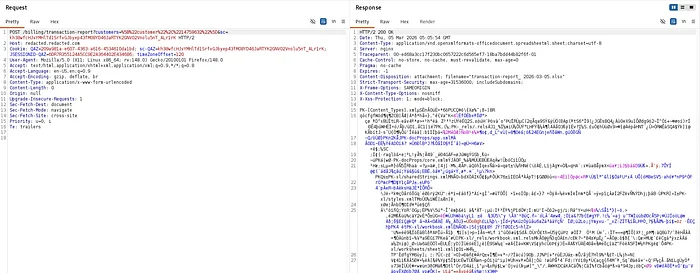
Step 3: reproduce from the Viewer's browser
To confirm the flaw without Burp, the researcher called the export endpoint directly from the Viewer's browser using this auto-submitting form:
<html> <body> <form action="https://redacted.redacted.com/billing/transaction-report?customers=%5B%22customer%22%2C%2214759632%22%5D&sc=[redacted]" method="POST"> <input type="submit" value="submit" /> </form> <script> window.onload = function() { document.forms[0].submit() } </script> </script> </body></html>
The form POSTs to the billing transaction report endpoint. The customers query parameter carries a URL-encoded JSON array identifying the customer (%5B%22customer%22%2C%2214759632%22%5D decodes to ["customer","14759632"]), and sc carries a token value. The inline script submits the form automatically on page load, so a Viewer who opens the page triggers the export without any further interaction.
The export request executed successfully and the transactions data file was downloaded directly, confirming that the server processes export file requests without enforcing access control based on the user's role privileges.
Root cause
The billing page enforces the role check and returns 403 to a Viewer, but the export endpoint behind the Export Transactions button does not apply the same authorisation check. It is a separate route (/billing/transaction-report) that does not enforce the role check, so a Viewer session can invoke it. The page-level defence did not help because the export is reachable independently of the page. The report does not describe the server-side code, so the exact location of the missing check is not stated.
Impact
A low-privileged user, the Viewer, can extract and download the organisation's transaction records, including names, addresses, emails, invoices and potentially users' financial data. The researcher describes this as unauthorised access to users' PII and financial data and says it ended with a $x,xxx reward. The data is returned as an encrypted transactions file, so reading its contents requires the ability to decrypt it; the report does not say how that encryption is keyed or whether the Viewer can decrypt the file.
Fix
The fix it implies is to enforce the same role check on the export endpoint that the billing page already applies, so that only Admin and Purchaser sessions can generate the transaction report, and to reject Viewer sessions with 403 regardless of how the request is issued.
Variants to test
- Export and download endpoints behind restricted pages. For every page that returns 403 to a low-privileged role, find the buttons that produce files (export, download, print, report) and replay their requests with the low-privileged session. A positive result is a 200 with a file body instead of a 403.
- Role matrix on every feature. Build sessions for each role and walk the application section by section, feature by feature, as the researcher did. A positive result is any action a role can perform that its documented privileges exclude.
- Automated authorisation checks. Run the Autorize extension while browsing as a high-privileged user so that each request is replayed with a lower-privileged session. A positive result is a request Autorize flags as bypassed, which you then confirm manually.
- Direct browser invocation. Reproduce a suspected bypass with an auto-submitting HTML form from the low-privileged browser, as in the PoC above, to show the issue does not depend on an intercepting proxy. A positive result is the file downloading from the low-privileged session.
- Parameter tampering on the export. Change the customer identifier in the
customersparameter to another organisation's value while keeping the low-privileged session. A positive result is another organisation's transaction file being returned, which would extend the flaw from role bypass to cross-tenant access.
What happened, in plain words
A company offered an online service for managing an organisation. Inside that service, people are given different roles, a bit like different keys to different rooms in the same building. An Admin can change everything about the organisation and its users. A Purchaser deals with billing and subscriptions. A Viewer is only supposed to look at a small set of things, without changing anything.
One part of the service, the Billing section, holds the organisation's money-related records: transactions and invoices. Only Admins and Purchasers are meant to see it. When the researcher, logged in as a Viewer, tried to open the billing page, the server said no with a 403 Forbidden message. That is the web equivalent of a locked door: the server understood the request but refused to carry it out.
But there was a second door. Inside the admin area there is a button called Export Transactions. Pressing it downloads a file containing the organisation's transaction data, including billing records, invoices and payment details. The researcher took the request that this button sends when an Admin presses it, swapped the Admin's login details for the Viewer's, and sent it again. The server did not refuse. It answered 200 OK and handed over the encrypted transactions file. A Viewer, who is not allowed anywhere near billing, could download the financial records.
This kind of mistake is called Broken Access Control: the application knows who you are but does not properly check what you are allowed to do. The researcher reported it and received a reward of $x,xxx.

The service and its three roles
The target was an organisation management system, one of the services a company offered. Think of it as a shared online office for a company: it holds the list of people, the settings, and the money records. To keep things tidy, the system gives every user one of three roles.
| Role | What it is allowed to do |
|---|---|
| Admin | Full control over organisation settings and user management |
| Purchaser | Billing and subscriptions |
| Viewer | Read-only access to a limited set of services |
"Read-only" means the Viewer can look but not change things. "Limited set of services" means the Viewer is not supposed to reach every part of the system.
The Billing section is where the organisation's transaction data and invoices live. Only Admins and Purchasers are meant to reach it. Inside that section sits a button labelled Export Transactions. Pressing it lets an Admin or Purchaser download the organisation's transaction data files, including billing records, invoices and payment details, onto their own computer.
Why does this arrangement matter for security? Because whenever an application has several levels of permission, there must be a check at every single action that confirms the person asking is allowed to do it. If even one action forgets the check, the whole permission system springs a leak. The researcher describes this setup as "a fertile environment for broken access control bugs", meaning a place where such mistakes are likely to hide.
Setting up the test
A session is what a website uses to remember that you are logged in. When you log in, the server sends your browser a small piece of data called a cookie, and the browser sends it back with every later request. The cookie is like a wristband at an event: the staff do not ask for your name every time, they just check the wristband. Having three sessions means having three wristbands, one per role, so the same actions can be tried as each kind of user.
The researcher intercepted the export request and edited it before forwarding it. Think of it as a mail interception service: you can open a letter, change a word, and send it on. The researcher also recommends a Burp extension called Autorize, which automates authorisation checks. An extension is an add-on that gives Burp extra abilities.
Finding the flaw
The researcher went through the application section by section and feature by feature, checking what each role could do. This is slow, deliberate work: open a page as Admin, note what is possible, then try the same thing as Viewer and see whether the server refuses. Every section behaved correctly against broken access control until Billing, which was the last one checked.
From the Viewer session, requesting the billing page, the page that returns all organisation transaction data and invoices, produced this response:
403 Forbidden
What this means: 403 is an HTTP status code, a short number the server sends to describe the result of a request. 200 means "here you go, success". 403 means "I know who you are, and you are not allowed". So the direct route into billing was properly blocked for viewers. The page itself was locked.
But the interesting part was elsewhere. While exploring the other admin features, the researcher noticed the Export Transactions button, the one that downloads the organisation's transaction data files, including billing records, invoices and payment details.
Why is a download button worth a second look? Because it produces the same financial data as the page the Viewer was just denied, yet it is a separate address on the server, a separate endpoint. An endpoint is one specific URL that performs one specific job, like a service counter in a large office: the front desk may turn you away, but if the back counter serves anyone who asks, the front desk's refusal means little. The page returned 403; the export is a different counter entirely, and nobody had checked whether it also says no.
Exploiting it
Step 1: capture the legitimate export request
The researcher started the export from the Admin session, the one that is allowed to do it, and intercepted the resulting request in Burp. Intercepting means pausing the request mid-flight so it can be read and edited before it reaches the server. The goal was to obtain a genuine, working export request to use as a template.
Step 2: swap the session
The intercepted request's session cookies were replaced with the Viewer's cookies, and the request was forwarded. In plain terms: the letter was written by an Admin, but the wristband inside it was swapped for a Viewer's wristband, and then it was posted. The expectation was a rejection, because a Viewer has no business exporting transactions. Instead the server processed it:
200 OK
and returned the encrypted transactions file. 200 OK is the success code. The server did not merely fail to notice the swap; it actively did the work and produced the file. The file is described as encrypted, meaning its contents are scrambled and need a key to be read. The report does not say how that encryption is keyed or whether the Viewer can decrypt the file.
Step 3: reproduce from the Viewer's browser
A finding is stronger when it does not depend on special tools. To confirm the flaw without Burp, the researcher called the export endpoint directly from the Viewer's browser using this auto-submitting form:
<html> <body> <form action="https://redacted.redacted.com/billing/transaction-report?customers=%5B%22customer%22%2C%2214759632%22%5D&sc=[redacted]" method="POST"> <input type="submit" value="submit" /> </form> <script> window.onload = function() { document.forms[0].submit() } </script> </script> </body></html>
Line by line, in plain words:
<html> <body>open an ordinary web page and its visible body. Nothing exotic: this is a page like any other.<form action="..." method="POST">starts a form, the same mechanism a login box or a search box uses.actionis the address the form sends its data to, andmethod="POST"says the data is sent as a POST request. A POST request is one way a browser talks to a server: it carries data in the body of the request, as opposed to a GET request, which mainly asks for a page. The address here is the billing transaction report endpoint,/billing/transaction-report.- The address carries two pieces of data after the
?, called query parameters. They are written asname=valuepairs joined by&. The first iscustomers, whose value is%5B%22customer%22%2C%2214759632%22%5D. That looks like gibberish because it is URL-encoded: certain characters cannot appear literally in a web address, so they are written as codes.%5Bis[,%22is a double quote,%2Cis a comma,%5Dis]. Decoded, the value is["customer","14759632"], a JSON array identifying the customer. JSON is a common text format for structured data, and an array is simply an ordered list. So this parameter says: the customer with identifier14759632. - The second parameter is
sc, whose value is a token-like string. A token is a value the server issues and expects back, used to identify or authorise the caller. The report does not explain what this particular token is for. <input type="submit" value="submit" />is the button that would send the form if a person clicked it.<script> window.onload = function() { document.forms[0].submit() } </script>is a small piece of JavaScript, the language browsers run to make pages interactive.window.onloadmeans "when the page has finished loading, do this". What it does isdocument.forms[0].submit(): find the first form on the page and submit it automatically. So nobody has to click anything. A Viewer who opens this page triggers the export by themselves.- The closing
</script> </body> </html>tags end the page. There is a stray extra</script>in the original, which browsers tolerate.
Why build this page at all? Because it proves the bypass needs nothing but a browser. The Viewer opens the page, the page quietly sends the export request with the Viewer's own session, and the server answers as if nothing were wrong. The export request executed successfully and the transactions data file was downloaded directly. This confirms that the server processes export file requests without enforcing access control based on the user's role privileges.
Why it worked
The billing page enforces the role check and returns 403 to a Viewer, but the export endpoint behind the Export Transactions button does not apply the same authorisation check. It is a separate route, /billing/transaction-report, that does not enforce the role check the billing page applies. The difference matters:
- Authentication answers "who are you?" The Viewer's cookie proves the Viewer is a real, logged-in user, so authentication passes.
- Authorisation answers "are you allowed to do this?" That question was never asked at the export endpoint.
A useful comparison is a building with a reception desk and a side door. The reception desk checks your badge and turns you away from the finance floor. The side door only checks that you have a badge at all, any badge, and lets you in. The page-level defence did not help because the export is reachable independently of the page.
Impact
A low-privileged user, the Viewer, can extract and download the organisation's transaction records, including names, addresses, emails, invoices and potentially users' financial data. The researcher describes this as unauthorised access to users' PII and financial data. PII stands for personally identifiable information: data that can identify a specific person, such as a name, address or email. The researcher says the finding ended with a $x,xxx reward.
The fix
The fix it implies is to enforce the same role check on the export endpoint that the billing page already applies, so that only Admin and Purchaser sessions can generate the transaction report, and to reject Viewer sessions with 403 regardless of how the request is issued. In the building comparison: put the same badge reader on the side door that the reception desk already uses.
Variants to test
- Export and download endpoints behind restricted pages. For every page that returns
403to a low-privileged role, find the buttons that produce files (export, download, print, report) and replay their requests with the low-privileged session. A positive result is a200with a file body instead of a403. - Role matrix on every feature. Build sessions for each role and walk the application section by section, feature by feature, as the researcher did. A positive result is any action a role can perform that its documented privileges exclude.
- Automated authorisation checks. Run the Autorize extension while browsing as a high-privileged user so that each request is replayed with a lower-privileged session. A positive result is a request Autorize flags as bypassed, which you then confirm manually.
- Direct browser invocation. Reproduce a suspected bypass with an auto-submitting HTML form from the low-privileged browser, as in the PoC above, to show the issue does not depend on an intercepting proxy. A positive result is the file downloading from the low-privileged session.
- Parameter tampering on the export. Change the customer identifier in the
customersparameter to another organisation's value while keeping the low-privileged session. A positive result is another organisation's transaction file being returned, which would extend the flaw from role bypass to cross-tenant access. Cross-tenant means reaching another organisation's data, where each organisation is a separate tenant in the same shared system.
Tips from the researcher
- Test each feature in the app, especially the smallest often overlooked buttons, such as export features.
- Use the Burp extension Autorize to detect these hidden flaws automatically while clicking around.
The researcher also points to a set of resources for getting started with Autorize: a theoretical guide, two practical guides and a video.
Glossary
- Access control: the rules that decide which user may perform which action.
- Admin: the role with full control over organisation settings and user management.
- Array: an ordered list of values in a data format such as JSON.
- Authentication: proving who you are, usually by logging in.
- Authorisation: deciding whether an identified user is allowed to perform a specific action.
- Autorize: a Burp Suite extension that automates authorisation checks by replaying requests with a lower-privileged session.
- Broken Access Control: a vulnerability where the application fails to enforce who is allowed to do what.
- Burp Suite: a tool that sits between browser and server so requests can be read, paused and edited.
- Cookie: a small piece of data a server gives the browser so it can recognise the logged-in user on later requests.
- Cross-tenant: reaching data belonging to another organisation in a shared system.
- Encrypted: scrambled so that it can only be read with the right key.
- Endpoint: one specific URL on a server that performs one specific job.
- Extension: an add-on that gives a program extra features.
- GET request: a request that mainly asks the server for a page or resource.
- HTTP status code: a short number in a response describing the result, such as
200for success or403for forbidden. - JavaScript: the language browsers run to make web pages interactive.
- JSON: a common text format for structured data.
- Parameter: a named value sent with a request, often in the URL after a
?. - PII: personally identifiable information, data that can identify a specific person.
- POST request: a request that carries data in its body, used when submitting forms and similar actions.
- Purchaser: the role that handles billing and subscriptions.
- Query parameter: a
name=valuepair in a URL after the?, with pairs joined by&. - Read-only: able to view but not change data.
- Role: a label given to a user that defines what they are allowed to do.
- Session: the server's memory of a logged-in user, kept alive by a cookie.
- Token: a value issued by the server and expected back, used to identify or authorise the caller.
- URL-encoded: a way of writing characters that cannot appear literally in a web address, using codes such as
%5Bfor[. - Viewer: the role restricted to read-only access to a limited set of services.

