How BAC(Broken Access Control) got me a Pre Account Takeover
The application allowed an attacker to change the email address of an invited user despite the UI preventing it, by intercepting and modifying the request. This could lead to pre-account takeover of an unregistered user.
 Published on bharat-singh.medium.com
This is a writeup about one of my recent findings on a VDP. I found a Broken Access Control bug which was eventually leading to Pre-Account Takeover.
The full write-up lives on its author's site
It belongs to its author, so we link to it rather than copy it. The other two tabs are our own rewrites, checked against it.
Context
This write-up covers a Broken Access Control finding on a VDP (vulnerability disclosure programme) web application that the researcher found while bug hunting. The application lets users sign up, create groups and invite other users to those groups. Invited users are managed through a User Manager feature, which shows basic information about each invited user: name, login and email. According to the researcher, the login field is the one tied to password change, so whoever controls the login of an invited account effectively controls that account.
The bug is a pre-account takeover: an attacker who can invite a user can change the email address of that invited, still unregistered user, and the change is accepted both on the front-end and on the back-end.
Setup
- A test account was used as the attacker:
[redacted]. - The attacker invited that same address to the platform, so the invited user under test was the attacker's own account.
- The target email used for the change was
[redacted]. - The work was done manually, with an intercepting proxy to modify request bodies.
- The programme was found through a public Bug Bounty Google Dork list.
No product name, version or specific endpoint is given in the report.
Finding it
After signing up, the researcher first spent time on Password Reset and 2FA functionality and found nothing there. The attention then moved to the User Manager option.
In User Manager, the invited user's details are displayed, including name, login and email. The login field is the one responsible for password change, but the interface does not allow the login or email field of an invited user to be edited.
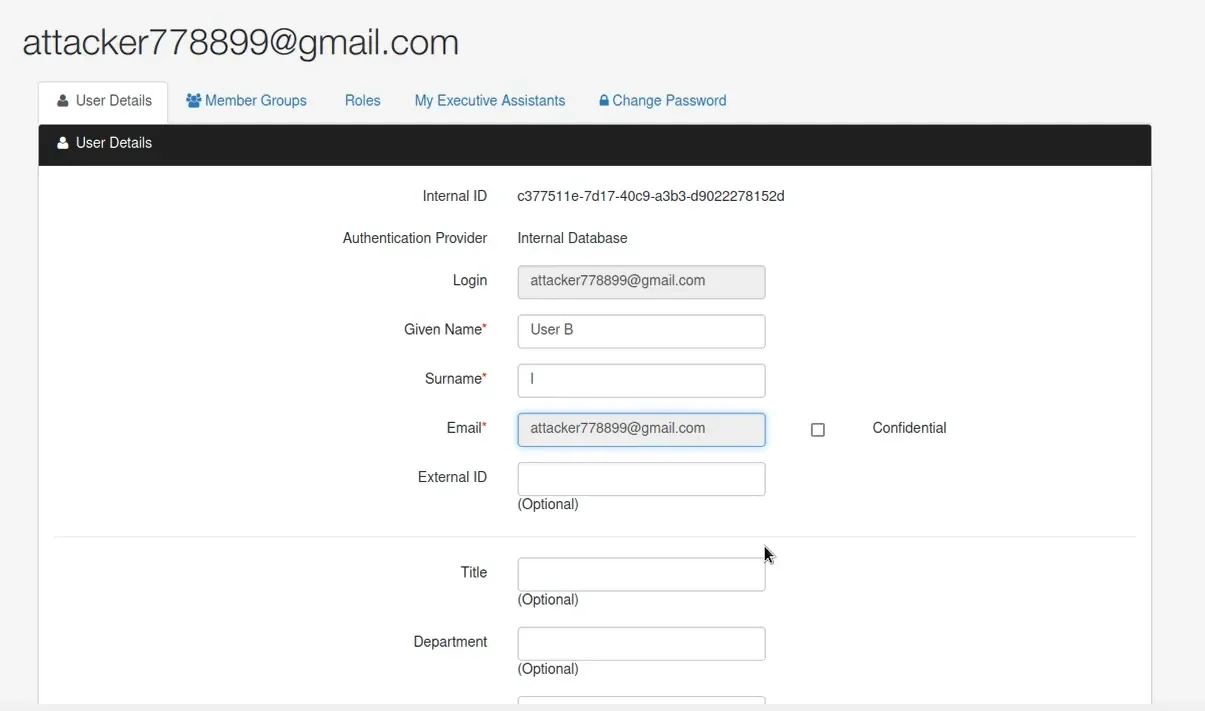
The screenshot shows the invited user's details with the login and email fields not editable. The researcher then tested the request directly.
Exploitation
Step 1: Try to change the login parameter
The researcher intercepted the request and attempted to modify the login parameter, hoping this would give account takeover of the invited user's account. That attempt did not work: the login change was not accepted.
Step 2: Change the email parameter instead
The next attempt targeted the email address. By intercepting the request, the researcher changed the email address to [redacted] in the request body.
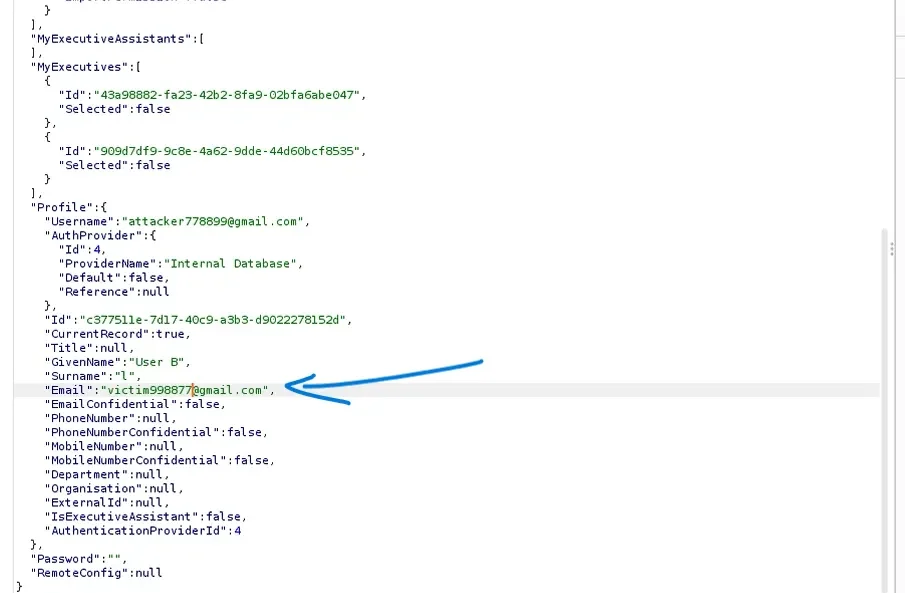
The screenshot shows the email parameter being modified in the intercepted request body. Unlike the login change, this one was accepted: the email address of the invited user changed on the front-end as well as on the back-end.
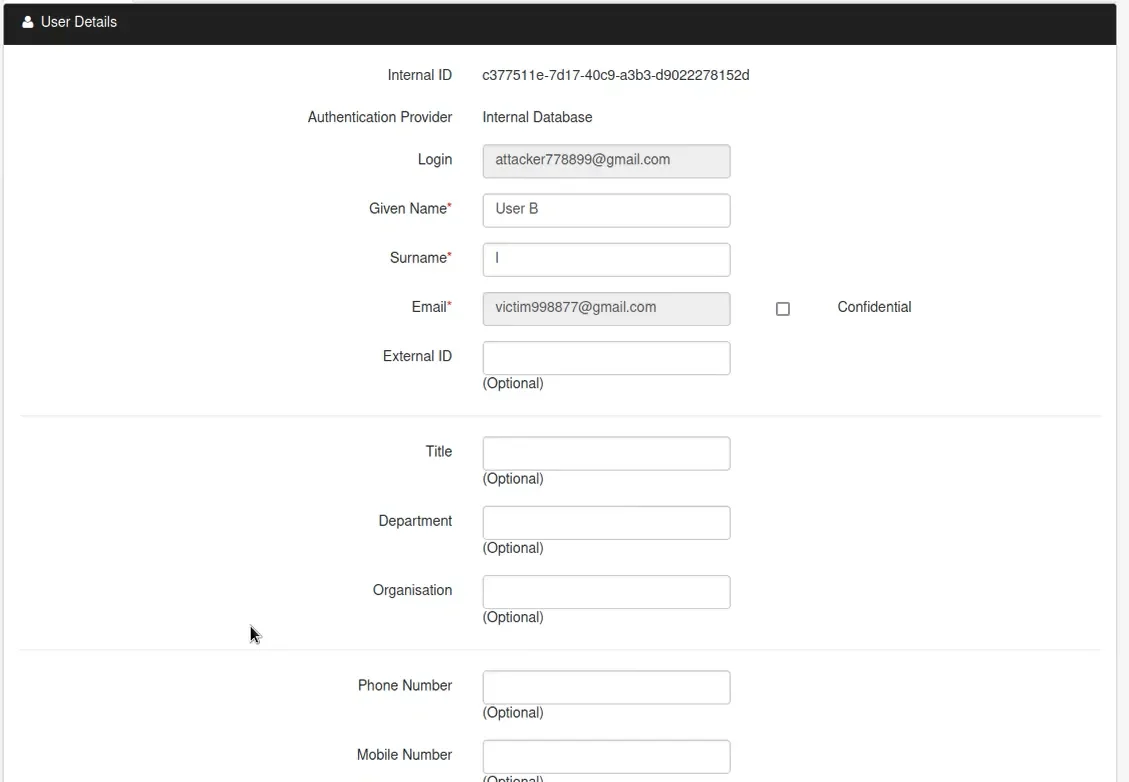
The second screenshot shows the email address successfully changed in the application.
The report does not include the raw HTTP request or response, so the exact endpoint, parameter names and headers are not reproduced here.
Root cause
The interface hides or blocks editing of the login and email fields for invited users, but the back-end does not enforce the same restriction on the email field. The server accepts a modified email value in the request body and persists it. The login change did not work, while the email change was accepted. The interface did not allow the change, but the modified email was accepted and persisted.
Impact
The researcher describes this as a pre-account takeover of any unregistered user: an attacker can change the email address of an invited user who has not yet registered, and can then misuse the identity of the victim. The researcher calls it a low severity bug, and the programme marked it as low severity.
Fix
The report states that the vulnerability was patched by the programme on 20 June 2023, but does not describe the change. The report does not describe the fix.
Variants to test
- Invite a user and tamper with every field in the update request body one at a time (name, login, email, role, group), watching for fields the interface marks read-only but the server accepts.
- Try changing the email of an invited user to an address you control, then complete registration and check whether the account binds to that address.
- Test the same field-level tampering on other user-management actions, such as resending an invite or editing a pending invitation.
- Check whether the restriction differs between roles (owner, admin, member) and whether a lower-privileged member can modify another user's email.
A positive result is any read-only field that the server accepts and persists when modified in the request body, especially the email of an unregistered invited user.
Timeline
| Date | Event |
|---|---|
| 25 March 2023 | Bug reported |
| 20 June 2023 | Vulnerability patched and marked as low severity |
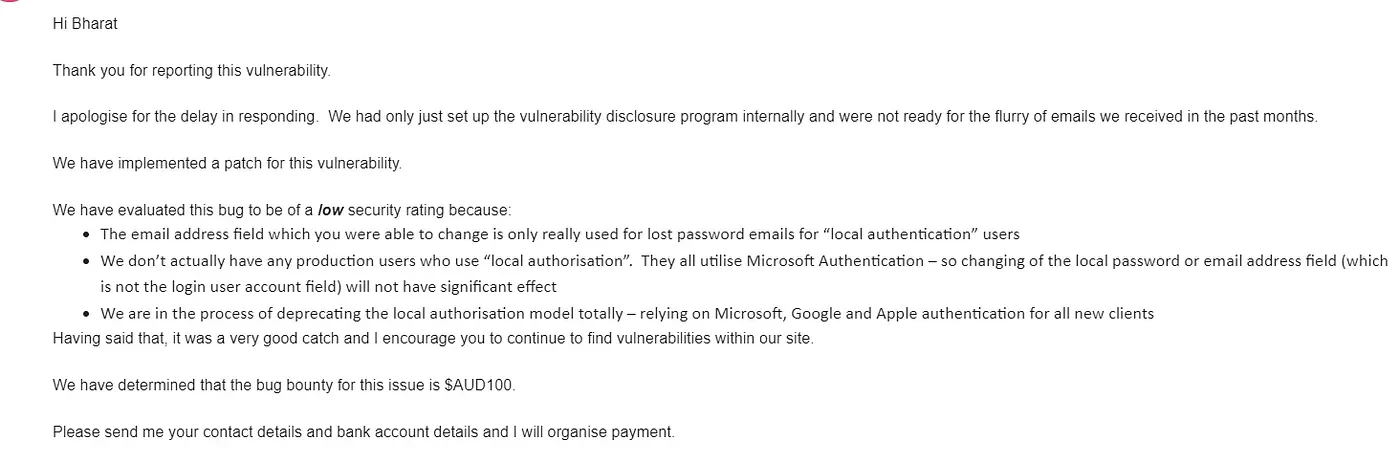
The final screenshot shows the programme's response.
What happened, in plain words
A security researcher was testing a website that lets people sign up, create groups and invite other people into those groups. When you invite someone, the site keeps a small record about them: their name, their login and their email address. The researcher found that although the website's screens stop you from editing the email address of an invited person, the server behind the website happily accepted a changed email address if you sent the request yourself. That means someone could invite a person who has not registered yet and swap their email for another address, which the researcher says allows misuse of the victim's identity. The researcher calls this a pre-account takeover, and the programme patched it and marked it as low severity.
This article walks through the same steps the researcher took, explaining each idea from scratch as it comes up.
Some background you need first
Before the story makes sense, here are a few everyday ideas.
A web application and its server. When you use a website, two things are talking to each other. Your browser draws the pages you see: buttons, forms, text boxes. The server is the computer far away that stores the real data and decides what is allowed. Think of a restaurant: the menu and the waiter are the browser side, the kitchen is the server. The waiter can tell you a dish is unavailable, but only the kitchen actually decides what gets cooked.
A request. Every time you click a button or submit a form, your browser sends a small message to the server called a request. It says what you want (for example, "save this change") and carries the data you typed. The server sends back a response, which is the answer.
An API. An API is the set of rules for how those requests must be shaped: which address to send them to, which field names to use, what the server expects back. It is the kitchen's order form. If you fill in the form correctly, the kitchen will cook it, whether or not the waiter would have let you order it.
An intercepting proxy. Normally your browser builds the request and sends it, and you never see it. A proxy is a tool that sits between your browser and the server, like a postal worker who opens each letter, lets you rewrite it, and then sends it on. Security testers use it to change values that the website's screens do not let them change.
A parameter. A parameter is simply a named value inside a request, for example email or login. It is a labelled box on the order form: the label says what it is, the contents are what you want.
Front-end and back-end. The front-end is everything that runs in your browser: the pages, the buttons, the greyed-out fields. The back-end is the server and its database. A rule enforced only in the front-end is like a sign on a door saying "staff only" with no lock: anyone who walks around the sign gets in.
Broken Access Control. Access control means deciding who is allowed to do what. Broken Access Control is when that decision is missing or wrong, so someone can do something they should not be allowed to do. Here, the interface did not allow the email change, but the server accepted it when the request was modified.
Account takeover and pre-account takeover. Account takeover means someone else gets into your account and acts as you. Pre-account takeover is the same idea one step earlier: the victim has been invited but has not registered yet, so there is no account to break into. The attacker changes the details attached to the invitation so that when the victim registers, or when the site sends messages to that invitation, the attacker is in control.
A VDP. A vulnerability disclosure programme is a scheme where an organisation invites people to report security problems to it, usually without paying a bounty. The researcher found this programme through a public list of search queries, a Bug Bounty Google Dork list, that helps people find such programmes.
The setup
The researcher worked with a test account acting as the attacker:
[redacted]
That same address was then invited to the platform, so the invited user being examined was the researcher's own account. This is a safe way to test: you are only tampering with an invitation that belongs to you. The email address used as the replacement target was:
[redacted]
The work was done by hand, using an intercepting proxy to edit request bodies. The report does not name the product, a version or a specific endpoint.
Finding it
After signing up, the researcher first spent time on the Password Reset and 2FA features. 2FA, two-factor authentication, is the second proof of identity some sites ask for after your password, such as a code on your phone. Nothing turned up there, so attention moved to the User Manager option.
User Manager is the part of the site where you see and manage the people you have invited. It shows basic information about each invited user: name, login and email. According to the researcher, the login field is the one tied to password change, so whoever controls the login of an invited account effectively controls that account. That is why the login field was the interesting one.
The interface does not allow the login or email field of an invited user to be edited.
The screenshot shows the invited user's details, with the login and email fields not editable. The caption reads "Not allowed to change Login and Email". The key point is that this restriction lives in the page you see. The page simply does not offer you the box to type in. It says nothing about what the server will do if a request arrives carrying a new value anyway, which is exactly what made the feature worth testing at the request level.
Trying it out
Step 1: try to change the login parameter
The researcher intercepted the request and attempted to modify the login parameter, hoping this would give account takeover of the invited user's account. The researcher hoped this would give account takeover of the invited user's account.
That attempt did not work. The login change was not accepted. The login change did not work, so the researcher moved on to the email field.
Step 2: change the email parameter instead
The next attempt targeted the email address. By intercepting the request, the researcher changed the email address to [redacted] in the request body.
The screenshot shows the email parameter being modified in the intercepted request body, with the caption "Change the email parameter in request body". In plain words: the page would not let the researcher type a new email, so the researcher caught the request on its way out, edited the email value inside it, and let it continue to the server.
Unlike the login change, this one was accepted. The email address of the invited user changed on the front-end as well as on the back-end: the page showed the new address, and the server had stored it.
The second screenshot shows the email address successfully changed in the application, captioned "Email Successfully changed". The report does not include the raw request or response, so the exact endpoint, parameter names and headers are not reproduced here.
Why it worked
The interface hides or blocks editing of the login and email fields for invited users, but the back-end does not enforce the same restriction on the email field. The server accepts a modified email value in the request body and saves it. The login change did not work, while the email change was accepted. The interface did not allow the change, but the modified email was accepted and persisted.
What an attacker could do with it
The researcher describes this as a pre-account takeover of any unregistered user: an attacker can change the email address of an invited user who has not yet registered, and can then misuse the identity of the victim. The researcher calls it a low severity bug, and the programme marked it as low severity.
The fix
The report states that the vulnerability was patched by the programme on 20 June 2023, but does not describe the change. The report does not describe the fix. In restaurant terms, the kitchen should refuse the order even if the waiter would never have taken it.
Other things worth testing
If you want to look for similar problems yourself, these are some directions to try.
- Invite a user and tamper with every field in the update request body one at a time (name, login, email, role, group), watching for fields the interface marks read-only but the server accepts.
- Try changing the email of an invited user to an address you control, then complete registration and check whether the account binds to that address.
- Test the same field-level tampering on other user-management actions, such as resending an invite or editing a pending invitation.
- Check whether the restriction differs between roles (owner, admin, member) and whether a lower-privileged member can modify another user's email.
A positive result is any read-only field that the server accepts and persists when modified in the request body, especially the email of an unregistered invited user.
Timeline
| Date | Event |
|---|---|
| 25 March 2023 | Bug reported |
| 20 June 2023 | Vulnerability patched and marked as low severity |
The final screenshot shows the programme's response, captioned "Their Response".
Glossary
- 2FA (two-factor authentication): a second proof of identity after your password, such as a code sent to your phone.
- Access control: the rules that decide who is allowed to do what on a system.
- Account takeover: when someone else gains control of your account and can act as you.
- API: the agreed set of rules for how requests to a server must be shaped and what they may contain.
- Back-end: the server and database that store data and make the real decisions.
- Broken Access Control: a vulnerability where those rules are missing or wrong, so someone can do something they should not be allowed to do.
- Bug Bounty Google Dork list: a public list of search queries used to find organisations that run vulnerability disclosure or bug bounty programmes.
- Endpoint: the specific address on a server that a request is sent to.
- Front-end: everything that runs in your browser, such as pages, forms and buttons.
- Intercepting proxy: a tool that sits between your browser and the server so you can read and edit requests before they are sent.
- Login field: in this report, the identifier tied to password change, so controlling it means controlling the account.
- Parameter: a named value inside a request, such as
emailorlogin. - Pre-account takeover: taking control of an invited user who has not registered yet, by changing the details attached to the invitation.
- Presentation layer: the part of an application the user sees and interacts with, as opposed to the server logic behind it.
- Request: the message your browser sends to the server when you do something, carrying the data involved.
- Request body: the part of a request that carries the data being sent, such as the fields of a form.
- Response: the server's answer to a request.
- Severity: a rating of how serious a vulnerability is, often low, medium, high or critical.
- User Manager: the feature of the site where invited users and their details are listed and managed.
- VDP (vulnerability disclosure programme): a scheme where an organisation invites people to report security problems to it.


