How Camera and Microphone Permissions Can Be Silently Abused (abuse google meet permissions)
The author claims that a page can open a hidden window pointing at an attacker-hosted Google Meet link, and that a user who has already granted Meet standing camera and microphone access may have those devices activated without noticing. The text says an attacker could then watch, photograph or listen to the user, but it presents no working demonstration beyond a screenshot.

Security
The full write-up lives on its author's site
It belongs to its author, so we link to it rather than copy it. The other two tabs are our own rewrites, checked against it.
Context
Google Meet is a browser-based video conferencing service. When a user joins a meeting, the browser asks for camera and microphone permission, and once granted, the camera and microphone can be opened as soon as a meeting is joined. The author of this write-up, Neemaaf, describes a way in which those already-granted permissions can be abused by a third-party website, and notes that a responsible disclosure to Google's security team was dismissed as low priority. The write-up was published on 13 October 2026.
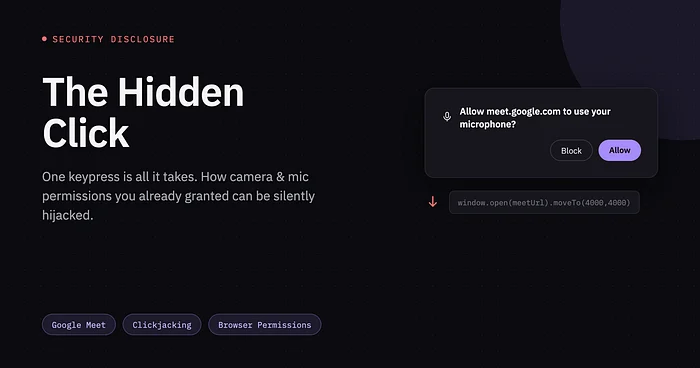
The question the author starts from is simple: can the camera and microphone permissions granted to Google Meet be abused?
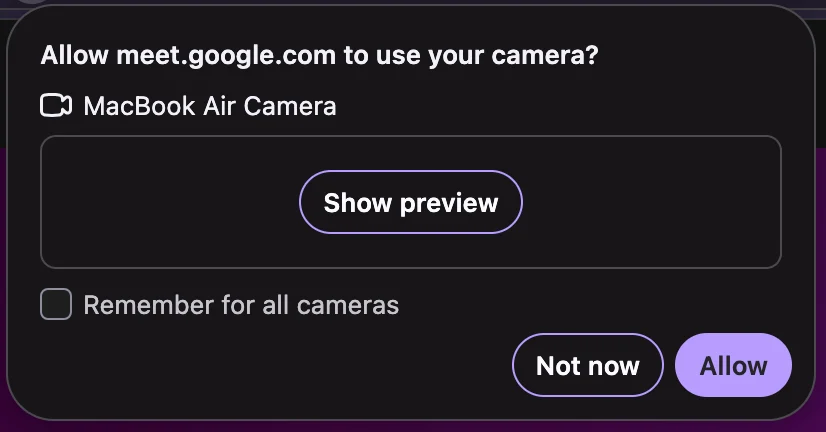
Setup
The write-up does not describe any accounts, roles, tool versions or test environment. The scenario it describes is that the victim has already granted Google Meet microphone and camera permissions in the browser, and that the attacker controls a meeting link and a website that embeds it.
Finding it
The author's observation is about the normal joining flow. When someone sends a Google Meet link, all it takes to enter the meeting is pressing a single Enter or Space key to accept it. If Google Meet has been granted microphone and camera permissions, the camera opens immediately on joining and reveals everything in front of it.
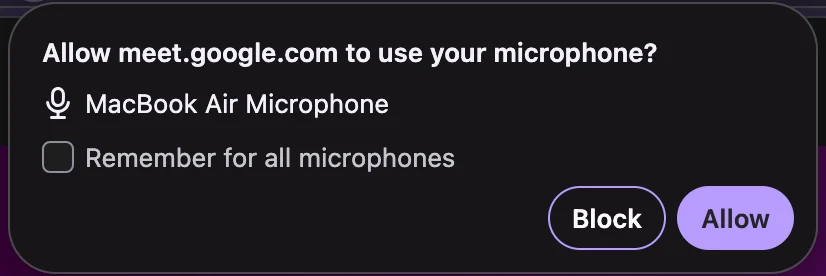
That combination, a single keystroke to accept a meeting plus standing camera and microphone permissions, is what the author treats as the weakness. The write-up does not describe a specific code defect in Google Meet itself; the abuse relies on the browser's permission model and on how a meeting is accepted.
Exploitation
The author describes the attack as a website that embeds code together with a meeting link hosted by the attacker. The write-up refers to the code in an image rather than reproducing it as text, so the exact markup is not available here.
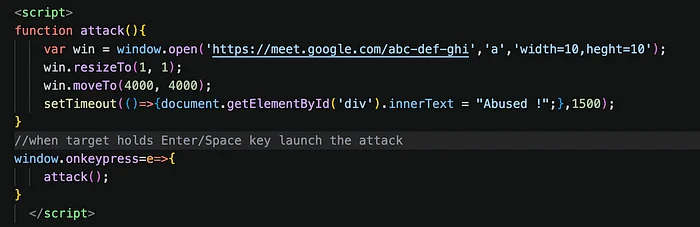
Step 1: The victim visits the attacker's page
The page contains the embedded code and the attacker's meeting link.
Step 2: The page opens a hidden window
When the code runs, it opens a window in a hidden state. The window is opened in a hidden state.
Step 3: The meeting is accepted with a single key press
Accepting the meeting requires only pressing Enter or Space. The author's protection advice warns about exactly this: on a page you do not fully trust, avoid reflexively pressing Enter or Space until you have looked at what is actually on screen.
Step 4: The camera and microphone open
Because Google Meet already holds camera and microphone permissions, joining the meeting opens the camera immediately. Through the hidden window, the attacker can then use the granted permissions to watch the victim, take pictures and listen to audio without the victim's knowledge.
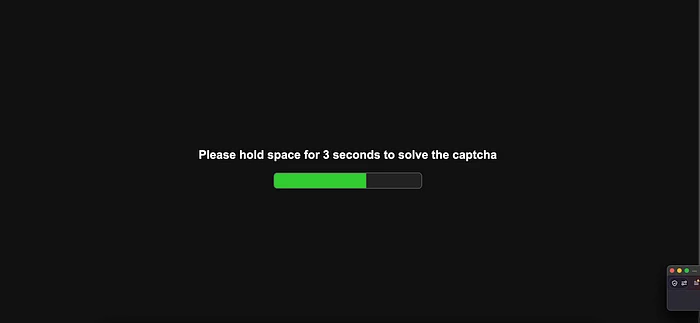
The image above is presented as a clear example of the attack: a vulnerability exploited through a very small window to gain access to the target's microphone and camera.
Root cause
The write-up frames the issue as a design and permission-model problem rather than a coding bug. Two properties combine:
- Camera and microphone permissions granted to Google Meet persist, so a meeting can open the devices without a fresh prompt.
- Joining a meeting can be completed with a single Enter or Space press, which makes it easy to trigger unintentionally.
Why the existing defences did not stop it is not analysed in the write-up. The author states only that Google's security team considered the issue low priority after repeated attempts to demonstrate its impact.
Impact
Under the conditions described, an attacker who controls a website and a meeting link can, once the victim has granted Google Meet camera and microphone permissions and accepts the meeting, watch the victim, take pictures and listen to audio without their knowledge. The write-up does not quantify how many users are affected, nor does it describe any specific victim or real-world incident. It presents the issue as something users should be aware of in case someone attempts this kind of abuse.
Fix
It offers user-side mitigations instead:
- Never check "remember for all microphones/cameras". Re-approving access each session is a minor inconvenience that the author says completely neutralises this attack vector.
- Periodically audit the browser's site permissions. Chrome, Firefox and Safari all let you view and revoke which domains have standing camera and microphone access; clear out anything you do not actively use.
- Watch for unexpected windows. If the cursor or focus seems to jump, or an unfamiliar tiny window flashes in the taskbar or dock, investigate before dismissing it.
- Be cautious on unfamiliar sites before pressing common keys. Avoid reflexively pressing Enter or Space on a page you do not fully trust until you have looked at what is actually on screen.
- Consider a hardware camera cover and a habit of muting the microphone by default. The author describes physical safeguards as some of the most reliable defences against software-based permission abuse.
Variants to test
These are generalisations of the pattern the write-up describes, not items covered by the report itself.
- Other conferencing services with standing device permissions. Check whether a service opens the camera or microphone on join without a fresh prompt. A positive result is a join that activates the devices with no additional consent step.
- Single-keystroke join flows. Look for meeting or call products where accepting an invitation needs only Enter or Space. A positive result is a join triggered by one key press with no visible confirmation.
- Hidden or minimised windows that can host the join. Test whether the join flow works in a window the user cannot see. A positive result is a successful join, with devices active, in a window that is not visible.
- Persistent "remember" permission grants. Check whether the browser's remember option for camera and microphone can be set for the conferencing origin. A positive result is a standing grant that survives the session and lets a later join open the devices silently.
Always pay attention to even the smallest windows that open on websites, as the author puts it, to avoid becoming a victim of malicious individuals.
What happened, in plain words
Google Meet is a video calling service that runs in your web browser. When you join a meeting, the browser asks whether the site may use your camera and microphone. If you say yes, Google Meet can then use your camera and microphone.
Neemaaf, the author of this write-up, asked a simple question: if you have already given Google Meet those permissions, can somebody else abuse them? The write-up describes how those permissions could be abused. A website controlled by an attacker can contain a Google Meet link and some embedded code. When you visit that page, the code opens a hidden window, and because joining a meeting only needs a single press of Enter or Space, the meeting can be accepted without you realising. The camera then opens, and the attacker can watch, take pictures and listen.
The author says this was reported responsibly to Google's security team, who treated it as low priority. The write-up was published on 13 October 2026 so that users can be aware of the risk.
A useful comparison: think of the browser permission as a key you have handed to a trusted shopkeeper. The problem here is not that the shopkeeper misuses the key, it is that someone else can trick you into walking through the shop door and standing in front of the camera while the door is open.
The question the author starts from
The write-up opens with a direct question: can the camera and microphone permissions you grant to Google Meet be abused?
To follow the rest, you only need two ideas:
- Permission: a decision you make in the browser that lets a specific website use a specific device, such as the camera or the microphone. The browser normally shows a small pop-up asking for it.
- Standing permission: a permission you have chosen to remember. Instead of asking every time, the browser keeps the answer and lets the site use the device whenever it wants, until you revoke it.
The normal joining flow
The author's observation is about what happens in ordinary use. When someone sends you a Google Meet link, all it takes to enter the meeting is pressing a single Enter or Space key to accept it. If Google Meet already has camera and microphone permissions, the camera opens immediately when you join and shows everything in front of it.
That combination is what the author treats as the weakness: one keystroke to accept a meeting, plus permissions that are already in place. The write-up does not describe a coding mistake inside Google Meet itself. The abuse relies on how browsers handle permissions and on how a meeting is accepted.
What the attacker needs
The write-up does not describe any accounts, roles, software versions or test setup. The only preconditions it states are:
- The victim has already granted Google Meet microphone and camera permissions in the browser.
- The attacker controls a meeting link.
- The attacker controls a website that embeds that link.
How the abuse works
The author describes the attack as a website that contains embedded code together with a meeting link hosted by the attacker. The write-up shows that code in an image rather than as text, so the exact markup is not reproduced here.
Step 1: You visit the attacker's page
The page holds the embedded code and the attacker's meeting link.
Step 2: The page opens a hidden window
When the code runs, it opens a window in a hidden state. The window is opened in a hidden state. A comparison: it is like a door being opened in another room, so you never notice that someone walked in.
Step 3: The meeting is accepted with one key press
Accepting the meeting needs only Enter or Space. The author's own protection advice warns about exactly this: on a page you do not fully trust, do not press Enter or Space out of habit until you have looked at what is actually on screen.
Step 4: The camera and microphone open
Because Google Meet already holds the permissions, joining the meeting opens the camera straight away. Through the hidden window, the attacker can then use those permissions to watch you, take pictures and listen to your audio without your knowledge.
The image above is presented as a clear example of the attack: a vulnerability exploited through a very small window to gain access to the target's microphone and camera.
Why it works
The write-up frames this as a design and permission-model problem rather than a coding bug. Two properties combine:
- Camera and microphone permissions granted to Google Meet persist, so a meeting can open the devices without a fresh prompt.
- Joining a meeting can be completed with a single Enter or Space press, which makes it easy to trigger by accident.
The write-up does not analyse why existing defences did not stop it. The author states only that Google's security team considered the issue low priority after repeated attempts to demonstrate its impact.
What the impact is
Under the conditions described, an attacker who controls a website and a meeting link can, once you have granted Google Meet camera and microphone permissions and you accept the meeting, watch you, take pictures and listen to your audio without your knowledge. The write-up does not quantify how many users are affected and does not describe any specific victim or real-world incident. It presents the issue so that users are aware in case someone attempts this kind of abuse.
How to protect yourself
It offers user-side mitigations instead:
- Never check "remember for all microphones/cameras". Re-approving access each session is a minor inconvenience that the author says completely neutralises this attack vector.
- Periodically audit your browser's site permissions. Chrome, Firefox and Safari all let you view and revoke which domains have standing camera and microphone access; clear out anything you do not actively use.
- Watch for unexpected windows. If your cursor or focus seems to jump, or an unfamiliar tiny window flashes in your taskbar or dock, investigate before dismissing it.
- Be cautious on unfamiliar sites before pressing common keys. Avoid reflexively pressing Enter or Space on a page you do not fully trust until you have looked at what is actually on screen.
- Consider a hardware camera cover and a habit of muting your microphone by default. The author describes physical safeguards as some of the most reliable defences against software-based permission abuse.
Related patterns worth checking
These are generalisations of the pattern the write-up describes, not items covered by the report itself.
- Other conferencing services with standing device permissions. Check whether a service opens the camera or microphone on join without a fresh prompt. A positive result is a join that activates the devices with no additional consent step.
- Single-keystroke join flows. Look for meeting or call products where accepting an invitation needs only Enter or Space. A positive result is a join triggered by one key press with no visible confirmation.
- Hidden or minimised windows that can host the join. Test whether the join flow works in a window the user cannot see. A positive result is a successful join, with devices active, in a window that is not visible.
- Persistent "remember" permission grants. Check whether the browser's remember option for camera and microphone can be set for the conferencing origin. A positive result is a standing grant that survives the session and lets a later join open the devices silently.
As the author puts it, always pay attention to even the smallest windows that open on websites, to avoid becoming a victim of malicious individuals.
Glossary
- Browser: the program you use to visit websites, such as Chrome, Firefox or Safari.
- Camera permission: your browser's decision to let a specific website use your camera.
- Microphone permission: your browser's decision to let a specific website use your microphone.
- Standing permission: a permission you have chosen to remember, so the site can use the device later without asking again.
- Revoke: to take a permission away, so the site must ask again.
- Google Meet: a browser-based video conferencing service.
- Meeting link: a web address that opens a specific meeting when you visit it.
- Embedded code: code placed inside a web page that makes the page do something, such as open another window.
- Hidden window: a browser window that is open but not visible to you.
- Keystroke: a single press of a key on your keyboard, such as Enter or Space.
- Focus: which window or element currently receives your key presses.
- Taskbar / dock: the bar on your screen that shows which programs and windows are open.
- Permission model: the set of rules a browser uses to decide when a website may use devices and data.
- Attack vector: the route an attacker uses to carry out an attack.
- Vulnerability: a weakness that can be used to make a system behave in a way its owner did not intend.
- Responsible disclosure: reporting a security issue privately to the organisation responsible, so it can be fixed before details are made public.
- Low priority: a rating meaning the organisation does not consider the issue urgent enough to act on quickly.
- Mitigation: something you can do to reduce the risk, even if the underlying issue is not fixed.
- Hardware camera cover: a physical cover over the camera lens.


