How I accessed the Sensitive document which I had already deleted
Uploaded KYC documents were stored in a publicly accessible S3 bucket, and deleting a document only removed it from the user interface while the file remained accessible on the server. An attacker could access sensitive identity documents without authentication, even after a user believed they had deleted them.
 Published on pawanchhabria.medium.com
Hello All, this is my third writeup. I have already published two writeups which are How I was able to access a properly Configured S3 Bucket and My First Pre-Auth Account Takeover in 20 secs.
The full write-up lives on its author's site
It belongs to its author, so we link to it rather than copy it. The other two tabs are our own rewrites, checked against it.
Context
This is a write-up about an application that lets users upload KYC documents. The documents accepted were Aadhar Card, PAN Card, Driving Licence and Passport. These are sensitive identity documents, and the author's point is that they must be handled and disposed of with care. The domain and other identifying details were masked for confidentiality.
The feature under test is the document upload and delete flow: a user uploads a document, sees it in the frontend, and can later delete it. The write-up examines what happens to the file on the server when the user deletes it.

Setup
The author does not describe any special accounts, roles, tools or versions. The work was done against the live application as a normal user of the upload feature. The only precondition is the ability to upload a document and then delete it. The author notes that a few attacks were tried against the website first and did not succeed, which is why the focus moved to how the PII data is handled.
Finding it
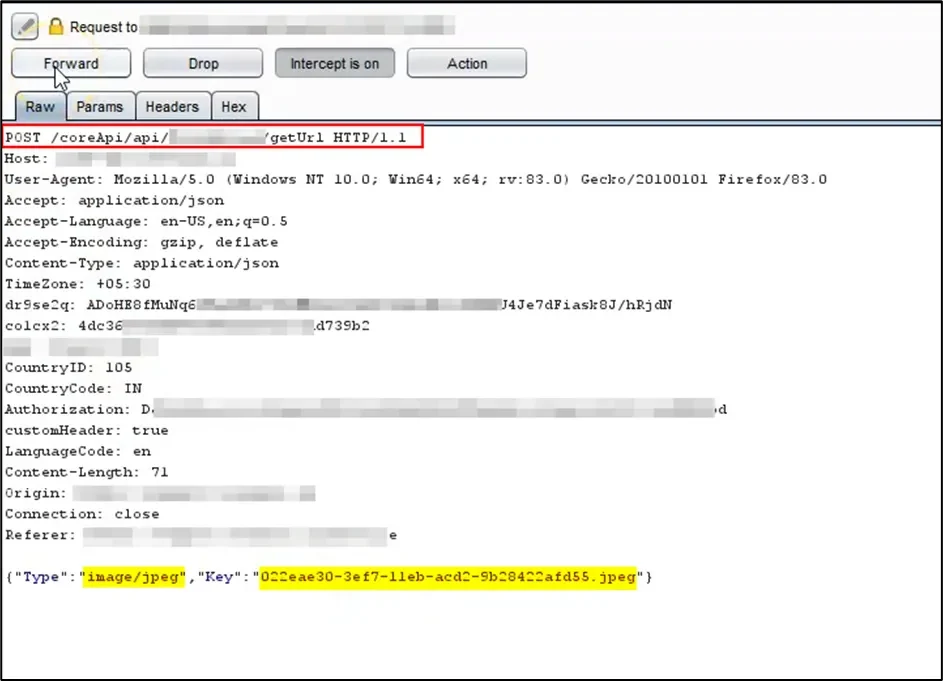
The author uploaded a dummy image and captured the upload request. The request looked like this:
Once the image was uploaded, the server returned a success response containing the link of the uploaded image.
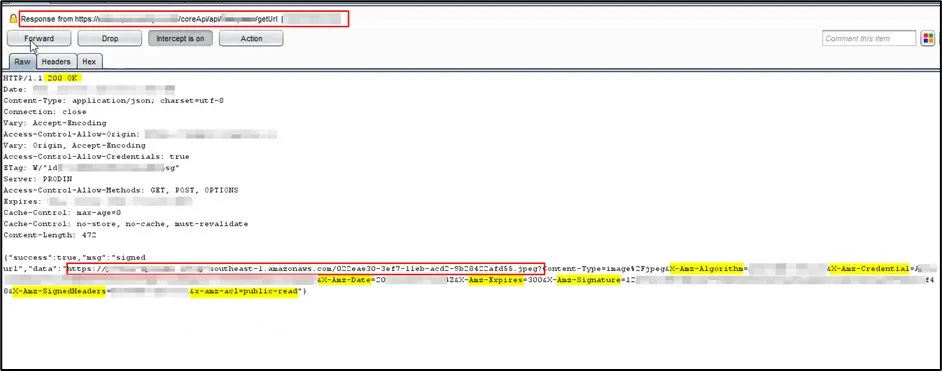
Two things stood out. The image was being uploaded to an S3 bucket, and the response carried a few Amazon headers. The file name started with "022eae" and ended with "fd55". The author then tried accessing the URL exactly as highlighted in the screenshot, just the URL on its own.

The document was accessible publicly. The author notes that someone might have uploaded a Passport or another sensitive document.
Exploitation
Step 1: Upload a document and note the returned URL
The upload request was captured and the server responded with a link to the uploaded file. The file name in that link, starting with "022eae" and ending with "fd55", is the identifier used throughout the rest of the test.
Step 2: Access the file URL without authentication
Requesting the URL from the upload response directly returned the document. No authentication was needed to fetch it, so the uploaded file was publicly readable from the S3 bucket.
Step 3: Delete the document from the frontend
The frontend showed the uploaded document. The author then deleted it, to check whether the deletion happened only in the UI or on the server as well. The delete request was captured and looked like this:
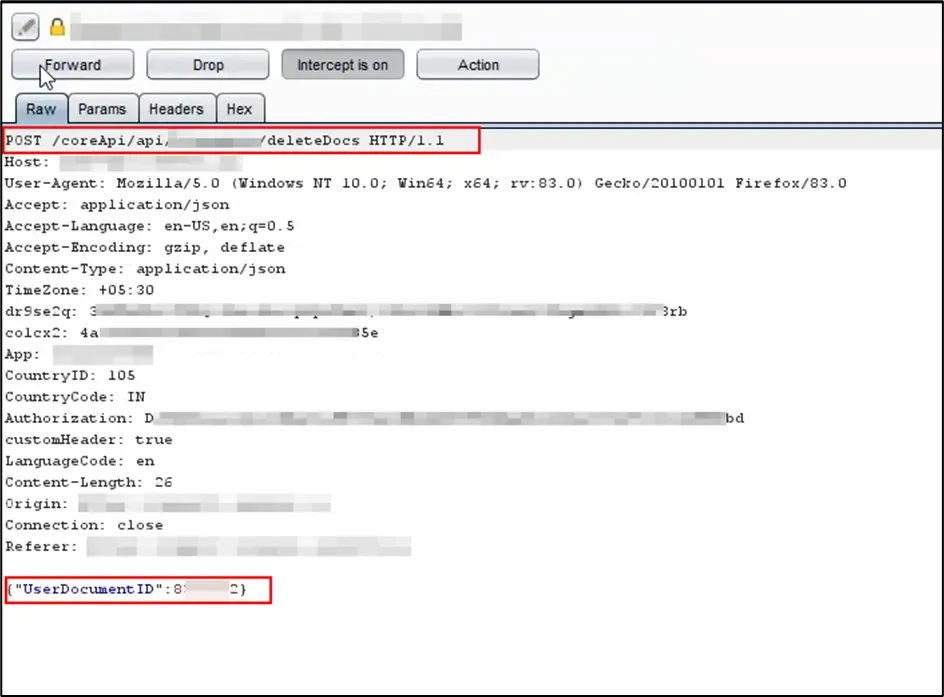
The uploaded image had a "Document ID" associated with it. The request was forwarded and the response awaited.
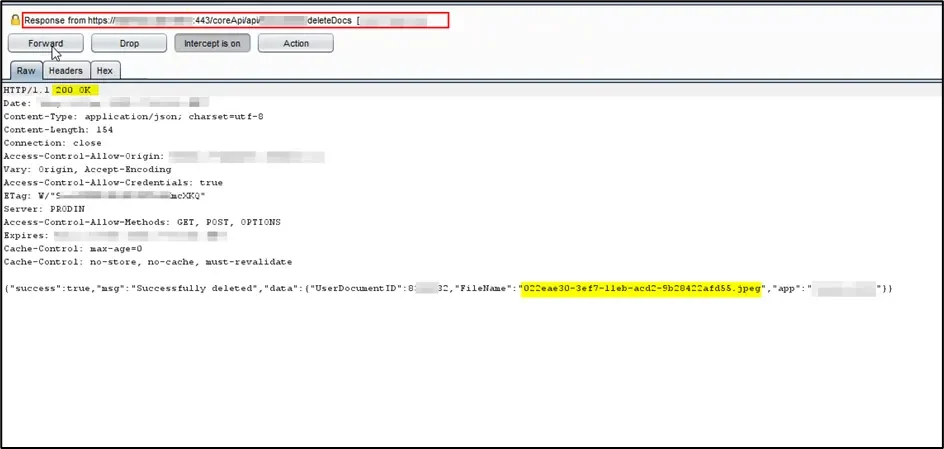
The response showed the file name of the deleted file: the same file that had been uploaded, starting with "022eae" and ending with "fd55". That was clear enough that the uploaded document had been deleted.

Step 4: Request the old URL again
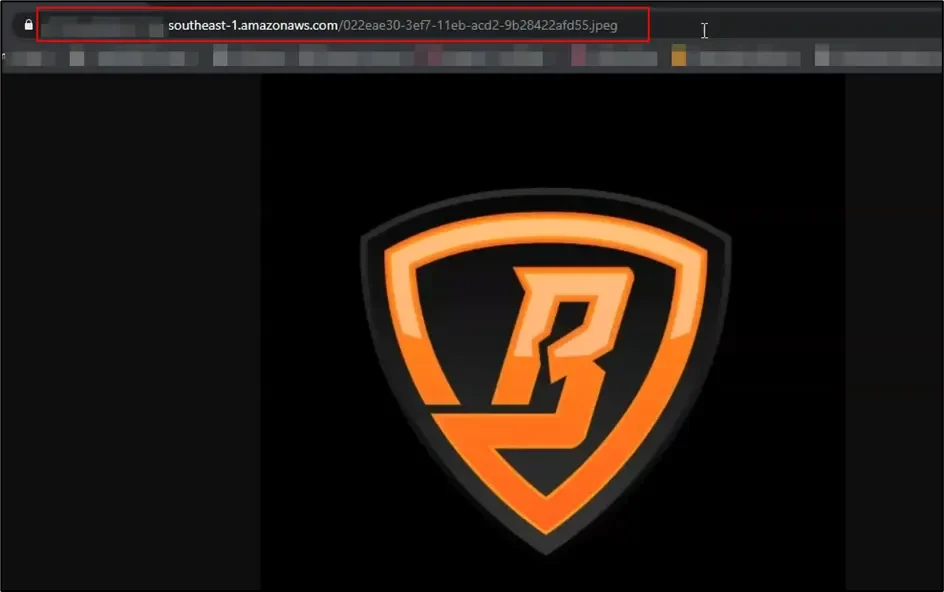
To answer the question of whether the file was gone from the UI only or from the server as well, the author pasted the entire URL of the uploaded document again. The document was still present on the server. It had only disappeared from the frontend, and it was the same file, starting with "022eae" and ending with "fd55", still publicly accessible.
Root cause
After deletion the document was gone from the user's view but the file was still present in the S3 bucket. The file kept its original name and its original public URL, so the link returned at upload time continued to resolve after deletion. Because the object was publicly readable in the first place, nothing else stood between anyone holding the URL and the document. The report does not describe the server-side code, so the exact reason the object was left in the bucket is not stated;
Impact
This is a privacy violation. A user believes the document has been deleted, but it is still available in the S3 bucket and accessible without authentication. The author frames it as a privacy compromise of the user. The author notes that users could have uploaded sensitive documents such as Aadhar Card, PAN Card, Driving Licence or Passport, and that a deleted file remained publicly accessible. The report does not give numbers for how many documents or users were affected.
Fix
Based on the finding, the deletion flow should remove the object from the S3 bucket when the user deletes a document, rather than only hiding it in the frontend, and uploaded KYC documents should not be publicly readable in the first place.
Variants to test
- Upload a file, note the returned URL, delete the file through the UI, then request the URL again. A positive result is the file still being served after deletion.
- Upload a file and request the returned URL from a session with no authentication, or from a private browser window. A positive result is the document being returned without credentials.
- Check whether the object name is guessable or sequential across uploads. A positive result is being able to reach another user's document by changing the name in the URL.
- Repeat the delete-and-refetch test on other document types offered by the application, since the report lists several KYC document types on the same upload feature. A positive result is any type that survives deletion on the server.
- Look at the upload response for storage-related headers and hostnames that reveal a bucket-backed store. A positive result is a direct object URL that can be fetched independently of the application.
The author's closing tip is to keep yourself updated: the idea would not have come up without having read about compliance material online. Everything is vulnerable, you just need some knowledge to find the vulnerable point.
What happened, in plain words
A website let people upload identity documents for KYC checks. KYC stands for "Know Your Customer": it is the process banks and similar services use to confirm who you are before they let you use their service. The documents the site accepted were Aadhar Card, PAN Card, Driving Licence and Passport. These are sensitive: they contain personal details that could be misused if a stranger got hold of them.
The researcher who wrote this report uploaded a test image, watched what the website did with it, and found two problems. First, the uploaded file was stored in a place that anyone on the internet could read, as long as they had the file's web address. Second, when the user pressed delete, the file disappeared from the screen but stayed on the server. So a user could believe their passport scan was gone while it was still sitting there, readable by anyone who had the link.
The report masks the domain and other identifying details for confidentiality. It does not give numbers for how many users or documents were affected.
Background: what the site does and what we are testing
The feature under test is simple from a user's point of view. You upload a document, you see it in the page, and later you can delete it. The question the researcher asked is: when you press delete, does the file actually go away on the server, or does it only vanish from your screen?
That distinction matters because a web page is only a view. The page you see in your browser is drawn from data the server sends. Hiding something in the page does not necessarily change anything on the server. Think of a library: crossing a book out of the printed catalogue does not remove the book from the shelf. Anyone who knows the shelf location can still walk in and take it.
The researcher first tried a few attacks against the website and could not get through. That is why the focus moved to how the personal data (PII, short for Personally Identifiable Information) is handled. PII is any data that can identify a real person: a name, an ID number, a photo of a passport.
Finding it
Step 1: Upload a dummy image and capture the request
The researcher uploaded a dummy image, meaning a harmless test picture rather than a real identity document. While doing so, the request the browser sent to the server was captured. Capturing a request means recording exactly what your browser sent and what the server sent back, so you can read it afterwards. Browsers have built-in developer tools for this (usually opened with F12), and there are separate programs that do the same job.
The request looked like this:
A request is simply a message your browser sends to a server asking it to do something: show a page, save a file, delete a record. The server is the computer somewhere else that holds the website's data and logic. The part of a website that accepts these messages and answers them is often called an API, short for Application Programming Interface. In everyday terms, the API is the counter staff: you hand over a form, they process it and hand something back. You never walk into the back room yourself.
When you upload a file, your browser does not send the file as part of the page. It sends a separate request carrying the file's contents, usually with a method called POST, which means "here is some data, please store or process it". The request also carries a Document ID or similar identifier so the server knows which record the file belongs to.
Step 2: Read the server's reply
Once the image was uploaded, the server returned a success response containing the link of the uploaded image.
A response is the server's answer to a request. A success response means the server accepted what was sent. Here the answer included a URL, which is the web address of the uploaded file. A URL is what you type in the address bar: it tells a browser exactly where to fetch something from.
Two details stood out in that response:
- The image was being uploaded to an S3 bucket. S3 is Amazon's cloud file storage service. A bucket is like a folder in the cloud: files are placed inside it and each file gets its own address. Many websites use S3 to store user uploads because it is cheap and reliable.
- The response carried a few Amazon headers. Headers are small labelled lines attached to a request or response, carrying extra information such as what kind of file it is or which service handled it. Seeing Amazon headers is a hint that the file is sitting in Amazon's storage rather than on the website's own server.
The file name started with "022eae" and ended with "fd55". That long random-looking name is the file's identifier in the bucket. It is what makes the file's address unique.
Step 3: Open the file's address directly
The researcher then tried accessing the URL exactly as highlighted in the screenshot, just the URL on its own, pasted into the browser.
The document was accessible publicly. "Publicly accessible" means the server handed the file over to anyone who asked, with no login, no password and no proof of who you are. Authentication is the process of proving who you are, usually by logging in. This file needed no authentication at all.
The researcher notes that someone might have uploaded a Passport or another sensitive document.
Exploitation
Step 1: Upload a document and note the returned URL
The upload request was captured and the server responded with a link to the uploaded file. The file name in that link, starting with "022eae" and ending with "fd55", is the identifier used throughout the rest of the test. Keeping that name is important: it is how the researcher later proves that the file still on the server is the very same file that was supposedly deleted.
Step 2: Access the file URL without authentication
Requesting the URL from the upload response directly returned the document. No authentication was needed to fetch it, so the uploaded file was publicly readable from the S3 bucket. In plain terms: the file's address worked like an unguarded door. Anyone with the address could open it.
Step 3: Delete the document from the frontend
The frontend is the part of the website you see and interact with in your browser: buttons, pages, forms. The frontend showed the uploaded document. The researcher then deleted it, to check whether the deletion happened only in the UI (user interface, another word for the frontend) or on the server as well. The delete request was captured and looked like this:
A delete request is a message telling the server to remove a record. The uploaded image had a "Document ID" associated with it, which is the label the website uses to refer to that particular upload. The request was forwarded and the response awaited. Forwarding means letting the captured request continue on to the server so it actually takes effect.
The response showed the file name of the deleted file: the same file that had been uploaded, starting with "022eae" and ending with "fd55". That was clear enough that the uploaded document had been deleted, at least as far as the website's own records were concerned.
Step 4: Request the old URL again
To answer the question of whether the file was gone from the UI only or from the server as well, the researcher pasted the entire URL of the uploaded document again. The document was still present on the server. It had only disappeared from the frontend, and it was the same file, starting with "022eae" and ending with "fd55", still publicly accessible.
This is the heart of the finding. The delete button did its job on the screen: the file vanished from the user's list. But the file itself was never removed from the S3 bucket. Its address still worked, and it still needed no login.
Why it happened
After deletion the document was gone from the user's view but the file was still present in the S3 bucket. In cloud storage, an object is simply a stored file. The file kept its original name and its original public URL, so the link returned at upload time continued to resolve after deletion. "Resolve" here means the address still led to the file.
Because the object was publicly readable in the first place, nothing else stood between anyone holding the URL and the document. There was no second lock to pick: the only protection was that the address was not widely known, and that is not protection at all.
The report does not describe the server-side code, so the exact reason the object was left in the bucket is not stated. In the library comparison: the catalogue entry was crossed out, but nobody went to the shelf.
Impact
This is a privacy violation. A user believes the document has been deleted, but it is still available in the S3 bucket and accessible without authentication. The researcher frames it as a privacy compromise of the user.
The author notes that users could have uploaded sensitive documents such as Aadhar Card, PAN Card, Driving Licence or Passport, and that a deleted file remained publicly accessible. That last part is what makes it serious: the user has done everything the website asked, and still the data remains.
Fix
Based on the finding, the deletion flow should remove the object from the S3 bucket when the user deletes a document, rather than only hiding it in the frontend. Uploaded KYC documents should also not be publicly readable in the first place: they should require proof of identity before the server hands them over.
Variants to test
If you want to try the same idea on a site you are allowed to test, these are the variations worth trying. Each one is a small experiment with a clear pass or fail.
- Upload a file, note the returned URL, delete the file through the UI, then request the URL again. A positive result is the file still being served after deletion.
- Upload a file and request the returned URL from a session with no authentication, or from a private browser window. A positive result is the document being returned without credentials. A private window is useful because it starts with no saved logins.
- Check whether the object name is guessable or sequential across uploads. A positive result is being able to reach another user's document by changing the name in the URL.
- Repeat the delete-and-refetch test on other document types offered by the application, since the report lists several KYC document types on the same upload feature. A positive result is any type that survives deletion on the server.
- Look at the upload response for storage-related headers and hostnames that reveal a bucket-backed store. A positive result is a direct object URL that can be fetched independently of the application.
The researcher's closing tip is to keep yourself updated: the idea would not have come up without having read about compliance material online. Compliance here means the rules and standards organisations must follow when handling personal data. Everything is vulnerable, you just need some knowledge to find the vulnerable point.
Glossary
- API: the part of a website that receives requests from your browser and answers them; the counter where you hand over a form and get something back.
- Authentication: proving who you are, usually by logging in. Without it, the server treats you as an anonymous stranger.
- Bucket: a storage folder in Amazon S3 where uploaded files are kept, each with its own address.
- Compliance: the rules and standards an organisation must follow when handling personal data.
- Credentials: the proof of identity you present, such as a login and password or a session cookie.
- Delete request: a message telling the server to remove a record.
- Document ID: the label the website uses to refer to one particular uploaded document.
- Dummy image: a harmless test picture uploaded instead of a real document.
- Frontend / UI: the part of the website you see and click in your browser.
- Headers: small labelled lines attached to a request or response carrying extra information, such as which service handled it.
- KYC: "Know Your Customer", the process of confirming a person's identity before letting them use a service.
- Object: a single stored file in cloud storage such as S3.
- PII: Personally Identifiable Information, any data that can identify a real person.
- POST: the request method used to send data to a server, for example to upload a file.
- Privacy violation: a failure that exposes or retains personal data in a way the person did not agree to.
- Publicly accessible: reachable by anyone on the internet without logging in.
- Request: the message your browser sends to a server asking it to do something.
- Response: the server's answer to a request.
- S3: Amazon's cloud file storage service.
- Session: the period during which a website remembers who you are, usually via a cookie.
- URL: a web address, what you type in the address bar to fetch something.
- Vulnerability: a weakness in a system that lets someone do something the owner did not intend.




