How I was able to access a properly Configured S3 Bucket
An unauthenticated config file exposed AWS access keys, which allowed the attacker to access a properly configured S3 bucket containing KYC documents. The attacker could list, upload, and delete bucket contents.
 Published on pawanchhabria.medium.com
This is my very first writeup and I hope it helps everyone. Recently, I came across an application which was using “S3 Buckets”.
The full write-up lives on its author's site
It belongs to its author, so we link to it rather than copy it. The other two tabs are our own rewrites, checked against it.
Context
An application was using an S3 bucket to store KYC documents and other important material. KYC (know your customer) documents are identity and verification records, so the bucket holds sensitive personal data rather than public assets. The researcher's starting assumption was the usual one: if a bucket is misconfigured, it can be read or written anonymously, so the first check is whether public read and public write are possible.
Setup
The tools involved were:
- The AWS CLI, used to test the bucket and later to authenticate against it.
- Burp Suite with the BurpSuite-Xkeys extension, described in the report as a Burp Suite extension that extracts interesting strings (keys, API keys, secret tokens, AWS secrets and so on) from a webpage and lists them as information issues.
- The target's JavaScript files and a configuration file served by the application.
The credentials used later came from the application itself.
Finding it
The first test was an attempt to access the bucket anonymously with the AWS CLI, checking for public read and public write access. The bucket was properly configured and returned "Access Denied" for both.
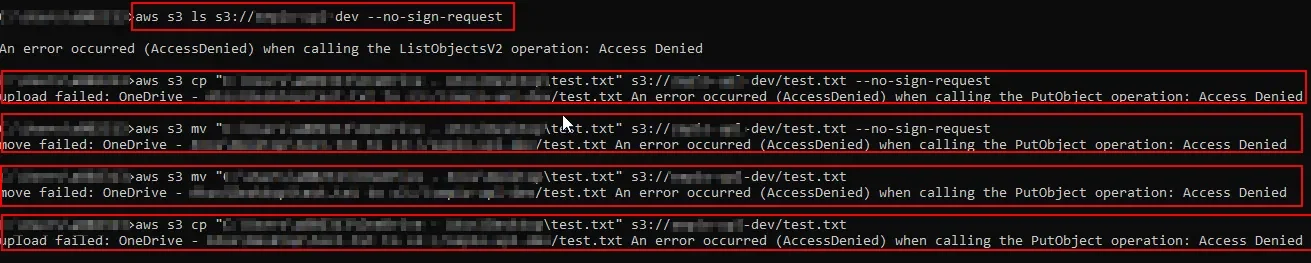
That result is the interesting part of the story: the bucket itself was not the weakness. The researcher treated the clean result as a reason to look elsewhere and started reconnaissance, going through the application's JavaScript files to search for sensitive material in the source code. Reading every JS file by hand was not feasible, so the BurpSuite-Xkeys extension was used to automate the extraction. The extension runs as a passive scan: you browse the target and it lists the interesting strings it finds.
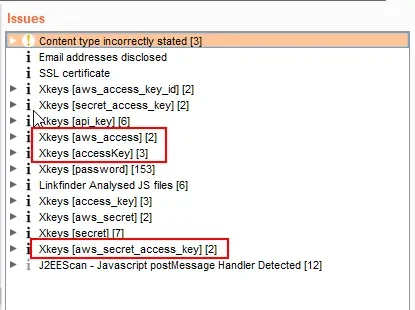
Among the results, two entries stood out: aws_secret_access_key and aws_access. They were present in a configuration file that was available without authentication. The report describes the file as containing all the important material the developer had left there by mistake.
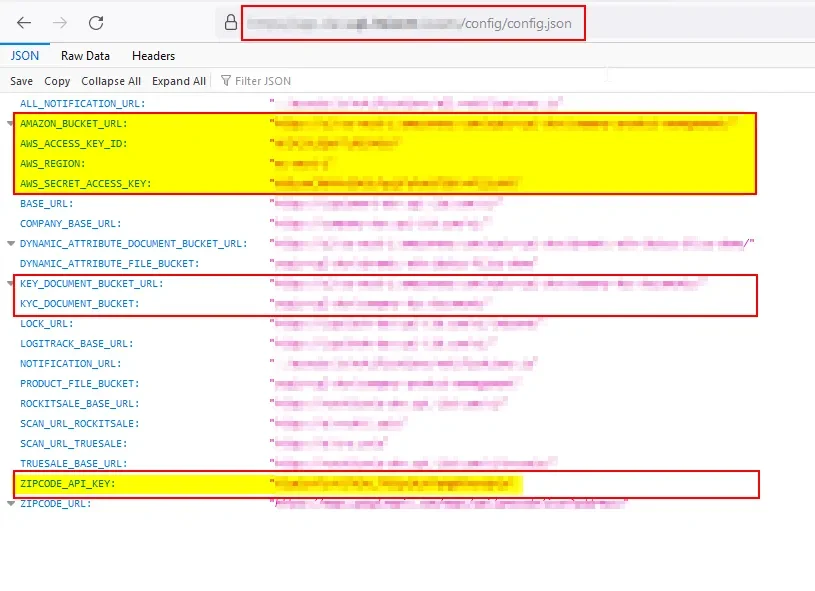

The configuration file is shown in the two images above.
Exploitation
Step 1: Obtain the credentials from the unauthenticated config file
The configuration file was reachable without authentication and contained the AWS access key material. The report does not give the file's URL or the exact key names.
Step 2: Configure the AWS CLI with the leaked keys
Configuring the AWS CLI requires an "AWS Access Key ID" and an "AWS Secret Access Key", and both were already present in the configuration file. The researcher configured the CLI with those keys.

Step 3: Access the bucket with the leaked identity
With the CLI configured, the researcher tried accessing the bucket again. This time the bucket listed its content, and all the KYC documents could be accessed. The bucket also allowed uploading and deleting content.
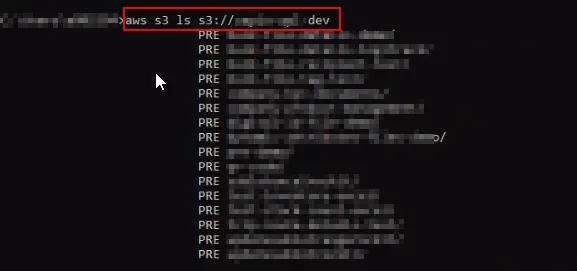
Because read, write and delete were all possible, the researcher notes that confidentiality, integrity and availability were all affected.
Root cause
The bucket's own access policy was correct: anonymous access was denied for both read and write. The failure was in the application, which served a configuration file containing AWS credentials to unauthenticated users. With those credentials the researcher could list, read, upload and delete objects, even though anonymous access was denied. The report frames this as material the developer left in the file by mistake; the exact mechanism by which the file became publicly reachable is not described.
Impact
The researcher recovered the AWS keys from the file and, with them, listed the bucket, read the KYC documents, and uploaded and deleted content. The affected data is identity documentation, so the exposure is sensitive personal data. The report does not state how long the file or the keys had been exposed, how many documents were in the bucket, or whether the keys were rotated afterwards.
Fix
The measures it implies are removing the credentials from any file served to clients, restricting access to configuration files, and scoping the credentials so that they cannot list, read, write or delete bucket objects.
Variants to test
- Passive secret scanning of JavaScript and config files. Run an extension such as BurpSuite-Xkeys while browsing the target, and also fetch configuration files directly without authentication. A positive result is any AWS key pair, token or secret appearing in a response that an unauthenticated user can retrieve.
- Test the bucket anonymously first, then with any recovered identity. A bucket that returns "Access Denied" for public read and write is not necessarily safe; if credentials turn up elsewhere, configure the CLI with them and retry the listing. A positive result is a successful object listing where anonymous access failed.
- Check the permissions of recovered credentials. Once authenticated, attempt to list, download, upload and delete. A positive result is any of these succeeding beyond read-only access, which shows the key is over-privileged as well as leaked.
- A positive result is the same file being served without authentication on another environment.
What happened, in plain words
An application stored identity documents in a cloud storage service called Amazon S3. The researcher who wrote this report wanted to know whether that storage was open to the public. He checked, and it was not: the storage refused him. That is the twist in this story. The storage was set up correctly, but a configuration file available without authentication contained the keys to it. With the keys, the researcher could access all the KYC documents, and also upload and delete files.
This write-up walks through the same steps in the same order, but explains each idea from scratch. You only need a browser and a computer to follow along.
The setting: what an S3 bucket is
Amazon S3 is a storage service. You put files into containers called buckets, and each file inside is called an object. Think of a bucket as a filing cabinet in a warehouse: the cabinet has a name, and inside it are folders and documents. Companies use buckets for backups, images, logs, and in this case KYC documents.
KYC stands for "know your customer". Banks and similar businesses are legally required to check who their customers are, so they collect identity papers: passports, ID cards, proof of address. These are sensitive personal records. If they leak, real people are harmed, not just the company.
A bucket has an access policy: a set of rules saying who may read, write or delete what. When a bucket is misconfigured, the policy is too loose and strangers on the internet can read or write it without any login. That is a very common bug, so it is the first thing a tester checks.
The first test: is the bucket open to everyone?
The researcher used a tool called the AWS CLI. CLI means command line interface: a program you run by typing commands into a text window, instead of clicking buttons. The AWS CLI is Amazon's official tool for talking to AWS services from that text window.
He used it to try two things against the bucket:
- Public read: can an anonymous stranger list and download the files?
- Public write: can an anonymous stranger upload files?
Both attempts failed. The bucket answered "Access Denied". That is the correct, healthy answer: the bucket was properly configured, and the door was locked.
The image shows the AWS CLI output for those two checks, with "Access Denied" returned for both public read and public write.
Most people would stop here and report "no issue". The researcher did not. He reasoned that if the front door is locked, maybe the key is lying somewhere else. That instinct is the whole lesson of this report.
Reconnaissance: looking for secrets in the website's code
Reconnaissance (recon) means gathering information about a target before attacking it: what it is built from, what files it loads, what it exposes. It is the same idea as walking around a building and noting windows, doors and bins before trying anything.
He started reading the site's JavaScript files. JavaScript is the programming language that runs inside your browser and makes web pages interactive. When you open a page, your browser downloads these files and runs them. Because the browser must download them, anyone can read them: they are public by design. Developers sometimes forget this and leave secrets inside them.
Reading every JavaScript file by hand was not realistic, so he used an automated helper: a Burp Suite extension called BurpSuite-Xkeys.
Burp Suite is a widely used tool for testing web applications. It sits between your browser and the website, like a postbox that lets you inspect every letter going in and out. It can be extended with plugins, and this one is such a plugin.
According to the report, BurpSuite-Xkeys is "A Burp Suite Extension to extract interesting strings (Keys, API keys, Secret tokens, AWS Secrets etc.) from a webpage and lists them as information issues." In plain words: it reads the pages and files your browser receives and highlights anything that looks like a secret, such as a password, a token or a cloud key.
It works as a passive scan: you simply browse the target normally, and the extension reports the interesting strings it finds.
The image shows the Xkeys output: the list of interesting strings the extension pulled out of the pages he browsed.
The find: a configuration file with no lock on it
Two of the results caught his eye: aws_secret_access_key and aws_access. These strings appeared in the extension's results and pointed to a configuration file. They pointed to a configuration file.
A configuration file is a plain text file that a program reads to learn its settings: addresses, options, and sometimes credentials. Think of it as the settings sheet taped inside a machine. If it is served by the website to anyone who asks, then anyone can read the settings, including any secrets written on the sheet.
That is exactly what happened here. The file was available without authentication. Authentication means proving who you are, usually by logging in. "Available without authentication" means the server handed the file over to anyone who requested it, with no login, no password, no account.
The report says the file "had all the important stuff that the developer had left by mistake". In other words, someone put real credentials into a file that was never meant to be public.
The two images show the configuration file as it was served. The report does not reproduce its contents as text, so the exact file name, URL and key values are not given here.
Using the leaked keys
Now the earlier failure made sense. The bucket was locked, but the keys to it were lying in a public file.
To use AWS from the command line, the AWS CLI needs two pieces of information:
- An AWS Access Key ID: a public identifier for a user or program, a bit like a username.
- An AWS Secret Access Key: the matching secret, a bit like a password. It must never be shared.
Together, a key ID and a secret are called credentials. Anyone holding both can act as that identity, exactly as if they had the username and password.
Both values were already in the configuration file. So he configured the AWS CLI with them, which simply means telling the tool "use these credentials when you talk to AWS". Then he tried the bucket again.
The image shows the moment the CLI, now configured with the leaked keys, is used against the bucket.
The result: full access
This time the bucket answered differently. It listed its content, and he could open all the KYC documents. The bucket also let him upload new files and delete existing ones.
The image shows the bucket's contents being listed after authenticating with the leaked keys.
He sums up the damage with the three classic pillars of information security:
- Confidentiality: keeping data secret from those not allowed to see it. Broken, because he could read the KYC documents.
- Integrity: keeping data correct and unaltered. Broken, because he could upload files.
- Availability: keeping data reachable when legitimate users need it. Broken, because he could delete files.
All three were affected at once. That is why a leaked cloud key is treated as serious even when the storage itself looks well configured.
Why it worked: the root cause
The bucket's own policy was fine. Anonymous read and write were both denied. The failure was in the application: it served a configuration file containing AWS credentials to unauthenticated visitors. With those credentials the researcher could list, read, upload and delete objects.
So the protection was not broken; it was bypassed. The researcher did not pick the lock, he found the key under the doormat and used it. The report describes the file as something the developer left there by mistake, and does not explain how the file became publicly reachable in the first place.
What an attacker could do with this
The researcher took the AWS keys from that configuration file and then:
- List the bucket and see what is inside.
- Download every KYC document, which is sensitive personal data about real people.
- Upload files.
- Delete files.
The report does not say how long the file or the keys had been exposed, how many documents the bucket held, or whether the keys were changed afterwards.
How to fix it
The report does not describe a remediation, but the measures it implies are clear:
- Remove credentials from any file that is served to browsers. Secrets belong on the server, never in files the public can download.
- Restrict access to configuration files so they cannot be fetched without authentication.
- Give credentials the smallest set of permissions they need, so that even if one leaks it cannot list, read, write or delete bucket objects.
Things to try yourself
These are the same checks, phrased as exercises. Each one lists what a positive result looks like.
- Scan pages and files for secrets. Browse the target with an extension such as BurpSuite-Xkeys running, and also try fetching configuration files directly without logging in. A positive result is any AWS key pair, token or secret appearing in a response that an unauthenticated user can retrieve.
- Test the bucket anonymously first, then with any identity you recover. A bucket that says "Access Denied" for public read and write is not automatically safe. If credentials turn up elsewhere, configure the CLI with them and retry the listing. A positive result is a successful listing where anonymous access failed.
- Check what the recovered credentials are allowed to do. Once authenticated, try to list, download, upload and delete. A positive result is any of these succeeding beyond read-only access, which shows the key is over-privileged as well as leaked.
- A positive result is the same file being served without authentication on another environment.
The researcher's own advice
His closing tip is to keep digging. If the first check comes back clean, that is not the end of the story; it is a reason to look somewhere else. Even when nothing turns up, you learn something that helps next time.
Glossary
- Access policy: the rules attached to a cloud resource saying who may read, write or delete it.
- Anonymous access: using a service without logging in, as any stranger on the internet could.
- Authentication: proving who you are, usually by logging in with a username and password or a key.
- Availability: the security property that data stays reachable for legitimate users when they need it.
- AWS: Amazon Web Services, Amazon's cloud platform offering storage, servers and many other services.
- AWS Access Key ID: the public identifier half of an AWS credential pair, similar to a username.
- AWS CLI: Amazon's command line tool for talking to AWS services by typing commands.
- AWS Secret Access Key: the secret half of an AWS credential pair, similar to a password; it must never be shared.
- Bucket: a container in Amazon S3 that holds files (objects).
- Burp Suite: a tool for testing web applications that sits between your browser and the site and lets you inspect the traffic.
- BurpSuite-Xkeys: a Burp Suite extension that extracts strings that look like keys, tokens and secrets from web pages and lists them as information issues.
- CLI (command line interface): a way of using a program by typing commands in a text window instead of clicking.
- Confidentiality: the security property that data is only seen by those allowed to see it.
- Configuration file: a plain text file a program reads to learn its settings, which may include credentials.
- Credentials: the pair of values (such as a key ID and a secret) that prove an identity to a service.
- Extension (plugin): an add-on that gives an existing program extra features.
- Integrity: the security property that data stays correct and unaltered.
- JavaScript: the programming language that runs in your browser to make web pages interactive; the files are downloaded by the browser and are therefore public.
- KYC (know your customer): identity and verification documents that businesses must collect about their customers.
- Object: a single file stored inside an S3 bucket.
- Passive scan: inspection of traffic that is already flowing, without sending attack requests of its own.
- Public read / public write: permission for anyone, without logging in, to download files / to upload files.
- Reconnaissance (recon): gathering information about a target before attempting anything against it.
- Root cause: the underlying reason a vulnerability exists, as opposed to its visible symptom.
- S3 (Amazon Simple Storage Service): Amazon's cloud file storage service, organised into buckets and objects.
- Token: a short string that acts as proof of identity or permission, similar to a temporary password.




