How I escalated default credentials to Remote Code Execution
A Tomcat manager interface was exposed on a non-standard port with default credentials, allowing an attacker to log in and upload a malicious WAR file. This led to remote code execution via a JSP webshell.
 Published on pawanchhabria.medium.com
Hello All, We all know Recon is very important to get P1 bugs. Shodan and Censys are probably the best search engines.
The full write-up lives on its author's site
It belongs to its author, so we link to it rather than copy it. The other two tabs are our own rewrites, checked against it.
Context
This write-up is about a Tomcat deployment that exposed its Application Manager Console to the internet, and about how a default credential pair on that console turned into remote code execution. The application itself was running Tomcat; the author refers to the domain as www.example.com and notes that the domain and other details have been masked for confidentiality.
The feature at the centre of it is the Tomcat Manager, the web console that lets an authorised user deploy, start, stop and undeploy web applications. One of its functions is uploading a WAR archive, which Tomcat then deploys as an application. That is the normal, intended behaviour, and it is also the path to code execution once someone else can reach the console.
Setup
The author had been testing application logic issues and was deliberately practising reconnaissance. The tool used was the Shodan search engine, plus a browser. No accounts, roles or special access were needed on the target: the whole point is that the console was reachable and answered to well-known credentials.

The image sits at the start of the write-up, where the author introduces reconnaissance with Shodan and Censys.
Finding it
The first attempts were conventional. The author brute forced Tomcat directories on the application and that did not work; a couple of other attempts also failed. That is when the search engine came in.
The domain name was pasted into Shodan and the results were filtered by port. One result stood out: an application running on port 8082 that was using Tomcat. The address is given in the write-up only as x.x.x.x, explicitly as an example.
Requesting the manager path on that host and port produced a username and password prompt, which the author took as a sign of hope:
http://x.x.x.x:8082/manager
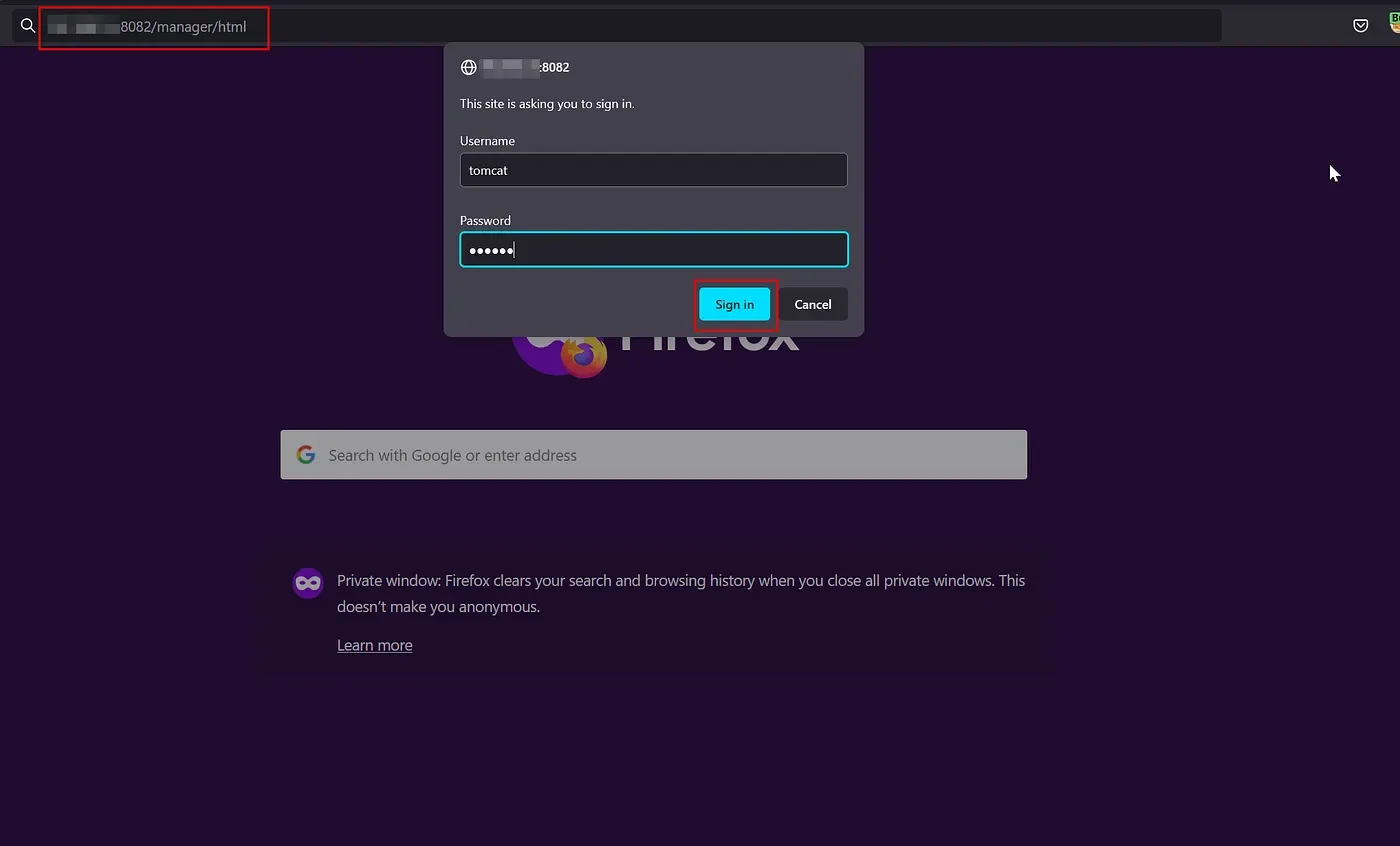
The screenshot shows the browser hitting the manager path on port 8082 and being asked for credentials.
Exploitation
Step 1: Log in with default credentials
The credentials tomcat / s3cret were accepted, and the Tomcat Application Manager Console became accessible.

The screenshot shows the manager console after the login succeeded with tomcat / s3cret.
Step 2: Prepare a malicious JSP and package it as a WAR
The author notes that this is technically the point to stop, but that a malicious WAR upload leads to remote code execution. A JSP file is needed to build the WAR. The JSP was taken from a public webshell collection (the cmd.jsp file in the fuzzdb-webshell set on GitHub), saved on the desktop as index.jsp, and then packaged into a WAR with the commands shown in the screenshot.
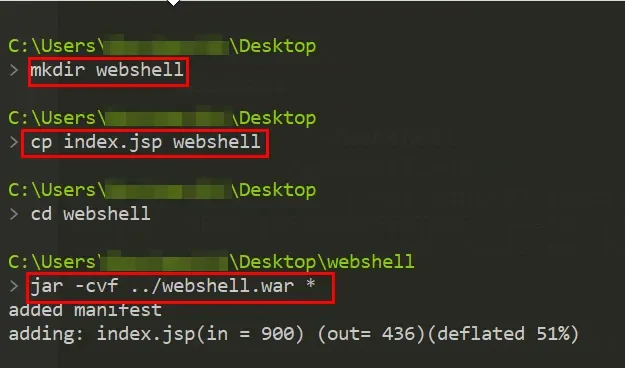
The screenshot shows the commands used to generate the WAR file from index.jsp.
Step 3: Upload the WAR through the manager
With the WAR generated, the author went to the "Select WAR file to upload" section of the console and uploaded it.
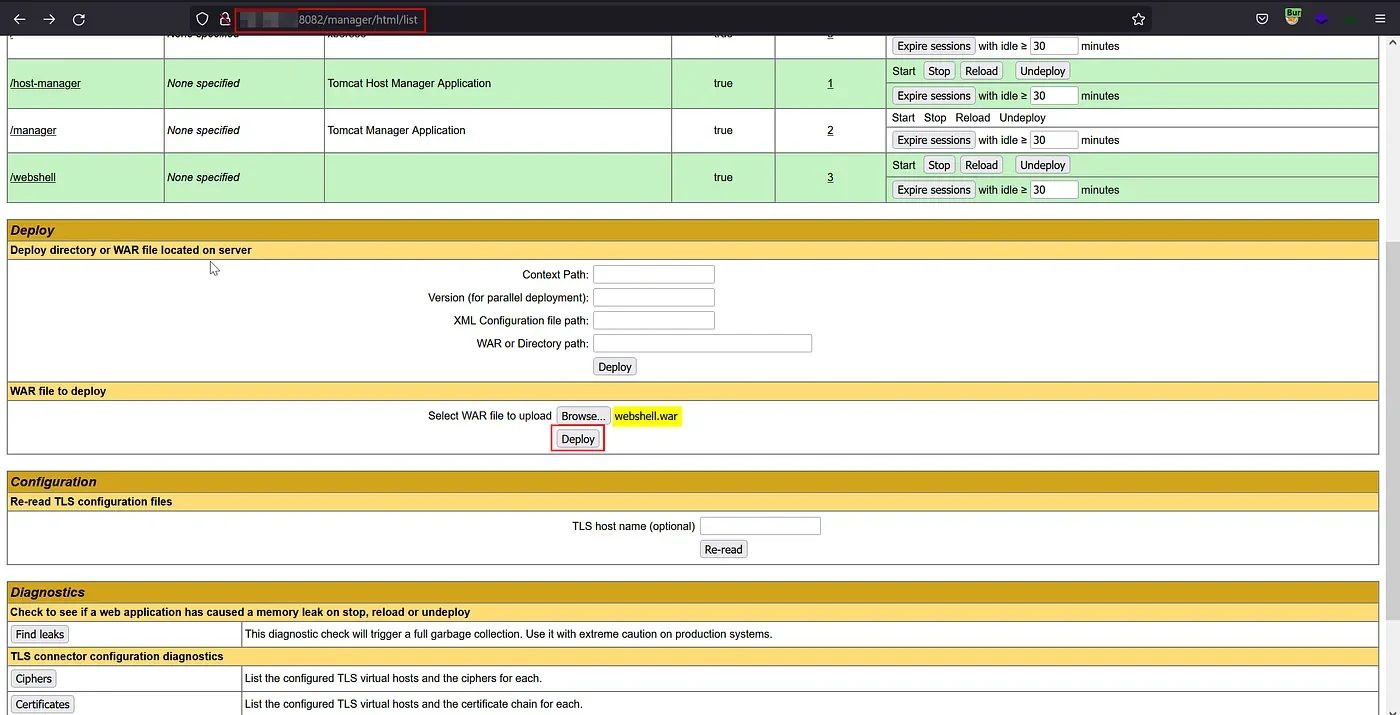
The screenshot shows the upload section of the manager with the WAR file selected.
Step 4: Confirm deployment
After refreshing the page, an application named "webshell" appeared in the list of applications.
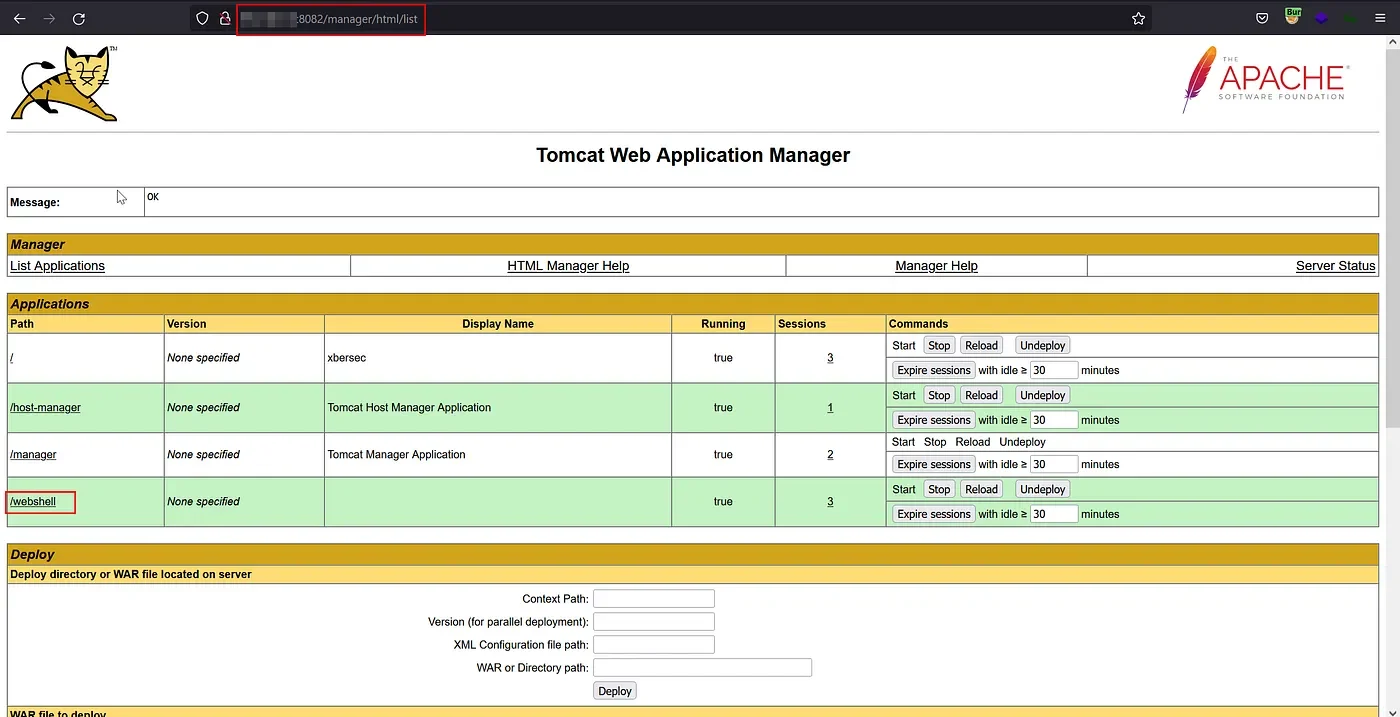
The screenshot shows the application list with the new "webshell" entry.
Step 5: Use the deployed shell
The application was opened in a new tab. The webshell had been uploaded successfully and the author was able to run a few commands through it.
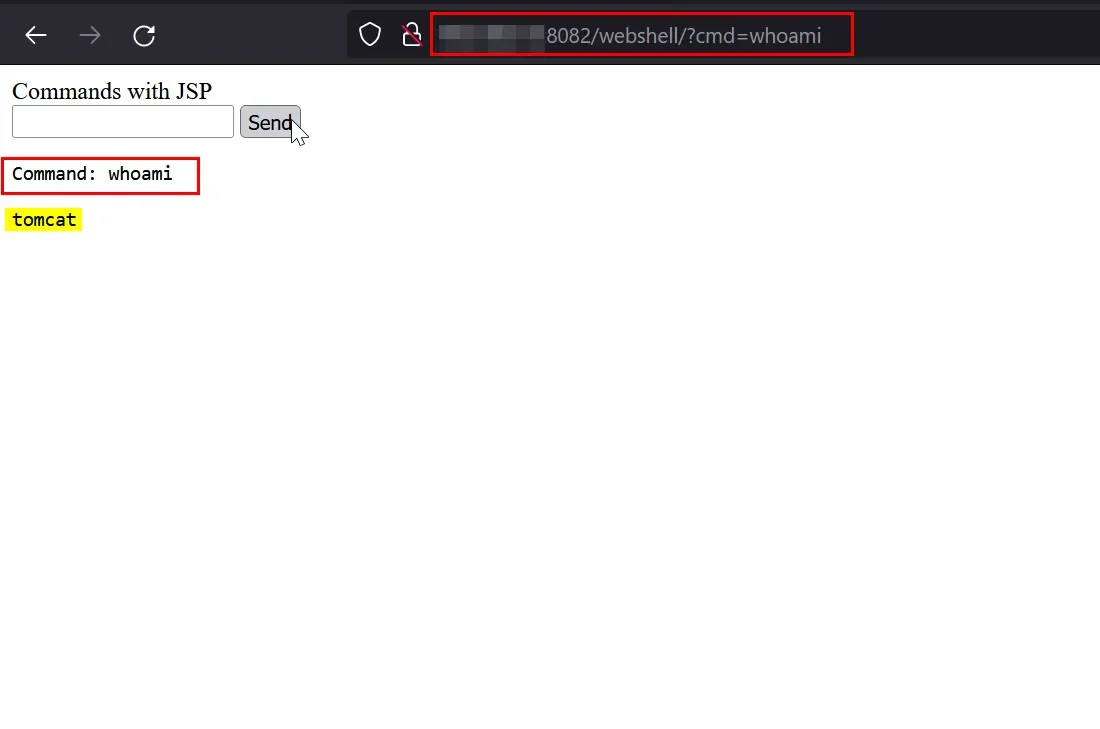
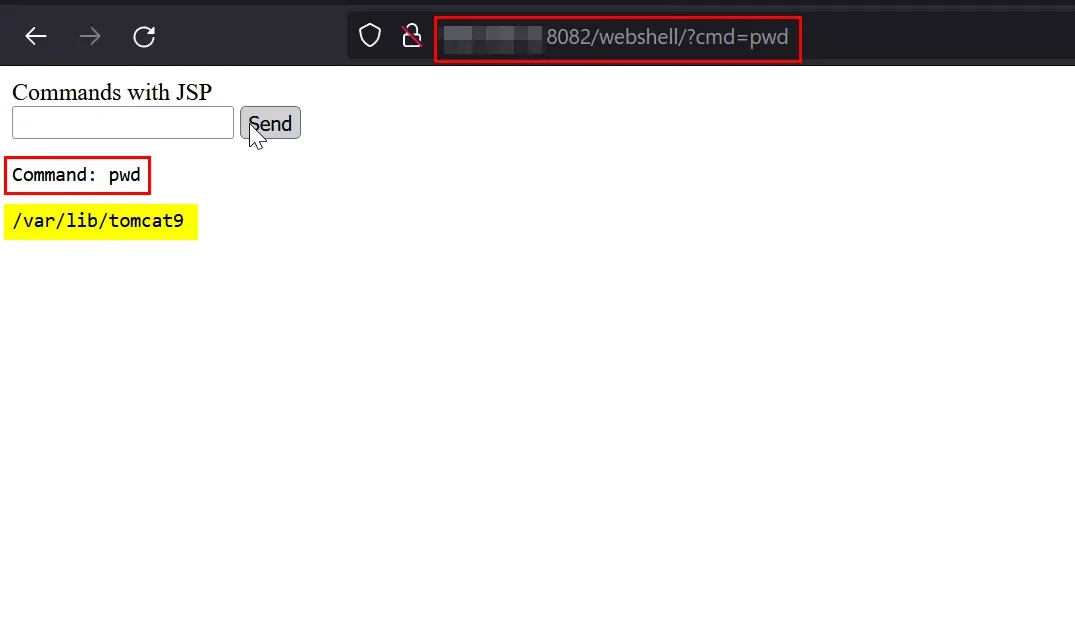
The two screenshots show the deployed webshell responding to commands.
Root cause
The console was reachable from the internet on port 8082 and still accepted the well-known default tomcat / s3cret credential pair. Because the Manager is designed to deploy applications, a successful login is equivalent to the ability to run code: any WAR containing a JSP is deployed and executed by the container. The manager still accepted the well-known default credential pair. The write-up does not describe the server configuration beyond this, so the exact reason the defaults survived is not stated.
Impact
An attacker who can reach the manager port can log in with default credentials and deploy an arbitrary application, which here gave a webshell through which a few commands were run. The author's own framing is that this is a remote code execution. The conditions are the ones seen here: the manager interface exposed on a reachable port and left on default credentials. The write-up does not describe what else was reachable from that host or what data was exposed.
Fix
What should be done follows from the root cause: change the manager credentials away from the defaults, and restrict access to the manager interface so it is not reachable from the internet, for example by binding it to localhost or placing it behind network controls. Removing or disabling the manager application where it is not needed also removes the deployment path entirely.
Variants to test
- Search engine pivots on the target domain, filtered by port, looking for other services on non-standard ports. A positive result is a host and port that the main application does not advertise.
- Request the manager path on each discovered Tomcat port. A positive result is a login prompt rather than a 404 or a connection refusal.
- Try the default
tomcat/s3cretpair against any prompt found. A positive result is access to the console and its application list. - Where the console is accessible, check whether the WAR upload section is available to the account. A positive result is the upload form accepting a WAR and the application appearing in the list after a refresh.
- A positive result is an authenticated administrative view that the public application never links to.
What happened, in plain words
A website was running a piece of software called Tomcat. Tomcat is a web server: a program that sits on a computer and answers requests from browsers, sending back web pages. Tomcat has a built-in administration page called the Manager, which is meant for the people who run the site. From that page an administrator can upload a packaged application and Tomcat will install and run it.
That administration page was reachable from the open internet, and it still accepted the factory username and password that Tomcat ships with. Anyone who found the page and knew those two words could log in. Once logged in, the author uploaded a small program of their own, Tomcat installed it, and the author could then run commands on the server. That last part is what people call remote code execution: running your own commands on someone else's machine from far away.
The author found the page not by guessing at the main website, but by searching a public database of internet-connected devices called Shodan. The write-up masks the real domain and shows the address only as x.x.x.x, explicitly as an example.
The idea behind the search
Before touching the target, the author had been practising reconnaissance. Reconnaissance (recon for short) means gathering information about a target before attacking it: what software it runs, which addresses it uses, which doors are open. The author points out that recon matters if you want to find serious bugs, and names Shodan and Censys as search engines for it.
A normal search engine indexes web pages. Shodan and Censys index machines and the services those machines expose, so you can search for things like "servers running Tomcat on this port". Think of the difference as searching a library catalogue (normal search) versus searching a list of every building in the city and which doors are unlocked (Shodan).
The image appears at the start of the write-up, where the author introduces reconnaissance with Shodan and Censys.
First attempts on the main site
The application was using Tomcat. The author's first move was to brute force Tomcat directories. Brute forcing means trying a long list of likely names one after another, automatically, hoping one exists. Directories here means the folder-like paths on a web server, such as the path where the Manager lives. If a path exists, the server answers; if not, it usually returns a "not found" error. That attempt did not work, and a couple of other attempts also failed.
This is worth pausing on. The main website did not advertise its Manager page, and guessing the path got nowhere. The page was still there, just not where the author was looking. That is exactly the situation where a search engine for devices helps.
Finding the Manager through Shodan
The author took the domain name and pasted it into Shodan, then filtered the results by port. A port is a numbered channel on a computer. One machine can run many services at once, and each listens on its own port number, the way one building can have many numbered doors. Web traffic normally uses port 80 or 443, but services can be put on any number.
Filtering by port narrowed the list down, and one result stood out: an application running on port 8082 that was using Tomcat. The address in the write-up is x.x.x.x, given only as an example.
So the author now had a host and a port that the main website never mentioned. That is the value of the pivot: the public site pointed at one address, and the search engine revealed another service on a non-standard port.
Knocking on the Manager door
The author requested the manager path on that host and port:
http://x.x.x.x:8082/manager
Line by line:
http://says to speak the ordinary web protocol, unencrypted.x.x.x.xis the placeholder for the machine's address.:8082is the port number, the specific door on that machine./manageris the path, the name of the page being asked for, which is where Tomcat's administration console lives by default.
Instead of a "not found" error, the server asked for a username and password. That prompt is a login form, and for the author it was a sign that the console was really there and reachable.
The screenshot shows the browser hitting the manager path on port 8082 and being asked for credentials.
Logging in with the factory password
Many products ship with a default account so that the first person to install them can get in. The idea is that the installer changes it immediately. Often nobody does. Tomcat's Manager has a well-known default pair, and the author tried it: username tomcat, password s3cret. It worked, and the Tomcat Application Manager Console opened.
This is the heart of the finding. Nothing was cracked and no clever trick was used. The door was simply left with the key the manufacturer puts in the box. The author's own reaction in the write-up is that this should technically have been the point to stop.
The screenshot shows the manager console after the login succeeded with tomcat / s3cret.
From a login to running code
The author knew that a successful login to this console is not just a view of settings. The Manager exists to deploy applications, and one way it does that is by accepting a WAR file. A WAR (web application archive) is a single file, like a zip archive, that bundles a whole web application so the server can install it in one go. Tomcat unpacks it and starts running it.
Inside a WAR you can put a JSP file. JSP stands for JavaServer Pages: a page that contains Java code, which the server runs when someone requests that page. A normal page is text the browser displays; a JSP page is a small program the server executes. That is why uploading one is equivalent to running code: the server is doing exactly what it was built to do, only with someone else's program.
The author needed a malicious JSP to build the WAR around. They took one from a public collection of webshells, specifically the cmd.jsp file in the fuzzdb-webshell set on GitHub. A webshell is a page that, once deployed, lets you type a command and see its output in the browser, so the browser becomes a remote control for the server. The file was saved on the desktop as index.jsp, and then packaged into a WAR with the commands shown in the screenshot.
The screenshot shows the commands used to generate the WAR file from index.jsp.
Uploading the WAR
With the WAR generated, the author went to the section of the console labelled "Select WAR file to upload" and uploaded it. This is the console's normal deploy feature, used by administrators every day. The only unusual thing was the contents of the file.
The screenshot shows the upload section of the manager with the WAR file selected.
Confirming it was installed
After refreshing the page, an application named "webshell" appeared in the list of applications. The list is the console's inventory of what is currently deployed, so a new entry means Tomcat accepted the file and started it.
The screenshot shows the application list with the new "webshell" entry.
Using the shell
The author opened the new application in a new tab. The webshell had been uploaded successfully and the author was able to run a few commands through it. At that point the browser was talking to a program the author had placed on the server, and the server was carrying out the commands.
The two screenshots show the deployed webshell responding to commands.
Why this worked
Two things had to be true at the same time:
- The Manager console was reachable from the internet on port 8082.
- It still accepted the well-known default
tomcat/s3cretpair.
Because the Manager is designed to deploy applications, a successful login is the same as the ability to run code: any WAR containing a JSP is installed and executed by Tomcat. The manager still accepted the well-known default tomcat / s3cret pair. The write-up does not describe the server configuration beyond this, so the exact reason the defaults survived is not stated.
What the impact is
Someone who can reach the manager port and knows the default pair can log in and deploy an arbitrary application, which here gave a webshell through which a few commands were run. The author frames it as remote code execution. The conditions are the ones seen here: the manager interface exposed on a reachable port and left on default credentials. The write-up does not describe what else was reachable from that host or what data was exposed.
How to prevent it
What should be done follows from the cause: change the manager credentials away from the defaults, and restrict access to the manager interface so it is not reachable from the internet, for example by binding it to localhost or placing it behind network controls. Removing or disabling the manager application where it is not needed also removes the deployment path entirely.
Things to try on your own targets
- Search engine pivots on the target domain, filtered by port, looking for other services on non-standard ports. A positive result is a host and port that the main application does not advertise.
- Request the manager path on each discovered Tomcat port. A positive result is a login prompt rather than a 404 or a connection refusal.
- Try the default
tomcat/s3cretpair against any prompt found. A positive result is access to the console and its application list. - Where the console is accessible, check whether the WAR upload section is available to the account. A positive result is the upload form accepting a WAR and the application appearing in the list after a refresh.
- A positive result is an authenticated administrative view that the public application never links to.
The author's closing advice is to think the other way round while hunting: old vulnerabilities never die, and you have to be creative enough to find them.
Glossary
- Tomcat: a web server written in Java that answers browser requests and can host web applications.
- Web server: a program that listens for requests from browsers and sends back pages or data.
- Manager (Tomcat Application Manager Console): Tomcat's built-in administration page for deploying, starting, stopping and removing applications.
- Reconnaissance (recon): gathering information about a target before attacking it, such as software, addresses and open ports.
- Shodan: a search engine that indexes internet-connected machines and the services they expose, rather than web pages.
- Censys: another search engine of the same kind, indexing internet-connected hosts and services.
- Brute force: trying a long list of likely names or passwords automatically, one after another, until something works.
- Directory: a folder-like path on a web server, such as
/manager. - Port: a numbered channel on a computer; each service listens on its own number, like numbered doors in one building.
- Default credentials: the factory username and password a product ships with, meant to be changed at install time.
- WAR (web application archive): a single file bundling a whole web application so a server can install it in one step.
- JSP (JavaServer Pages): a page containing Java code that the server executes when the page is requested.
- Webshell: a page deployed on a server that lets you type commands and see their output in a browser.
- Remote code execution (RCE): running your own commands on someone else's machine from a distance.
- 404: the standard web response meaning the requested page does not exist.
- Localhost: the machine itself, reachable only from that machine, not from the internet.


