How I Bypassed A.i. Based Facial Detection Restriction With An Intended Feature On A Photo Sharing App ?
The facial recognition step during registration could be bypassed by importing a photo from the gallery instead of using a live camera feed. An attacker could verify an account using someone else's photo, potentially impersonating that person or creating multiple accounts with the same image.
 Published on medium.com
I writing this article to share an Interesting bypass of A.I. based facial recognition system on a photo sharing application and its Implications I found if not managed or created securely. I will be keeping the application details confidential, for now we will call this application as “Test Application”.
The full write-up lives on its author's site
It belongs to its author, so we link to it rather than copy it. The other two tabs are our own rewrites, checked against it.
Context
The target is a photo sharing application that the author refers to only as "Test Application"; the real name is kept confidential. The application is available on Android (Play Store) and iOS (App Store), and it also has a web version, which the author did not test. Testing was done on Android, and the author expects the same behaviour on iOS because the functionality is the same.
The application uses A.I. to map the facial structure of its users so that it can pick out a user's face from group photos and list those photos under that user's profile. This saves the user from going through each photo manually. The author describes this feature as working well with many users and many pictures.
Registration is gated by identity verification. The user signs up with an email address or phone number, verifies an OTP sent through the chosen method, and is then prompted to go through facial recognition as the final step of registration. The author states that this step is followed strictly and cannot be skipped.
Setup
No accounts, tools or versions are described beyond the following:
- A signup with an email address or phone number.
- OTP verification through the same method.
- The mandatory facial recognition step, which the author tested on the Android build of the application.
The author also tested with a physical photograph held in front of the camera.
Finding it
The author noticed that the facial recognition screen offers a way out of the live camera flow. If the user taps out of the facial feature box intentionally, the application allows importing a picture from the gallery instead of requiring a live human face. The author calls this an intended feature, because it exists in the product by design.
The reasoning about why this works is about what the A.I. actually checks. A robust liveness check would map the whole face, its textures, the eyes (retina) and the lips, and would establish that a real person is present rather than a photograph. In this application the detection pattern was flawed: the model was trained to verify identity on only two points.
- The face should be of a human.
- The human face should be looking straight.
Because the A.I. fails to tell the difference between a live human face and a deepfake or simply a normal human face, anyone who satisfies those two conditions can import a picture and be verified.
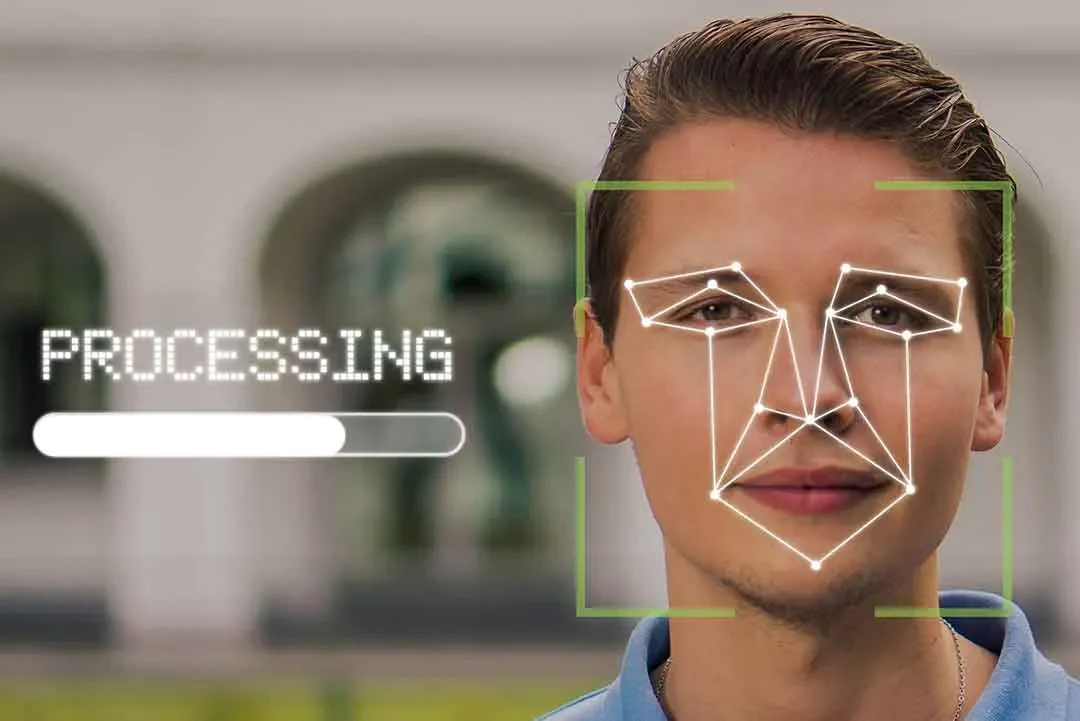
The author also tried holding an actual physical picture in front of the camera. That attempt did not succeed: as the camera and the picture came closer together the image got blurry and was detected. The author's view is that a physical picture might be accepted if it could be presented without going blurry, but that this is extremely difficult to do.
Exploitation
Step 1: Reach the facial recognition step
Register with an email address or phone number and complete OTP verification. The application then presents the facial recognition procedure as the final registration step.
Step 2: Leave the live camera box
Tap out of the facial feature box intentionally. The application then offers the option to import a picture from the gallery instead of capturing a live face.
Step 3: Import a picture that meets the two conditions
Choose a picture of a human face that is looking straight. The author states that a deepfake picture would also pass, provided it meets the same two conditions, and that meeting them is easy.

The imported picture was accepted and the author was verified as the user, without a live face being presented to the camera.
Root cause
The design flaw is the combination of two things. First, the application exposes an intended gallery import path on the identity verification screen, so the input to the check does not have to come from a live camera. Second, the A.I. model only verifies that the input is a human face looking straight; it does not perform liveness detection, meaning it does not check textures, eyes or lips to establish that a real person is in front of the camera rather than a photograph or a deepfake. The author describes the detection pattern as flawed for exactly this reason.
The physical-photograph attempt failed only because the picture went blurry as it was brought close to the camera and was detected at that first step. That is an incidental obstacle, not a liveness control: the author notes that if an attacker found a way to present a physical picture without blur, it could be bypassed, though this is extremely difficult.
Impact
An attacker can import anyone's picture from the gallery and pass the mandatory verification step. With that, the attacker can watch all the group pictures of users without revealing their own identity, because the A.I. will not be able to find the attacker's picture in any group photo: it does not exist in those photos.
From the ordinary user's point of view, importing a picture for convenience without going through live detection is acceptable to the developer. The author's concern is the broader attack surface this opens:
- If an attacker breaches admin credentials and the same A.I. based detection is implemented on admin privileges and on the admin user, importing the admin's picture would bypass the step without any issue.
- An attacker can create many accounts with the same picture and plague the A.I. so that it maps out pictures of a certain person, filling up profiles and making it hard to tell the actual user from the fake ones.
- Attackers can use anyone's picture without their permission, which the author calls seriously concerning.
Fix
The author does not describe any fix being applied. The report was submitted ethically and the author was waiting for a response at the time of writing, days later. The author discussed the issue with mentor Jayesh Sir (@Jayesh25_ on X), who confirmed it is a valid issue.
Variants to test
- On any onboarding flow with a selfie or face check, look for a gallery or file import option on the same screen. A positive result is that an imported still image is accepted as verification.
- Submit a still image of a person looking straight at the camera. A positive result is successful verification without any liveness challenge.
- Submit a deepfake or otherwise synthetic face that meets the same two conditions. A positive result is the same successful verification.
- Hold a physical printed photograph in front of the camera at a distance where it stays sharp. A positive result is acceptance of the printed photo; in this report the close-range attempt went blurry and was detected.
- Reuse one picture across many accounts. A positive result is that the face-mapping feature associates the same face with multiple profiles, which is the account-flooding scenario the author describes.
- Check whether the same verification component is used for privileged accounts such as administrators. A positive result is that an imported picture satisfies the check for an admin identity.

No machines are fool proof.
What happened, in plain words
A photo sharing app asked every new user to go through facial recognition with the phone camera. The author found that this check could be skipped: instead of using the live camera, you could import a picture from the phone's gallery, and the app would accept it as proof of identity. The app's artificial intelligence (A.I.) only checked two things: that the picture contained a human face, and that the face was looking straight ahead. It never checked whether a real, living person was actually in front of the camera. So a still photo of any person looking straight at the lens was enough to pass.
The author calls this a bypass "with an intended feature" because the gallery import option is a real part of the product, built on purpose, not a bug in the usual sense. The problem is that this intended convenience undermines a security step that is supposed to be mandatory.
This article walks through the whole story from zero. You do not need to know how to program or how to test software. If you can use a browser and a phone, you can follow along. Every technical word is explained the first time it appears, and there is a glossary at the end.
The application and what it does
The target is a photo sharing application. The author keeps its real name private and calls it the "Test Application". It is available on Android through the Play Store and on iOS through the App Store. It also has a web version, but the author did not test that one. Testing was done on Android, and the author expects iOS to behave the same way because the functionality is the same.
What makes this app interesting is how it uses A.I. The app builds a map of each user's facial structure, meaning the arrangement of eyes, nose, mouth and the rest of the face. With that map it can look through group photos and pick out the photos that contain your face, then list them under your profile. This saves you the trouble of scrolling through every photo to find yourself. The author says the feature works well even with many users and many pictures.
Think of it like a very patient friend who has memorised what you look like and sorts a shoebox of holiday photos for you. The friend does not need you to be present; they only need to know your face.
How registration works
Before anyone can use the app, they have to register, and registration is gated by identity verification. Here is the flow:
- The user signs up with an email address or a phone number.
- The app sends a one-time password (OTP) through the method the user chose, and the user enters it to confirm.
- Once the identity checks are done, the app asks the user to go through facial recognition as the final step of registration.
The author states that this facial recognition step is followed strictly and cannot be skipped.
An OTP is a short code that is valid only once and only for a short time. It is a way of proving that you control the email address or phone number you claim to own. Think of it as a shop handing you a numbered ticket when you drop off a coat: only the person holding that exact ticket gets the coat back.
Where the A.I. comes in
The A.I. is not only used at registration. It is the engine behind the face-mapping feature described above. It learns what each user's face looks like and then finds that face in group photos.
Where the vulnerability is
A vulnerability is a weakness in how software is built or configured that someone can use to make it behave in a way its creators did not intend. Here the weakness is on the facial recognition screen itself.
If the user taps out of the facial feature box intentionally, meaning they deliberately close or leave the live camera view, the application offers a way to import a picture from the gallery instead of requiring a live human face. The author calls this an intended feature because it exists in the product by design. But it undermines the verification step, because the input to the check no longer has to come from a live camera.
Why the bypass works
To understand why this matters, it helps to know what a good face check should do. A robust liveness check would map the whole face, its textures, the eyes (retina) and the lips, and would establish that a real person is present rather than a photograph. "Liveness" simply means proving that the thing in front of the camera is alive right now, not a picture, a video replay or a mask.
In this application the detection pattern was flawed. The model was trained to verify identity on only two points:
- The face should be of a human.
- The human face should be looking straight.
Because the A.I. fails to tell the difference between a live human face and a deepfake or simply a normal human face, anyone who satisfies those two conditions can import a picture and be verified.
A deepfake is an image or video generated or altered by software so that a person appears to do or say something they never did. For this report, the important part is that a deepfake can look like a human face looking straight ahead, which is all the app checks.
The image above illustrates the idea: a normal human face, or a deepfake, that meets the two conditions is enough to pass the check.
What the author tried with a physical photo
The author also tried holding an actual physical picture in front of the camera. That attempt did not succeed. As the camera and the picture came closer together, the image got blurry and was detected.
Why does blur matter? A camera focuses on a certain distance. When you bring a printed photo very close to the lens, the camera cannot focus sharply on it, and the result is a soft, smeared image. The picture got blurry and was detected.
The author's view is that a physical picture might be accepted if it could be presented without going blurry, but that this is extremely difficult to do. In other words, the blur was an accidental obstacle, not a deliberate liveness control.
Exploitation, step by step
Exploitation means carrying out the attack in practice. Here is how the author did it.
Step 1: Reach the facial recognition step
Register with an email address or phone number and complete OTP verification. The application then presents the facial recognition procedure as the final registration step.
Why this step: you cannot test the face check without first getting to it, and the app only shows it after the earlier registration steps are complete.
Step 2: Leave the live camera box
Tap out of the facial feature box intentionally. The application then offers the option to import a picture from the gallery instead of capturing a live face.
Why this step: this is the moment the intended feature appears. The live camera is no longer the only way in; the gallery becomes an alternative source of input.
Step 3: Import a picture that meets the two conditions
Choose a picture of a human face that is looking straight. The author states that a deepfake picture would also pass, provided it meets the same two conditions, and that meeting them is easy.
Why this step: the A.I. only checks those two conditions, so a still image that satisfies them is treated the same as a live person.
The imported picture was accepted and the author was verified as the user, without a live face being presented to the camera. The image above shows the picture the author used to bypass the security check and get successfully verified as the user.
Root cause
The root cause is the underlying reason the problem exists, as opposed to the symptom you see. Here it is the combination of two things.
First, the application exposes an intended gallery import path on the identity verification screen, so the input to the check does not have to come from a live camera.
Second, the A.I. model only verifies that the input is a human face looking straight. It does not perform liveness detection, meaning it does not check textures, eyes or lips to establish that a real person is in front of the camera rather than a photograph or a deepfake. The author describes the detection pattern as flawed for exactly this reason.
The physical-photograph attempt failed only because the picture went blurry as it was brought close to the camera and was detected at that first step. That is an incidental obstacle, not a liveness control. The author notes that if an attacker found a way to present a physical picture without blur, it could be bypassed, though this is extremely difficult.
A useful comparison: a bouncer who only checks that you are wearing a suit will let in anyone in a suit, including someone who borrowed one for the evening. The bouncer is checking a surface detail, not whether you belong. Here the A.I. checks a surface detail (a human face looking straight) rather than whether a live person is present.
Impact
Impact means the harm that can come from the weakness. An attacker can import anyone's picture from the gallery and pass the mandatory verification step. With that, the attacker can watch all the group pictures of users without revealing their own identity, because the A.I. will not be able to find the attacker's picture in any group photo: it does not exist in those photos.
From the ordinary user's point of view, importing a picture for convenience without going through live detection is acceptable to the developer. The author's concern is the broader attack surface this opens. "Attack surface" means all the different ways an attacker could get in or misuse the system; the more ways there are, the harder it is to defend.
- If an attacker breaches admin credentials and the same A.I. based detection is implemented on admin privileges and on the admin user, importing the admin's picture would bypass the step without any issue. "Admin credentials" are the username and password (or similar) that give someone administrator rights, the highest level of control in an app.
- An attacker can create many accounts with the same picture and plague the A.I. so that it maps out pictures of a certain person, filling up profiles and making it hard to tell the actual user from the fake ones.
- Attackers can use anyone's picture without their permission, which the author calls seriously concerning.
Fix
The author does not describe any fix being applied. The report was submitted ethically and the author was waiting for a response at the time of writing, days later. The author discussed the issue with mentor Jayesh Sir (@Jayesh25_ on X), who confirmed it is a valid issue.
"Submitted ethically" means the author told the app's owners about the problem privately, rather than using it for personal gain or publishing it without warning. This is the normal practice in security research: give the people who can fix it a chance to do so.
Variants to test
If you want to look for similar problems in other apps, here are starting points. A "variant" is a related version of the same idea.
- On any onboarding flow with a selfie or face check, look for a gallery or file import option on the same screen. A positive result is that an imported still image is accepted as verification.
- Submit a still image of a person looking straight at the camera. A positive result is successful verification without any liveness challenge.
- Submit a deepfake or otherwise synthetic face that meets the same two conditions. A positive result is the same successful verification.
- Hold a physical printed photograph in front of the camera at a distance where it stays sharp. A positive result is acceptance of the printed photo; in this report the close-range attempt went blurry and was detected.
- Reuse one picture across many accounts. A positive result is that the face-mapping feature associates the same face with multiple profiles, which is the account-flooding scenario the author describes.
- Check whether the same verification component is used for privileged accounts such as administrators. A positive result is that an imported picture satisfies the check for an admin identity.
No machines are fool proof. The image above closes the article on that note.
Glossary
- A.I. (artificial intelligence): software that learns patterns from examples and then makes decisions based on them, rather than following only fixed rules written by a person.
- Admin credentials: the login details that give someone administrator rights, the highest level of control in an application.
- Attack surface: all the different ways an attacker could get into or misuse a system; a larger attack surface means more things to defend.
- Bypass: getting past a security check without satisfying it properly.
- Deepfake: an image or video generated or altered by software so that a person appears to do or say something they never did.
- Exploitation: carrying out an attack in practice, using a weakness to achieve a result.
- Facial recognition: software that identifies or verifies a person by analysing the arrangement of features on their face.
- Gallery import: a feature that lets a user pick an existing picture from the phone's photo library instead of taking a new one with the camera.
- Impact: the harm that can result from a weakness, such as unauthorised access or misuse of data.
- Intended feature: something the product does on purpose, by design, as opposed to an accidental bug.
- Liveness detection: a check that confirms a real, living person is present in front of the camera, rather than a photograph, video replay or mask.
- OTP (one-time password): a short code valid once and for a limited time, used to prove you control an email address or phone number.
- Root cause: the underlying reason a problem exists, as opposed to the symptom you observe.
- Variant: a related version of the same weakness, looked for in other places or products.
- Vulnerability: a weakness in how software is built or configured that someone can use to make it behave in a way its creators did not intend.

