How I Bypassed a Region-Locked Comment Feature on a Public Bug Bounty Program
A comment feature was blocked by region in the web UI, but the GraphQL API behind it did not enforce the same region check. An attacker in a blocked region could read and post comments by calling the API directly.
 Published on medium.com
Bug Bounty
The full write-up lives on its author's site
It belongs to its author, so we link to it rather than copy it. The other two tabs are our own rewrites, checked against it.
Context
The target was a large public bug bounty program for a big video platform that hosts support videos and reels. The program had a leaderboard with thousands of resolved reports. The feature at the centre of the write-up is the comment section on videos: reading the comment list and posting a comment.
In the researcher's country the comment feature was not available at all. The subscription (pro) feature was also not available there, which is a business decision rather than a bug, but it suggested that other features might be region-gated too.
Setup
- A normal account on the platform, created after reading the full program policy.
- Two browsers side by side: one routed through a VPN in a supported country, one on the researcher's normal connection.
- A proxy for replaying and later for inspecting the Android app's traffic.
- The scope also included an Android app, which was installed later in the process.
No specific tool versions are given in the report.
Finding it
The researcher started with the usual surface: sign in, sign up, every parameter that could be touched, and attempts to open private videos that should not be accessible. Nothing came of it.
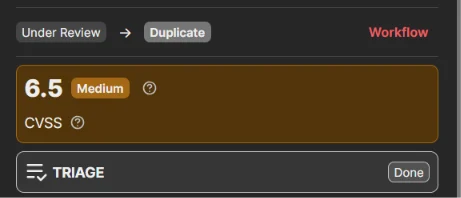
The first real finding was a race condition on the like button: sending the like request many times at once pushed the counter up further than it should have gone. That was reported and closed as a duplicate. The researcher is explicit that on a program this size such a bug is almost always already reported, and that finding a real bug and getting paid for it are two different things.
While testing the pro feature, the researcher noticed the subscription was not available in their country. That is not a bug in itself, but it prompted a hypothesis: if one feature is blocked by region, others probably are too, and region logic is often implemented in a messy way.
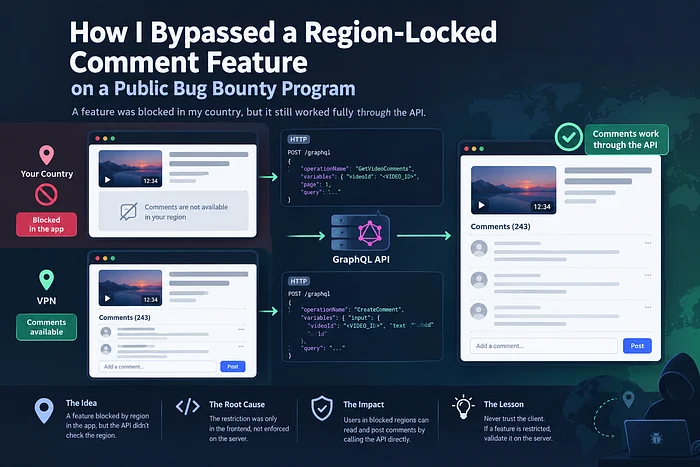
The test was simple. Two browsers were opened side by side, one with a VPN in a supported country and one on the normal connection, and the same videos were loaded in both to compare what appeared. After a few minutes the difference showed up: the VPN browser had a comments section and the normal browser did not. From the researcher's country, comments could neither be read nor posted. The feature was simply absent.
Exploitation
Step 1: capture the requests behind the feature
A missing button does not say where the block lives. The backend might reject the operation, or only the app might hide it while the API still answers anyone. The only way to tell is to ask the API directly. The researcher took the two requests behind the feature from the VPN browser, the GraphQL request that reads comments and the one that posts a comment. Both examples in the write-up are simplified for illustration, with the host, IDs and token replaced by placeholders.
Reading comments:
POST /graphql HTTP/2Host: api.example.comAuthorization: Bearer <AUTH_TOKEN>Content-Type: application/json{ "operationName": "GetVideoComments", "variables": { "videoId": "<VIDEO_ID>", "page": 1 }, "query": "query GetVideoComments($videoId: String!, $page: Int) { video(id: $videoId) { id title comments(first: 10, page: $page) { totalCount edges { node { id text createDate } } } } }"}
This is a GraphQL query named GetVideoComments that takes a videoId and a page, and returns the video's id, title and a page of comments with totalCount and the id, text and createDate of each comment node. It is sent as a POST to /graphql with a bearer token in the Authorization header.
Posting a comment:
POST /graphql HTTP/2Host: api.example.comAuthorization: Bearer <AUTH_TOKEN>Content-Type: application/json{ "operationName": "CreateComment", "variables": { "input": { "videoId": "<VIDEO_ID>", "text": "Hello world" } }, "query": "mutation CreateComment($input: CreateCommentInput!) { createComment(input: $input) { status comment { id text createDate } } }"}
This is a GraphQL mutation named CreateComment that takes a CreateCommentInput containing the videoId and the comment text, and returns a status plus the created comment's id, text and createDate.
Step 2: replay from the blocked region
Both requests were replayed from the normal connection with the VPN off. Both worked. From a country where the UI showed no comments at all, the researcher could read the whole comment list and post new comments that went through.
The backend never checked where the request came from. It trusted the app to hide the feature, and the app is the one thing an attacker fully controls.
Step 3: report the web issue
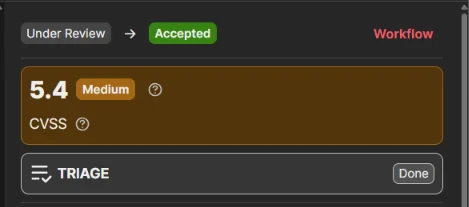
The web report was accepted as medium and rewarded.
Step 4: repeat the test on the Android app
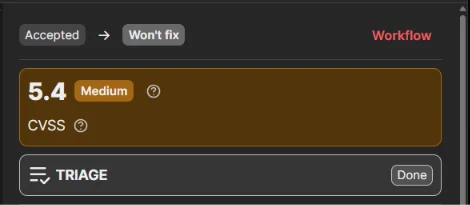
The program policy contained a line the researcher remembered: the same bug found in a different parameter can count as a separate report. The scope also included an Android app, so it was installed, its traffic was sent through the proxy, and the comment feature was checked again. It was there, and the app used a different request than the website. Same bug, different parameter, so by the program's own rules it was a separate, valid report. That became the second valid report.
Final score on this target: three reports, one duplicate (the like race condition) and two valid comment bypasses, web and mobile.
Root cause
The feature was blocked by region, but the block was in the wrong place. The app decides whether to show the comments UI based on the user's region. The GraphQL resolvers behind it do not perform the same check.
What should happen: a comment read or write from a blocked region is rejected by the API, regardless of which app sent it.
What actually happens: the API answers any logged-in user. The region block only works while the official app is used the normal way.
This is a client-side security check. The rule is real and intentional, but it was never enforced on the server, only in the frontend. Anyone with a proxy and a logged-in account can go around it, because going around a UI is easy. The report does not describe any server-side control that was present and failed; the check simply was not there.
Impact
The proven impact is narrow and the researcher is careful not to oversell it: a user in a region where comments are off can still read and post comments by calling the API directly. That is the full extent of what was demonstrated.
It still matters because companies block features by region for real reasons, such as content moderation rules, local laws and legal risk. When the block exists only on the surface, the company believes a control is working in a market where it is not. The researcher frames this as a compliance and policy problem rather than a data leak, and says that angle is what made the report land.
No account takeover, no access to private data and no admin actions were claimed. The advice given is to report only what can be proven, which keeps the report strong and the triager on your side.
Fix
The report does not state what the vendor changed. What it describes as the correct behaviour is that a comment read or write from a blocked region is rejected by the API no matter which client sent it, meaning the region check has to be enforced in the GraphQL resolvers rather than only in the frontend.
Variants to test
- Compare two sessions from different regions. Load the same resource in a browser behind a VPN in a supported country and in a browser on a blocked connection, and diff which features appear. A positive result is a feature present in one and absent in the other.
- Replay the hidden feature's API calls from the blocked connection. Capture the GraphQL or REST requests behind the feature in the supported region, then send them with the VPN off. A positive result is a successful read or write from a region where the UI hides the feature.
- Check other region-gated features the same way, such as subscriptions, payments or content categories. A positive result is any operation the UI refuses but the API accepts.
- Test the mobile app for the same feature. Install the Android app, proxy its traffic and look for the same operation on a different endpoint or with a different request shape. A positive result is the same bypass through a request the web client does not use, which may qualify as a separate report under the program's rules.
- Look for logic that only breaks under a setup most testers skip, rather than the obvious IDOR and authentication bugs. A positive result is a behaviour that differs only when two conditions are combined, such as region plus a specific client.
What happened, in plain words
A researcher found that a video platform hid its comment section from users in certain countries. The button was gone, the list was gone, the whole feature was invisible. But when the researcher sent the same requests the website normally sends, from a country where the feature was supposed to be blocked, the server answered anyway. Comments could be read and posted from a place where the product said they could not.
This is a beginner's walkthrough of that report. It assumes you can use a browser and a computer and nothing else. Every technical word is explained the first time it appears, and the requests are shown as they appear in the write-up, with a plain-words explanation underneath.
The target, and why a crowded program is still worth testing
The researcher was working on a public bug bounty program. A bug bounty program is a deal a company makes with the public: if you find a security problem in our product and report it responsibly, we may pay you a reward (a bounty) and we will fix it. Programs are usually run on a platform that lists the rules, the things you are allowed to test (the scope), and a leaderboard of reports that have been resolved. The product was a big video platform that hosts support videos and reels.
The leaderboard had thousands of resolved reports. A beginner looks at that number and thinks: everything has been found, why bother. The researcher's point is the opposite. A big program is not clean, it is clean of the easy bugs. The obvious things, like changing a video ID in a URL to see someone else's private video, or messing with the signup form, have all been tried a thousand times. What is left is the strange logic that only breaks when you set up a situation most people never bother to set up.
The feature at the centre of the story is the comment section on videos: the list of comments under a video, and the box where you type a new one. Two actions matter here: reading the comment list, and posting a comment.
In the researcher's country, that feature did not exist at all. The paid subscription feature (called "pro" in the report) was also unavailable there. That second fact is not a bug, it is a business decision: the company chose not to sell that product in that market. But it planted an idea. If one feature is switched off by country, others probably are too, and country-based logic is often built in a messy way.
Setting up
The researcher used:
- A normal account on the platform, created after reading the full program policy. The policy is the rulebook: what you may test, what you may not, and how reports are judged.
- Two browsers side by side: one going through a VPN in a supported country, one on the normal connection. A VPN is a service that makes your internet traffic appear to come from another country. It is like a forwarding address for your connection.
- A proxy for replaying requests and later for inspecting the Android app's traffic. A proxy is a program that sits between your browser or phone and the internet, so you can see and edit every message that passes through. Think of it as a post office that lets you open the envelopes.
- The scope also included an Android app, which was installed later.
The report does not give tool versions.
Finding it
The researcher started with the usual surface: sign in, sign up, every parameter that could be touched, and attempts to open private videos that should not be accessible. Nothing came of it.
The first real finding was a race condition on the like button. A race condition is when a program does two things at almost the same moment and the result depends on which one finishes first, like two people grabbing the last ticket at the same instant and both getting one. Here, sending the like request many times at once pushed the counter up further than it should have gone. That was reported and closed as a duplicate: someone else had already reported the same bug, so it earned nothing. The researcher is explicit that on a program this size such a bug is almost always already reported, and that finding a real bug and getting paid for it are two different things.
While testing the pro feature, the researcher noticed the subscription was not available in their country. That is not a bug in itself, but it prompted a hypothesis: if one feature is blocked by region, others probably are too, and region logic is often implemented in a messy way.
The test was simple. Two browsers were opened side by side, one with a VPN in a supported country and one on the normal connection, and the same videos were loaded in both to compare what appeared. After a few minutes the difference showed up: the VPN browser had a comments section and the normal browser did not. From the researcher's country, comments could neither be read nor posted. The feature was simply absent.
Step 1: capture the requests behind the feature
A missing button does not tell you where the block lives. Two very different things could be happening:
- The backend (the server, the computer that actually stores the comments and does the work) refuses the operation. In that case the block is real and there is nothing to find.
- Only the frontend (the part of the product you see and click, running in your browser or app) hides the feature, while the backend still answers anyone who asks. In that case the block is decoration.
The only way to tell the difference is to ask the backend directly, without the frontend in the way. That is what a proxy lets you do.
The requests in question are API calls. An API is the set of doors a product's frontend uses to talk to its backend. When you click "post comment", your browser does not magically write to a database; it sends a message to the server saying "create a comment with this text on this video", and the server replies. An API is like a restaurant's kitchen window: the menu (the frontend) is what customers see, but the window is where orders actually go in and food comes out. If you can walk up to the window yourself, you do not need the menu.
These particular calls are GraphQL. GraphQL is a way of designing an API where the client sends one request describing exactly what it wants, and the server sends back exactly that shape of data. Instead of many fixed addresses like /video/123/comments, there is usually one address, here /graphql, and the body of the request says what to do. Two kinds of operation exist in GraphQL: a query, which only reads data, and a mutation, which changes something. Reading comments is a query; posting a comment is a mutation.
Every one of these requests carries a token. A token (here a bearer token) is a long string that proves who you are, a bit like a wristband at an event: you show it once at the door, and after that you just show the wristband to prove you are allowed in. It is sent in an HTTP header, which is a small labelled line attached to a request carrying extra information. The header here is Authorization: Bearer <AUTH_TOKEN>. If someone else gets your token, they can act as you, which is why tokens are secrets.
The researcher took the two requests behind the feature from the VPN browser, the GraphQL request that reads comments and the one that posts a comment. Both examples in the write-up are simplified for illustration, with the host, IDs and token replaced by placeholders.
Reading comments:
POST /graphql HTTP/2Host: api.example.comAuthorization: Bearer <AUTH_TOKEN>Content-Type: application/json{ "operationName": "GetVideoComments", "variables": { "videoId": "<VIDEO_ID>", "page": 1 }, "query": "query GetVideoComments($videoId: String!, $page: Int) { video(id: $videoId) { id title comments(first: 10, page: $page) { totalCount edges { node { id text createDate } } } } }"}
Line by line, in plain words:
POST /graphql HTTP/2says: send a POST request (a request that carries a body of data) to the address/graphql, using version 2 of HTTP, the language browsers and servers speak.Host: api.example.comsays which server this request is for.api.example.comis a placeholder, not the real address.Authorization: Bearer <AUTH_TOKEN>is the wristband: the token that proves the sender is a logged-in user.<AUTH_TOKEN>stands in for the real secret.Content-Type: application/jsonsays the body is written in JSON, a simple text format for structured data using curly braces, quotes and colons. It is how almost every API exchanges data."operationName": "GetVideoComments"names the operation being run, so the server knows which one you mean."variables": { "videoId": "<VIDEO_ID>", "page": 1 }supplies the inputs: which video, and which page of comments.<VIDEO_ID>is a placeholder for the real video's identifier."query": "query GetVideoComments(...) { ... }"is the actual instruction.querymeans read-only. It asks for the video'sidandtitle, and for itscomments, taking the first 10 on the requested page. For the comments it asks fortotalCount(how many there are in total) and, for each comment (edges { node { ... } }), the comment'sid,textandcreateDate(when it was written).
Posting a comment:
POST /graphql HTTP/2Host: api.example.comAuthorization: Bearer <AUTH_TOKEN>Content-Type: application/json{ "operationName": "CreateComment", "variables": { "input": { "videoId": "<VIDEO_ID>", "text": "Hello world" } }, "query": "mutation CreateComment($input: CreateCommentInput!) { createComment(input: $input) { status comment { id text createDate } } }"}
Line by line:
- The first four lines are the same as before: same address, same server, same token, same JSON body.
"operationName": "CreateComment"names this operation."variables": { "input": { "videoId": "<VIDEO_ID>", "text": "Hello world" } }supplies the input: the video to comment on, and the text of the comment, here the harmless stringHello world."query": "mutation CreateComment(...) { ... }"is the instruction.mutationmeans this one changes data. It callscreateCommentwith that input and asks for back astatus(did it work) plus the new comment'sid,textandcreateDate.
Step 2: replay from the blocked region
Both requests were replayed from the normal connection with the VPN off. Replaying means sending a captured request again, unchanged, from wherever you like. Both worked. From a country where the UI showed no comments at all, the researcher could read the whole comment list and post new comments that went through.
The backend never checked where the request came from. It trusted the app to hide the feature, and the app is the one thing an attacker fully controls. That last sentence is the heart of the whole bug. The frontend runs on the user's machine, so the user can always change it, bypass it, or skip it entirely and talk to the server directly. Anything that only exists in the frontend is a suggestion, not a lock.
Step 3: report the web issue
The web report was accepted as medium and rewarded. Medium is a severity rating: not the worst possible, not trivial either. The researcher had framed it carefully, which is covered below.
Step 4: repeat the test on the Android app
The program policy contained a line the researcher remembered: the same bug found in a different parameter can count as a separate report. A parameter here means a different input or a different request shape, in this case a different client sending its own version of the same operation. The scope also included an Android app, so it was installed, its traffic was sent through the proxy, and the comment feature was checked again. It was there, and the app used a different request than the website. Same bug, different parameter, so by the program's own rules it was a separate, valid report. That became the second valid report.
Final score on this target: three reports, one duplicate (the like race condition) and two valid comment bypasses, web and mobile.
Root cause
The feature was blocked by region, but the block was in the wrong place. The app decides whether to show the comments UI based on the user's region. The GraphQL resolvers behind it do not perform the same check. A resolver is the piece of server code that actually answers a GraphQL operation: the query arrives, the resolver goes and fetches the data. If the resolver does not check the region, nothing checks the region.
What should happen: a comment read or write from a blocked region is rejected by the API, regardless of which app sent it.
What actually happens: the API answers any logged-in user. The region block only works while the official app is used the normal way.
This is a client-side security check. That is the name for a rule that is enforced only in the part of the product the user controls (the browser or the app), and not on the server. The rule is real and intentional, but it was never enforced on the server, only in the frontend. Anyone with a proxy and a logged-in account can go around it, because going around a UI is easy. The report does not describe any server-side control that was present and failed; the check simply was not there.
An everyday comparison: a shop that puts a "staff only" sign on a door but never locks it. The sign is a real instruction, and honest customers obey it. It is not a control.
Impact
The proven impact is narrow and the researcher is careful not to oversell it: a user in a region where comments are off can still read and post comments by calling the API directly. That is the full extent of what was demonstrated.
It still matters because companies block features by region for real reasons, such as content moderation rules, local laws and legal risk. When the block exists only on the surface, the company believes a control is working in a market where it is not. The researcher frames this as a compliance and policy problem rather than a data leak. Compliance means following the rules that apply to you, including laws about what a service may offer in a given country. That angle is what made the report land.
No account takeover (someone else gaining control of your account), no access to private data and no admin actions were claimed. The advice given is to report only what can be proven, which keeps the report strong and keeps the triager on your side. A triager is the person at the program who reads your report first and decides whether it is valid, a duplicate, or not a bug at all.
Fix
What it describes as the correct behaviour is that a comment read or write from a blocked region is rejected by the API no matter which client sent it, meaning the region check has to be enforced in the GraphQL resolvers rather than only in the frontend.
Variants to test
These are the same ideas, written as things you could try on another program.
- Compare two sessions from different regions. Load the same resource in a browser behind a VPN in a supported country and in a browser on a blocked connection, and diff which features appear. A positive result is a feature present in one and absent in the other.
- Replay the hidden feature's API calls from the blocked connection. Capture the GraphQL or REST requests behind the feature in the supported region, then send them with the VPN off. A positive result is a successful read or write from a region where the UI hides the feature. REST is the other common style of API, built around fixed addresses and standard methods rather than one endpoint with a query language.
- Check other region-gated features the same way, such as subscriptions, payments or content categories. A positive result is any operation the UI refuses but the API accepts.
- Test the mobile app for the same feature. Install the Android app, proxy its traffic and look for the same operation on a different endpoint or with a different request shape. A positive result is the same bypass through a request the web client does not use, which may qualify as a separate report under the program's rules.
- Look for logic that only breaks under a setup most testers skip, rather than the obvious IDOR and authentication bugs. IDOR (insecure direct object reference) is when changing an identifier in a request, such as a video ID, lets you reach someone else's data. A positive result is a behaviour that differs only when two conditions are combined, such as region plus a specific client.
Glossary
- API: the set of doors a product's frontend uses to talk to its backend; the kitchen window where orders go in and food comes out.
- Account takeover: when an attacker gains control of another person's account.
- Backend: the server side of a product, where data is stored and work is done.
- Bearer token: a secret string sent in a request that proves who you are, like a wristband at an event.
- Bounty: the reward a program may pay for a valid security report.
- Bug bounty program: a public deal where a company invites people to find and report security problems in exchange for recognition or payment.
- Client-side security check: a rule enforced only in the part of the product the user controls (browser or app), not on the server.
- Compliance: following the rules and laws that apply to a business, including what it may offer in a given country.
- Content moderation: the process of reviewing and controlling what users are allowed to post.
- Duplicate: a report of a bug that has already been reported, so it earns nothing.
- Endpoint: a specific address on a server that accepts requests, such as
/graphql. - Frontend: the part of a product you see and click, running in your browser or app.
- GraphQL: an API style where the client sends one request describing exactly what data it wants, and the server returns exactly that shape.
- Header: a small labelled line attached to an HTTP request or response carrying extra information, such as a token.
- HTTP: the language browsers and servers use to exchange requests and responses.
- IDOR: insecure direct object reference; changing an identifier in a request to reach data that is not yours.
- JSON: a simple text format for structured data using braces, quotes and colons, used by most APIs.
- Medium: a severity rating meaning not the worst possible and not trivial.
- Mutation: in GraphQL, an operation that changes data.
- Parameter: an input to a request; in this report, also used for a different request shape from a different client.
- Policy: the program's rulebook: what you may test, what you may not, and how reports are judged.
- Proxy: a program that sits between your browser or phone and the internet so you can see and edit the messages passing through.
- Query: in GraphQL, an operation that only reads data.
- Race condition: when two actions happen at almost the same moment and the result depends on which finishes first.
- Replay: sending a captured request again, unchanged, from wherever you like.
- Resolver: the server code that actually answers a GraphQL operation and fetches the data.
- REST: an API style built around fixed addresses and standard methods rather than one endpoint with a query language.
- Scope: the list of things a program allows you to test.
- Token: a secret string that proves who you are; if someone else gets it, they can act as you.
- Triager: the person at the program who first reads your report and decides whether it is valid, a duplicate, or not a bug.
- VPN: a service that makes your internet traffic appear to come from another country, like a forwarding address for your connection.

