How I Discovered a Critical Vulnerability on a Government Website
An internet-facing Qlik Sense Enterprise instance was found running a November 2022 build affected by several publicly known vulnerabilities, including a request-tunnelling flaw linked to a pre-authentication RCE chain and a path traversal toward the internal repository API. The author confirmed the version and reproduced detection behaviour but deliberately stopped short of achieving code execution.

Cybersecuirty
The full write-up lives on its author's site
It belongs to its author, so we link to it rather than copy it. The other two tabs are our own rewrites, checked against it.
Context
This write-up describes an assessment of a government web estate in which an internet-facing Qlik Sense Enterprise instance was found running an affected release. Qlik Sense is a business intelligence platform; the host in question presented the familiar Qlik Sense login page, with authentication in place, no exposed dashboard and no obvious administrative functionality on the homepage.
The three publicly disclosed Qlik Sense issues that matter here are:
| CVE | Description |
|---|---|
| CVE-2023-41265 | HTTP Request Tunneling |
| CVE-2023-41266 | Path Traversal |
| CVE-2023-48365 | Information Disclosure |
CVE-2023-41265 is the most serious of the three and is associated with a pre-authentication RCE attack chain. The testing was authorised and deliberately kept non-destructive: no arbitrary commands were executed, no sensitive data was exfiltrated and no persistence was established.
Setup
The assessment began with ordinary subdomain enumeration rather than with a CVE search. The tools used for discovery were:
- Subfinder
- Findomain
- GitHub-subdomains
- Assetfinder
- Amass
The Qlik instance presented a login page, and the work described here stayed on the unauthenticated surface. The only credential appearing in the commands is a GitHub token placeholder for github-subdomains, which is redacted below.
Finding it
Step 1: subdomain collection
Subdomains were gathered from several sources in parallel:
subfinder -d target.com -all -o subfinder.txt
findomain -t target.com -q > findomain.txt
github-subdomains \
    -d target.com \
    -t ghp_[redacted] \
    -o github.txt
assetfinder --subs-only target.com \
    > assetfinder.txt
amass enum -passive \
    -df domain.txt \
    -o amass.txt
The results were merged and de-duplicated:
cat \
    subfinder.txt \
    amass.txt \
    findomain.txt \
    github.txt \
    assetfinder.txt \
    | sort -u \
    > subs.txt
A subdomain existing in DNS does not mean a live application sits behind it, so the next stage was validation.
Step 2: DNS resolution and live host discovery
dnsx was used to determine which discovered hosts actually resolved, requesting A, AAAA and CNAME records and keeping only NOERROR responses:
dnsx \
    -l subs.txt \
    -a \
    -aaaa \
    -cname \
    -resp \
    -rcode noerror \
    -retry 3 \
    -o valid_subs.txt
followed by:
sed -i 's/\[NOERROR\]//g' valid_subs.txt
httpx then identified hosts exposing HTTP/HTTPS services and collected fingerprints: HTTP status, page title, technology, IP address, web server, CDN, favicon, JARM and HTTP/2 support.
httpx \
    -l valid_subs.txt \
    -probe \
    -sc \
    -title \
    -tech-detect \
    -location \
    -ip \
    -cdn \
    -web-server \
    -favicon \
    -jarm \
    -http2 \
    -random-agent \
    -silent \
    -rate-limit 5 \
    -t 5 \
    -o alive.txt
or, more simply:
httpx -l valid_subs.txt -o recon/alive1.txt
This reduced hundreds of DNS records to a set of actual web applications worth manual inspection.
Step 3: crawling the web estate
Live hosts were only the beginning; the next question was which endpoints were exposed. Katana was run with JavaScript crawling, known-file crawling, depth 3, form and URL extraction, extension filtering and rate limits:
katana \
    -list alive1.txt \
    -jc \
    -kf all \
    -d 3 \
    -fsu \
    -ef png,jpg,jpeg,gif,svg,css,woff,woff2,ttf,eot,ico \
    -ct 10m \
    -rl 50 \
    -o  katana.txt
Hakrawler was used as a second crawler:
cat alive1.txt | hakrawler \
    -d 3 \
    -t 20 \
    -u \
    > hakrawler.txt
Historical URLs were collected with Waymore and URLFinder, and everything was merged and normalised with uro:
cat \
    katana.txt \
    hakrawler.txt \
    waymore.txt \
    urlfinder.txt \
    | uro \
    | sort -u \
    > urls.txt
Step 4: the interesting host
Among the discovered hosts was a Qlik Sense instance exposing the familiar login page. Authentication was present, the homepage held no obvious sensitive information, there was no exposed dashboard and no obvious administrative functionality. The question that turned out to matter was simply: which version of Qlik Sense is this?
Exploitation
Step 5: fingerprinting the version
For enterprise applications, publicly accessible product metadata is a useful place to look. For Qlik Sense the researcher requested:
GET /resources/autogenerated/product-info.json?.ttf
The endpoint returned product information, and the server identified itself as Qlik Sense Enterprise, November 2022, version 14.97.3.
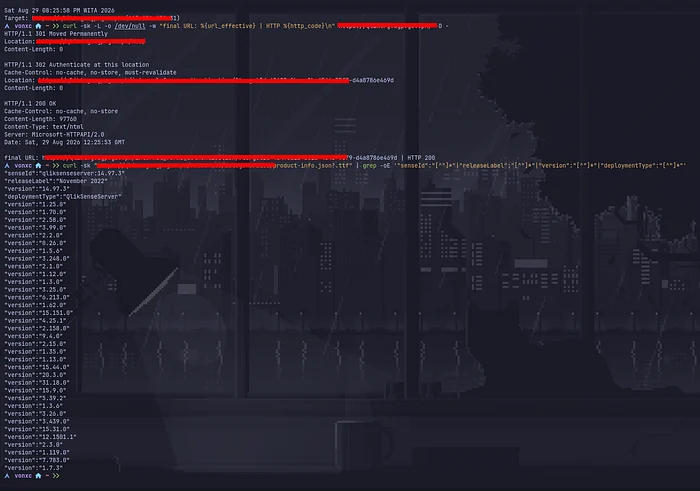
That version is affected by the three CVEs listed above, which made the host far more interesting than the login page suggested. Version information lets you correlate a product with known advisories, and here it was the bridge between "I found a Qlik server" and "I found a Qlik server running an affected release".
Step 6: CVE-2023-48365, information disclosure
The publicly accessible product metadata was itself significant. The endpoint disclosed the product name, product version, release family, deployment type and internal product identifier. This behaviour is associated with CVE-2023-48365. Version disclosure alone is not catastrophic, but it becomes far more useful when the disclosed version maps directly to known vulnerabilities, as it did here.
Step 7: CVE-2023-41265, request tunnelling
CVE-2023-41265 involves HTTP request tunnelling caused by the way the affected Qlik Sense components process HTTP requests. A detection request produced a result matching the vulnerability signature:
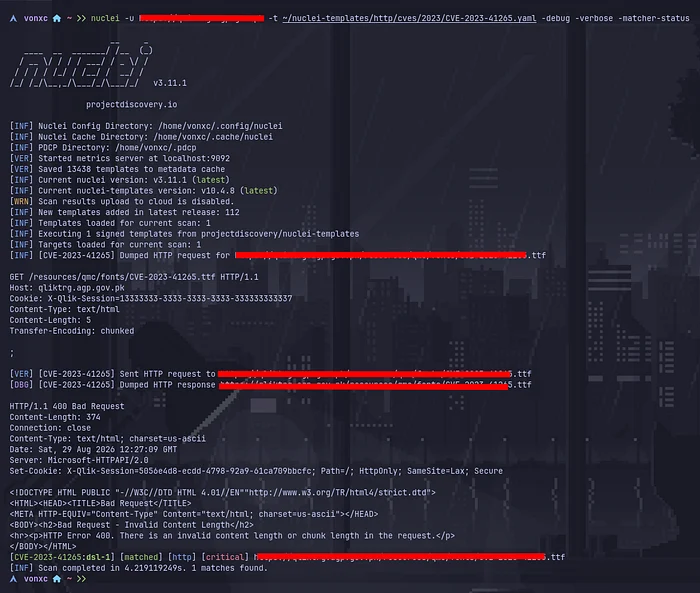
The server responded with:
HTTP/1.1 400 Bad Request
Content-Type: text/html; charset=us-ascii
Server: Microsoft-HTTPAPI/2.0
Set-Cookie:X-Qlik-[redacted]
What mattered was not the 400 on its own but the behaviour consistent with the detection logic for the affected Qlik implementation, including the Qlik session cookie. A scanner identifying vulnerable behaviour is not the same as obtaining remote code execution, so the result was treated as a lead for controlled validation rather than turned into a weaponised exploit.
Step 8: CVE-2023-41266, path traversal toward the Repository API
CVE-2023-41266 involves path traversal through a Qlik resource endpoint toward the internal Qlik Repository Service (QRS) API. A non-destructive validation request was sent:
GET /resources/qmc/fonts/../../../qrs/ReloadTask?xrfkey=1333333333333337&filter=.ttf HTTP/1.1
Host: localhost
X-Qlik-Xrfkey: 1333333333333337
The server returned:
HTTP/1.1 400 Bad Request
Server: Microsoft-HTTPAPI/2.0
Set-Cookie: X-Qlik-[redacted] Path=/; HttpOnly; ...
The interesting part was the error message:
The comparison expression does not consist of three elements: .ttf
That response appeared to originate from Qlik's Repository API processing rather than from the outer web server simply rejecting the request. Similar parser-level behaviour was observed when testing several QRS resource paths:

The goal was never to manipulate these resources, only to determine whether the traversal could reach the internal application layer. It could.
Step 9: the chain
The three findings were not unrelated. They formed a chain of evidence:
| Vulnerability | Role |
|---|---|
| CVE-2023-48365 | Exposes Qlik product/build information |
| CVE-2023-41266 | Demonstrates path traversal toward internal QRS functionality |
| CVE-2023-41265 | Serious request-tunnelling vulnerability associated with a pre-auth RCE chain |
The real security concern was not that a malformed request produces HTTP 400. It was that the exposed instance matched a vulnerable release and exhibited behaviour associated with a vulnerability whose documented exploitation chain can ultimately lead to pre-authentication remote code execution.
Step 10: stopping before the shell
Once a vulnerability that may lead to RCE is identified, the temptation is to prove everything: command execution, a file, a webshell, whoami, a data dump. For a government-owned system the researcher judged a shell unnecessary. The evidence already showed that Qlik Sense was publicly reachable, that the exact product version was disclosed, that the deployment ran an affected release, that CVE-2023-41265 detection behaviour was reproducible, that CVE-2023-41266 traversal behaviour reached QRS processing, and that the vulnerabilities corresponded to publicly documented Qlik security issues. So testing stopped: no shell, no persistence, no data dump.
Step 11: scope validation
The Qlik signatures were checked against the live hosts discovered during reconnaissance to see whether this was a widespread problem or one forgotten server. The Qlik-specific finding was isolated to a single exposed instance, which reduced the possibility of reporting a broad scanner false positive and framed the issue as one specific externally accessible enterprise application running an affected release.
Root cause
The underlying problems are the vulnerabilities themselves: request tunnelling in the way the affected Qlik Sense components process HTTP requests (CVE-2023-41265), path traversal through a Qlik resource endpoint toward the internal QRS API (CVE-2023-41266), and disclosure of product metadata through a publicly reachable endpoint (CVE-2023-48365). The instance was running a November 2022 build, 14.97.3, which is affected by all three.
Impact
The documented exploitation chain for CVE-2023-41265 can lead to pre-authentication remote code execution, summarised in the report as:
Unauthenticated attacker
        ↓
HTTP request tunneling
        ↓
Internal request access
        ↓
Authentication boundary bypass
        ↓
Arbitrary file access
        ↓
Remote Code Execution
The final RCE stage was not executed, so the accurate statement is that the exposed instance was confirmed to run an affected build and exhibited behaviour associated with CVE-2023-41265, a vulnerability whose documented exploitation chain can lead to pre-authentication RCE. The primary finding was classified as Critical / P1, on the basis of the security consequence of the vulnerable request-processing behaviour rather than the age of the software alone. The impact applies to this single externally accessible instance; the report does not describe other affected hosts.
Fix
The report gives remediation as guidance rather than describing changes that were made.
- Patch Qlik Sense. Upgrade the affected deployment to a release containing the relevant security fixes. Continuing to run an affected November 2022 build leaves the application exposed to publicly known vulnerabilities.
- Restrict internet exposure. If the deployment does not need to be public, place it behind a VPN, IP allowlisting, zero-trust access, internal network controls or strong authentication gateways. Administrative and repository functionality in particular should not be unnecessarily exposed.
- Review logs. Because these vulnerabilities have been publicly known for several years, administrators should review historical logs for unusual Qlik requests, unexpected task or reload activity, suspicious files, unexpected processes, authentication anomalies and unexpected application changes.
Variants to test
- Other Qlik Sense deployments. Request
/resources/autogenerated/product-info.json?.ttfand read the returned product name, version, release family, deployment type and internal identifier. A positive result is a version that maps to a published advisory. - Qlik request-tunnelling detection. Send the detection request used for CVE-2023-41265 and look for a response consistent with the affected implementation, including the
X-Qlik-Sessioncookie. A positive result is that signature, not a400by itself. - QRS traversal validation. Send a request of the form
/resources/qmc/fonts/../../../qrs/ReloadTask?xrfkey=...&filter=.ttfwith a matchingX-Qlik-Xrfkeyheader. A positive result is an error message originating from Qlik's Repository API parser, such as the comparison-expression error above, rather than a plain rejection by the outer web server. - Other QRS resource paths. Repeat the traversal against several QRS resource paths and compare parser-level responses; consistent application-layer errors indicate the traversal reaches internal processing.
- Scope checks on other estates. Run the same Qlik signatures across the live hosts from your own reconnaissance.
The general lesson is the chain Asset -> Technology -> Version -> Vulnerability: the tools did not find the RCE, they reduced a large web estate to a manageable set of interesting applications, and the breakthrough came from lining those four pieces up.

What happened, in plain words
A security researcher was looking at a set of websites belonging to a government. The researcher had permission to test them, and the testing was done carefully so that nothing was broken, no data was taken and nothing was left behind on the systems.
While looking around, the researcher found a login page for a piece of software called Qlik Sense Enterprise. Qlik Sense is a business intelligence platform: companies use it to build dashboards and reports from their data, a bit like a very powerful spreadsheet that many people can share. The login page looked completely ordinary. There was a username and password box, no dashboard visible, and nothing that looked like an admin area.
The important discovery was not the login page itself but the version of the software behind it. The researcher found a small file that the server publishes openly, which said the server was running Qlik Sense Enterprise, November 2022 release, version 14.97.3. That version is known to have three publicly documented security problems. One of them, CVE-2023-41265, is serious: the published description of how it can be abused ends in an attacker running their own code on the server, without ever logging in.
The researcher confirmed behaviour associated with two of those problems, then stopped. No shell was obtained, no commands were run, no data was copied. The point of the exercise was to gather enough evidence to prove the risk and report it, not to break in.
The whole thing started with something very ordinary: making a list of the organisation's subdomains.
1. It started with recon
Recon (short for reconnaissance) means mapping out what exists before you touch anything. Think of a burglar walking around a building first, noting which doors exist, rather than trying the first door they see. In security work, recon means finding out which servers and websites an organisation has on the internet.
A subdomain is a name that sits in front of a main domain. If the main domain is target.com, then mail.target.com and vpn.target.com are subdomains. Large organisations have many of them, often hundreds, and some are forgotten.
A DNS record is the entry in the internet's address book that connects a name like mail.target.com to a numeric address. We will come back to that.
The researcher used several tools, each of which collects subdomains from a different source, so that the combined list is as complete as possible:
- Subfinder: queries many public sources for subdomains.
- Findomain: another subdomain collector, with its own sources.
- GitHub-subdomains: searches public code on GitHub, because people sometimes leave hostnames in scripts or configuration files.
- Assetfinder: finds domains and subdomains related to a target.
- Amass: a larger mapping tool that can also work passively, meaning it only uses public information and never sends probing traffic to the target.
Here is the command block from the assessment:
subfinder -d target.com -all -o subfinder.txt
findomain -t target.com -q > findomain.txt
github-subdomains \
    -d target.com \
    -t ghp_[redacted] \
    -o github.txt
assetfinder --subs-only target.com \
    > assetfinder.txt
amass enum -passive \
    -df domain.txt \
    -o amass.txt
Line by line:
subfinder -d target.com -all -o subfinder.txtruns Subfinder against the domaintarget.com, asks it to use all of its sources, and writes the results to a file calledsubfinder.txt. The-dflag means domain,-allmeans use every source,-omeans output file.findomain -t target.com -q > findomain.txtruns Findomain against the same target.-tmeans target,-qmeans quiet (print only the results, no banner or progress noise), and>sends that output intofindomain.txt.- The
github-subdomainscommand is spread over several lines with backslashes at the end. A backslash at the end of a line in a shell means "this command continues on the next line".-d target.comis the domain,-t ghp_[redacted]is a GitHub access token (a secret string that lets the tool search GitHub on your behalf; it is redacted here because it is a credential), and-o github.txtwrites the results to a file. assetfinder --subs-only target.com > assetfinder.txtruns Assetfinder and asks for subdomains only (--subs-only), saving the output toassetfinder.txt.amass enum -passive -df domain.txt -o amass.txtruns Amass in enumeration mode.-passivemeans it only uses public data and does not send traffic to the target.-df domain.txtmeans read the list of domains to look at from a file calleddomain.txt.-o amass.txtwrites the results to a file.
Why five tools? Each one sees a different slice of the internet. One might know about a hostname from certificate transparency logs, another from search engines, another from code repositories. Running several and combining them gives a much fuller picture than any single tool.
After collecting the results, the researcher merged the files and removed duplicates:
cat \
    subfinder.txt \
    amass.txt \
    findomain.txt \
    github.txt \
    assetfinder.txt \
    | sort -u \
    > subs.txt
Line by line:
catis the command that prints the contents of files. Here it is given five files, one per line, each line ending in a backslash so the shell knows the command continues.- The
|symbol is a pipe. It takes whatever the command on the left printed and hands it to the command on the right, like passing a bucket along a line of people. sort -usorts the incoming lines alphabetically and-umeans unique, so duplicate lines are dropped.> subs.txtwrites the final result into a file calledsubs.txt.
At this point there was a long list of possible hostnames. But there is an obvious problem: a name existing in DNS does not mean there is a live website behind it. A name can point to a server that was switched off years ago. So the next step was to check which ones actually respond.
2. DNS resolution and live host discovery
DNS resolution is the process of turning a name into an address. When you type a website name into your browser, your computer asks a DNS server "what is the address for this name?" and gets an answer back. If the answer is an error, there is nothing there.
The researcher used a tool called dnsx to ask that question for every name on the list:
dnsx \
    -l subs.txt \
    -a \
    -aaaa \
    -cname \
    -resp \
    -rcode noerror \
    -retry 3 \
    -o valid_subs.txt
Line by line:
dnsxis the tool being run.-l subs.txtmeans read the list of names from the filesubs.txt.-aasks for A records, which map a name to an IPv4 address (the classic numeric address like[redacted]).-aaaaasks for AAAA records, which map a name to an IPv6 address (the newer, longer form of address).-cnameasks for CNAME records, which are aliases: one name pointing at another name.-respmeans show the response, not just the name.-rcode noerrorkeeps only answers where the DNS reply was "no error", meaning the name exists and resolved.-retry 3tries up to three times if a query fails, because DNS can be flaky.-o valid_subs.txtwrites the results to a file.
Then a small clean-up step:
sed -i 's/\[NOERROR\]//g' valid_subs.txt
Line by line:
sedis a text editing tool that works from the command line.-imeans edit the file in place, saving changes back to the same file.'s/\[NOERROR\]//g'is the instruction: find the text[NOERROR]and replace it with nothing. Thegat the end means do it everywhere, not just the first time. The backslashes before the square brackets are there because square brackets have a special meaning in this pattern language and need to be escaped to be treated as literal characters.valid_subs.txtis the file being edited.
Why bother? The tool had added a marker [NOERROR] next to each working name. Removing it leaves a clean list of names that can be fed to the next tool.
Next came httpx, which actually visits each host over HTTP and HTTPS and records what it finds:
httpx \
    -l valid_subs.txt \
    -probe \
    -sc \
    -title \
    -tech-detect \
    -location \
    -ip \
    -cdn \
    -web-server \
    -favicon \
    -jarm \
    -http2 \
    -random-agent \
    -silent \
    -rate-limit 5 \
    -t 5 \
    -o alive.txt
Line by line:
httpxis the tool.-l valid_subs.txtreads the list of names from the file.-probemeans actually send a request to each one rather than just checking DNS.-screcords the status code, the three-digit number a web server returns (200 means OK, 404 means not found, 403 means forbidden, and so on).-titlerecords the page title, the text shown in the browser tab. Titles often reveal what software is running.-tech-detecttries to guess which technologies the site uses (for example, a particular web framework or content management system).-locationrecords redirects, so you can see if a host sends you somewhere else.-iprecords the numeric address of the host.-cdnnotes whether the host sits behind a CDN (content delivery network), a service that sits in front of a site to speed it up and hide the real server.-web-serverrecords the web server software name, such as nginx or IIS.-faviconrecords a fingerprint of the site's small icon. Many products ship the same icon, so it is a useful clue.-jarmrecords a JARM fingerprint, a way of identifying a server based on how it responds to a special handshake. It is like recognising a person by their handshake.-http2notes whether the host supports HTTP/2, a newer version of the web protocol.-random-agentsends a random browser identification string with each request, so the tool does not look identical every time.-silentsuppresses extra output so only the results appear.-rate-limit 5sends at most five requests per second, to be gentle on the target.-t 5uses five worker threads at a time.-o alive.txtwrites the results to a file.
A simpler version was also used:
httpx -l valid_subs.txt -o recon/alive1.txt
Line by line:
httpxis the tool.-l valid_subs.txtreads the list of names.-o recon/alive1.txtwrites the output to a file calledalive1.txtinside a folder calledrecon.
Why this step matters: it turns hundreds of DNS names into a much smaller list of actual websites. Instead of staring at a list of names, the researcher could now focus on real applications.
3. Crawling the web estate
Finding live hosts was only the beginning. The next question was: what pages and endpoints are actually exposed on each one?
Crawling means automatically following links on a website, the way a search engine does, to discover all the pages it can reach. An endpoint is a specific address on a server that does something, for example a page, an image, or a piece of software that answers requests. Think of a website as a building and endpoints as the individual doors and windows.
The researcher used two crawlers.
Katana:
katana \
    -list alive1.txt \
    -jc \
    -kf all \
    -d 3 \
    -fsu \
    -ef png,jpg,jpeg,gif,svg,css,woff,woff2,ttf,eot,ico \
    -ct 10m \
    -rl 50 \
    -o  katana.txt
Line by line:
katanais the crawler.-list alive1.txtreads the list of live hosts from the file.-jcmeans parse JavaScript. Modern websites build pages with JavaScript, and links can be hidden inside that code, so reading it finds more.-kf allmeans look for known files, a built-in list of common filenames that are worth checking.-d 3sets the crawl depth to three links away from the starting page. Depth one is the page itself, depth two is links on that page, and so on. Three is a reasonable balance between coverage and time.-fsumeans extract forms, scripts and URLs from the pages it sees.-ef png,jpg,jpeg,gif,svg,css,woff,woff2,ttf,eot,icois an extension filter: skip files with these extensions. Images, stylesheets and fonts are not interesting for finding application pages, and skipping them saves a lot of time.-ct 10msets a crawl time limit of ten minutes per host.-rl 50limits the request rate to fifty per second.-o katana.txtwrites the results to a file.
Hakrawler, as a second crawler:
cat alive1.txt | hakrawler \
    -d 3 \
    -t 20 \
    -u \
    > hakrawler.txt
Line by line:
cat alive1.txtprints the list of live hosts.|pipes that list into the next command.hakrawleris the second crawler, which reads the list from its input.-d 3sets the crawl depth to three.-t 20uses twenty threads at once.-umeans show unique URLs only, dropping duplicates.> hakrawler.txtwrites the output to a file.
Why two crawlers? They find different things. One may follow JavaScript-generated links that the other misses, and vice versa. Using both gives a broader picture.
The researcher also collected historical URLs using Waymore and URLFinder. Historical URLs are addresses that used to exist and may still work, found in archives and public datasets. A page that was removed from the menu can still be reachable if you know the address, like a door that was painted over but never bricked up.
Finally, everything was merged and normalised with uro:
cat \
    katana.txt \
    hakrawler.txt \
    waymore.txt \
    urlfinder.txt \
    | uro \
    | sort -u \
    > urls.txt
Line by line:
catprints the contents of four files: the two crawler outputs and the two historical URL lists.|pipes that combined output into the next command.uroremoves duplicate URLs and tidies them up, for example by dropping near-identical variants that differ only in trivial ways.|pipes the cleaned list onward.sort -usorts the list and removes exact duplicates.> urls.txtwrites the final list to a file.
This gave a much broader picture of the exposed attack surface. Attack surface means everything an attacker could possibly interact with: every reachable page, service and endpoint. The bigger the surface, the more places there are to look.
4. Then I found something interesting
Among the discovered hosts was a Qlik Sense instance. The host showed a familiar interface: the Qlik Sense login page.
At first there was nothing particularly exciting about it. Authentication was present, meaning you had to log in. There was no obvious sensitive information on the homepage, no exposed dashboard and no obvious administrative functionality.
So the researcher started with a basic question: which version of Qlik Sense is this?
That question turned out to be the important part. A login page tells you a product exists. The version tells you whether that product has known problems.
5. Fingerprinting the Qlik Sense version
Fingerprinting means working out exactly what software and version is running on a server, the way you might identify a car's make and model from its shape and badges. It matters because security problems are usually tied to specific versions: a fix is released in a new version, and older versions stay vulnerable.
One useful technique when assessing enterprise applications is looking for publicly accessible product metadata. Metadata is data about the product itself, such as its name, version and build details, rather than the business data it holds. Many products publish a small file with this information, often for support or update purposes, without requiring a login.
For Qlik Sense, the researcher requested:
GET /resources/autogenerated/product-info.json?.ttf
Line by line:
GETis the HTTP method. HTTP is the language browsers and servers use to talk.GETmeans "please give me this thing". It is what your browser sends when you open a page./resources/autogenerated/product-info.jsonis the path being requested. The name suggests a JSON file (a common text format for structured data) containing product information, generated automatically.?.ttfis a query string appended to the path. The?starts the query string, and.ttfis the content.
The endpoint returned product information containing:
And there it was. The server identified itself as:
Qlik Sense Enterprise, November 2022, version 14.97.3
This was much more interesting than the login page. Version information is valuable during vulnerability research because it lets you match a product against known security advisories. An advisory is a public notice from a vendor or a security body saying "this product, in these versions, has this problem, and here is the fix".
In this case, the version pointed toward several serious Qlik Sense vulnerabilities. The three that matter here are:
| CVE | Description |
|---|---|
| CVE-2023-41265 | HTTP Request Tunneling |
| CVE-2023-41266 | Path Traversal |
| CVE-2023-48365 | Information Disclosure |
A CVE is a Common Vulnerabilities and Exposures identifier. It is a unique code, like a licence plate, given to a publicly catalogued security flaw so that everyone can refer to the same thing. The year in the code is the year it was catalogued.
CVE-2023-41265 is the most serious of the three and is associated with a pre-authentication RCE attack chain. Pre-authentication means it can be triggered before logging in, so a username and password do not protect you. RCE stands for remote code execution: an attacker can make the server run code of their choosing. An attack chain is a sequence of steps where each one enables the next, like a set of dominoes.
6. CVE-2023-48365, information disclosure
The publicly accessible product metadata was itself significant. The endpoint disclosed information such as:
- Product name
- Product version
- Release family
- Deployment type
- Internal product identifier
This behaviour is associated with CVE-2023-48365. Information disclosure means the software reveals information it should not, usually to someone who has not logged in. On its own, version disclosure is not necessarily catastrophic. Knowing that a server runs a particular version does not let you break in by itself.
But it becomes much more useful to an attacker when the disclosed version maps directly to known vulnerabilities. In this case, the version information became the bridge between two statements:
"I found a Qlik server."
and
"I found a Qlik server running an affected release."
Think of it like a house number. Knowing the number alone does not let you in, but if the local newspaper has published that number 14 has a broken back door, the number suddenly matters a great deal.
7. CVE-2023-41265, the serious one
The next vulnerability investigated was CVE-2023-41265. This vulnerability involves HTTP request tunneling caused by the way the affected Qlik Sense components process HTTP requests.
What is request tunneling? Normally, a web server receives a request, decides what to do with it, and either handles it or rejects it. Tunneling means an attacker can craft a request that the front of the application accepts, but which carries a second, hidden request inside it, like a letter inside an envelope. The inner request then gets processed by a deeper part of the system that the attacker should never have been able to reach directly. That is how a request that looks harmless on the outside can reach internal machinery.
A detection request produced a result matching the vulnerability signature:
A signature here means a pattern of behaviour that is characteristic of a particular vulnerability. It is like recognising a disease from a set of symptoms rather than from a single test.
The server responded with:
HTTP/1.1 400 Bad Request
Content-Type: text/html; charset=us-ascii
Server: Microsoft-HTTPAPI/2.0
Set-Cookie:X-Qlik-[redacted]
Line by line:
HTTP/1.1 400 Bad Requestis the status line.HTTP/1.1is the protocol version, and400 Bad Requestmeans the server did not understand or accept the request. It is the server's way of saying "no".Content-Type: text/html; charset=us-asciisays the body of the response is HTML text, using the US-ASCII character set.Server: Microsoft-HTTPAPI/2.0says the web server software identifies itself as Microsoft's HTTP API, version 2.0. This is a common component on Windows servers.Set-Cookie:X-Qlik-[redacted] is the server handing back a **cookie**. A cookie is a small piece of text a server asks your browser to store and send back on later requests, so the server can recognise you. Think of it as a cloakroom ticket: you show it later and get your coat. Here the cookie is namedX-Qlik-Sessionand its value is a long identifier. The attributes after it set rules:Path=/means it applies to the whole site,HttpOnlymeans JavaScript on the page cannot read it (a protection against some attacks),SameSite=Laxlimits when it is sent from other sites, andSecure` means it is only sent over encrypted connections.
What caught the researcher's attention was not simply the 400. Plenty of malformed requests produce a 400. The response exhibited behaviour consistent with the detection logic for the affected Qlik implementation, including the Qlik session cookie. In other words, the server's reaction had the shape of the known problem, not just the shape of a generic rejection.
There is an important distinction here. A vulnerability scanner identifying a vulnerable behaviour is not the same thing as obtaining remote code execution. A smoke alarm going off does not mean the house is on fire; it means there is reason to look. The researcher treated the result as a lead and continued with controlled validation rather than turning it into a weaponised exploit. Controlled validation means checking just enough to confirm the issue, with no attempt to cause harm.
8. CVE-2023-41266, path traversal toward the Repository API
The second interesting vulnerability was CVE-2023-41266. This vulnerability involves path traversal through a Qlik resource endpoint toward the internal Qlik Repository Service (QRS) API.
Let us unpack that. A path is the part of a URL that points to a file or resource, like /images/logo.png. Path traversal means using special sequences in the path, usually ../, to climb out of the folder you are supposed to be in and reach files elsewhere. On a computer, ../ means "go up one folder". If a web application does not check paths carefully, an attacker can use ../ repeatedly to walk from a public folder into private parts of the system. It is like being told to fetch a document from reception and instead walking down the corridor into the manager's office because nobody stopped you.
An API is an application programming interface: a way for one piece of software to talk to another, usually by sending requests to specific addresses and getting structured answers back. Think of it as a service counter. You do not go into the kitchen; you go to the counter, ask for something specific, and get it.
The Qlik Repository Service (QRS) is Qlik's internal service that manages the repository: the store of apps, tasks and configuration. It is meant to be used by the Qlik management console, not by random visitors from the internet.
The researcher performed a non-destructive validation request similar to:
GET /resources/qmc/fonts/../../../qrs/ReloadTask?xrfkey=1333333333333337&filter=.ttf HTTP/1.1
Host: localhost
X-Qlik-Xrfkey: 1333333333333337
Line by line:
GETis the method, asking for something./resources/qmc/fonts/../../../qrs/ReloadTaskis the path. It starts in a public-looking folder,/resources/qmc/fonts/, then uses../../../three times to climb upwards, and then goes into/qrs/ReloadTask.ReloadTaskis a QRS resource. The traversal is the attempt to reach the internal service from a public starting point.?xrfkey=1333333333333337&filter=.ttfis the query string.xrfkeyis a key value that Qlik expects to match theX-Qlik-Xrfkeyheader. Cross-site request forgery is an attack where a malicious site tricks your browser into sending a request to another site where you are logged in; the key proves the request came from the right place.filter=.ttfis a filter parameter, and.ttfis the value being passed.HTTP/1.1is the protocol version.Host: localhostis the Host header, which tells the server which site name the request is for. Servers often host many sites on one address, so this header says which one you want.localhostnormally means "this machine".X-Qlik-Xrfkey: 1333333333333337is a custom header carrying the same key value as in the query string. Qlik expects the two to match.
The server returned:
HTTP/1.1 400 Bad Request
Server: Microsoft-HTTPAPI/2.0
Set-Cookie: X-Qlik-[redacted] Path=/; HttpOnly; ...
Line by line:
HTTP/1.1 400 Bad Requestagain means the server rejected the request.Server: Microsoft-HTTPAPI/2.0again identifies the web server software.Set-Cookie: X-Qlik-[redacted] Path=/; HttpOnly; ...again sets a Qlik session cookie.<uuid>is a placeholder for a unique identifier, and the...indicates the line was shortened.
But the interesting part was the error message:
The comparison expression does not consist of three elements: .ttf
This is a message from the software that was processing the request, complaining about the filter=.ttf value. It says a comparison expression should have three elements, and it only got .ttf. The wording is technical, but the meaning for the researcher is simple: the request reached Qlik's own processing logic. If the outer web server had simply refused the request, the message would have been a generic rejection. Instead, the message came from deeper inside.
This was useful because the response appeared to originate from Qlik's Repository API processing rather than simply being rejected by the outer web server. In other words, the traversal had reached the internal application layer. The researcher also observed similar parser-level behaviour when testing several QRS resource paths:
The goal was not to manipulate these resources. The goal was simply to determine whether the traversal could reach the internal application layer. It could.
9. Putting the pieces together
At this point the picture became much clearer. The findings were not three completely unrelated issues. They formed a chain of useful evidence:
| Vulnerability | Role |
|---|---|
| CVE-2023-48365 | Exposes Qlik product/build information |
| CVE-2023-41266 | Demonstrates path traversal toward internal QRS functionality |
| CVE-2023-41265 | Serious request-tunnelling vulnerability associated with a pre-auth RCE chain |
The most important vulnerability was clearly CVE-2023-41265. The interesting part was not that sending a quote or malformed request produces HTTP 400. The real security concern was that the exposed Qlik instance matched a vulnerable release and exhibited behaviour associated with a vulnerability whose documented exploitation chain can ultimately lead to pre-authentication remote code execution.
That distinction matters. A 400 error is noise. A 400 error with the fingerprint of a known serious vulnerability, on a version known to be affected, is a finding.
10. Why I didn't go for the shell
This was probably the most important decision in the entire assessment.
Once you identify a vulnerability that may lead to RCE, there is always the temptation to prove everything. Get command execution. Create a file. Deploy a webshell. Run whoami. Dump something interesting.
A webshell is a small piece of code uploaded to a server that lets an attacker run commands through a web page. whoami is a command that prints the name of the user the server is running as, a common first step after breaking in. A data dump means copying out large amounts of data.
But at some point, proving the vulnerability and compromising the system become two different things. For a government-owned system, the researcher did not think obtaining a shell was necessary. The evidence already showed:
- Qlik Sense was publicly reachable.
- The exact product version was disclosed.
- The deployment was running an affected release.
- CVE-2023-41265 detection behaviour was reproducible.
- CVE-2023-41266 traversal behaviour reached QRS processing.
- The vulnerabilities corresponded to publicly documented Qlik security issues.
That was enough to produce a meaningful report. So the researcher stopped. No shell. No persistence. No data dump. Just evidence.
Persistence means leaving something behind so you can get back in later, such as a hidden account or a scheduled task. It is one of the things that turns a test into an intrusion.
11. Scope validation
Another question the researcher wanted to answer was: was this a widespread problem or just one forgotten server?
Scope validation means checking how far a finding extends. One vulnerable server is a mistake. Fifty vulnerable servers is a systemic problem, and the report needs to say which it is.
The researcher checked the relevant Qlik signatures against the live hosts discovered during reconnaissance. The result was interesting: the Qlik-specific finding was isolated to a single exposed instance.
That made the finding more interesting from a defensive perspective. It was not simply "the entire environment is outdated". It was one specific externally accessible enterprise application running an affected Qlik Sense release. This also helped reduce the possibility of reporting a broad scanner false positive. A false positive is an alarm that turns out to be wrong. Checking the signature across many hosts and finding only one match makes it much more likely that the match is real.
12. Severity
The researcher classified the primary finding as Critical / P1. Severity is a rating of how serious a problem is. P1 means priority one, the highest level in a common ranking scheme.
The reason is not simply that the software is old. Old software by itself does not automatically mean critical severity. Plenty of old software is harmless. The important part is the security consequence associated with the vulnerable request-processing behaviour.
The relevant attack chain can be summarised as:
Unauthenticated attacker
        ↓
HTTP request tunneling
        ↓
Internal request access
        ↓
Authentication boundary bypass
        ↓
Arbitrary file access
        ↓
Remote Code Execution
Line by line:
Unauthenticated attackermeans someone who has not logged in and has no account.HTTP request tunnelingis the trick of hiding one request inside another so it reaches deeper than it should.Internal request accessmeans the hidden request reaches internal parts of the system.Authentication boundary bypassmeans getting past the login check without logging in. A boundary here is a line that should not be crossed.Arbitrary file accessmeans reading or writing files of the attacker's choosing.Remote Code Executionmeans running code on the server from a distance.
The researcher did not personally execute the final RCE stage. So the accurate description is not "I achieved RCE". Instead, the technically accurate description is that the exposed Qlik Sense instance was confirmed to run an affected build and exhibited behaviour associated with CVE-2023-41265, a vulnerability whose documented exploitation chain can lead to pre-authentication remote code execution.
That distinction keeps the report strong without overstating the evidence. It is the difference between saying "the lock is broken" and saying "I emptied the safe".
13. Responsible disclosure
Responsible disclosure is the practice of telling the owner about a security problem privately, giving them time to fix it, rather than publishing it or exploiting it. It is the difference between finding a wallet and handing it in versus emptying it.
Throughout the assessment, the researcher tried to keep the testing as safe as possible. The researcher did not:
- Execute arbitrary commands
- Deploy a webshell
- Establish persistence
- Dump databases
- Modify Qlik applications
- Delete or reload production tasks
- Access unrelated internal systems
- Exfiltrate sensitive information
Exfiltrate means to copy data out of a system without permission.
Once there was enough evidence, testing stopped and the issue was reported. For vulnerabilities capable of reaching server-level compromise, this is an important part of responsible security research. You do not always need to compromise the machine to prove that it can be compromised.
14. Remediation
Remediation means fixing the problem. The most important remediation is straightforward.
Patch Qlik Sense
Upgrade the affected Qlik Sense deployment to a release containing the relevant security fixes. A patch is an update that fixes a known problem. Continuing to run an affected November 2022 build leaves the application exposed to publicly known vulnerabilities.
Restrict internet exposure
If the Qlik deployment does not need to be publicly accessible, place it behind:
- VPN
- IP allowlisting
- Zero-trust access
- Internal network controls
- Strong authentication gateways
A VPN is a virtual private network: an encrypted tunnel that makes a remote computer behave as if it were inside the organisation's network. IP allowlisting means only letting in computers from a list of approved addresses. Zero-trust access means checking every request as if it came from an untrusted place, rather than assuming that being inside the network is enough. Authentication gateways are extra login checks placed in front of an application.
Administrative and repository functionality should especially not be unnecessarily exposed to the public internet.
Review logs
Because these vulnerabilities have been publicly known for several years, administrators should also review historical logs for potential exploitation. A log is a record that a system keeps of what happened, like a diary of requests and actions.
Things worth looking for include:
- Unusual Qlik requests
- Unexpected task or reload activity
- Suspicious files
- Unexpected processes
- Authentication anomalies
- Unexpected application changes
An anomaly is something that does not fit the normal pattern.
15. What I learned from this finding
The biggest lesson was not actually about Qlik Sense. It was about reconnaissance.
The vulnerable application was not found by starting with "let me search for CVE-2023-41265". It was found by gradually reducing a large attack surface.
The tools themselves were not the vulnerability. Subfinder did not find the RCE. Amass did not find the RCE. Katana did not find the RCE. httpx did not find the RCE. They simply helped reduce a large web estate into a manageable set of interesting applications.
The actual breakthrough came from connecting four pieces:
Asset -> Technology -> Version -> Vulnerability
Line by line:
- Asset means a thing the organisation owns on the internet, such as a server or a website.
- Technology means what software that asset runs, such as Qlik Sense.
- Version means which release of that software, such as 14.97.3.
- Vulnerability means a known weakness in that release.
Once those four pieces lined up, the attack surface suddenly looked very different.
Conclusion
What initially looked like another Qlik Sense login page turned out to be an exposed enterprise application running an affected release. The journey started with nothing more than subdomain enumeration and eventually led to:
Qlik Sense Enterprise
-> version disclosure
-> affected release
-> CVE-2023-41266 validation
-> CVE-2023-41265 validation
-> potential pre-authentication RCE
The most important part, however, was knowing when to stop. The researcher did not need a shell prompt. The researcher did not need to deploy a webshell. The researcher did not need to access sensitive government data. The evidence already showed that the exposed application was running a version affected by a serious, publicly documented vulnerability.
For the researcher, that is one of the most valuable lessons in vulnerability research: good security research is not only about how far you can exploit something. It is also about knowing exactly how far you need to go to prove it.
Glossary
- A record: a DNS record that maps a name to an IPv4 address.
- AAAA record: a DNS record that maps a name to an IPv6 address.
- Advisory: a public notice describing a security problem in a product and usually its fix.
- Anomaly: something that does not fit the normal pattern.
- API: application programming interface; a defined way for one piece of software to talk to another.
- Attack chain: a sequence of steps where each one enables the next.
- Attack surface: everything an attacker could possibly interact with.
- Authentication: the process of proving who you are, usually with a username and password.
- Authentication boundary bypass: getting past a login check without logging in.
- CDN: content delivery network; a service placed in front of a site to speed it up and hide the real server.
- CNAME record: a DNS record that makes one name an alias for another.
- Controlled validation: checking just enough to confirm an issue, without causing harm.
- Cookie: a small piece of text a server asks a browser to store and send back later, used to recognise the browser.
- Crawling: automatically following links on a website to discover pages.
- Cross-site request forgery: an attack where a malicious site tricks a browser into sending a request to another site where the user is logged in.
- CVE: Common Vulnerabilities and Exposures; a unique public identifier for a catalogued security flaw.
- Data dump: copying out large amounts of data.
- DNS: the internet's naming system that turns names into addresses.
- DNS resolution: the process of turning a name into an address.
- Endpoint: a specific address on a server that does something.
- Exfiltrate: to copy data out of a system without permission.
- False positive: an alarm that turns out to be wrong.
- Fingerprinting: working out exactly what software and version a server runs.
- GET: the HTTP method that asks a server to return something.
- Host header: the part of an HTTP request that says which site name the request is for.
- HTTP: the language browsers and servers use to talk.
- HTTP request tunneling: hiding one request inside another so it reaches deeper into a system than it should.
- Information disclosure: software revealing information it should not.
- IP allowlisting: only letting in computers from a list of approved addresses.
- JARM: a technique for identifying a server from how it responds to a special handshake.
- JSON: a common text format for structured data.
- Log: a record a system keeps of what happened.
- Metadata: data about a product itself, such as its name and version, rather than the business data it holds.
- P1: priority one, the highest level in a common severity ranking.
- Patch: an update that fixes a known problem.
- Path: the part of a URL that points to a file or resource.
- Path traversal: using
../sequences to climb out of an intended folder and reach other files. - Persistence: leaving something behind on a system so you can get back in later.
- Pipe: the
|symbol, which passes the output of one command to another. - Pre-authentication: able to be triggered before logging in.
- Qlik Repository Service (QRS): Qlik's internal service that manages its repository of apps, tasks and configuration.
- Qlik Sense Enterprise: a business intelligence platform used to build dashboards and reports from data.
- RCE: remote code execution; making a server run code of your choosing from a distance.
- Recon: reconnaissance; mapping out what exists before touching anything.
- Remediation: fixing a problem.
- Responsible disclosure: telling an owner about a security problem privately and giving them time to fix it.
- Scope validation: checking how far a finding extends.
- Severity: a rating of how serious a problem is.
- Signature: a pattern of behaviour characteristic of a particular vulnerability.
- Status code: the three-digit number a web server returns with a response.
- Subdomain: a name that sits in front of a main domain, such as
mail.target.com. - VPN: virtual private network; an encrypted tunnel that makes a remote computer behave as if inside a network.
- Webshell: a small piece of code uploaded to a server that lets an attacker run commands through a web page.
- Zero-trust access: checking every request as if it came from an untrusted place.



