How I Discovered Multiple Vulnerabilities on a vu.nl Subdomain
A university subdomain exposed an open directory containing a script with hardcoded database and email credentials and a log file leaking user email addresses, plus a publicly reachable PHP configuration page. Client-side JavaScript on another subdomain took the URL fragment and assigned it to the browser location without validation, allowing a javascript: URL to run script and allowing redirection to an external site.

Cybersecurity
The full write-up lives on its author's site
It belongs to its author, so we link to it rather than copy it. The other two tabs are our own rewrites, checked against it.
Context
This write-up covers five issues found on a subdomain belonging to Vrije Universiteit Amsterdam. The researcher, Aditya Nail Emery, lists them up front:
- Hardcoded Credentials
- PII Leak
- phpinfo.php information disclosure
- DOM-based Cross-Site Scripting (DOM XSS)
- Open Redirect
The first subdomain discussed is referred to in the report as redacted.redacted.vu.nl. It hosted a directory with listing enabled, a Python mailing script and a log file. A second subdomain, redacted.vu.nl, hosted a login system and an exposed phpinfo.php page, and its client-side JavaScript contained the logic behind the DOM XSS and the open redirect.
Setup
The work started with passive and active subdomain enumeration using:
subfinderassetfinderdnsxhttpx
Directory discovery was done with ffuf against the DirBuster medium wordlist. JavaScript review was done by reading the application's files directly, in particular main.js.
Finding it
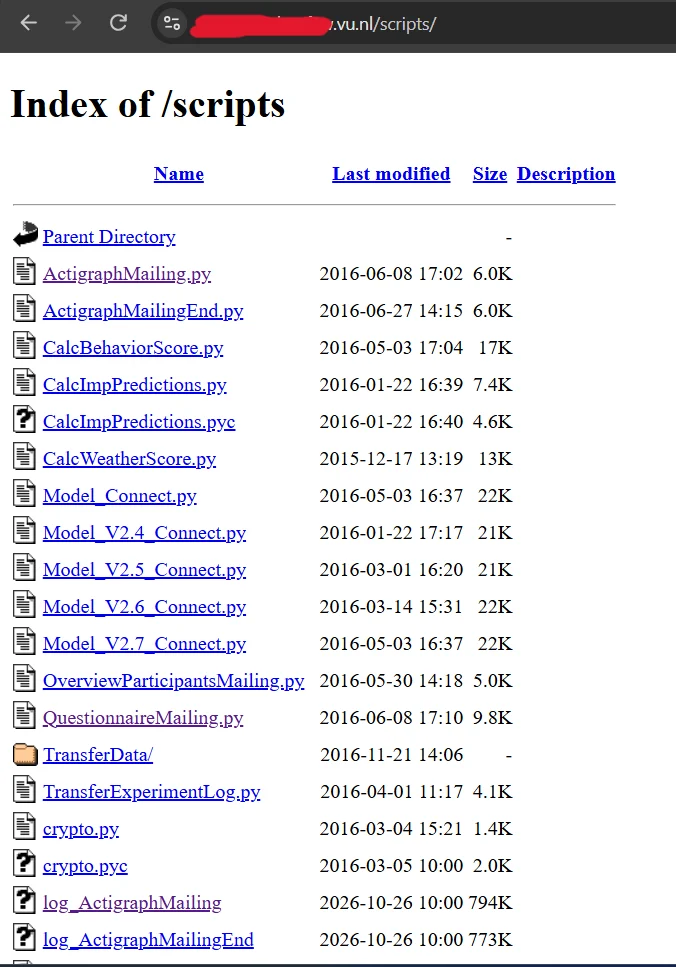
Enumeration produced several subdomains, one of which was redacted.redacted.vu.nl. A fuzzing run against it returned a directory with listing enabled, and exploring that directory led to scripts/ActigraphMailing.py, which contained hardcoded database and email credentials, and to scripts/log_ActigraphMailing, which contained a log file leaking user PII, including email addresses.
A second subdomain, redacted.vu.nl, had a login system. The researcher tested it for SQL injection and reflected XSS and found nothing there. A check for commonly exposed files turned up a publicly reachable phpinfo.php. That was reported, and testing initially stopped there because the researcher was away from home and did not expect the report to be accepted as a valid finding.
Later, back at home, the same subdomain was picked up again and its JavaScript files were reviewed, starting with main.js. That review produced the remaining findings.
Exploitation
Step 1: Directory fuzzing
The scan was run with a low thread count and a rate limit:
ffuf -u https://redacted.redacted.vu.nl/FUZZ -w /usr/share/wordlists/dirbuster/directory-list-2.3-medium.txt -t 2 -rate 5
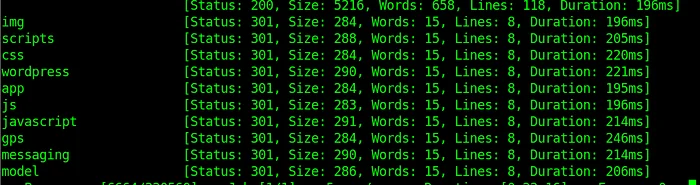
The scan was run with -t 2 and -rate 5. The scan turned up a directory with listing enabled, exposing its contents.
Step 2: Hardcoded credentials
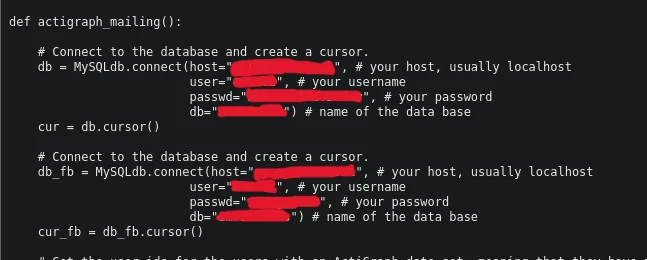
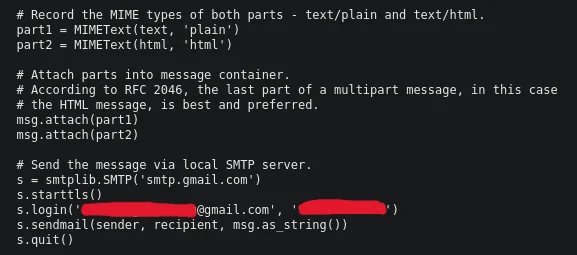
Inside scripts/ActigraphMailing.py the researcher found hardcoded database and email credentials.
Step 3: PII leak
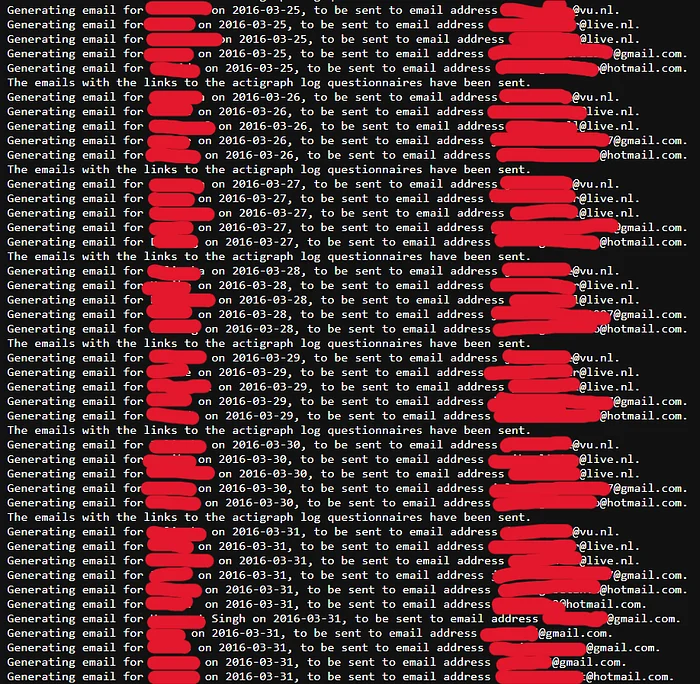
Digging further, scripts/log_ActigraphMailing turned out to contain a log file leaking user PII, emails included.
Step 4: phpinfo.php
The second subdomain, redacted.vu.nl, was checked for commonly exposed files that could disclose sensitive configuration information. The URL tried was:
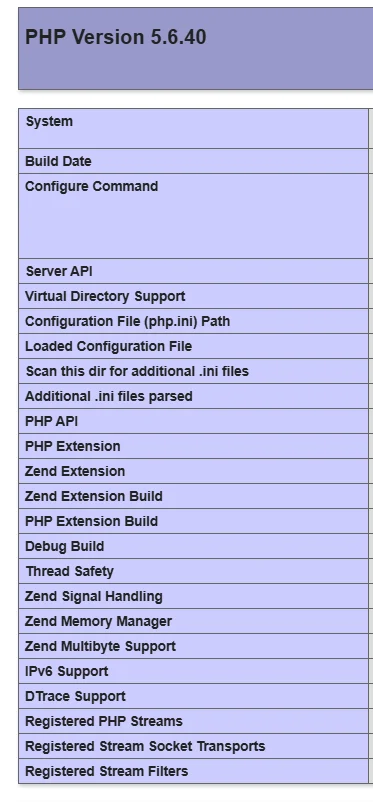
It was publicly accessible and returned the full PHP configuration page. No obvious secrets such as database credentials appeared in the output, but the researcher still classifies it as unnecessary information disclosure.
Step 5: Reading main.js
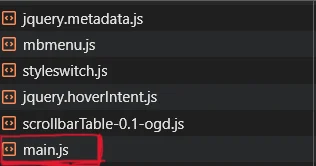
Reviewing the application's JavaScript, particularly main.js, the researcher found this code:
if (document.location.href.search(/#/) != -1) { var url = document.location.href.split("#"); if (url[1]) document.location.href = url[1];}
There is no validation or restriction of the destination. That assignment is what caught the researcher's attention.
Step 6: DOM XSS through the fragment
The first test was whether a javascript: URL supplied through the fragment would execute. The following payload worked:
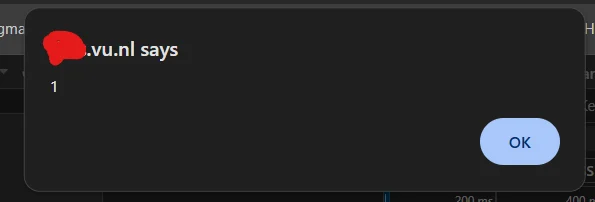
The payload worked.
The vulnerable flow, as the report describes it:
URL fragment ↓document.location.href ↓No validation ↓javascript: URL ↓JavaScript execution
Because the flaw lives entirely in client-side JavaScript, server-side filtering would not necessarily prevent exploitation.
Step 7: Open redirect
The same logic accepts an external URL in the fragment:
The application processes the fragment and navigates the browser to the supplied external URL, which makes this an open redirect. An attacker could use a legitimate vu.nl URL that redirects users to an attacker-controlled site, which the report notes could be useful in phishing or social-engineering scenarios.
Root cause
The mistake is in main.js: the value after # is taken from document.location.href and written straight into document.location.href without any check on the scheme or destination. Since the decision is made in the browser, any server-side input filtering on the request would not necessarily stop it.
Impact
The DOM XSS executes the fragment's javascript: URL as code in the page's origin, as the alert(1) payload demonstrated. The open redirect lets an attacker use a legitimate vu.nl URL as the visible link while sending the user elsewhere, which the report frames as useful for phishing or social engineering. The file scripts/ActigraphMailing.py contained hardcoded database and email credentials, and scripts/log_ActigraphMailing contained a log file leaking user PII including email addresses. The phpinfo.php page discloses the full PHP configuration; the report states that no obvious secrets such as database credentials were visible in it.
Fix
The report does not describe any remediation or say what was changed.
Variants to test
- Search client-side JavaScript for assignments to
document.location.href,location.href,window.locationand similar sinks that take their value fromlocation.hash,location.searchordocument.referrer. A positive result is a sink fed directly by a fragment or query value with no scheme or host check. - Try a
javascript:payload in the fragment of any page that readslocation.hash, for example#javascript:alert(1). A positive result is script execution in the page's origin. - Try an external URL in the same fragment, for example
#https://evil.com. A positive result is the browser navigating off-site from the legitimate domain. - Run a directory fuzzing scan with a modest rate against other hosts in scope and look for listing-enabled directories. A positive result is a browsable index exposing scripts, logs or configuration files.
- Request
phpinfo.phpand similar diagnostic files on other hosts. A positive result is a full configuration page returned to an unauthenticated client. - Grep exposed scripts for credential-looking strings and log paths. A positive result is a source file containing database or mail credentials, or a log file reachable over HTTP that contains user data.

The lesson the researcher draws: do not stop at the obvious endpoints, always check the client-side JavaScript, and trace how user-controlled input, including URL fragments, actually flows through the app.
What happened, in plain words
A security researcher named Aditya Nail Emery spent some time looking at websites belonging to Vrije Universiteit Amsterdam (a university in the Netherlands). The university owns many websites under the name vu.nl. Each separate website under that name is called a subdomain, for example something.vu.nl. Think of vu.nl as a big office building and each subdomain as a different room inside it: same building, different door.
Over the course of the work he found five problems:
- Hardcoded Credentials
- PII Leak
- phpinfo.php information disclosure
- DOM-based Cross-Site Scripting (DOM XSS)
- Open Redirect
Before explaining each one, here is the short version of what those words mean, because the rest of the article uses them constantly.
- Hardcoded credentials means a username and password written directly into a program's source file, like writing your house key's code on the door frame instead of keeping it in your pocket. Anyone who can read the file can read the secret.
- PII stands for Personally Identifiable Information: data that points at a real person, such as an email address, a name or a phone number.
- Information disclosure means a website hands out information it should have kept to itself, such as a page describing how the server is configured.
- XSS (Cross-Site Scripting) means getting a website to run code that the website's owners did not write, inside a visitor's browser. The code then behaves as if the website itself had written it.
- Open redirect means a website will happily forward a visitor to any other website you name in the link, even a site the owners have nothing to do with.
The first subdomain in the story is written in the report as redacted.redacted.vu.nl. It had a folder whose contents could be browsed, a Python script named scripts/ActigraphMailing.py, and a log file. The second subdomain, redacted.vu.nl, had a login page, an exposed phpinfo.php page, and some JavaScript that turned out to contain the cause of the last two problems.

Reconnaissance
What reconnaissance is and why it comes first
Before you can test a website you have to know it exists. Reconnaissance (recon for short) is the looking-around phase: finding out which subdomains exist, which ones respond, and which look interesting. It is the same as walking around a building before trying any doors, noting which doors are labelled, which are open and which look neglected.
The researcher used four tools for this:
subfinderassetfinderdnsxhttpx
Here is what each one does, in plain terms:
- subfinder and assetfinder are programs that collect subdomain names from public sources. The internet keeps many public records about which names exist, and these tools gather them so you do not have to guess names one by one.
- dnsx asks the internet's address book, called DNS, whether a given name actually points to a machine. DNS is the system that turns a name like
vu.nlinto the numeric address of a server, much like a phone book turns a name into a number. - httpx then actually visits each name and reports whether a website answers, and roughly what kind of website it is.
This process produced several subdomains. One of them was redacted.redacted.vu.nl, and that is where the story starts.
Directory listing
What a directory listing is
Websites are stored as folders and files on a server, just like folders and files on your own computer. Normally a web server is configured so that if you ask for a folder, it either shows a proper page or refuses. But sometimes the server is left in a mode where asking for a folder shows you a plain list of everything inside it, like opening a cupboard and finding the contents labelled. That is a directory listing, and it is a gift to anyone looking around, because it saves them from guessing file names.
To find folders like this, the researcher ran a fuzzing scan. Fuzzing means trying a long list of likely names automatically and watching which ones come back with something other than "not found". It is like standing at a wall of numbered lockers and trying every number in a list rather than guessing randomly.
The command used was:
ffuf -u https://redacted.redacted.vu.nl/FUZZ -w /usr/share/wordlists/dirbuster/directory-list-2.3-medium.txt -t 2 -rate 5
Line by line, in plain words:
ffufis the name of the fuzzing program being run.-u https://redacted.redacted.vu.nl/FUZZgives the address to test. The wordFUZZis a placeholder: ffuf replaces it with each candidate name from the list, one at a time, and builds a full address such ashttps://redacted.redacted.vu.nl/scripts.-w /usr/share/wordlists/dirbuster/directory-list-2.3-medium.txtpoints at the word list, a long text file of common folder and file names.-wstands for wordlist.-t 2means use at most two requests at the same time. Fewer simultaneous requests means less load on the server, and less chance of looking like an attack.-rate 5caps the speed at five requests per second, again to stay gentle against a university's machine.
The scan found a folder with listing enabled, showing its contents. The researcher then explored that folder.
Hardcoded credentials
What hardcoded credentials are
A program often needs to log in to something else: a database (where the website keeps its data) or a mail server (to send email). To do that it needs a username and password. Hardcoding means those details are typed directly into the program's source code instead of being kept in a separate, protected place.
The problem is simple. Anyone who can read the file can read the password. And because the file is often copied around, backed up and shared, the secret spreads. It is like writing the combination of a safe on a sticky note attached to the safe.
Inside scripts/ActigraphMailing.py, the researcher found hardcoded database and email credentials. The .py ending tells you it is a Python program.
PII Leak
What a log file is, and why it leaks
A log file is a running diary that a program writes as it works: who did what, when, and often with which details. Logs are useful for fixing problems. But if a program writes personal details into its diary, and that diary sits in a folder anyone can browse, then those personal details are public.
Digging further, the researcher found that scripts/log_ActigraphMailing contained a log file leaking user PII, email addresses included.
Second subdomain
Another subdomain, redacted.vu.nl, had a login system. A login system is the part of a site that asks for a username and password and then decides whether to let you in.
The researcher tested it for two common problems:
- SQL injection: a database understands a language called SQL, and a login form passes what you type into that language. If the site builds its database question by gluing your typing straight into it, clever typing can change the question itself. Think of a form that asks "name?" and someone writing an answer that also contains a new instruction for the clerk.
- Reflected XSS: the site takes something you typed and echoes it straight back into the page. If the echo is not cleaned, the thing you typed can include code, and the browser runs it.
Neither of these worked here. That is a normal and useful result: testing something and finding nothing tells you where the weak spots are not.
phpinfo.php
What phpinfo.php is
PHP is a programming language commonly used to build websites. It ships with a built-in diagnostic page called phpinfo.php that prints a long report about how PHP is set up on that server: which version, which settings, which extensions are loaded. Developers use it while building a site. It should be removed or locked down before the site goes public, because it describes the inside of the machine to anyone who asks.
The researcher checked for commonly exposed files that could disclose sensitive configuration information, and tried:
Line by line:
https://means the request travels encrypted, so nobody in between can read it.redacted.vu.nlis the second subdomain, the one with the login system./phpinfo.phpis the path being requested: a file namedphpinfo.phpin the site's top folder.
The page was publicly accessible and returned the full PHP configuration page. No obvious secrets such as database credentials appeared in the output, but the researcher still counts it as unnecessary information disclosure.
He reported it and initially stopped testing there. He was outside at the time and did not expect the report to be accepted as a valid finding.
Further enumeration
Later, back at home, he picked the same subdomain up again and started reading its JavaScript files.
What JavaScript is and why reading it matters
JavaScript is the programming language that runs inside your browser. It is what makes a page interactive: buttons that respond, menus that open, forms that check themselves before sending. The browser downloads these programs as files along with the page, which means anyone can read them. They are not secret.
That is exactly why reading them is worthwhile. A website's visible surface may look tidy, but the JavaScript shows how it actually behaves, including any shortcuts the developers took. The researcher started with main.js, a very common name for a site's main JavaScript file.
While reading, he found this code:
if (document.location.href.search(/#/) != -1) { var url = document.location.href.split("#"); if (url[1]) document.location.href = url[1];}
This is one line in the report, but it contains several ideas. Here is what each part means, in plain words:
document.location.hrefis the full address of the page currently open in the browser, the same text you see in the address bar..search(/#/)looks for the#character inside that address. The#is called the fragment marker; everything after it is the fragment. A fragment is the part of a web address that comes after the hash, for example the#sectioninpage.html#section.!= -1means "was found". The search returns-1when the character is absent, so this condition asks: does the address contain a#?document.location.href.split("#")cuts the address into pieces at the#. The first piece is everything before it, the second piece is everything after it.url[1]is that second piece, the fragment itself. In programming, counting usually starts at zero, sourl[0]is the first piece andurl[1]is the second.if (url[1])means "only if there is actually something after the#".document.location.href = url[1]then sets the page's address to that fragment value. In other words, it tells the browser to go wherever the fragment says.
Put together: if the address contains a #, take whatever follows it and send the browser there, with no check on where that is. That is what caught the researcher's attention.
DOM XSS
What the DOM is
When a browser loads a page, it builds an internal model of that page: every heading, button and link becomes an object in a tree. That model is called the DOM, short for Document Object Model. JavaScript reads and changes the page through the DOM. When JavaScript changes the address, it is changing the DOM's idea of where the page is.
DOM XSS is a specific flavour of XSS where the dangerous step happens entirely inside the browser's JavaScript, with no help from the server. The server may never see the malicious part at all, because the fragment after # is not normally sent to the server. That is why server-side filtering would not necessarily prevent it: the server is not in the conversation.
The researcher tested whether a javascript: address supplied through the fragment would run. A javascript: address is a special kind of link that tells the browser "run what follows as JavaScript" instead of "go to a page". The payload that worked was:
Line by line:
https://redacted.vu.nl/auth/login/is the ordinary login page address.#starts the fragment.javascript:alert(1)is the fragment.alert(1)is the simplest possible JavaScript instruction: it makes the browser pop up a small box containing the number 1. It is the standard harmless way to prove that code ran.
What happened: the script split the fragment off the address and assigned it to document.location.href. The browser saw a javascript: address and executed it as code in the page's origin. Origin here means the combination of scheme, host and port that the browser treats as one trust boundary, roughly "this website". Code running in that origin is treated by the browser as coming from that website.
The vulnerable flow, as the report describes it:
URL fragment ↓document.location.href ↓No validation ↓javascript: URL ↓JavaScript execution
Read it top to bottom: the fragment comes in, it is written into the page's address, nothing checks it, the browser recognises a javascript: address, and the code runs. Each arrow is one step with no gate in between.
Because the flaw lives entirely in the browser-side JavaScript, filtering on the server would not necessarily stop it.
Open Redirect
What an open redirect is
The same logic also accepts an ordinary external web address in the fragment. The example given was:
Line by line:
https://redacted.vu.nl/auth/login/is again the real login page.#https://evil.comis the fragment, and this time it is a full address pointing at a different site.
The application processes the fragment and navigates the browser to that external address. So a link that visibly starts with the university's own domain ends up taking the visitor somewhere else entirely.
Why that matters: people check the beginning of a link before clicking. A link that begins with a trusted name looks trustworthy. An attacker could use a legitimate vu.nl address that forwards visitors to a site they control, which the report notes could be useful in phishing or social-engineering scenarios. Phishing is tricking someone into trusting a link or page so they hand over information or run something harmful; social engineering is the broader trick of manipulating people rather than machines.
Conclusion
The researcher's own summary is that basic recon and source review can turn up issues that are not visible from the app's surface. He initially found only the phpinfo.php exposure, and going back to read the JavaScript led to three more findings, all tied to how URL fragments were handled.
His closing advice: do not stop at the obvious endpoints. Always check the client-side JavaScript and trace how user-controlled input, including URL fragments, actually flows through the app.
Glossary
- Subdomain: a named website inside a larger domain, such as
something.vu.nlinsidevu.nl. - Reconnaissance (recon): the looking-around phase of security testing, finding which systems exist and which look interesting.
- DNS: the internet's address book, turning names like
vu.nlinto the numeric addresses of servers. - subfinder / assetfinder: tools that collect subdomain names from public sources.
- dnsx: a tool that checks whether a name actually points to a machine.
- httpx: a tool that visits a name and reports whether a website answers there.
- Directory listing: a server setting that shows a browsable list of the files inside a folder.
- Fuzzing: automatically trying a long list of likely names or inputs and watching which ones produce a different response.
- ffuf: a fuzzing program that replaces a placeholder in an address with each word from a list.
- Wordlist: a text file of candidate names or inputs used by a fuzzing tool.
- Rate limit: a cap on how many requests are sent per second, to avoid overloading a server.
- Hardcoded credentials: a username and password written directly into a program's source file.
- Database: the organised store where a website keeps its data.
- Log file: a running diary a program writes as it works, recording events and sometimes personal details.
- PII: Personally Identifiable Information, data that points at a real person, such as an email address.
- Information disclosure: a website revealing information it should have kept private.
- SQL injection: tricking a site into changing its database question by gluing user input into that question.
- Reflected XSS: a site echoing user input straight back into the page, letting that input run as code.
- PHP: a programming language commonly used to build websites.
- phpinfo.php: a built-in PHP diagnostic page that prints the server's PHP configuration.
- JavaScript: the programming language that runs inside a browser and makes pages interactive.
- Fragment: the part of a web address after the
#character. - DOM: Document Object Model, the browser's internal tree model of the page, which JavaScript reads and changes.
- DOM XSS: Cross-Site Scripting where the dangerous step happens entirely in the browser's JavaScript, without the server being involved.
- XSS (Cross-Site Scripting): getting a website to run code its owners did not write, inside a visitor's browser.
javascript:URL: a special link that tells the browser to run what follows as JavaScript instead of navigating to a page.- Origin: the combination of scheme, host and port that a browser treats as one trust boundary, roughly "this website".
- Open redirect: a website forwarding a visitor to any address supplied in the link, including sites the owners do not control.
- Phishing: tricking someone into trusting a link or page so they give away information or run something harmful.
- Social engineering: manipulating people, rather than machines, to get them to do something unsafe.
- Payload: the specific input or link used to demonstrate a vulnerability.



