How I Found an SQL Injection Vulnerability at Universitas Negeri Jakarta (UNJ)
A hidden parameter in a login request was passed to a backend database query without proper sanitisation, causing a server error when a single quote was supplied. An attacker could inject SQL through this parameter, though the author stopped after confirming the error and did not extract data.

Cybersecurity
The full write-up lives on its author's site
It belongs to its author, so we link to it rather than copy it. The other two tabs are our own rewrites, checked against it.
Context
Universitas Negeri Jakarta (UNJ) runs a subdomain that hosts a login-protected application. The researcher, Aditya Nail Emery, describes himself as a 12th-grade student at SMAN 1 Payakumbuh and a self-taught cybersecurity enthusiast with around two months of experience; this was his first vulnerability write-up and the first SQL injection he reported. The subdomain name is redacted in the write-up, so the exact host is not public. The feature under test is the login form and, more importantly, the HTTP request that the form submits: the application processes at least one parameter that is not visible in the login interface, and that parameter reaches a backend database query.
Setup
The work was done from outside, starting from routine reconnaissance. The only precondition was finding the subdomain, which came out of routine reconnaissance. The tools listed in the write-up are:
subfinderassetfinderdnsxhttpx
Burp Suite was used to intercept the login request and to replay it in Repeater, so that parameters could be analysed one at a time. No versions are given for any of the tools.
Finding it
Reconnaissance produced several subdomains of interest. One of them, redacted.unj.ac.id, presented a login system, which made it worth a closer look at how the application handled input.
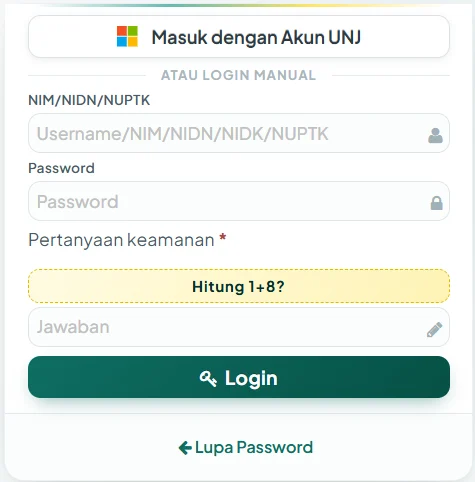
The first attempts targeted the username field of the login form with SQL injection payloads. Those attempts did not work: the requests appeared to be blocked by a Web Application Firewall (WAF). Rather than start on WAF bypasses, the researcher intercepted the login request and sent it to Burp Suite Repeater to inspect the parameters individually.
While reading the request, he noticed another parameter that was not immediately obvious from the login interface.

That is the interesting part of the finding: the visible form exposed one set of inputs, but the underlying request carried an additional parameter that the interface never showed, and that parameter was apparently passed to the database layer.
Exploitation
Step 1: probe the hidden parameter with a single quote
The hidden parameter was tested with a simple single quote:
The quote is the classic error-based probe: if the value is concatenated into a SQL statement, the unbalanced quote breaks the syntax of the query. The server returned a 500 internal error.
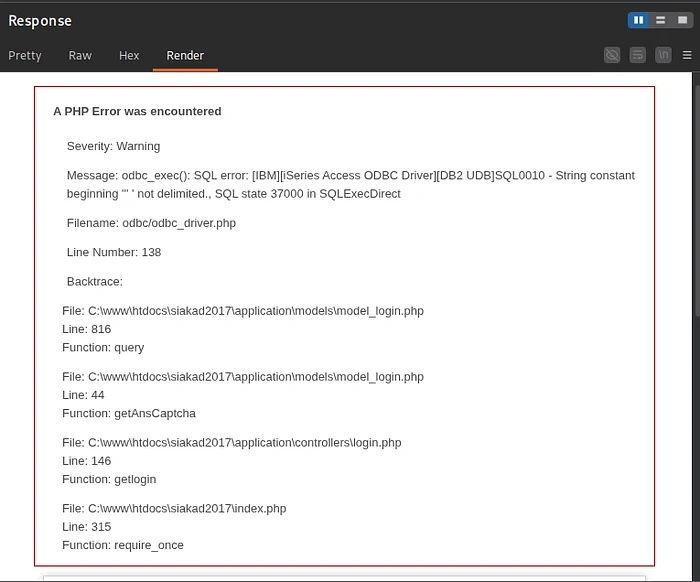
A 500 on its own is weak evidence, but here the researcher read it as a sign that the input was being processed by a backend database query, which is what made an error-based SQL injection plausible. The write-up does not include the full request, the parameter name, or the response body, so the exact query and error text are not public.
Step 2: stop and report
With that evidence in hand, the researcher deliberately did not go further. No exploitation of the error output, no data extraction, no attempt to access database contents. The vulnerability was reported to the UNJ team at:
[redacted]
The report included the details needed for the team to investigate and reproduce the issue.
Root cause
The write-up does not show the server-side code, so the mechanism can only be described in general terms. The behaviour is consistent with user input from the hidden parameter being placed into a SQL query without proper parameterisation, so that a single quote produces a syntax error and a 500 response. The visible login fields were protected well enough that the initial payloads were stopped, and the researcher attributes that to a WAF rather than to the application code. The hidden parameter was not visible in the login interface, and a single quote there produced a 500. Whether the WAF rule set simply did not inspect that parameter, or the parameter was added to the request in a way the filter did not expect, is not stated.
Impact
The researcher's own assessment is limited to what the 500 demonstrated: the input reaches a backend database query, which is enough to suspect error-based SQL injection. He did not attempt to read data, so no confidentiality, integrity or authentication impact is demonstrated in the write-up. In the general case, an injectable parameter behind a login form can allow an attacker to alter the query logic, for example to bypass authentication, or to extract database contents through error messages or other channels. Which of these applied here is not established by the report. The UNJ team confirmed the finding as valid, which supports the injection itself but does not extend the demonstrated impact beyond the error condition.
Fix
The write-up does not describe the remediation that UNJ applied. The fix that follows from the root cause is to stop building the query by string concatenation and use parameterised statements or prepared statements for every parameter, including ones that are not shown in the interface. Input validation and a WAF can reduce noise, but they are not a substitute for parameterisation, and the initial payloads on the visible fields were blocked.
Timeline
| Date | Event |
|---|---|
| 2 September 2026 | Vulnerability reported to UNJ |
| 4 September 2026 | Vulnerability confirmed as valid |
| 4 September 2026 | Certificate of appreciation issued |

Lessons learned
The main lesson the researcher draws is about where to look. Testing should not concentrate only on the obvious parameters visible in the interface; reading the underlying HTTP request reveals further parameters and attack surfaces that are not immediately visible. The second lesson is about handling a WAF block: instead of immediately trying to bypass it, inspect the request and analyse the parameters one by one, because the block may only apply to the fields you started with.
Variants to test
- Hidden request parameters on login forms. Intercept the login POST and compare the parameter set with the visible fields. A positive result is an extra parameter that changes server behaviour when its value is altered, for example a different error, status code or response length.
- Single-quote probes on each parameter individually. Send
'in one parameter at a time while leaving the others untouched. A positive result is a database error, a 500, or a response that differs from the baseline only for that parameter. - Parameters the WAF does not inspect. Repeat the probe on parameters that were added to the request but are not part of the form. A positive result is the same error behaviour that the visible fields did not produce.
- Error-based confirmation. If a quote produces an error, look for database error text in the response body, or compare responses for a syntactically valid variant against the broken one. A positive result is a response that reflects the query structure rather than a generic error page.
- Authentication logic parameters. On login endpoints, look for parameters that influence the query beyond username and password, such as flags or identifiers. A positive result is a change in authentication outcome when only that parameter is modified.
What happened, in plain words
A student found a security hole in a university website. The hole was in a login page, but not in the parts of the login page you can see. When you type your username and password into a website and press the button, your browser does not just send those two things. It sends a small package of information to the server, and that package can contain extra pieces that the page never shows you. One of those hidden pieces was being passed straight into the database, and a single apostrophe typed into it made the server crash with an error. That is the classic sign of an SQL injection, a bug where text you type is treated as part of a database command instead of as plain text.
The researcher is Aditya Nail Emery, a 12th-grade student at SMAN 1 Payakumbuh who describes himself as self-taught with around two months of experience. This was his first vulnerability write-up and the first SQL injection he reported. The subdomain name is redacted in the write-up, so the exact address is not public. He reported the issue to the university, the university confirmed it was real, and he received a certificate of appreciation.
A few words before we start, because the rest of the article uses them constantly.
- A server is the computer somewhere else that holds a website and answers when your browser asks for a page. Your browser is the client.
- A subdomain is a name that sits in front of a main domain. If the main site is
unj.ac.id, then something likesomething.unj.ac.idis a subdomain, a separate service run by the same organisation. Think of a big office building: the main address is the building, and each subdomain is a different department inside it, with its own door and its own lock. - A database is an organised store of information, like a very large, very strict spreadsheet. A website's login page usually asks the database a question such as "is there a user with this name and this password?".
- SQL is the language used to ask those questions. A query is one such question.
- SQL injection means getting your own text into that question so that the database reads it as part of the instruction rather than as a value. It is like a form that asks for your name, and you write "Alice, and also please hand me every file in the cabinet". If the clerk reads the whole line as an instruction, you have injected something.
- A Web Application Firewall, or WAF, is a filter that sits in front of a website and inspects incoming requests, blocking ones that look like attacks. Think of a bouncer at the door who checks bags.
- HTTP is the language browsers and servers use to talk. A request is what your browser sends ("please give me this page", or "here is my login"), and a response is what comes back, including a status code, a number that says how it went. 200 means fine, 500 means the server hit an internal error.
- A parameter is one named piece of data inside a request, like
username=alice. A form shows you some parameters; a request can carry more. - Burp Suite is a tool that sits between your browser and the server so you can see and edit requests. Repeater is the part of it that lets you send the same request again and again with small changes.
- Reconnaissance means looking around first to find out what exists, before testing anything.
Setup
The work started from outside, with routine reconnaissance. The only precondition was finding the subdomain in the first place, and that came from routine reconnaissance.
Reconnaissance here means gathering names. A company's main website is easy to find, but the interesting services are often on subdomains that nobody links to. The tools listed in the write-up are:
subfinderassetfinderdnsxhttpx
In plain terms: subfinder and assetfinder collect subdomain names from public sources, dnsx checks which of those names actually exist in the Domain Name System (the internet's address book, which turns a name into a machine), and httpx checks which of the live ones actually answer as web servers. No versions are given for any of the tools.
Burp Suite was used to intercept the login request and replay it in Repeater, so that parameters could be examined one at a time. Intercepting means catching the request in the middle, before it reaches the server, so you can read it.
Finding it
Reconnaissance produced several subdomains of interest. One of them, redacted.unj.ac.id, presented a login system, which made it worth a closer look at how the application handled input.
A login page is interesting to a tester for a simple reason: it is the one place on a site where a stranger is invited to type something and have it processed. Every field on it is a possible way in.
The first attempts targeted the username field of the login form with SQL injection payloads. A payload is simply the text you send to try to trigger the bug. Those attempts did not work: the requests appeared to be blocked by a Web Application Firewall. In everyday terms, the bouncer looked in the bag, found something suspicious, and turned the request away.
At this point there is a fork in the road. One option is to start trying to sneak past the WAF, which is a whole separate skill. The other is to stop and ask why the filter was the thing that stopped it, and whether the filter was looking at everything. The researcher took the second option: he intercepted the login request and sent it to Burp Suite Repeater to inspect the parameters individually.
While reading the request, he noticed another parameter that was not immediately obvious from the login interface.
This is the heart of the finding. The visible form showed one set of inputs, but the underlying request carried an additional parameter that the interface never displayed, and that parameter was apparently passed to the database layer. Picture a paper form with two boxes printed on it, username and password, but the envelope it arrives in also has a third line filled in that nobody at the front desk ever mentioned. If the back office reads the envelope rather than the form, that third line matters.
Exploitation
Step 1: probe the hidden parameter with a single quote
The hidden parameter was tested with a simple single quote:
That is the entire payload: one apostrophe character. It is the classic error-based probe, and the reasoning is worth spelling out. In SQL, text values are wrapped in single quotes, so a query might look like WHERE name = 'alice'. The database knows the first quote opens the text and the second closes it. If you send a value containing a quote of your own, and the application glues your text straight into the query, the quotes no longer pair up. The database sees something like WHERE name = ''' and cannot make sense of it, so it stops with a syntax error. It is like a sentence with an unmatched quotation mark: the reader loses track of where the quoted speech ends.
The server returned a 500 internal error.
A 500 on its own is weak evidence. Servers return 500 for all sorts of reasons, and many of them have nothing to do with databases. What made it meaningful here is the context: the input was a single quote, the response was an internal error, and the researcher read that as a sign the input was being processed by a backend database query. That combination is what made an error-based SQL injection plausible. Error-based means the bug reveals itself through the error the database produces.
The write-up does not include the full request, the parameter name, or the response body, so the exact query and the error text are not public.
Step 2: stop and report
With that evidence in hand, the researcher deliberately did not go further. No exploitation of the error output, no data extraction, no attempt to access database contents. This is a choice worth understanding, because it is not the same as giving up. Once you have shown that a single quote breaks the query, you have shown the bug exists. Pushing on to pull data out of the database turns a demonstration into an intrusion, and it is exactly the step that can harm real people whose information sits in that database.
The vulnerability was reported to the UNJ team at:
[redacted]
That is an email address, the university's contact point for this kind of report. The report included the details needed for the team to investigate and reproduce the issue. Reproduce is the key word: a good report lets someone else follow your steps and see the same result, rather than asking them to take your word for it.
Root cause
The write-up does not show the server-side code, so the mechanism can only be described in general terms. The behaviour is consistent with user input from the hidden parameter being placed into a SQL query without proper parameterisation. Parameterisation, also called a prepared statement, means sending the query and the values separately, so the database treats the values strictly as data and never as part of the instruction. It is the difference between handing a clerk a form with blanks to fill in, and letting a stranger rewrite the form itself.
With that missing, a single quote produces a syntax error and a 500 response. The visible login fields were protected well enough that the initial payloads were stopped, and the researcher attributes that to a WAF rather than to the application code. The hidden parameter was not visible in the login interface, and a single quote there produced a 500. Whether the WAF rule set simply did not inspect that parameter, or the parameter was added to the request in a way the filter did not expect, is not stated.
Impact
The researcher's own assessment is limited to what the 500 demonstrated: the input reaches a backend database query, which is enough to suspect error-based SQL injection. He did not attempt to read data, so no confidentiality, integrity or authentication impact is demonstrated in the write-up. Those three words are worth unpacking. Confidentiality means keeping data secret; integrity means keeping it correct and unaltered; authentication means proving you are who you say you are, which is what a login page is for.
In the general case, an injectable parameter behind a login form can allow an attacker to alter the query logic, for example to bypass authentication, or to extract database contents through error messages or other channels. Bypassing authentication means getting in without a valid password, by making the database's yes/no question answer yes. Which of these applied here is not established by the report. The UNJ team confirmed the finding as valid, which supports the injection itself but does not extend the demonstrated impact beyond the error condition.
Fix
The write-up does not describe the remediation that UNJ applied. The fix that follows from the root cause is to stop building the query by string concatenation and use parameterised statements or prepared statements for every parameter, including ones that are not shown in the interface. String concatenation is gluing text together to form a command, which is exactly how injected text becomes part of the command. Input validation and a WAF can reduce noise, but they are not a substitute for parameterisation, and the initial payloads on the visible fields were blocked.
Timeline
| Date | Event |
|---|---|
| 2 September 2026 | Vulnerability reported to UNJ |
| 4 September 2026 | Vulnerability confirmed as valid |
| 4 September 2026 | Certificate of appreciation issued |
The timeline is short: reported on 2 September, confirmed two days later, and the certificate issued the same day as the confirmation. For a first report from a researcher with two months of experience, that is a fast and clean outcome.
Lessons learned
The main lesson the researcher draws is about where to look. Testing should not concentrate only on the obvious parameters visible in the interface; reading the underlying HTTP request reveals further parameters and attack surfaces that are not immediately visible. An attack surface is simply any place where input can enter the system. The visible form is the front door; the request is the whole building.
The second lesson is about handling a WAF block. Instead of immediately trying to bypass it, inspect the request and analyse the parameters one by one, because the block may only apply to the fields you started with. The bouncer checked the front pocket and missed the inside one.
Variants to test
These are the same ideas generalised, so a beginner can recognise the pattern elsewhere.
- Hidden request parameters on login forms. Intercept the login POST and compare the parameter set with the visible fields. A positive result is an extra parameter that changes server behaviour when its value is altered, for example a different error, status code or response length.
- Single-quote probes on each parameter individually. Send
'in one parameter at a time while leaving the others untouched. A positive result is a database error, a 500, or a response that differs from the baseline only for that parameter. The baseline is the normal response you recorded before changing anything, so you have something to compare against. - Parameters the WAF does not inspect. Repeat the probe on parameters that were added to the request but are not part of the form. A positive result is the same error behaviour that the visible fields did not produce.
- Error-based confirmation. If a quote produces an error, look for database error text in the response body, or compare responses for a syntactically valid variant against the broken one. A positive result is a response that reflects the query structure rather than a generic error page.
- Authentication logic parameters. On login endpoints, look for parameters that influence the query beyond username and password, such as flags or identifiers. A positive result is a change in authentication outcome when only that parameter is modified.
Glossary
- Server: the remote computer that stores a website and answers requests from browsers.
- Client: the program making the request, usually your browser.
- Subdomain: a named service under a main domain, such as
something.unj.ac.idunderunj.ac.id. - Domain Name System (DNS): the internet's address book, turning names into machines.
- Database: an organised store of information that a website queries.
- SQL: the language used to ask a database questions.
- Query: one question or instruction sent to a database.
- SQL injection: getting your own text treated as part of a database command instead of as a value.
- Error-based SQL injection: a form of SQL injection that reveals itself through database error messages or error responses.
- Payload: the text you send to try to trigger a vulnerability.
- Web Application Firewall (WAF): a filter in front of a website that inspects and blocks suspicious requests.
- HTTP: the language browsers and servers use to exchange requests and responses.
- Request: what the browser sends to the server.
- Response: what the server sends back.
- Status code: a number in the response saying how it went, such as 200 for fine or 500 for an internal error.
- Parameter: one named piece of data inside a request, such as
username=alice. - Burp Suite: a tool that sits between browser and server so requests can be seen and edited.
- Repeater: the Burp Suite component that resends a request with changes.
- Intercept: to catch a request in transit so it can be read or modified.
- Reconnaissance: the initial phase of looking around to find what exists before testing.
subfinder: a tool that collects subdomain names from public sources.assetfinder: a tool that collects subdomain names from public sources.dnsx: a tool that checks which names exist in DNS.httpx: a tool that checks which live hosts answer as web servers.- Parameterisation / prepared statement: sending a query and its values separately so values are always treated as data, never as instructions.
- String concatenation: gluing text together to build a command, which is how injected text becomes part of the command.
- Input validation: checking incoming data against expected rules before using it.
- Attack surface: any place where input can enter a system.
- Baseline: the normal response recorded before any change, used for comparison.
- Confidentiality: keeping data secret.
- Integrity: keeping data correct and unaltered.
- Authentication: proving you are who you say you are.
- Authentication bypass: getting in without valid credentials by altering the login logic.
- Reproduce: to follow someone's steps and obtain the same result.
- Remediation: the fix applied to close a vulnerability.



