Broken Access Control Leading to Exposure of 7,000+ PII Records on a Jakarta Government Subdomain.
PDF documents on a government subdomain were directly accessible without the intended authorisation, even though the root path returned 403 Forbidden. An attacker could download these files and read over 7,000 records of personal information such as full names and national ID numbers.

Bug Bounty
The full write-up lives on its author's site
It belongs to its author, so we link to it rather than copy it. The other two tabs are our own rewrites, checked against it.
Context
This is a write-up of a Broken Access Control finding on a subdomain of jakarta.go.id, the domain of the Jakarta government. The researcher, Aditya Nail Emery, describes it as his second vulnerability write-up. The subdomain name itself is redacted throughout, so the specific host is not public.
The feature involved is document hosting: the subdomain serves PDF files. The root of the subdomain is protected, but individual PDF documents were reachable directly. The documents contained personal data of individuals, and the researcher counts more than 7,000 PII records across them.
Setup
The work was reconnaissance-driven and used no accounts or credentials. The tools listed are:
subfinderassetfinderdnsxhttpx
GAU (Get All URLs) was used later to collect historical URLs, and a search engine query was used for enumeration. No versions are given.
Finding it
Subdomain enumeration surfaced several interesting hosts. One of them was:
redacted.jakarta.go.id
Requesting the root of that subdomain returned a 403 Forbidden response.
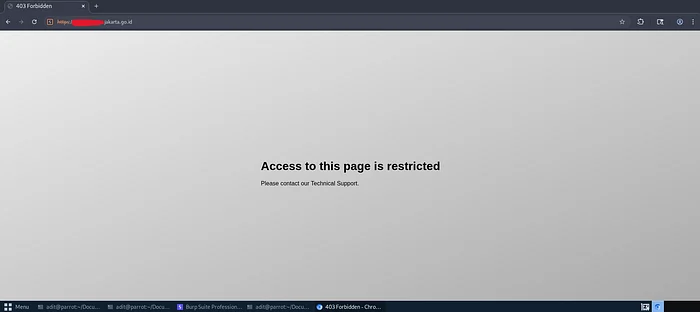
The screenshot shows the root of the subdomain answering with 403 Forbidden, which at first glance makes the host look inaccessible. The researcher's reasoning at this point is the key to the whole finding: a 403 on the root path does not mean every resource hosted on the domain is protected. Access control applied at the root says nothing about how individual files are served.
Exploitation
Step 1: collect historical URLs with GAU
To find out whether previously indexed or discovered URLs existed under the subdomain, the researcher ran GAU against the target:
gau redacted.jakarta.go.id
GAU queries public sources for URLs that have been seen before for a given domain. The output contained several historical and previously discovered URLs. Among them, PDF files stood out.

The screenshot shows the GAU output for the target, with the historical URLs it returned.
Step 2: open a PDF directly
The researcher opened one of the PDF URLs directly in the browser. Although the root domain returned 403 Forbidden, the PDF resource itself was accessible without the expected access restrictions. That is the Broken Access Control: the document was served to anyone who knew or found its URL, bypassing the authorisation mechanism that was supposed to guard it.
Step 3: assess what the documents contain
The PDF contained sensitive information belonging to individuals, and the researcher counts more than 7,000 PII records in total. The exposed information included PII such as:
- Full names
- NIK (Population Identification Number)
- Place of birth
- Other personal information contained within the documents
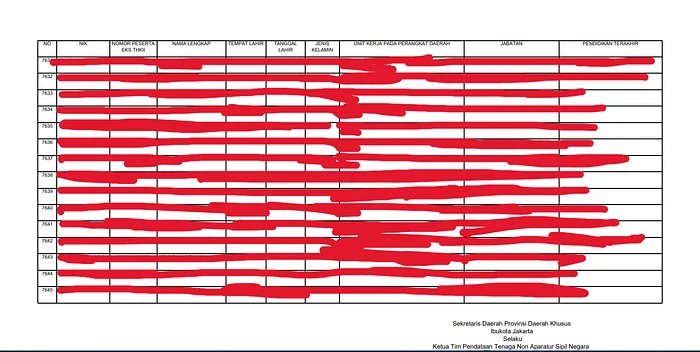
The screenshot shows the kind of personal data present in the exposed documents. The core issue is that these documents could be accessed directly without going through the intended authorisation mechanism.
Step 4: check whether the exposure is broader
Having confirmed one publicly accessible PDF, the researcher tested whether this was an isolated file or a wider exposure. The method was a search-engine query:
site:redacted.jakarta.go.id .pdf
The site: operator restricts results to the subdomain, and the .pdf term biases results towards PDF documents. The search results returned multiple PDF documents hosted on the same subdomain. After reviewing the available documents without accessing or collecting unnecessary sensitive information, the researcher concluded that the exposure was not limited to a single file, and that the affected documents appeared to contain information belonging to a large number of individuals.
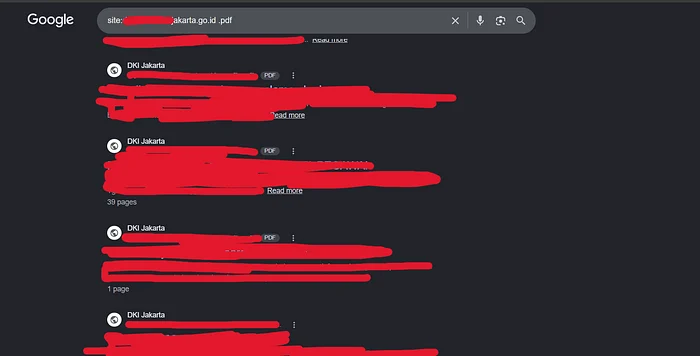
The screenshot shows the search-engine results listing multiple PDF documents on the same subdomain.
Root cause
Access control was enforced on the root path of the subdomain, which returned 403 Forbidden, but not on the individual PDF resources. The documents were served directly to anyone with the URL, so the authorisation step that was meant to precede access was never applied to them. The files were reachable by direct URL and had been recorded in public URL sources. The report does not describe the server configuration behind this, so the exact mechanism is not stated.
Impact
Anyone who found a document URL could read it without authentication or authorisation. The documents contained PII of individuals, including full names, NIK and place of birth, and the researcher counts more than 7,000 records. The exposure was not limited to one file: multiple PDFs on the same subdomain were publicly reachable. The researcher does not state who the affected individuals are beyond describing them as individuals whose data appears in the documents.
Fix
The measure it does describe is on the disclosure side: the researcher reported the issue to the appropriate security team and deliberately did not publish the actual PII, the complete document URLs, or anything that would let readers reach the exposed records. The timeline given is:
| Date | Event |
|---|---|
| 25 August 2026 | Vulnerability reported |
| 26 August 2026 | Vulnerability confirmed as valid |
| 28 September 2026 | Certificate of appreciation issued |
Variants to test
- Root returns 403 but files do not. On any host where the root path is forbidden, run GAU and open the historical URLs it returns. A positive result is a resource such as a PDF, export or attachment that loads without the restriction the root enforces.
- Search-engine enumeration of file types. Query
site:target.tld .pdfand repeat with other document extensions. A positive result is a list of documents on the same host that open directly. - Direct URL access to documents found in URL archives. Take URLs from GAU output and request them without any session. A positive result is a document served in full rather than a redirect to a login or a
403. - Compare root and resource responses. Request the root and a known document path on the same host and compare status codes. A positive result is a
403on the root and the document loading with content.
Closing note
The write-up is deliberately limited: the subdomain, the document URLs and the PII itself are withheld so that readers cannot reach the exposed records. The value for other testers is the method: treat a 403 on the root as a starting point rather than a conclusion, and check what the URL archives and search engines already know about a host.
What happened, in plain words
A security researcher was looking at websites run by the government of Jakarta, Indonesia. The main domain is jakarta.go.id. Governments, like companies, run many smaller websites under one main name; each of those smaller sites is called a subdomain. Think of the main domain as a large office building and each subdomain as a separate office inside it, each with its own door and its own lock.
One of those offices was a website that stores PDF documents. A PDF is a file format for documents that look the same on every computer, like a digital printout. The front door of this office, the main page you reach when you type the address, was locked: the server answered 403 Forbidden, which is the web's way of saying "you are not allowed in here".
But the researcher knew something important: locking the front door does not lock the filing cabinets. The individual PDF files inside were still reachable if you knew their exact addresses. Those files contained personal information about real people: full names, a national identity number, place of birth and more. The researcher counts more than 7,000 PII records in total.
This kind of mistake has a name: Broken Access Control. "Access control" means the rules that decide who is allowed to see what. "Broken" means those rules were not applied where they mattered. The site checked permission at the front door but not at the filing cabinets.
The researcher reported it to the security team, the team confirmed it, and later sent a certificate of appreciation. The write-up deliberately hides the exact subdomain and the file addresses so that nobody can go and read the personal data.
This is the researcher's second public write-up. His name is Aditya Nail Emery.

The words you need before we start
A few everyday comparisons will make the rest of this article easy to follow.
- Server: the computer somewhere in the world that holds a website and answers when your browser asks for a page. Think of it as the shop assistant behind the counter.
- Browser: the program on your computer, such as Chrome or Firefox, that asks the server for pages and shows them to you.
- HTTP status code: a three-digit number the server sends back with every answer.
200means "here is the page".403means "I understood you, but you are not allowed".404means "no such page". You normally never see these numbers, but tools and developers do. - URL: the full address of something on the web, like
https://example.com/files/report.pdf. Every file, not just every page, has one. - Subdomain: a smaller name in front of the main domain, like
shop.example.comunderexample.com. Organisations use them to separate services. - Reconnaissance (often shortened to "recon"): the information-gathering phase before testing. It is like walking around a building first to see which doors exist, before trying any of them.
- PII (Personally Identifiable Information): any data that can identify a specific person, such as a full name, an identity number or a date and place of birth.
- NIK: the Indonesian Population Identification Number, a long number assigned to each citizen, similar to a national ID number in other countries.
- Command line / terminal: a text window where you type commands instead of clicking. Security tools are usually run this way.
- Tool: a small program that does one job, such as finding subdomains or collecting URLs.
Step 1: finding the subdomains
The researcher started with reconnaissance, as usual. The goal of this phase is to learn what exists before testing anything. You cannot test a website you do not know about.
He used four tools:
subfinderassetfinderdnsxhttpx
What each one does, in plain terms:
subfindersearches public sources for subdomains that belong to a domain. Public sources include things like certificate records that websites must publish when they use secure connections. It is like finding a company's branch offices listed in a public directory.assetfinderdoes a similar job from different data sources. Running two finders instead of one simply means finding more.dnsxchecks whether the subdomains found actually exist and respond. A name in a directory might be outdated; this tool knocks on the door to see if anyone answers. DNS is the internet's phone book: it turns a name likeexample.cominto the numeric address of the server.httpxthen checks which of those live hosts actually serve a website, and records basic details such as the status code. A server can exist without running a website on it.
During this process he found several interesting subdomains. One of them was:
redacted.jakarta.go.id
Line by line: this is a single hostname. The word redacted stands in for the real name, which the researcher removed on purpose so that readers cannot visit the site. jakarta.go.id is the government domain it belongs to. Nothing else is on this line; it is just the address.
Step 2: the locked front door
He opened the root of that subdomain, meaning the main page you get when you type just the address with nothing after it. The server returned:
The screenshot shows the root of the subdomain answering with 403 Forbidden. At first glance the site looks inaccessible, and many people would stop here and move on to the next subdomain.
The researcher did not stop, and his reasoning is the heart of the whole finding. A 403 on the root path only tells you that the front page is protected. It says nothing about the individual files stored on the same server. In the office comparison: the receptionist turns you away at the entrance, but the storage room at the back may have no lock at all.
This is worth remembering as a general habit: a refusal at one address is a starting point, not a conclusion.
Step 3: collecting old addresses with GAU
To find out whether anyone had ever recorded addresses under this subdomain, he used a tool called GAU, which stands for Get All URLs. GAU does not scan the target. Instead it asks public archives and datasets, such as the Wayback Machine (which stores old copies of web pages) and other public collections, for every URL that has ever been seen for a given domain. It is like asking a librarian for every address ever printed in old catalogues.
He ran:
gau redacted.jakarta.go.id
Line by line: gau is the name of the program. redacted.jakarta.go.id is the domain to look up. When you press Enter, the tool prints a long list of URLs, one per line, that public sources have recorded for that domain in the past.
The output contained several historical and previously discovered URLs. While reviewing the list, one kind of URL caught his attention: PDF files.
The screenshot shows the GAU output for the target, with the historical URLs it returned. The value here is that these addresses were already public knowledge. Anyone with the same tool, or a search engine, could find them too. That matters later when judging how serious the exposure is.
Step 4: opening a PDF directly
He took one of the PDF addresses from the list and opened it directly in his browser, the same way you would open any link.
Surprisingly, although the root of the domain returned 403 Forbidden, the PDF itself loaded without any restriction. No login, no permission check, nothing. The browser simply showed the document.
This is the vulnerability. The front page returned 403 Forbidden, but the individual files did not. The individual files did not. Anyone who knew or found the address could read the file, and the address was already sitting in public URL archives.
A useful comparison: a hotel has a reception desk that checks your reservation, but the room doors are all unlocked and numbered. Knowing the room number is enough.
Step 5: what was inside the documents
The PDF contained sensitive information belonging to individuals. The exposed information included PII such as:
- Full names
- NIK (Population Identification Number)
- Place of birth
- Other personal information contained within the documents
The screenshot shows the kind of personal data present in the exposed documents. The core issue is not just that a file was readable, but that the file was full of information about real people, and it could be reached directly without passing through the intended permission check.
Step 6: was it one file or many?
One exposed file could be a mistake. Many exposed files mean a pattern. So he tested whether the exposure was wider, using a search engine query:
site:redacted.jakarta.go.id .pdf
Line by line: site: is a search-engine operator that restricts results to one website, here the redacted subdomain. The word .pdf biases the results towards PDF documents, because search engines index the file type and the address. Together the query asks: "show me PDF documents that the search engine knows about on this specific subdomain."
This works because search engines crawl the public web and remember what they find. If a document was reachable by anyone, a search engine may well have recorded it, and then anyone can find it with a query like this one.
The search results returned multiple PDF documents hosted on the same subdomain.
The screenshot shows the search-engine results listing multiple PDF documents on the same subdomain. He reviewed the available documents without accessing or collecting unnecessary sensitive information, a deliberate choice to limit how much personal data he handled. He concluded that the exposure was not limited to a single file, and that the affected documents appeared to contain information belonging to a large number of individuals.
Why this happened
Access control was applied to the root path of the subdomain, which is why it answered 403 Forbidden, but not to the individual PDF files. The files were served directly to anyone with the address, so the permission step that was supposed to come first never happened for them.
The files could be reached by direct address and had already been recorded in public URL sources. The report does not describe the server configuration behind this, so the exact technical cause is not stated.
What the impact was
Anyone who found a document address could read it, with no login and no permission check. The documents contained PII of individuals, including full names, NIK and place of birth, and the researcher counts more than 7,000 records. The exposure was not limited to one file: multiple PDFs on the same subdomain were publicly reachable. The report does not say who the affected individuals are beyond describing them as individuals whose data appears in the documents.
How it was handled
After confirming the problem and its impact, he reported it to the appropriate security team. For responsible disclosure, he did not publish the actual PII, the complete document addresses, or anything that would let readers reach the exposed records. Responsible disclosure means giving the owner time to fix a problem before telling the world about it, and never publishing data that could harm the people involved.
The timeline was:
| Date | Event |
|---|---|
| 25 August 2026 | Vulnerability reported |
| 26 August 2026 | Vulnerability confirmed as valid |
| 28 September 2026 | Certificate of appreciation issued |
How you could look for the same thing
These are the same checks, written so that a beginner can follow the idea. Only test sites you own or have permission to test.
- A locked front page does not mean locked files. On any site whose main page refuses you, collect the old addresses with GAU and open what it returns. Something interesting is a file such as a PDF, an export or an attachment that loads without the restriction the front page enforces.
- Search engines as a file finder. Query
site:target.tld .pdfand repeat with other document extensions. Something interesting is a list of documents on the same site that open directly. - Direct addresses from URL archives. Take addresses from GAU output and open them with no login at all. Something interesting is a document shown in full, rather than a redirect to a login page or a
403. - Compare the front page and a file. Request the root and a known document address on the same site and compare the status codes. Something interesting is a
403on the root and the document loading with content.
The lesson
The write-up is deliberately limited: the subdomain, the document addresses and the PII itself are withheld so that readers cannot reach the exposed records. The value for other testers is the method. Treat a 403 on the front page as a starting point rather than a conclusion, and check what URL archives and search engines already know about a site.
Glossary
- Access control: the rules that decide who is allowed to see or do what on a system.
- Broken Access Control: when those rules are missing or applied in the wrong place, so someone can reach something they should not.
- Authorisation: the check that a specific person is allowed to do a specific thing, as opposed to authentication, which is only about proving who they are.
- Authentication: proving who you are, for example by logging in.
- Browser: the program you use to view web pages.
- DNS: the internet's phone book, turning names into server addresses.
- Domain: the main name of a website, such as
jakarta.go.id. - Subdomain: a smaller name in front of a domain, such as
shop.example.com. - GAU (Get All URLs): a tool that collects URLs previously recorded in public archives for a domain.
- HTTP status code: the three-digit number a server returns with each answer, such as
200or403. 200: the server found the page and is sending it.403 Forbidden: the server understood the request but refuses to allow it.404: the server has no such page.- NIK: the Indonesian Population Identification Number.
- PDF: a document file format that displays the same way on any computer.
- PII (Personally Identifiable Information): data that can identify a specific person.
- Reconnaissance (recon): the information-gathering phase before testing.
- Responsible disclosure: reporting a problem privately to the owner and not publishing data that could harm people.
- Root path: the main page of a site, reached by typing the address with nothing after it.
- Server: the computer that holds a website and answers requests for it.
site:operator: a search-engine instruction that limits results to one website.- Tool: a small program that performs one job.
- URL: the full address of something on the web.
- Wayback Machine: a public archive that stores old copies of web pages.
subfinder,assetfinder,dnsx,httpx: the four tools used in the reconnaissance phase, for finding subdomains, checking they exist, and checking which serve a website.

