How I Discovered Stored XSS in Event Email Templates
The event registration form did not sanitise or encode user-supplied first and last names before inserting them into automated confirmation emails. An attacker could inject HTML and XSS payloads that were rendered by the email client, enabling phishing and social engineering.

medium.com
Published on medium.com
Bug Hunting
The full write-up lives on its author's site
It belongs to its author, so we link to it rather than copy it. The other two tabs are our own rewrites, checked against it.
Context
The target was an event registration portal, referred to in the write-up as events.example.com. When a user registers for an event, the application captures input fields such as first name, last name and email address, processes them, and then sends the registrant an automated email containing confirmation and login details. That outbound email is rendered from an HTML template, and the values the user typed are placed into it.
The researcher's stated goal during the session was to follow where user-supplied data flows: whether it is reflected on a dashboard, stored in a database, or rendered inside automated outbound communications such as emails. The last of those turned out to be the interesting one.
Setup
No special accounts, roles, tools or versions are described. The only precondition mentioned is a working registration on the event portal and access to an inbox that receives the resulting email; the researcher used a temporary email address for the registration. The payloads were delivered through the ordinary registration form, so no privileged access was needed.
Finding it
While exploring the platform, the researcher came across the event registration portal and noted that the form collects first name, last name and email. The question posed was whether that data is reflected on a dashboard, stored in the database, or rendered inside automated outbound communications. Because the application sends confirmation and login details by email, the email template became the place to check for stored, unencoded output.
Exploitation
Step 1: Fill the form with HTML and XSS payloads
The researcher navigated to the event registration page and filled in the details, deliberately using payloads in the name fields rather than benign values:
- In the First Name field:
<img src=x onerror=alert(0)> - In the Last Name field: a custom HTML/link payload.
<img src=x onerror=alert(0)>
The first payload is a broken image reference: the browser or email client fails to load x and would fire the onerror handler. Its purpose here is to show whether the value is treated as markup rather than text. The second payload was a custom HTML/link payload. The exact markup of the link payload is not reproduced in the write-up.
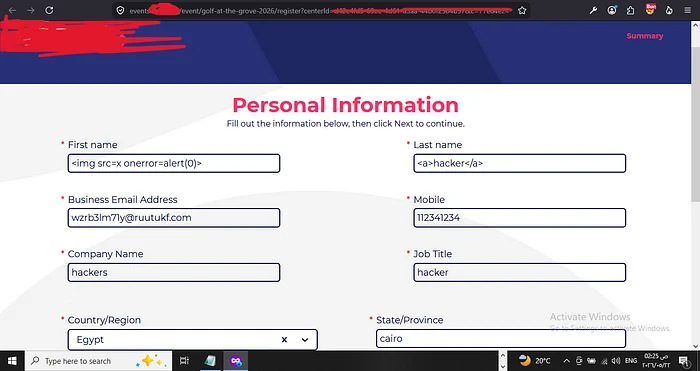
The screenshot accompanies the payload entry step.
Step 2: Submit the registration
The researcher filled in a temporary email address, completed the required fields and submitted the form. The application processed the registration normally.
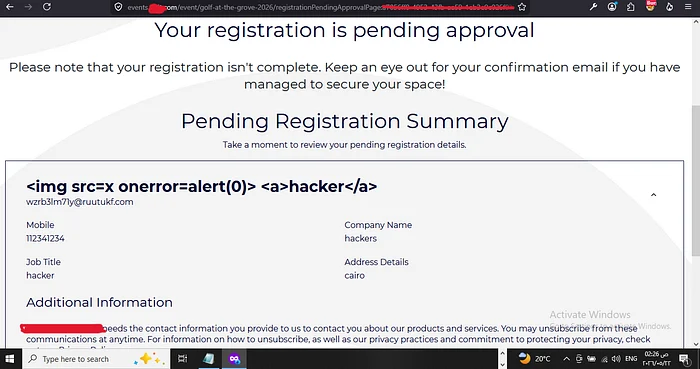
The screenshot accompanies the submission step.
Step 3: Open the email
A few moments later the platform sent the confirmation and login details to the supplied address. On opening the message, the injected XSS and HTML tags were parsed live by the email client: the backend had taken the raw input without sanitisation or encoding and rendered it directly inside the HTML email template.
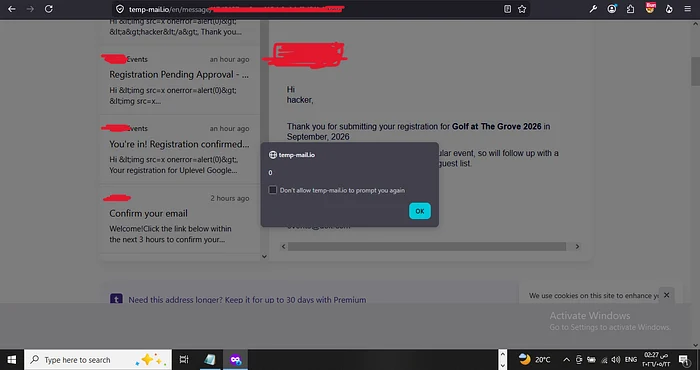
The screenshot accompanies the point where the researcher opened the email.
Root cause
The backend placed the submitted first name and last name values into the HTML email template without sanitisation or output encoding, so the email client parsed them as markup. The write-up does not describe any server-side validation, encoding step or content filter that was present and bypassed; the input simply reached the template raw. The failure is one of output encoding at the point of rendering, in a context (email) that is easy to overlook because it is not the browser interface the tester is looking at.
Impact
Modern webmail clients block active script execution inside emails, so the practical risk described is not script execution in the recipient's mail client. Instead, injecting raw HTML or custom links into messages that come from a trusted domain creates a strong vector for phishing and social engineering: the recipient sees attacker-controlled markup inside a legitimate, trusted notification. The write-up does not go beyond that; it does not claim account takeover, credential theft or any specific exploitation against real users.
Fix
The write-up does not state what the vendor changed, and the report was closed as out of scope, so no remediation is documented. The implied fix is to encode user-supplied values for the HTML context when building the email template, so that names are emitted as text and any markup in them is displayed literally rather than parsed.
Variants to test
- Other outbound templates. Register, reset a password, change an email address or trigger any notification that echoes a name or other profile field, then inspect the received message source. A positive result is your markup appearing unencoded in the email body.
- Fields beyond names. Try the same payloads in company name, job title, address, event comments or any free-text field that might appear in a confirmation email. A positive result is the payload rendered as markup in the message.
- Link payloads specifically. Where script handlers are stripped or blocked by the mail client, a plain anchor with attacker-chosen text and destination is the more realistic phishing primitive. A positive result is a clickable link in a trusted email that you control.
- Downstream consumers of the same data. If the name is also shown on an admin dashboard, attendee list or PDF ticket, check those renderings too. A positive result is the same unencoded output in any of those surfaces.
Conclusion
The report was packaged and sent to the security team, and was closed as out of scope. The lesson the researcher draws is to never limit testing to the web browser interface and to always trace where user-supplied data travels.
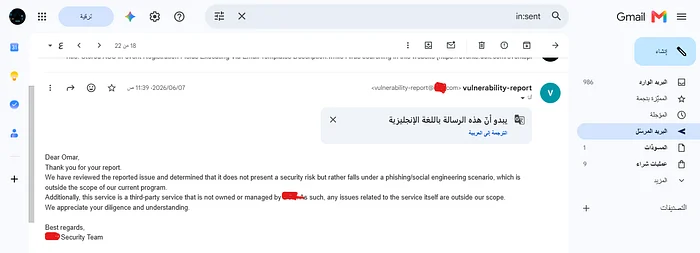
The screenshot accompanies the security team's response.
What happened, in plain words
A security researcher was looking at a website where people sign up for events. When you register, you type your first name, your last name and your email address. The site then sends you an email with your confirmation and your login details.
The researcher typed some special text into the name fields instead of a normal name. That text was not a name at all: it was a small piece of code that a browser or an email program can understand as instructions. When the confirmation email arrived, the email program did not show that text as plain words. It treated it as markup and parsed it. The site had taken what the researcher typed and put it straight into the email without cleaning it up first.
This kind of problem is called stored cross-site scripting, usually shortened to stored XSS. "Stored" means the bad input is saved by the site and used again later, in this case inside an email. "Scripting" means the input contains code that the program reading it may run. The researcher wrote the whole thing up and sent it to the security team, and the team closed the report as out of scope, meaning they decided it was not something they would treat as a bug in their programme.
Below I walk through the same steps the researcher took, explaining each idea from scratch as it comes up.
Some background first
What the site does
The target was an event registration portal, referred to in the write-up as events.example.com. A portal here just means a website with a specific job. This one lets people sign up for events. You fill in a form, press a button, and the site records you as an attendee.
When you register, the application captures input fields such as first name, last name and email address. It processes them, and then it sends you an automated email containing your confirmation and your login details. That email is not typed by a person each time. It is built from a template: a ready-made page of email with blanks in it, a bit like a printed party invitation where someone writes your name on the dotted line before posting it. The site fills the blanks with the values you typed.
What the researcher was looking for
The researcher's stated goal during the session was to follow where user-supplied data flows. "User-supplied data" simply means anything a visitor types into the site. The question was whether that data is:
- Reflected on a dashboard: shown back to you on a page straight after you type it.
- Stored in a database: saved by the site so it can be used again later.
- Rendered inside automated outbound communications such as emails: placed into messages the site sends out on its own.
The last of those turned out to be the interesting one. That is worth pausing on, because it is the heart of the story. Most people testing a website only look at the website itself, in the browser. But data you type often travels further than the page in front of you: into emails, into reports, into admin screens. If the site cleans up your input for the web page but forgets to clean it up for the email, the problem is still there, just somewhere you were not looking.
Two ideas you need before the payloads make sense
HTML is the language that describes what a web page or an HTML email looks like. It is made of tags, which are instructions in angle brackets. For example, <b>hello</b> tells the program to show the word "hello" in bold. Normally, when you type a name into a form, the site should treat your text as text: if you type <b>, you should see the characters <b> on screen, not a bold effect. When a site fails to do that, we say the input is not encoded or not sanitised.
- Encoding means converting special characters into a safe form so they are displayed literally. The
<character, for instance, gets turned into something like<, which a program shows as a<sign rather than reading it as the start of a tag. - Sanitising means removing or neutralising anything dangerous from the input before using it.
XSS, or cross-site scripting, is the name for the whole family of bugs where an attacker gets their own code treated as part of a trusted page or message. The everyday comparison: imagine a noticeboard in an office where staff pin official announcements. If anyone can pin a fake announcement that looks official, people will believe it because it is on the official board. XSS is the digital version of that. The attacker's text ends up somewhere trusted, and the program reading it cannot tell the difference.
Setup
No special accounts, roles, tools or versions are described in the write-up. The only precondition mentioned is a working registration on the event portal and access to an inbox that receives the resulting email. The researcher used a temporary email address for the registration. A temporary email address is a throwaway inbox you can use for a few minutes without giving your real address; it is handy when you do not want to hand your personal email to a test site.
The payloads were delivered through the ordinary registration form, so no privileged access was needed. That is an important point for a beginner: this was not a case of breaking into an admin area. The researcher used the same public form any visitor would use.
Finding it
While exploring the platform, the researcher came across the event registration portal and noted that the form collects first name, last name and email. The question posed was whether that data is reflected on a dashboard, stored in the database, or rendered inside automated outbound communications. Because the application sends confirmation and login details by email, the email template became the place to check for stored, unencoded output.
In plain terms: the researcher saw that the site promises to email you after you register. That promise is a clue. It means your typed name is going to be used somewhere other than the page you are on. So the test becomes: type something that is obviously not a name, and see whether the email treats it as text or as instructions.
Exploitation
Step 1: Fill the form with HTML and XSS payloads
The researcher navigated to the event registration page and filled in the details, deliberately using payloads in the name fields rather than benign values. A payload is just the specific piece of test input an attacker or tester uses to see how a system reacts. It is the probe you poke the system with.
- In the First Name field:
<img src=x onerror=alert(0)> - In the Last Name field: a custom HTML/link payload.
<img src=x onerror=alert(0)>
Let us take that first payload apart piece by piece, because every part has a job.
<img ...>is an HTML tag that tells the program to display an image. The program reading it, whether a browser or an email client, will try to fetch and show a picture.src=xis the address of the picture. Here it is just the single letterx, which is not a real address. There is no image atx, so the load will fail.onerror=alert(0)is an instruction that says: if the image fails to load, run this piece of code.alert(0)is a very simple piece of JavaScript, the language browsers use for interactivity. It pops up a small box on screen with the number 0 in it.
So the whole payload means: "try to show a picture from a place that does not exist, and when that fails, pop up a box." The failure is deliberate. The researcher wants the failure, because the failure is what triggers the pop-up. If the site treats the input as plain text, the email will show the literal characters <img src=x onerror=alert(0)> and nothing will happen. If the site treats the input as HTML, the email program will try to load the image and fail. Either way, the researcher learns something: the reaction tells you whether the input was cleaned up.
The second payload was a custom HTML/link payload. In other words, the first payload tests whether code runs; the second tests whether any HTML at all gets through. A link is a particularly useful thing to get through, because a link can point anywhere the attacker chooses. The exact markup of the link payload is not reproduced in the write-up.
The screenshot accompanies the payload entry step.
Step 2: Submit the registration
The researcher filled in a temporary email address, completed the required fields and submitted the form. The application processed the registration normally.
The screenshot accompanies the submission step.
Why use a temporary address? Because the test depends on receiving the email. The researcher needs an inbox they can open, and using a throwaway one keeps the test tidy and avoids mixing it with a real mailbox. The site, for its part, behaved as it always does: it accepted the registration and went off to send the confirmation.
Step 3: Open the email
A few moments later the platform sent the confirmation and login details to the supplied address. On opening the message, the injected XSS and HTML tags were parsed live by the email client: the backend had taken the raw input without sanitisation or encoding and rendered it directly inside the HTML email template.
A few terms here are worth unpacking.
- The backend is the part of the site that runs on the company's servers, out of sight. The page you see in your browser is the front end; the backend is what saves your data, builds the email and sends it.
- An email client is the program or website you use to read mail, such as a webmail service. It has to interpret HTML to show formatted emails, which is exactly why HTML in an email can do things.
- Parsed means the program read the text and worked out what it means. When the email client parsed the payload, it did not see a strange name; it saw an image tag with an error handler, and it acted on it.
The screenshot accompanies the point where the researcher opened the email.
This is the moment the researcher describes as "BOOM". The name field had travelled all the way from a public form, through the backend, into an email, and arrived still active. Nothing along the way had turned it into harmless text.
Root cause
The backend placed the submitted first name and last name values into the HTML email template without sanitisation or output encoding, so the email client parsed them as markup. Output encoding means cleaning data at the moment you put it into a page or message, so that it is shown as text and never read as instructions. It is the seatbelt of web development: a small step applied at the last moment that prevents a much bigger problem.
The write-up does not describe any server-side validation, encoding step or content filter that was present and bypassed; the input simply reached the template raw. The failure is one of output encoding at the point of rendering, in a context (email) that is easy to overlook because it is not the browser interface the tester is looking at.
That last sentence is the real lesson. The website itself may have been perfectly careful. The gap was in a place most testers never open: the inbox.
Impact
Modern webmail clients block active script execution inside emails, so the practical risk described is not script execution in the recipient's mail client. In other words, the pop-up box trick may not fire in a modern inbox, because those programs are built to refuse to run code from messages.
Instead, injecting raw HTML or custom links into messages that come from a trusted domain creates a strong vector for phishing and social engineering. Let us define those.
- Phishing is a con in which an attacker sends a message that looks like it comes from someone trustworthy, to get the recipient to click a link or hand over information.
- Social engineering is the broader trick of manipulating people rather than machines: exploiting trust, urgency or habit.
- A trusted domain is a web address people already believe in, such as the address of a company they do business with.
The everyday comparison: a letter on official company stationery asking you to confirm your password will be taken far more seriously than the same request scribbled on a napkin. If an attacker can put their own link inside a genuine notification email from a real company, the link inherits that company's credibility. The recipient sees attacker-controlled markup inside a legitimate, trusted notification.
The write-up does not go beyond that; it does not claim account takeover, credential theft or any specific exploitation against real users. That restraint matters. A good report says what was actually shown, not what might theoretically follow.
Fix
The write-up does not state what the vendor changed, and the report was closed as out of scope, so no remediation is documented. Out of scope means the security team decided the issue fell outside the rules of their bug bounty programme, so they would not treat it as a valid report.
The implied fix is to encode user-supplied values for the HTML context when building the email template, so that names are emitted as text and any markup in them is displayed literally rather than parsed. In everyday terms: when the site writes your name onto the invitation, it should copy the letters exactly and never let them act as instructions. If someone types <img ...>, the email should show those characters, not try to load a picture.
Variants to test
If you want to try this kind of testing yourself, here are the directions the researcher suggests. Each one is a variation on the same question: where else does my input end up, and is it cleaned there?
- Other outbound templates. Register, reset a password, change an email address or trigger any notification that echoes a name or other profile field, then inspect the received message source. A positive result is your markup appearing unencoded in the email body. "Message source" means the raw underlying text of the email, which most mail programs let you view; it shows you what was really sent, not just what is displayed.
- Fields beyond names. Try the same payloads in company name, job title, address, event comments or any free-text field that might appear in a confirmation email. A positive result is the payload rendered as markup in the message.
- Link payloads specifically. Where script handlers are stripped or blocked by the mail client, a plain anchor with attacker-chosen text and destination is the more realistic phishing primitive. An anchor is the HTML element for a link. A primitive here means a basic building block an attacker can use. A positive result is a clickable link in a trusted email that you control.
- Downstream consumers of the same data. If the name is also shown on an admin dashboard, attendee list or PDF ticket, check those renderings too. A positive result is the same unencoded output in any of those surfaces. "Downstream consumers" just means other places that read the same saved data later.
Conclusion
The report was packaged and sent to the security team, and was closed as out of scope. The lesson the researcher draws is to never limit testing to the web browser interface and to always trace where user-supplied data travels.
The screenshot accompanies the security team's response.
Even a closed report can teach something. The researcher's takeaway is a habit worth copying: when you type something into a website, ask yourself where that text goes next. It might go to a database, a dashboard, a PDF, or an inbox. Each of those is a place where the same input has to be handled safely, and each is a place a tester can look.
Glossary
- Anchor: the HTML element used to create a link.
- Backend: the part of a website that runs on the company's servers, handling saving, processing and sending, out of sight of the visitor.
- Cross-site scripting (XSS): a class of bug where an attacker's input is treated as code by a page or message, instead of as plain text.
- Email client: the program or web service you use to read email.
- Encoding (output encoding): converting special characters into a safe form so they are displayed literally rather than read as instructions.
- HTML: the language of tags that describes how a web page or HTML email is structured and displayed.
- HTML email template: a ready-made email layout with blanks that the site fills in with values such as a user's name.
- Input field: a box on a form where a visitor types information.
- JavaScript: the programming language browsers use to make pages interactive.
- Out of scope: a decision by a security team that a reported issue falls outside the rules of their programme and will not be treated as a valid report.
- Parsed: read and interpreted by a program, which works out what the text means and acts on it.
- Payload: the specific piece of test input used to see how a system reacts.
- Phishing: a con in which a message pretending to come from a trusted source tricks the recipient into clicking a link or giving away information.
- Primitive: a basic building block that an attacker can use to achieve something.
- Reflected: shown back to the user on a page shortly after they type it.
- Sanitising: removing or neutralising dangerous parts of input before it is used.
- Social engineering: manipulating people, rather than machines, by exploiting trust or habit.
- Stored XSS: XSS where the malicious input is saved by the site and used again later, for example in an email or on another page.
- Temporary email address: a throwaway inbox used for a short time, often for testing.
- Trusted domain: a web address that people already recognise and believe in.
- Vector: the route or means by which an attack is delivered.



