How, I dumped crypto data by chaining directory listing to open S3 Bucket
A subdomain with directory listing served files from an S3 bucket that was publicly writable, allowing the attacker to list, download, and delete files. The attacker downloaded zip files containing database configuration and table details.

Today, I am gonna share one of my interesting private bug Bounty finding and very Unique s3 Bucket finding but before starting, Let’s just understand what is S3 Bucket and why it is very important.
The full write-up lives on its author's site
It belongs to its author, so we link to it rather than copy it. The other two tabs are our own rewrites, checked against it.
Context
An Amazon S3 bucket is AWS's Simple Storage Service: cloud storage for files, folders and objects. In practice it mostly holds images, videos, PDFs and text files, and in rarer cases source backups or credentials in plain text. It can be managed through the website or through the AWS CLI, which is what this write-up uses. S3 Transfer Acceleration is also mentioned as a way to move data quickly and securely from a client to a bucket through AWS edge locations.
The target here is a private bug bounty program. The asset involved is a subdomain of the target, referred to as https://dbXXX.xyz.org/, which serves files to users and is backed by an S3 bucket. The bucket is named in the form https://XXXXX-dbXXX-public.s3.eu-central-1.amazonaws.com. Names are redacted in the report itself.
The report opens with the scale of the problem: permission mistakes on S3 buckets are as old as the service. It cites Skyhigh's finding that 7% of all S3 buckets are open and Rapid7's finding that even 17% are open.
Setup
The only tooling described is:
- Amass, used for subdomain enumeration during recon.
- The AWS CLI, configured on a Windows, Linux or Mac machine, used to interact with the bucket.
- Standard command line tools such as
curlandwget, tried during the bypass attempts.
No account, role or credential on the target is described. The precondition for the finding is simply that the bucket exists, is reachable, and is referenced by the target's file-serving subdomain.
Finding it
There are multiple ways to find an S3 bucket associated with a target application, including brute forcing the target with various tools. In this case the entry point came from recon: Amass subdomain enumeration surfaced https://dbXXX.xyz.org/, which looked interesting enough to browse.
That domain was vulnerable to directory listing. The researcher went through each listed directory, but every directory listed its data without allowing a download. Why the download failed is not explained in the report. After roughly 5 to 6 hours of trying bypasses with curl, wget and other methods, nothing worked, and the idea was nearly dropped.
While browsing the domain, a unique request stood out:
https://XXXXX-dbXXX-public.s3.eu-central-1.amazonaws.com
This S3 endpoint was serving content to https://dbXXX.xyz.org/, and the data was the same data listed in the directory. That is the pivot: validation was happening on the https://dbXXX.xyz.org/ side but not on the S3 bucket side. Checking the bucket endpoint directly showed it was open to the public and contained the same data as the domain.
Exploitation
Step 1: Confirm the bucket is public
Requesting the bucket endpoint directly returned the same content that the directory listing on https://dbXXX.xyz.org/ exposed. The application's behaviour was now clear: the domain front end applied some validation, the bucket behind it did not.
Step 2: Interact with the bucket from the CLI
With the AWS CLI configured, the bucket commands worked. The researcher could browse the data and download it, and beyond downloading could list, copy and move the data, because the bucket was open to the world. An open S3 bucket is part of the OWASP Serverless Top 10, and this one was serving all the content to https://dbXXX.xyz.org/.
The proof of concept is two steps: configure the AWS CLI, then run the commands below.
aws s3 ls s3://<xyz>-uploads/
aws s3 rm s3://<xyz>-uploads/test.html
The first command lists the contents of the bucket prefix. The second deletes an object from the bucket. The report shows both commands as the proof of concept.
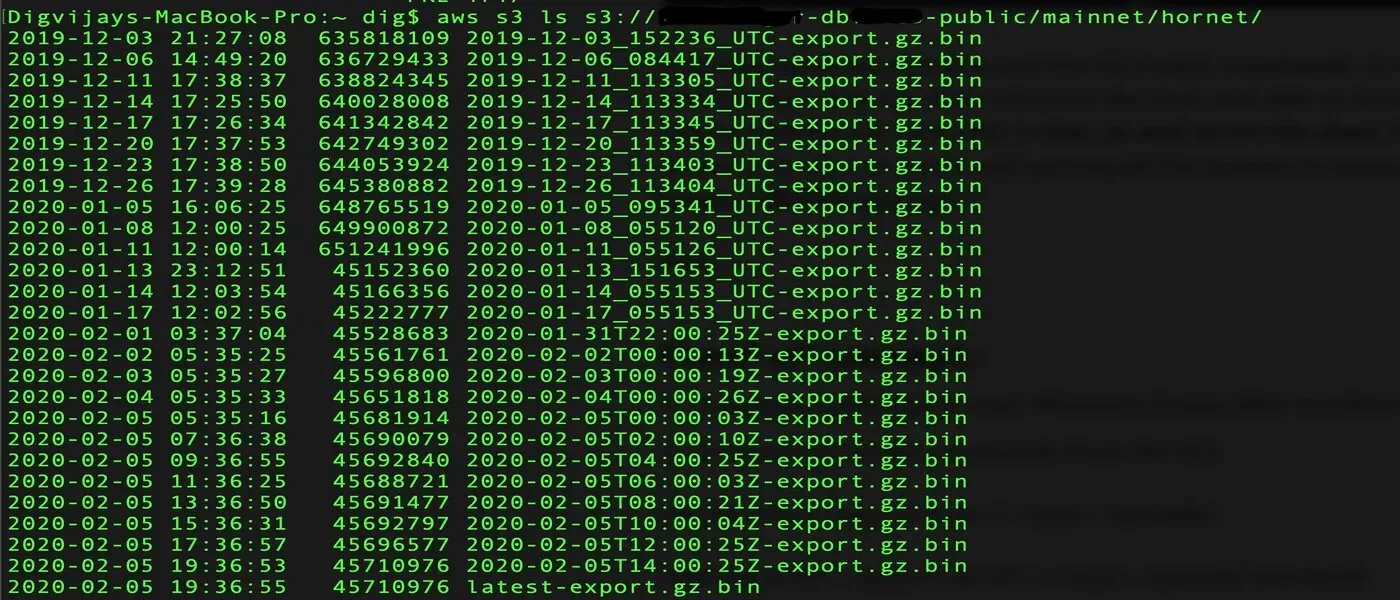
The screenshot accompanies the CLI commands.
Step 3: Mine the downloaded archives
Among the data were many zip files. After extracting them, the researcher found a DB config file containing a lot of information. Only part of it is mentioned in the report, because of the criticality of the data.
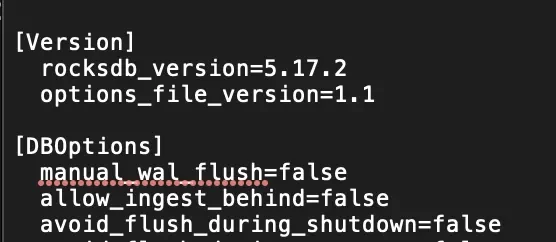
The first screenshot is captioned DB version and tables details.
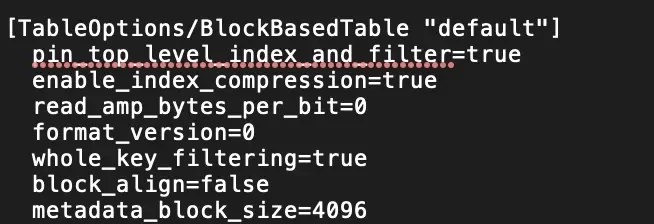
The second screenshot is captioned Meta data and table details.
Root cause
The mistake is a permissions problem on the S3 bucket: it was open to the public, so anyone who knew or guessed the bucket endpoint could list, download, copy, move and delete objects. The front-end domain https://dbXXX.xyz.org/ did apply some validation, but the bucket did not, so the protection existed only on one side of the chain. The report describes this as data validation on the domain side but not from the S3 bucket side.
Why the directory listing on the domain would not let the researcher download files is not explained. The bucket endpoint bypassed that restriction entirely.
Impact
Under the conditions described, an attacker who finds the bucket endpoint can browse and download everything in it, and can also delete or move objects. In this case the bucket held zip archives that, once extracted, exposed a DB config file with database version and table details. The report deliberately withholds the rest of the config because of data criticality, so the full extent of what was exposed is not stated. The bucket was serving all content to the target's file domain.
Fix
The report gives two recommendations:
- Review the bucket ACLs to verify
WRITEandWRITE_ACPare only set on specific users, never on groups such asAllUsersorAuthenticatedUsers. - Review how objects are uploaded to S3 buckets and make sure proper ACLs are set on both buckets and objects.
It also notes that newly created Amazon S3 buckets and objects are private and protected by default, with a link to AWS's announcement of S3 Block Public Access as another layer of protection for accounts and buckets.
Variants to test
- Enumerate subdomains with Amass and browse any file-serving host for directory listing. A positive result is a directory index that reveals file names, especially when the files themselves cannot be downloaded from the domain.
- A positive result is a bucket hostname that serves the same content as the domain.
- Request the bucket endpoint directly and compare the response with the domain's listing. A positive result is identical content served without the domain's validation.
- Download the listed archives and inspect configuration files inside them. A positive result is database connection details, versions or table metadata.
What happened, in plain words
A security researcher was looking for weaknesses in a private bug bounty program, which is a scheme where a company invites people to test its systems and report problems, often for a reward. During routine exploration, the researcher found a web address belonging to the company that showed a plain list of files, like looking at a folder on your own computer and seeing everything inside it. That is called directory listing. The odd part was that the files were visible but would not download.
After hours of trying different tricks to download them, the researcher noticed something in the background: the page was quietly pulling its files from a separate storage service run by Amazon, called an S3 bucket. When the researcher visited that storage service directly, the same files were there, and this time they could be listed, downloaded, copied, moved and even deleted, with no login at all. The company had put a lock on the front door (its own web address) but left the back door (the storage bucket) wide open.
Inside the bucket were zip archives. Unpacking them revealed a configuration file for a database, containing details about the database version, its tables and other metadata. The researcher reported it, and the report withholds the most sensitive parts of that file.
This article walks through the same story from the beginning, explaining every term as it appears, so that someone who has only ever used a browser can follow it.
Background: what an S3 bucket is
Amazon Web Services, usually shortened to AWS, is a company that rents out computing power and storage over the internet. One of its products is Amazon S3, which stands for Simple Storage Service. Think of it as a giant online filing cabinet: you put files, folders and other objects into it, and you can get them back later. A single cabinet is called a bucket, and each item you put inside is called an object.
In everyday use, S3 mostly holds images, videos, PDFs and text files. In rarer cases it holds source code backups or credentials written in plain text, which is why a misconfigured bucket can be serious.
You can manage a bucket in two ways: through the AWS website in a browser, or through the AWS CLI. The CLI, or command line interface, is a text window where you type commands instead of clicking buttons. This write-up uses the CLI.
The report also mentions S3 Transfer Acceleration, a feature that speeds up transfers between a client and a bucket by routing them through AWS edge locations, which are AWS data centres placed close to users around the world. Think of it as an express delivery route rather than the ordinary post.
The scale of the problem
Permission mistakes on S3 buckets are as old as the service itself. The report cites two studies: Skyhigh found that 7% of all S3 buckets are open, and Rapid7 found that even 17% are open. An open bucket is one that anyone on the internet can read from, and sometimes write to, without proving who they are.
The tools used
The report describes only a few tools:
- Amass, a tool for subdomain enumeration. A subdomain is a smaller address under a main domain: if
example.orgis the main site, thenfiles.example.orgis a subdomain. Enumeration means systematically discovering these names, because companies often have many and forget some of them. - The AWS CLI, configured on a Windows, Linux or Mac machine, used to talk to the bucket.
- Ordinary command line tools such as
curlandwget, which fetch web pages and files from a terminal, tried during the failed download attempts.
No account, role or credential on the target is described. The only precondition for the finding is that the bucket exists, is reachable, and is referenced by the company's file-serving subdomain.
Finding it
There are several ways to discover an S3 bucket linked to a target, including brute forcing, which means trying many possible names automatically until one works. Here the entry point came from reconnaissance, the exploratory phase where a researcher maps out what a company owns. Amass surfaced https://dbXXX.xyz.org/, a subdomain that looked interesting enough to open in a browser.
That domain was vulnerable to directory listing. If you have ever opened a web address that ends in a folder and seen a bare list of file names instead of a designed page, you have seen directory listing. It happens when a web server is configured to show the contents of a folder rather than a proper index page.
The researcher went through each listed directory, but every one showed its files without allowing a download. The report does not explain why the download failed. After roughly 5 to 6 hours of trying workarounds with curl, wget and other methods, nothing worked, and the idea was nearly abandoned.
While browsing the domain, one request stood out:
https://XXXXX-dbXXX-public.s3.eu-central-1.amazonaws.com
This is the address of the S3 bucket itself. The XXXXX and dbXXX parts are placeholders: the real names are hidden in the report to protect the company. The s3.eu-central-1.amazonaws.com part tells you it is an AWS storage endpoint in the eu-central-1 region, which is AWS's name for a data centre location in central Europe.
This bucket was serving content to https://dbXXX.xyz.org/, and the data was the same data listed in the directory. That is the turning point: the checking was happening on the https://dbXXX.xyz.org/ side but not on the S3 bucket side. Visiting the bucket address directly showed it was open to the public and held the same data as the domain.
Exploitation
Step 1: Confirm the bucket is public
Opening the bucket address directly returned the same content that the directory listing on https://dbXXX.xyz.org/ exposed. The behaviour was now clear: the domain in front applied some validation, the bucket behind it did not. A useful comparison is a shop with a security guard at the front entrance and an unlocked loading bay at the back. The guard only checks people who come through the front.
Step 2: Interact with the bucket from the CLI
With the AWS CLI configured, the bucket commands worked. The researcher could browse the data and download it, and beyond downloading could list, copy and move the data, because the bucket was open to the world. An open S3 bucket is part of the OWASP Serverless Top 10, a well-known list of the most common security mistakes in serverless setups, which are systems where the cloud provider runs the code for you.
The proof of concept is two steps: configure the AWS CLI, then run the commands below.
aws s3 ls s3://<xyz>-uploads/
This command asks AWS to list (ls) the contents of a bucket called <xyz>-uploads. The s3:// prefix is how you write the address of a bucket. The <xyz> part is a placeholder for the hidden name. If the bucket is private, this command fails unless you have been given permission. Here it returned a listing, which proves anyone can see what is inside.
aws s3 rm s3://<xyz>-uploads/test.html
This command removes (rm) a file called test.html from the same bucket. The report shows this command as part of the proof of concept. Both commands are shown as the proof of concept.
The screenshot accompanies the CLI commands.
Step 3: Mine the downloaded archives
Among the data were many zip files. A zip file is a compressed container holding one or more files, like a box packed tightly to save space. After extracting them, the researcher found a DB config file. DB stands for database, an organised store of information, and a config file is a small text file that tells software how to connect to it, often including the address, the username and sometimes the password. The report says the file contained a lot of information, and only part of it is mentioned, because of the criticality of the data.
The first screenshot is captioned DB version and tables details. A table is a grid of rows and columns inside a database, like a spreadsheet.
The second screenshot is captioned Meta data and table details. Metadata is data about data: for example, when a file was created, how large it is, or who owns it.
Root cause
The mistake is a permissions problem on the S3 bucket: it was open to the public, so anyone who knew or guessed the bucket address could list, download, copy, move and delete objects. The front-end domain https://dbXXX.xyz.org/ did apply some validation, but the bucket did not, so the protection existed only on one side of the chain. The report describes this as data validation on the domain side but not from the S3 bucket side.
Why the directory listing on the domain would not let the researcher download files is not explained. The bucket address bypassed that restriction entirely.
Impact
Under the conditions described, an attacker who finds the bucket address can browse and download everything in it, and can also delete or move objects. In this case the bucket held zip archives that, once extracted, exposed a DB config file with database version and table details. The report deliberately withholds the rest of the config because of data criticality, so the full extent of what was exposed is not stated. The bucket was serving all content to the company's file domain.
Fix
The report gives two recommendations:
- Review the bucket ACLs to verify
WRITEandWRITE_ACPare only set on specific users, never on groups such asAllUsersorAuthenticatedUsers. An ACL, or access control list, is a set of rules saying who may do what with a resource.WRITEmeans permission to add or change files, andWRITE_ACPmeans permission to change the access control list itself.AllUsersmeans literally everyone on the internet, andAuthenticatedUsersmeans anyone with any AWS account, which is still far too broad. - Review how objects are uploaded to S3 buckets and make sure proper ACLs are set on both buckets and objects.
It also notes that newly created Amazon S3 buckets and objects are private and protected by default, with a link to AWS's announcement of S3 Block Public Access as another layer of protection for accounts and buckets. Block Public Access is a setting that overrides any attempt to make a bucket public, like a master switch that stays off.
Variants to test
- Enumerate subdomains with Amass and browse any file-serving host for directory listing. A positive result is a directory index that reveals file names, especially when the files themselves cannot be downloaded from the domain.
- Page source is the underlying text a browser receives, and network requests are the messages it sends and receives behind the scenes; both can be seen in a browser's developer tools. A positive result is a bucket hostname that serves the same content as the domain.
- Request the bucket address directly and compare the response with the domain's listing. A positive result is identical content served without the domain's validation.
- Download the listed archives and inspect configuration files inside them. A positive result is database connection details, versions or table metadata.
Glossary
- ACL (access control list): a set of rules saying who may read, write or change a resource.
- Amass: a tool that discovers subdomains belonging to a target.
- AWS (Amazon Web Services): a cloud provider that rents out computing and storage over the internet.
- AWS CLI: a text-based tool for controlling AWS services by typing commands.
- Brute forcing: trying many possible names or values automatically until one works.
- Bucket: a container in Amazon S3 that holds files and objects.
- Config file: a small text file that tells software how to connect to or behave with another system.
- Credentials: information such as a username and password that proves who you are.
- curl / wget: command line tools that fetch web pages and files.
- Database (DB): an organised store of information, usually arranged in tables.
- Directory listing: a web server setting that shows the contents of a folder as a plain list of file names.
- Edge location: an AWS data centre placed close to users to speed up transfers.
- Endpoint: the address of a service on the internet.
- Metadata: data about data, such as a file's size, owner or creation time.
- Object: a single item stored in an S3 bucket, such as a file.
- Open bucket: an S3 bucket that anyone on the internet can access without proving who they are.
- OWASP Serverless Top 10: a well-known list of the most common security mistakes in serverless systems.
- Recon (reconnaissance): the exploratory phase of mapping out what a target owns.
- S3 (Simple Storage Service): Amazon's cloud storage product for files and objects.
- S3 Block Public Access: an AWS setting that prevents a bucket from being made public.
- S3 Transfer Acceleration: an AWS feature that speeds up transfers through edge locations.
- Subdomain: a smaller address under a main domain, such as
files.example.orgunderexample.org. - Table: a grid of rows and columns inside a database.
- Validation: checking that a request is allowed before serving it.
- Zip file: a compressed container holding one or more files.



