How I earned 200$ in Bug Bounty Program
The upload form on a job application page allowed path traversal characters in the filename, causing the server to attempt an SMB connection to an attacker-controlled address. This could let an attacker make the server connect to internal or external SMB shares, potentially leaking credentials or enabling further attacks.
 Published on medium.com
Hello, welcome to my new article, this article will talk about how I earned 200$ in Bug Bounty Program. First, let me introduce my self, I am Idan and I am a penetration tester / red teamer.
The full write-up lives on its author's site
It belongs to its author, so we link to it rather than copy it. The other two tabs are our own rewrites, checked against it.
Context
This is the story of my first bounty on HackerOne, a $200 reward for an information disclosure issue. The company behind the target asked me not to publish its name, so throughout this article I call it "testsite", with the main site at https://www.testsite.com. The vulnerable feature was not on the main site at all: it was an apply form for a job on a subdomain, derech.testsite.com, where an applicant fills in personal information and uploads a picture of themselves. That upload is the part that mattered.
Setup
There were no accounts, roles or special tooling beyond the ordinary. I ran subdomain finder scripts, SubList3r for example, to enumerate subdomains related to the target. The only other thing I needed was a way to intercept the upload request, which I did while submitting the form. The target was a newly joined program on HackerOne, and that timing is part of the approach: with so many testers on the platform, I could not find vulnerabilities on "old" websites, so I decided the right approach for being one of the first testers was to test the newest website that had joined the Bug Bounty Program. That reasoning paid off.
Finding it
I checked all the functions and options on the main company website and found nothing there. After running the subdomain finder scripts and doing a lot of research, I got the target derech.testsite.com. I noticed that this website looked a little old, and thought there might be the right vulnerability there.
I went through the functions of the site until I reached an apply form for a job in the company, which required uploading a picture of myself. That is where I started to smell my victory. I filled in my personal information until I arrived at the upload, and then thought about what to try.
Obviously I first tried to upload a PHP script for RCE or other vulnerabilities, and I could not find any vulnerability that way. But I thought there might be more to try, and right there I got the idea to try path traversal. The concept is the familiar one: a file path built from user input that is not properly constrained, so that sequences intended to move up the directory tree are honoured by the server.
Exploitation
Step 1: capture the upload request
While I uploaded my picture, I captured the request so that I could modify the filename and try my luck for path traversal.
Step 2: put traversal characters in the filename
As we know, we cannot put some special characters like !@#$%^&<> in a filename. After I did this, I got an error with a message of their IP SMB server.
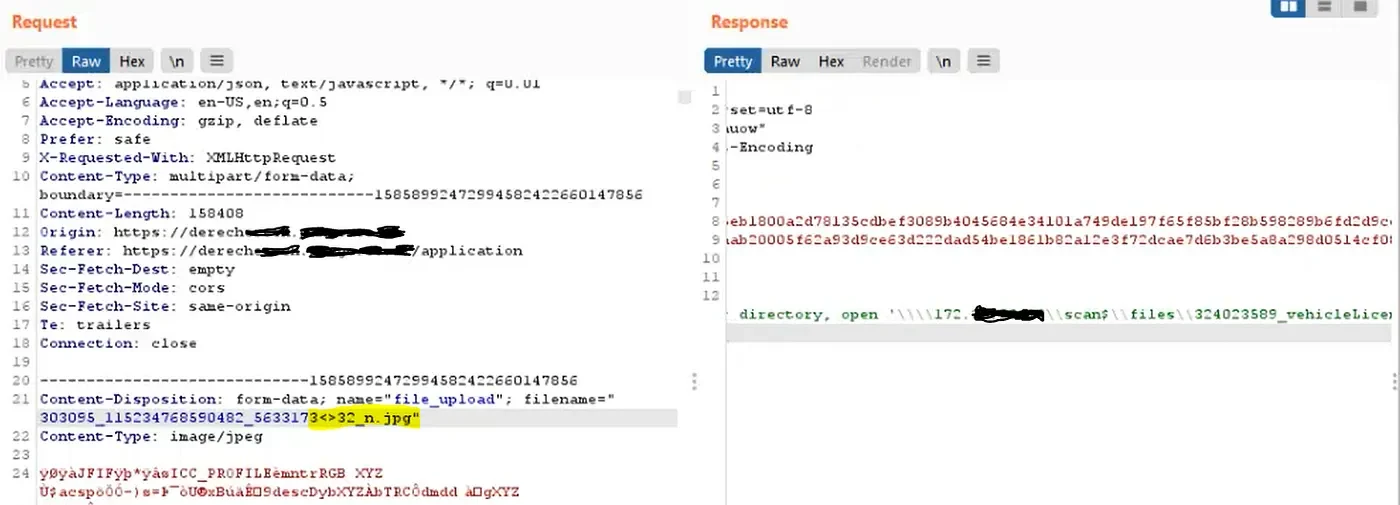
The screenshot shows the error returned by the application, which leaked the address of their SMB server. That leak is the information disclosure: the application's error handling exposed internal infrastructure detail that a normal applicant should never see.
Step 3: report
I reported the issue to HackerOne. I got a message from them that I earned $200 from this vulnerability, and the happiest thing is that the company closed this vulnerability successfully.
Root cause
The report does not show the server-side code, so the exact cause is not established; the error returned after the crafted filename leaked the address of their SMB server. When the crafted name was processed, the failure path returned a raw error to the user that included the address of their SMB server. Two mistakes combine here: unvalidated user input in a file path, and verbose error output that exposes internal infrastructure. The report does not show the server-side code, so the exact mechanism is likely a filename concatenated into a path that the application then tried to resolve, with the resulting exception surfaced to the client.
Impact
Anyone who can reach the job application form could cause the application to disclose the address of an internal SMB server. It tells an attacker about internal infrastructure that is not meant to be public.
Fix
The company closed the vulnerability successfully. What should be done is to reject or sanitise traversal sequences and special characters in uploaded filenames, generate a server-side name for stored files rather than trusting the client's, and return a generic error to the user instead of raw exception text that names internal hosts.
Variants to test
- Upload forms on other subdomains: submit a filename containing traversal sequences and watch for error pages that name internal hosts, paths or services. A positive result is any response that reveals infrastructure detail you did not already know.
- Filename fields outside uploads, such as export or report names: try traversal sequences and look for errors that disclose filesystem paths. A positive result is a stack trace or path in the response.
- Error handling generally: send malformed input to forms and APIs and check whether raw exceptions, internal addresses or service names come back. A positive result is any internal detail in a user-facing error.
- Newly joined programs: enumerate subdomains with a tool such as SubList3r and prioritise older-looking applications, where error handling and input validation are more likely to be weak. A positive result is a subdomain with an upload or file-handling feature that behaves differently from the main site.
What happened, in plain words
I found a bug on a company's website and was paid $200 for reporting it. The bug was on a job application form: when I uploaded a picture, the site let me put unusual characters in the file name. Instead of rejecting them, the site showed an error message that revealed the address of an internal file server (an SMB server). That kind of leak is called information disclosure: the site tells you something about its private network that you should never see. The company fixed it, and I got my first bounty on HackerOne.
The target and the approach
The company asked me not to publish its name, so I call it "testsite". The main website is at https://www.testsite.com. The bug was not on that main site. It was on a subdomain, derech.testsite.com, which hosted a job application form. On that form, an applicant fills in personal details and uploads a picture of themselves. The upload was the part that mattered.
A subdomain is a smaller site under the main domain, like a separate department of the same company. To find subdomains, I ran scripts such as SubList3r. These tools try many common names and report which ones exist. I did this because the main site had nothing, and smaller or older parts of a company's web presence are often less carefully built.
I also chose to look at programs that had just joined HackerOne. HackerOne is a platform where companies invite security researchers to test their systems and pay for valid reports. Many testers work on the same programs, so older programs have usually been picked over. A newly joined program is more likely to still have easy-to-find problems. That reasoning worked: I found the bug on a fresh program.
Finding the form
I checked all the functions and options on the main company website and found nothing. After running the subdomain finder scripts and doing more research, I reached derech.testsite.com. The site looked a little old, which suggested it might have weaker input handling.
I went through the site's features until I found a job application form. It asked for personal information and a picture of myself. That upload field is where I started to think there might be a way in. I filled in the form up to the upload step and then considered what to try.
First attempts: uploading a script
My first idea was to upload a PHP script. PHP is a programming language often used on web servers. If a site lets you upload a .php file and then runs it when someone opens it, an attacker can make the server execute their code. That is called remote code execution, or RCE, and it is a very serious bug. I tried that and other similar tricks, but none worked. The PHP upload attempt did not work.
That failure is normal. Most upload forms check the file type or store files somewhere they are never executed. But an upload form still has to handle the file name, and that is where I turned next.
The idea: path traversal
Path traversal is a bug where a program builds a file path from something the user controls, and the user can sneak in characters that move the path to a different folder. Think of a building directory: "go to room 5, then take the stairs up one floor" is a path. If a visitor can write the directions, they might write "go to room 5, then go up to the roof" and end up somewhere they should not be. On a computer, the characters ../ mean "go up one folder". If a program takes a file name from you and does not clean it, you might be able to make it read or write outside the folder it intended.
I wanted to see whether the upload form would accept a file name containing such characters, and what would happen if it did. The goal was not necessarily to read a file; even an error message could be useful.
Capturing the upload request
While I uploaded my picture, I captured the request. A request is the message your browser sends to a server when you submit a form or load a page. Capturing it means using a tool that sits between your browser and the server, so you can see the exact text of the request and change it before it is sent. I did this so I could edit the file name in the request and try path traversal characters.
Sending the special characters
As we know, we cannot put some special characters like !@#$%^&<> in a file name. I put those characters into the file name field and sent the request. The application responded with an error that included the address of their SMB server.
SMB stands for Server Message Block. It is a protocol used mostly on Windows networks for sharing files and printers. An SMB server is a machine on the internal network that offers shared folders. Its address is internal infrastructure: something an outside visitor should never learn from a public website.
The screenshot shows the error page returned by the application. It contains the address of their SMB server. That is the information disclosure: the site's error handling revealed an internal detail. The report does not show the exact text of the error or the address itself.
Why this happens
The report does not show the server-side code, so the exact cause is not shown. When the crafted name was processed, something failed, and the failure path returned a raw error to the user that included the SMB server address. Two mistakes combine: unvalidated user input in a file path, and verbose error output that exposes internal infrastructure. The report does not include the server-side code, so the exact mechanism is not shown. A likely explanation is that the file name was joined into a path, the application tried to resolve it, and the resulting exception was shown to the client.
Impact
Anyone who can reach the job application form could make the application disclose the address of an internal SMB server. That is useful to an attacker during reconnaissance: it reveals internal infrastructure that is not meant to be public.
The fix
The company closed the vulnerability successfully. What should be done is to reject or sanitise traversal sequences and special characters in uploaded file names, generate a server-side name for stored files instead of trusting the client's, and return a generic error to the user instead of raw exception text that names internal hosts.
Other places to look
- Upload forms on other subdomains: submit a file name containing traversal sequences and watch for error pages that name internal hosts, paths or services. A positive result is any response that reveals infrastructure detail you did not already know.
- File name fields outside uploads, such as export or report names: try traversal sequences and look for errors that disclose filesystem paths. A positive result is a stack trace or path in the response.
- Error handling generally: send malformed input to forms and APIs and check whether raw exceptions, internal addresses or service names come back. A positive result is any internal detail in a user-facing error.
- Newly joined programs: enumerate subdomains with a tool such as SubList3r and prioritise older-looking applications, where error handling and input validation are more likely to be weak. A positive result is a subdomain with an upload or file-handling feature that behaves differently from the main site.
Glossary
- API: a way for one program to talk to another, like a waiter taking your order to the kitchen; here, the forms and endpoints a website exposes.
- Bounty: a reward paid by a company for a valid security report.
- Bug Bounty Program: a scheme where a company invites researchers to test its systems and pays for confirmed bugs.
- Cookie: a small piece of data a website stores in your browser to remember you between requests.
- Error handling: the part of a program that decides what to show when something goes wrong.
- HackerOne: a platform that hosts bug bounty programs and handles reports and payments.
- Information disclosure: a bug where a system reveals data it should keep private, such as internal addresses or file paths.
- Path traversal: a bug where user input in a file path lets someone move outside the intended folder, often using
../. - PHP: a programming language commonly used to build websites.
- RCE (remote code execution): a bug where an attacker can make a server run their own code.
- Request: the message a browser sends to a server when you load a page or submit a form.
- SMB (Server Message Block): a protocol for sharing files and printers, mostly on Windows networks.
- SMB server: a machine on a network that offers shared folders over SMB.
- Subdomain: a smaller site under a main domain, such as
derech.testsite.comundertestsite.com. - SubList3r: a tool that finds subdomains of a target domain.
- Token: a piece of data, often secret, that proves who you are or authorises an action.



