How I Earned $$$ for Excessive Data Exposure Through Directory Traversal Leads to Product Price Manipulation
 Published on mshibilmp.medium.com
This is my second small write-up✍️. This time I am writing about the first bounty I received from a private program.
The full write-up lives on its author's site
It belongs to its author, so we link to it rather than copy it. The other two tabs are our own rewrites, checked against it.
Context
The target is a private bug bounty program, referred to throughout as Redact.com. The application offers a handful of products used to organise documents, and the feature under test is the product purchasing flow: selecting a product, adding it to a cart, and checking out with an optional coupon code.
The write-up frames the class of issue as API3: Excessive Data Exposure, which it describes as sensitive data being exposed to an unauthorised user or application, including data such as passwords, credit card numbers, social security numbers and other personal information. That can happen when an application is not properly configured to limit access to sensitive data, or when it does not properly encrypt the data before it is stored or transmitted, letting malicious actors reach data that should be kept private.

Setup
The program had a medium scope. The researcher began with subdomain enumeration; only a few of the discovered subdomains were in scope, and the rest belonged to third-party domains. The main tool used was Burp Suite, to intercept the cart requests. No account details, roles or software versions are given.
Finding it
The researcher walked through each functionality of the main application to understand how it works, then concentrated on the purchasing flow. Products were added to the cart with Burp intercepting the requests, and each request's response was inspected. Nothing interesting turned up on the first pass.
The next day, going over the same scenario again, one of the add-to-cart requests stood out because of two parameters. One was named base:
base=https://www.redact.com
and the other was named next, sitting in the URL:
next=https://www.redact.com/cart?sku=0000000
The researcher started manipulating these parameters one after another.
Exploitation
Step 1: Traversal in the base parameter
Sending the payload /../../../../../../ through the base parameter unlocked it via simple directory traversal. The traversal landed on another subdomain, which returned sensitive information in JSON format:
https://api.redact.com/numericalvalue/cart/list.ext?id=
Step 2: Reading the exposed data
Inspecting the response showed excessive data: the product's distinct coupon codes, an id, and the clients who received personalised discounts were all exposed.
Step 3: Applying a coupon
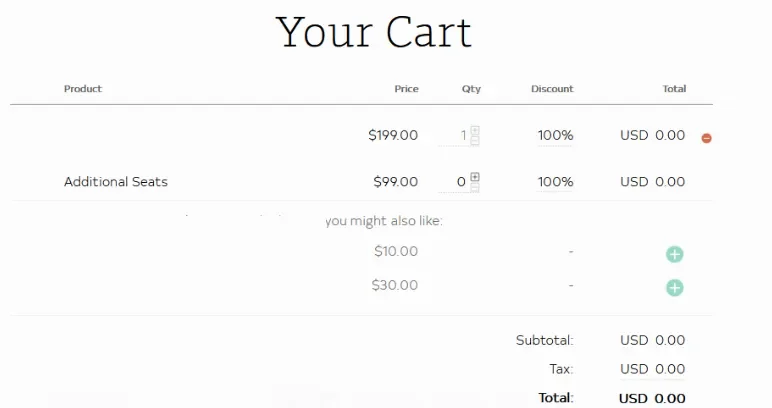
One of the copied coupon codes was entered at checkout and produced a discount on the product. The researcher then tried each and every coupon code, and one of them offered a 100% discount. Applying that code changed the price to 000.00 for the Pro product, so it could be purchased free of cost.
Root cause
The report does not describe the server-side code, so the exact cause is not confirmed. A traversal sequence in the value landed on another subdomain, which returned sensitive information in JSON format. The response includes coupon codes, an id and the clients who received personalised discounts, so the endpoint is over-exposing data rather than returning only what the purchasing flow needs. One of the exposed coupon codes was applied at checkout and changed the price. The report does not describe the server-side code, so the exact validation that was missing is likely rather than confirmed.
Impact
The exposed response contained the product's distinct coupon codes, an id, and the clients who received personalised discounts. With a 100% coupon among them, the Pro product can be bought free of cost.
Fix
Based on the finding, the base value should be validated against an allowlist of expected hosts and the path normalised before the request is built, and the cart list endpoint should return only the fields the purchasing flow needs, keeping coupon codes and client discount data out of responses to users who should not see them.
Variants to test
- Send traversal sequences such as
/../../../../../../in any parameter that takes a URL (redirect targets,base,next, return URLs) and watch for responses from a different host or subdomain. A positive result is a response whose body comes from an internal or sibling host rather than the expected one. - Request cart, order and list endpoints with an empty or manipulated
idand inspect the JSON for fields the UI never shows, such as coupon codes, internal ids or client identifiers. A positive result is any field beyond what the page renders. - Take any coupon code found in a response and apply it at checkout. A positive result is a price change, especially a drop to zero.
- Compare the fields returned by the API with the fields the front end displays, looking for over-exposure in list endpoints. A positive result is personal or discount data returned to a user who should not receive it.
For reporting the vulnerability the researcher was awarded $500 and received appreciation from the client.
What happened, in plain words
A security researcher tested a private bug bounty program, which is a company that pays people to look for weaknesses in its systems. Throughout the write-up the company is called Redact.com. The application sells a handful of products that people use to organise their documents. The researcher focused on one ordinary feature: buying a product. You pick a product, put it in a cart (the online basket you fill before paying), and then check out, where you can optionally type in a coupon code to get money off.
The weakness found belongs to a family the report calls API3: Excessive Data Exposure. An API is the part of a website that quietly exchanges data with the browser behind the scenes: when a page shows you a list of items, it is usually the API that sends that list, in a compact text format called JSON. Excessive data exposure means the API sends back more information than the page actually needs. The report describes it as sensitive data being exposed to an unauthorised user or application, including things like passwords, credit card numbers, social security numbers and other personal information. That can happen when an application is not properly configured to limit access to sensitive data, or when it does not properly encrypt the data before it is stored or transmitted, which lets malicious actors reach data that should be kept private. A simple comparison: it is like a shop assistant who, when you ask what is in stock, hands you the whole stockroom inventory including the list of secret staff discount codes, instead of just the item names.
In this case the over-shared data included the product's coupon codes, an internal id (a unique identifier the system uses to refer to a record), and the clients who had received personalised discounts. One of those coupon codes gave a 100% discount, so the researcher could buy the Pro product for nothing. The company paid a $500 bounty for the report.
Setting the scene
The program had a medium scope. Scope is the list of systems a researcher is allowed to test; anything outside it is off limits. The researcher started with subdomain enumeration, which means finding out which subdomains exist under the main domain. A subdomain is a name that sits in front of the main domain, like shop.example.com next to example.com; companies often run many of them for different services. Only a few of the discovered subdomains were in scope, and the rest belonged to third-party domains, meaning other companies, so they were left alone.
The main tool used was Burp Suite. Burp is a program that sits between your browser and the website and lets you pause, read and change every request before it is sent. A request is simply the message your browser sends to a server when you click something or load a page; the server answers with a response. Think of Burp as a transparent mail sorting office where you can open every letter, read it, rewrite it and put it back in the post.
No account details, roles or software versions are given in the report.
Finding it
The researcher walked through each functionality of the main application to understand how it works, the way you would click around a new site to learn what each button does. Then the focus narrowed to the purchasing flow. Products were added to the cart with Burp intercepting the requests, and each request's response was inspected. Nothing interesting turned up on the first pass, so that day ended without a result.
The next day, going over the same scenario again, one of the add-to-cart requests stood out because of two parameters. A parameter is a named value attached to a request, like a label on a form field: the name tells the server what the value is for. One parameter was named base:
base=https://www.redact.com
This line says: the parameter called base carries the value https://www.redact.com, which is a full web address. The parameter is named base and carries a full web address.
The other parameter was named next, sitting in the URL:
next=https://www.redact.com/cart?sku=0000000
Here the parameter next carries another full web address, this time pointing at the cart page with a sku value of 0000000. A URL is the address you see in your browser's address bar. The part after the question mark is the query string, a list of parameters glued onto the address; sku is a stock keeping unit, a code that identifies a particular product. The parameter is named next and carries a full web address pointing at the cart page.
The researcher started manipulating these parameters one after another. The reasoning is simple: whenever a website accepts an address from you and then uses it, you should ask what happens if you give it a strange address.
Exploitation
Step 1: Traversal in the base parameter
Sending the payload /../../../../../../ through the base parameter unlocked it via simple directory traversal. A payload is the deliberately crafted value you send to test a system. Directory traversal is a trick where the sequence ../ is used to climb up out of the folder you are supposed to be in. On a computer, .. means the folder above the current one, so repeating it walks upwards through the folder structure. A comparison: if a librarian is told to fetch a book from shelf 3 and you instead say "go up, up, up, up, up, up", they may end up in a room you were never meant to enter.
The traversal landed on another subdomain, which returned sensitive information in JSON format:
https://api.redact.com/numericalvalue/cart/list.ext?id=
Reading this address piece by piece: https:// is the secure web protocol; api.redact.com is a subdomain whose name suggests it is the API server, the machine that serves data rather than web pages; /numericalvalue/cart/list.ext is the path to a particular endpoint, where an endpoint is one specific address on a server that performs one specific job; and ?id= is a query string with a parameter named id whose value is left empty. The name of the path suggests it lists carts. The query string has a parameter named id whose value is left empty.
Step 2: Reading the exposed data
Inspecting the response showed excessive data: the product's distinct coupon codes, an id, and the clients who received personalised discounts were all exposed. In other words, the list endpoint did not return only what the purchasing flow needed. It returned coupon codes, an id and the clients who received personalised discounts. This is the heart of the finding: the data was not stolen by breaking a password, it was simply handed over because the endpoint was too generous.
Step 3: Applying a coupon
One of the copied coupon codes was entered at checkout and produced a discount on the product. The researcher then tried each and every coupon code, and one of them offered a 100% discount. Applying that code changed the price to 000.00 for the Pro product, so it could be purchased free of cost. The step matters because it turns a data leak into a real financial effect: reading the codes was the disclosure, and using one was the price manipulation.
Root cause
The report does not describe the server-side code, so the exact cause is not confirmed. An allowlist is a list of values that are explicitly permitted, with everything else refused; normalising means cleaning a value up into a standard form before using it, so that tricks like ../ cannot survive. A traversal sequence in the value landed on another subdomain, which returned sensitive information in JSON format. The response includes coupon codes, an id and the clients who received personalised discounts, so the endpoint is over-exposing data rather than returning only what the purchasing flow needs. One of the exposed coupon codes was applied at checkout and changed the price. The report does not describe the server-side code, so the exact validation that was missing is likely rather than confirmed.
Impact
The exposed response contained the product's distinct coupon codes, an id, and the clients who received personalised discounts. With a 100% coupon among them, the Pro product can be bought free of cost. Authentication means proving who you are, usually by logging in; if an endpoint answers without it, anyone who can reach the address can read the data.
Fix
Based on the finding, the base value should be validated against an allowlist of expected hosts and the path normalised before the request is built, and the cart list endpoint should return only the fields the purchasing flow needs, keeping coupon codes and client discount data out of responses to users who should not see them. In everyday terms: check the address against a short list of approved destinations before fetching it, and only hand out the information the page actually shows.
Variants to test
- Send traversal sequences such as
/../../../../../../in any parameter that takes a URL (redirect targets,base,next, return URLs) and watch for responses from a different host or subdomain. A positive result is a response whose body comes from an internal or sibling host rather than the expected one. - Request cart, order and list endpoints with an empty or manipulated
idand inspect the JSON for fields the UI never shows, such as coupon codes, internal ids or client identifiers. A positive result is any field beyond what the page renders. - Take any coupon code found in a response and apply it at checkout. A positive result is a price change, especially a drop to zero.
- Compare the fields returned by the API with the fields the front end displays, looking for over-exposure in list endpoints. A positive result is personal or discount data returned to a user who should not receive it.
For reporting the vulnerability the researcher was awarded $500 and received appreciation from the client.
Glossary
- API: the part of a website that exchanges data with the browser behind the scenes, usually in JSON rather than as a web page.
- API3: Excessive Data Exposure: the name the report gives to the class of issue where an API returns more data than the page needs, including sensitive fields.
- Allowlist: a list of values that are explicitly permitted, with everything else refused.
- Authentication: proving who you are, usually by logging in.
- Base parameter: the request parameter named
base, which the application uses as a starting address when building another address. - Bounty: the money a company pays a researcher for reporting a valid vulnerability.
- Burp Suite: a tool that sits between the browser and the website so requests and responses can be paused, read and changed.
- Coupon code: a short code entered at checkout that reduces the price.
- Directory traversal: a trick using
../sequences to climb out of the intended folder or path and reach somewhere else. - Endpoint: one specific address on a server that performs one specific job.
- Excessive data exposure: see API3: Excessive Data Exposure.
- id: a unique identifier the system uses to refer to a record.
- JSON: a compact text format used to send structured data between a server and a browser.
- Next parameter: the request parameter named
next, which the application uses to decide where to send you after an action. - Normalising: cleaning a value into a standard form before using it, so tricks like
../cannot survive. - Parameter: a named value attached to a request, like a label on a form field.
- Payload: the deliberately crafted value you send to test a system.
- Private program: a bug bounty program that only invited researchers may test.
- Query string: the part of a URL after the question mark, holding parameters.
- Request: the message your browser sends to a server when you load a page or click something.
- Response: the server's answer to a request.
- Scope: the list of systems a researcher is allowed to test.
- sku: stock keeping unit, a code that identifies a particular product.
- Subdomain: a name that sits in front of the main domain, such as
api.example.comnext toexample.com. - Subdomain enumeration: finding out which subdomains exist under a main domain.
- Third-party domain: a domain owned by another company, outside the program's scope.
- URL: the address you see in your browser's address bar.
- Vulnerability: a weakness in a system that can be used to make it behave in a way its owners did not intend.



