How I Earned My First $$ Bounty from Google — And What I Learned
A Google-hosted cloud storage bucket for a public-sharing feature was configured with an IAM policy that granted allUsers both read and list permissions, when only read was needed. An attacker could enumerate and download every object in the bucket without authentication, exposing user content and metadata at scale.

Bug Bounty
The full write-up lives on its author's site
It belongs to its author, so we link to it rather than copy it. The other two tabs are our own rewrites, checked against it.
Context
This is an account of a security misconfiguration found in Google-hosted cloud storage that backed a public-sharing feature. The feature itself is ordinary: a user creates content on a Google product, exports it, generates a link, and anyone holding that link can fetch the exported file. The researcher's question was narrow: which permissions does that feature actually need, and which permissions had actually been granted to the storage backend?
The answer was that the bucket's IAM policy granted allUsers a role bundling two permissions, only one of which the feature used. The extra permission turned a link-based sharing design into a fully enumerable public index.
Setup
The write-up does not describe any accounts, roles, tooling or versions used during testing. The only precondition that matters is stated plainly: the bucket was configured so that allUsers held a role, and the storage API could be queried without authentication. All three steps below were performed unauthenticated.
Finding it
The researcher was doing routine research into how cloud platforms configure storage access for public-facing features, and identified a Google-hosted service with a public-sharing feature. The reasoning that led to the finding was a comparison between intended and actual permissions:
- The sharing feature only requires
read specific objects by direct reference. If you have a share link, you can fetch the file it points to. That is the intended behaviour. - The bucket's IAM policy, however, granted
allUsersa broader role that bundled two permissions:read object, to read a specific file (needed).list bucket, to enumerate all objects in the entire bucket (not needed).
The sharing feature never uses the second permission, but it was granted anyway. That gap between what the feature needs and what the policy allows is what the researcher went on to confirm.
Exploitation
Step 1: List the bucket index
The researcher queried the storage API's list endpoint with no authentication:
GET https://storage.googleapis.com/[bucket-name]/
The response was a complete index of thousands of objects, including direct download links, creation dates and file sizes. No credentials, no share link and no prior knowledge of any object name were required.
Step 2: Download arbitrary objects
Each object in the listing came with a direct mediaLink. Any object could then be fetched by requesting it:
GET https://storage.googleapis.com/download/[object-path]
Again, no authentication was required, and the researcher observed no rate limiting.
Step 3: Verify scale
The researcher paginated through the full listing using the nextPageToken field. The bucket contained thousands of user-generated objects spanning years of data, all enumerable, all downloadable and all reachable without authentication.
Root cause
The root cause is permission creep in the bucket's IAM policy. Predefined IAM roles bundle multiple permissions for convenience, and the role granted here included both read and list, while only read was needed. Granting a role for one permission brought along another that the feature never used.
The vulnerability was not in application code. It was in the access control policy: a feature designed around point access via unguessable share links became a full public index. The researcher's framing of the distinction is the clearest way to state it: get permission is intentional, list permission is not. Nothing in the design stopped the listing from being public, because the listing was authorised by the same policy that authorised reads.
Impact
The researcher describes three consequences.
- Bulk extraction of all user content. An attacker could automatically download every object ever created on the platform, rather than only the content they held a link to: thousands of files spanning years of data, grabbed at once.
- Unintended information disclosure. Object metadata and user-supplied labels are stored alongside each file. During testing the researcher found multiple instances where users had included personal information (names, IDs, email addresses and similar) in their object metadata, information they clearly never intended to be publicly discoverable. They believed they were sharing a private link; the enumeration exposed them at scale anyway.
- No safeguards. There was no rate limiting or CAPTCHA to stop automated bulk extraction, so pulling everything at scale was trivially easy.
These impacts apply to any object in the bucket, not only to objects whose owners had shared a link, and they require no authentication of any kind.
Reporting, rejection and rebuttal
The report was filed on Google's Bug Hunters platform and laid out:
- clear reproduction URLs;
- an explanation of why this was a real security gap, not just "it's public";
- the technical distinction between
getpermission (intentional) andlistpermission (unintended); - the impact: mass model extraction plus incidental PII exposure.
The first response was a rejection, auto-classified as "Intended Behaviour". The reasoning given was that public buckets for sharing features are standard, and that it is the customer's job to configure them correctly.
The researcher pushed back with a more precise framing:
- the service is not a third-party customer's GCP project, it is Google's own product infrastructure;
- the shared responsibility model does not apply when Google owns and operates the bucket itself;
- the issue is not that reads are public (they should be, for sharing), it is that listing the entire bucket index is public (it should not be).
The report was re-opened, formally classified as a bug, assigned to the engineering team, confirmed fixed, and a reward was approved.
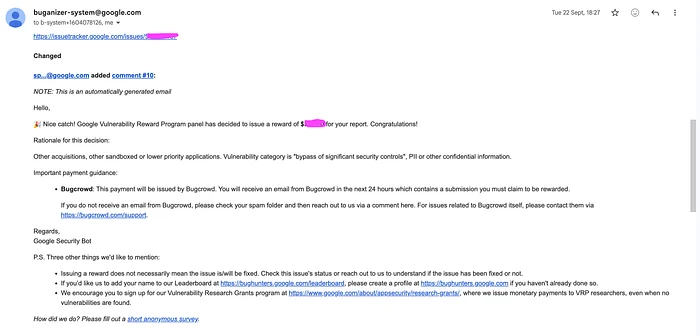
The image sits at the point in the story where the reward was approved, after the rejection and the rebuttal.
Fix
The lesson drawn was to replace the overly broad role with one that grants only read, with no list. Cloud platforms typically offer both bundled roles, for convenience, and granular roles, for precision; this case needed precision. The timeline records the fix status as resolved.
The broader lesson for teams building cloud products is to audit what permissions applications actually need against what has been granted, and to test public endpoints as an outsider would, since that is sometimes the only way to see what is really exposed.
Variants to test
The same pattern generalises to any storage backend behind a sharing feature. Concrete things to try, and what a positive result looks like:
- Anonymous bucket listing. Request the list endpoint of a bucket that backs a share-link feature without credentials. A positive result is a listing of objects you were never given links to.
- Compare read against list. Confirm that a single object can be fetched by direct reference (expected) and then check separately whether the bucket can be enumerated (not expected). The second succeeding while the first is intended is the finding.
- Check
allUsersandallAuthenticatedUsersbindings. Look for roles that bundlelistwithreadon buckets whose feature only needs point access. A positive result is a role that grants enumeration where the product only needs object reads. - Paginate the listing. Follow
nextPageTokento establish the true scale of what is exposed. A positive result is a listing that continues well beyond a handful of objects, especially objects spanning a long period. - Inspect object metadata. Check whether user-supplied metadata and labels are returned in listings. A positive result is personal information appearing in metadata for objects whose owners expected link-only sharing.
- Test for rate limiting. Attempt automated bulk retrieval and observe whether throttling or a challenge appears. A positive result is sustained unauthenticated retrieval with no rate limiting.
- Check ownership of the bucket. When a report is rejected as customer misconfiguration, establish whether the bucket belongs to the platform itself or to a third-party customer. A positive result is first-party infrastructure, which removes the shared responsibility defence.
What happened, in plain words
A security researcher found a mistake in how Google had set up one of its own cloud storage areas. The product had a normal sharing feature: you make something, you export it, you get a link, and anyone with that link can open the file. That part worked as intended. The problem was that the storage area behind the feature was also set up to let anyone, without logging in, ask for a complete list of every file inside it. So a person who was only ever meant to open one file they had a link to could instead see the names and download links of thousands of files, going back years.
The researcher reported it. Google's system rejected the report automatically, saying the behaviour was intended. The researcher wrote back with a sharper explanation of why it was not intended, and the report was reopened, classified as a real bug, fixed, and paid.
This article walks through the whole story slowly, explaining each idea as it appears. You only need to be comfortable using a browser.
The feature and the question
The researcher was looking at how cloud platforms set up storage for features that are meant to be public. They found a Google-hosted service with a public-sharing feature. The feature is simple and familiar: a user creates content, exports it, generates a link, and shares that link with anyone.
A useful comparison is a hotel. Normally, if you are given a room key, you can open your own room. You cannot walk up to the front desk and ask for a printed list of every guest and every room number. The key gives you one door; it does not give you the building's directory.
The researcher asked a narrow question: which permissions does this sharing feature actually need, and which permissions had actually been granted to the storage behind it? Those are two different things, and the gap between them is where security bugs often live.
Some words you will need
Before going further, a few terms, explained from zero.
Cloud storage is disk space rented from a big company and reached over the internet. You do not own the physical hard drive; you store files in it remotely. Google's cloud storage is one example.
A bucket is the container inside cloud storage. Think of it as a folder at the top level. Files (called objects) live inside a bucket.
An API is the way one piece of software asks another piece of software to do something. A useful comparison is a restaurant menu: you do not walk into the kitchen, you pick an item from the menu and the kitchen prepares it. The API is the menu of requests a service accepts, and the response is the dish that comes back. When you type a web address into a browser, the browser is making a request to a server; that request and its answer travel over a set of rules called HTTP.
Authentication means proving who you are, like showing a passport at a border. Unauthenticated means no proof of identity was presented at all: the request was made as a complete stranger.
A permission is an allowance to do one specific thing. IAM stands for Identity and Access Management: the system that decides who is allowed to do what. An IAM policy is the written set of those decisions attached to a resource such as a bucket.
A role is a bundle of permissions given a name, so you can grant several at once instead of one by one. allUsers is a special name meaning literally everyone on the internet, logged in or not.
Two permissions matter here. read object means you may open one specific file if you know which file it is. list bucket means you may ask the bucket to tell you the names of everything inside it. The first is like being able to open a door you have the key to. The second is like being handed the building's full directory.
The vulnerability: too much permission
The researcher tested the storage backend and found the bucket had been set up with overly permissive IAM policies. In plain words: it allowed more than the feature needed.
The sharing feature only requires one thing: read specific objects by direct reference. If you have a share link, you can fetch the file it points to. That is the intended behaviour, and it is fine.
But the bucket's IAM policy granted allUsers a broader role that bundled two permissions together:
read object, to read a specific file (needed).list bucket, to enumerate all objects in the entire bucket (not needed).
The second permission should not have been there. The sharing feature never uses it. But it was granted anyway, because it came attached to the same role as the first.
With the list permission, the researcher could query the storage API directly and retrieve a complete index of every object ever stored in that bucket. No authentication was needed, no link was needed, and no prior knowledge of any object name was needed.
The researcher's own comparison is worth keeping: it is like leaving the front door locked but the complete guest list visible outside. The sharing feature was intended only for people with a key, but the entire directory was indexable without one.
How it was confirmed
Three steps, all performed without logging in.
Step 1: List the bucket index
The researcher asked the storage API for the bucket's contents, with no credentials at all:
GET https://storage.googleapis.com/[bucket-name]/
Line by line: GET is the HTTP method that means "give me this thing". https://storage.googleapis.com/ is the address of Google's storage service. [bucket-name] is a placeholder for the name of the specific bucket, which the write-up does not disclose. The trailing slash means the request is aimed at the bucket itself rather than at one file inside it.
This step was taken because the researcher wanted to test whether the list permission was really open to the public. If the bucket had been set up correctly, this request would have been refused for a stranger. Instead, the response was a complete index of thousands of objects, including direct download links, creation dates and file sizes. No credentials, no share link and no prior knowledge of any object name were required.
Step 2: Download arbitrary objects
Each object in that listing came with a direct mediaLink, which is simply a web address that points straight at the file. Any object could then be fetched by requesting it:
GET https://storage.googleapis.com/download/[object-path]
Line by line: again GET asks for a thing. https://storage.googleapis.com/download/ is the download route of the storage service. [object-path] is a placeholder for the location of one particular file, which the write-up does not disclose. The researcher took these paths from the listing in step 1.
This step was taken to prove that the listing was not just a harmless list of names: the files themselves could be pulled down. Again, no authentication was required, and the researcher observed no rate limiting. Rate limiting is a cap on how many requests one source may make in a period, like a shop limiting how many items one customer can buy at once; without it, a script can fetch everything quickly.
Step 3: Verify scale
The researcher paged through the full listing using the nextPageToken field. A useful comparison is a long list of search results split across pages: the site gives you the first page and a marker telling it where to continue. nextPageToken is that marker. By following it, the researcher could keep asking for the next chunk of the listing until there were no more chunks.
This step was taken to measure how much was exposed, not just whether something was. The bucket contained thousands of user-generated objects spanning years of data, all enumerable, all downloadable and all reachable without authentication.
The real impact
The researcher describes three consequences.
- Bulk extraction of all user content. An attacker could automatically download every object ever created on the platform, rather than only the content they held a link to: thousands of files spanning years of data, grabbed at once. The word "automatically" matters: a short script could loop over the listing and save each file, with no human clicking anything.
- Unintended information disclosure. Object metadata and user-supplied labels are stored alongside each file. Metadata is data about the file rather than the file's contents, such as a title or a note the user attached. During testing the researcher found multiple instances where users had included personal information (names, IDs, email addresses and similar) in their object metadata, information they clearly never intended to be publicly discoverable. They believed they were sharing a private link; the enumeration exposed them at scale anyway. PII, short for personally identifiable information, is the general name for data that can point to a real person.
- No safeguards. There was no rate limiting or CAPTCHA to stop automated bulk extraction, so pulling everything at scale was trivially easy. A CAPTCHA is the little puzzle that asks you to prove you are human; its absence means a program can keep going without interruption.
These impacts apply to any object in the bucket, not only to objects whose owners had shared a link, and they require no authentication of any kind.
Reporting, rejection and rebuttal
The researcher filed a report on Google's Bug Hunters platform. A bug bounty or VRP (Vulnerability Reward Program) is a scheme where a company invites outsiders to report security problems and pays for good ones. The report laid out:
- clear reproduction URLs, meaning the exact addresses someone else can open to see the problem for themselves;
- an explanation of why this was a real security gap, not just "it's public";
- the technical distinction between
getpermission (intentional) andlistpermission (unintended); - the impact: mass model extraction plus incidental PII exposure.
The first response was a rejection, auto-classified as "Intended Behaviour". "Auto-classified" means a system, not a person, made the call. The reasoning given was that public buckets for sharing features are standard, and that it is the customer's job to configure them correctly. That reasoning comes from the shared responsibility model: the idea that a cloud provider secures the underlying platform while the customer secures what they put on it.
The researcher pushed back with a more precise framing:
- the service is not a third-party customer's GCP project, it is Google's own product infrastructure;
- the shared responsibility model does not apply when Google owns and operates the bucket itself;
- the issue is not that reads are public (they should be, for sharing), it is that listing the entire bucket index is public (it should not be).
The report was re-opened, formally classified as a bug, assigned to the engineering team, confirmed fixed, and a reward was approved.
The image sits at the point in the story where the reward was approved, after the rejection and the rebuttal.
The fix and the lesson
The lesson drawn was to replace the overly broad role with one that grants only read, with no list. Cloud platforms typically offer both bundled roles, for convenience, and granular roles, for precision; this case needed precision. The timeline records the fix status as resolved.
The root cause is what the researcher calls permission creep: the policy ends up allowing more than the feature needed. Predefined roles bundle several permissions for convenience, and the role granted here included both read and list, while only read was needed. Granting a role for one permission brought along another that the feature never used.
The vulnerability was not in application code. It was in the access control policy: a feature designed around point access via unguessable share links became a full public index. The researcher's framing of the distinction is the clearest way to state it: get permission is intentional, list permission is not. Nothing in the design stopped the listing from being public, because the listing was authorised by the same policy that authorised reads.
The broader lesson for teams building cloud products is to audit what permissions applications actually need against what has been granted, and to test public endpoints as an outsider would, since that is sometimes the only way to see what is really exposed.
Variants to test
The same pattern generalises to any storage backend behind a sharing feature. Concrete things to try, and what a positive result looks like:
- Anonymous bucket listing. Request the list endpoint of a bucket that backs a share-link feature without credentials. A positive result is a listing of objects you were never given links to.
- Compare read against list. Confirm that a single object can be fetched by direct reference (expected) and then check separately whether the bucket can be enumerated (not expected). The second succeeding while the first is intended is the finding.
- Check
allUsersandallAuthenticatedUsersbindings. Look for roles that bundlelistwithreadon buckets whose feature only needs point access. A positive result is a role that grants enumeration where the product only needs object reads. - Paginate the listing. Follow
nextPageTokento establish the true scale of what is exposed. A positive result is a listing that continues well beyond a handful of objects, especially objects spanning a long period. - Inspect object metadata. Check whether user-supplied metadata and labels are returned in listings. A positive result is personal information appearing in metadata for objects whose owners expected link-only sharing.
- Test for rate limiting. Attempt automated bulk retrieval and observe whether throttling or a challenge appears. A positive result is sustained unauthenticated retrieval with no rate limiting.
- Check ownership of the bucket. When a report is rejected as customer misconfiguration, establish whether the bucket belongs to the platform itself or to a third-party customer. A positive result is first-party infrastructure, which removes the shared responsibility defence.
Glossary
- API: the set of requests one piece of software accepts from another, like a menu you order from.
- Authentication: proving who you are, such as logging in.
- Unauthenticated: done without proving identity at all.
- Bucket: the top-level container in cloud storage that holds files.
- Object: one file stored inside a bucket.
- Cloud storage: rented disk space reached over the internet.
- HTTP: the rules browsers and servers use to exchange requests and responses.
- GET: the HTTP method that asks a server to return something.
- IAM: Identity and Access Management, the system that decides who may do what.
- IAM policy: the written set of access decisions attached to a resource.
- Role: a named bundle of permissions granted together.
- Permission: an allowance to perform one specific action.
allUsers: a special name meaning everyone on the internet, logged in or not.allAuthenticatedUsers: a special name meaning everyone who is logged in to any account.read object: permission to open one specific file you know the name of.list bucket: permission to ask a bucket for the names of everything inside it.- Enumerate: to list items one by one, here the contents of a bucket.
mediaLink: a direct web address pointing at a stored file.nextPageToken: a marker returned with a partial listing that tells you how to request the next part.- Rate limiting: a cap on how many requests a source may make in a period.
- CAPTCHA: a puzzle meant to prove a human, not a program, is making the request.
- Metadata: data about a file, such as a title or note, rather than its contents.
- PII: personally identifiable information, data that can point to a real person.
- Permission creep: access gradually or accidentally allowing more than was intended.
- Shared responsibility model: the idea that a cloud provider secures the platform and the customer secures what they put on it.
- Bug bounty / VRP: a scheme where a company pays outsiders for reporting security problems.
- Responsible disclosure: reporting a vulnerability privately to the owner so it can be fixed before it is made public.
- First-party infrastructure: systems owned and run by the company itself, not by its customers.
- Endpoint: a specific address on a service that accepts a particular kind of request.
- Pagination: splitting a long list into pages you request one at a time.

