How I earned $$$$ through Stored XSS
A search field and several stored inputs in an AngularJS application evaluated user-supplied template expressions, allowing an attacker to run JavaScript in other users' browsers. The author found five endpoints where the payload was stored and later triggered, and reported them for a bounty.

The article is about a bug on a private program which I found. The bug reported was a stored xss through AngularJS CSTI.
The full write-up lives on its author's site
It belongs to its author, so we link to it rather than copy it. The other two tabs are our own rewrites, checked against it.
Context
This is a beginner's account of a stored cross-site scripting bug found through AngularJS client-side template injection (CSTI) on a private bug bounty program. The application was built from several different technologies and had many user roles and many functionalities. The report does not name the program, the product or the affected endpoints, and the author notes that no screenshots of the target can be shared because the program is private.
A search field accepted input through a POST request rather than a GET parameter, and it evaluated AngularJS expressions in the input, but the CSRF token blocked the reflected route. Other parts of the application were not built on AngularJS 1.5.9, which is why the same payload behaved differently depending on where it was entered.
Setup
The author describes themselves as a beginner and says the article may not be useful to experts. The only tool named is Autorize, used to check for IDOR and access control problems. The application had multiple user roles and many functionalities, and the author first enumerated all of them to understand what each role was supposed to be able to access. No account details, versions of the target software or specific roles are given.
The payload fired only once input was stored in one place and triggered in another, a second-order pattern.
Finding it
The author's stated approach was to go as deep as possible: test every button, every functionality and everything accessible. After mapping the application, they ran Autorize against it to look for IDOR and access control issues but found none. They then moved to XSS testing.
Because part of the application used AngularJS, they tested every available input with the CSTI payload:
In an AngularJS context this expression is evaluated by the client and renders as 49. At first the payload did not reflect as intended. Further testing showed that the application was made of different parts and that some of them were not based on AngularJS 1.5.9, so only the AngularJS-backed parts evaluated the expression.
A search field did trigger the payload and returned 49.

The screenshot is placed where the author describes the search field returning 49.
The search was sent as a POST request, so there was no GET parameter to edit and share. The author considered a POST-based reflected XSS but the request carried a CSRF token, and the CSRF bypasses they tried did not work. That left stored inputs as the way forward.
They began collecting every place where input could be stored and tested each one. The stored values did not reflect at first, but after a few steps, in a second-order pattern where input is stored in one place and triggered in another, the payload fired.

The screenshot sits at the point where the author commits to testing every storage location.
Exploitation
Step 1: confirm CSTI in the search field
The payload {{7*7}} was submitted through the search field and the response evaluated it to 49. This confirmed that the field's value was processed by AngularJS on the client.
Step 2: deal with the POST and CSRF token
The search used a POST request, so there was no URL parameter to craft. The request also carried a CSRF token, and the bypasses the author tried did not work. The reflected route was therefore set aside.
Step 3: find stored inputs and test for second-order execution
The author listed all the places where data could be stored and tested them one by one. The values did not execute immediately. After a few steps, where the stored input was rendered in a different place from where it was entered, the payload fired.
Step 4: change the payload to read cookies
The payload was edited to:
{constructor.constructor(alert(1)}
The payload was edited to this form, then changed to alert the cookie value. The author then changed it to alert the cookie value. The cookies had the Secure and HttpOnly flags set, but there was a duplicate of all these cookies without those flags set.
Step 5: find every endpoint that triggers it
The author found 5 places where the payload was triggered and reported all of them. All of them were reported for maximum coverage.
Step 6: submit and wait
The reports were submitted late at night. The author did not wait for the triage round to finish and went to sleep, unsure whether the reports would be accepted and doubting their quality. They woke repeatedly to check the status on their phone.
Around 5 A.M. they checked their mail.
The screenshot is placed where the author describes the acceptance email.
4 of the 5 reports completed and won the qr round, each paying a bounty. The author shared the news first with their mother.
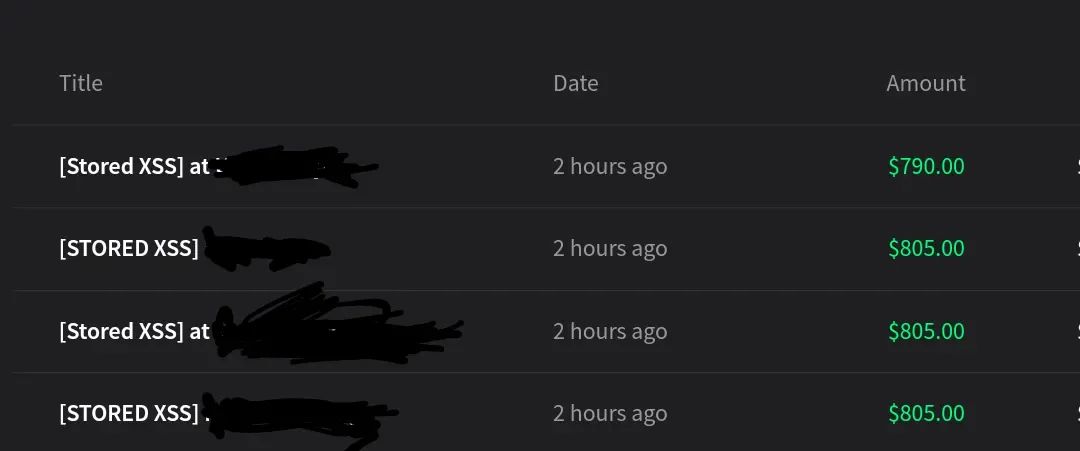
The screenshot is placed where the author describes sharing the result with their mother.
Timeline
| Stage | Time |
|---|---|
| Hunt | 6pm to 8pm |
| Report | 8pm to 9pm |
| Accepted | 5 A.M. |

The final image closes the article.
Root cause
The application evaluated user-controlled input as an AngularJS expression. Where the input was stored and later rendered in an AngularJS context, the expression ran in the browser of whoever viewed it. The mixed technology stack meant only some parts of the application were AngularJS 1.5.9, so the same payload worked in some views and not others. The CSRF token on the search POST, and the bypasses the author tried, did not work, so the stored, second-order path was pursued.
The impact of the script was widened by cookie handling: the Secure and HttpOnly flags were present on the main cookies, but duplicates of the same cookies existed without those flags, so client-side JavaScript could read them.
Impact
An attacker who can store input that is later rendered in an AngularJS context can execute JavaScript in the browser of any user who views that content. In this case the script could read the duplicate cookies that lacked the Secure and HttpOnly flags. The author does not describe which users or roles would view the stored content, or what the readable cookies granted. The bug was found on a private program and the affected endpoints are not disclosed.
Fix
The report does not say what the program changed. The general fix is to stop evaluating user-controlled input as an AngularJS expression, for example by not compiling stored content with AngularJS, by escaping or sanitising it before rendering, and by removing the duplicate cookies that lack the Secure and HttpOnly flags.
Variants to test
- Submit
{{7*7}}in every input of an application that uses AngularJS and look for49in the rendered page. A positive result shows the input reaches an AngularJS evaluation context. - When a reflected field is protected by a CSRF token, look for the same value stored and rendered elsewhere. A positive result is the payload firing after a save-and-view cycle rather than in the immediate response.
- Try the sandbox escape form
{constructor.constructor(alert(1)}where{{7*7}}evaluates. A positive result is an alert box, which shows arbitrary JavaScript execution rather than simple expression evaluation. - After confirming execution, read
document.cookieand compare it with the cookies set by the server. A positive result is a readable cookie that duplicates a flagged one. - Repeat the working payload in every other storage location and endpoint. A positive result is the same execution in each place, which increases the coverage of the report.
What happened, in plain words
A security researcher who describes themselves as a beginner found a bug on a private bug bounty program. A bug bounty program is an arrangement where a company invites outside people to look for security problems in its systems and pays them for reporting what they find. "Private" means you can only take part if you have been invited, and you are not allowed to talk publicly about the details.
The bug was a stored cross-site scripting (stored XSS) issue that came from AngularJS client-side template injection (CSTI). Both of those terms are explained below. The short version is: the application took text that a user typed, saved it, and later treated that text as a small program to run inside the browser of whoever looked at the page.
The application was built from several different technologies, had many kinds of user accounts (roles) and had many features. The report does not name the program, the product or the affected pages, and the author says they cannot share screenshots of the target because the program is private.
A search field accepted what you typed through a POST request rather than a GET parameter, and it evaluated AngularJS expressions inside the input, but the CSRF token blocked that route. Other parts of the application were not built on AngularJS 1.5.9, which is why the same payload behaved differently depending on where it was entered.
Setup
The author describes themselves as a beginner and says the article may not be useful to experts. The only tool named is Autorize, used to check for IDOR and access control problems. The application had multiple user roles and many functionalities, and the author first enumerated all of them to understand what each role was supposed to be able to access. No account details, versions of the target software or specific roles are given.
The payload fired only once input was stored in one place and triggered in another, a second-order pattern.
The ideas you need before reading on
- Browser: the program on your computer that shows web pages (Chrome, Firefox, Safari). It downloads a page and runs the code that comes with it.
- Server: the computer somewhere else that stores the website and answers the browser's requests.
- Request: a message the browser sends to the server. "Give me this page", "save this text", "search for this word".
- GET and POST: two kinds of request. A GET request usually puts its data in the address bar (the URL), so you can copy the link and send it to someone. A POST request puts its data in the body of the message, which is not visible in the address bar and is not part of a shareable link.
- Parameter: one named piece of data in a request, for example
search=hello. - Input: any place where a person can type something into a website: a search box, a comment box, a profile name field.
- JavaScript: the programming language that web pages run inside your browser. It is what makes pages interactive.
- XSS (cross-site scripting): a bug where an attacker manages to get their own JavaScript to run inside someone else's browser, on the real website. The browser trusts the site, so it trusts the script too.
- Reflected XSS: the script comes back in the immediate response to your own request. You type something, the server echoes it into the page, and it runs. It usually needs the victim to click a crafted link.
- Stored XSS: the script is saved by the application (in a comment, a profile, a saved search) and runs later, for anyone who views that saved content. No special link is needed.
- Second-order: a pattern where the input is saved in one place and used or shown in a completely different place. You type in form A, and the effect appears on page B.
- Cookie: a small piece of text that a website asks your browser to keep and send back with every request. It is how a site remembers that you are logged in. If an attacker can read your cookies, they may be able to act as you.
- CSRF token: a random value that a website puts into forms and requests so that it can tell a genuine request from one forged by another site. It is like a cloakroom ticket: without the matching ticket, the request is refused.
- AngularJS: a JavaScript framework, a ready-made toolkit for building interactive web pages. One of its features is that it can evaluate small expressions written inside double curly braces, such as
{{7*7}}, and show the result on the page. - Template: the page with those little expressions in it. AngularJS fills in the blanks.
- CSTI (client-side template injection): when a user's input ends up being treated as part of that template, so the framework evaluates it as code instead of showing it as plain text. It is the difference between a form printing your name on a badge and a form obeying your name as an instruction.
- Payload: the specific piece of text an attacker sends to try to trigger a bug.
- IDOR: a bug where changing an identifier in a request (for example an account number) lets you see someone else's data.
- Access control: the rules about who is allowed to do what. A broken access control bug means those rules can be bypassed.
- Enumerate: to list everything systematically, one by one, rather than guessing.
- Endpoint: one specific address or function of an application that accepts requests, for example the search feature or the profile save feature.
- Triage: the first stage of a bug bounty report, where the program's team checks whether the report is valid.
- Bounty: the money paid for a valid report.
Finding it
The author's stated approach was to go as deep as possible: test every button, every functionality and everything accessible. The reasoning is simple. You cannot find a bug in a feature you never opened, and a feature you have not understood is a feature whose odd behaviour you will not notice.
After mapping the application, they ran Autorize against it to look for IDOR and access control issues but found none. Autorize is a browser extension that replays your requests with different credentials to see whether the site lets one user reach another user's data. Nothing came back, so they moved to XSS testing.
Because part of the application used AngularJS, they tested every available input with the CSTI payload:
Line by line, in plain words:
{{opens an AngularJS expression. AngularJS treats everything between the braces as something to calculate, not as text to display.7*7is ordinary arithmetic: seven times seven.}}closes the expression.
So if a page shows 49 where you typed {{7*7}}, the page did not print your text. It calculated it. That is the proof that your input is being treated as code by AngularJS. It is like writing "2+2" on a form and having the clerk hand you back "4" instead of your note.
At first the payload did not reflect as intended. Further testing showed that the application was made of different parts and that some of them were not based on AngularJS 1.5.9, so only the AngularJS-backed parts evaluated the expression. This is common in large applications: different teams, different years, different toolkits, all glued together under one login.
A search field did trigger the payload and returned 49.
The screenshot is placed where the author describes the search field returning 49.
The search was sent as a POST request, so there was no GET parameter to edit and share. Think about the difference: with a GET search you could copy the address bar, paste it into a message, and the victim's click would run your payload. With a POST, the data is not in the address, so there is nothing to send.
The author considered a POST-based reflected XSS but the request carried a CSRF token, and the CSRF bypasses they tried did not work. The token is the cloakroom ticket described earlier: the server checks it before accepting the search, and without a valid one the request is rejected. That closed the reflected route.
That left stored inputs as the way forward. If the application saves your text and shows it later on a page that AngularJS processes, the payload runs when the page is viewed, and no crafted link is needed.
They began collecting every place where input could be stored and tested each one. The stored values did not reflect at first, but after a few steps, in a second-order pattern where input is stored in one place and triggered in another, the payload fired. In everyday terms: you write something on a form at the front desk, and it comes back to you printed on a noticeboard in another room.
The screenshot sits at the point where the author commits to testing every storage location.
Exploitation
Step 1: confirm CSTI in the search field
The payload {{7*7}} was submitted through the search field and the response evaluated it to 49. This confirmed that the field's value was processed by AngularJS on the client. "On the client" means inside your own browser, not on the server. The server sent the page, and the page's own JavaScript did the calculation.
Step 2: deal with the POST and CSRF token
The search used a POST request, so there was no URL parameter to craft. The request also carried a CSRF token, and the bypasses the author tried did not work. The reflected route was therefore set aside. The lesson is not that the bug was gone, only that this particular delivery method was blocked.
Step 3: find stored inputs and test for second-order execution
The author listed all the places where data could be stored and tested them one by one. The values did not execute immediately. After a few steps, where the stored input was rendered in a different place from where it was entered, the payload fired. This is the second-order pattern: the save happens in one feature, the display happens in another, and only the display is built with AngularJS.
Step 4: change the payload to read cookies
The payload was edited to:
{constructor.constructor(alert(1)}
Line by line, in plain words:
{opens the expression, the same idea as the double braces above.constructoris a property that every JavaScript object has. It points to the function that created the object.constructor.constructorwalks one step further and reaches JavaScript's built-inFunctionconstructor, the mechanism that turns text into a runnable function.alert(1)is a tiny piece of JavaScript that makes the browser pop up a box saying1.
The payload was edited to this form, then changed to alert the cookie value. "Sandbox" here means the restriction AngularJS puts around expressions so they cannot do dangerous things. "Arbitrary JavaScript" means any code the attacker wants, not just arithmetic. The alert(1) box is the proof: if it appears, the attacker's code is running.
The author then changed it to alert the cookie value. The application's cookies had the Secure and HttpOnly flags set, but there was a duplicate of all these cookies without those flags set, so the script could read them.
Two flags need explaining:
- Secure means the browser only sends that cookie over an encrypted (HTTPS) connection.
- HttpOnly means JavaScript on the page is not allowed to read that cookie. It is a direct defence against exactly this kind of bug.
So the main cookies were protected, but a second copy of each one existed without those protections. It is like a building with a locked safe in the office and an identical unlocked drawer in the corridor.
Step 5: find every endpoint that triggers it
The author found 5 places where the payload was triggered and reported all of them. All of them were reported for maximum coverage. Reporting every affected place matters because a fix applied to one page does not automatically fix the others.
Step 6: submit and wait
The reports were submitted late at night. The author did not wait for the triage round to finish and went to sleep, unsure whether the reports would be accepted and doubting their quality. They woke repeatedly to check the status on their phone.
Around 5 A.M. they checked their mail.
The screenshot is placed where the author describes the acceptance email.
4 of the 5 reports completed and won the qr round, each paying a bounty. The author shared the news first with their mother.
The screenshot is placed where the author describes sharing the result with their mother.
Timeline
| Stage | Time |
|---|---|
| Hunt | 6pm to 8pm |
| Report | 8pm to 9pm |
| Accepted | 5 A.M. |
The final image closes the article.
Root cause
The application evaluated user-controlled input as an AngularJS expression. Where the input was stored and later rendered in an AngularJS context, the expression ran in the browser of whoever viewed it. The mixed technology stack meant only some parts of the application were AngularJS 1.5.9, so the same payload worked in some views and not others. The CSRF token on the search POST, and the bypasses the author tried, did not work, so the stored, second-order path was pursued.
The impact of the script was widened by cookie handling: the Secure and HttpOnly flags were present on the main cookies, but duplicates of the same cookies existed without those flags, so client-side JavaScript could read them.
Impact
An attacker who can store input that is later rendered in an AngularJS context can execute JavaScript in the browser of any user who views that content. In this case the script could read the duplicate cookies that lacked the Secure and HttpOnly flags. The author does not describe which users or roles would view the stored content, or what the readable cookies granted. The bug was found on a private program and the affected endpoints are not disclosed.
Fix
The report does not say what the program changed. The general fix is to stop evaluating user-controlled input as an AngularJS expression, for example by not compiling stored content with AngularJS, by escaping or sanitising it before rendering, and by removing the duplicate cookies that lack the Secure and HttpOnly flags.
Variants to test
- Submit
{{7*7}}in every input of an application that uses AngularJS and look for49in the rendered page. A positive result shows the input reaches an AngularJS evaluation context. - When a reflected field is protected by a CSRF token, look for the same value stored and rendered elsewhere. A positive result is the payload firing after a save-and-view cycle rather than in the immediate response.
- Try the sandbox escape form
{constructor.constructor(alert(1)}where{{7*7}}evaluates. A positive result is an alert box, which shows arbitrary JavaScript execution rather than simple expression evaluation. - After confirming execution, read
document.cookieand compare it with the cookies set by the server. A positive result is a readable cookie that duplicates a flagged one. - Repeat the working payload in every other storage location and endpoint. A positive result is the same execution in each place, which increases the coverage of the report.
Glossary
- Access control: the rules about who is allowed to do what in an application.
- AngularJS: a JavaScript framework for building interactive web pages, which can evaluate expressions written inside double curly braces.
- Arbitrary JavaScript: any code an attacker chooses to run, not just a fixed calculation.
- Autorize: a browser extension that replays requests with different credentials to check for access control problems.
- Bounty: the money a bug bounty program pays for a valid report.
- Browser: the program on your computer that downloads and displays web pages and runs their JavaScript.
- Bug bounty program: an arrangement where a company invites outside researchers to find and report security problems in exchange for payment.
- Client: your own computer and browser, as opposed to the server.
- Cookie: a small piece of text a website asks your browser to store and send back with later requests, often used to keep you logged in.
- CSRF token: a random value placed in forms and requests so the server can tell a genuine request from a forged one.
- CSTI (client-side template injection): a bug where user input is treated as part of a page template and evaluated as code by a framework such as AngularJS.
- Endpoint: one specific address or function of an application that accepts requests.
- Enumerate: to list everything systematically, one by one.
- GET request: a request that usually carries its data in the URL, so the link can be copied and shared.
- HttpOnly: a cookie flag that stops JavaScript on the page from reading that cookie.
- IDOR: a bug where changing an identifier in a request lets you reach another user's data.
- Input: any place where a person can type something into a website.
- JavaScript: the programming language that web pages run inside the browser.
- Parameter: one named piece of data in a request.
- POST request: a request that carries its data in the message body, not in the URL.
- Private program: a bug bounty program you can only take part in if invited, with details that are not public.
- Reflected XSS: a bug where the attacker's script comes back in the immediate response to a request, usually requiring the victim to click a crafted link.
- Role: a kind of user account with a defined set of permissions, such as administrator or ordinary user.
- Sandbox (AngularJS): the restriction AngularJS places around expressions to stop them doing dangerous things.
- Second-order: a pattern where input is saved in one place and used or displayed in another.
- Secure: a cookie flag that makes the browser send the cookie only over an encrypted connection.
- Server: the remote computer that stores a website and answers the browser's requests.
- Stored XSS: a bug where the attacker's script is saved by the application and runs later for anyone who views that content.
- Template: a page containing placeholders that a framework fills in.
- XSS (cross-site scripting): a bug where an attacker gets their own JavaScript to run inside someone else's browser on a real website.




