How I Escalated from Operator to Admin on a Leading Travel Platform on Hackerone Via GraphQL Mutation
The GraphQL accountUpdate mutation checked that the caller's JWT held the supplier:admin role but did not verify that this admin role belonged to the supplierId being modified. An attacker who was admin of their own supplier and had a low-privilege role on a victim supplier could escalate their account to admin on the victim supplier.
 Published on medium.com
Bug Bounty Writeup
The full write-up lives on its author's site
It belongs to its author, so we link to it rather than copy it. The other two tabs are our own rewrites, checked against it.
Context
The target was the supplier portal of a leading global travel and booking platform, reached through its GraphQL endpoint at POST /graphql. Suppliers on this platform are separate organisations, and each supplier organisation has its own set of user accounts with roles such as Admin, Finance, Ticketing, Operator and Guide. The portal lets a supplier admin manage their team: inviting people, assigning roles, and updating user information through an accountUpdate GraphQL mutation. A single person can belong to more than one supplier, and the portal offers a multi-supplier selection prompt at login so the user can pick which organisation to work in.
The bug is a cross-supplier privilege escalation: a user who holds a low-privilege role on a target supplier, and who happens to be an admin on their own supplier, can turn that low-privilege membership into full ADMIN on the target supplier.
Setup
Two completely independent accounts were registered from scratch through the supplier registration flow:
- Attacker account: full ADMIN privileges on Supplier A (Attacker Company).
- Victim account: full ADMIN privileges on Supplier B (Victim Company).
The only tool named in the report is Burp Suite, used to intercept the update request and replay it in Repeater. No product versions are given.
The precondition for the attack is that the victim supplier has invited the attacker's email address and given it some low-privilege role. The report notes that no confirmation handshake was required for the invitation: the attacker only had to log out and log back in.
Finding it
While exploring the supplier portal's GraphQL endpoint, the researcher started analysing how user roles and permissions are managed across different supplier organisations. The interesting behaviour appeared after the accounts were linked.
From the victim's dashboard, the admin invited the attacker's email address and assigned a low-privilege role: Ticketing.
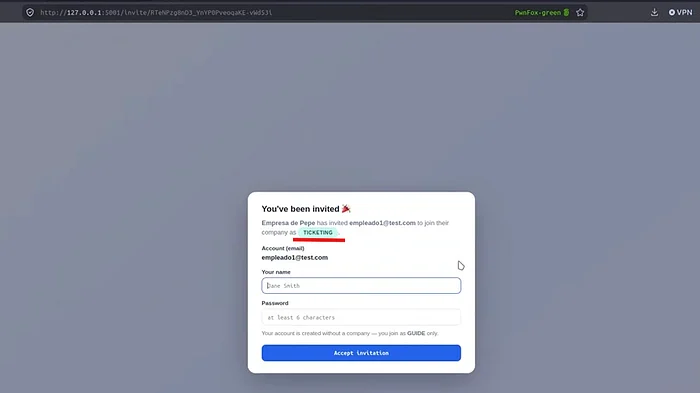
After the invitation, the attacker received a notification email. On logging back in, a multi-supplier selection prompt appeared, letting the user choose between Supplier A (where they were an Admin) and Supplier B (where they were just a Finance or Ticketing user).
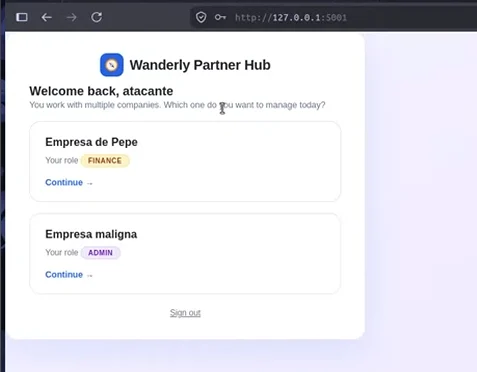
When logged into the victim's supplier profile (Empresa de Pepe), access was properly restricted as a FINANCE. When logged into the attacker's own company (Empresa maligna), the account had full ADMIN capabilities. That difference in context is what made the authorisation check worth probing.
Exploitation
Step 1: Capture the account update request
Working inside the attacker's own company (Empresa maligna), the researcher navigated to the account management section to modify user information:
- Triggered an update request in the UI.
- Without making any changes yet, intercepted the HTTP request with Burp Suite and sent it to Repeater.
Inspecting the GraphQL mutation (accountUpdate) revealed the gap: the backend authorisation layer checked whether the JWT contained the supplier:admin role claim, but it failed to verify whether that admin role actually corresponded to the specific supplierId being mutated in the request body.
Step 2: Swap in the admin JWT and retarget the mutation
In Burp Repeater, the intercepted request was modified by replacing the session JWT with the active JWT belonging to the attacker account, which held full ADMIN privileges on Empresa Maligna. The mutation payload was then pointed at the appropriate fields and role configuration as ADMIN.
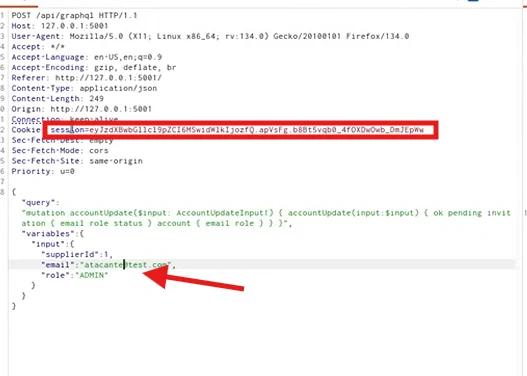
The report does not reproduce the raw request body, so the exact field names and values of the mutation are not shown here.
Step 3: Send the crafted request
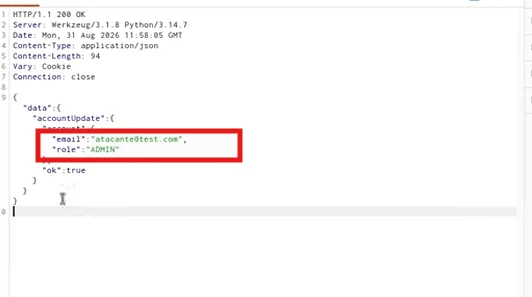
When the crafted request was sent using the attacker's admin JWT, the backend failed to validate whether that administrative session actually corresponded to the target supplier, and responded with a clean result.
Step 4: Confirm the escalation
To verify impact, the researcher logged out and logged back into the attacker account, selected the victim supplier ID (Empresa Pepe), and had complete ADMIN access to all administrative functionalities, bookings, financials, inventory, and sensitive traveller PII belonging to the victim company.

Root cause
The accountUpdate mutation checked the supplier:admin role claim inside the JWT but failed to verify whether that admin role corresponded to the supplierId in the request body. A session carrying the admin claim could name a different supplier in the body and have the mutation applied there.
The role claim check on the token was real but context-blind: it answered "is this user an admin somewhere?" rather than "is this user an admin of the supplier being modified?". Because the attacker legitimately held ADMIN on their own supplier, the claim check passed.
Impact
An attacker who is an admin on their own supplier and holds a minimal non-privileged role on a target supplier can:
- Elevate their own account to ADMIN on any target supplier.
- Gain full access to bookings, financial records, inventory, products, and reviews.
- Modify the target supplier's company details, terms and conditions, and privacy policies.
- Create, manage, or delete user accounts within the victim organisation.
The resulting ADMIN access included sensitive traveller PII belonging to the victim company. The attack requires the victim supplier to have granted the attacker's email address some role on their organisation, however low-privileged.
Fix
The engineering team deployed a patch on August 7, 2026, ensuring that the accountUpdate mutation derives the supplier directly from the authenticated session and ignores any external supplierId sent in the request body.
The report describes the proper fix as validating that the authenticated session's admin privileges directly match the target supplierId being modified.
IF user.role == "supplier:admin" THEN VERIFY user.supplier_id == input.supplierId
Timeline as reported:
| Date | Event |
|---|---|
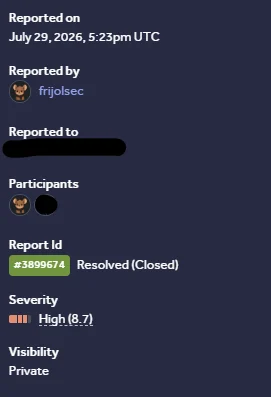
| July 29, 2026 | Report submitted and triaged. |
| July 30, 2026 | Multi-supplier login behaviour clarified and a video PoC provided. |
| August 7, 2026 | Patch deployed. |
| August 7, 2026 | Retested, fix confirmed, report marked as Resolved. |
Variants to test
- Other mutations that take a supplier or tenant identifier in the body. Enumerate mutations beyond
accountUpdate(user creation, role assignment, company profile updates) and replay each with an admin JWT from a different supplier while naming the victim's identifier. A positive result is a successful response and a visible change on the victim organisation. - Role claim without scope binding. Look for any authorisation check that tests a role claim (
supplier:admin,org:owner, and similar) without comparing it to the resource's owner. A positive result is an action succeeding on an object belonging to another organisation. - Multi-tenant membership confusion. Where a user can belong to several organisations, log in under one context and act on another, including after re-login and supplier switching. A positive result is data or functionality from the other organisation appearing under the wrong context.
- Invitation flows without a handshake. Accept an invitation with no confirmation step, then check whether the resulting low-privilege membership can be combined with privileges held elsewhere. A positive result is any cross-context action the low-privilege role should not permit.
- Identifier substitution in GraphQL variables. Where the server derives context from the session but also accepts an identifier in variables, send both and see which wins. A positive result is the body-supplied identifier taking effect over the session-derived one.
What happened, in plain words
A large travel and booking platform runs a portal where travel suppliers (hotels, tour operators, agencies and so on) manage their business. Each supplier is a separate organisation with its own team of users, and each user has a role: Admin, Finance, Ticketing, Operator or Guide. The portal is built on a GraphQL API, which is a way for the website's pages to ask the server for data and to send changes back.
The researcher found a flaw in how the portal decides whether you are allowed to change a user account. The server checked that the request's JWT carried the supplier:admin role claim, but never checked that this admin role corresponded to the supplier being changed. So a person who is an admin of their own supplier, and who has been given a low-privilege role such as Ticketing on a victim supplier, could edit accounts belonging to the victim and make themselves a full Admin there. That is called privilege escalation: turning a small amount of access into a much larger amount.
This article walks through the whole story from zero: what the portal does, what the pieces are (API, token, role, mutation), how the researcher set up two accounts, how the request was captured and changed, and how the platform fixed it.

The pieces you need to know first
Before the steps make sense, here are the ideas the report uses, explained as simply as possible.
- Supplier portal. A website where a travel company logs in to manage its team, its bookings, its money and its stock (inventory). Think of it as a shared office building: each company has its own floor, its own staff and its own filing cabinets.
- API. The counter where the website's pages hand requests to the server. You click a button, the page sends a message to the API, the API does the work and sends an answer back. It is like a restaurant: the menu page is what you see, the kitchen is the server, and the waiter carrying orders back and forth is the API.
- GraphQL. A style of API where every request names exactly what it wants, in a structured message. A request that changes something is called a mutation. The portal's GraphQL endpoint is at
POST /graphql, meaning requests are sent with the HTTP POST method to that path. - Endpoint. The address on the server that accepts a particular kind of request.
POST /graphqlis one endpoint that handles many different operations. - Role. A label attached to a user account that says what they may do. Admin can do everything; Finance sees money; Ticketing handles tickets; Operator and Guide are working roles.
- JWT (JSON Web Token). A signed piece of text that the server gives you when you log in, and that your browser sends back with every request so the server knows who you are. Think of it as a wristband at an event: it is stamped by the organisers, it says which areas you may enter, and you show it at every door. The report calls the role claim inside it
supplier:admin, which is the stamp that says "this person is an admin of a supplier". - Claim. A single statement inside a JWT, such as a role name or a user identifier.
supplierId. The identifier of a supplier organisation. Every supplier has one, and requests that act on a supplier name it.- Authorisation. Deciding whether a logged-in user is allowed to do the thing they are asking for. Authentication is who are you; authorisation is are you allowed.
- Privilege escalation. Gaining more power than you were given. Here it means going from a low role on the victim supplier to Admin on it.
- Cross-supplier (cross-tenant) escalation. The same idea across organisations: using rights in one company to act on another company.
- Burp Suite and Repeater. A tool that sits between your browser and the server so you can look at, pause and re-send requests by hand. Repeater is the part where you edit a request and send it again as many times as you like. Think of it as intercepting a letter, reading it, changing a word and posting it again.
- PII. Personally identifiable information: data that identifies a real person, such as traveller names and contact details.
Reconnaissance and setup
The researcher began by exploring the supplier portal's GraphQL endpoint (POST /graphql) and studying how user roles and permissions are managed across different supplier organisations. The goal of this stage is simply to understand the shape of the system: which operations exist, what they take as input, and what the server checks before acting.
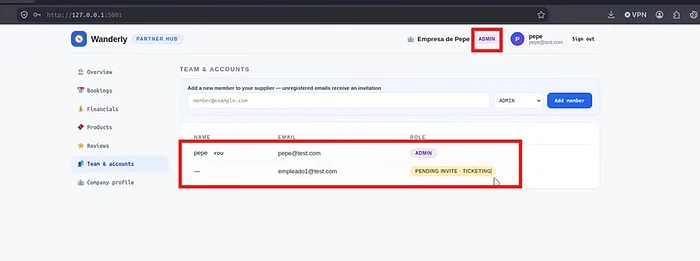
To test the idea properly, two completely independent accounts were registered from scratch through the supplier registration flow:
- Attacker account: created with full ADMIN privileges on Supplier A (Attacker Company).
- Victim account: created with full ADMIN privileges on Supplier B (Victim Company).
Why two accounts? Because the suspected flaw is about mixing up organisations. To prove it, you need one organisation you control completely (the attacker's) and a separate organisation that plays the victim. If the same person can use power from the first to act on the second, the flaw is real.
Linking the accounts
Next, the researcher simulated a real-world scenario: the victim wants to add a new team member. From the victim's dashboard, the admin invited the attacker's email address and assigned a low-privilege role: Ticketing.
This is an ordinary feature. Companies invite staff, and staff get a role. The point of the step is to give the attacker a legitimate, very limited foothold inside the victim organisation, exactly as a real low-privileged employee would have.
Once the invitation was sent, the attacker received a notification email. The interesting behaviour was that no confirmation handshake was required: the attacker simply had to log out and log back in. A handshake here would mean the invited person having to click a link or confirm by email before the membership becomes active. Without one, the attacker simply had to log out and log back in.
Upon logging back in, a multi-supplier selection prompt appeared, allowing the user to choose between Supplier A (where they were an Admin) and Supplier B (where they were just a Finance or Ticketing user).
This prompt matters. It shows that one login can carry membership of several organisations, and the portal asks which one you want to work in. That design is convenient, but it means the server must be very careful to keep the organisations apart on every single request.
Finding the authorisation flaw
When logged into the victim's supplier profile (Empresa de Pepe), access was properly restricted as a FINANCE. When logged into the attacker's own company (Empresa maligna), the account had full ADMIN capabilities.
That difference is the clue. The same person, the same browser, the same kind of request, but different power depending on which organisation is selected. The natural question is: what exactly does the server look at to decide? If it only looks at the role stamp in the token, and not at which supplier the request is aimed at, then the two can be pulled apart.
Exploitation
Step 1: Capture the account update request
Working inside the attacker's own company (Empresa maligna), the researcher navigated to the account management section to modify user information:
- Triggered an update request in the UI.
- Without making any changes yet, intercepted the HTTP request with Burp Suite and sent it to Repeater.
Why make no changes? Because the goal at this stage is not to change anything, it is to see the exact message the page sends. The browser builds that message for you; intercepting it lets you read it and later edit it by hand.
Inspecting the GraphQL mutation (accountUpdate) revealed the gap: the backend authorisation layer checked whether the JWT contained the supplier:admin role claim, but it failed to verify whether that admin role actually corresponded to the specific supplierId being mutated in the request body.
In plain words: the server asked "does this wristband say admin?" and stopped there. It never asked "is this wristband an admin of the supplier named in this request?". The role check was real, but blind to context.
Step 2: Swap in the admin JWT and retarget the mutation
In Burp Repeater, the intercepted request was modified by replacing the session JWT with the active JWT belonging to the attacker account, which held full ADMIN privileges on Empresa Maligna. The mutation payload was then pointed at the appropriate fields and role configuration as ADMIN.
Why this step? The attacker's admin token is the key that passes the role check. The request body is where the target supplier is named. If the server never compares the two, then an admin token from one supplier plus a supplier identifier from another should be accepted. The report does not reproduce the raw request body, so the exact field names and values of the mutation are not shown here.
Step 3: Send the crafted request
When the crafted request was sent using the attacker's admin JWT, the backend failed to validate whether that administrative session actually corresponded to the target supplier, and responded with a clean result.
A clean result means the server did not complain. It accepted the request as if it were perfectly normal. That is the moment the flaw is confirmed: the backend failed to validate whether the administrative session corresponded to the target supplier.
Step 4: Confirm the escalation
To verify impact, the researcher logged out and logged back into the attacker account, selected the victim supplier ID (Empresa Pepe), and had complete ADMIN access to all administrative functionalities, bookings, financials, inventory, and sensitive traveller PII belonging to the victim company.
Why log out and back in? Because the change was made to the account's role on the victim supplier, and a fresh login is the honest way to see what the account can now do. Selecting the victim supplier and finding full admin screens, bookings, money records, stock and traveller data proves the escalation end to end.
Root cause
The accountUpdate mutation checked the supplier:admin role claim inside the JWT but failed to verify whether that admin role corresponded to the supplierId in the request body. Any session carrying the admin claim could therefore name a different supplier in the body and have the mutation applied there.
The role claim check on the token was real but context-blind: it answered "is this user an admin somewhere?" rather than "is this user an admin of the supplier being modified?". Because the attacker legitimately held ADMIN on their own supplier, the claim check passed.
A useful comparison: a building security guard who checks that your badge says "manager" but never checks which company's name is printed on it. You are a manager, just not of this building.
Impact
An attacker who is an admin on their own supplier and holds a minimal non-privileged role on a target supplier can:
- Elevate their own account to ADMIN on any target supplier.
- Gain full access to bookings, financial records, inventory, products, and reviews.
- Modify the target supplier's company details, terms and conditions, and privacy policies.
- Create, manage, or delete user accounts within the victim organisation.
The resulting ADMIN access included sensitive traveller PII belonging to the victim company. The attack requires the victim supplier to have granted the attacker's email address some role on their organisation, however low-privileged. In other words, the entry ticket is small, but the room it opens is the whole business.
Fix
The engineering team deployed a patch on August 7, 2026, ensuring that the accountUpdate mutation derives the supplier directly from the authenticated session and ignores any external supplierId sent in the request body.
In plain words: the server now decides which supplier you are acting on by looking at your own logged-in session, not by trusting a number the request hands it. If you are logged in as supplier A, the change applies to supplier A, whatever the body claims.
The report describes the proper fix as validating that the authenticated session's admin privileges directly match the target supplierId being modified.
IF user.role == "supplier:admin" THEN VERIFY user.supplier_id == input.supplierId
Line by line:
IF user.role == "supplier:admin"checks whether the logged-in user carries the admin role stamp.THEN VERIFY user.supplier_id == input.supplierIdadds the missing half: the supplier the user belongs to must be the same supplier named in the request. Only then is the change allowed.
Timeline as reported:
| Date | Event |
|---|---|
| July 29, 2026 | Report submitted and triaged. |
| July 30, 2026 | Multi-supplier login behaviour clarified and a video PoC provided. |
| August 7, 2026 | Patch deployed. |
| August 7, 2026 | Retested, fix confirmed, report marked as Resolved. |
Variants to test
Once you understand the shape of this bug, you can look for relatives of it. Each item below says what to try and what a positive result looks like.
- Other mutations that take a supplier or tenant identifier in the body. Enumerate mutations beyond
accountUpdate(user creation, role assignment, company profile updates) and replay each with an admin JWT from a different supplier while naming the victim's identifier. A positive result is a successful response and a visible change on the victim organisation. - Role claim without scope binding. Look for any authorisation check that tests a role claim (
supplier:admin,org:owner, and similar) without comparing it to the resource's owner. A positive result is an action succeeding on an object belonging to another organisation. - Multi-tenant membership confusion. Where a user can belong to several organisations, log in under one context and act on another, including after re-login and supplier switching. A positive result is data or functionality from the other organisation appearing under the wrong context.
- Invitation flows without a handshake. Accept an invitation with no confirmation step, then check whether the resulting low-privilege membership can be combined with privileges held elsewhere. A positive result is any cross-context action the low-privilege role should not permit.
- Identifier substitution in GraphQL variables. Where the server derives context from the session but also accepts an identifier in variables, send both and see which wins. A positive result is the body-supplied identifier taking effect over the session-derived one.
Glossary
- API: the interface through which a website's pages send requests to a server and receive answers.
- Authentication: proving who you are, usually by logging in.
- Authorisation: deciding whether a logged-in user is allowed to perform a particular action.
- Burp Suite: a tool that sits between your browser and a server so you can inspect, pause, edit and re-send requests.
- Claim: a statement inside a token, such as a role name or a user identifier.
- Cross-tenant escalation: using rights held in one organisation to act on another organisation.
- Endpoint: the address on a server that accepts a particular kind of request, such as
POST /graphql. - GraphQL: a style of API where each request names exactly the data or change it wants, in a structured message.
- Handshake: a confirmation step, such as clicking a link or confirming by email, before an invitation becomes active.
- HTTP POST: the method used to send data to a server, here used to send GraphQL requests to
/graphql. - Inventory: the stock a supplier sells, such as rooms, seats or tours.
- JWT (JSON Web Token): a signed piece of text issued at login and sent with each request so the server knows who you are and what roles you hold.
- Multi-supplier selection prompt: a screen at login that asks which of your organisations you want to work in.
- Mutation: a GraphQL request that changes something, as opposed to one that only reads.
- PII: personally identifiable information, data that identifies a real person.
- Privilege escalation: gaining more access or power than your account was given.
- Repeater: the part of Burp Suite where you edit a captured request and send it again.
- Role: a label on an account saying what it may do, such as Admin, Finance, Ticketing, Operator or Guide.
- Root cause: the underlying reason a vulnerability exists, as opposed to its visible symptom.
supplier:admin: the role claim in the token that marks a user as an admin of a supplier.supplierId: the identifier of a supplier organisation, used in requests that act on a supplier.- Tenant: one separate organisation on a shared platform; here, one supplier.
- Token: a piece of text issued at login and sent with requests to identify the session, of which a JWT is one kind.
- Triage: the first review of a security report, where the receiving team confirms and prioritises it.
- UI: the user interface, the pages and buttons you see in the browser.
- Video PoC: a proof of concept recorded on video, showing the issue being reproduced step by step.

