How I Escalated Privileges by Manipulating a Client-Side Permission Matrix
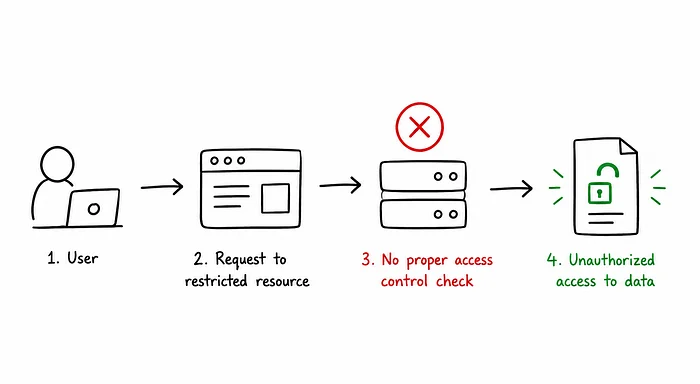
The application relied on a client-side permission matrix to decide which administrative UI elements to show, but the backend did not verify the user's actual privileges when serving sensitive admin endpoints. An attacker could tamper with the permission response to unlock admin views and then retrieve the full user dataset, including emails and roles, without authorisation.
 Published on medium.com
Cybersecurity
The full write-up lives on its author's site
It belongs to its author, so we link to it rather than copy it. The other two tabs are our own rewrites, checked against it.
Context
The target was a web application with a single-page application (SPA) frontend, reached during a penetration test at app.target.com. After login, the SPA fetches the user's profile from the /user/self endpoint. That response contains a JSON permission matrix, and the SPA uses it to decide which UI elements, navigation paths and data-fetching triggers to render. The application also exposes an administrative endpoint, /admin/users, which returned user records with roles and group assignments.
The flaw described in the write-up is insecure client-side authorization control: the frontend decides who sees what, and the backend treats frontend visibility as security. The author classifies the issue as broken access control and describes it as high severity, allowing escalation from a standard user to administrative data.
Setup
The test used a low-privileged test account, authenticated to app.target.com. The account's email in the captured payload is [redacted], and its role is User. The only tool named is an intercepting proxy, used to capture and modify the HTTP response from /user/self while navigating to administrative paths (/admin/users). No product versions are given.
Finding it
While testing the application, the author noticed that the permission data driving the administrative UI arrived from the server as part of the user profile response and was consumed directly by the client. The server trusted the client to state its own permissions rather than enforcing access restrictions on the backend. That made the response body a candidate for tampering: if the frontend unlocks views based on this JSON, altering it in transit should reveal administrative UI, and the question then is whether the backend independently checks authority when those views request data.
Exploitation
Step 1: Log in as a standard user
The author authenticated to app.target.com with the low-privileged test account.
Step 2: Intercept and manipulate the permission response
With an intercepting proxy, the author captured the HTTP response from /user/self during navigation to administrative paths (/admin/users). The original payload restricted user management access:
{ "external_user_id": "auth0|xxxxxxxxxxxxxxxxxxxxxxxx", "email": "[redacted]", "permissions": { "usermanagement_access": "view", "manage_type_lists": false, "create_report_allowed": false, "analytics_access": "user", "impersonate_user_allowed": false, "view_all_docs": false }, "roles": [{"name": "User"}]}
The permissions object is the matrix the SPA reads. For a standard user, usermanagement_access is view, the boolean flags (manage_type_lists, create_report_allowed, impersonate_user_allowed, view_all_docs) are false, and analytics_access is user. The roles array still says User.
The author modified the response body in transit to elevate privileges:
{ "external_user_id": "auth0|xxxxxxxxxxxxxxxxxxxxxxxx", "email": "[redacted]", "permissions": { "usermanagement_access": "edit", "manage_type_lists": true, "create_report_allowed": true, "analytics_access": "all", "impersonate_user_allowed": true, "view_all_docs": true }, "roles": [{"name": "User"}]}
Every permission value was raised: usermanagement_access from view to edit, analytics_access from user to all, and all four boolean flags from false to true. The roles entry was left as User, which shows the escalation did not depend on changing the role name, only the permission matrix.
Step 3: Access administrative data
On receiving the altered response, the client-side UI unlocked full administrative views. The browser then automatically sent follow-up data requests to /admin/users:
GET /admin/users HTTP/1.1Host: app.target.comAuthorization: Bearer <valid_low_priv_token>
The request carries the same low-privileged bearer token as before; nothing about the session changed. The backend returned the complete dataset without verifying the session's actual privileges against a server-side Access Control List (ACL):
HTTP/1.1 200 OKContent-Type: application/json[ { "id": "auth0|69df55bb284edfb390202df6", "email": "[redacted]", "role": "Admin", "groups": [...] }, ...]
The response is a JSON array of user records, including an administrator's identifier, email address, role and group membership.
Step 4: Full unauthorised disclosure
Through this manipulation, a standard user could retrieve sensitive platform data across the entire tenant, including:
- User IDs and registered email addresses
- Full user profile configurations
- Internal group assignments and system roles
- Specific permission assignment maps
Root cause
The backend treated frontend visibility as an authorization boundary. The permission matrix in the /user/self response is client-side state: the SPA uses it to render UI, but the server neither signs it nor re-derives permissions from the session when sensitive endpoints are called. Because /admin/users did not check the verified session token against a server-side ACL, the only thing standing between a standard user and the administrative dataset was the frontend's decision not to ask for it. Tampering with the response removed that decision.
Impact
The author lists three consequences:
- Unauthorised reconnaissance: low-privileged users can map out tenant user bases, administrative structures and internal permission maps.
- Compliance violations: exposing PII across tenant boundaries triggers regulatory penalties under GDPR, HIPAA and CCPA.
- Privilege escalation vector: internal metadata such as admin emails and IDs directly feeds spear-phishing and API abuse campaigns.
The disclosure is scoped to what the manipulated session could retrieve: user records across the tenant, including administrator identities, roles and groups. The write-up does not describe write operations against administrative endpoints, only the data returned by /admin/users.
Fix
The author's position is that frontend authorization handles UI layout, never security. The recommended remediation:
- Enforce backend RBAC/ABAC: every API route must independently query a server-side Access Control List (ACL) using the verified session token before returning data.
- Zero trust frontend state: treat all client-side logic, headers and payload flags as untrusted, and never treat UI visibility as an authorization boundary.
- Deny by default: reject requests lacking explicit server-side authorization with
403 Forbidden.
The write-up states the vulnerability was responsibly disclosed and remediated before publication, but does not describe the specific code change made.
Variants to test
The author gives five general tests for access control and IDOR issues. Each applies to other targets as follows:
- Parameter and ID swapping: change numeric IDs, UUIDs or decoded strings in paths and queries, for example
/user/101to/user/102. - Auth token swapping (cross-account): capture a request from a victim account and replay it with the attacker's Authorization header or cookie.
- Response manipulation: intercept
/meor/permissionsresponses and change"is_admin": falsetotrueto reveal hidden API routes. The report gives this test without describing what a positive result looks like. - Parameter injection: add unauthorised role or tenant fields directly to JSON body updates, for example
{"role": "admin", "tenant_id": "target_tenant"}. - HTTP method switching: if
GET /admin/usersreturns403, tryPOST,PUT,DELETE, or use theX-HTTP-Method-Override: PUTheader.
What happened, in plain words
A security researcher was performing a penetration test on a web application. While doing that, he found a way for an ordinary user account to see data that only an administrator should be able to see: the full list of users on the platform, including their email addresses, their roles and which groups they belong to.
The reason it worked is simple to describe. The website's front end (the part you see in your browser) was deciding who gets to see what. The back end (the server that actually holds the data) trusted that decision instead of checking for itself. So when the researcher changed the permission data on its way to the browser, the browser unlocked the administrative screens, and the server handed over the data without checking.
This kind of mistake is called broken access control: the rules about who may do what are either missing or enforced in the wrong place. The researcher rated it high severity.
Some background before the details
A few everyday ideas will make the rest of this easy to follow.
A web application and its two halves. Most modern websites are split in two. The front end is the part that runs in your browser: the buttons, the menus, the pages. The back end is the program on a server somewhere that stores the data and answers questions about it. The front end asks the back end for information, and the back end replies.
An API and an endpoint. An API (application programming interface) is the set of questions the back end is willing to answer. Each question has an address, called an endpoint. For example, /user/self is an endpoint that means "give me the profile of the person who is logged in". /admin/users is an endpoint that means "give me the list of all users". Think of endpoints as counters in a building: you walk up to the right counter and ask for the thing you need.
JSON. When the back end answers, it usually sends the information in a format called JSON. It looks like a shopping list with labels: a name in quotes, a colon, then a value. Curly braces { } group things together, and square brackets [ ] hold lists. It is designed to be easy for a program to read.
A token. When you log in, the server gives your browser a small piece of text called a token (sometimes stored in a cookie). Your browser sends it back with every request, like a wristband at an event: it proves who you are without you typing your password again. A bearer token is simply a token you "bear", meaning you present it with each request.
A single-page application (SPA). This is a website built so that the browser loads one page and then keeps updating it as you click around, rather than loading a fresh page each time. It feels fast and smooth, but it means a lot of the decision-making about what to show happens inside your browser.
An intercepting proxy. This is a tool that sits between your browser and the server and lets you look at, and change, the messages going back and forth. Imagine a postal worker who is allowed to open your letters, read them, rewrite them, and then deliver them. That is what the researcher used here.
A permission matrix. A grid of yes/no and level settings that says what a user is allowed to do: can they view the user list, can they edit it, can they see all analytics or only their own, and so on. The word matrix just means a table of these settings.
RBAC, ABAC and an ACL. These are ways of writing down who may do what on the server side. RBAC (role-based access control) gives permissions to roles, like "Admin" or "User", and then assigns people to roles. ABAC (attribute-based access control) makes decisions from details about the person and the situation. An ACL (access control list) is the actual list the server checks: this person may read this thing, that person may not. The important point is that all of these live on the server, where the user cannot edit them.
PII. Personally identifiable information: data that can identify a real person, such as a name, an email address or an ID.
A tenant. In a service used by many organisations, each organisation's separate space is called a tenant. Data from one tenant should never leak into another.
The discovery
While testing the application, the researcher noticed something about how the administrator screens were being switched on. The information that decided whether the admin menus appeared was arriving from the server as part of the ordinary user profile, and the browser was using it directly.
That raised an obvious question. If the browser decides what to show based on a message it receives, what happens if that message is changed on the way? And, more importantly, when the browser then asks the server for the sensitive data behind those screens, does the server check for itself, or does it just assume that anyone who asked must be allowed?
In this application, the answer to the second question was the bad one. The server trusted the browser to state its own permissions. The researcher calls this insecure client-side authorization control: the front end decides who sees what, and the back end treats "the front end showed it" as proof that it was allowed.
The five general tests the researcher lists
Before the walkthrough, the write-up gives five general checks that apply to many websites, not just this one. They are worth knowing because they are the kind of thing you would try on any target.
- Parameter and ID swapping. Change a number or identifier in the address and see whether you get someone else's data. For example, change
/user/101to/user/102. If the second address returns a different person's information while you are still logged in as yourself, the server is not checking ownership. - Auth token swapping (cross-account). Take a request made by one account (the victim) and send it again using a different account's token (the attacker's). If the victim's data comes back to the attacker's session, the server is trusting the token without checking what it is allowed to reach.
- Response manipulation. Intercept the reply from an endpoint such as
/meor/permissionsand change"is_admin": falsetotrue. If hidden parts of the interface appear, and the follow-up requests to the server succeed with your original low-privileged token, you have found the same flaw as in this report. - Parameter injection. Add fields the application did not intend you to set, directly into the JSON you send when updating something, for example
{"role": "admin", "tenant_id": "target_tenant"}. If the server accepts them and your account gains the role or crosses into another tenant, the server is not filtering what it accepts. - HTTP method switching. Every request has a method, a verb that says what kind of action it is:
GETmeans "read",POSTmeans "create",PUTmeans "replace",DELETEmeans "remove". IfGET /admin/usersreturns403(the code for "forbidden"), try the same address withPOST,PUTorDELETE, or add the headerX-HTTP-Method-Override: PUT. Some servers check permissions for one method but forget the others.
The attack, step by step
Step 1: Log in as a standard user
The researcher logged in to app.target.com with a low-privileged test account. Starting from the weakest possible account is deliberate: if an ordinary user can reach administrator data, the problem is real and serious.
Step 2: Intercept and change the permission response
With the intercepting proxy running, the researcher navigated towards the administrative pages (/admin/users) and captured the reply that came back from the /user/self endpoint. This is the message that tells the browser who you are and what you may do.
The original reply restricted user management access:
{ "external_user_id": "auth0|xxxxxxxxxxxxxxxxxxxxxxxx", "email": "[redacted]", "permissions": { "usermanagement_access": "view", "manage_type_lists": false, "create_report_allowed": false, "analytics_access": "user", "impersonate_user_allowed": false, "view_all_docs": false }, "roles": [{"name": "User"}]}
Line by line, in plain words:
- The outer
{ }is the whole profile record. "external_user_id": "auth0|xxxxxxxxxxxxxxxxxxxxxxxx"is the account's identifier. Theauth0|prefix is part of the account's identifier. The rest is masked here to protect the real account."email": "[redacted]"is the test account's email address."permissions": { ... }is the permission matrix, the table of what this user may do."usermanagement_access": "view"means this user may look at user management but not change anything."manage_type_lists": falsemeans this user may not manage the lists of types used in the application."create_report_allowed": falsemeans this user may not create reports."analytics_access": "user"means this user may see only their own analytics, not everyone's."impersonate_user_allowed": falsemeans this user may not pretend to be another user."view_all_docs": falsemeans this user may not see all documents."roles": [{"name": "User"}]is a list containing one role, namedUser. This is the ordinary, non-administrator role.
The researcher then changed the reply on its way to the browser, raising every permission:
{ "external_user_id": "auth0|xxxxxxxxxxxxxxxxxxxxxxxx", "email": "[redacted]", "permissions": { "usermanagement_access": "edit", "manage_type_lists": true, "create_report_allowed": true, "analytics_access": "all", "impersonate_user_allowed": true, "view_all_docs": true }, "roles": [{"name": "User"}]}
What changed, and why each change matters:
"usermanagement_access"went from"view"to"edit". The browser now believes this user may not only look at user management but change it."manage_type_lists"went fromfalsetotrue, so the browser believes list management is allowed."create_report_allowed"went fromfalsetotrue, so report creation is allowed."analytics_access"went from"user"to"all", so the browser believes the user may see everyone's analytics, not just their own."impersonate_user_allowed"went fromfalsetotrue, so the browser believes the user may act as another user."view_all_docs"went fromfalsetotrue, so the browser believes all documents are visible.- The
"roles"entry was deliberately left asUser. This is the interesting part: the escalation did not need a change of role name at all. Only the permission matrix was edited; the role entry stayed asUser.
Step 3: Reach the administrative data
With the altered reply in hand, the browser's interface unlocked the full administrative views. The browser then automatically sent its usual follow-up requests to /admin/users to fill those views with data:
GET /admin/users HTTP/1.1Host: app.target.comAuthorization: Bearer <valid_low_priv_token>
Line by line:
GET /admin/users HTTP/1.1is the request line.GETmeans "read this"./admin/usersis the endpoint being asked for.HTTP/1.1is the version of the web protocol being used.Host: app.target.comtells the server which site the request is for. One server can host many sites, so this says which one.Authorization: Bearer <valid_low_priv_token>is the proof of identity.Bearermeans "the token that follows is my credential". The placeholder<valid_low_priv_token>stands for the same ordinary user's token as before. Nothing about the session had changed: it was still the low-privileged account.
The server replied with the complete dataset, without checking the session's real privileges against a server-side access control list:
HTTP/1.1 200 OKContent-Type: application/json[ { "id": "auth0|69df55bb284edfb390202df6", "email": "[redacted]", "role": "Admin", "groups": [...] }, ...]
Line by line:
HTTP/1.1 200 OKis the status line.200is the code for "here is your data, everything went fine".Content-Type: application/jsonsays the body is in JSON format, so the browser knows how to read it.- The
[ ]means the body is a list of records, one per user. "id": "auth0|69df55bb284edfb390202df6"is a user's identifier."email": "[redacted]"is that user's email address. The wordadminin the address shows this is an administrator account."role": "Admin"is that user's role, the highest level."groups": [...]is the list of groups the user belongs to. The...stands for the contents, which are not shown.- The final
...means the list continues with more users in the same shape.
This is the moment the flaw becomes clear. The server had every opportunity to check the token against its own records and refuse. It did not. The only thing that had been stopping an ordinary user from getting this data was the browser's decision not to ask for it, and that decision had just been edited away.
Step 4: What could be seen
Through this manipulation, a standard user could retrieve sensitive platform data across the entire tenant:
- User IDs and registered email addresses
- Full user profile configurations
- Internal group assignments and system roles
- Specific permission assignment maps
In everyday terms: the whole staff directory, with contact details, job titles and who reports to whom, handed to someone who should only have seen their own entry.
Why it happened
The back end treated front-end visibility as if it were a security boundary. The permission matrix in the /user/self reply is just information for the browser to draw the screen. The server did not check the session's actual privileges against a server-side access control list when sensitive endpoints were called. Because /admin/users did not check the verified session token against a server-side access control list, the only barrier was the browser's choice not to ask. Changing the reply removed that choice.
The card should be checked at every door, not just at reception.
What the impact is
The write-up lists three consequences:
- Unauthorised reconnaissance. A low-privileged user can map out the organisation's user base, its administrative structure and its internal permission maps.
- Compliance violations. Exposing personal information across tenant boundaries can trigger regulatory penalties under GDPR, HIPAA and CCPA, three laws that govern personal and health data in different regions.
- A stepping stone to further attacks. Internal details such as administrator email addresses and IDs feed directly into phishing campaigns (convincing emails sent to real staff) and into further abuse of the API.
The disclosure is limited to what the manipulated session could retrieve: user records across the tenant, including administrator identities, roles and groups. The write-up does not describe changing or deleting anything through the administrative endpoints, only the data returned by /admin/users.
How to fix it
The researcher's position is that front-end authorization is for laying out the screen, never for security. The recommended fixes:
- Enforce backend RBAC/ABAC. Every API route must independently check a server-side access control list, using the verified session token, before returning any data. The server should work out permissions itself, not take them from the browser.
- Zero trust in front-end state. Treat everything that comes from the browser, including logic, headers and flags in the payload, as untrusted. Never treat the fact that a screen is visible as proof that the action is allowed.
- Deny by default. If a request does not carry explicit server-side authorization, refuse it with
403 Forbidden.
The write-up states that the vulnerability was responsibly disclosed and fixed before publication, but it does not describe the specific code change that was made.
Glossary
- API: the set of questions a back end is willing to answer, and the rules for asking them.
- Endpoint: a specific address on an API, such as
/user/self, that does one job. - Front end: the part of a website that runs in your browser and draws what you see.
- Back end: the program on a server that stores data and answers requests.
- Single-page application (SPA): a website that loads once and updates itself in the browser as you click, rather than loading new pages.
- JSON: a text format for structured data, using labels, quotes, curly braces and square brackets.
- Token: a piece of text issued at login that your browser sends with each request to prove who you are.
- Bearer token: a token presented with each request, where simply having it is the proof.
- Cookie: a small piece of data a website stores in your browser, often used to hold a session token.
- Session: the period during which the server remembers that you are logged in.
- Intercepting proxy: a tool placed between browser and server that can read and change the messages passing through.
- Permission matrix: a table of settings saying what a user may view, edit or access.
- Role: a label such as
UserorAdminthat groups permissions together. - Broken access control: a flaw where the rules about who may do what are missing or enforced in the wrong place.
- Client-side authorization control: deciding what a user may do inside the browser, rather than on the server.
- RBAC (role-based access control): giving permissions to roles and assigning people to roles.
- ABAC (attribute-based access control): deciding access from details about the person and the situation.
- ACL (access control list): the server-side list that says who may read or change what.
- Zero trust: treating anything coming from the browser as untrusted until the server has checked it.
- Deny by default: refusing any request that lacks explicit permission, rather than allowing it.
- HTTP method: the verb on a request, such as
GET(read),POST(create),PUT(replace) orDELETE(remove). - Header: extra information attached to a request or reply, such as
HostorAuthorization. - Status code: a number in the reply saying how it went, such as
200(fine) or403(forbidden). - 403 Forbidden: the status code meaning the server understood the request but refuses to allow it.
- PII (personally identifiable information): data that can identify a real person, such as a name, email address or ID.
- Tenant: one organisation's separate space inside a shared service.
- IDOR (insecure direct object reference): a flaw where changing an identifier in a request gives you someone else's data.
- Parameter: a value sent with a request, in the address, the body or a header.
- UUID: a long, unique identifier made of letters and numbers.
- GDPR, HIPAA, CCPA: laws in different regions governing personal and health data and the penalties for exposing it.
- Phishing: sending convincing fake messages to trick people into revealing information or clicking something harmful.
- Reconnaissance: gathering information about a target before attacking it.
- Severity: a rating of how serious a flaw is, often high, medium or low.
- Remediation: the fix applied to close a vulnerability.
- Responsible disclosure: reporting a flaw privately to the owner and allowing time to fix it before publishing details.

