How I Found a Blind SSRF Through a Referer Header — Here’s Ho
The application processed the attacker-controlled Referer header on the server side, causing a DNS lookup to an attacker-supplied domain. An attacker could use this to make the server contact arbitrary hosts, though only a DNS interaction was demonstrated.
 Published on meetcyber.net
Ssrf Vulnerability
The full write-up lives on its author's site
It belongs to its author, so we link to it rather than copy it. The other two tabs are our own rewrites, checked against it.
Context
The target was a web application with a password-reset feature. The researcher was testing that feature and capturing its traffic in Burp Suite. The request under examination carried a Referer header, and the question that drove the whole test was whether the server did anything with the URL in that header on the server side.
A Referer header normally tells the server where a request originated. The researcher's point is that it is still user-controlled input, and therefore deserves the same scrutiny as parameters, cookies and JSON fields. The finding is a blind SSRF, or out-of-band server-side interaction: the application's backend appeared to resolve an attacker-supplied hostname, and the only evidence was a DNS callback to an external server.
Setup
The tooling was Burp Suite, used to capture the password-reset request and to send it to Burp Repeater for modification. The out-of-band interaction service was Burp Collaborator, used to generate a unique domain and to observe interactions against it.
No accounts, roles or versions are described in the report. The precondition is simply that the tester can send a password-reset request and modify its headers.
Finding it
While testing the password-reset functionality, the researcher noticed a Referer header in the request. The request itself was unremarkable: no parameter looked injectable and the application returned a normal successful response. The request itself was unremarkable, and the header looked completely ordinary at first.
The question posed was: what happens if the server actually processes the URL supplied in the Referer header? That question led to the potential blind SSRF.
The original Referer value was similar to:
Referer: https://target.example/
Exploitation
Step 1: Identify URL-like input
The researcher inspected the request for parameters, headers and other values containing URLs or hostnames. The Referer header stood out as worth testing.
Step 2: Capture the request
The password-reset request was captured in Burp Suite.
Step 3: Move it to Repeater
The request was sent to Burp Repeater so that only the input under test could be changed while the rest of the request stayed the same, without repeatedly navigating through the application.
Step 4: Use a unique Collaborator domain
The original Referer value was replaced with a unique domain generated through Burp Collaborator. A unique domain matters because it makes it possible to correlate an interaction with one specific request. The modified request looked like this:
GET /password-reset HTTP/1.1Host: target.exampleReferer: https://<unique-Collaborator-domain>/
Step 5: Send the request
The request was sent and the application responded normally:
HTTP/1.1 200 OK
At first glance nothing was unusual. The important part was not the response but whether the backend would attempt to resolve or contact the supplied domain.
Step 6: Check for an interaction
The Collaborator interaction panel was checked. The Collaborator server had received a DNS interaction for the unique domain supplied in the Referer header.
The request flow had changed from:
My browser → Application
to evidence suggesting:
My request → Application → server-side DNS resolution → my Collaborator domain
The server was not simply reflecting the Referer value in the response. Something in the application's server-side processing path appeared to be resolving the attacker-controlled hostname. The DNS callback provided evidence that the hostname had been resolved from the application's infrastructure.
Root cause
The likely underlying problem is unsafe server-side processing of attacker-controlled URL data. The application appears to process the Referer value in a component capable of performing DNS or network resolution.
The security principle is that HTTP headers are untrusted input. A server should not assume a Referer value is safe merely because browsers normally generate it, since an attacker can construct HTTP requests manually. The report does not describe the specific code path or any defence that was present and failed.
Impact
The evidence supports one claim: attacker-controlled input supplied through the Referer header causes server-side DNS interaction with an attacker-controlled domain. That is enough to report as a potential blind SSRF or out-of-band server-side interaction.
The DNS callback alone did not demonstrate access to internal applications, access to cloud metadata, retrieval of internal files, authentication bypass, credential theft, account takeover or internal network compromise. The researcher explicitly did not claim any of these, because such claims would require additional authorised evidence.
Severity depends on what the vulnerable server can actually reach and what an attacker can achieve. For this proof of concept, only a DNS-level interaction was demonstrated, so the researcher would initially describe the issue as Medium severity, with the possibility of a higher severity if further authorised testing demonstrates meaningful HTTP access to internal or restricted services. The final severity should also take the specific bug bounty programme's policy and severity guidelines into account.
Fix
The report does not say what the application changed. It sets out what developers should do:
- If the application does not need to make a server-side request based on the
Refererheader, do not do it. - If external URL retrieval is genuinely required, use an allowlist that permits only explicitly trusted destinations instead of arbitrary hostnames.
- Validate and normalise URLs before passing them to components that perform network requests.
- Restrict outbound network access so application servers have controlled egress rather than unrestricted access to the network.
- Protect internal services with network-level controls so application servers cannot unnecessarily reach sensitive internal services.
- Treat headers such as
Referer,Hostand other client-controlled values as untrusted rather than automatically trusted.
Variants to test
SSRF testing usually starts with obvious parameters such as:
url=redirect=callback=image=webhook=endpoint=
but server-side components can process URLs from less obvious locations, and headers are one example. Applications may use headers for analytics, logging, redirect logic, tracking, link generation, security workflows and third-party integrations. If a value that can contain a URL is passed into a component that performs DNS or network resolution, that is an unexpected attack surface.
Concrete things to try on other targets:
-
Replace the
Referervalue with a unique Collaborator domain on a request the backend might process, such as the password-reset request. A positive result is a DNS or HTTP interaction in the Collaborator panel correlated with that request. -
Do the same with other client-controlled headers that can carry URLs, such as
Hostand other headers the application may consume. A positive result is an out-of-band interaction from the application's infrastructure. -
Keep the rest of the request unchanged and vary only one input at a time, so that any interaction can be attributed to that input. A positive result would be a response or interaction that demonstrates meaningful access, which is what would justify a severity above Medium.
A DNS callback by itself does not prove that the application can retrieve arbitrary internal data. Report what you can reproduce, and keep what was observed separate from what might be possible.
What happened, in plain words
A security researcher was testing a website's password-reset feature. When you click "forgot my password" on a site, your browser sends a request to the site's server asking it to start the reset process. The researcher was watching those requests with a tool called Burp Suite, which lets you see and edit the traffic between your browser and a website.
Inside one of those requests was a small piece of information called a Referer header. A header is extra information that travels with every request, a bit like the address and return-address written on an envelope. The Referer header normally tells the server which page you came from. It looked completely ordinary.
The researcher asked a simple question: what if the server actually takes the web address in that header and tries to visit it? To find out, they replaced the address with one they controlled, a unique throwaway domain generated by a service called Burp Collaborator. Then they sent the request and watched whether anything tried to contact that domain.
Something did. The Collaborator service recorded a DNS lookup for the researcher's domain. A DNS lookup is the step a computer takes to turn a name like example.com into a numeric address, like looking up a name in a phone book before you can call someone. The DNS callback provided evidence that the hostname had been resolved from the application's infrastructure. That means the server had taken the address from the Referer header and tried to resolve it.
This is called a blind SSRF. SSRF stands for Server-Side Request Forgery: the server is tricked into making a request on the attacker's behalf. It is called "blind" because the attacker never sees the response to that request, only evidence that it happened. The researcher was careful to say that this proved only one thing: the server resolves an attacker-supplied hostname. It did not prove access to internal systems, files or credentials.
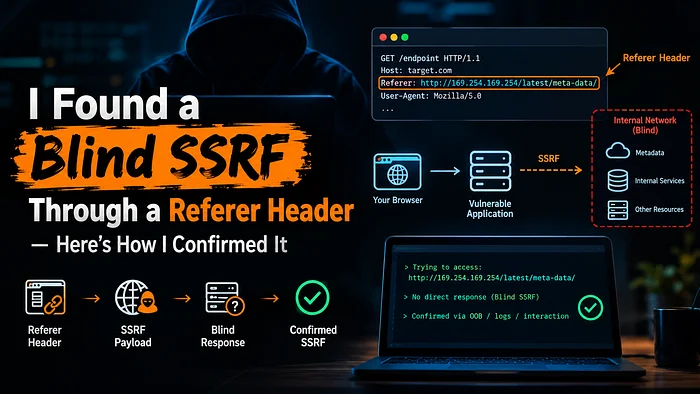
The image above is described in the article as AI generated.
The first clue
The researcher was testing the password-reset functionality and capturing the requests through Burp Suite. Burp Suite is a program that sits between your browser and a website, like a recording device on a phone line. It lets you pause a request, look at every part of it, change it, and send it again.
The request contained a Referer header similar to:
Referer: https://target.example/
Line by line:
Referer:is the name of the header. It is spelled that way, with one "r" in the middle, because that misspelling was baked into the web standard long ago and everyone has kept it.https://target.example/is the value. It is a web address, the same kind you type into a browser's address bar.target.exampleis a placeholder name used in examples, not a real site.
Normally, a Referer header simply tells the server where the request originated. Think of it as a shop assistant asking "where did you hear about us?" and you answering with the name of a website. The browser fills this in automatically when you click a link from one page to another.
But HTTP headers are still user-controlled input. That is the key idea. Even though your browser writes the header for you, nothing stops a person from writing a different value by hand. Tools like Burp Suite exist precisely to do that. So headers deserve the same security attention as parameters, cookies, JSON fields and other request data.
A parameter is a value attached to a request, often visible in the address bar after a question mark, such as ?search=shoes. A cookie is a small piece of data a website stores in your browser so it can recognise you on the next request, like a cloakroom ticket. A JSON field is a named value inside a structured data blob that applications exchange. All of these are inputs the server reads, and all of them can be tampered with.
The researcher decided to test whether the application was doing anything server-side with the supplied URL. "Server-side" means the work happens on the website's own computers, not in your browser. If the server reads the address and acts on it, that is server-side processing.
Changing the Referer
The researcher sent the request to Burp Repeater so they could modify the request without repeatedly navigating through the application. Repeater is a part of Burp Suite that holds one request on screen and lets you resend it as many times as you like, changing one thing each time. It saves you from clicking through the same pages over and over.
The original Referer value was replaced with a unique Burp Collaborator domain. Burp Collaborator is a service that gives you a domain name nobody else is using and then tells you if anything ever tries to contact it. It is like planting a fake phone number in a form and seeing whether anyone calls it.
The modified request looked like this:
GET /password-reset HTTP/1.1Host: target.exampleReferer: https://<unique-Collaborator-domain>/
Line by line, as the report presents it:
GET /password-reset HTTP/1.1is the first line of the request.GETis the method, meaning "please give me this"./password-resetis the path, the part of the site being requested.HTTP/1.1is the version of the language the browser and server speak.Host: target.exampletells the server which website name the request is for. One server can host many sites, so this header says which one you want.Referer: https://<unique-Collaborator-domain>/is the changed part. The angle brackets mark a placeholder: in the real request, a unique domain generated by Collaborator stood there instead.
The important part was not the response itself. The interesting question was whether the application's backend would attempt to resolve or contact the domain. Resolving means turning the domain name into an address, the phone-book step. Contacting means actually sending traffic to it. Either one would be a sign that the server was acting on the value.
The researcher sent the request. The application responded normally:
HTTP/1.1 200 OK
Line by line:
HTTP/1.1is the protocol version of the reply.200 OKis the status code. A status code is a three-digit number the server sends to say how things went.200means "success, here you go". You have seen these before without knowing it:404means "not found".
At first glance, there was nothing unusual. The response was normal, and at first glance there was nothing unusual. That is typical of blind vulnerabilities: the visible response tells you nothing, so you have to look elsewhere for evidence.
Then the researcher checked the out-of-band interaction. "Out-of-band" means the evidence arrives through a different channel than the normal response, in this case through the Collaborator service rather than through the reply to the request.
The moment things got interesting
The Collaborator server had received a DNS interaction for the unique domain supplied in the Referer header. A DNS interaction is a record that some computer somewhere asked the internet's phone book for the address of that domain. Because the domain was unique and freshly generated, there was no innocent reason for anyone to look it up.
That changed the situation. The request flow had gone from:
My browser → Application
to evidence suggesting:
My request → Application → server-side DNS resolution → my Collaborator domain
In plain words: first, only the researcher's own browser was talking to the application. After the change, the application's own computers were reaching out to the researcher's domain. The arrow in the middle, "server-side DNS resolution", is the new step that should not have existed.
That is the important observation. The server was not simply returning the Referer value in the response, which would just be echoing text back. Something in the application's server-side processing path appeared to be resolving the attacker-controlled hostname.
Why a DNS callback matters
A DNS callback by itself does not prove that the application can retrieve arbitrary internal data. That is an important distinction, and it is where many beginners go wrong.
A blind SSRF vulnerability can sometimes produce very little visible information to the tester. Instead of receiving the server's response directly, the tester may observe an external interaction such as DNS or HTTP traffic. That is why out-of-band testing can be useful when investigating potential SSRF behaviour: when the front door gives you nothing, you watch the back door.
In this case, the DNS interaction provided evidence that the application was processing attacker-controlled URL data on the server side. However, the researcher did not claim that they had accessed an internal service, a cloud metadata endpoint, credentials or sensitive information. A cloud metadata endpoint is a special internal address that cloud servers use to hand out configuration and sometimes credentials; reaching it is a classic SSRF goal. Those claims would require additional authorised evidence.
The interesting part: the Referer header
One thing the researcher found particularly interesting was the location of the input. When people think about SSRF testing, they often look for obvious parameters such as:
url=redirect=callback=image=webhook=endpoint=
Line by line, these are names of parameters that commonly hold web addresses:
url=a generic address field.redirect=where to send the user next.callback=an address to notify when something finishes.image=an address from which to load a picture.webhook=an address a service should call when an event happens.endpoint=another name for a destination address.
Each of these is a place where a developer might take a user-supplied address and fetch it. That makes them the obvious places to test. But server-side components can potentially process URLs from less obvious locations too, and HTTP headers are one example.
Applications may use headers for things such as:
- Analytics, counting visitors and where they come from.
- Logging, keeping a record of requests for debugging.
- Redirect logic, deciding where to send a user next.
- Tracking, following a user's journey across pages.
- Link generation, building links that point back to the site.
- Security workflows, checks that run when a request arrives.
- Third-party integrations, passing data to other services.
If an application takes a value that can contain a URL and passes it into a server-side component that performs DNS or network resolution, that can create an unexpected attack surface. An attack surface is simply the total set of places where an attacker can try to put input in.
My testing methodology
The researcher approached the issue incrementally rather than immediately attempting aggressive SSRF payloads. A payload is the specific piece of input an attacker sends to try to trigger a behaviour. Going step by step matters because it keeps the evidence clean: if you change ten things at once and something happens, you cannot say which change caused it.
The basic methodology was:
1. Identify URL-like input
The researcher inspected the request for parameters, headers and other values that contained URLs or hostnames. The Referer header stood out as something worth testing.
2. Capture the request
The password-reset request was captured in Burp Suite. Capturing means recording the request so you can study and replay it.
3. Move it to Repeater
Repeater made it easier to modify only the input under test while keeping the rest of the request unchanged. This is the discipline that makes a finding trustworthy: one variable at a time.
4. Use a unique Collaborator domain
The existing Referer was replaced with a unique domain generated through an out-of-band interaction service. Using a unique domain is important because it makes it easier to correlate an interaction with a specific request. If you reused one domain for everything, a callback would tell you that something happened, but not which of your many requests caused it.
5. Send the request
The application returned a normal successful response, the 200 OK seen earlier.
6. Check for an interaction
The researcher then checked the Collaborator interaction panel. The DNS callback provided the evidence that the hostname had been resolved from the application's infrastructure.
What I could prove
Based on the evidence collected, the researcher could reasonably report:
Attacker-controlled input supplied through the
Refererheader causes server-side DNS interaction with an attacker-controlled domain.
That is much more accurate than saying:
"I hacked the server."
Those are very different claims. Security reports become much stronger when they clearly separate what was observed from what might be possible. Observed: a DNS lookup arrived. Possible: something worse might be reachable. Only the first belongs in the finding until the second is demonstrated.
What I couldn't prove
The DNS callback alone did not demonstrate:
- Access to internal applications
- Access to cloud metadata
- Retrieval of internal files
- Authentication bypass
- Credential theft
- Account takeover
- Internal network compromise
A quick word on the less obvious ones. Authentication bypass means getting in without valid login details. Credential theft means stealing usernames or passwords. Account takeover means controlling someone else's account. Internal network compromise means getting a foothold inside the organisation's private network.
This is one of the most important lessons from the test: do not turn a potential impact into a confirmed impact. Report what you can reproduce.
Why I considered it blind SSRF
Traditional SSRF often gives the attacker some form of response from the server-side request. For example, if the server fetches a web page on your behalf and shows you the result, you can read whatever it fetched.
Blind SSRF is different. The server may make the request, but the attacker does not directly see the response. Instead, external interaction can provide evidence that the request occurred. For example:
Attacker | | HTTP request vTarget Application | | Server-side processing vDNS / HTTP interaction | vAttacker-controlled OAST server
Line by line, this diagram is a chain:
Attackeris the researcher, sitting at their own computer.- The arrow labelled
HTTP requestis the request the researcher sends to the target. Target Applicationis the website under test.- The arrow labelled
Server-side processingis the application doing something with the input on its own machines. - The arrow labelled
DNS / HTTP interactionis the application reaching out to the internet. Attacker-controlled OAST serveris the Collaborator service, a server the researcher controls for the purpose of catching these interactions. OAST stands for out-of-band application security testing, which is the general name for this technique.
In this case, the DNS interaction was the observable signal.
Severity: why I didn't immediately call it critical
It is tempting to see "SSRF" and immediately assign a Critical severity. Severity is the rating of how serious a bug is, usually from low to critical. I do not think that is a good approach.
Severity depends heavily on what the vulnerable server can actually reach and what an attacker can achieve. For this particular proof of concept, the researcher demonstrated a DNS-level interaction. A proof of concept, or PoC, is the smallest reproducible demonstration that a bug is real. They did not demonstrate access to sensitive internal resources.
Therefore, the researcher would initially describe the issue as Medium severity, with the possibility of a higher severity if further authorised testing demonstrates meaningful HTTP access to internal or restricted services. The final severity should also take the specific bug bounty programme's policy and severity guidelines into account. A bug bounty programme is an organisation's scheme for paying researchers who report bugs responsibly, and it publishes rules about what is in scope and how findings are rated.
The root cause
The likely underlying problem is unsafe server-side processing of attacker-controlled URL data. The application appears to be processing the Referer value in a component capable of performing DNS or network resolution.
The important security principle here is simple: HTTP headers are untrusted input. A server should not assume that a Referer value is safe merely because browsers normally generate it. An attacker can construct HTTP requests manually, and tools like Burp Suite make that easy.
How developers can prevent this
If an application does not need to make a server-side request based on the Referer header, the safest approach is simply not to do it. If external URL retrieval is genuinely required, developers should consider several layers of protection:
Use an allowlist
Only permit explicitly trusted destinations instead of allowing arbitrary hostnames. An allowlist is a list of things that are allowed, with everything else refused by default. It is the opposite of a blocklist, which tries to name everything bad and misses new tricks.
Validate URLs
Validate and normalise URLs before passing them to components that perform network requests. Validating means checking that the value has the expected shape. Normalising means rewriting it into one standard form so that sneaky variations cannot slip past the check.
Restrict outbound network access
Application servers should have controlled egress access rather than unrestricted access to the network. Egress means traffic going out from the server. If the server can only talk to the few places it needs, a successful SSRF has nowhere useful to go.
Protect internal services
Network-level controls should prevent application servers from unnecessarily reaching sensitive internal services.
Treat headers as untrusted
Headers such as Referer, Host and other client-controlled values should not automatically be considered safe.
The bigger lesson
This test reminded the researcher that good bug hunting is not always about finding an unusual parameter. Sometimes it is about questioning assumptions.
A Referer header looks harmless. A normal 200 OK response looks harmless. And a password-reset request may look like a routine piece of application functionality. But combining those observations with a simple question, "Does the server actually do anything with this value?", can reveal an entirely different attack surface.
Final thoughts
The most valuable part of this finding was not simply seeing a DNS callback. It was understanding what that callback actually proved and what it did not.
The evidence showed that attacker-controlled input supplied through the Referer header could trigger server-side DNS interaction. That is enough to investigate and report as a potential blind SSRF or out-of-band server-side interaction, but not enough by itself to claim internal data access or full server compromise.
For security researchers, that distinction matters. Good bug reports are not about making the impact sound bigger. They are about making the evidence impossible to misunderstand.
Test ethically, stay within scope, and report only what you can reproduce.
Glossary
- Allowlist: a list of destinations or values that are explicitly permitted, with everything else refused by default.
- Attack surface: the total set of places where an attacker can try to supply input.
- Authentication bypass: getting access to something without valid login details.
- Blind SSRF: a server-side request forgery where the attacker cannot see the server's response and relies on out-of-band evidence instead.
- Bug bounty programme: an organisation's scheme for rewarding researchers who report vulnerabilities under published rules.
- Burp Collaborator: a service that provides a unique domain and reports any DNS or HTTP interaction with it.
- Burp Repeater: a Burp Suite tool that holds a single request so it can be edited and resent repeatedly.
- Burp Suite: a tool that intercepts, inspects and modifies traffic between a browser and a website.
- Cloud metadata endpoint: an internal address on cloud servers that serves configuration data and sometimes credentials.
- Cookie: a small piece of data a website stores in your browser so it can recognise you on later requests.
- Credential theft: stealing usernames, passwords or other login secrets.
- DNS: the system that turns a domain name into a numeric address, like a phone book for the internet.
- DNS interaction: a recorded DNS lookup for a domain, used here as evidence that something tried to resolve it.
- Egress: network traffic going out from a server.
- Header: extra information sent alongside an HTTP request or response, such as the host name or the referring page.
- Host header: the header that names which website a request is for.
- HTTP: the language browsers and web servers use to exchange requests and responses.
- JSON field: a named value inside a structured data object that applications exchange.
- Normalise: rewrite a value into one standard form so variations cannot bypass a check.
- OAST: out-of-band application security testing, the technique of detecting server behaviour through a separate channel such as DNS.
- Out-of-band: evidence that arrives through a different channel than the normal response.
- Parameter: a value attached to a request, often after a question mark in a URL.
- Payload: the specific input an attacker sends to try to trigger a behaviour.
- Proof of concept (PoC): the smallest reproducible demonstration that a vulnerability is real.
- Referer header: the header that tells a server which page the request came from.
- Resolve: turn a domain name into a numeric address so it can be contacted.
- Root cause: the underlying reason a vulnerability exists.
- Server-side: work that happens on the website's own computers rather than in your browser.
- Severity: a rating of how serious a vulnerability is, usually from low to critical.
- SSRF (Server-Side Request Forgery): a vulnerability where the server is tricked into making a request on the attacker's behalf.
- Status code: a three-digit number in a response saying how the request went, such as
200 OKor404. - Validate: check that a value has the expected shape before using it.
- Webhook: an address a service calls automatically when an event happens.