How I Found a Bug Bounty Vulnerability That Let Me Remove Other Users’ Access
The Page user-management endpoint did not enforce the same role-hierarchy checks as the Notebook endpoint, so a lower-privileged collaborator could remove or downgrade an administrator's membership. An attacker could lock other users out of a Page they were supposed to access.
 Published on medium.com
Cybersecurity
The full write-up lives on its author's site
It belongs to its author, so we link to it rather than copy it. The other two tabs are our own rewrites, checked against it.
Context
The target was a web application built around Notebooks and Pages. A Notebook is the main workspace for an entire engineering project, and inside it users create Pages that hold the project's content and visualisations.
Access is granted in two layers. To reach a project a user first needs an invitation to the Notebook, and to read a specific Page's content they also need to be invited to that Page separately. That separation between the Notebook and the Page is what made the difference in this report.
Users are assigned numeric roles with different permission levels:
| Value | Role |
|---|---|
100 |
Viewer |
200 |
Contributor |
300 |
Author |
400 |
Editor |
500 |
Admin |
The goal of the testing was to understand how the application enforced those permissions on the server, not just what the interface allowed.
Setup
The researcher tested with an authenticated session belonging to a lower-privileged collaborator, described as the attacker's authentication token. The Page used for testing contained an administrator at permission level 500 alongside collaborators at 200, 300 and 400. Requests were captured and their JSON bodies edited before being replayed with the attacker's own token.
Finding it
While exploring how collaborators were added, the researcher noticed that inviting users triggered requests to a user-management endpoint. The first one investigated was the Notebook endpoint:
POST /api/notebook/[NOTEBOOK_ID]/save-users
The captured request was modified using the attacker's own authenticated session to try to increase the attacker's permissions. The server rejected the attempt:
{ "message": "Cannot modify the permissions of a user with a higher role than your own", "data": null, "error": null}
The attempt failed, but it revealed that the server was checking role hierarchy for this operation. That raised the obvious question: did the corresponding Page endpoint enforce the same restriction?
Exploitation
Step 1: Locate the Page sharing request
Moving into the project itself, the researcher examined how users are invited to individual Pages. When a user clicks Done in the Page-sharing interface, the application sends a request to:
POST /api/page/[PAGE_ID]/save-users
The request was captured and its JSON body examined. It contained the Page's user list and permission values.
Step 2: Try the obvious escalation first
Using the lower-privileged attacker's authentication token, the researcher first tested whether the attacker's own permissions could be escalated, and then whether another user's privileges could be increased. Both attempts failed.
Step 3: Inspect the original user list
Rather than repeating the same tests, the researcher looked at how the endpoint handled changes to the submitted user list. The original response showed the administrator with permission level 500, alongside other collaborators with lower permission levels:
{ "_id": "[PAGE_ID]", "name": "Default", "isPublic": false, "createdBy": { "permissions": 500, "_id": "[ADMIN_MEMBERSHIP_ID]" }, "users": [ { "permissions": 500, "_id": "[ADMIN_MEMBERSHIP_ID]" }, { "permissions": 200, "_id": "[CONTRIBUTOR_MEMBERSHIP_ID]" }, { "permissions": 300, "_id": "[AUTHOR_MEMBERSHIP_ID]" }, { "permissions": 400, "_id": "[EDITOR_MEMBERSHIP_ID]" } ], "parent": null, "notebook": "[NOTEBOOK_ID]", "userPermissions": { "permissions": 200 }}
The users array is the membership list for the Page, each entry pairing a membership _id with a permissions value. The createdBy object carries the administrator's membership at 500, and userPermissions shows the caller's own level, 200 in this case.
Step 4: Remove the administrator from the submitted list
Using the attacker's valid authentication token, the administrator's entry was removed from the submitted users list:
{ "users": [ { "permissions": 200, "_id": "[CONTRIBUTOR_MEMBERSHIP_ID]" }, { "permissions": 300, "_id": "[AUTHOR_MEMBERSHIP_ID]" }, { "permissions": 400, "_id": "[EDITOR_MEMBERSHIP_ID]" } ]}
The server accepted the change, and the administrator lost access to the Page.
Step 5: Reduce permissions and remove other users
The researcher went further and tested whether other users' permission levels could be reduced instead of removing them entirely. That worked too. Other users could also be removed from the Page.
Root cause
The Page endpoint accepted the modified list without the role-hierarchy check that the Notebook endpoint applied. The Notebook endpoint performed that check, as the rejection message showed, but the Page operation did not. The earlier tests showed that escalation attempts were refused, while removal and reduction of a higher-role user succeeded.
Impact
A lower-privileged collaborator could interfere with other users' access to the project, potentially locking them out of a Page they were supposed to access. Because the affected users might lose access without understanding what had happened, identifying the cause could also become difficult. This could disrupt collaboration and leave users unable to access their project content through the affected Page.
The issue was not privilege escalation alone: it was a Broken Access Control vulnerability that allowed unauthorised changes to other users' permissions and memberships.
Fix
After the issue was reported and worked on with the security team, the vulnerability was fixed. During retesting, the server rejected attempts to modify the permissions of a higher-role user and returned:
{ "message": "Cannot modify the permissions of a user with a higher role than your own", "data": null, "error": null}
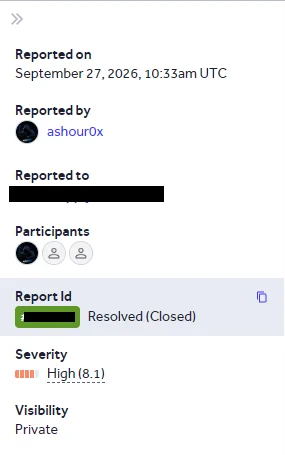
This demonstrated that the server was enforcing the role-hierarchy restriction that had been missing from the vulnerable operation. The report was eventually marked Resolved.
Variants to test
A positive result is a 200 where the response or a follow-up fetch shows a higher-role member removed or downgraded.
A positive result is either change being accepted by a caller at 200.
A positive result is your level rising in the stored state.
A positive result is the creator losing access or the ownership reference changing.
A positive result is a change applied outside your own scope.
What happened, in plain words
A web application lets people work together on engineering projects. Each project lives in something called a Notebook, and inside a Notebook people create Pages that hold the actual content and diagrams. To get into a project you need an invitation to the Notebook, and to read a particular Page you need a separate invitation to that Page. Different people get different levels of power, from someone who can only look (Viewer) up to someone who can do everything (Admin).
The researcher, Ashour, was testing this application as part of a bug bounty programme. A bug bounty programme is a scheme where a company invites outside people to look for security mistakes in its systems and report them, sometimes for a reward. Ashour had already sent in several reports: some turned out to be duplicates (someone else had reported the same thing first) and some were marked informative (real observations, but not treated as a security problem worth fixing). This report describes the first one that was resolved.
The mistake he found was this: a person with low permissions could send the application a list of who should have access to a Page, leave the administrator out of that list, and the application would believe it. The administrator then lost access to the Page. The same trick could lower other people's permission levels or remove them entirely. In security language this is called Broken Access Control: the application does not properly check whether the person asking is allowed to make the change they are asking for.
First, understanding the application
The application is built around Notebooks and Pages. Think of a Notebook as the shared folder for a whole engineering project, and a Page as one document inside that folder, holding the project's content and visualisations (charts, diagrams and so on).
Access works in two layers:
- To reach a project at all, you need an invitation to the Notebook.
- To read a specific Page's content, you also need to be invited to that Page separately.
That separation matters later, because the Notebook endpoint and the Page endpoint behaved differently.
Users are given numeric roles. The higher the number, the more the person can do:
| Value | Role |
|---|---|
100 |
Viewer |
200 |
Contributor |
300 |
Author |
400 |
Editor |
500 |
Admin |
A role here is simply a label that says what a person is allowed to do. The numbers are the application's internal way of ranking those labels, so 500 outranks 400, which outranks 300, and so on. This ranking is called the role hierarchy.
The aim of the testing was to understand how the application enforced those permissions on the server, not just what the interface allowed. The interface is what you see in the browser: buttons, menus, forms. The server is the computer behind the scenes that actually stores the data and decides whether a request is allowed. A common beginner mistake is to assume that hiding a button hides the ability to do something. It does not: anyone can send a request to the server directly, so the server has to check every request on its own.

The tools and ideas you need for the rest of this article
Before the steps make sense, here are the few concepts they rely on.
API. An API (Application Programming Interface) is the set of addresses a web application exposes so that programs, including the browser's own JavaScript, can ask it to do things. A useful comparison is a restaurant: the menu is the API, the kitchen is the server, and you can only order what is on the menu. When you click a button in a modern web app, the browser usually sends a request to one of these addresses and the server replies with data, often in a format called JSON.
JSON. JSON is a plain-text way of writing structured data, using curly braces for objects, square brackets for lists, and "name": value pairs. It looks like this: {"name": "Default"}. It is just text, which is why it is easy to copy, edit and send back.
Endpoint. An endpoint is one specific address on the server, such as /api/page/[PAGE_ID]/save-users. The part in square brackets is a placeholder for a real identifier, a long string that names one particular Page. Endpoints are usually tied to one action: this one saves the list of users for a Page.
HTTP request and method. Your browser talks to servers using HTTP. Each request has a method, a word that says what kind of action it is. GET means "give me something", POST means "here is some data, do something with it". The requests in this report are all POST, because they send data to be saved.
Authentication token (or session cookie). When you log in, the server gives your browser a small piece of data that proves who you are on every later request. It might be a cookie (a small value the browser stores and sends automatically) or a token (a value the application attaches to requests itself). Think of it as a wristband at an event: the door staff check the wristband, not your face. Anyone who holds your wristband can act as you, which is why these values are secret and are replaced with [redacted] in write-ups.
Intercepting proxy. An intercepting proxy is a tool that sits between your browser and the server. It lets you pause a request, read it, change it, and then send it on. Without one, you can only use the application the way its interface intends. With one, you can send whatever you like, which is exactly what a server-side check has to defend against.
Privilege escalation. Privilege escalation means giving yourself more power than you were granted. If a Contributor could turn themselves into an Admin, that would be privilege escalation.
Broken Access Control. Broken Access Control is the general name for mistakes where the server does not correctly check whether the person making a request is allowed to make it. It covers reading other people's data, changing things you should not change, and, as here, altering other people's access.
Setup
Ashour tested with an authenticated session belonging to a lower-privileged collaborator. In other words, he was logged in as a normal user with limited rights, and he used that user's authentication token for every request. This is the honest way to test: you prove what a real low-privileged user could do, not what an administrator could do.
The Page used for testing contained an administrator at permission level 500, alongside collaborators at 200, 300 and 400. So there was a clear target: a Page where someone far more powerful than the tester also had access.
Requests were captured and their JSON bodies edited before being replayed with the attacker's own token. "Replayed" means sending the same request again, possibly with changes, using the same credentials.
Finding it
While exploring how collaborators were added, Ashour noticed that inviting users triggered requests to a user-management endpoint. In plain terms: when you use the sharing screen to add someone, the browser quietly sends a message to the server saying "here is the new list of people and their permission levels". The first endpoint he investigated was the Notebook one:
POST /api/notebook/[NOTEBOOK_ID]/save-users
Reading that address: POST means it sends data to be saved, /api/ marks it as part of the application's programming interface, notebook says it concerns a Notebook, [NOTEBOOK_ID] is the placeholder for one particular Notebook, and save-users says the action is to save the user list.
He captured the request and modified it using his own authenticated session, trying to increase his own permissions. The server rejected the attempt:
{ "message": "Cannot modify the permissions of a user with a higher role than your own", "data": null, "error": null}
Line by line, this reply says:
"message"holds a human-readable explanation: you cannot change the permissions of a user whose role is higher than yours."data"isnull, meaning no useful data came back, because the action did not happen."error"is alsonull, which is a little odd but common: the application chose to describe the refusal inmessagerather than in an error field.
The attempt failed, but it taught something valuable. The server was checking the role hierarchy for this operation: it compared the role of the person making the request with the role of the user being changed, and refused when the target outranked the caller. That is exactly the right behaviour.
That raised the obvious question: did the corresponding Page endpoint enforce the same restriction? The Notebook and the Page are two layers of the same product, and it is very common for one layer to be written carefully and the other to be forgotten. Testing the sibling feature is one of the highest-value habits in this kind of work.
Exploitation
Step 1: Locate the Page sharing request
Moving into the project itself, Ashour examined how users are invited to individual Pages. When a user clicks Done in the Page-sharing interface, the application sends a request to:
POST /api/page/[PAGE_ID]/save-users
This is the Page version of the Notebook endpoint seen earlier: same shape, same save-users action, but scoped to a single Page instead of a whole Notebook. The request was captured and its JSON body examined. It contained the Page's user list and permission values. In other words, the browser was sending the server the complete membership list of the Page, and the server was expected to save it.
Step 2: Try the obvious escalation first
Using the lower-privileged attacker's authentication token, Ashour first tested whether his own permissions could be escalated, and then whether another user's privileges could be increased. Both attempts failed.
This is worth pausing on. The natural first idea in a sharing feature is "can I make myself an Admin?" The server said no. A less patient tester would stop there and move on. The lesson is that a refusal on one path does not mean the whole endpoint is safe: the same endpoint may handle several kinds of change, and each kind needs its own check.
Step 3: Inspect the original user list
Rather than repeating the same tests, Ashour looked at how the endpoint handled changes to the submitted user list. The original response showed the administrator with permission level 500, alongside other collaborators with lower permission levels:
{ "_id": "[PAGE_ID]", "name": "Default", "isPublic": false, "createdBy": { "permissions": 500, "_id": "[ADMIN_MEMBERSHIP_ID]" }, "users": [ { "permissions": 500, "_id": "[ADMIN_MEMBERSHIP_ID]" }, { "permissions": 200, "_id": "[CONTRIBUTOR_MEMBERSHIP_ID]" }, { "permissions": 300, "_id": "[AUTHOR_MEMBERSHIP_ID]" }, { "permissions": 400, "_id": "[EDITOR_MEMBERSHIP_ID]" } ], "parent": null, "notebook": "[NOTEBOOK_ID]", "userPermissions": { "permissions": 200 }}
This is a JSON object describing one Page. Going through it field by field:
"_id": "[PAGE_ID]"is the unique identifier of this Page. Every object in the application has one."name": "Default"is the Page's display name."isPublic": falsemeans the Page is not open to the public; you need an invitation."createdBy"describes the person who created the Page. Inside it,"permissions": 500says the creator is an Admin, and"_id": "[ADMIN_MEMBERSHIP_ID]"is the identifier of that person's membership of this Page. A membership is the record that links a user to a Page together with their permission level; it is not the user account itself."users"is the membership list for the Page. Each entry pairs a membership_idwith apermissionsvalue. There are four entries: the administrator at500, a contributor at200, an author at300and an editor at400."parent": nullmeans this Page has no parent Page."notebook": "[NOTEBOOK_ID]"says which Notebook this Page belongs to."userPermissions": { "permissions": 200 }shows the caller's own level,200in this case. The caller is the person making the request, here the low-privileged tester. So the application itself is telling us that the person asking is only a Contributor, while the list contains an Admin.
That last field is the key observation. The request is being made by a 200, and the data being changed includes a 500. If the server does not compare those two numbers, the 200 can do whatever they like to the 500.
Step 4: Remove the administrator from the submitted list
Using the attacker's valid authentication token, the administrator's entry was removed from the submitted users list:
{ "users": [ { "permissions": 200, "_id": "[CONTRIBUTOR_MEMBERSHIP_ID]" }, { "permissions": 300, "_id": "[AUTHOR_MEMBERSHIP_ID]" }, { "permissions": 400, "_id": "[EDITOR_MEMBERSHIP_ID]" } ]}
Compare this with the original. The users list now has three entries instead of four: the contributor, the author and the editor. The administrator's entry, the one with "permissions": 500 and "_id": "[ADMIN_MEMBERSHIP_ID]", is simply gone. Nothing else was added; the only change is a deletion from a list.
The idea behind the test is simple once you see it. The server accepted the list without the administrator in it. If the list no longer mentions the administrator, then, as far as the server is concerned, the administrator should no longer have access. The server accepted the change, so the removal of a more powerful user was not blocked.
The server accepted the change, and the administrator lost access to the Page.
Step 5: Reduce permissions and remove other users
Ashour went further and tested whether other users' permission levels could be reduced instead of removing them entirely. That worked too. Other users could also be removed from the Page.
So the weakness was not limited to one special case: reducing other users' permission levels and removing other users also worked.
Root cause
The Page endpoint accepted the modified list without the role-hierarchy check the Notebook endpoint applied. The Notebook endpoint performed that check, as the rejection message showed, but the Page operation did not.
The earlier tests showed escalation attempts were refused, while removal and reduction of a higher-role user succeeded. The earlier tests showed exactly this split: escalation attempts were refused, while removal and reduction of a higher-role user succeeded. In everyday terms, the door staff checked your wristband when you tried to enter a more exclusive room, but not when you tried to throw someone else out of the building.
Impact
A lower-privileged collaborator could interfere with other users' access to the project, potentially locking them out of a Page they were supposed to access. Because the affected users might lose access without understanding what had happened, identifying the cause could also become difficult. This could disrupt collaboration and leave users unable to access their project content through the affected Page.
It is worth being clear about why this matters even though no data was stolen. Access control is what makes shared work possible: people trust that the list of collaborators is managed by the people in charge. If any Contributor can quietly remove the Admin, that trust is gone, and the damage can be hard to trace because the removed user sees only that something stopped working.
The issue was not privilege escalation alone: it was a Broken Access Control vulnerability that allowed unauthorised changes to other users' permissions and memberships.
Fix
After the issue was reported and worked on with the security team, the vulnerability was fixed. During retesting, the server rejected attempts to modify the permissions of a higher-role user and returned:
{ "message": "Cannot modify the permissions of a user with a higher role than your own", "data": null, "error": null}
This is the same refusal message the Notebook endpoint had produced all along. The message field explains the rule being applied, data is null because nothing was changed, and error is null because the application reports the refusal in its own message field. Seeing it on the Page endpoint is the proof that matters: the server was now enforcing the role-hierarchy restriction that had been missing from the vulnerable operation.
The report was eventually marked Resolved.
Variants to test
If you find something like this, the same idea usually exists in more than one place. These are the follow-up tests described for this class of issue.
A positive result is a 200 where the response or a follow-up fetch shows a higher-role member removed or downgraded. A 200 is the standard HTTP status code for "OK, done".
A positive result is either change being accepted by a caller at 200.
A positive result is your level rising in the stored state. Mass assignment is when a server blindly copies fields from the data you send into its own records, including fields you were never meant to set.
A positive result is the creator losing access or the ownership reference changing.
A positive result is a change applied outside your own scope. A tenant here means one separate project or workspace whose data should stay apart from others.
The empty square brackets mean "a list with nothing in it".
Glossary
- API: the set of addresses a web application exposes so that programs, including the browser, can ask it to do things; like a menu you order from.
- Authentication token: a secret value that proves which user a request comes from, sent with each request instead of a password.
- Broken Access Control: a class of security mistake where the server does not correctly check whether the person making a request is allowed to make it.
- Cookie: a small value stored by the browser and sent automatically with requests, often used to carry a session.
- Cross-tenant: involving objects that belong to a different project or workspace than your own.
- Duplicate: a bug report describing an issue that someone else already reported.
- Endpoint: one specific address on a server that performs one action, such as saving a Page's user list.
- HTTP: the protocol browsers and servers use to exchange requests and responses.
- Informative: a report status meaning the observation was noted but not treated as a security problem to fix.
- Intercepting proxy: a tool placed between browser and server that lets you pause, read and edit requests before they are sent.
- JSON: a plain-text format for structured data, using curly braces for objects, square brackets for lists and
"name": valuepairs. - Mass assignment: a server copying fields from submitted data straight into its records, including fields the user should not be able to set.
- Membership: the record that links a user to a Page or Notebook together with their permission level.
- Method: the word at the start of an HTTP request (
GET,POSTand so on) that says what kind of action it is. - Notebook: in this application, the main workspace for an entire engineering project, containing Pages.
- Page: a document inside a Notebook that holds the project's content and visualisations.
- Permission level: the number attached to a user's membership that says how much they can do, from
100(Viewer) to500(Admin). - Privilege escalation: giving yourself more power than you were granted.
- Replay: sending a captured request again, possibly modified, with the same credentials.
- Role: a label such as Viewer, Contributor, Author, Editor or Admin that defines what a user may do.
- Role hierarchy: the ranking of roles, where a higher number outranks a lower one.
- Server: the computer behind the scenes that stores data and decides whether each request is allowed.
- Session: the period during which the server recognises you as a logged-in user, usually tracked by a cookie or token.
- Status code: a number in an HTTP response saying how the request went, such as
200for OK. - Tenant: one separate project or workspace whose data should stay apart from other tenants' data.
- Vulnerability: a weakness in an application that someone could use to do something they are not supposed to do.

