How I Found a company’s internal S3 Bucket with 41k Files
An internal S3 bucket was publicly listable and readable, exposing 41,000 files including CSV backups with personal data such as usernames, emails, phone numbers and addresses. An attacker could download these files and obtain sensitive information about staff and users.
 Published on infosecwriteups.com
I found a company’s S3 bucket which was used internally and was not referenced anywhere in GitHub or its domain. This was my first valid vulnerability which I reported 7 months ago and was only possible due to manual recon.
The full write-up lives on its author's site
It belongs to its author, so we link to it rather than copy it. The other two tabs are our own rewrites, checked against it.
Context
This is a write-up of a manual reconnaissance finding: an S3 bucket used internally by a company, which was not referenced anywhere in the company's GitHub organisation or on its domain. The researcher describes it as his first valid vulnerability, reported about seven months before the article was published, and attributes it entirely to manual recon rather than tooling.
The target was a bug bounty program with a limited scope, so ASN enumeration and vertical enumeration were not worthwhile. The bucket itself was found through a secondary company name rather than through the program's primary name, and it held 41,000 files. The report does not name the company or the bucket; the company is referred to as FooBar Inc (redacted).
Setup
The tools involved were:
- Crunchbase, for company metadata.
- GitHub, to check for an organisation matching the alternative name.
- GrayHatWarfare's bucket search at
https://buckets.grayhatwarfare.com/buckets. - The AWS CLI, installed and configured following a separate guide the author links to.
grep, a small bash script for file-type frequency, andwgetfor bulk download.
The methodology followed was JHaddix's v4 methodology. The author notes that GrayHatWarfare's bucket search requires registration and that free accounts only see a limited set of buckets; new buckets are added regularly but full access is for premium subscribers.
Finding it
Step 1: an alternative company name from Crunchbase
The scope was limited, so instead of ASN work the author looked the program's company up on Crunchbase. In the Details section he found an Also Known As header giving a second name for the company, shown in the screenshot as FooBar Inc (redacted).
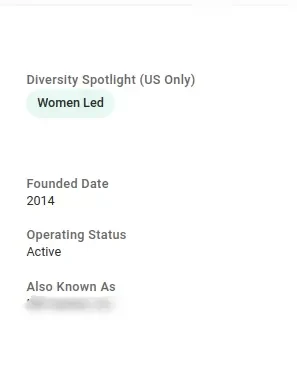
That alternative name is the pivot for everything that follows: it is a name the company uses but which is less likely to appear in the program's public scope.
Step 2: checking GitHub for the alternative name
The first check was whether a GitHub organisation existed with a name similar to the alternative name. One did, but it had no public repositories, so there was nothing to mine there.
Step 3: searching GrayHatWarfare for name variations
The author then searched GrayHatWarfare for the alternative name and variations of it, such as foodev, through the bucket search page:
https://buckets.grayhatwarfare.com/buckets
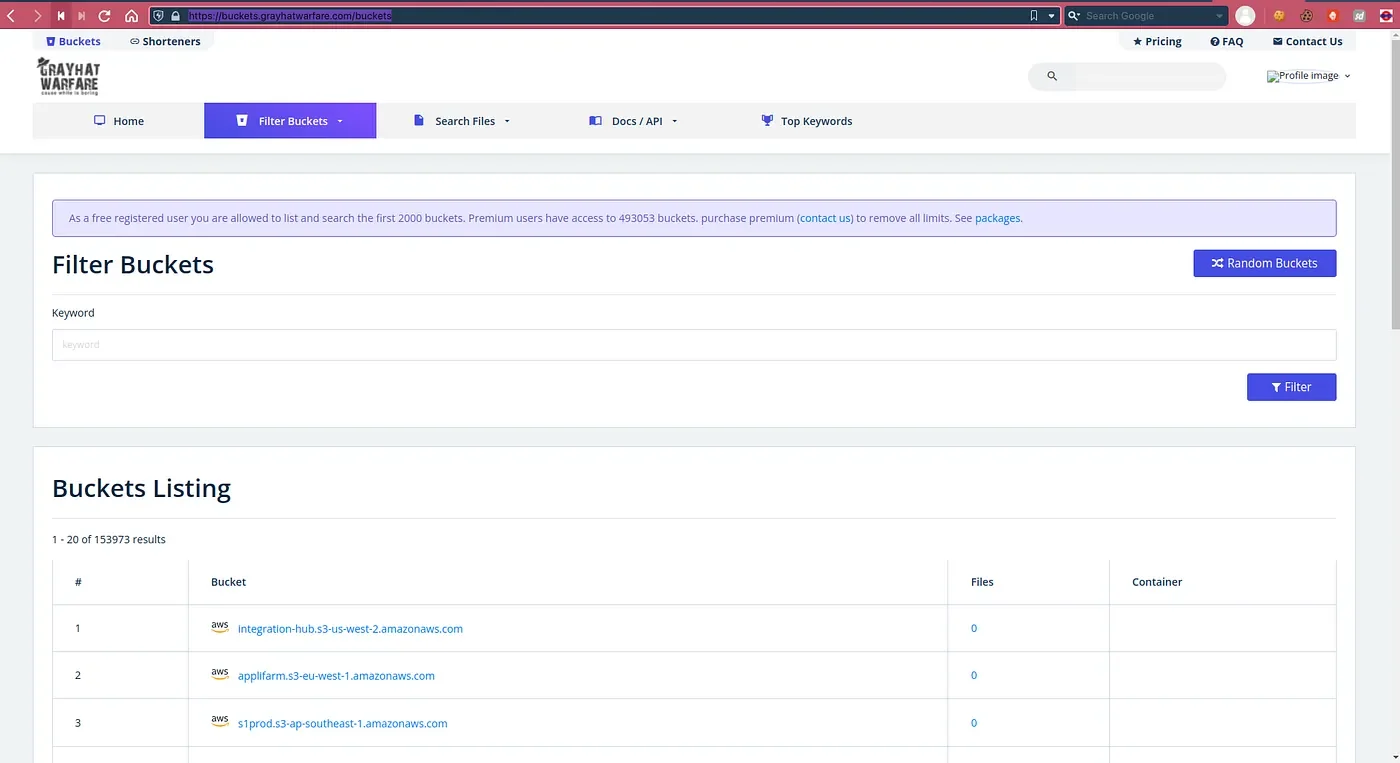
This returned a bucket named foositedev containing 41,000 files.
Exploitation
Step 1: test the five S3 bucket permissions with aws-cli
The author lists the five main S3 bucket permissions and the command used to test each one.
LIST, to list all files in the bucket:
aws s3 ls s3://bucketName
READ, to read a particular object:
aws s3 cp s3://bucketName/PathtoFile LocalFile
WRITE, to write, overwrite or delete a particular object:
aws s3 cp poc.txt s3://bucketName/poc.txt
READ_ACP, to read access control permissions:
aws s3api get-bucket-acl --bucket bucketName
WRITE_ACP, to write or modify access control permissions:
aws s3api put-bucket-acl --acl public-read-write --bucket bucketName
Running these against the bucket showed that READ_ACP, LIST and READ were enabled.
Step 2: enumerate the whole bucket without downloading it
With 41,000 files, downloading everything was not feasible. The author used the recursive listing with a summary to get the full object list plus totals:
aws s3 ls --summarize --human-readable --recursive s3://bucketName
This returned every file with its path, the total number of files and the total bucket size, which was 23.6 GB.
Step 3: filter the listing by file type
A first look at some of the listing, filtered with grep, showed node modules, HTML, gif and jpeg files, all of which were useless for the purpose. The author saved the full output to a file and wrote a bash script that outputs the different file types present and their frequency.
Step 4: pull the interesting CSVs
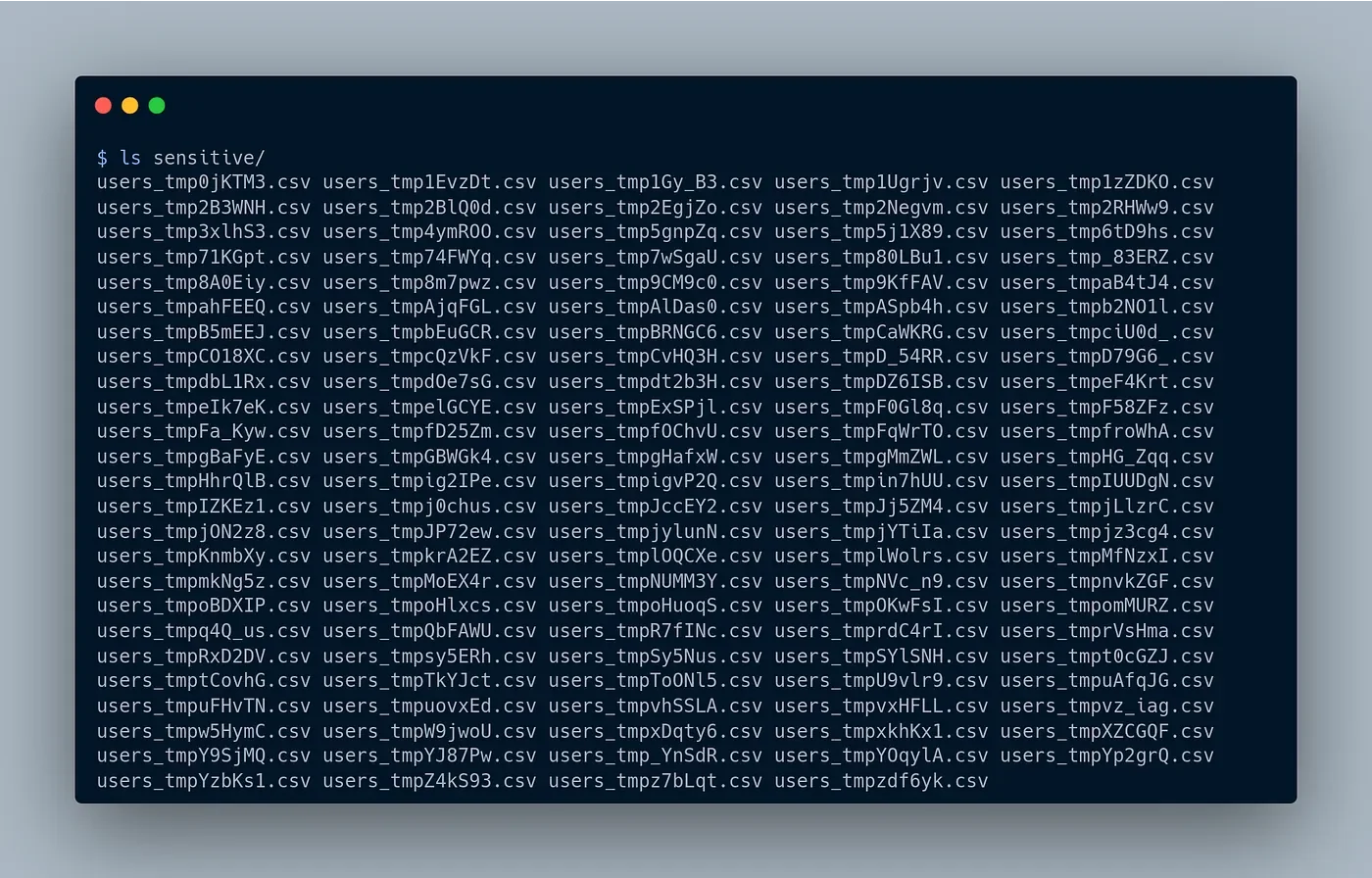
Among the file types in that output were CSV files with the name users. He grepped for them, collected the URLs into a file and downloaded them with:
wget -i urls.txt -P directory
Step 5: what the files contained
The CSV files were backups from the company's database. They contained usernames, email addresses, phone numbers, addresses and a lot of other PII, across a total of 32 columns. Many of the email addresses were staff emails on the company's own domain.
Step 6: report and outcome
The finding was written up in detail and submitted. It was accepted quickly, marked as high severity, and rewarded $250. The author notes that despite the company being a million-dollar company, its bounty scale was low: $500 for critical, $250 for high, $100 for medium and $0 for low, with no P4 or P5 accepted. He continued on the same program for four months afterwards and found roughly 18 vulnerabilities, including duplicates, medium, high and six critical, but no low-severity ones.
Root cause
The bucket was configured to allow anonymous LIST, READ and READ_ACP. That combination is what made the whole chain possible: LIST turned a guessed bucket name into a complete inventory of 41,000 objects, and READ allowed the database backup CSVs to be downloaded directly. The report does not describe how the bucket policy or ACL came to be set that way;
The reason the bucket was hard to find is separate from the misconfiguration: it was not referenced in the company's GitHub organisation or on its domain, so the usual sources (Burp proxy traffic, crawlers such as hakrawler or gospider, GitHub) would not have surfaced it. The route taken was the alternative company name from Crunchbase, combined with a bucket search engine.
Impact
Anyone who guessed or found the bucket name could list its entire contents and download any object, with no authentication. In this case that meant database backup CSVs containing usernames, email addresses, phone numbers, addresses and other PII across 32 columns, including staff email addresses on the company domain. The bucket was used internally, so the exposure covered internal data rather than public assets. The report lists only READ_ACP, LIST and READ as enabled.
Fix
The permissions that need removing are the anonymous LIST, READ and READ_ACP grants shown by the tests above; once those are gone, the bucket name alone no longer gives access to the object list or the objects themselves.
Variants to test
- Alternative company names from Crunchbase. Look in the Details section for an Also Known As header, then search bucket indexes for that name and its variations (for example appending
dev,site,prod). A positive result is a bucket whose name matches the variation and whose contents relate to the target. - GitHub organisation under the alternative name. Check whether an organisation exists with that name. A positive result here is public repositories containing bucket names, endpoints or credentials; in this case there were none, but the check is cheap.
- Permission sweep on any bucket found. Run the five commands above against the bucket. A positive result is
LIST,READorREAD_ACPsucceeding anonymously;WRITEorWRITE_ACPsucceeding is a more serious finding still. - Recursive listing plus file-type frequency. Use the
--summarize --human-readable --recursivelisting, save it, and count extensions. A positive result is a cluster of backup-style files such as CSVs, SQL dumps or archives among the noise of node modules and static assets. - Name-based grep of the listing. Grep the saved listing for terms such as
users,backup,dumporexport. A positive result is a path that can then be fetched withwget -ioraws s3 cpand inspected for PII.
What happened, in plain words
A security researcher found a company's private storage area on the internet. Think of it like a filing cabinet that the company used internally, sitting in a public corridor with the door unlocked. Nobody had linked to it from the company's website or from its code hosting pages, so the usual ways of finding such things did not work. He found it by learning a second name the company uses, then searching a website that keeps an index of these storage areas.
The storage area is called an S3 bucket. S3 is Amazon's service for storing files online, and a bucket is simply a folder in that service. Companies use buckets for websites, backups, images and all sorts of internal data. Buckets are supposed to be private, but they can be misconfigured so that anyone on the internet can look inside and take files out.
This bucket held 41,000 files. The researcher did not download all of them, because that would have been impractical. Instead he listed every file name, sorted the list by file type, spotted some spreadsheet-style files named users, and downloaded only those. They turned out to be database backups containing personal information: usernames, email addresses, phone numbers, addresses and more, across 32 columns. He reported it, the report was accepted as high severity, and he was paid $250.
This was his first valid vulnerability. He reported it about seven months before writing the article, and he says it was only possible because of manual recon, meaning he poked around by hand rather than relying on automated tools.
About the researcher
The author is Tarun, a security researcher and bug hunter from India. He mentions a previous article of his about writing automation scripts without bash, and links to his GitHub, Twitter and Medium profiles. None of that matters for reproducing the finding, but it sets the context: this is someone who builds tooling, choosing to do this particular hunt by hand.
Recon
Recon, short for reconnaissance, is the information-gathering phase of a security test. Before you can find a weakness you have to map out what the target owns and where it lives on the internet. It is like casing a building before trying the doors: you look at the signs, the side entrances, the names on the letterbox.
The author lists the common ways people find S3 buckets for a bug bounty program:
- Burp proxy: Burp is a tool that sits between your browser and the website and records every request. If a page loads a file from a bucket, the bucket's address appears in that traffic.
- hakrawler and gospider: these are crawlers. A crawler is a program that visits a website and follows every link it finds, like a person clicking every link on every page. If any page links to a bucket, the crawler records it.
- GitHub: developers sometimes leave bucket names, addresses or even access keys in public code repositories. GitHub is the most popular place to publish code.
He notes there are other ways too, and says he may write a separate article about them.
As a newcomer, he was following JHaddix's v4 methodology, a well-known checklist for bug bounty recon. The scope of this program was limited, meaning the company had told researchers which of its systems they were allowed to test, and the list was short. Because of that, ASN enumeration and vertical enumeration were not worth doing. Two terms to unpack:
- ASN enumeration: every network on the internet belongs to an Autonomous System, identified by an ASN number. Enumerating ASNs means finding all the network ranges a company owns and scanning them for services. It is a broad sweep, useful when the scope is wide.
- Vertical enumeration: going deep on one system, testing every feature and parameter of a single application.
With a narrow scope, neither approach would have paid off. So he took a different route: he visited Crunchbase.
Crunchbase is a public database of company information, a bit like a business directory. Companies list their founding date, staff, funding and, importantly for this story, alternative names. In the Details section of the program company's Crunchbase page, he found an Also Known As header giving a second name for the company, shown in the screenshot as FooBar Inc (redacted).
That alternative name is the pivot for everything that follows. A pivot is a piece of information that lets you move from one place to another: here, from the company's official name, which everyone knows and which the program's scope covers, to a name the company also uses but which is less likely to appear in public lists of what researchers are testing. If a bucket is named after the alternative name, searching for the official name will never find it.
Checking GitHub for the alternative name
The first thing he did with the new name was check whether a GitHub organisation existed with a similar name. A GitHub organisation is a shared account that groups a company's or project's repositories. A repository (repo) is a project folder containing code and its history.
One did exist, but it had no public repositories. That means there was nothing to read: no code, no configuration files, no accidentally committed bucket names. The check cost almost nothing, so it was worth doing, but it produced nothing.
Searching GrayHatWarfare
GrayHatWarfare is a website that indexes publicly reachable S3 buckets. An index, in this sense, is like a library catalogue: it does not hold the books, but it records their names and where they are, so you can search for them. GrayHatWarfare continuously discovers buckets and lets you search by name.
The author is candid about its downside: the pricing. Free accounts only see a limited set of buckets, and full access is for premium subscribers. He notes that new buckets are added regularly, but the complete search is paid. For a beginner this matters, because open buckets are rare, so the free tier may not show the one you need.
He searched for the alternative name and some variations of it, such as foodev, by visiting this page:
https://buckets.grayhatwarfare.com/buckets
This is simply the bucket search page of the site. You open it in a browser, type a name into the search box, and it returns buckets whose names match. The variations matter because companies name buckets by combining their name with a purpose or environment: dev for development, site for a website, prod for production. Searching only the exact name would miss those combinations.
The search returned a bucket named foositedev, containing 41,000 files. Notice what has happened: the bucket was never linked from the company's website or its code, so crawlers and proxy traffic would never have found it. It was found purely because its name contains a company name that is not the obvious one.
Exploitation
Exploitation means turning a suspected weakness into a demonstrated one. In this case it means proving, with commands, that the bucket really does let an outsider in.
Testing the five S3 bucket permissions
S3 buckets have permissions, rules about who may do what. The author lists five main ones and the command used to test each. The commands use the AWS CLI, which is Amazon's command-line interface: a program you install on your computer that lets you talk to Amazon's services by typing commands instead of clicking in a browser. He links to a separate guide for installing and configuring it.
A note on the placeholder bucketName: in every command below, that word stands for the real name of the bucket. You replace it with the name you are testing.
LIST, to list all files in the bucket:
aws s3 ls s3://bucketName
Line by line: aws runs the AWS CLI program. s3 says which Amazon service you want, here the storage service. ls means list, the same as the ls command in a normal terminal that lists files in a folder. s3://bucketName is the address of the bucket, in the same way https:// addresses a website. If the bucket allows anonymous listing, this prints the names of the files inside. If it does not, you get an access denied error.
READ, to read a particular object:
aws s3 cp s3://bucketName/PathtoFile LocalFile
An object is S3's word for a single file. cp means copy. The first path is the file inside the bucket, the second is where to save it on your own machine. So this downloads one file. If it succeeds without any credentials, the bucket allows anyone to read its contents.
WRITE, to write, overwrite or delete a particular object:
aws s3 cp poc.txt s3://bucketName/poc.txt
This copies a small local file called poc.txt up into the bucket. POC stands for proof of concept: a harmless demonstration that something is possible. If this works, an outsider can add files, replace existing ones, or delete them. That is far more serious than reading, because it can be used to deface a site or plant malicious content.
READ_ACP, to read access control permissions:
aws s3api get-bucket-acl --bucket bucketName
ACP stands for Access Control Policy, the list of who is allowed to do what. s3api is the lower-level part of the AWS CLI that exposes the raw S3 interface, and get-bucket-acl asks the bucket to show its permission list. If this succeeds anonymously, an outsider can see exactly which accounts and groups have access, which is useful information for further attacks.
WRITE_ACP, to write or modify access control permissions:
aws s3api put-bucket-acl --acl public-read-write --bucket bucketName
put-bucket-acl changes the permission list. The --acl public-read-write part asks to make the bucket readable and writable by the public. If this succeeded, an outsider could hand themselves and everyone else full access. It is the most dangerous of the five.
Running these against the bucket showed that READ_ACP, LIST and READ were enabled. In plain terms: anyone could see the list of files, download any file, and read the permission list, but nobody outside could add, change or delete anything.
Enumerating the whole bucket without downloading it
With 41,000 files, downloading everything was not feasible. Even if each file were small, the total would be enormous, and most of it would be irrelevant. So the next step was to get a complete inventory without fetching the contents.
aws s3 ls --summarize --human-readable --recursive s3://bucketName
Line by line: ls lists, as before. --recursive means go into every folder and subfolder, not just the top level, the same way a recursive search on your computer looks inside every directory. --summarize adds a summary at the end: the total number of objects and their combined size. --human-readable prints sizes in units a person can read, such as megabytes and gigabytes, instead of raw byte counts.
This returned every file with its path, the total number of files and the total bucket size, which was 23.6 GB. That number is the key to the next decision: 23.6 GB is too much to pull down casually, but a text list of names is tiny.
Filtering the listing by file type
A first look at some of the listing, filtered with grep, showed node modules, HTML, gif and jpeg files. grep is a command that searches text for a pattern and prints the matching lines, like the find function in a text editor but for command output. Node modules are the downloaded libraries a JavaScript project depends on: thousands of small files with no interest to an attacker. HTML pages, gifs and jpegs are website assets. All of it was useless for the purpose.
So he saved the full output to a file and wrote a bash script that outputs the different file types present and their frequency. A bash script is a small text file of commands that the computer runs in sequence. Counting file types is a way of seeing the shape of a bucket at a glance: if 90 percent of it is node modules and images, the interesting files are the rare extensions hiding among them.
Pulling the interesting CSVs
Among the file types in that output were CSV files with the name users. CSV stands for comma-separated values: a plain text file that stores a table, with one row per line and commas between the columns. It is what you get when you export a spreadsheet or a database table. A file called users in a bucket is a strong hint of a user table.
He grepped for them, collected the URLs into a file, and downloaded them with:
wget -i urls.txt -P directory
Line by line: wget is a program that downloads files from the internet. -i urls.txt means read the list of addresses from the file urls.txt, one per line, and download each one in turn. -P directory means save everything into the folder named directory. So this is a bulk download: instead of fetching each file by hand, you give it a list and it works through them.
What the files contained
The CSV files were backups from the company's database. A database backup is a copy of the data a company keeps in its systems, made so it can be restored if something goes wrong. Backups are exactly the kind of file that should never be public, because they contain everything at once.
These contained usernames, email addresses, phone numbers, addresses and a lot of other PII, across a total of 32 columns. PII stands for personally identifiable information: data that can identify a real person, such as a name, an email, a phone number or a home address. Many of the email addresses were staff emails on the company's own domain.
Report and outcome
The finding was written up in detail and submitted through the bug bounty platform. A bug bounty program is a scheme where a company invites outsiders to test its systems and pays for valid findings, with rules about what is in scope and how much each severity level is worth.
It was accepted quickly, marked as high severity, and rewarded $250. Severity is the rating of how serious a finding is, usually from low to critical, and it determines the reward.
The author notes that despite the company being a million-dollar company, its bounty scale was low: $500 for critical, $250 for high, $100 for medium and $0 for low, with no P4 or P5 accepted. P4 and P5 are the lowest tiers on the common five-level scale used by bug bounty platforms, so the program simply did not pay for minor issues.
He continued on the same program for four months afterwards and found roughly 18 vulnerabilities, including duplicates, medium, high and six critical, but no low-severity ones. A duplicate is a finding someone else already reported, which usually earns nothing.
Root cause
The bucket was configured to allow anonymous LIST, READ and READ_ACP. Anonymous here means without any login or key: a stranger with a browser or the AWS CLI and the bucket's name. That combination is what made the whole chain possible. LIST turned a guessed bucket name into a complete inventory of 41,000 objects, because once you can list, you no longer need to guess individual file names. READ allowed the database backup CSVs to be downloaded directly.
The report does not describe how the bucket policy or ACL came to be set that way. A bucket policy is the set of rules attached to a bucket saying who may do what; an ACL is the older, simpler permission list.
The reason the bucket was hard to find is separate from the misconfiguration. It was not referenced in the company's GitHub organisation or on its domain, so the usual sources, Burp proxy traffic, crawlers such as hakrawler or gospider, and GitHub, would not have surfaced it. The route taken was the alternative company name from Crunchbase, combined with a bucket search engine.
Impact
Anyone who guessed or found the bucket name could list its entire contents and download any object, with no authentication. Authentication means proving who you are, with a password or a key; here there was none to prove.
In this case that meant database backup CSVs containing usernames, email addresses, phone numbers, addresses and other PII across 32 columns, including staff email addresses on the company domain. The bucket was used internally, so the exposure covered internal data rather than public assets. The report lists only READ_ACP, LIST and READ as enabled.
Fix
The report does not state what the company changed. The permissions that need removing are the anonymous LIST, READ and READ_ACP grants shown by the tests above. Once those are gone, the bucket name alone no longer gives access to the object list or the objects themselves.
Variants to test
These are the same techniques applied more generally, so you can try them on other targets.
- Alternative company names from Crunchbase. Look in the Details section for an Also Known As header, then search bucket indexes for that name and its variations, for example appending
dev,siteorprod. A positive result is a bucket whose name matches the variation and whose contents relate to the target. - GitHub organisation under the alternative name. Check whether an organisation exists with that name. A positive result here is public repositories containing bucket names, endpoints or credentials. In this case there were none, but the check is cheap.
- Permission sweep on any bucket found. Run the five commands above against the bucket. A positive result is
LIST,READorREAD_ACPsucceeding anonymously.WRITEorWRITE_ACPsucceeding is a more serious finding still. - Recursive listing plus file-type frequency. Use the
--summarize --human-readable --recursivelisting, save it, and count extensions. A positive result is a cluster of backup-style files such as CSVs, SQL dumps or archives among the noise of node modules and static assets. - Name-based grep of the listing. Grep the saved listing for terms such as
users,backup,dumporexport. A positive result is a path that can then be fetched withwget -ioraws s3 cpand inspected for PII.
Glossary
- S3 bucket: a folder in Amazon's Simple Storage Service, used to hold files online.
- Object: S3's word for a single file stored in a bucket.
- Recon (reconnaissance): the information-gathering phase of a security test, before any weakness is exploited.
- Manual recon: gathering information by hand rather than with automated tools.
- Bug bounty program: a scheme where a company invites outsiders to test its systems and pays for valid findings.
- Scope: the list of systems a program allows researchers to test.
- ASN enumeration: finding all the network ranges a company owns and scanning them for services.
- Vertical enumeration: going deep on a single application, testing every feature and parameter.
- Burp proxy: a tool that sits between your browser and a website and records every request.
- Crawler: a program that visits a website and follows every link it finds.
- hakrawler, gospider: crawlers used in bug bounty recon.
- GitHub: a website for publishing and sharing code.
- Repository (repo): a project folder containing code and its history.
- GitHub organisation: a shared account that groups a company's or project's repositories.
- Crunchbase: a public database of company information.
- Also Known As: a Crunchbase field giving an alternative name for a company.
- Pivot: a piece of information that lets you move from one line of investigation to another.
- GrayHatWarfare: a website that indexes publicly reachable S3 buckets and lets you search them.
- Index: a catalogue of names and locations, like a library catalogue, that you can search.
- AWS CLI: Amazon's command-line interface, a program that talks to Amazon's services from typed commands.
- Permission: a rule about who may do what with a resource.
- LIST: the permission to see the names of files in a bucket.
- READ: the permission to download a file from a bucket.
- WRITE: the permission to add, overwrite or delete a file in a bucket.
- ACP (Access Control Policy): the list of who is allowed to do what on a bucket.
- READ_ACP: the permission to view that list.
- WRITE_ACP: the permission to change that list.
- Anonymous access: access without any login or key.
- Recursive listing: listing that goes into every folder and subfolder.
- grep: a command that searches text for a pattern and prints matching lines.
- Bash script: a small text file of commands the computer runs in sequence.
- Node modules: the downloaded libraries a JavaScript project depends on.
- CSV (comma-separated values): a plain text file storing a table, one row per line with commas between columns.
- wget: a program that downloads files from the internet, including in bulk from a list.
- Database backup: a copy of a company's stored data, kept so it can be restored.
- PII (personally identifiable information): data that can identify a real person, such as a name, email, phone number or address.
- Severity: the rating of how serious a finding is, usually from low to critical.
- P4, P5: the two lowest tiers on the common five-level severity scale.
- Duplicate: a finding someone else already reported.
- Bucket policy: the set of rules attached to a bucket saying who may do what.
- ACL: an older, simpler permission list attached to a resource.
- Authentication: proving who you are, with a password or a key.
- Proof of concept (POC): a harmless demonstration that a weakness is real.



