How I Found an Admin Session That Refused to Die — A Role-Based Access Control Horror Story
A user invited directly as Admin and then downgraded to Viewer kept full administrative access in their existing session, while the same downgrade after a promotion correctly killed the session. An attacker with a downgraded account could continue performing Admin-only actions such as managing users and changing settings.
 Published on medium.com
Rbac
The full write-up lives on its author's site
It belongs to its author, so we link to it rather than copy it. The other two tabs are our own rewrites, checked against it.
Context
The target is a B2B recipient hub. Organizations sign up, invite team members, and assign each member one of two roles: Admin, which has full control including managing other users, or Viewer, which is read-only. The core promise of the system, as with any RBAC design, is that changing someone's role changes their access with it, immediately.
The bug is a role-based access control failure in which a user kept full Admin access after being downgraded to Viewer. The deciding factor was not the downgrade itself but how the Admin role had originally been assigned: through a direct invitation rather than through a later promotion.
Setup
The researcher, Mohamed Khaled, is a penetration tester at CyberVuln LLC and a bug bounty hunter on HackerOne and Bugcrowd. The report does not name the program, the application, or any software versions, and it shows no raw HTTP requests or responses. The evidence is the behaviour of the application and the screenshots reproduced below.
The preconditions for the test are simply an organization on the platform and the ability to invite users and change their roles. Two roles exist: Admin and Viewer. The researcher's working hypothesis required two distinct paths to the same end state, a user who is Admin and then becomes Viewer:
- Promote an existing Viewer to Admin, then downgrade back to Viewer.
- Invite a brand-new user directly as Admin, then downgrade to Viewer.
Finding it
The researcher started with the usual broken access control playbook: swapping IDs between a Viewer and an Admin to see what would slip through. Every attempt came back 403. The checks were clean and textbook-correct, and normally that would be the cue to move on. What nagged instead was the cleanliness itself, and the suspicion that the wrong thing was being tested: not requests, but sessions.
A write-up read long before, about how session tokens get issued and refreshed, planted a question that had never actually been tested: what happens to an active session when the role behind it changes mid-flight?
The first attempt was to promote a Viewer to Admin and then downgrade them back. The session was killed instantly and a re-login was forced. That is correct behaviour, and it looked like a dead end.
What kept the thread alive was a smaller question: how did that Admin role come to exist in the first place? In that test the researcher had promoted the user from Viewer to Admin personally. That raised the possibility that the application treated a user who was promoted to Admin differently from someone who was invited as Admin from day one. Both hold the same role, but the question was whether the application treated them the same way under the hood. If they were not the same, would the downgrade even trigger the same code path, and would the session even know to check?

The invitation form shows the Admin role selected for a newly invited organization member, with Viewer available as the alternative. That is the one variable left untouched: invitation. Every test so far assumed a user became Admin after the fact. The next question was what happens if someone is handed the Admin role from the very first second their account exists.

The team members page shows two active users, an Organization Owner and an Admin, each marked with a yellow crown icon indicating elevated privileges.
Exploitation
Step 1: Invite a new user directly as Admin
Instead of promoting an existing user upwards, the researcher invited a brand-new user directly with the Admin role. This is the path that had never been exercised in the earlier tests.
Step 2: Downgrade that user to Viewer
The new Admin was then downgraded straight back to Viewer. The end state is identical to the earlier dead-end test, a user whose current role is Viewer, but the road to get there is different.

The team members page shows the Organization Owner marked with a yellow crown icon and the user whose role has been downgraded from Admin to Viewer.
Step 3: Refresh without logging out
The page was refreshed, expecting the session to be killed exactly as before. This time nothing happened. The user was still logged in and still Admin. A second refresh confirmed it was not an illusion.
Step 4: Perform an Admin-only action
With the role now Viewer, the researcher tried an Admin-only action. It succeeded. The application continued to allow administrative operations using the existing session.
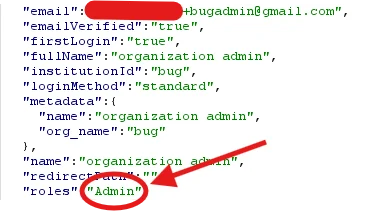
After the downgrade from Admin to Viewer, the active session still returns "roles": "Admin", which indicates that the previous administrative role remains in the session data.
The contrast is the whole finding: same downgrade, same final role, completely different outcome, all because of a detail as small as how the Admin role got assigned in the first place.
Reproduction summary
- Invite a new user directly with the Admin role.
- Downgrade that user to Viewer.
- Without logging out, attempt an Admin-only action: it succeeds.
- Compare: invite as Viewer, promote to Admin, downgrade to Viewer: the session is correctly killed and re-authentication is forced.
Root cause
The behaviour suggests that the application may be relying on role information stored in the active session instead of consistently enforcing the user's current role after a downgrade. The promotion flow appears to trigger a session refresh or invalidation, while the direct-invitation flow may not. The exact internal cause would require further investigation, but the observed result is clear: a user downgraded from Admin to Viewer can still perform administrative actions using an existing session.
Because the two paths converge on the same visible state, the gap is invisible to anyone who only tests the promotion route.
Impact
A user whose Admin access was explicitly revoked can keep acting as Admin, managing users and changing settings, for as long as their session stays alive. That is a real problem for offboarding and incident response, where revoking access needs to mean now, not whenever the user chooses to log out. Because the flaw only appears on one invitation path, it is easy for testers and for the application's own QA to miss entirely.
Fix
The report does not describe a fix or a vendor response.
- Other role-change paths. Try every route that can change a role (invitation, bulk import, API, SCIM or directory sync, admin console) and check whether the session is invalidated. A positive result is an old session that still carries the previous role after the change.
- Removal rather than downgrade. Remove a user from the organization entirely and keep using their session. A positive result is continued access to organization resources after removal.
- Session data inspection. Where the session payload is readable, check whether role or permission claims are embedded and whether they change after a role update. A positive result is a stale role claim that the server still honours.
- Privilege escalation through invitation. Invite a user at a higher role than the inviter should be able to grant, or accept an invitation that carries a role the accepting user should not receive. A positive result is an account holding a role it was never legitimately granted.
- Long-lived sessions. Leave a downgraded session idle and return later. A positive result is administrative access that survives well beyond the role change.
What happened, in plain words
Imagine a shared office building where every member of staff carries a key card. The card is programmed with a level: managers get a card that opens every door, visitors get a card that only opens the front lobby. When someone is demoted from manager to visitor, the security desk is supposed to reprogram their card on the spot, so the next time they wave it at the server room door, it stays locked.
In this story, the reprogramming worked for people who had been promoted to manager and then demoted. But for people who were hired straight in as managers and then demoted, the card kept opening every door. Same demotion, same final job title, completely different result. The difference was only in how the person had originally been given the manager title.
That is the whole bug. A user who was invited to the platform as an Admin, then downgraded to Viewer, could keep doing Admin things, because the application kept trusting an old copy of their role that was stored in their active login session.
This write-up is for someone who has never done security testing. We will go slowly, explain every term the first time it appears, and walk through exactly what the researcher did and why.
The people and the target
The researcher is Mohamed Khaled, a penetration tester at CyberVuln LLC and a bug bounty hunter on HackerOne and Bugcrowd. A penetration tester is someone paid to attack a system with permission, to find its weaknesses before criminals do. A bug bounty hunter does something similar, but through a public programme where companies pay for reports of security bugs. The report does not name the programme, the application, or any software versions, and it shows no raw network requests or responses. The evidence is the behaviour of the application and the screenshots reproduced below.
The target is a B2B recipient hub. "B2B" means business-to-business: the product is sold to companies, not to individual consumers. A "recipient hub" is a place where an organisation manages the people who receive or handle something on its behalf. In practice, organisations sign up, invite team members, and give each member one of two roles.
A role is a label that says what a person is allowed to do. This platform has exactly two:
- Admin: full control, including managing other users.
- Viewer: read-only, meaning they can look but not change anything.
This kind of design is called RBAC, short for role-based access control. Instead of writing a separate permission list for every single person, you give each person a role, and the role carries the permissions. The everyday comparison is a hotel: you do not give each guest a custom list of doors they may open; you give them a key card type (guest, cleaner, manager) and the card type decides.
The core promise of any RBAC system is simple: change someone's role, and their access changes with it, immediately. If you demote a manager to visitor, the manager powers must stop working right away, not at the end of the day.
The two ideas you need before the story
Two technical ideas come up constantly, so let us define them from zero.
A session. When you log in to a website, the website needs a way to remember that you are you on every following page load. The web was not built to remember anything between clicks, so the site hands your browser a small piece of data at login, and your browser sends it back with every request. That ongoing conversation is your session. The piece of data is often a cookie (a small text file the browser stores for a site) or a token (a string the browser or app sends in a header). Think of it as a wristband at a festival: you show your ticket once at the gate, you get a wristband, and after that the staff check the wristband instead of your ticket. If the wristband says "backstage", you get backstage, even if the organisers later decide you should not have one.
An API. Short for application programming interface, an API is the set of doors a website's own pages use to talk to its server behind the scenes. When you click a button, your browser does not usually reload a whole page; it sends a small request to an API address, and the server sends back data. The everyday comparison is a restaurant: the menu is the API, the kitchen is the server, and you do not walk into the kitchen yourself, you order through the menu. Security testers care about APIs because they can send requests directly, bypassing the buttons and forms the designers intended you to use.
The first attempts: swapping IDs
The researcher started with the usual broken access control playbook. Broken access control is a broad category of bug where the application lets someone do something they should not be allowed to do, usually because it fails to check who is asking. The classic test is ID swapping: you take a request that works for your own account, change an identifier in it to someone else's, and see whether the server still answers. If a Viewer can change an ID and reach an Admin-only page, access control is broken.
Every attempt came back 403. A 403 is the HTTP status code for "forbidden": the server understood the request and refused it. The checks were clean and textbook-correct. Normally that would be the cue to move on, because a well-built application simply refuses the attack.
What nagged instead was the cleanliness itself, and the suspicion that the wrong thing was being tested. Not requests, but sessions. The researcher was not asking "can I sneak a request through?" but "what happens to a session that is already open when the role behind it changes?"
A write-up read long before, about how session tokens get issued and refreshed, planted a question that had never actually been tested: what happens to an active session when the role behind it changes mid-flight? "Mid-flight" means while the session is still open, without the user logging out and back in.
The first real test, and the dead end
The first attempt was to promote a Viewer to Admin and then downgrade them back. The session was killed instantly and a re-login was forced. That is correct behaviour: the application noticed the role change and threw away the old wristband. It looked like a dead end.
What kept the thread alive was a smaller question: how did that Admin role come to exist in the first place? In that test the researcher had promoted the user from Viewer to Admin personally. That raised the possibility that the application treated a user who was promoted to Admin differently from someone who was invited as Admin from day one. Both hold the same role, but the question was whether the application treated them the same way under the hood. "Under the hood" means in the internal code, not in what the screen shows.
If they were not the same, would the downgrade even trigger the same code path, and would the session even know to check? A code path is the sequence of instructions the program runs for a particular action. Two actions that look identical on screen can run through completely different code, and a check present in one path can be missing from the other.
The invitation form shows the Admin role selected for a newly invited organisation member, with Viewer available as the alternative. That is the one variable left untouched: invitation. Every test so far assumed a user became Admin after the fact. The next question was what happens if someone is handed the Admin role from the very first second their account exists.
The team members page shows two active users, an Organisation Owner and an Admin, each marked with a yellow crown icon indicating elevated privileges. The crown is just a visual hint that these accounts have more power than a Viewer.
Exploitation
Step 1: Invite a new user directly as Admin
Instead of promoting an existing user upwards, the researcher invited a brand-new user directly with the Admin role. This is the path that had never been exercised in the earlier tests. The reasoning: if the promotion route correctly kills the session, maybe the invitation route behaves differently.
Step 2: Downgrade that user to Viewer
The new Admin was then downgraded straight back to Viewer. The end state is identical to the earlier dead-end test, a user whose current role is Viewer, but the road to get there is different. This is the heart of the experiment: hold the destination fixed and change only the route.
The team members page shows the Organisation Owner marked with a yellow crown icon and the user whose role has been downgraded from Admin to Viewer.
Step 3: Refresh without logging out
The page was refreshed, expecting the session to be killed exactly as before. This time nothing happened. The user was still logged in and still Admin. A second refresh confirmed it was not an illusion. Refreshing is important because it forces the browser to ask the server for the page again, using the existing session, so it tests what the server currently believes about the user.
Step 4: Perform an Admin-only action
With the role now Viewer, the researcher tried an Admin-only action. It succeeded. The application continued to allow administrative operations using the existing session. This is the moment the bug is proven: it is not just a stale label on a page, the server actually acted on the old role.
After the downgrade from Admin to Viewer, the active session still returns "roles": "Admin", which indicates that the previous administrative role remains in the session data. In other words, the wristband still says "backstage" even though the guest list has been changed.
The contrast is the whole finding: same downgrade, same final role, completely different outcome, all because of a detail as small as how the Admin role got assigned in the first place.
Reproduction summary
- Invite a new user directly with the Admin role.
- Downgrade that user to Viewer.
- Without logging out, attempt an Admin-only action: it succeeds.
- Compare: invite as Viewer, promote to Admin, downgrade to Viewer: the session is correctly killed and re-authentication is forced.
Root cause
The behaviour suggests that the application may be relying on role information stored in the active session instead of consistently enforcing the user's current role after a downgrade. The promotion flow appears to trigger a session refresh or invalidation, while the direct-invitation flow may not. The exact internal cause would require further investigation, but the observed result is clear: a user downgraded from Admin to Viewer can still perform administrative actions using an existing session.
Session invalidation means deliberately throwing away the old session so it can no longer be used, forcing the person to log in again. Because the two paths converge on the same visible state, the gap is invisible to anyone who only tests the promotion route.
Impact
A user whose Admin access was explicitly revoked can keep acting as Admin, managing users and changing settings, for as long as their session stays alive. That is a real problem for offboarding (the process of removing someone's access when they leave a team or company) and for incident response (the work of containing an attack while it is happening), where revoking access needs to mean now, not whenever the user chooses to log out. Because the flaw only appears on one invitation path, it is easy for testers and for the application's own QA to miss entirely. QA stands for quality assurance, the team that tests the product before release.
Fix
The report does not describe a fix or a vendor response. "Cached" means a stored copy kept for convenience; the danger is that the copy goes stale.
Variants to test
Each one is a variation on the same question: does the system notice when a person's power changes?
- Other role-change paths. Try every route that can change a role (invitation, bulk import, API, SCIM or directory sync, admin console) and check whether the session is invalidated. A positive result is an old session that still carries the previous role after the change. SCIM is a standard way for companies to automatically sync user accounts from a central directory; directory sync is the same idea in general.
- Removal rather than downgrade. Remove a user from the organisation entirely and keep using their session. A positive result is continued access to organisation resources after removal.
- Session data inspection. Where the session payload is readable, check whether role or permission claims are embedded and whether they change after a role update. A positive result is a stale role claim that the server still honours. A claim is a statement inside a token, such as "this user is an Admin".
- Privilege escalation through invitation. Invite a user at a higher role than the inviter should be able to grant, or accept an invitation that carries a role the accepting user should not receive. A positive result is an account holding a role it was never legitimately granted. Privilege escalation means gaining more power than you were given.
- Long-lived sessions. Leave a downgraded session idle and return later. A positive result is administrative access that survives well beyond the role change.
Glossary
- 403: the HTTP status code meaning "forbidden"; the server understood the request and refused it.
- Admin: the role with full control, including managing other users.
- API (application programming interface): the set of addresses a website's pages use to talk to its server; testers can send requests to it directly.
- B2B (business-to-business): a product sold to companies rather than individual consumers.
- Broken access control: a bug class where the application lets someone do something they should not be allowed to do, usually because it fails to check who is asking.
- Bug bounty hunter: someone who finds security bugs and reports them through a programme that pays for valid reports.
- Cached: a stored copy kept for convenience, which can become stale.
- Claim: a statement inside a token, such as "this user is an Admin".
- Code path: the sequence of instructions a program runs for a particular action; two similar-looking actions can use different paths.
- Cookie: a small piece of data a website asks the browser to store and send back on later requests.
- Directory sync: automatically copying user accounts from a central company directory into an application.
- ID swapping: changing an identifier in a request to another user's identifier to see whether the server still answers.
- Incident response: the work of containing and handling a security attack while it is happening.
- Offboarding: the process of removing a person's access when they leave a team or company.
- Penetration tester: someone paid to attack a system with permission, to find weaknesses before criminals do.
- Privilege escalation: gaining more power than you were legitimately given.
- QA (quality assurance): the team that tests a product before release.
- RBAC (role-based access control): giving each person a role, where the role carries the permissions, instead of a custom permission list per person.
- Role: a label that says what a person is allowed to do, such as Admin or Viewer.
- SCIM: a standard way for companies to automatically sync user accounts from a central directory.
- Session: the ongoing logged-in conversation between your browser and a website, identified by a cookie or token.
- Session invalidation: deliberately throwing away an old session so it can no longer be used, forcing a new login.
- Token: a string sent with requests to prove who you are, often used instead of or alongside a cookie.
- Viewer: the read-only role; the user can look but not change anything.

