How I Found My First CVE: From Random Testing to CVE-2024–46910
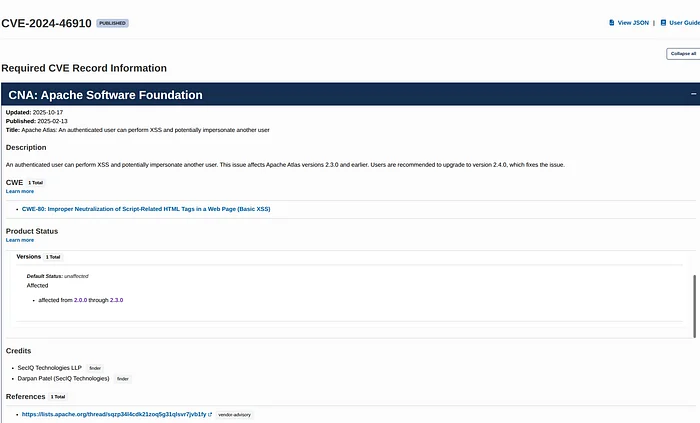
A stored cross-site scripting vulnerability existed in Apache Atlas, where user-controlled input was saved and later rendered to other users without proper escaping. An attacker could submit malicious content that would execute JavaScript in the browser of anyone who viewed the affected content.

medium.com
Published on medium.com
Vulnerability Research
The full write-up lives on its author's site
It belongs to its author, so we link to it rather than copy it. The other two tabs are our own rewrites, checked against it.
Context
Apache Atlas is an open-source data governance and metadata framework. The finding described here is a stored Cross-Site Scripting (XSS) vulnerability in Apache Atlas, which was later assigned CVE-2024-46910. The author does not name the specific Atlas feature, endpoint, parameter or version in this write-up; what he describes is a location in the application where user-controlled input is accepted, stored by the application, and later rendered back to users.
Before this finding, the author's background was penetration testing, bug bounty hunting and web application testing. He had read CVE disclosures and used them during security testing, but had not previously had a finding of his own receive a CVE identifier.
Setup
The write-up does not describe a lab setup, specific accounts, roles, tools or product versions. The work was exploratory testing against Apache Atlas, observing how the application handled user-controlled input. No proxy configuration, browser extensions or test harness are mentioned.
Finding it
The investigation began with what the author calls random testing: exploring different parts of Apache Atlas and watching how user-controlled input was handled, without a fixed methodology and without the goal of finding a CVE. The working questions were:
- Where can I control input?
- Where is that input stored?
- Where does it appear again?
- Is it escaped or sanitised?
- Does the application treat it as data or HTML/JavaScript?
He started testing inputs with harmless payloads and watched how Apache Atlas processed them. Eventually he found a location where his input was stored and later rendered back to users. That is what caught his attention: the input was not merely reflected in the immediate response, it persisted and was served again later.
Exploitation
The author does not publish the endpoint, the parameter name, the exact payload or the raw HTTP requests and responses. What he describes is the attack flow and the proof he built around it.
Step 1: Identify a controllable input
He located a place in Apache Atlas where he could submit attacker-controlled content. The write-up does not say which feature or field this was.
Step 2: Confirm that the input is stored
After submission, the application saved the input rather than only echoing it back in the same response. This is the distinction he draws between reflected XSS, where the payload comes from the request and is immediately reflected, and stored XSS, where the application saves the attacker-controlled input and later serves it to another user. The behaviour he observed matched the second case.
Step 3: Confirm that the stored value is rendered
When the affected content was viewed, the stored value was rendered back to users. He then checked whether the browser interpreted the injected content as executable JavaScript rather than as inert data.
Step 4: Make the behaviour reproducible
He worked on making the behaviour consistent and verified five things:
- He could control the input.
- The application stored the input.
- The stored value was later rendered.
- The browser interpreted the injected content as executable JavaScript.
- The behaviour could be reproduced reliably.
Only once he had a reliable proof of concept did he move on to reasoning about impact.
Root cause
The write-up does not include the vulnerable code, so the precise defect is not stated. What the observed behaviour shows is that Apache Atlas stored user-controlled content and later rendered it into a page, and the browser executed it as JavaScript. Whether the missing control was output encoding, input sanitisation, a Content Security Policy, or something else is not described; the report only establishes that the stored value reached the browser as executable content.
Impact
The author is careful about impact and frames it as conditional. Stored XSS can be more dangerous than it first appears because the attacker does not necessarily need to send a malicious URL directly to a victim: if malicious content is stored inside the application, other users may encounter it naturally while using the application. Depending on the application's privileges and functionality, successful XSS could potentially allow an attacker to perform actions in the victim's browser context.
The real impact therefore depends on:
- Who can submit the malicious content?
- Who can view it?
- What privileges do those users have?
- What sensitive functionality is available from the affected interface?
- Are there additional browser-side protections?
Fix
It states only that the author documented the issue, including the affected functionality, reproduction steps, proof of concept and security impact, and reported it to the Apache project, and that the vulnerability was eventually assigned CVE-2024-46910. What was changed in the product is not covered.
Variants to test
These are generalisations from the approach described, not claims about Apache Atlas.
- Any field whose value is displayed to other users later. Submit a harmless marker, then view the record from a different account or page. A positive result is the marker appearing unescaped in the rendered page source.
- Metadata and catalogue-style fields. Names, descriptions, classifications and annotations in governance tools are often stored and re-rendered in list and detail views. A positive result is the stored value being interpreted as markup rather than displayed as text.
- Fields rendered in more than one place. A value may be escaped in the detail view but not in a search result, audit log or export. A positive result is execution in any one of those secondary views.
- Inputs that pass through processing before storage. If the application transforms or normalises the value before saving it, test whether the transformation can be used to bypass filtering. A positive result is executable content surviving the transformation and being rendered.
- Privilege boundaries. Check whether a low-privileged user can store content that a higher-privileged user later views. A positive result is a stored payload submitted by the lower-privileged account executing in the session of the higher-privileged one.
Lessons
The author closes with the points he took from the work: do not test only known vulnerability patterns, because applications have unique functionality and custom workflows; understand the application and ask where input goes, whether it is stored, who can access it later, how it is processed and where it is rendered; make findings reproducible; treat impact as being as important as the payload, since finding <script> executing is only part of the story; and do not underestimate exploratory testing. The shift he describes afterwards is looking at open-source projects not only as something to use but as something to understand: how it was built, where it trusts user input, what assumptions the developers made, and what happens when those assumptions are wrong.

What happened, in plain words
A security researcher found a bug in a piece of software called Apache Atlas. The bug let someone put content into the application that the application would save and later show to other people, and that a web browser would run as a small program. Bugs of this kind are called Cross-Site Scripting, usually shortened to XSS. Because the content is saved first and shown later, this particular kind is called stored XSS.
The bug was given an official identifier in a public catalogue of known security flaws: CVE-2024-46910. CVE stands for Common Vulnerabilities and Exposures. Think of it like a registration number for a security flaw, so that everyone in the world can refer to the same bug unambiguously. It was the researcher's first CVE.
What makes the story useful for a beginner is that it did not start with a clever plan. It started with the researcher opening the application, poking at different parts of it, typing things into fields, and watching what came back. That is the whole method described here. No special tools, no secret technique. Curiosity, plus the patience to follow one odd behaviour until it made sense.
Some background first: what the pieces are
Before the story makes sense, a few everyday ideas need to be clear.
What Apache Atlas is
Apache Atlas is described in the write-up as an open-source data governance and metadata framework. Those words sound heavy, so unpack them.
- Open source means the program's source code is published, and anyone can read it, use it, and contribute to it. It is not a secret product you can only rent.
- Metadata means data about data. If a company has a big collection of tables and files holding information, the metadata is the description of those things: what each table is called, what it contains, who owns it, which category it belongs to. It is like the label and index card on a box in a warehouse, rather than the contents of the box.
- Data governance means the rules and processes a company uses to keep track of that data: who is allowed to see it, where it came from, how it is classified. A governance tool is where people record and look up those facts.
So Apache Atlas is a web application where people record descriptions of data assets and browse them. Because it is a web application, people use it through a browser, typing into forms and clicking around, exactly like any website.
What a web application actually does with your typing
When you type into a field on a website and press a button, your browser sends what you typed to a computer somewhere else, called a server. The server decides what to do with it. Often it saves it in a database, which is a structured store of information that survives after you close the page. Later, when you or someone else opens a page that shows that information, the server fetches it from the database and puts it into the page it sends back to the browser.
That round trip, type, send, save, show later, is the heart of this whole story. Most of the time it works exactly as intended. The interesting question for a security tester is what happens when the thing you typed is not ordinary text but something the browser is willing to treat as instructions.
What a browser does with a page
A web page is not just words. It is a document written in a language called HTML, which describes structure: this bit is a heading, this bit is a paragraph, this bit is a form. HTML can also carry small programs written in a language called JavaScript, which the browser runs. JavaScript is what makes pages interactive: it can react to clicks, fetch more data, and change what is on screen.
The crucial point: the browser cannot tell whether a piece of JavaScript came from the website's own developers or from something a user typed in. If the JavaScript arrives inside the page, the browser runs it. That is by design, and it is exactly what makes XSS possible.
What XSS means
Cross-Site Scripting is when an attacker manages to get their own JavaScript into a page that other people view, so that it runs in those other people's browsers. The name is a bit misleading; it is not really about crossing between sites so much as about running the attacker's script inside someone else's session on a trusted site.
Why does that matter? Because JavaScript running in a page can do anything the page itself can do. It can read what is displayed, send requests to the server as if it were the logged-in user, and change what the user sees. It runs with the user's permissions, because as far as the browser is concerned, it is part of the site.
Reflected versus stored XSS
The write-up draws one distinction that you must hold on to.
- Reflected XSS: the thing you typed comes straight back in the response to your own request. It is like shouting into a canyon and hearing your own echo. It only affects whoever sends that particular request, so an attacker usually has to trick a victim into clicking a crafted link.
- Stored XSS: the application saves what you typed, and later serves it to whoever views that content. It is like writing on a whiteboard in a busy office: you write once, and everyone who walks past reads it. No trick link needed. The victim just uses the application normally and encounters the content.
Stored XSS can be more dangerous than reflected XSS, and it is the kind found here.
What a CVE is, and why getting one feels different
A CVE is a public record. When a security flaw is confirmed and the maintainers of the software acknowledge it, it can be assigned an identifier of the form CVE-YYYY-NNNN. That identifier is then referenced by security tools, scanners, advisories and other researchers. Before this finding, the researcher had read CVEs and used them while testing other people's systems. Having one attached to something he found himself was, in his words, a completely different feeling from finding a bug during a paid test. It made the work part of the public record rather than a line in a private report.
How it started: random testing
The researcher's background was penetration testing (being paid to break into systems with permission, to find weaknesses before criminals do), bug bounty hunting (finding bugs in companies' systems for a reward), and testing web applications. He knew what CVEs were. He had never had one of his own.
He describes the start plainly: interesting vulnerabilities do not always come from following a perfect methodology. Sometimes you just start testing. He was not thinking "today I am going to find a CVE". He was looking for places where the application accepted input and later displayed or processed it.
That framing is worth pausing on, because it is the most transferable idea in the whole article. A methodology is a checklist of steps. Checklists are useful, but they only cover what someone already thought of. Applications have their own peculiar features, custom screens, unusual workflows. Wandering through them with a question in mind ("where does my typing end up?") finds things a checklist will not.
The questions he asked
While testing, he kept a short list of questions in mind:
- Where can I control input?
- Where is that input stored?
- Where does it appear again?
- Is it escaped or sanitised?
- Does the application treat it as data or HTML/JavaScript?
Two of those terms need explaining.
Escaping (also called encoding) means converting special characters into harmless stand-ins before putting them into a page. In HTML, the characters < and > are special: they mark the beginning and end of a tag, which is a piece of markup. If a user types <b>hello</b>, and the application escapes it, the browser receives something like <b>hello</b> and displays the literal text <b>hello</b> on screen. If the application does not escape it, the browser sees a real tag and renders bold text. Escaping is the difference between the browser reading your typing as text and reading it as instructions.
Sanitising means cleaning input by removing or neutralising the dangerous parts, rather than encoding them. Escaping preserves the text but defuses it; sanitising strips things out. Either can be a defence. Neither is present in a vulnerable spot.
The last question is the important one. An application can treat what you typed in two ways: as data (just characters to display) or as code (markup and script to be interpreted). Every XSS bug is, at bottom, a case of the application treating data as code.
Finding the spot
He began testing inputs with harmless payloads and watching how Apache Atlas processed them. A payload here simply means the text you submit to test a behaviour. Harmless means it does not attack anything; it is a probe, like tapping a wall to hear if it is hollow.
Eventually he found a location where his input was stored and later rendered back to users. Rendered means turned into what you see on the page. That is what caught his attention: the input was not merely echoed in the immediate response, it persisted and was served again later.
At this point the write-up is deliberately vague. It does not name the feature, the page, the field, the parameter, or the version of Apache Atlas. What it describes is the shape of the behaviour: a place where you can submit content, the application keeps it, and it comes back to other users later. If you are following along at home, that shape is what you are looking for, not a specific URL.
The moment it became stored XSS
He lays out the difference again in his own words. With reflected XSS, the payload generally comes from the request and is immediately reflected in the response. With stored XSS, the application saves the attacker-controlled input and later serves it to another user. The behaviour he observed matched the second case.
He could submit attacker-controlled content, have it stored by the application, and later trigger JavaScript when the affected content was viewed. That last part is the proof: not just that the text came back, but that the browser ran it.
He is explicit that this was more than finding an input that accepts HTML. He had to understand the complete attack flow: who submits, what is saved, who views, and what runs. That complete flow is the finding.
Proving it
Finding something suspicious is not enough. His stated lesson: a good vulnerability report needs reproducible proof. Reproducible means that if someone else follows your steps, they get the same result every time. A bug that happens once and cannot be repeated is a rumour, not a finding.
So he worked on making the behaviour consistent, and verified five things:
- He could control the input.
- The application stored the input.
- The stored value was later rendered.
- The browser interpreted the injected content as executable JavaScript.
- The behaviour could be reproduced reliably.
Read those as a chain, because each link depends on the one before. If you cannot control the input, nothing else matters. If the input is not stored, it is at best reflected. If it is stored but never shown, it is inert. If it is shown but escaped, the browser displays text instead of running it. And if it only works sometimes, you cannot hand it to anyone. All five together make a proof of concept, which is a small, safe demonstration that the bug is real.
Only once he had that did he start thinking about impact.
Why stored XSS matters
He is careful here, and beginners should be too. Stored XSS can be more dangerous than it first appears, but how dangerous depends on circumstances.
The core reason it is dangerous: an attacker does not necessarily need to send a malicious URL directly to a victim. If malicious content is stored inside an application, other users may encounter it naturally while using the application. No phishing email, no suspicious link. The victim logs in to a tool they trust and the content is simply there.
Depending on the application's privileges and functionality, successful XSS could potentially allow an attacker to perform actions in the victim's browser context. Browser context means: as far as the server is concerned, the requests are coming from the logged-in victim, with the victim's permissions. If the victim is an administrator, the script may be able to do more than for an ordinary user.
The real impact therefore depends on questions such as:
- Who can submit the malicious content?
- Who can view it?
- What privileges do those users have?
- What sensitive functionality is available from the affected interface?
- Are there additional browser-side protections?
Each of these changes the answer. If only the person who submitted the content can see it, the bug is nearly worthless. If a low-privileged user can plant content that a senior administrator later views, it is serious. If the affected screen offers sensitive functionality, the script may be able to use it. If the browser has extra protections in place, the script may be limited in what it can reach.
Understanding those questions is what turns a simple XSS finding into meaningful security research. The write-up does not state which of these conditions held in Apache Atlas, so the concrete severity is not established here beyond the general risk of stored XSS.
From vulnerability to CVE
At this point he had something he believed was worth reporting. He documented the issue, including the affected functionality, reproduction steps, proof of concept, and security impact, and reported it to the Apache project.
That list is worth memorising, because it is the standard shape of a good report:
- Affected functionality: which part of the product is broken.
- Reproduction steps: the exact sequence someone else follows to see it.
- Proof of concept: the minimal demonstration that it works.
- Security impact: what an attacker could actually do with it, and under what conditions.
Eventually the vulnerability was assigned CVE-2024-46910. Seeing a CVE identifier attached to something he had personally discovered was a completely different feeling from finding a bug during a pentest. It made the process feel real. The vulnerability was no longer just another finding in a report; it had become part of the public vulnerability record.
It states only that the issue was reported and that the CVE was assigned.
What finding a first CVE taught him
He closes with five lessons. They are short, but each one is worth expanding for a beginner.
1. Do not only look for known vulnerability patterns
It is easy to fall into the habit of testing only things you have seen before. You learn a trick, you try it everywhere, you find the same class of bug repeatedly. That works, up to a point. But applications often have unique functionality, custom workflows, and unexpected ways of processing user input. Curiosity matters. The bug in this story was found by looking at something ordinary and asking what happened to the typing.
2. Understand the application
Payloads are useful, but understanding the application's behaviour is more important. Instead of blindly throwing payloads everywhere, ask: where does this input go? Is it stored? Who can access it later? How is it processed? Where is it rendered? Those questions can lead you much further than a huge payload list. A payload list is a bag of keys; understanding the application tells you which doors exist.
3. Reproducibility matters
A vulnerability that works once is interesting. A vulnerability that you can reproduce consistently, explain clearly, and demonstrate safely is a much stronger finding. Consistency is what lets a developer fix it, and what lets a reviewer trust you.
4. Impact matters as much as the payload
Finding <script> executing is only part of the story. Security research is about understanding what that execution means in the context of the application. A script that runs on a page nobody visits is a curiosity. A script that runs in a session with more privileges may have more serious consequences. Same technical bug, very different consequence.
5. Do not underestimate random testing
What started as exploratory testing eventually turned into a CVE. That was probably the biggest lesson. You do not always need an elaborate research plan to find something interesting. Sometimes you just need to start looking.
From one CVE to vulnerability research
CVE-2024-46910 was his first CVE, but more importantly, it gave him confidence to go deeper into vulnerability research.
After that, he started looking at open-source projects differently. Instead of only asking "how can I use this application?", he started asking:
- How was this application built?
- Where does it trust user input?
- What assumptions did the developers make?
- What happens when those assumptions are wrong?
That shift in mindset is one of the biggest steps he has taken in his cybersecurity journey. It is a shift from being a user of software to being a reader of it. Every feature is a set of assumptions: the developers assumed this field holds a name, so they did not expect it to hold a script. Finding bugs is largely the business of finding those assumptions and testing what happens when they fail.
Final thoughts
Getting a first CVE was not the result of some sophisticated exploit chain or an extremely complicated technique. It started with curiosity, experimentation, and following an unusual behaviour until he understood what was actually happening.
That is something he wants to remind himself, and anyone starting vulnerability research: do not be afraid to test the things that look ordinary. A simple input field, an unexpected response, or a piece of data rendered in the wrong place can sometimes lead much further than you expect.
For him, that journey started with random testing. It ended with his first CVE: CVE-2024-46910. And, as he puts it, that was just the beginning.
Glossary
- Apache Atlas: an open-source data governance and metadata framework, used to record and browse descriptions of an organisation's data assets.
- Bug bounty hunting: finding security bugs in companies' systems, within their rules, in exchange for a reward.
- Browser context: the permissions and identity a script inherits by running inside a page the logged-in user is viewing.
- CVE (Common Vulnerabilities and Exposures): a public identifier assigned to a confirmed security flaw so everyone can refer to the same bug.
- Data governance: the rules and processes an organisation uses to track, classify and control access to its data.
- Database: a structured store of information that persists after a page is closed.
- Escaping (encoding): converting special characters into harmless stand-ins so the browser displays them as text rather than interpreting them as markup.
- Exploit chain: a sequence of separate weaknesses combined so that each enables the next.
- HTML: the language that describes the structure of a web page.
- Impact: what an attacker could actually do with a bug, and under what conditions.
- JavaScript: the programming language browsers run to make pages interactive.
- Metadata: data about data; descriptions such as names, owners and categories of stored information.
- Methodology: a fixed checklist of testing steps.
- Payload: the text or content submitted during testing to probe how an application handles input.
- Penetration testing: being paid, with permission, to attack a system in order to find its weaknesses before criminals do.
- Privileges: the permissions an account has, such as whether it can view, edit or administer something.
- Proof of concept: a small, safe demonstration that a bug is real and repeatable.
- Reflected XSS: a bug where the submitted content comes straight back in the response to the same request.
- Rendered: turned into what appears on the page.
- Reproducible: able to be repeated reliably by someone else following the same steps.
- Sanitising: cleaning input by removing or neutralising dangerous parts.
- Server: the remote computer that receives requests, processes them and sends pages back.
- Stored XSS: a bug where the application saves attacker-controlled content and later serves it to other users, who then run it in their browsers.
- Tag (HTML): a piece of markup such as
<b>that tells the browser how to treat the content around it. - Vulnerability research: the study of how software can be made to behave in unintended and unsafe ways.
- XSS (Cross-Site Scripting): getting your own JavaScript into a page other people view, so it runs in their browsers with their permissions.



