How I found two api vulnerabilities by analyzing JS source code
Two API endpoints lacked proper authorization checks: one allowed adding or deleting a call-to-action link on any video, and another allowed viewing stickers associated with a private video. An attacker could modify content on other users' videos or view private video metadata without permission.
 Published on medium.com
Hello everybody, my name is Mohammed Waleed, I’m a beginner bug hunter and web developer and today I will share with you how I found two api bugs on a private bug bounty program by analyzing website source code and how you can also use source code and JS files to find vulnerabilities, let’s get started!
The full write-up lives on its author's site
It belongs to its author, so we link to it rather than copy it. The other two tabs are our own rewrites, checked against it.
Context
This write-up covers two access control bugs found on a private HackerOne program. The researcher calls the target target.com because the program does not allow disclosure of its identity. The scope was small: a single wildcard domain, *.target.com. The main application is built with React, and the features involved are video upload and video stickers.
The first feature is a call-to-action (CTA) button: a link with a text label that appears under the video and redirects the viewer to a website when clicked. The second feature is a special kind of video that allows stickers to be added to it. Both features are backed by API endpoints that the researcher found in the frontend JavaScript.
Setup
The researcher decided to start hunting on the main application. The tools used were:
- Chrome DevTools, specifically the Sources tab, to inspect the frontend code.
- The Resources Saver Chrome extension, to download the frontend source code from the browser.
- Burp Suite Repeater, to craft and send requests.
- Multiple accounts on the target, created to compare values between users.
No special role or privilege is described. The researcher uploaded a private video with one account and used another account to test access to its stickers.
Finding it
After some recon, the researcher opened the Sources tab in Chrome DevTools to see whether the frontend source code was available. A folder called web-app contained the frontend source code of the website.
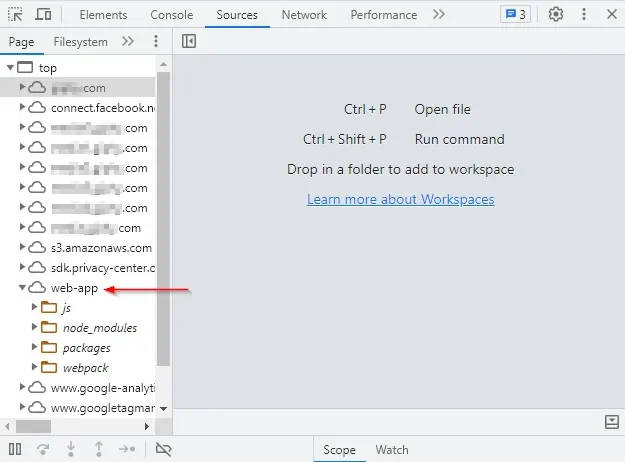
The code was downloaded with the Resources Saver extension and reviewed manually. Because the researcher focuses on API hacking, the search started with API endpoints inside the JS files. A folder called api contained files with many API endpoints for both the web and the mobile application. All endpoints found were saved in an Excel sheet and then analysed and tested one by one, working out what each one does in the application.
Two endpoints turned out to have access control problems.
Exploitation
1) Adding and deleting a CTA button on any video
The endpoint found in the source code was:
/v1/videos/<video_id>/cta
The function in the source code looked like this:
export function updateCTA(videoId: string, ctaURL: string, ctaText: string) { return getResults( appendQuery(`${TARGET_API_URL}videos/${video_id}/cta`, { api_key: WEB_API_KEY, link: ctaURL, text: ctaText, }), { method: ctaText ? 'put' : 'delete', } )}
What stood out was that the function sends no authorization headers or parameters other than the web API key. The researcher created multiple accounts and confirmed that the web API key is the same for all users, so it identifies the application, not the user.
To see what the endpoint actually does, the researcher crafted a PUT request in Burp Repeater. The ${video_id} was replaced with the ID of a video uploaded by the researcher. The request was accepted.
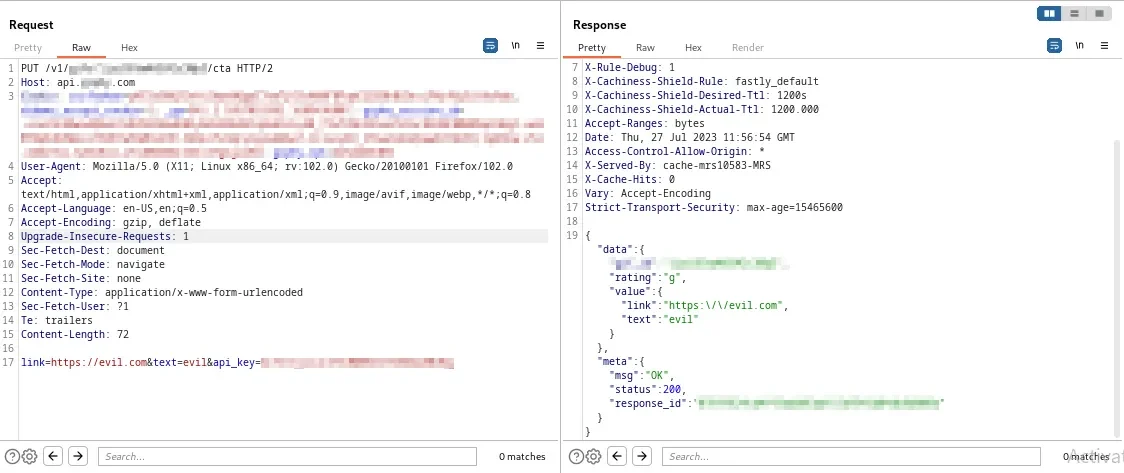
Opening the video showed a button underneath it that redirects to a website when clicked, which is the CTA the request had created.

The researcher was also able to delete it by making a DELETE request. In other words, a link can be added to or deleted from any video on the website without any user interaction. The report was accepted and triaged.
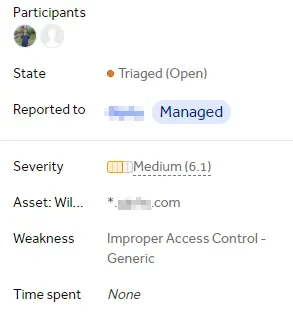
The researcher notes one oddity: nothing in the application allows a user to add links when uploading a video, so the feature is probably no longer exposed in the UI, or is only available to specific account types.
2) Viewing stickers associated with a private video
The second endpoint found in the source code was:
v1/videos/<id>/associations
This endpoint returns the stickers associated with a video. The researcher uploaded a private video with stickers, then tried to view the associated stickers using another account. The request was accepted and all stickers associated with the private video were returned.
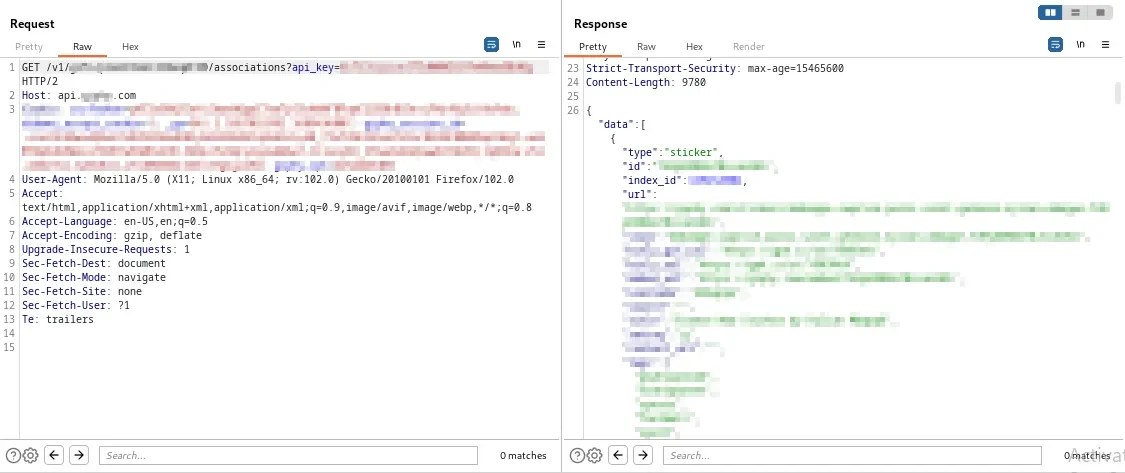
This report was closed as informative because the impact is very low.
Root cause
Both endpoints act on a video identified only by its ID in the path, and the frontend function shown sends no per-user credential. The only credential sent by the frontend function is the shared web API key, which is identical for every account, so it cannot tie a request to a user. Authorisation therefore has to happen on the server, and for the stickers endpoint the server accepted a request against a video belonging to another account. The report does not show the server-side code, so the exact check that is missing is not stated.
Impact
With the CTA endpoint, an attacker could add or delete a link on any video on the website without any user interaction. With the associations endpoint, an attacker could read the stickers attached to a private video belonging to another account. The program rated the second issue as very low impact and closed it as informative; the first was accepted and triaged.
Fix
The report does not describe any fix that was applied. The change that would address both issues is a server-side ownership check on the video identified in the path, so that a request is only honoured when the authenticated caller owns that video, rather than relying on the shared web API key as the only credential.
Variants to test
- Download the frontend bundle from the Sources tab and grep it for API paths, then test each path with IDs belonging to a second account. A positive result is a
2xxresponse that changes or returns another user's object. - Look for API functions that send only a static application key and no user token, as
updateCTAdoes here. A positive result is a request that succeeds against another account's resource with no per-user credential. - Try the same path with different methods, since this endpoint switches between
PUTandDELETEbased on the payload. A positive result is a state change on a resource you do not own. - Test read endpoints for private objects, such as the associations endpoint, using an ID from a private upload on another account. A positive result is data about the private object being returned.
- Check the mobile API files in the bundle as well as the web ones, since the report found endpoints for both. A positive result is an endpoint that behaves the same way outside the web client.
What happened, in plain words
A security researcher, Mohammed Waleed, was hunting for bugs on a private bug bounty program. A bug bounty program is an arrangement where a company invites independent researchers to look for security problems in its systems and report them, often for a reward. Because the program is private and does not allow the company to be named, the researcher calls the target target.com throughout. Everything below is about that renamed target.
The researcher found two problems in the website's API. An API (Application Programming Interface) is the set of hidden addresses a website's own pages use to talk to its servers: when you click a button, your browser sends a request to one of these addresses and the server answers with data or performs an action. Think of the website's visible pages as the front of a shop and the API as the back door the staff use to fetch stock; if the back door is left unlocked, anyone who knows the address can walk in.
Both problems are access control bugs. Access control means the rules that decide who is allowed to do what. A broken access control bug means the server lets someone do something they should not be allowed to do, for example change or read another person's content. The researcher could add or delete a link on a video, and could read the stickers attached to someone else's private video. The first report was accepted and triaged (a triage is the program's first review, where they confirm the report is valid and worth investigating). The second was closed as informative, meaning the program read it but decided the impact was too low to act on.
The researcher found both by reading the website's own JavaScript source code, the programming instructions the browser downloads to make the site work. That is the main lesson of the story: the code that runs in your browser can reveal API addresses that are not visible anywhere on the page.
The target and the features involved
The scope of the program was small: a single wildcard domain, *.target.com. A wildcard domain means every subdomain of target.com was in scope, so anything ending in .target.com could be tested. The main application is built with React, a popular JavaScript framework for building user interfaces. A framework is a collection of ready-made code that developers use as a starting point, a bit like a kit of pre-cut parts for building a wardrobe.
Two features matter here:
- Video upload with a CTA button. A CTA (call to action) is a button shown under a video with a text label, which sends the viewer to a website when clicked. The researcher calls this a button, and it is backed by an API endpoint.
- Videos with stickers. A special kind of video lets the uploader add stickers to it. Stickers are small images placed on top of the video.
Both features are powered by API endpoints that the researcher found in the frontend JavaScript. An endpoint is a specific address on the server that accepts a particular kind of request, for example "create a CTA on video number 123".
The tools used
The researcher decided to start hunting on the main application. The tools were:
- Chrome DevTools, Sources tab. DevTools is the set of developer tools built into the Chrome browser. The Sources tab shows every file the browser downloaded to display the page, including JavaScript files.
- The Resources Saver Chrome extension. An extension is a small add-on for the browser. This one saves the files shown in the Sources tab to disk so they can be read offline. The researcher links to it in the Chrome Web Store.
- Burp Suite Repeater. Burp Suite is a tool for intercepting and editing the requests a browser sends. Repeater is the part that lets you write a request by hand and send it again and again, changing one thing at a time. It is like being able to write a letter yourself instead of only choosing from pre-written ones.
- Multiple accounts on the target. The researcher created several accounts to compare values between users.
No special role or privilege is described. The researcher uploaded a private video with one account and used a second account to test access to its stickers.
Finding it
After some recon (reconnaissance, the early phase of gathering information about a target), the researcher opened the Sources tab in Chrome DevTools to see whether the frontend source code was available. A folder called web-app contained the frontend source code of the website.
The screenshot shows the Sources tab with that web-app folder, which is what told the researcher the code could be read directly.
The code was downloaded with the Resources Saver extension and reviewed by hand. Because the researcher focuses on API hacking, the search started with API endpoints inside the JavaScript files. A folder called api contained files with many API endpoints for both the web and the mobile application. All endpoints found were saved in an Excel sheet and then analysed and tested one by one, working out what each one does in the application. Keeping a list matters: the code can contain dozens of addresses, and a spreadsheet stops you losing track of which ones you have already tried.
Two endpoints turned out to have access control problems.
Exploitation
1) Adding and deleting a CTA button on any video
The endpoint found in the source code was:
/v1/videos/<video_id>/cta
Read this address from left to right. /v1/ is a version marker, a common way for APIs to say "this is version 1 of the interface". videos/ says we are dealing with videos. <video_id> is a placeholder for the number or code that identifies one particular video, the same way a house number identifies one house on a street. cta says we want the call-to-action button belonging to that video. So the whole address means "the CTA button of video number X".
The function in the source code looked like this:
export function updateCTA(videoId: string, ctaURL: string, ctaText: string) { return getResults( appendQuery(`${TARGET_API_URL}videos/${video_id}/cta`, { api_key: WEB_API_KEY, link: ctaURL, text: ctaText, }), { method: ctaText ? 'put' : 'delete', } )}
Line by line, in plain words:
export function updateCTA(videoId: string, ctaURL: string, ctaText: string)declares a reusable piece of code calledupdateCTAthat takes three inputs: which video, the web address the button should point to, and the text shown on the button.return getResults(starts the actual network call and says the result of that call is what the function gives back.appendQuery(${TARGET_API_URL}videos/${video_id}/cta, {builds the full address by gluing the API base address tovideos/, the video ID and/cta. The${...}syntax means "insert the value of this variable here".api_key: WEB_API_KEY,adds a parameter calledapi_keywhose value is a constant namedWEB_API_KEY. A parameter is an extra piece of information attached to the address, like a note clipped to a letter.link: ctaURL,adds the destination address of the button.text: ctaText,adds the label shown on the button.method: ctaText ? 'put' : 'delete',chooses the HTTP method. An HTTP method is the verb of a request:GETmeans "read",PUTmeans "create or replace",DELETEmeans "remove". This line says: if button text was supplied, usePUT(create the button); otherwise useDELETE(remove it).
What stood out was that the function sends no authorization headers or parameters other than the web API key. A header is extra information attached to a request, like the envelope around a letter. An authorization header is the part that proves who you are, usually a token: a long random string the server gave you when you logged in, which acts like a wristband at an event. The researcher created multiple accounts and confirmed that the web API key is the same for all users, so it identifies the application, not the user. In other words, the only credential in the request is a shared password for the whole website, not a personal one.
To see what the endpoint actually does, the researcher crafted a PUT request in Burp Repeater. The ${video_id} was replaced with the ID of a video uploaded by the researcher. The request was accepted.
The screenshot shows the request in Burp Repeater and the server's acceptance of it.
Opening the video showed a button underneath it that redirects to a website when clicked, which is the CTA the request had created.
The screenshot shows the button under the video.
The same button could then be removed with a DELETE request. In other words, a link can be added to or deleted from any video on the website without any user interaction. The report was accepted and triaged.
The researcher notes one oddity: nothing in the application allows a user to add links when uploading a video, so the feature is probably no longer exposed in the interface, or is only available to specific account types. This is a useful reminder that an API can still accept requests for a feature the visible website no longer offers.
2) Viewing stickers associated with a private video
The second endpoint found in the source code was:
v1/videos/<id>/associations
Again, read it in parts: v1/ is the version, videos/ is the collection of videos, <id> is the placeholder for one video's identifier, and associations means the things linked to that video, which in this feature are the stickers.
This endpoint returns the stickers associated with a video. The researcher uploaded a private video with stickers, then tried to view the associated stickers using another account. The request was accepted and all stickers associated with the private video were returned.
The screenshot relates to the stickers of the private video being returned to the second account.
This report was closed as informative because the impact is very low.
Why it worked
Both endpoints act on a video identified only by its ID in the address, and the frontend function shown sends no per-user credential. The only credential sent by the frontend function is the shared web API key, which is identical for every account, so it cannot tie a request to a user. Authorisation, the server-side decision about whether this particular user may do this particular thing, therefore has to happen on the server, and for the stickers endpoint the server accepted a request against a video belonging to another account. The report does not show the server-side code, so the exact check that is missing is not stated.
A simple comparison: a hotel key card should only open your own room. Here the card was the same for every guest, and the door only asked for the room number, not for proof that the room was yours.
Impact
With the CTA endpoint, an attacker could add or delete a link on any video on the website without any user interaction. With the associations endpoint, an attacker could read the stickers attached to a private video belonging to another account. The program rated the second issue as very low impact and closed it as informative; the first was accepted and triaged.
Fix
The report does not describe any fix that was applied. The change that would address both issues is a server-side ownership check on the video identified in the address, so that a request is only honoured when the authenticated caller owns that video, rather than relying on the shared web API key as the only credential.
Variants to test
- Download the frontend bundle from the Sources tab and search it for API paths, then test each path with IDs belonging to a second account. A positive result is a
2xxresponse (a success code from the server) that changes or returns another user's object. - Look for API functions that send only a static application key and no user token, as
updateCTAdoes here. A positive result is a request that succeeds against another account's resource with no per-user credential. - Try the same path with different methods, since this endpoint switches between
PUTandDELETEbased on the payload. A positive result is a state change on a resource you do not own. - Test read endpoints for private objects, such as the associations endpoint, using an ID from a private upload on another account. A positive result is data about the private object being returned.
- Check the mobile API files in the bundle as well as the web ones, since the report found endpoints for both. A positive result is an endpoint that behaves the same way outside the web client.
Glossary
- Access control: the rules that decide who may do what; a broken access control bug lets someone act beyond their permissions.
- API (Application Programming Interface): the set of addresses a website or app uses behind the scenes to send and receive data.
- API key: a string that identifies an application to a server; here it is shared by all users, so it does not identify a person.
- Authorisation: the server's decision about whether a specific user is allowed to perform a specific action.
- Burp Suite Repeater: a tool for writing a request by hand, sending it, and editing and resending it.
- Call to action (CTA): a button with a label that links to a website, shown under a video in this report.
- Chrome DevTools: the developer tools built into the Chrome browser, including the Sources tab that lists downloaded files.
- Credential: anything used to prove identity, such as a token or a key.
- DELETE: an HTTP method meaning "remove this".
- Endpoint: one specific address on a server that accepts a particular kind of request.
- Extension: a small add-on that adds features to a browser.
- Framework: a collection of ready-made code developers build on, such as React.
- Frontend: the part of a website that runs in your browser.
- GET: an HTTP method meaning "read this".
- Header: extra information attached to a request, separate from the address and body.
- HTTP method: the verb of a request, such as
GET,PUTorDELETE. - Informative: a report status meaning the program read the report but will not act on it.
- JavaScript: the programming language browsers run to make web pages interactive.
- Parameter: an extra piece of information attached to an address, such as
api_keyorlink. - Private program: a bug bounty program that is not open to the public and whose details may not be disclosed.
- PUT: an HTTP method meaning "create or replace this".
- React: a JavaScript framework for building user interfaces.
- Recon (reconnaissance): the early phase of gathering information about a target.
- Resources Saver: a Chrome extension that saves the files shown in the Sources tab to disk.
- Scope: the set of systems a researcher is allowed to test.
- Sources tab: the part of Chrome DevTools that lists the files the browser downloaded.
- Sticker: a small image placed on top of a video in this report.
- Token: a long random string given to you at login that proves who you are on later requests.
- Triage: the program's first review of a report, where it confirms the report is valid.
- Wildcard domain: a scope entry such as
*.target.comthat covers every subdomain oftarget.com. - 2xx: the family of HTTP response codes that mean success.

