How I got a trip to amsterdam through bug bounty
The login and forgot-password pages had no rate limiting, and the forgot-password feature generated a new six-character password with a predictable format. An attacker could brute-force the password to take over any account.
 Published on ninadmathpati.com
Hello guys welcome to my blog, Let me tell this is my first blog and will be further writing more blogs on critical vulnerabilities that i found, I hope you would find it interesting. So without wasting time lets move forward, Here I would like to share how I got a trip to Amsterdam with all expenses paid for 5 days.
The full write-up lives on its author's site
It belongs to its author, so we link to it rather than copy it. The other two tabs are our own rewrites, checked against it.
Context
This is a write-up of a full account takeover found in a login portal. The researcher describes the issue as a simple vulnerability rather than a server-side flaw, and the takeover was achieved by brute forcing the login. The report does not name the target program or the product; the only asset recorded alongside the write-up is the researcher's own site, ninadmathpati.com, which is where the blog was published. The weakness class is brute force.
The feature involved is the forgot password flow. Normally, when a user requests a password reset, the server should send a reset link or a one-time token that the user uses to choose a new password. Here the server behaved differently: on a password request it set a new password on the account by default and mailed that password to the user.
Setup
The researcher created an account on the portal and intercepted its requests and responses with Burp Suite. No versions, roles or other preconditions are given in the report. The only tooling mentioned is Burp Suite, both for interception and, later, for the intruder, plus a Python script for generating candidate passwords.
Finding it
After creating the account and checking for minor vulnerabilities, the researcher went to the forgot password page. Requesting a password for the account caused the server to set a new password and send it by email. The mail contained a password in a format such as:
Ab3CdF
The password was six characters long. To reconfirm the combination, the researcher requested the password 100 times. From those requests it was clear that there was no rate limiting on the login page and no rate limiting on the forgot password page.
Two things therefore looked wrong. First, the reset flow hands out a machine-generated password whose shape is predictable: the sample mixes upper case, lower case and digits in a fixed six-character pattern. Second, nothing throttles repeated attempts, so an attacker is free to try candidate passwords against an account as fast as the server will answer.
Exploitation
Step 1: Establish the password format
By requesting a password repeatedly and reading the mails, the researcher established the format of the generated password, illustrated by the sample Ab3CdF. The report does not state the exact character set or the exact generation rule beyond the six-character length and the mixed-case-and-digit appearance of the sample.
Step 2: Confirm there is no rate limiting
The researcher requested the password 100 times. The report concludes from this that there is no rate limiting implemented on the login page and forgot password page. This matters because the login endpoint is the one that will be attacked, and it accepts unlimited guesses.
Step 3: Work out the search space
The researcher estimates the number of possible passwords for the observed format at nearly 56,800,235,584. That is a very large number of candidates for a single account, but because the format is known the candidates can be generated rather than guessed blindly.
Step 4: Generate candidates
With the format known, a Python script can generate the password list, or any of the many other tools that do the same work can be used. The report does not include the script itself.
Step 5: Brute force the login
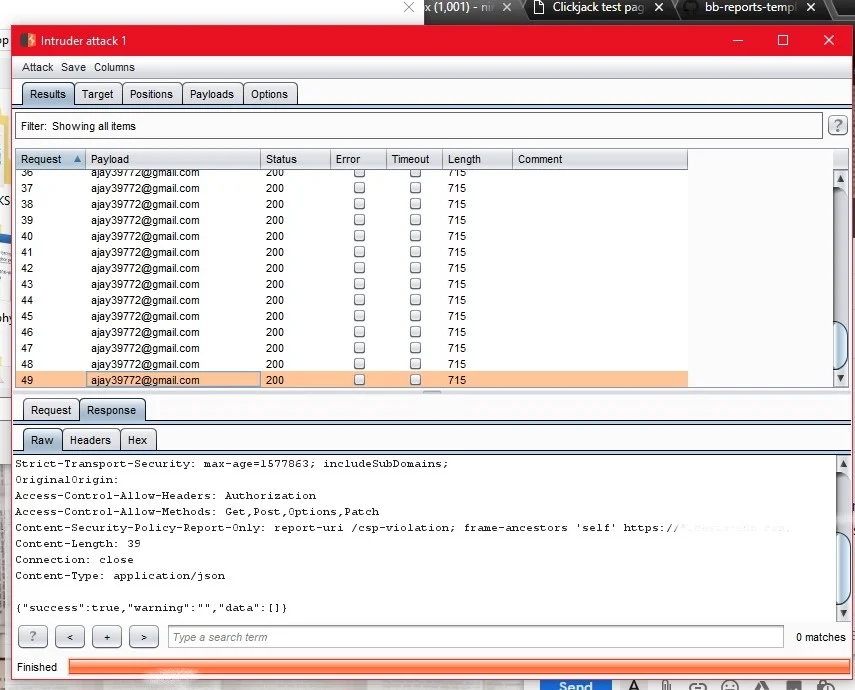
Once the passwords are generated, they are fed to the Burp Suite intruder (the report describes this loosely as "some thing like this") to carry out the brute force attack against the login. The stated outcome is a full account takeover.
Root cause
The design mistake is in the forgot password flow: instead of issuing a reset link or token, the server resets the account password itself and emails a generated password. That generated password is short (six characters) and follows a predictable pattern, so the space of possible values, while large, is enumerable. The second mistake is the absence of rate limiting on the login page and on the forgot password page, which lets an attacker submit candidates without being slowed or blocked.
Impact
An attacker who knows the password format and can make unlimited login attempts can brute force an account and take it over completely. The researcher notes having found this class of issue many times in different ways, and describes this route as the easiest to understand.
Fix
Based on the root cause, the fixes would be to stop emailing generated passwords and instead send a single-use, time-limited reset token, and to add rate limiting to both the login page and the forgot password page so that repeated attempts are throttled.
Variants to test
- Request a password reset several times and compare the generated passwords. A positive result is a fixed length and a recognisable character pattern, which makes candidate generation feasible.
- Send a burst of login attempts for one account and watch for lockout, delays or CAPTCHA. A positive result is that all attempts are processed normally.
- Check whether the forgot password endpoint itself is throttled by requesting resets repeatedly. A positive result is that every request succeeds and a new password is mailed each time.
- Look for other flows that mail a generated secret, such as invitation or activation mails, and check whether the secret has a predictable format and is accepted without attempt limits.
What happened, in plain words
A security researcher found a way to take over other people's accounts on a website's login portal. The trick was not a clever server-side exploit; it was a simple one. The site's "forgot password" feature did not send a reset link. Instead, it quietly set a brand new password on the account and emailed that password to the user. The new password was only six characters long and followed a predictable pattern, mixing upper case letters, lower case letters and digits, like Ab3CdF. On top of that, the login page and the forgot password page had no limit on how many times you could try. So the researcher could generate a huge list of possible passwords matching the pattern and try them one after another until one worked. That is called brute forcing, and it led to a full account takeover. The researcher's prize was a five-day, all-expenses-paid trip to Amsterdam.
The report does not name the company or the product. The only site recorded alongside the write-up is the researcher's own blog, ninadmathpati.com, where the story was published. The weakness class is brute force.
The feature that was broken
The feature involved is the forgot password flow. On most sites, when you click "forgot password", the server sends you a link or a one-time code. You click the link or type the code, and then you choose a new password yourself. The server never knows your password in plain form; it only stores a scrambled version.
Here the server behaved differently. When you asked for a password, it set a new password on your account by default and emailed that password to you. That means the server itself picked the password, and the password it picked was short and followed a pattern. Both of those facts matter later.
Setting up
The researcher created an account on the portal. Then they used a tool called Burp Suite to intercept the requests and responses. Burp Suite is a program that sits between your browser and the website, like a postal worker who opens every letter, reads it, and then seals it again before delivery. It lets you see exactly what your browser sends to the server and exactly what the server sends back. No versions, roles or other preconditions are given in the report. The only tools mentioned are Burp Suite, used both for interception and later for the intruder, plus a Python script for generating candidate passwords.
Finding it
After creating the account and checking for minor vulnerabilities, the researcher went to the forgot password page. Requesting a password for the account caused the server to set a new password and send it by email. The mail contained a password in a format such as:
Ab3CdF
Let us read that sample carefully. It is six characters long. It contains upper case letters, lower case letters and digits. The report treats the sample as showing a format.
The password was six characters long. To reconfirm the combination, the researcher requested the password 100 times. From those requests it was clear that there was no rate limiting on the login page and no rate limiting on the forgot password page.
Rate limiting is a defence where a server counts how often you ask for something and slows you down or blocks you after too many tries. Think of a bank cashier who lets you withdraw money but asks you to wait a minute after every third withdrawal. Without rate limiting, the cashier just serves you as fast as you can ask. Here, the researcher asked for a new password 100 times and every request went through. That is the evidence that no rate limiting was in place.
Two things therefore looked wrong. First, the reset flow hands out a machine-generated password whose shape is predictable: the sample mixes upper case, lower case and digits in a fixed six-character pattern. Second, nothing throttles repeated attempts, so an attacker is free to try candidate passwords against an account as fast as the server will answer.
Exploitation
Step 1: Establish the password format
By requesting a password repeatedly and reading the mails, the researcher established the format of the generated password, illustrated by the sample Ab3CdF. The report does not state the exact character set or the exact generation rule beyond the six-character length and the mixed-case-and-digit appearance of the sample.
Why does this matter? If you know the shape of a password, you do not have to guess blindly. You can write a program that produces every password that fits the shape. It is like knowing that a house key has five pins and each pin has ten positions; you can cut every possible key instead of trying random shapes.
Step 2: Confirm there is no rate limiting
The researcher requested the password 100 times. The report concludes from this that there is no rate limiting implemented on the login page and forgot password page. This matters because the login endpoint is the one that will be attacked, and it accepts unlimited guesses.
An endpoint is simply a specific address on a server that does one job. The login endpoint is the address your browser sends your username and password to when you press "Log in". If that address never says "slow down", an attacker can keep sending guesses.
Step 3: Work out the search space
The researcher estimates the number of possible passwords for the observed format at nearly 56,800,235,584. That is a very large number of candidates for a single account, but because the format is known the candidates can be generated rather than guessed blindly.
A search space is the set of all possible values you might have to try. Here it is enormous, but it is finite and it is known. That is the difference between searching a library where you know every book's title and searching a library in the dark.
Step 4: Generate candidates
With the format known, a Python script can generate the password list, or any of the many other tools that do the same work can be used. The report does not include the script itself.
Step 5: Brute force the login
Once the passwords are generated, they are fed to the Burp Suite intruder (the report describes this loosely as "some thing like this") to carry out the brute force attack against the login. The stated outcome is a full account takeover.
Burp Suite's intruder is a feature that takes a request and replaces one part of it, such as the password field, with each item from a list, one after another. It is like a machine that fills in a form with every entry from a long list and presses submit each time.
Root cause
The design mistake is in the forgot password flow: instead of issuing a reset link or token, the server resets the account password itself and emails a generated password. That generated password is short (six characters) and follows a predictable pattern, so the space of possible values, while large, is enumerable. The second mistake is the absence of rate limiting on the login page and on the forgot password page, which lets an attacker submit candidates without being slowed or blocked.
Impact
An attacker who knows the password format and can make unlimited login attempts can brute force an account and take it over completely. The researcher notes having found this class of issue many times in different ways, and describes this route as the easiest to understand.
Fix
Based on the root cause, the fixes would be to stop emailing generated passwords and instead send a single-use, time-limited reset token, and to add rate limiting to both the login page and the forgot password page so that repeated attempts are throttled.
Variants to test
- Request a password reset several times and compare the generated passwords. A positive result is a fixed length and a recognisable character pattern, which makes candidate generation feasible.
- Send a burst of login attempts for one account and watch for lockout, delays or CAPTCHA. A positive result is that all attempts are processed normally.
- Check whether the forgot password endpoint itself is throttled by requesting resets repeatedly. A positive result is that every request succeeds and a new password is mailed each time.
- Look for other flows that mail a generated secret, such as invitation or activation mails, and check whether the secret has a predictable format and is accepted without attempt limits.
Glossary
- Account takeover: gaining control of someone else's account, usually by learning or changing their password.
- Brute force: trying many possible passwords, one after another, until one works.
- Burp Suite: a tool that sits between your browser and a website so you can read and change the requests and responses.
- Burp Suite intruder: a Burp Suite feature that repeats a request with a different value, such as a password, from a list each time.
- CAPTCHA: a test that asks you to prove you are human, used to slow down automated attempts.
- Endpoint: a specific address on a server that performs one job, such as logging in.
- Forgot password flow: the series of pages and requests a site uses when you ask to recover or reset your password.
- Full account takeover: complete control of an account, not just access to one part of it.
- Intercept: to capture a request or response so you can inspect it before it continues.
- Login portal: the page or pages where users sign in.
- Password reset token: a one-time, time-limited code sent to a user so they can choose a new password themselves.
- Payload: the value you insert into a request when testing, such as a candidate password.
- Python: a programming language often used to write small scripts, including password generators.
- Rate limiting: a server defence that slows or blocks you after too many requests in a short time.
- Request: the message your browser sends to a server, for example when you press a button.
- Response: the message a server sends back to your browser.
- Search space: the set of all possible values an attacker might have to try.
- Server-side: happening on the server rather than in your browser.
- Token: a short piece of data used to prove identity or authorise an action, often single-use.
- Vulnerability: a weakness in a system that an attacker can use to do something they should not be able to do.



