How I was able to bypass the current password?
The security question and answer could be changed through a CSRF request that did not require the current password, because the first-time setup request lacked that check. An attacker could change a victim's security question and answer, then use the forgot-password flow to reset the password and take over the account.
 Published on ninadmathpati.com
Hope you are earning a lot through bug bounty, Now, a day’s I feel bug bounty is all about bypassing the remediation implemented. Thought to share one of my recent findings, As it’s a private program, let’s call it as some Xyz.com
The full write-up lives on its author's site
It belongs to its author, so we link to it rather than copy it. The other two tabs are our own rewrites, checked against it.
Context
The target is a private bug bounty program, referred to in the write-up as xyz.com. The feature in question is the profile security settings: the place where a user sets or updates a security question and answer, and where the application normally asks the user to re-enter their current password before saving changes. The same security question is later used on the forgot password page as an alternative way to reset the account password.
The author's framing is that bug bounty work often comes down to bypassing remediation that has already been put in place. The current password confirmation is exactly that kind of control: an identity check added to stop an attacker who has a session, or a cross-site request, from changing sensitive account settings.
Setup
The write-up does not describe the tooling beyond a proxy used to capture requests (Burp Suite is mentioned in the list of things tried). Two accounts are involved:
- A newly created account, used to observe the first-time security question and answer creation flow.
- A second, victim account, whose security question and answer were changed.
The precondition is that the application is already known to the author to be vulnerable to CSRF. The author states this directly: the application was vulnerable to CSRF, but the current password confirmation meant CSRF alone could not be used against the update flow.
Finding it
The author first lists the obvious ways to get past a current password check, all of which were tried and none of which worked:
- Check whether the password is properly validated.
- Try removing the old password parameter through Burp Suite.
- Try providing a different user's password.
- Response manipulation.
- SQL injection.
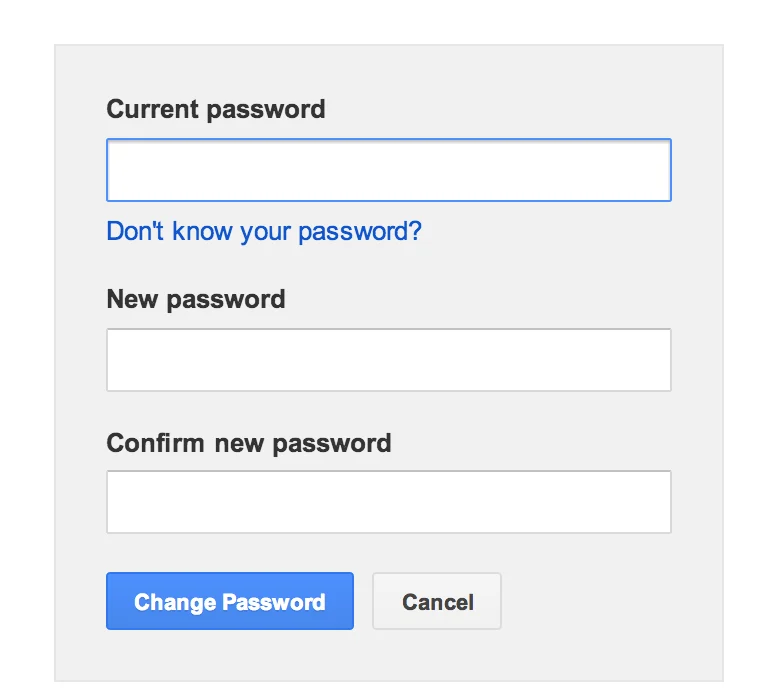
With those ruled out, the author turned to the CSRF angle. Because the current password was required on the update request, a straightforward CSRF against the update endpoint could not succeed. The insight was to look at a different request that touches the same data: the first-time creation of the security question and answer.
Exploitation
Step 1: Create a fresh account and capture the creation request
A new account was registered and logged in. On first login the application asked the user to create a security question and answer. The request for that flow was captured, and the resulting CSRF proof of concept looked like this:
<html>
<body>
<script>history.pushState('', '', '/')</script>
<form action="https://xyz.com/myprofile/editLogin" method="POST">
<input type="hidden" name="question" value="PET" />
<input type="hidden" name="answer" value="test1234" />
<input type="hidden" name="answer2" value="test1234" />
<input type="hidden" name="saveSubmit" value="Save and Continue" />
<input type="hidden" name="origin" value="loginAccount" />
<input type="hidden" name="requestor" value="accountSummary" />
<input type="hidden" name="loginPage" value="false" />
<input type="hidden" name="securityQAPage" value="true" />
<input type="submit" value="Submit request" />
</form>
</body>
</html>
The form posts to /myprofile/editLogin with the chosen question (PET), the answer twice (answer and answer2), and a set of hidden fields that describe the context of the request: saveSubmit, origin, requestor, loginPage and securityQAPage. The history.pushState call keeps the browser URL unchanged while the form is submitted. Crucially, this request carries no current password field at all.
Step 2: Compare the creation and update requests
The author notes that the CSRF request for updating the security question and answer was different from the one for creating it. The creation flow is the first time the user sets the question and answer, so the server does not require the current password for it. That difference is the whole opening: the same endpoint, or at least the same underlying data change, is reachable through a request shape that never asks for the password.
Step 3: Replay the creation request against another user
The creation request was then used to change the security question and answer of the other user. It worked. The author summarises the result as being able to change anyone's security question, and describes this as successfully bypassing the current password option.

Step 4: Turn it into account takeover
The security question is not just a stored profile field. On the forgot password page there was an option to reset the password by answering the security question. Once an attacker can set the victim's question and answer, they know the answer, so they can complete the reset flow and take over the account. The author states this plainly: through this vulnerability a full account takeover was possible.
Root cause
The likely cause is that the current password check was applied to the update path but not to the creation path, while both paths write the same security question and answer fields. The creation request is accepted without a current password, while the update request requires one. Because the creation request is accepted without a current password, and because the application has no CSRF protection on that request, an attacker can submit it on behalf of a logged-in victim.
The existing defence, the current password prompt, only covered the update request. It did not cover the first-time creation request, so the control could be sidestepped by using the request shape that omits it.
Impact
An attacker who can get a logged-in victim to load a page containing the CSRF form can set that victim's security question and answer. From there, the attacker can use the forgot password flow, answer the question they just set, and reset the password, resulting in full account takeover. The author does not describe the preconditions of the attack. The author says the security question of anyone could be changed.
Fix
The write-up does not say what was changed. The fix that follows from the finding is to require the current password on every path that creates or changes the security question and answer, including the first-time creation flow, and to add CSRF protection to those requests so that the contextual hidden fields cannot be used to reach the data change from a cross-site form.
Variants to test
- Parallel flows on the same data. Find every endpoint that writes a sensitive field (security question, email address, recovery phone, MFA settings) and compare the first-time setup request with the later update request. A positive result is a setup request that succeeds without the current password and can be replayed against an account that already has the field set.
- Context fields as a bypass. Look for hidden fields such as
origin,requestor,loginPageorsecurityQAPagethat select a code path. Try changing them on the protected request to values taken from the unprotected flow. A positive result is the protected action completing without the password. - CSRF on the unprotected flow. Capture the setup request and rebuild it as an auto-submitting HTML form, as above. A positive result is the victim's setting changing after they load the page while logged in.
- Password reset via security question. Where the security question is used for password reset, check whether the answer can be set or changed without the current password. A positive result is a complete reset of the victim's password using an answer the attacker chose.
What happened, in plain words
A security researcher was testing a website as part of a private bug bounty program. A bug bounty program is an arrangement where a company invites independent testers to look for security problems in its systems and report them, sometimes for a reward. The company in this story is not named, so the researcher calls it xyz.com.
The part of the site being tested is the profile security settings. This is the page where you set up a security question and answer, for example a question like "what is the name of your first pet?" with an answer only you should know. The site later uses that question on its forgot password page, as an alternative way to prove who you are and reset your password if you forget it.
Normally, before the site lets you change your security question or answer, it asks you to type your current password again. This is a common safety measure: even if someone is already logged in to your account, they still have to prove they know the password before they can change sensitive settings. The researcher found a way around that check, and in the end could take over other people's accounts.
The idea behind the attack
The researcher's starting point is a general observation about bug bounty work: a lot of it comes down to getting around protections that were added after earlier problems. The current password prompt is exactly that kind of protection. It exists to stop two kinds of attacker:
- someone who already has access to your logged-in session, for example because you left your account open on a shared computer;
- a cross-site request forgery (CSRF) attack, which is explained below.
CSRF is a trick where an attacker builds a web page that, when you visit it, quietly sends a request to another site where you are logged in. Your browser automatically attaches your login information (usually a cookie, a small piece of data the site stored in your browser when you logged in) to any request going to that site. So the other site sees a request that looks like it came from you, even though you never intended to send it. A simple comparison: imagine a company that accepts written instructions from anyone who shows a valid staff badge. If someone can trick you into handing over a signed instruction while you are wearing your badge, the company will carry it out, because the badge is all it checks.
The researcher already knew the site was vulnerable to CSRF. But because the update request also demanded the current password, a plain CSRF attack against the update could not work: the attacker does not know the victim's password, so the request would be rejected.
Setting up
The write-up does not describe the tools in detail beyond a proxy used to capture requests. A proxy is a program that sits between your browser and the website and lets you see and edit every request and response. Burp Suite, mentioned in the list of things tried below, is a well-known proxy of this kind.
Two accounts are involved:
- A newly created account, used to watch what happens the very first time a user sets up a security question and answer.
- A second account, the victim, whose security question and answer were changed.
What was tried first
The researcher began with the obvious ways to get past a current password check. All of them were tried and none worked:
- Check whether the password is properly validated.
- Try removing the old password parameter through Burp Suite.
- Try providing a different user's password.
- Response manipulation.
- SQL injection.
A few of those terms deserve a plain explanation. A parameter is one of the named pieces of data sent with a request, for example question=PET or answer=test1234. Removing the password parameter means deleting that piece of data from the request and seeing whether the server still accepts it. Response manipulation means intercepting the server's reply in the proxy and editing it, for example changing a "failed" message into a "success" one, to see whether the browser or the application then behaves as if the action succeeded. SQL injection is a class of attack where specially crafted input is fed to a database so that it runs commands the developer did not intend; here it was tried as a way to get past the password check, and it did not work.
With all of those ruled out, the researcher turned back to CSRF. A direct CSRF against the update request was blocked by the password requirement. The insight was to stop looking at the update request and look instead at a different request that touches the same data: the first-time creation of the security question and answer.
Step 1: Create a fresh account and capture the creation request
A new account was registered and logged in. On first login the site asked the user to create a security question and answer. The researcher captured the request that this form sends, and rebuilt it as a CSRF proof of concept: a small HTML page that, when opened in a browser, submits the same request automatically. It looked like this:
<html>
<body>
<script>history.pushState('', '', '/')</script>
<form action="https://xyz.com/myprofile/editLogin" method="POST">
<input type="hidden" name="question" value="PET" />
<input type="hidden" name="answer" value="test1234" />
<input type="hidden" name="answer2" value="test1234" />
<input type="hidden" name="saveSubmit" value="Save and Continue" />
<input type="hidden" name="origin" value="loginAccount" />
<input type="hidden" name="requestor" value="accountSummary" />
<input type="hidden" name="loginPage" value="false" />
<input type="hidden" name="securityQAPage" value="true" />
<input type="submit" value="Submit request" />
</form>
</body>
</html>
Line by line, in plain words:
<html>,<body>and their closing tags are the basic skeleton of any web page.<script>history.pushState('', '', '/')</script>runs a tiny piece of JavaScript.history.pushStatechanges what the browser's address bar shows without actually loading a new page. Here it is used to keep the URL looking unchanged while the form is submitted, so the victim is less likely to notice anything odd.<form action="https://xyz.com/myprofile/editLogin" method="POST">starts a form.actionis the address the form sends its data to, andmethod="POST"means the data is sent in the body of the request rather than appended to the address. This is the address the captured creation request was sent to.- Each
<input type="hidden" ... />is a field the user never sees.nameis the field's label andvalueis what gets sent. The first three carry the chosen question (PET) and the answer twice (answerandanswer2), the answer is sent twice, asanswerandanswer2. saveSubmitcarries the text of the button that was pressed. is the HTML code for a space, so the value isSave and Continue.origin,requestor,loginPageandsecurityQAPageare extra fields that describe the context of the request: which part of the site the user came from and which page they are on. They describe the context of the request.<input type="submit" value="Submit request" />is the button. On the attacker's page it would normally be clicked by the victim, or triggered automatically by a small script.
The key detail is what is missing: this request carries no current password field at all.
Step 2: Compare the creation and update requests
The researcher noticed that the CSRF request for updating the security question and answer was different from the one for creating it. That makes sense from the site's point of view: the creation flow is the first time a user sets the question and answer, so there is nothing to confirm yet, and the server does not ask for the current password. The update flow, by contrast, does ask for it.
That difference is the whole opening. The same data, the security question and answer, can be written through a request shape that never asks for the password.
Step 3: Replay the creation request against another user
The researcher then used the creation request to change the security question and answer of the other account. It worked. In the write-up the researcher puts it simply: the security question of anyone could be changed, and this amounted to bypassing the current password option.
Step 4: Turn it into account takeover
The security question is not just a stored profile field. On the forgot password page there was an option to reset the password by answering the security question. Once an attacker can set the victim's question and answer, the attacker knows the answer, because they chose it. They can then go through the forgot password flow, answer the question they just set, and reset the password. The researcher states this plainly: through this vulnerability a full account takeover was possible. Account takeover means gaining control of someone else's account, in this case by ending up with their password.
Why it worked
The likely cause is that the current password check was applied to the update path but not to the creation path, even though both paths write the same security question and answer fields. The server appears to trust the contextual hidden fields (origin, requestor, loginPage, securityQAPage) to decide which flow is in progress, rather than enforcing the password requirement on the data change itself. Because the creation request is accepted without a current password, and because the site has no CSRF protection on that request, an attacker can submit it on behalf of a logged-in victim.
In other words, the existing defence, the current password prompt, only covered the update request. It did not cover the first-time creation request, so the control could be sidestepped by using the request shape that omits it.
What an attacker could do
An attacker who can get a logged-in victim to load a page containing the CSRF form can set that victim's security question and answer. From there, the attacker can use the forgot password flow, answer the question they just set, and reset the password, resulting in full account takeover. The write-up does not describe the preconditions of the attack. The author says the security question of anyone could be changed.
How to fix it
The fix that follows from the finding is to require the current password on every path that creates or changes the security question and answer, including the first-time creation flow, and to add CSRF protection to those requests so that the contextual hidden fields cannot be used to reach the data change from a cross-site form. CSRF protection usually means a secret value that the site's own pages include in their forms and that an attacker's page cannot know, so requests forged from another site are rejected.
Similar things to test
- Parallel flows on the same data. Find every endpoint that writes a sensitive field (security question, email address, recovery phone, MFA settings) and compare the first-time setup request with the later update request. A positive result is a setup request that succeeds without the current password and can be replayed against an account that already has the field set.
- Context fields as a bypass. Look for hidden fields such as
origin,requestor,loginPageorsecurityQAPagethat select a code path. Try changing them on the protected request to values taken from the unprotected flow. A positive result is the protected action completing without the password. - CSRF on the unprotected flow. Capture the setup request and rebuild it as an auto-submitting HTML form, as above. A positive result is the victim's setting changing after they load the page while logged in.
- Password reset via security question. Where the security question is used for password reset, check whether the answer can be set or changed without the current password. A positive result is a complete reset of the victim's password using an answer the attacker chose.
Glossary
- Bug bounty program: an arrangement where a company invites independent testers to find and report security problems, sometimes for a reward.
- Private program: a bug bounty program that is not open to the public; only invited researchers can take part.
- Endpoint: a specific address on a website that accepts requests, such as
/myprofile/editLogin. - Parameter: a named piece of data sent with a request, for example
questionoranswer. - Proxy: a program that sits between your browser and a website so you can see and edit the requests and responses. Burp Suite is one.
- Request: the message your browser sends to a website when you click something or submit a form.
- Response: the message the website sends back.
- POST: a way of sending a request where the data travels in the body of the message rather than in the address.
- Cookie: a small piece of data a site stores in your browser, often used to remember that you are logged in.
- Session: the period during which a site remembers you as logged in, usually via a cookie.
- CSRF (cross-site request forgery): an attack where a page controlled by an attacker causes your browser to send a request to another site where you are logged in, so the request appears to come from you.
- CSRF proof of concept: a small HTML page that demonstrates the attack by submitting the forged request automatically.
- Current password confirmation: a check that asks you to retype your password before a sensitive change is saved.
- Security question and answer: a question and a secret answer set on your profile, used as an alternative way to prove who you are, for example when resetting a password.
- Forgot password flow: the sequence of pages a site shows when you cannot log in and need to reset your password.
- Account takeover: gaining control of someone else's account, typically by obtaining or resetting their password.
- Parameter removal: deleting a field from a request to see whether the server still accepts it.
- Response manipulation: editing the server's reply in a proxy to see whether the application behaves as if an action succeeded.
- SQL injection: an attack where crafted input is fed to a database so it runs commands the developer did not intend.
- Hidden field: a form field the user never sees but that is still sent with the request.
history.pushState: a JavaScript function that changes the address bar without loading a new page.- HTML entity (
 ): a code used in HTML to represent a character; is a space. - MFA: multi-factor authentication, a login step that requires more than just a password, such as a code from a phone.
- Remediation: a fix or protection added to close a security problem.