How I got access to critical data of a Company in no time ?
The meeting console accepted any numeric meeting ID without rate limiting, allowing an attacker to brute-force valid IDs. This let the attacker join multiple meetings without an invite, potentially accessing critical client and user data.
 Published on medium.com
kaustubh kale
The full write-up lives on its author's site
It belongs to its author, so we link to it rather than copy it. The other two tabs are our own rewrites, checked against it.
Context
The target was a company's primary domain that acted as a gateway for corporate meetings. Users connect to a meeting either through the company's software or through a web console, and the only way in is an invite or a valid Meeting ID. The console accepts a unique number of digits as the Meeting ID, and the researcher describes the program as a private one that he followed and reported to frequently.
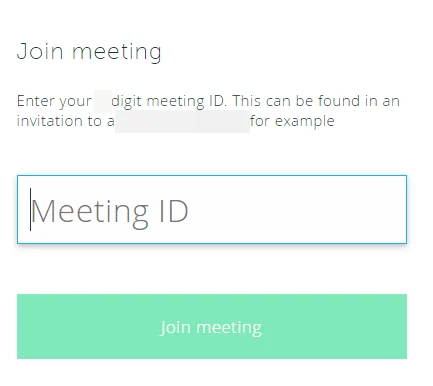
The screenshot shows the console used to connect to a meeting: a single field where the Meeting ID is entered.
Setup
The researcher used Burp Suite to capture the request that submits the Meeting ID and Burp Intruder to send a range of numbers as the payload. No accounts, roles or versions are described in the report. The precondition for the attack is that the console accepts a numeric Meeting ID and that a valid ID can be guessed.
Finding it
Because the console accepted a unique number of digits to connect a meeting, the first thing the researcher wanted to check was rate limiting, and then to work out the range of numbers so that the brute force would not waste time. To shorten the search he used Google to dork for meeting IDs belonging to the company, and found some IDs in FAQ documents published on the company's sub domain. He entered a few of those IDs at random to see the response, and the response confirmed that the ID he entered was once a valid Meeting ID.

The screenshot shows the response returned after entering a Meeting ID taken from the FAQ documents.
Exploitation
Step 1: Confirm the response for a known ID
Entering an ID found in the public FAQ documents returned a response that confirmed the ID had once been valid. This gave the researcher a reference response to compare against during the brute force.
Step 2: Capture the request and brute force the ID space
He captured the request that submits the Meeting ID in Burp and attacked it through Intruder with a numbers payload, iterating over an assumed range of numbers. The report does not include the raw request or the payload configuration.

The screenshot shows the response received after the Intruder attack was executed. The researcher noticed that the length of the IDs changed, which made him confident that some of the IDs in the range might be valid meeting IDs.
Step 3: Use the valid IDs
All the IDs he obtained were accepted as valid Meeting IDs, and he was able to bypass the console to connect to multiple meetings at various locations.

The screenshot shows the console after access to a meeting was obtained.
Root cause
The console accepted a numeric Meeting ID as the credential for joining a meeting, and a range of numbers could be submitted in bulk, with valid IDs distinguished from invalid ones by the response. The report does not describe any other defence, such as account lockout, CAPTCHA or per-user throttling, being present. The IDs were also discoverable in public FAQ documents on the company's sub domain, which gave the researcher a confirmed valid ID to compare responses against.
Impact
Anyone who could reach the console could enumerate valid Meeting IDs and join meetings without an invite. The researcher was able to connect to multiple meetings at various locations. He describes this as a very critical flaw that could be misused by anyone with wrong intentions and could hamper an organisation's reputation, and notes that this kind of vulnerability may involve critical client data and user data that can be misused in various ways. The report does not state how many meetings were reached or what data was exposed inside them.
Fix
The measures it implies are rate limiting on the Meeting ID submission endpoint, so that a range of numbers cannot be tried in bulk, and treating the Meeting ID as insufficient on its own, so that joining requires the invite or another credential rather than a guessable number.
Variants to test
- Numeric join endpoints on other meeting or webinar products. Submit a known-valid ID and an invalid one and compare status codes, body length and error text. A positive result is a response that reliably distinguishes valid from invalid IDs.
- Rate limiting checks on the same endpoint. Send a burst of sequential IDs and watch for throttling, lockout or CAPTCHA. A positive result is a long run of requests with no throttling and a distinguishable valid-ID response.
- Public documents as an ID source. Search FAQ pages, support articles and PDFs on the target's subdomains for sample IDs. A positive result is an ID from documentation that the console accepts.
- Response length as an oracle. Where the body text is identical, compare response lengths across a range. A positive result is a consistent length difference for valid IDs, as the researcher observed here.
- Invite bypass. Try joining a meeting with only an ID and no invite. A positive result is being placed into the meeting without any invite flow.
What happened, in plain words
A security researcher found that a company's meeting website let anyone join a meeting by typing a number, called a Meeting ID, without needing an invitation. He guessed many numbers in a row and got into several meetings. He reported it, but the company marked it as a duplicate of another report. This article explains, step by step, how he did it, so that someone new to security can understand the weakness and why it matters.
Background: what the company's service does
The company runs online meetings. People join a meeting either by using the company's installed software or by opening a web page, called a console, in a browser. To get in, you need one of two things: an invitation, or a valid Meeting ID. A Meeting ID is a number that identifies a particular meeting. The console has a single field where you type that number.
The screenshot shows the console: one input box for the Meeting ID and a button to connect.
The researcher's setup
To test the console, the researcher used a tool called Burp Suite. Burp Suite is a program that sits between your browser and a website and lets you see and change the requests your browser sends. A request is the message your browser sends to a server, for example "let me join meeting 12345". Burp Suite can capture that request, and another part of it, called Burp Intruder, can send the same request many times with different values in one of the fields. That is called a brute-force attack: trying many possibilities automatically instead of guessing by hand.
The report does not mention any user accounts, roles or software versions. The precondition for the attack was that the console accepted a numeric Meeting ID that could be guessed.
Finding it
The first thing the researcher wanted to check was rate limiting. Rate limiting is a defence where a server refuses to answer if you send too many requests too quickly, for example after five attempts in a minute. Without rate limiting, an attacker can try thousands of numbers without being stopped. The second thing was to work out the range of numbers, so that the brute force would not waste time on numbers that could not exist.
To find real Meeting IDs quickly, he used Google to search for pages that mentioned meeting IDs for that company. This technique is often called Google dorking: using advanced search terms to find information that was not meant to be public. He found some IDs in FAQ documents published on the company's sub domain. A sub domain is a part of the company's website, like help.example.com, separate from the main site. An FAQ is a list of frequently asked questions, often with examples.
He entered a few of those IDs at random to see what the console would say. The response confirmed that the ID he entered was once a valid Meeting ID. That gave him a reference: he now knew what a valid ID looked like in the response, so he could compare other responses against it.
The screenshot shows the response after entering a Meeting ID taken from the FAQ documents.
Exploitation
Step 1: Confirm the response for a known ID
When he typed an ID from the public FAQ documents, the console returned a response that confirmed the ID had once been valid. That difference is the key: it tells an attacker "this number is a real meeting". Without such a difference, guessing numbers would be useless because every response would look the same. This step is about finding that signal, called an oracle in security: something that reliably answers a question, here "is this ID valid?".
Step 2: Capture the request and brute force the ID space
He captured the request that submits the Meeting ID in Burp and attacked it through Intruder with a numbers payload. A payload is the part of the request that changes on each attempt; here it was a number. Intruder sent the request over and over, each time with a different number from an assumed range. The report does not include the raw request or the exact payload configuration.
The screenshot shows the response received after the Intruder attack was executed. The researcher noticed that the length of the IDs changed. Response length is the size of the page or data the server sends back. If valid IDs produce a longer or shorter response than invalid ones, that difference can be used to tell them apart even when the text looks similar. This made him confident that some of the IDs in the range might be valid meeting IDs.
Step 3: Use the valid IDs
All the IDs he obtained were accepted as valid Meeting IDs, and he was able to bypass the console to connect to multiple meetings at various locations. In other words, the console let him into meetings without an invitation, just by knowing the number.
The screenshot shows the console after access to a meeting was obtained.
Why this works (root cause)
The console accepted a numeric Meeting ID as the only credential for joining a meeting. A credential is something that proves you are allowed in, like a password or an invitation. Here the only credential was a number that could be guessed. The endpoint, meaning the specific address on the server that handles the join request, allowed a range of numbers to be submitted in bulk. So a range of numbers could be submitted in bulk, and valid IDs could be distinguished from invalid ones by the response. The report does not describe any other defence, such as account lockout, CAPTCHA or per-user throttling, being present. Account lockout means blocking an account after too many failed attempts; a CAPTCHA is a puzzle to prove you are human; throttling is slowing down repeated requests.
The IDs were also discoverable in public FAQ documents on the company's sub domain. That gave the researcher a confirmed valid ID to compare responses against, which made the brute force much easier.
Impact
Anyone who could reach the console could enumerate valid Meeting IDs and join meetings without an invite. Enumerate means to list or discover items one by one. The researcher was able to connect to multiple meetings at various locations. He describes this as a very critical flaw that could be misused by anyone with wrong intentions and could hamper an organisation's reputation. He also notes that this kind of vulnerability may involve critical client data and user data that can be misused in various ways.
Fix
The measures it implies are rate limiting on the Meeting ID submission endpoint, so that a range of numbers cannot be tried in bulk, and treating the Meeting ID as insufficient on its own, so that joining requires the invite or another credential rather than a guessable number.
Variants to test
If you want to look for similar problems, here are checks you can try. Each one describes what to do and what a positive result looks like.
- Numeric join endpoints on other meeting or webinar products. Submit a known-valid ID and an invalid one and compare status codes, body length and error text. A positive result is a response that reliably distinguishes valid from invalid IDs.
- Rate limiting checks on the same endpoint. Send a burst of sequential IDs and watch for throttling, lockout or CAPTCHA. A positive result is a long run of requests with no throttling and a distinguishable valid-ID response.
- Public documents as an ID source. Search FAQ pages, support articles and PDFs on the target's subdomains for sample IDs. A positive result is an ID from documentation that the console accepts.
- Response length as an oracle. Where the body text is identical, compare response lengths across a range. A positive result is a consistent length difference for valid IDs, as the researcher observed here.
- Invite bypass. Try joining a meeting with only an ID and no invite. A positive result is being placed into the meeting without any invite flow.
Glossary
- API: a set of rules that lets one program talk to another; here, the way the web console sends the Meeting ID to the server.
- Brute force: trying many possible values automatically until one works.
- Burp Intruder: a part of Burp Suite that sends the same request many times with different values in a chosen field.
- Burp Suite: a tool that captures and modifies the requests a browser sends to a website.
- CAPTCHA: a puzzle designed to tell humans from automated programs.
- Console: the web page where a user types a Meeting ID to join a meeting.
- Credential: something that proves you are allowed to access something, such as a password or an invitation.
- Endpoint: the specific address on a server that handles a particular request.
- Enumerate: to discover items one by one, for example valid Meeting IDs.
- FAQ: frequently asked questions, often published as help documents.
- Google dorking: using advanced search terms to find information that was not meant to be public.
- Invitation: a message that gives someone permission to join a specific meeting.
- Meeting ID: a number that identifies a meeting on the company's service.
- Oracle: something that reliably answers a question, such as whether an ID is valid, by its response.
- Payload: the part of a request that is changed on each attempt in an automated attack.
- Rate limiting: a defence that blocks or slows requests when too many arrive in a short time.
- Request: the message a browser sends to a server asking it to do something.
- Response: the message a server sends back to a browser.
- Response length: the size of the data a server sends back, which can differ between valid and invalid requests.
- Sub domain: a part of a website with its own address, such as help.example.com.
- Throttling: deliberately slowing down repeated requests to limit abuse.

