How I Hacked an IISc Subdomain Without Knowing the Admin Password ️
An administrative portal for an IISc subdomain relied on the client-side handling of the authentication response to decide whether a user was logged in. By changing the server's 401 response to a 200 and removing the error message, the author could reach the portal interface and view sensitive institutional information.
 Published on medium.com
Cybersecurity
The full write-up lives on its author's site
It belongs to its author, so we link to it rather than copy it. The other two tabs are our own rewrites, checked against it.
Context
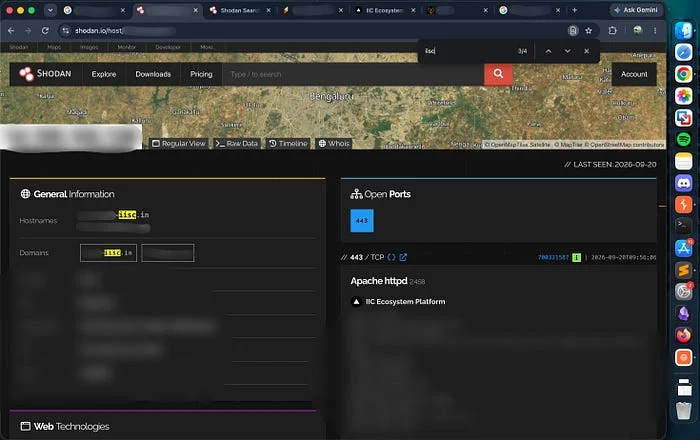
During a security research session the author explored publicly exposed infrastructure belonging to the Indian Institute of Science (IISc). Reconnaissance with Shodan turned up a host on an IISc subdomain that exposed an HTTPS port. Opening the host in a browser revealed an administrative portal in the IISc ecosystem, apparently offering administrative functionality for managing institutional resources. The portal sat behind a login interface that required valid credentials.
The author had no credentials for the portal. The interesting part of the write-up is not the exposure itself but how the frontend decided whether a login had succeeded.
Setup
- Target: a publicly reachable host on an IISc subdomain, found through Shodan, serving HTTPS.
- Access: no valid account. The author tried a handful of common default credential combinations, including
admin,root,testandadmin123. None worked. - Tooling: a browser and Burp Suite, with the browser configured to send application traffic through the proxy so that the authentication request and its response could be intercepted.
- Precondition for the technique: the ability to intercept and modify the authentication response in transit, which in practice means a proxy the tester controls, or any position where the response can be altered before the browser processes it.
Finding it
The Shodan results pointed to the host.
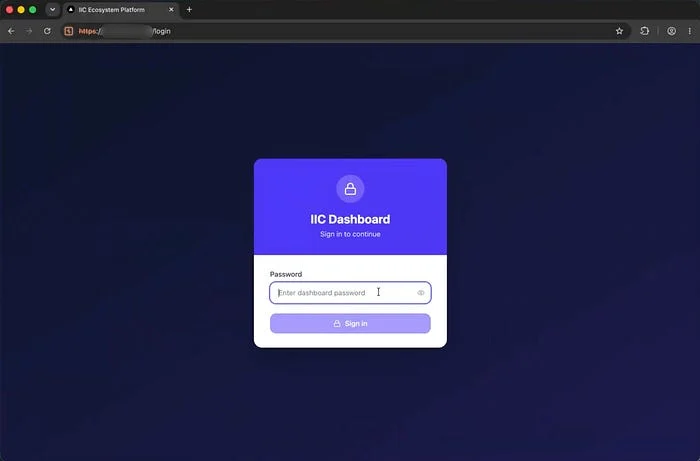
Browsing to the host produced an administrative portal for managing institutional resources.
After the default credential attempts failed, the author stopped guessing and looked at how the frontend processed the authentication response. The question was whether the login interface relied entirely on the status code and message returned by the authentication endpoint to decide whether the user was authenticated. That is a design smell: if the client trusts the response to decide access, the response becomes an input the user can control.
Exploitation
Step 1: Capture the authentication exchange
With Burp Suite proxying the browser, the author submitted the login form and intercepted the authentication request, then examined the server response.
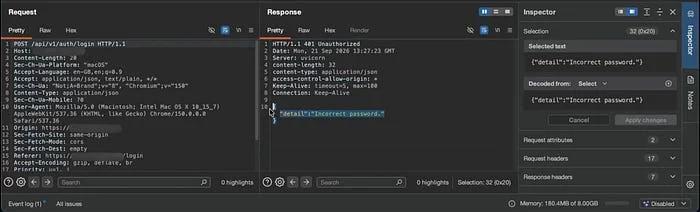
The server answered with:
HTTP/1.1 401 Unauthorized
The response also carried an error message saying the supplied credentials were invalid. That is the expected behaviour for a failed login, and it confirmed the server itself was rejecting the attempt.
Step 2: Modify the response
The author intercepted the authentication response before it reached the browser and made two changes:
- Changed the HTTP status code from
401 Unauthorizedto200 Unauthorized:
HTTP/1.1 200 Unauthorized
- Removed the error message indicating invalid credentials.
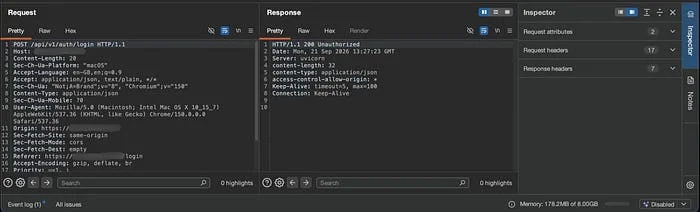
Note that the reason phrase was left as Unauthorized; only the numeric status code was changed.
Step 3: Forward the modified response
The modified response was forwarded to the browser. The application let the author proceed past the login interface, and the administrative portal became accessible in the browser even though the original authentication attempt had returned an unauthorised response.
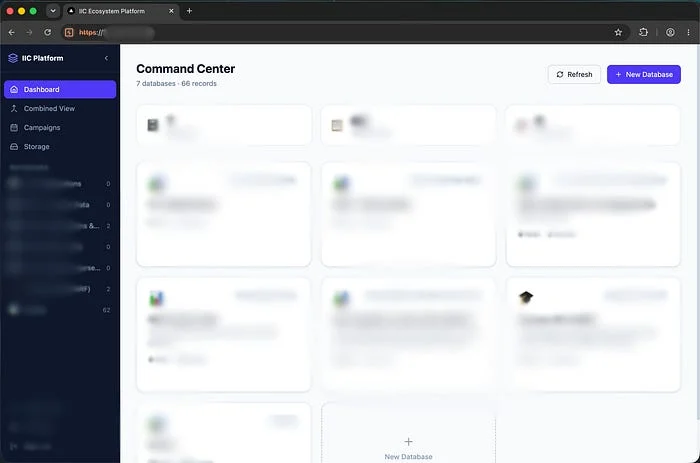
This is the core observation: the frontend trusted the modified authentication response and treated the session as authenticated.
Step 4: Examine what the portal exposed
Inside the portal the author looked through the available sections to judge impact. The categories of information encountered included:
- Database management information.
- Internal API references.
- Internal host information.
- Details concerning upcoming research and development collaborations.
- Employee personally identifiable information (PII).
The author avoided reproducing sensitive records or accessing unrelated resources.
Root cause
The login interface appeared to trust properties of the HTTP response, namely the status code and the error message, rather than a server-side session or token state that the client cannot forge. Changing the status code to 200 and dropping the error message was enough for the frontend to render the portal as if the user were logged in.
It is worth being precise about what this does and does not prove. Modifying a response in an intercepting proxy does not change the authentication decision made by the server. The bypass is of the login interface, not necessarily of server-side authentication. The real security impact therefore depends on whether the protected backend APIs independently validate the user's authentication and authorisation. If those endpoints also trust client-controlled session state, or fail to enforce authorisation, the consequences would be significantly more serious. The report does not establish which of these was the case.
Impact
Under the conditions described, an attacker who can intercept and alter the authentication response can get past the login interface and reach an administrative portal where the author encountered database management information, internal API references, internal host information, details of upcoming research and development collaborations, and employee PII. The confidentiality concern is the main one: an administrative portal is expected to enforce strong authentication and authorisation because it may expose resources that should never be publicly accessible.
The severity hinges on the backend question above. If the backend enforces its own authentication and authorisation, the manipulated response yields only a cosmetic bypass of the interface. If it does not, the exposure is substantial. The report does not state which situation applied, nor does it give a severity rating or bounty.
Fix
The report does not describe any remediation applied by IISc. The principle it draws from the finding is that authentication must never depend exclusively on client-side application behaviour. Concretely, the frontend should not treat a status code or message from the authentication endpoint as proof of a session; the server should issue and validate a session or token, and every protected backend endpoint should independently validate authentication and authorisation rather than trusting client-controlled state.
Responsible disclosure
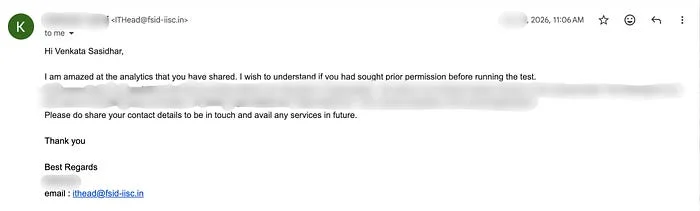
The author reported the finding to the IT Head of IISc, explaining the authentication-related weakness, the testing methodology and the potential exposure of sensitive institutional information. The report was acknowledged, and the author received thanks for reporting it responsibly.
Variants to test
- Status-code-only checks elsewhere. On other login forms, intercept the failed authentication response and change only the numeric status to
200, leaving the reason phrase and body intact. A positive result is the UI moving past the login screen while the server still considers the session unauthenticated. - Body-flag checks. Look for JSON or HTML responses containing fields such as
success,authenticatedorerror, and flip them in the intercepted response. A positive result is the frontend granting access on the strength of the altered field. - Backend enforcement probe. After any such UI bypass, request a protected API endpoint directly with the same session state. A positive result, meaning data returned without a valid server-side session, shows the bypass reaches the backend and is a real authentication flaw rather than a cosmetic one.
- Client-side route guards. Applications that gate routes in JavaScript may be bypassed by navigating directly to an administrative path. A positive result is an administrative view rendering without a server-issued session.
- Exposed administrative hosts. Repeat the Shodan-style search for institutional subdomains exposing HTTPS and check whether administrative interfaces are reachable at all. A positive result is an admin login page on a host that should not be publicly exposed, which is worth reporting even before any bypass is attempted.
What happened, in plain words
A security researcher was looking around the internet for computers belonging to the Indian Institute of Science (IISc), a large academic institution. Using a search engine for internet-connected devices called Shodan, he found one machine on an IISc subdomain that was reachable from the public internet and was running a secure web service (HTTPS). When he opened it in a browser, it turned out to be an administrative portal: a private control panel meant for staff to manage the institution's resources.
The portal asked for a username and password. He did not have one. He tried a few very common default combinations, and none worked. Instead of sitting there guessing passwords, he asked a different question: how does this login page actually decide that I am logged in? He used a tool called Burp Suite to sit between his browser and the server, so he could see and edit the messages they exchanged. When he tried to log in, the server replied with a clear "no": a 401 Unauthorized status and an error message saying the credentials were invalid.
He then edited that reply before it reached his browser. He changed the status code from 401 to 200 (the code that normally means "OK") and deleted the error message. The application let him proceed past the login interface, and the portal became accessible, even though the server had never actually accepted his password. Inside, he found sensitive institutional information. He stopped there, did not copy any private records, and reported the problem to IISc's IT Head, who acknowledged it and thanked him.
The important lesson is simple: a login page must not decide whether you are logged in by trusting a message that arrives over the network, because anyone who can edit that message can lie to it.
Background: the words you need first
Before walking through the steps, here are the ideas that come up, explained from scratch.
- Server and browser. A server is a computer somewhere on the internet that stores a website and answers requests. Your browser is the program on your own computer that sends those requests and displays the answers. When you type an address and press Enter, your browser sends a request and the server sends back a response.
- HTTP and HTTPS. HTTP is the language browsers and servers use to talk. Each exchange has a request (what you want) and a response (the answer). HTTPS is the same language, but wrapped in encryption so that nobody in the middle can read or change it in transit. The padlock in your browser's address bar means HTTPS.
- Status code. Every HTTP response starts with a three-digit number that summarises the outcome.
200means "OK, here is what you asked for".401means "you are not authorised, you need to log in".404means "not found". These numbers are how software, rather than humans, understands what happened. - Subdomain. A subdomain is a prefix on a domain name. If the main domain is
example.edu, thenadmin.example.eduis a subdomain. Institutions often run many subdomains for different services, and some are forgotten or left exposed. - Shodan. Shodan is a search engine that indexes internet-connected devices and services rather than web pages. You can search it for things like "hosts on this domain that expose HTTPS", which is useful for finding machines that are reachable from anywhere in the world.
- Administrative portal. A control panel for staff. It is the back office of a website: the place where people manage accounts, data and settings. Because it controls so much, it is exactly the kind of page that should be locked down tightly.
- Credentials. A username and password, or any other proof of who you are.
- Default credentials. Many products ship with a built-in username and password (like
admin/admin) so that the first person to set them up can log in. If nobody changes them, anyone who knows the defaults can get in. Trying a few of these is a standard, quick check. - Proxy and Burp Suite. A proxy is a middleman. Instead of your browser talking directly to the server, it talks to the proxy, and the proxy talks to the server. Burp Suite is a tool that acts as this middleman and lets you pause, read and edit every message going each way. Security testers use it to see what is really being sent, and to try changing it.
- Intercepting. When Burp is set to intercept, it holds a message and waits for you to look at it before passing it on. You can forward it unchanged, or edit it first.
- API. An API (Application Programming Interface) is the set of hidden addresses a website's own pages use to fetch and save data behind the scenes. When you click a button, the page often calls an API in the background to get the actual information. APIs are the machinery under the visible interface.
- Session and token. A session is the server's memory of "this browser is logged in as this person". Because HTTP itself has no memory, the server usually gives the browser a small piece of proof, called a token or session cookie, which the browser sends back with every later request. If the server checks that token properly, a user cannot fake being logged in. If the frontend just assumes you are logged in because a reply looked positive, the token never mattered.
- Frontend and backend. The frontend is the part that runs in your browser: the pages, buttons and JavaScript. The backend is the part that runs on the server: the database and the APIs. A secure design makes the backend the judge of who is allowed to do what, and treats the frontend as a display layer that can be wrong or manipulated.
- Response manipulation. This is the vulnerability class here. It means editing a server's reply on its way to the browser so that the browser draws a different conclusion from the one the server intended. It works when the frontend trusts the reply to make a security decision.
- Personally identifiable information (PII). Data that identifies a specific person: names, contact details, staff records and so on. Leaking it is a privacy and legal problem.
1. Finding the host with Shodan
The researcher began by searching Shodan for domains and subdomains connected to IISc. This is reconnaissance: the phase where you map out what an organisation has exposed to the internet before touching anything. The goal is not to break in, but to see what is visible from outside, because anything visible is potentially reachable by anyone.
The Shodan results pointed to a publicly accessible host on an IISc subdomain that had an HTTPS port open. An open port is like an unlocked door in a building's outer wall: it does not by itself mean anyone can get into the rooms, but it does mean the door exists and can be tried.
He opened the host in a browser and found an administrative portal belonging to the IISc ecosystem. The portal appeared to offer administrative functions for managing institutional resources.
The screenshot shows that portal. At this point the researcher knew two things: this is a management interface, and it is reachable from the open internet. Both facts make it worth a closer look, because administrative interfaces are supposed to be the most protected part of a system.
2. Trying the obvious passwords first
The portal presented a login form asking for valid credentials. The researcher had none, so he did what any tester does first: he tried a short list of common default combinations, including:
adminroottestadmin123
None of them worked. This is a quick, cheap check, and it is worth doing because default passwords are a real and common mistake. But it is also a dead end here, and importantly, the researcher did not keep guessing. Brute-forcing passwords is noisy, slow and often against the rules. Instead he changed the question: not "what is the password?" but "how does this page decide I am logged in?"
That shift is the heart of the whole finding. If the page's decision depends on something the visitor can influence, the password may not matter at all.
3. Catching the login exchange
He opened Burp Suite and set his browser to send its traffic through it. Think of it as putting a recording device on the wire between your browser and the server: every request and response passes through Burp, which can pause and show it to you.
He submitted the login form with his failed credentials and intercepted the authentication request, then looked at the server's response.
The screenshot shows the captured authentication exchange. The server's answer was:
HTTP/1.1 401 Unauthorized
Line by line, in plain words:
HTTP/1.1is the version of the HTTP protocol being used. It is just the label at the start of the reply.401is the status code. It means "you are not authorised". The server is saying: I do not recognise these credentials, so I am refusing.Unauthorizedis the reason phrase, a short human-readable label that goes with the number. It is decoration for people reading logs; software is supposed to act on the number.
The response also contained an error message saying the supplied credentials were invalid. That is exactly what should happen when a login fails, and it confirmed that the server itself was rejecting the attempt. The server was doing its job.
The interesting question was what the browser did with that answer. Did the login page read the status code and the error message and decide, from those alone, whether to show the portal? If so, the page was treating a message from the network as a security decision, and messages from the network can be edited by whoever sits in the middle.
4. Editing the reply
He intercepted the authentication response before it reached the browser and made two changes.
- He changed the HTTP status code from
401 Unauthorizedto200 Unauthorized:
HTTP/1.1 200 Unauthorized
- He removed the error message indicating invalid credentials.
The screenshot shows the modified response. Look closely at the code block above, because one detail matters: the reason phrase still says Unauthorized. Only the number changed, from 401 to 200. The reason phrase still said Unauthorized; only the number changed, from 401 to 200.
Why make these two changes? Because they are the two signals a login page typically uses to decide success or failure: the status code and the error text. If the page is making its decision from those signals, then flipping them should flip the decision. The researcher was testing a hypothesis, not guessing.
5. Forwarding it and getting in
He forwarded the edited response to the browser. The application let him proceed past the login interface, and the administrative portal became accessible in the browser, even though the original login attempt had returned an unauthorised response.
The screenshot shows the portal open in the browser after the edit. This is the core observation of the whole report: the frontend appeared to trust the modified response. The server had never accepted a password. The browser had simply been told a story, and it believed it.
It is worth being precise about what this proves and what it does not. Editing a reply in a proxy does not change the decision the server made. The server still considered the visitor unauthenticated. What was bypassed was the login screen, not necessarily the server's own checks. Whether that matters in practice depends on the next question: do the protected APIs behind the portal check the visitor's session for themselves, or do they also trust whatever the browser claims?
6. Looking at what the portal held
Inside the portal, the researcher went through the available sections to judge the impact. He was careful: he did not copy sensitive records or wander into unrelated parts of the system. The categories of information he encountered included:
- Database management information.
- Internal API references.
- Internal host information.
- Details concerning upcoming research and development collaborations.
- Employee personally identifiable information (PII).
Each of these is significant. Database management information could describe how the institution's data is stored and administered. Internal API references reveal the hidden addresses the site uses behind the scenes, which are useful to an attacker mapping the system. Internal host information exposes the names and layout of machines that are not meant to be public. Details of upcoming research collaborations are confidential institutional plans. Employee PII identifies real people and carries privacy and legal weight.
An administrative portal is expected to enforce strong authentication and authorisation precisely because it can expose resources that should never be publicly reachable. Here, editing a single reply appeared to be enough to get past the login screen and reach all of it.
7. Why this works, and why the backend matters
The finding rests on one principle: authentication must never depend only on what happens in the browser. The frontend is code running on a machine the visitor controls. Anything it decides can be influenced by the visitor. If it decides "logged in" because a reply said 200, then anyone who can edit that reply decides too.
The everyday comparison: imagine a club where the door staff radio the front desk to ask whether a guest is on the list, and the front desk replies "no". If the guest can intercept that radio call and change it to "yes", the door staff will wave them in. The front desk's records never changed, but the door opened anyway. Whether the guest can then get drinks at the bar depends on whether the bar staff check the list themselves.
That is exactly the distinction here. Bypassing the login interface is not the same as bypassing server-side authentication. The real impact depends on whether the protected backend APIs independently validate the user's authentication and authorisation. If those endpoints also trust client-controlled session state, or fail to enforce authorisation, the consequences would be significantly more serious. The report does not establish which of these was the case.
8. Reporting it to IISc
After identifying the issue and understanding its potential impact, the researcher reported it to the institution rather than publishing sensitive details. He sent his findings to the IT Head of IISc, explaining the authentication-related weakness, the testing methodology and the potential exposure of sensitive institutional information.
The report was acknowledged, and he received thanks for reporting it responsibly.
Finding a vulnerability is only part of the work. Telling the organisation clearly, privately and usefully is the other part, and it is what turns a discovery into a fix rather than a leak.
9. What the fix looks like
The report does not describe any remediation applied by IISc. The principle it draws is that authentication must never depend exclusively on client-side behaviour. In practice, the frontend should not treat a status code or message from the authentication endpoint as proof of a session. The server should issue and validate a session or token, and every protected backend endpoint should independently check authentication and authorisation rather than trusting state the client controls.
10. Related things to test
Once you understand the pattern, you can look for it elsewhere. These are the variants the technical write-up lists.
- Status-code-only checks. On other login forms, intercept the failed authentication response and change only the numeric status to
200, leaving the reason phrase and body intact. A positive result is the interface moving past the login screen while the server still considers the session unauthenticated. - Body-flag checks. Look for JSON or HTML responses containing fields such as
success,authenticatedorerror, and flip them in the intercepted response. A positive result is the frontend granting access on the strength of the altered field. - Backend enforcement probe. After any such interface bypass, request a protected API endpoint directly with the same session state. A positive result, meaning data returned without a valid server-side session, shows the bypass reaches the backend and is a real authentication flaw rather than a cosmetic one.
- Client-side route guards. Applications that gate routes in JavaScript may be bypassed by navigating directly to an administrative path. A positive result is an administrative view rendering without a server-issued session.
- Exposed administrative hosts. Repeat the Shodan-style search for institutional subdomains exposing HTTPS and check whether administrative interfaces are reachable at all. A positive result is an admin login page on a host that should not be publicly exposed, which is worth reporting even before any bypass is attempted.
Glossary
- API: the hidden set of addresses a website's own pages use to fetch and save data behind the scenes.
- Administrative portal: a control panel for staff, used to manage accounts, data and settings.
- Authentication: the process of proving who you are, usually with a username and password.
- Authorisation: the process of deciding what a proven user is allowed to do.
- Backend: the part of a system that runs on the server, including databases and APIs.
- Burp Suite: a tool that acts as a middleman between browser and server so you can pause, read and edit messages.
- Credentials: a username and password, or any other proof of identity.
- Default credentials: built-in usernames and passwords that products ship with, which should be changed on setup.
- Frontend: the part of a system that runs in your browser, such as pages, buttons and JavaScript.
- HTTP: the language browsers and servers use to exchange requests and responses.
- HTTPS: HTTP wrapped in encryption, shown by the padlock in the address bar.
- Intercepting: pausing a message in a proxy so you can inspect or edit it before it continues.
- Personally identifiable information (PII): data that identifies a specific person, such as names or contact details.
- Port: a numbered channel on a computer through which a particular service listens for connections.
- Proxy: a middleman that sits between your browser and a server and passes messages between them.
- Reconnaissance: the mapping-out phase of security testing, where you find out what an organisation has exposed.
- Response manipulation: editing a server's reply on its way to the browser so the browser draws a different conclusion.
- Session: the server's memory that a particular browser is logged in as a particular person.
- Shodan: a search engine that indexes internet-connected devices and services rather than web pages.
- Status code: the three-digit number at the start of an HTTP response that summarises the outcome, such as
200for OK or401for unauthorised. - Subdomain: a prefix on a domain name, such as
admininadmin.example.edu. - Token: a small piece of proof, often stored as a cookie, that the browser sends back so the server can recognise the session.
- Vulnerability: a weakness in a system that can be used to make it behave in a way its owners did not intend.

