How I hacked into a website to prepare for my finals

medium.com
Published on medium.com
This is my last year in high school, so we have had the final exam last week; As you all know, bug bounty and programming took a very large part of my life, so I had no time and no intention to prepare to my finals. 7 days before the exam, I started looking for a website that gives free or paid lessons, and I have…
The full write-up lives on its author's site
It belongs to its author, so we link to it rather than copy it. The other two tabs are our own rewrites, checked against it.
Context
The target is a website that sells lessons and exercises. The author describes it as a site that explains lessons very well, with the catch that it only sells early access at 120eur, which he considered expensive for the seven days he needed before his final exam. The site's address is withheld, so throughout the write-up it is called redacted.com.
The relevant feature is the payment flow. The site uses Braintree to process payments. The author's goal was to obtain the paid early access without paying, and the write-up follows his path from the main site to a development subdomain where the payment flow behaved differently.
Setup
No accounts, roles or credentials are given beyond what the author created himself: he signed up on the main site, and later obtained access to a development environment. The tools he names are:
- Aquatone, used for domain and endpoint discovery (
aquatone-gather). - nmap, for port scanning.
- dirb and gobuster, for content discovery.
- Burp Suite, used to brute-force a basic authentication prompt with a medium-sized wordlist.
- A search engine, to find Braintree test card numbers in the public documentation.
No versions are given for any of these tools.
Finding it
The first attempt was on the main site. After signing up, the author looked for an endpoint vulnerable to SQL injection or NoSQL injection and found nothing; in his words the website was immune up to that point. He then went through the payment process and saw that Braintree handled payments. Because he had hunted on Braintree many times before, he concluded there was no way to get free access there by editing the amount or similar, so he moved on to reconnaissance.
He extracted domains with Aquatone by running aquatone-gather and obtained several endpoints. One of them was dev.redacted.com. At first it returned a 404 not found error. Rather than stopping, he ran a quick nmap check and found five open ports: 22, 80, 443, 8080 and 8081.
Port 8080 also returned 404 not found, and dirb and gobuster found nothing new there. While fuzzing dev.redacted.com:8080, he looked at dev.redacted.com:8081, where he found a basic authorization prompt.
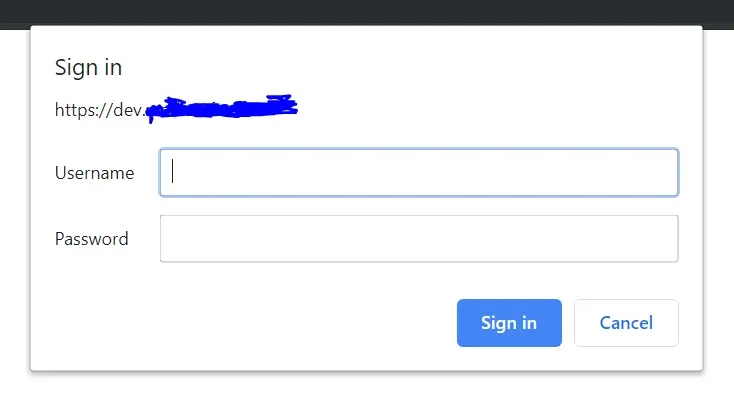
The screenshot shows that prompt on port 8081, the point where the development environment stopped returning 404 and started asking for credentials.
Exploitation
Step 1: brute-forcing the basic authentication prompt
He first tried default credentials, Admin:Admin, admin:admin and similar, without success. He then downloaded a medium wordlist and configured Burp Suite to brute-force the sign-in page. After almost three hours he got a successful response. The credentials were dev for both the username and the password, which he notes made him realise how dumb he was for spending three hours on it.
As the URL suggests, this endpoint was a development version of the actual website. He looked for new features there and found nothing, then went through the payment process again. At that point he realised he had found the issue.
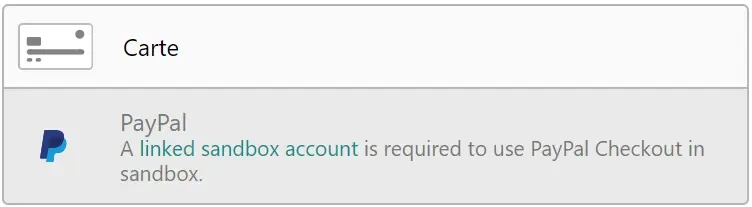
The screenshot shows what he saw in the development payment flow, the observation that made him conclude the environment was usable for his purpose.
Step 2: using Braintree test cards
He chose Card as the payment method and went through the payment process. He then searched for "Braintree test cards" and found the test card numbers in the Braintree documentation.
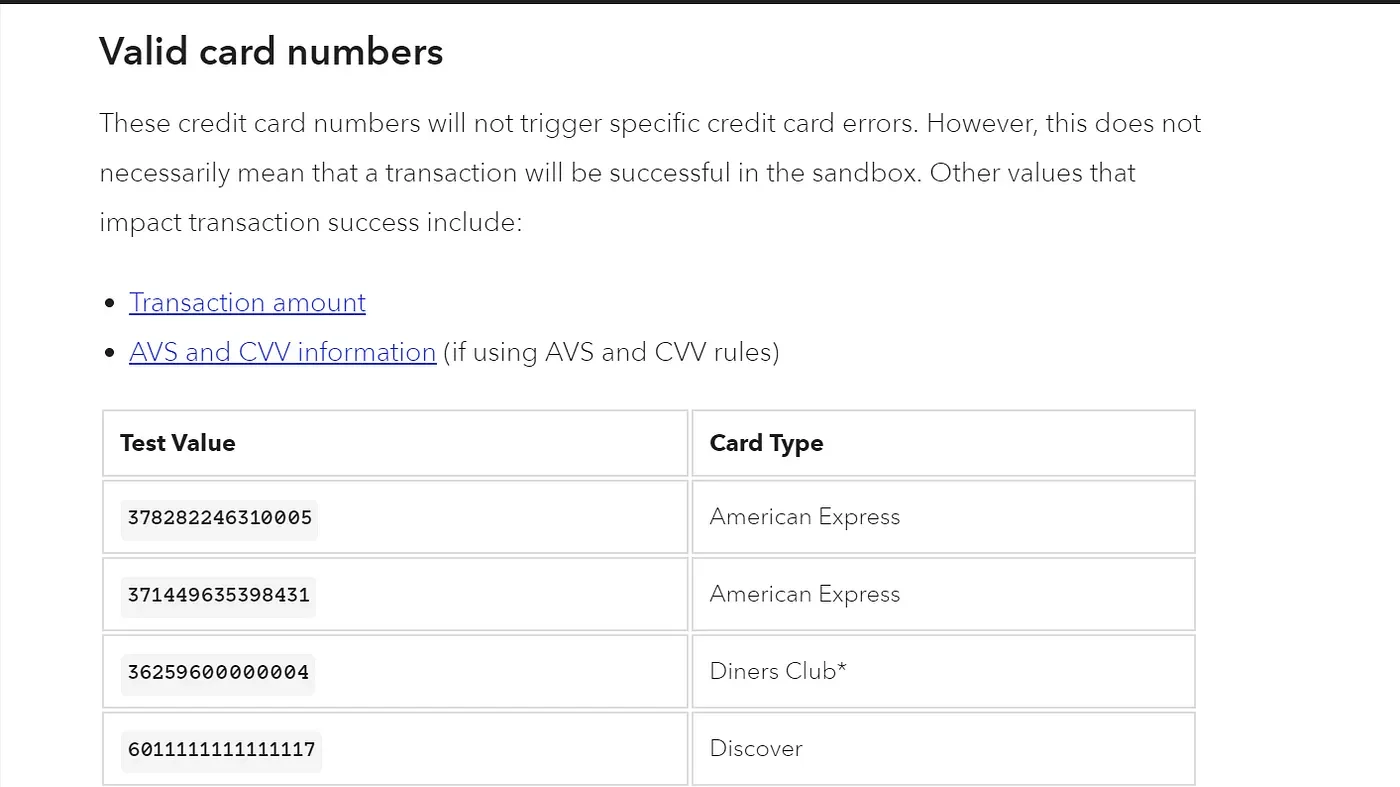
The screenshot shows the documentation page with the test card details.
He tested one of those cards.
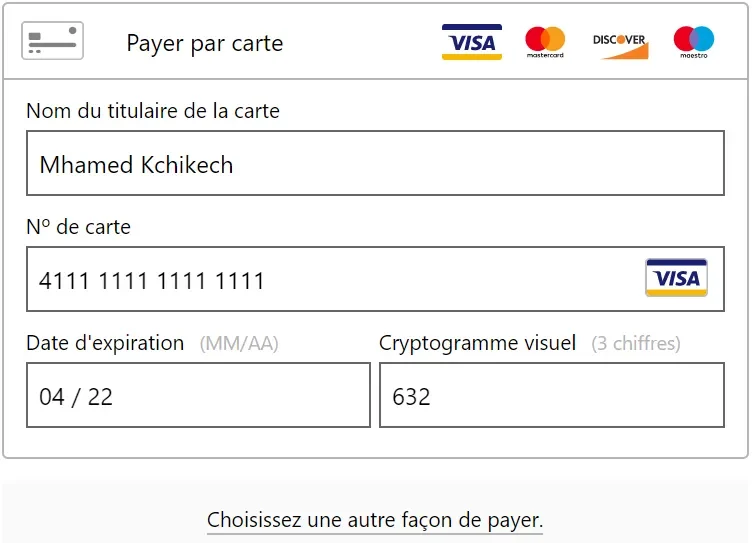
The screenshot shows the card details entered in the payment form.
He clicked Pay.

The screenshot shows the result of the payment attempt.
The payment was successful, and he obtained free access to all the lessons and exercises. He notes that in the end he did not use the site to prepare for his finals and passed them without even knowing the title of the lessons.
He reported the bug to the site owner as a thank you and states he had no intention of receiving a monetary reward.
Root cause
The development environment at dev.redacted.com accepted the published Braintree test card numbers and produced a successful payment. The author does not describe the Braintree configuration, so the exact setting is not stated in the report. The report does not describe the Braintree configuration behind this behaviour.
The environment was behind an HTTP basic authentication prompt, protected by the guessable pair dev / dev, which fell to a wordlist attack. The main site's defences against injection did not matter here, because the weakness was on a separate development host.
Impact
An attacker who finds the development host can obtain the paid early access, and with it all the lessons and exercises, without paying. The precondition is that the development environment is reachable and that its payment flow accepts test cards. In this case the basic authentication prompt was bypassed with a trivial credential pair. The author does not describe any access to other users' data or to production systems, and the report does not state how the issue was fixed or whether a bounty was paid.
Fix
Based on the described weakness, the development environment should not be publicly reachable, or should be protected by credentials that are not guessable and by network-level restrictions. Its payment integration should not accept published test card numbers in an environment that serves real content.
Variants to test
- Enumerate subdomains and alternate ports on any target with a payment flow, using Aquatone, nmap, dirb and gobuster as in this write-up. A positive result is a host or port that returns something other than 404, such as a login prompt or a different version of the application.
- Try default and simple credential pairs on any basic authentication prompt, then a wordlist attack through Burp Suite. A positive result is a successful response with credentials such as
dev/dev. - Walk the payment flow on every non-production environment you find. A positive result is a payment form that accepts the provider's published test card numbers.
- Complete a payment with a test card and check whether the account receives the paid entitlement. A positive result is access to content that should require a real purchase.
- Compare the production and development payment flows. A positive result is a development flow that accepts published test card numbers.
What happened, in plain words
A student had final exams coming up in seven days and found a website that sold lessons and exercises. The only way to buy access was an early access plan costing 120eur, which he thought was too expensive for a week of use. So he decided to try to get the paid access for free.
He could not get in through the main website. His attempts at SQL injection and NoSQL injection found nothing. But while looking around, he found a second copy of the website, a development version of the actual site. That copy was protected by a simple username and password box, and the password turned out to be as easy as the username. Once inside, he went through the payment process on that development copy and discovered it accepted the test card numbers that the payment company publishes for testing. He paid with a test card, the payment went through, and the site gave him access to all the lessons and exercises for free.
He never actually used the site to study, passed his exams anyway, and reported the problem to the site owner as a thank you, without asking for money.
This article walks through the same steps he took, explaining each idea from scratch along the way. The website's real address is hidden, so it is called redacted.com throughout.
The target and the goal
The website sells lessons and exercises. The author describes it as a site that explains lessons very well. The catch is that it only sells early access, at 120eur, which he considered expensive for the seven days he needed before his final exam.
The feature that matters here is the payment flow, meaning the sequence of pages you go through to buy something: choose a plan, choose a payment method, enter card details, confirm. The site uses a company called Braintree to handle payments. Braintree is a payment provider: instead of the website storing your card details itself, it hands the payment off to Braintree, which talks to the banks and tells the website whether the payment succeeded.
The goal was to obtain the paid early access without paying. The path goes from the main site to a development subdomain, where the payment flow behaved differently.
A quick word on subdomains
A domain is the name of a site, like redacted.com. A subdomain is a name placed in front of it, like dev.redacted.com. Companies often use subdomains to separate parts of their infrastructure: www for the public site, dev for a development copy, staging for a pre-release copy, and so on. Development copies are built so that programmers can test changes without breaking the real site, and they are exactly the kind of place where security settings are looser. Finding them is a standard part of reconnaissance, which simply means gathering information about a target before attacking it.
The tools used
No accounts, roles or credentials are given beyond what the author created himself: he signed up on the main site, and later obtained access to a development environment. The tools he names are:
- Aquatone, used for domain and endpoint discovery (
aquatone-gather). - nmap, for port scanning.
- dirb and gobuster, for content discovery.
- Burp Suite, used to brute-force a basic authentication prompt with a medium-sized wordlist.
- A search engine, to find Braintree test card numbers in the public documentation.
No versions are given for any of these tools. Here is what each one does in plain terms:
- Aquatone is a tool that helps map out which subdomains exist for a domain and takes screenshots of what it finds, so you can see at a glance which hosts are alive and what they look like.
- nmap is a port scanner. Every computer on a network listens on numbered channels called ports, and each service (a web server, a remote login service, and so on) uses a particular port. Scanning tells you which ports are open, and therefore which services are running.
- dirb and gobuster are content discovery tools. They take a list of common file and folder names and request each one from a web server, reporting which ones exist. It is like trying every door in a corridor to see which ones open.
- Burp Suite is a tool that sits between your browser and a website, letting you see and modify every request. One of its features can send many login attempts automatically, which is what brute-forcing means: trying a long list of guesses until one works.
- A wordlist is simply a text file with one candidate per line, for example common passwords or common folder names. A "medium" wordlist is one of moderate size, a compromise between speed and coverage.
Finding it
First attempt: the main site
The first attempt was on the main site. After signing up, the author looked for an endpoint vulnerable to SQL injection or NoSQL injection and found nothing; in his words the website was immune up to that point.
An endpoint is a specific address on a server that does something when you send it a request, for example the address that handles login or the one that returns a list of lessons. SQL injection is a classic attack where you slip database commands into a form field, hoping the site pastes your input straight into a database query. NoSQL injection is the same idea against a different family of databases. Both are ways of making the site's database do something it was not meant to do, such as returning data it should keep private. The main site did not fall for either.
He then went through the payment process and saw that Braintree handled payments. Because he had hunted on Braintree many times before, he concluded there was no way to get free access there by editing the amount or similar, so he moved on to reconnaissance. In other words, he had already spent a lot of time poking at Braintree in other projects and knew it was solid, so attacking the payment provider itself was a dead end. The interesting question became: is there another copy of this website with weaker settings?
Second attempt: looking for other hosts
He extracted domains with Aquatone by running aquatone-gather and obtained several endpoints. One of them was dev.redacted.com. At first it returned a 404 not found error.
A 404 not found is the standard web response meaning "there is nothing at this address". Many people stop when they see one. The author's point is that a 404 on the front page does not mean the server behind it is empty; it may simply mean the front page is not where the content lives.
Rather than stopping, he ran a quick nmap check and found five open ports: 22, 80, 443, 8080 and 8081. In everyday terms, the building's front door was locked, but a scan of the walls showed five windows. Ports 80 and 443 are the standard ones for ordinary web traffic (unencrypted and encrypted respectively). Port 22 is normally used for remote login to a server. Ports 8080 and 8081 are commonly used by web servers running on a non-standard port, often during development.
Port 8080 also returned 404 not found, and dirb and gobuster found nothing new there. While fuzzing dev.redacted.com:8080, he looked at dev.redacted.com:8081, where he found a basic authorization prompt.
Fuzzing means sending lots of slightly varied requests automatically to see how the server reacts. A basic authorization prompt is the small pop-up box a browser shows asking for a username and password. It is a very old, very simple login mechanism built into the web protocol itself: the browser sends the username and password with every request, encoded but not encrypted unless the connection uses HTTPS.
The screenshot shows that prompt on port 8081, the point where the development environment stopped returning 404 and started asking for credentials.
Exploitation
Step 1: brute-forcing the basic authentication prompt
He first tried default credentials, Admin:Admin, admin:admin and similar, without success. Default credentials are the factory settings that come with a piece of software, and people often forget to change them. Trying them is always worth a minute.
He then downloaded a medium wordlist and configured Burp Suite to brute-force the sign-in page. After almost three hours he got a successful response. The credentials were dev for both the username and the password, which he notes made him realise how dumb he was for spending three hours on it.
Why did this work? Because the password was a short, obvious word. A brute-force attack does not need cleverness; it needs the password to be guessable. Three hours of automated guessing is cheap for an attacker and expensive for a defender whose password is one word long.
As the URL suggests, this endpoint was a development version of the actual website. He looked for new features there and found nothing, then went through the payment process again. At that point he realised he had found the issue.
The screenshot shows what he saw in the development payment flow, the observation that made him conclude the environment was usable for his purpose.
Step 2: using Braintree test cards
He chose Card as the payment method and went through the payment process. He then searched for "Braintree test cards" and found the test card numbers in the Braintree documentation.
This is the key idea. Payment providers run two separate worlds. The live world moves real money and only accepts real cards. The sandbox (also called test mode) is a practice world where no money moves, and the provider publishes fake card numbers that always produce a chosen result: success, decline, error, and so on. Programmers use these numbers to test their checkout without spending anything. The numbers are public on purpose, which is exactly why they must never work on a site that serves real content.
The screenshot shows the documentation page with the test card details.
He tested one of those cards.
The screenshot shows the card details entered in the payment form.
He clicked Pay.
The screenshot shows the result of the payment attempt.
The payment was successful, and he obtained free access to all the lessons and exercises. He notes that in the end he did not use the site to prepare for his finals and passed them without even knowing the title of the lessons.
He reported the bug to the site owner as a thank you and states he had no intention of receiving a monetary reward.
Why it worked
The development environment at dev.redacted.com accepted the published Braintree test card numbers and produced a successful payment. The author does not describe the Braintree configuration, so the exact setting is not stated in the report. The report does not describe the Braintree configuration behind this behaviour.
In plain words: the test copy of the shop accepted the published test card numbers, and the payment went through. The door had a simple username and password box, and the password was dev. The main site's defences against injection did not matter here, because the weakness was on a separate development host.
What an attacker could do with it
An attacker who finds the development host can obtain the paid early access, and with it all the lessons and exercises, without paying. The precondition is that the development environment is reachable and that its payment flow accepts test cards. In this case the basic authentication prompt was bypassed with a trivial credential pair. The author does not describe any access to other users' data or to production systems, and the report does not state how the issue was fixed or whether a bounty was paid.
How it should be fixed
Based on the described weakness, the development environment should not be publicly reachable, or should be protected by credentials that are not guessable and by network-level restrictions. Its payment integration should not accept published test card numbers in an environment that serves real content.
Things to try on other targets
These are the same techniques, written as a checklist you can follow on a site you are allowed to test:
- Enumerate subdomains and alternate ports on any target with a payment flow, using Aquatone, nmap, dirb and gobuster as in this write-up. A positive result is a host or port that returns something other than 404, such as a login prompt or a different version of the application.
- Try default and simple credential pairs on any basic authentication prompt, then a wordlist attack through Burp Suite. A positive result is a successful response with credentials such as
dev/dev. - Walk the payment flow on every non-production environment you find. A positive result is a payment form that accepts the provider's published test card numbers.
- Complete a payment with a test card and check whether the account receives the paid entitlement. A positive result is access to content that should require a real purchase.
- Compare the production and development payment flows. A positive result is a development flow that accepts published test card numbers.
Lessons the author drew
- 404 Not found doesn't mean the end of the way.
- Bruteforce does help.
- If you don't use Nmap you're missing a lot.
- Don't forget to use dirb and its alternatives.
- Searching for subdomains is primordial.
Glossary
- Aquatone: a tool that discovers subdomains for a domain and captures screenshots of the hosts it finds.
- aquatone-gather: the Aquatone command used here to collect domains and endpoints.
- Basic authentication: a simple login mechanism built into the web protocol where the browser sends a username and password with each request, usually shown as a pop-up prompt.
- Braintree: a payment provider that handles card payments on behalf of a website.
- Brute-force: trying many candidate passwords or names automatically until one works.
- Burp Suite: a tool that intercepts and modifies traffic between your browser and a website, and can automate repeated requests such as login attempts.
- Content discovery: systematically requesting common file and folder names to find hidden parts of a site.
- Credentials: a username and password pair.
- Default credentials: the factory username and password that ship with a piece of software, often left unchanged.
- Development environment: a copy of a website used by its programmers to test changes, separate from the live site.
- dirb: a content discovery tool that requests names from a wordlist and reports which exist.
- Domain: the name of a website, such as
redacted.com. - Endpoint: a specific address on a server that performs an action when it receives a request.
- Entitlement: the right, recorded by the site, to access paid content.
- Fuzzing: sending many slightly varied requests automatically to observe how a server responds.
- gobuster: a content discovery tool similar in purpose to dirb.
- HTTP: the protocol browsers and web servers use to exchange requests and responses.
- HTTPS: HTTP carried over an encrypted connection, so others on the network cannot read it.
- Live mode: the payment provider setting that moves real money and accepts only real cards.
- nmap: a port scanner that reports which network ports on a host are open.
- NoSQL injection: slipping database commands into input handled by a non-relational database, hoping the site executes them.
- Port: a numbered channel on a computer that a particular service listens on, such as 80 for ordinary web traffic.
- Production: the live website that real users and real payments use.
- Reconnaissance: gathering information about a target before attacking it.
- Sandbox: the payment provider's practice mode, where no money moves and published test cards are accepted.
- SQL injection: slipping database commands into input that a site pastes into a database query.
- Subdomain: a name placed in front of a domain, such as
dev.redacted.com, often used for separate environments. - Test card: a fake card number published by a payment provider for use in its sandbox.
- Wordlist: a text file containing one candidate per line, used by guessing and discovery tools.
- 404 not found: the standard web response meaning there is nothing at the requested address.



