How I Landed in IISc’s Hall of Fame: Stored XSS via SVG Upload
An image upload feature accepted SVG files without validating their content and served them back as image/svg+xml on the same origin. An attacker could upload an SVG containing an event handler, and anyone opening the resulting URL would run the script in the context of that origin.
 Published on medium.com
Cybersecurity
The full write-up lives on its author's site
It belongs to its author, so we link to it rather than copy it. The other two tabs are our own rewrites, checked against it.
Context
IISc is one of India's top institutes, and its main site is iisc.ac.in. While doing recon across its subdomains, I came across a tool hosted on one of them that was meant for an eye test. The flow was simple: a user uploads an eye image, the application processes it, and shows it back somewhere in the UI.
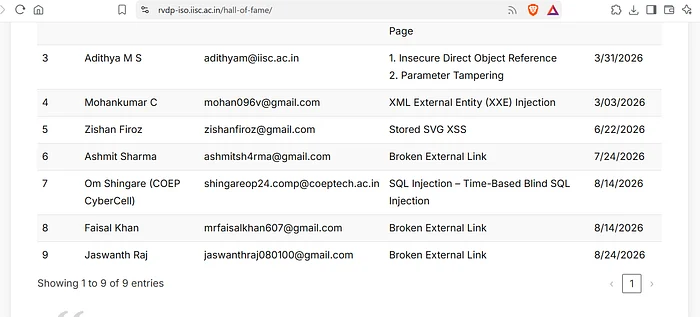
That upload field is the whole story. It turned into a stored XSS finding and got me into IISc's Hall of Fame.
Setup
The report describes no accounts, roles, tooling or versions. The only precondition was access to the eye test tool on an IISc subdomain and its image upload field. No authentication step is mentioned.
Finding it
Whenever I see an image upload feature, the first thing I check is SVG. Most developers treat SVG like PNG or JPG. It is not. SVG is an XML document. If the server serves it back as image/svg+xml on the same origin, the browser parses it like a live document, not a picture, and any script or event handler inside it can run.
That is exactly the assumption I wanted to test on the eye image field.
Exploitation
Step 1: Upload an SVG instead of a photo
I picked the eye image upload field and dropped in a .svg file instead of a real photo. No client-side check blocked it. More importantly, the server did not validate the actual file content either: no magic byte check, no real image signature check. It simply trusted the extension and the MIME type my browser sent.
The payload was basic:
<svg xmlns="http://www.w3.org/2000/svg" onload="alert('XSS')"></svg>
The onload attribute on the root <svg> element runs when the browser renders the document. The app accepted the file, stored it, and handed back a URL, same as it would for a normal image.
Step 2: Open the stored file
I opened the file's URL directly in the browser. Since the server was serving it as image/svg+xml and was not sanitising it or forcing a download, the browser rendered it as a document and ran the onload handler.
The alert box popped up with "XSS", straight from the IISc subdomain.
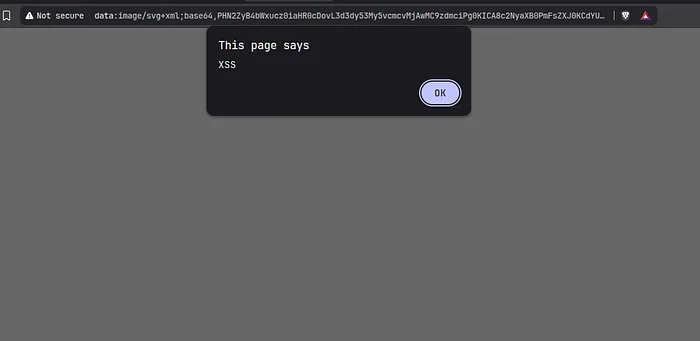
That confirmed it. This was not reflected, and not something that only fired for me. The file was sitting on the server. Anyone who opened that URL, or anyone I shared the link with, would get the same script running in their browser, in the context of that origin.
Root cause
The app assumed that "uploaded file has an image extension" means "safe to serve back as-is". SVG breaks that assumption because it is markup, not pixels. The server neither validated the real content of the file nor sanitised the markup inside it, and it served the result back as image/svg+xml, so the browser treated it as a live document.
Impact
This is textbook stored XSS via file upload, but the real impact depends on what else lives on that origin:
- If the subdomain shares session or cookie scope with other IISc systems, a script here could exfiltrate that.
- The link looks like a normal file URL, easy to pass off as "here's my report" and get someone to open it.
- SVG lets you go further than a plain alert.
foreignObjectcan embed HTML, fake a login prompt, or quietly shipdocument.cookiesomewhere. I kept my PoC to a simple alert since that was enough to prove impact.
Fix
IISc's team fixed it properly. The general advice for anyone dealing with this bug class:
- Do not trust the extension or the client-supplied MIME type; validate the actual file content.
- If SVG has to be supported, sanitise server-side and strip script tags, event handler attributes and
foreignObject. - Serve user-uploaded files from a cookie-less origin, or force
Content-Disposition: attachment. - Set a strict
Content-Typeon the response; do not let the browser guess.
Variants to test
This one took maybe ten minutes to find because I always test upload fields with SVG before anything else. Boring to explain, easy to miss if you are not specifically looking for it. It still shows up on production apps, including academic institutions, way more often than it should.
What happened, in plain words
IISc is one of India's top institutes, and its main website is iisc.ac.in. While looking around its subdomains, I found a small tool hosted on one of them that was meant for an eye test. The flow was simple: you upload a picture of an eye, the application processes it, and shows it back to you somewhere on the page.
That upload field is the whole story. It turned into a stored XSS finding and got me into IISc's Hall of Fame.
A few words before we start, because the rest of this article leans on them.
- A subdomain is a smaller address that belongs to a main website. If
iisc.ac.inis the main building, then something likeeyetest.iisc.ac.inwould be a separate room inside it. The report does not name the exact subdomain, so I will just call it "the IISc subdomain". - An upload field is the button on a web page that lets you pick a file from your computer and send it to the website. Think of it as a mail slot in a door: you push a document through, and the building keeps it.
- XSS stands for Cross-Site Scripting. It means getting a website to run code that the website's owners did not write. A browser runs code it receives from a site, so if an attacker can slip code into what the site sends back, the browser will happily run it. It is like a stranger managing to add a page to a book you are reading, and you cannot tell it was not part of the original.
- Stored XSS is the version where the bad code is saved on the server first. It does not just flash by once; it sits there, and every person who opens the affected page gets it. Compare it to graffiti painted on a wall versus a rude gesture made in passing: the graffiti stays for everyone.
Setup
The report describes no accounts, roles, tooling or versions. The only precondition was access to the eye test tool on an IISc subdomain and its image upload field. No login step is mentioned.
In other words, you did not need to be anyone special to reach this feature. You just needed a browser and the address of the tool.
Finding it
Whenever I see an image upload feature, the first thing I check is SVG. Most developers treat SVG like PNG or JPG. It is not. SVG is an XML document. If the server serves it back as image/svg+xml on the same origin, the browser parses it like a live document, not a picture, and any script or event handler inside it can run.
That is exactly the assumption I wanted to test on the eye image field.
Let me unpack that paragraph, because it is the heart of the whole bug.
- PNG and JPG are ordinary picture formats. They contain pixels and nothing else. A browser looks at them and thinks "a picture", and pictures cannot run code.
- SVG stands for Scalable Vector Graphics. It is also used for pictures, but it is written as text, in a format called XML. XML is a way of writing structured text with labels in angle brackets, like
<name>value</name>. Because SVG is text with labels, it can also carry instructions, including instructions that a browser will execute. - XML is a general text format for structured data. If you have ever seen a form where every answer has a label around it, that is the idea.
- A MIME type is a short label a server attaches to a file to tell the browser what kind of thing it is.
image/pngmeans "this is a PNG picture".image/svg+xmlmeans "this is an SVG picture". The browser reads that label and decides how to treat the file. - Origin is the combination of scheme, host and port, roughly "which site this page belongs to". Two pages on the same origin can read each other's data; pages on different origins cannot. It is like the difference between two rooms in the same flat and two rooms in different buildings.
- An event handler is a small piece of code attached to something that can happen, such as "when this finishes loading, do that". In a web page, an attribute like
onloadis an event handler: it names code to run when the element has loaded.
So the question I was asking was simple: does this eye test tool accept an SVG, keep it, and hand it back in a way that makes the browser treat it as a live document rather than a picture? If yes, any instructions inside the SVG will run.
Exploitation
Step 1: Upload an SVG instead of a photo
I picked the eye image upload field and dropped in a .svg file instead of a real photo. No client-side check blocked it. More importantly, the server did not validate the actual file content either: no magic byte check, no real image signature check. It simply trusted the extension and the MIME type my browser sent.
The payload was basic:
<svg xmlns="http://www.w3.org/2000/svg" onload="alert('XSS')"></svg>
Line by line, in plain words:
<svg ...>opens an SVG element. Everything between the opening and closing tag belongs to this picture.xmlns="http://www.w3.org/2000/svg"tells the browser which set of rules this element follows. It is a standard label that says "this is a real SVG". Without it, some browsers would not treat the element as an SVG at all.onload="alert('XSS')"is the event handler. It says: as soon as this SVG has loaded, run the code inside the quotes. That code isalert('XSS'), which opens a small pop-up box in the browser showing the textXSS. A pop-up is the classic, harmless way to prove that code ran, because only code can make one appear.></svg>closes the element. There is nothing inside the picture, which is fine: the point is not to show an image, it is to run the handler.
Why this step matters: the file is not a photo at all. It is a tiny text document that happens to be labelled as an image. If the site only looks at the file name ending in .svg and at the label the browser sends, it will wave it through.
A few terms from that paragraph:
- Client-side check means a check that happens in your own browser before the file is sent. It is easy to get around, because the browser belongs to the person uploading. Think of a bouncer who only checks the label on a parcel and never opens it.
- Server-side validation means the server itself opens the parcel and checks what is inside. That is the check that actually protects a site.
- Magic bytes are the first few bytes of a file that identify its real format, regardless of the name. A real PNG starts with a known signature; a text file pretending to be a PNG does not. Checking magic bytes is like sniffing a bottle instead of reading its label.
- File extension is the ending of a file name, such as
.jpgor.svg. It is only a name, and names can be wrong or changed.
The app accepted the file, stored it, and handed back a URL, same as it would for a normal image. A URL is the address of something on the web, the thing you type into the address bar. Getting a URL back means the file now lives on the server and can be opened by anyone who has that address.
Step 2: Open the stored file
I opened the file's URL directly in the browser. Since the server was serving it as image/svg+xml and was not sanitising it or forcing a download, the browser rendered it as a document and ran the onload handler.
The alert box popped up with "XSS", straight from the IISc subdomain.
The alert box popped up with "XSS", straight from the IISc subdomain, which is the proof that the code inside the uploaded file actually ran.
Two more terms from this step:
- Sanitising means cleaning content before it is shown, for example removing anything that looks like code. It is like a mail room that opens every parcel and takes out anything dangerous before delivering it.
- Forcing a download means telling the browser "do not display this, save it to disk instead". A downloaded file is not run as a page, so code inside it does not execute in the site's context.
That confirmed it. This was not reflected, and not something that only fired for me. The file was sitting on the server. Anyone who opened that URL, or anyone I shared the link with, would get the same script running in their browser, in the context of that origin.
- Reflected XSS is the cousin of stored XSS. There, the bad code is bounced straight back in a single response, for example because it was placed in a link. It only affects the person who clicks that particular link. Stored XSS is worse because the file stays put and works for everyone.
- Running in the context of that origin means the code runs as if it were part of the IISc site itself. It can do anything a page on that site could do, which is why the next section matters.
Root cause
The app assumed that "uploaded file has an image extension" means "safe to serve back as-is". SVG breaks that assumption because it is markup, not pixels. The server neither validated the real content of the file nor neutralised the markup inside it, and it served the result back on the same origin with an SVG content type, so the browser treated it as a live document.
Markup simply means text with labels and instructions in it, the kind of thing a browser reads and acts on. A photo has no markup; an SVG does. The mistake was treating a document as if it were a photo.
Impact
This is textbook stored XSS via file upload, but the real impact depends on what else lives on that origin:
- If the subdomain shares session or cookie scope with other IISc systems, a script here could exfiltrate that.
- The link looks like a normal file URL, easy to pass off as "here's my report" and get someone to open it.
- SVG lets you go further than a plain alert.
foreignObjectcan embed HTML, fake a login prompt, or quietly shipdocument.cookiesomewhere. I kept my PoC to a simple alert since that was enough to prove impact.
Some of those words need explaining:
- A cookie is a small piece of data a website asks your browser to keep and send back with every request to that site. It is how a site remembers that you are logged in. Think of it as a wristband you get at the door: show it and you are let back in without proving who you are again.
- A session is the logged-in period that the cookie represents. If someone steals the cookie, they can often act as you until it expires.
- Cookie scope is which addresses a cookie is sent to. If several systems share the same scope, a script running on one of them may be able to read cookies meant for the others.
- Exfiltrate means to send stolen data out to somewhere the attacker controls.
- PoC stands for proof of concept: the smallest demonstration that shows a problem is real. Mine was the pop-up, because a pop-up can only appear if code ran.
foreignObjectis an element inside SVG that lets you place ordinary HTML content inside the picture. HTML is the language web pages are written in. That means an SVG can carry a fake login form, which is a convincing way to trick someone into typing a password.document.cookieis the way code in a browser reads the cookies for the current page. If a script can read it, it can send the value elsewhere.
Fix
IISc's team fixed it properly. The general advice for anyone dealing with this bug class:
- Do not trust the extension or the client-supplied MIME type; validate the actual file content.
- If SVG has to be supported, sanitise server-side and strip script tags, event handler attributes and
foreignObject. - Serve user-uploaded files from a cookie-less origin, or force
Content-Disposition: attachment. - Set a strict
Content-Typeon the response; do not let the browser guess.
What each point means in everyday terms:
- Check the contents, not the label. Open the parcel and look inside. If the file claims to be a picture, confirm it really is one by its internal signature, not by its name.
- If SVG must be allowed, clean it. Remove anything that can act: script tags (blocks of code), event handler attributes such as
onload, andforeignObject(the element that lets HTML hide inside a picture). - Put uploaded files somewhere harmless. A cookie-less origin is a separate address that holds no login cookies, so even if code runs there, there is nothing valuable to steal.
Content-Disposition: attachmentis a header, a line of instructions sent with a file, that tells the browser to download the file rather than display it. - Say clearly what the file is.
Content-Typeis the header carrying the MIME type. Setting it strictly stops the browser from guessing and deciding to treat a file as a live page.
The image sits with this advice section.
Variants to test
A vector here just means a route by which the code gets in and runs.
This one took maybe ten minutes to find because I always test upload fields with SVG before anything else. Boring to explain, easy to miss if you are not specifically looking for it. It still shows up on production apps, including academic institutions, way more often than it should.
Glossary
- Client-side check: a check performed in your own browser before data is sent, which the person uploading can bypass.
- Cookie: a small piece of data a site stores in your browser and gets back on later requests, commonly used to keep you logged in.
- Cookie scope: the set of addresses a cookie is sent to.
- Cookie-less origin: a separate web address that holds no login cookies, so code running there has nothing sensitive to read.
Content-Disposition: attachment: an instruction sent with a file telling the browser to download it instead of displaying it.Content-Type: the header that tells the browser what kind of file it is receiving.document.cookie: the browser feature that lets code read the cookies of the current page.- Event handler: code attached to something that can happen, such as an element finishing loading.
- Exfiltrate: to send stolen data out to an attacker-controlled place.
- File extension: the ending of a file name, such as
.jpgor.svg, which is only a label. foreignObject: an SVG element that lets ordinary HTML be placed inside a picture.- HTML: the language web pages are written in.
- Magic bytes: the first bytes of a file that reveal its real format regardless of its name.
- Markup: text containing labels and instructions that a browser reads and acts on.
- MIME type: a short label saying what kind of file something is, such as
image/pngorimage/svg+xml. - Origin: the combination of scheme, host and port that identifies which site a page belongs to.
- PNG / JPG: ordinary picture formats that contain pixels and cannot run code.
- PoC (proof of concept): the smallest demonstration that a problem is real.
- Reflected XSS: XSS where the bad code is returned once in a single response and only affects the person who triggers it.
- Sanitising: cleaning content by removing anything dangerous before it is shown.
- Server-side validation: checking a file's real content on the server, which the uploader cannot bypass.
- Session: the logged-in period represented by a cookie.
- Stored XSS: XSS where the bad code is saved on the server and runs for everyone who opens the affected page.
- Subdomain: a smaller address belonging to a main website.
- SVG: a picture format written as text in XML, which can therefore carry instructions.
- Upload field: the part of a web page that lets you send a file to the site.
- URL: the address of something on the web.
- Vector: a route by which code gets in and runs.
- XSS (Cross-Site Scripting): getting a website to run code its owners did not write.
- XML: a text format for structured data using labels in angle brackets.



