How I Ran a Company’s Own Internal Workflows With a Free Account
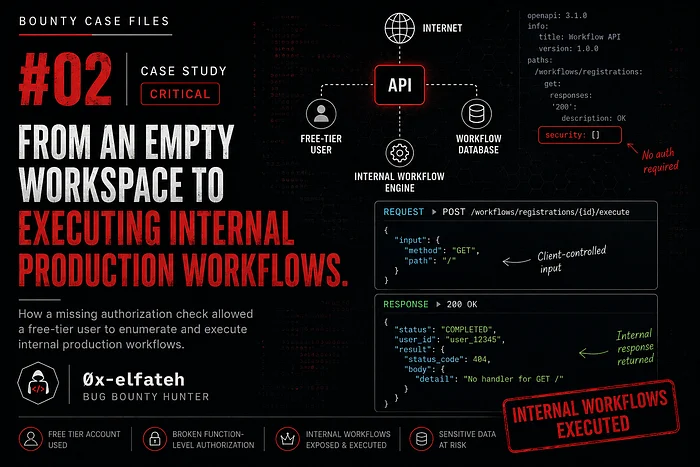
An API endpoint that listed and executed workflow registrations did not check the caller's organisation, so a free-tier user in an empty organisation could enumerate internal production workflows and run them under their own identity. The attacker could read internal schemas and deployment details and trigger executions, receiving the internal router's responses.

infosecwriteups.com
Published on infosecwriteups.com
Bug Bounty
The full write-up lives on its author's site
It belongs to its author, so we link to it rather than copy it. The other two tabs are our own rewrites, checked against it.
Context
The target was a SaaS console for a fairly well-known platform, on a private bug bounty program. The console is a normal application where users create workflows, list them and execute them. The researcher cannot name the target, the domain or the internal service names, so everything in the write-up is intentionally generic.
The bug class is Broken Authorization, also described as missing access control. In this case the missing check let a free-tier user, in an organisation that owned nothing, list the company's internal production workflows, execute them and read the responses back.
Setup
The researcher created a fresh free account with a fresh organisation: no workflows, no executions, nothing. The work was done by comparing the API against what the UI actually calls, using Burp to send and inspect requests. No other tooling, versions or preconditions are given in the report.
Finding it
The first step was to establish a baseline. Asking the console for the account's own workflows:
GET /api/.../workflows
returned:
{ "workflows": [], "next_cursor": null}
That is the baseline: the account owns nothing. The researcher then started diffing the API against what the UI calls, on the principle that the UI is a curated menu while the API is the whole kitchen. While looking through the available endpoints, one stood out that the frontend never touched for this account:
GET /api/.../workflows/registrations
Sending it did not return an empty array, an authorization error or somebody else's workflow. It returned internal workflow registrations: fourteen of them. The researcher's first thought was that the response must be cached, and it was not.
None of the registrations belonged to the account, and the names made that obvious. They looked along the lines of:
__shared-[REDACTED]-router
__shared-[REDACTED]-task-runner[REDACTED]-production
The combination of __, shared and production reads as internal and definitely not for customers. The endpoint did not return only names: each registration exposed input schema, output schema, deployment information, task queues, execution metadata, and model and agent configuration. None of that appeared anywhere in the user interface. At this point the issue was already a solid information disclosure.
Then the researcher noticed that one workflow accepted an HTTP-shaped object:
{ "method": "...", "path": "...", "headers": {}, "body": {}}
Exploitation
Step 1: Execute an internal workflow
Listing internal configuration is already bad; executing internal workflows is a different story. The researcher built the safest request possible against the registration ID:
POST /api/.../workflows/registrations/<REDACTED_ID>/execute
with the body:
{ "input": { "method": "GET", "path": "/" }}
The response came back almost immediately:
HTTP/2 200 OK
The request was repeated and the response was the same. The platform had accepted a request to execute one of its own internal production workflows. The response body confirmed it:
{ "status": "RUNNING", "execution_id": "<REDACTED>"}
Step 2: Read the execution result
Using the returned execution ID, the researcher queried the execution endpoint. A few hundred milliseconds later:
{ "status":"COMPLETED", "user_id":"<MY_USER_ID>", "result":{ "status_code":404, "body":{ "detail":"No handler for GET /" } }}
Two details stood out. First, the user_id in the result was the researcher's own. The execution was not anonymous and was not attributed to an internal service account: it ran under the researcher's own authenticated identity, because the backend accepted the session as good enough. Second, the workflow returned its own response, No handler for GET /, which meant the request had reached a live internal router and the router was talking back.
Step 3: Probe a few more paths, then stop
The researcher tried a handful of additional harmless paths. Every one returned a different message of the form:
No handler for GET <path>
That is a real routing table being exercised from a free account. The researcher stopped there: anything beyond that would have meant interacting with actual production handlers, which crossed the line of responsible testing.

Step 4: Confirm the missing check with status codes
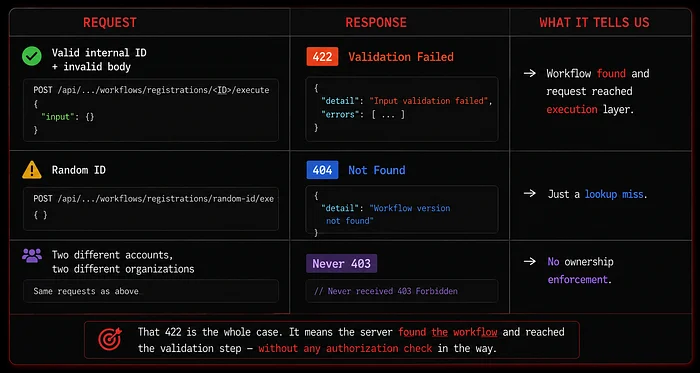
To get something objective that no reviewer could argue with, the researcher stopped guessing and compared responses across multiple accounts in completely separate organisations. A 422 means the server found the workflow, tried to validate the request, and the input was wrong. To reach validation, the request had already passed authorization. Across those accounts, the researcher never saw a single:
403 Forbidden
From the behaviour that could be observed, there was no effective authorization check protecting the registration lookup and execution path. At that point there was enough evidence to submit the report.

Root cause
The whole bug lives between two lines:
workflow = get_registration(id)
execute(workflow)
and the line that should have been sitting between them:
if workflow.organization != current_user.organization: return 403
One missing authorization check. Authentication tells the application who you are; authorization decides what you are allowed to touch. One happened, the other never did. The registration lookup and the execution path were not scoped to the caller's organisation, so a registration belonging to an internal deployment was returned and executed for the researcher's free-tier account.
Impact
The demonstrated impact was already severe. A free-tier user could enumerate internal production workflows, retrieve internal workflow schemas, execute production workflows and retrieve execution results. That alone is a cross-tenant authorization failure.
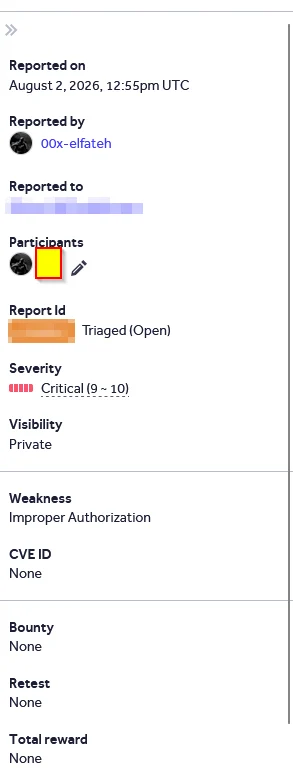
During analysis the researcher also noticed several workflows suggesting even greater impact. Those were intentionally not tested, because doing so could have affected other users or production infrastructure, and they were documented as hypotheses rather than demonstrated impact. The security team agreed with the findings and classified the issue as Critical.
Fix
Conceptually the fix is one sentence: scope every registration lookup and execution to the caller's organisation before validation ever begins. Internal deployments should never be exposed through user-facing APIs in the first place. The report does not say which change was actually made.
Variants to test
- Diff the API against the UI. Look for endpoints the frontend never calls for your account, such as collection endpoints for registrations, templates or internal resources. A positive result is objects that do not belong to your organisation, especially names containing markers like
__,sharedorproduction. - Compare status codes across tenants. Send the same request from accounts in separate organisations and watch for
422(validation reached, so authorization passed) versus403or404. A positive result is validation errors on resources you do not own, with no403anywhere. - Check the identity in execution results. After triggering any asynchronous job, read the
user_idor owner field in the result. A positive result is your own identity attached to a job you should not be able to run. - Probe with inert input. Where a workflow or job accepts an HTTP-shaped object, send a
GETfor/and other harmless paths. A positive result is a distinct handler-level error per path, which shows a live internal router is being exercised. - Stop at the boundary. Once execution is confirmed, do not interact with real production handlers; document the hypotheses instead.
What happened, in plain words
A security researcher found a way to use a company's own internal tools with a free account. The company runs a website (a "console") where customers build small automated jobs called workflows. The researcher signed up for a free account, which belonged to a brand new organisation that owned nothing at all. Then he found a hidden part of the website's API that the normal interface never shows. That hidden part handed him a list of the company's own internal production workflows. Worse, it let him start one of them and read the answer back. The company's security team agreed with the findings and rated the issue Critical.
The researcher could not name the company, the domain or the internal service names, because the work was done on a private bug bounty program. A bug bounty program is an arrangement where a company invites outside people to look for security problems and report them, usually with a reward. "Private" means only invited researchers can take part. Everything in the write-up is therefore deliberately generic.
The bug class is Broken Authorization, also called missing access control. In plain words: the website checked that you were logged in, but never checked whether you were allowed to use that particular feature. The missing check let a free-tier user, in an organisation that owned nothing, list the company's internal production workflows, execute them and read the responses back.
The basics you need before the story
A few everyday ideas come up again and again, so here they are from zero.
A website and its API. When you use a website, your browser shows you pages with buttons and menus. Behind those pages, the browser is quietly sending requests to the website's API. An API (Application Programming Interface) is the set of doors a program offers for other programs to talk to it. Think of a restaurant: the menu is the interface you see, and the kitchen is where the actual work happens. You order from the menu, and the kitchen prepares the food. The API is the ordering counter between the two.
Requests and responses. Every time your browser asks the API for something, that is a request. The API answers with a response. A request has a method (a verb saying what you want to do), a path (which door you are knocking on), and sometimes a body (extra information you are sending). A response has a status code (a number saying how it went) and usually a body (the answer itself).
Status codes. These are three-digit numbers. 200 means "OK, here is your answer". 403 means "Forbidden, you are not allowed". 404 means "Not Found, there is nothing here". 422 means "I understood your request but the details you sent are wrong". You will see all of these in the story, and the difference between them turns out to be the whole point.
JSON. Most APIs answer in JSON, a simple text format for structured data. It uses curly braces {} for an object (a labelled box of values) and square brackets [] for a list. "workflows": [] means "the workflows field contains an empty list".
Authentication and authorization. These two sound alike and are constantly confused. Authentication answers "who are you?" It is the bouncer checking your ID at the door. Authorization answers "what are you allowed to do?" It is the list of rooms your badge opens once you are inside. A site can do the first perfectly and forget the second entirely. That is exactly what happened here.
A workflow. In this product, a workflow is a small automated job that a customer sets up and then runs. You describe what should happen, and the platform carries it out. Customers create them, list them and execute them.
A registration. The platform keeps a record of every workflow that exists, called a registration. It holds the workflow's name and the details of how it is set up. Some of these registrations belong to the company itself, not to any customer.
A free-tier account and an organisation. The service has paid plans and a free plan. A free-tier account is the cheapest kind, with limited features. Each account sits inside an organisation, which is the group of users and resources that belong together. A brand new organisation owns nothing until someone creates something in it.
Burp. Burp is a tool that sits between your browser and the website and lets you read and edit every request and response. Think of it as a transparent mail slot: you can see every letter going in and out, and rewrite one before it is delivered. The researcher used Burp to send requests by hand and to watch the replies.
Intercepting proxy. That is the general name for a tool like Burp. It is a middleman that both sides trust, so it can record and change the traffic.
A session and a cookie. When you log in, the website gives your browser a small piece of data called a session cookie. Your browser sends it back with every request so the site knows it is still you. It works like a wristband at an event: you show your ID once at the entrance, and after that the wristband is enough to get back in. The backend here looked at the researcher's wristband and accepted it as good enough.
Cross-tenant. A tenant is one customer's separate space inside a shared service, like one flat in an apartment building. Cross-tenant means one tenant reaching into another tenant's space. Here the researcher reached into the company's own space from a free account.
Information disclosure. This simply means the site revealed information it should have kept private. It is a category of bug on its own, even before anything is changed or run.
Responsible disclosure. This is the practice of reporting a security problem privately to the company, giving them time to fix it, and not poking further than needed to prove the point. It is the difference between a locksmith who tells you your door is open and a burglar who walks in.
Setting up
The researcher created a fresh free account with a fresh organisation. No workflows, no executions, nothing. The work was done by comparing the API against what the user interface actually calls, using Burp to send and inspect requests. The report does not give any other tooling, versions or preconditions.
Why start from an empty account? Because an empty account gives you a clean reference point. If you know for certain that you own nothing, then anything the site shows you that you did not create is clearly not yours. That is the whole trick.
Finding it
Step 1: Establish a baseline
The first step was to ask the console for the account's own workflows. In Burp, that request looked like this:
GET /api/.../workflows
Line by line: GET is the method, meaning "give me something, I am not changing anything". /api/.../workflows is the path, the address of the door being knocked on. The ... stands for parts of the address the researcher removed so the company cannot be identified. The response was:
{ "workflows": [], "next_cursor": null}
Line by line: the outer {} is one JSON object. "workflows": [] says the list of workflows is empty, which is exactly right for a brand new account. "next_cursor": null is the site's way of saying there is no next page of results; null means "nothing". This is the baseline: the account owns nothing. Remember that, because it matters later.
Step 2: Compare the API with the interface
The researcher then started comparing the API against what the interface calls. The principle behind this is worth stating plainly: the interface is a curated menu, while the API is the whole kitchen. The buttons you see were chosen for you by the developers. The API, however, offers many more doors than the interface ever opens, and some of those doors may not have been given a lock.
While looking through the available endpoints, one stood out that the frontend never touched for this account:
GET /api/.../workflows/registrations
Line by line: again GET, meaning "just show me". The path ends in /registrations, which is the list of workflow records. The interface for this account never called it, which is precisely why it was interesting. An endpoint is simply one addressable operation the API offers, one door in the building.
Sending it did not return an empty list, an authorization error or somebody else's workflow. It returned internal workflow registrations: fourteen of them. The researcher's first thought was that the response must be cached, meaning an old saved copy served by mistake, and it was not.
Why would caching be the first guess? Because a result that looks impossible is easier to explain as a stale copy than as a real answer. Checking that it was not cached ruled out the innocent explanation.
Step 3: Read the names
None of the registrations belonged to the account, and the names made that obvious. They looked along the lines of:
__shared-[REDACTED]-router
__shared-[REDACTED]-task-runner[REDACTED]-production
Line by line: __ is a double underscore, a prefix developers often use for things that are internal or special. shared suggests something used by many parts of the system rather than by one customer. production means the live system that real users depend on, as opposed to a test copy. [REDACTED] marks text the researcher removed to avoid naming the company. router and task-runner are the kinds of internal components that move requests around and carry out background jobs.
The combination of __, shared and production reads as internal and definitely not for customers. It is the internet's universal dialect for "keep out".
The endpoint did not return only names. Each registration exposed its input schema, its output schema, deployment information, task queues, execution metadata, and model and agent configuration. In plain words: a schema is the description of what data goes in and what comes out, like a form showing which fields exist and what type each one is. Deployment information says where and how the thing is running. Task queues are the waiting lines of jobs to be done. Execution metadata is bookkeeping about past runs. Model and agent configuration describes the settings of the automated components involved. None of that appeared anywhere in the user interface. At this point the issue was already a solid information disclosure: the site had handed over a map of its own insides.
Step 4: Notice the shape of one workflow
Then the researcher noticed that one workflow accepted an HTTP-shaped object:
{ "method": "...", "path": "...", "headers": {}, "body": {}}
Line by line: this JSON object describes an HTTP request. "method" is the verb, such as GET or POST. "path" is the address being requested. "headers" is a box of extra labels sent with a request, such as what kind of content is expected; here it is empty. "body" is the content being sent along; here it is also empty. The dots ... are placeholders for values the researcher did not show.
Why did this matter so much? Because a workflow that takes an HTTP request as its input is a workflow that can be told to fetch something. If such a workflow can be run, the company's own infrastructure sends a request on the caller's behalf. That is a much bigger deal than reading a list.
Exploitation
Step 1: Execute an internal workflow
Listing internal configuration is already bad. Executing internal workflows is a different story. So the researcher built the safest request he could think of, aimed at the registration ID:
POST /api/.../workflows/registrations/<REDACTED_ID>/execute
Line by line: POST is the method used when you are asking the server to do something rather than just show you something. The path points at one specific registration, identified by <REDACTED_ID>, and ends in /execute, which is the door that starts it running. The ID was removed so the company's internals stay private.
Why the safest possible request? Because the goal is to prove the door opens, not to cause any effect. A harmless request proves the point without touching anything real.
The body sent with it was:
{ "input": { "method": "GET", "path": "/" }}
Line by line: the outer object has one field, "input", holding what the workflow should receive. Inside, "method": "GET" means "fetch something, change nothing". "path": "/" means the root of the site, the front page, the most harmless address there is. No headers, no body, nothing that could alter anything.
The response came back almost immediately:
HTTP/2 200 OK
Line by line: HTTP/2 is the version of the web protocol used for the conversation. 200 OK is the status code meaning "done, here is your answer". The request was repeated and the response was the same. The platform had accepted a request to execute one of its own internal production workflows. The response body confirmed it:
{ "status": "RUNNING", "execution_id": "<REDACTED>"}
Line by line: "status": "RUNNING" says the job has started and is in progress. "execution_id" is a unique label for this particular run, like a ticket number you can use to check on it later. The value itself was removed.
Why is this the moment that matters? Because computers normally say 403 when you ask for something you are not allowed to have. This one said yes.
Step 2: Read the execution result
Using the returned execution ID, the researcher queried the execution endpoint. A few hundred milliseconds later:
{ "status":"COMPLETED", "user_id":"<MY_USER_ID>", "result":{ "status_code":404, "body":{ "detail":"No handler for GET /" } }}
Line by line: "status":"COMPLETED" says the job has finished. "user_id" is the identity the job ran under, and the value was the researcher's own account. "result" holds what the job produced. Inside it, "status_code":404 is the answer the internal system gave to the request the workflow made. "body" holds the content of that answer, and "detail":"No handler for GET /" is the message: nothing here is set up to answer a request for the root path.
Two details stood out. First, the user_id in the result was the researcher's own. The execution was not anonymous and was not attributed to an internal service account. It ran under the researcher's own authenticated identity, because the backend accepted the session as good enough. In other words, the system looked at the wristband and waved him through.
Second, the workflow returned its own response, No handler for GET /. That meant the request had reached a live internal router, a piece of software whose job is to direct incoming requests to the right place, and the router was talking back. A 404 from a router is not a failure of the test; it is proof that a real internal component answered.
Step 3: Probe a few more paths, then stop
The researcher tried a handful of additional harmless paths. Every one returned a different message of the form:
No handler for GET <path>
Line by line: the message repeats the same shape, with <path> standing for whichever address was tried. A different message for each path means the router is genuinely looking at the address and answering accordingly. That is a real routing table being exercised from a free account.
The researcher stopped there. Anything beyond that would have meant interacting with actual production handlers, the pieces of software that do real work for real users, and that crossed the line of responsible testing. Knowing where to stop is part of the job, not a limitation of it.
Step 4: Confirm the missing check with status codes
To get something objective that no reviewer could argue with, the researcher stopped guessing and compared responses across multiple accounts in completely separate organisations. This is the difference between "I think it works" and "here is the pattern, check it yourself".
A 422 means the server found the workflow, tried to validate the request, and the input was wrong. Validation is the step where the server checks that what you sent makes sense, like a form rejecting a date in the wrong format. The key insight is the order of events: to reach validation, the request had already passed authorization. If the server is complaining about your input, it has already decided you are allowed to be there.
Across those accounts, the researcher never saw a single:
403 Forbidden
Line by line: 403 Forbidden is the status code meaning "I know who you are, and you are not allowed to do this". Its complete absence, while 422 kept appearing, showed that the authorization step was simply not happening. From the behaviour that could be observed, there was no effective authorization check protecting the registration lookup and execution path. At that point there was enough evidence to submit the report.
Root cause
The whole bug lives between two lines:
workflow = get_registration(id)
Line by line: this fetches the workflow record that matches the given ID. It is a lookup, nothing more. It does not ask who is asking.
execute(workflow)
Line by line: this starts the workflow running. Again, it does not ask who is asking.
And the line that should have been sitting between them:
if workflow.organization != current_user.organization: return 403
Line by line: if starts a check. workflow.organization is the organisation that owns the workflow. != means "is not equal to". current_user.organization is the organisation of the person making the request. So the whole line reads: if the workflow belongs to a different organisation than the caller, then return 403, refuse the request. That check was missing.
One missing authorization check. Authentication tells the application who you are; authorization decides what you are allowed to touch. One happened, the other never did. The registration lookup and the execution path were not scoped to the caller's organisation, so a registration belonging to an internal deployment was returned and executed for the researcher's free-tier account.
Impact
The demonstrated impact was already severe. A free-tier user could enumerate internal production workflows, meaning list them one by one; retrieve internal workflow schemas; execute production workflows; and retrieve execution results. That alone is a cross-tenant authorization failure: one customer's space reaching into another's, or in this case into the company's own.
During analysis the researcher also noticed several workflows suggesting even greater impact. Those were intentionally not tested, because doing so could have affected other users or production infrastructure, and they were documented as hypotheses rather than demonstrated impact. A hypothesis here means "this looks possible, but I did not prove it, and I did not try". The security team agreed with the findings and classified the issue as Critical.
Fix
Conceptually the fix is one sentence: scope every registration lookup and execution to the caller's organisation before validation ever begins. In plain words, check whose workflow it is before you even look at what the request contains. Internal deployments should never be exposed through user-facing APIs in the first place.
Variants to test
If you want to look for something similar on a site you are allowed to test, these are the patterns to try. Always stay within the rules of the program you are working with.
- Diff the API against the UI. Look for endpoints the frontend never calls for your account, such as collection endpoints for registrations, templates or internal resources. A positive result is objects that do not belong to your organisation, especially names containing markers like
__,sharedorproduction. - Compare status codes across tenants. Send the same request from accounts in separate organisations and watch for
422(validation reached, so authorization passed) versus403or404. A positive result is validation errors on resources you do not own, with no403anywhere. - Check the identity in execution results. After triggering any asynchronous job, meaning one that runs in the background and reports back later, read the
user_idor owner field in the result. A positive result is your own identity attached to a job you should not be able to run. - Probe with inert input. Where a workflow or job accepts an HTTP-shaped object, send a
GETfor/and other harmless paths. A positive result is a distinct handler-level error per path, which shows a live internal router is being exercised. - Stop at the boundary. Once execution is confirmed, do not interact with real production handlers; document the hypotheses instead.
Glossary
- API: the set of doors a program offers so other programs can talk to it; the ordering counter between a website and its kitchen.
- Authentication: proving who you are, like showing ID at the door.
- Authorization: deciding what you are allowed to do once you are known, like the rooms your badge opens.
- Baseline: a known, expected result you record first so you can tell later when something is wrong.
- Broken Function-Level Authorization: a bug where a feature is reachable by someone who should not be allowed to use it, because the permission check is missing.
- Bug bounty program: an arrangement where a company invites outside researchers to find and report security problems, often for a reward.
- Burp: a tool that sits between browser and website and lets you read and edit every request and response.
- Cached: an old saved copy of a response, served again instead of a fresh one.
- Cookie: a small piece of data your browser stores and sends back so the site recognises you, like a wristband at an event.
- Cross-tenant: one customer's separate space reaching into another's inside a shared service.
- Endpoint: one addressable operation an API offers; one door in the building.
- Execution: one run of a workflow, with its own ticket number.
- Execution ID: the unique label for a particular run, used to check on it later.
- Free tier: the cheapest plan of a paid service, with limited features.
- GET: the request method meaning "give me something, change nothing".
- Handler: the piece of software that actually answers a particular request.
- Headers: extra labels sent along with a request, such as what kind of content is expected.
- HTTP: the protocol browsers and servers use to exchange requests and responses.
- HTTP/2: a version of that protocol.
- Hypothesis: a possibility that looks likely but has not been proven, and in this case was deliberately not tested.
- Information disclosure: a bug where the site reveals information it should have kept private.
- Intercepting proxy: a trusted middleman that records and can change traffic between two sides.
- JSON: a simple text format for structured data, using
{}for objects and[]for lists. - Method: the verb of a request, such as GET or POST.
- Organisation: the group of users and resources that belong together on a service.
- Path: the address part of a request, saying which door you are knocking on.
- POST: the request method used when asking the server to do something rather than just show you something.
- Production: the live system that real users depend on, as opposed to a test copy.
- Registration: the platform's record of a workflow, holding its name and how it is set up.
- Request: a message your browser or tool sends to a server asking for something.
- Response: the server's answer to a request, with a status code and usually a body.
- Responsible disclosure: reporting a problem privately, giving time to fix it, and not going further than needed to prove it.
- Router: software that directs incoming requests to the right place.
- Schema: the description of what data goes in and what comes out, like a form showing its fields.
- Session: the state of being logged in, carried between requests by a cookie.
- Status code: a three-digit number in a response saying how it went, such as
200,403,404or422. - Task queue: a waiting line of jobs to be carried out.
- Tenant: one customer's separate space inside a shared service, like one flat in a building.
- Validation: the step where the server checks that what you sent makes sense, such as a form rejecting a badly formatted date.
- Workflow: a small automated job a customer sets up and then runs.
- 200 OK: the status code meaning the request succeeded.
- 403 Forbidden: the status code meaning you are known but not allowed.
- 404 Not Found: the status code meaning there is nothing at that address.
- 422: the status code meaning the request was understood but the details sent were wrong.

