How I Used JS files inspection and Fuzzing to do admins/supports stuff
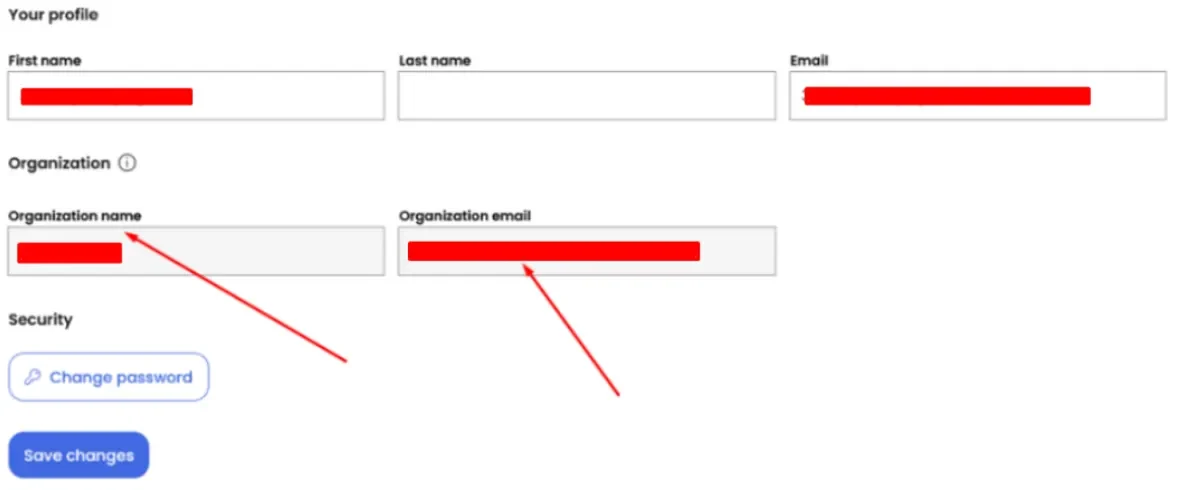
An API endpoint intended for admins to update organisation details accepted a regular user's session token and allowed the user to change the organisation name and email. The attacker could modify organisation details that should only be editable by admins or support.
 Published on medium.com
Hi boyzzzzz, How are you! I missed u really ❤ I found a new bug today that allowed me to do a support activity, Since I am not permitted to disclose this bug ..
The full write-up lives on its author's site
It belongs to its author, so we link to it rather than copy it. The other two tabs are our own rewrites, checked against it.
Context
The target is a website the author refers to as target.com because the bug was not cleared for disclosure. The product lets a user create projects inside an organization. The organization has a name and an email address, and those two fields are deliberately not editable by the user: the report says that if you want to change them you have to contact the admin or support. The site exposes an API under https://target.com/endpoints/organization/<ACTION>, and the front end is a JavaScript application that calls those endpoints.
The weakness is broken access control: an action that should be reserved for admin or support was reachable by an ordinary user through the API.
Setup
The author had an account on the site and had been hunting on it for nearly four or five days, so the request shapes and the token handling were already familiar. Two tools did the heavy lifting:
- The browser and the site's own JavaScript bundles, read from the source code.
- Burp Suite, with the Param Miner extension installed. Param Miner collects parameters seen in the Burp history for a target, which the author used to build a list of candidate parameter names.
For the parameter fuzzing step the author used the Burp Intruder with this wordlist:
https://github.com/danielmiessler/SecLists/blob/master/Discovery/Web-Content/burp-parameter-names.txt
No special role was needed: the whole point is that a normal account was enough.
Finding it
While inspecting the JavaScript files, the author went through many of them and one stood out because it contained more than one request definition for the endpoints the site uses. That file described the API calls in a small wrapper, and one entry was particularly interesting:
saveOrganization: async a => _({ method: "PUT", endpoint: "/endpoints/organization/update", body: a }).then(r => n(r)),
This tells you the method (PUT), the path (/endpoints/organization/update) and that the whole body is passed through from the caller. Since the UI does not let a user change the organization name or email, an endpoint that updates the organization is exactly the kind of thing worth poking at.



Exploitation
Step 1: probe the endpoint with an empty body
The first request was a PUT to the endpoint with no data:
PUT /endpoints/organization/update HTTP/2Host: home.target.comCookie: XXXXXXXXXXXXXXXXXXXXXXXXXXXXXUser-Agent: Mozilla/5.0 (Windows NT 10.0; Win64; x64; rv:109.0) Gecko/20100101 Firefox/110.0Accept: application/jsonReferer: <https://home.target.com/>Content-Type: application/jsonContent-Length: 76Origin: <https://home.target.com/>
The response was a server error, which the author considered expected given that a PUT with no body has nothing to update:
HTTP/2 500 Internal Server Error{"error": {"code": "500", "message": "A server error has occurred"}}

Step 2: send arbitrary JSON and learn about the authorisation check
Next, a random body was sent:
PUT /endpoints/organization/update HTTP/2Host: home.target.comCookie: XXXXXXXXXXXXXXXXXXXXXXXXXXXXXUser-Agent: Mozilla/5.0 (Windows NT 10.0; Win64; x64; rv:109.0) Gecko/20100101 Firefox/110.0Accept: application/jsonReferer: https://home.target.com/Content-Type: application/jsonContent-Length: 76Origin: https://home.target.com/{"hello":"goodbye"}
HTTP/2 500 Internal Server Error]{"message":"Error: This user does not have admin access!","type":"error"}
The error message is the interesting part: the server is checking for admin access. The author's reading was that the endpoint expects a session or token value in the body, and that the check fails only because the request did not present one in the form the endpoint looks for.
Step 3: work out the parameter name for the token
From the days spent on the site, the author knew that a token is required on every API request, that each account has its own token, and that different endpoints call that same token by different names. The names seen across the API were:
Param Miner was used to pull these parameter names out of the Burp history for the target. The author then took a token from a random request and tried it against each candidate name in turn.
The name that worked was session_id:
PUT /endpoints/organization/update HTTP/2Host: home.target.comCookie: XXXXXXXXXXXXXXXXXXXXXXXXXXXXXUser-Agent: Mozilla/5.0 (Windows NT 10.0; Win64; x64; rv:109.0) Gecko/20100101 Firefox/110.0Accept: application/jsonReferer: https://home.target.com/Content-Type: application/jsonContent-Length: 76Origin: https://home.target.com/{"session_id":"9n5n6zxxxxxxxxxllye4ul"}
HTTP/2 400 Bad Request{"message":"No data to update"}
The 400 with No data to update shows the session was accepted. The endpoint is now waiting for a field to change.
Step 4: fuzz for the fields that can be changed
The request was sent to Burp Intruder with the SecLists parameter-name wordlist, using a body of the form:
{"session_id":"9n5n6zdxxxxxxxx05llye4ul", "$myrandomparam$":"changevalueeeee"}
After three or four minutes of fuzzing, one request stood out with a different status code and response length. The parameter that produced it was name:
PUT /endpoints/organization/update HTTP/2Host: home.target.comCookie: XXXXXXXXXXXXXXXXXXXXXXXXXXXXXUser-Agent: Mozilla/5.0 (Windows NT 10.0; Win64; x64; rv:109.0) Gecko/20100101 Firefox/110.0Accept: application/jsonReferer: https://home.target.com/Content-Type: application/jsonContent-Length: 76Origin: https://home.target.com/{"session_id":"9n5n6xxxxxxxxxxc05llye4ul", "name":"changevalueeeee"}
HTTP/2 200 OK{"billing_enabled":false,"billing_type":"trial","created_at":1676997471,"data_streams_plan":"starter","email_address":"[redacted]","feature_flag":{"allow_usage_billing":false,"forever_free_tier":false},"first_non_auth_api_call_made":null,"id":"2lxxxxxxxxxxzf49rtjd8ia","invoices":null,"is_marketplace_org":false,"marketplace_id":null,"name":"changevalueeeee","stripe_customer_id":null,"trial_end_date":1678207071}
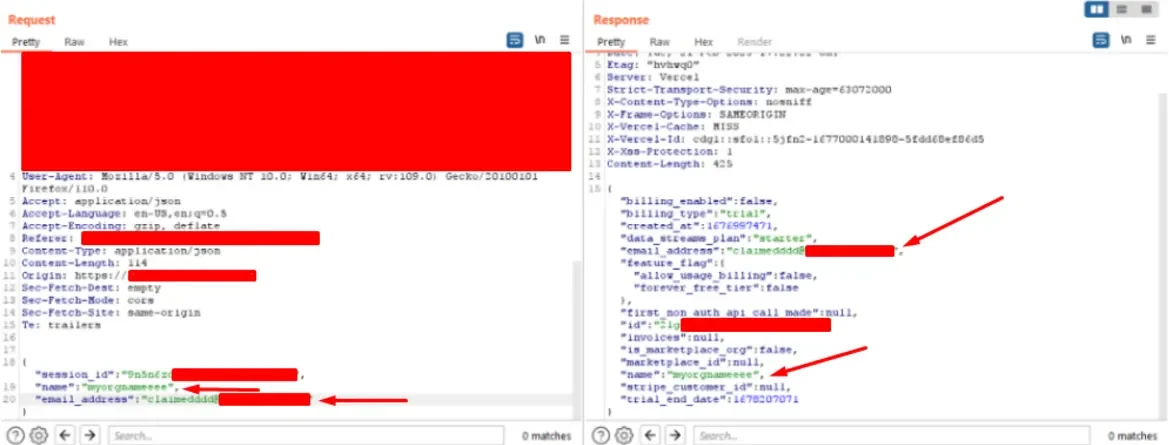
The response echoes the new name, and the report says this action should only be done by admin or support. The response also returns the organization object, including email_address, the address the author could not change through the interface.
Step 5: change the email address too
Since the response exposes email_address, the author sent it in the body together with session_id and name and set a new value. The name and email were both changed successfully.

Root cause
The endpoint accepted a token supplied in the request body under the name session_id, taken from the author's own account, and then allowed the update. The author's own token, submitted as session_id, satisfied the check that produced This user does not have admin access! when no token was present. In other words, the authorisation decision appears to be tied to a body parameter rather than to the caller's actual role, which let the author's ordinary account reach an admin-only action. The report does not show the server-side code, so the exact check is not visible; the behaviour above is what the requests demonstrate.
The UI hid the action by not offering it, but the API behind it was reachable directly. The parameter name had to be recovered from the API's inconsistent naming across endpoints.
Impact
An authenticated user with an ordinary account could change the name and email address of their organization, actions the report says are reserved for admin or support. The response also returns other organization fields such as the internal id, billing flags, plan and trial dates, which the author saw in the 200 response. The report does not describe what else the same technique reached, and it does not state whether other organizations could be targeted; the demonstration is limited to the author's own organization.
Fix
The fix that follows from the behaviour is to enforce the admin or support role on the server for /endpoints/organization/update, independently of any token supplied in the body, and to stop accepting a caller-supplied session_id as proof of an elevated role. The name and email fields should be rejected for callers without that role, and the endpoint should not return fields the caller is not entitled to see.
Variants to test
- Read every JavaScript bundle for endpoint definitions and look for
PUT,PATCHandDELETEcalls the UI never issues. A positive result is a request that returns200with data the UI would not let you submit. - Try the same endpoint with an empty body and with junk JSON. A positive result is an error message that names a role or permission check, which tells you the check exists and what it depends on.
- Collect the parameter names the API uses for the session token (Param Miner or manual review of the history) and try each one with your own token. A positive result is a change from an authorisation error to a validation error such as
No data to update. - Fuzz field names with a parameter wordlist against the now-accepted request. A positive result is a different status code or response length for one field name, and a response body echoing the new value.
- Take any field returned in the response that the UI treats as read-only, such as an email address, and send it back in the request body. A positive result is the value changing in the response.
What happened, in plain words
A security researcher found a way to change two settings on a website that ordinary users are not supposed to be able to change: the name and the email address of their organisation. The website's normal pages hide those fields, so a user who wants them changed is told to contact an administrator or support. But the website's behind-the-scenes machinery, the part the pages talk to, still accepted the change from a normal user account. The researcher found that machinery by reading the website's own code, worked out the secret word the machinery wanted, and then changed the name and the email.
The report calls the site target.com because the bug was not cleared for public disclosure, so the real name is hidden. Everything below is about how the researcher got there, step by step, with the same requests that were sent.
The product and the feature
The site lets a person create projects inside an organisation. Think of an organisation as a shared folder for a team: it has a name and an email address attached to it. Those two details are deliberately locked. The report says that if you want to change them, you have to contact the admin or support. That is the rule the site intends to enforce.
Behind the visible pages, the site runs an API. An API is the set of addresses a website's own pages use to talk to its server, the way a restaurant menu is the list of things you are allowed to order from the kitchen. The pages you see are just a front; when you click something, the page sends a request to one of these API addresses and shows you the answer. The site's API lives under https://target.com/endpoints/organization/<ACTION>, where <ACTION> is a word describing what you want done, such as update.
The weakness here is called broken access control. Access control is the rule about who is allowed to do what: an admin can change the organisation name, an ordinary user cannot. Broken access control means the server does not actually enforce that rule, even though the interface pretends to. It is like a building where the door to the manager's office is locked, but the same office has a second door round the back that nobody locked.
Getting ready
The researcher had an account on the site and had been looking at it for nearly four or five days, so the shape of the requests and the way the site handled tokens were already familiar. Two tools did most of the work:
- The browser, plus the site's own JavaScript files, read from the page source.
- Burp Suite, a program that sits between your browser and a website so you can see and edit every request, with an extension called Param Miner installed. Param Miner collects parameter names it has seen in Burp's history for a target, which the researcher used to build a list of candidate names.
A parameter is a named piece of data sent with a request, like a labelled box on a form: name is a box, email_address is a box. The server reads the label to know what the value means.
For the step where field names were guessed in bulk, the researcher used Burp Intruder (the part of Burp that sends the same request many times with one part swapped each time) with this wordlist:
https://github.com/danielmiessler/SecLists/blob/master/Discovery/Web-Content/burp-parameter-names.txt
That line is a link to a public list of common parameter names. Intruder takes each name from the list, puts it into the request in place of a placeholder, sends the request, and records the answer. Doing this by hand would take hours; the tool does it in minutes.
No special role was needed for any of this. The whole point is that a normal account was enough.
Finding it
While reading the JavaScript files, the researcher went through many of them. One stood out because it contained more than one request definition for the endpoints the site uses. A JavaScript file is code the browser downloads and runs to make a page interactive; it often contains the exact addresses and shapes of the API calls the page makes, which is why it is worth reading. That file described the API calls in a small wrapper, and one entry was particularly interesting:
saveOrganization: async a => _({ method: "PUT", endpoint: "/endpoints/organization/update", body: a }).then(r => n(r)),
Line by line, in plain words:
saveOrganization: async a =>defines a function namedsaveOrganizationthat takes one input, calleda, and runs asynchronously (meaning it does not block the page while waiting for the server)._({ method: "PUT", endpoint: "/endpoints/organization/update", body: a })calls a helper,_, with three pieces of information: the HTTP method isPUT, the address is/endpoints/organization/update, and the body of the request is whatever was passed in asa..then(r => n(r))says: when the server answers, pass that answer to another function,n.
Two things matter here. First, the method is PUT. An HTTP method is the verb of a request: GET means "give me something", POST usually means "create something", PUT usually means "replace or update something". Second, the whole body is passed straight through from the caller. Since the interface does not let a user change the organisation name or email, an endpoint whose whole job is to update the organisation is exactly the kind of thing worth poking at.
Exploitation
Step 1: probe the endpoint with an empty body
The first request was a PUT to the endpoint with no data at all:
PUT /endpoints/organization/update HTTP/2Host: home.target.comCookie: XXXXXXXXXXXXXXXXXXXXXXXXXXXXXUser-Agent: Mozilla/5.0 (Windows NT 10.0; Win64; x64; rv:109.0) Gecko/20100101 Firefox/110.0Accept: application/jsonReferer: <https://home.target.com/>Content-Type: application/jsonContent-Length: 76Origin: <https://home.target.com/>
Line by line:
PUT /endpoints/organization/update HTTP/2is the request line: the verb, the path on the server, and the version of the protocol.Host: home.target.comsays which site the request is for. One server can host many sites, so the request has to name the one it wants.Cookie: XXXXXXXXXXXXXXXXXXXXXXXXXXXXXis a cookie: a small piece of data the browser stores for a site and sends back with every request, which is how the site recognises you between page loads. The value is redacted here.User-Agentdescribes the browser that sent the request.Accept: application/jsonsays the client would like the answer in JSON, a text format for structured data.Referersays which page the request came from.Content-Type: application/jsonsays the body of the request is JSON.Content-Length: 76says how many bytes the body has.Originsays which site the request originated from.
The response was a server error, which the researcher considered expected given that a PUT with no body has nothing to update:
HTTP/2 500 Internal Server Error{"error": {"code": "500", "message": "A server error has occurred"}}
HTTP/2 500 Internal Server Erroris the status line. A status code is a three-digit number summarising the result:200means success,400means the request was malformed,500means the server itself failed while handling it.- The body is a JSON object with an error code and a generic message. Nothing useful leaked, but the endpoint clearly exists and reacts.
Step 2: send arbitrary JSON and learn about the authorisation check
Next, a random body was sent:
PUT /endpoints/organization/update HTTP/2Host: home.target.comCookie: XXXXXXXXXXXXXXXXXXXXXXXXXXXXXUser-Agent: Mozilla/5.0 (Windows NT 10.0; Win64; x64; rv:109.0) Gecko/20100101 Firefox/110.0Accept: application/jsonReferer: https://home.target.com/Content-Type: application/jsonContent-Length: 76Origin: https://home.target.com/{"hello":"goodbye"}
HTTP/2 500 Internal Server Error]{"message":"Error: This user does not have admin access!","type":"error"}
The body {"hello":"goodbye"} is a JSON object with one made-up field, hello, set to goodbye. It means nothing to the server, but it is valid JSON, so the request gets past the first parsing stage and reaches the logic that decides whether you are allowed to do this.
The error message is the interesting part: This user does not have admin access!. The server is checking for admin access. The researcher's reading was that the endpoint expects a session or token value in the body, and that the check fails only because the request did not present one in the form the endpoint looks for.
A token (or session token) is a long random string the server gives you when you log in. It works like a cloakroom ticket: you show it, the server looks up which account it belongs to, and lets you act as that account. You do not type it yourself; the site stores it and sends it with your requests. The point of the next step is that this endpoint wanted the token in a different place than usual, and under a different name.
Step 3: work out the parameter name for the token
From the days spent on the site, the researcher knew that a token is required on every API request, that each account has its own token, and that different endpoints call that same token by different names. The names seen across the API were:
That list is the same idea under many labels. One endpoint might expect the token in a box labelled code, another in a box labelled session, another in tokenId, and so on. If you send the token in the wrong box, the server sees no token at all.
Param Miner was used to pull these parameter names out of the Burp history for the target, so the list was not guesswork. The researcher then took a token from a random request and tried it against each candidate name in turn, one request per name.
The name that worked was session_id:
PUT /endpoints/organization/update HTTP/2Host: home.target.comCookie: XXXXXXXXXXXXXXXXXXXXXXXXXXXXXUser-Agent: Mozilla/5.0 (Windows NT 10.0; Win64; x64; rv:109.0) Gecko/20100101 Firefox/110.0Accept: application/jsonReferer: https://home.target.com/Content-Type: application/jsonContent-Length: 76Origin: https://home.target.com/{"session_id":"9n5n6zxxxxxxxxxllye4ul"}
HTTP/2 400 Bad Request{"message":"No data to update"}
The body now contains one field, session_id, whose value is the researcher's own token (partly redacted). The answer changed from 500 with an admin-access error to 400 with No data to update. That is the signal: the session was accepted. The endpoint is now waiting for a field to change. A 400 here is progress, not failure.
Step 4: fuzz for the fields that can be changed
The request was sent to Burp Intruder with the SecLists parameter-name wordlist, using a body of the form:
{"session_id":"9n5n6zdxxxxxxxx05llye4ul", "$myrandomparam$":"changevalueeeee"}
Here $myrandomparam$ is the placeholder Intruder replaces with each name from the list, one request at a time. The value changevalueeeee is a marker the researcher chose so that, if the server echoed it back, it would be obvious which field had been accepted.
After three or four minutes of fuzzing, one request stood out with a different status code and response length. When you send hundreds of requests, the ones that behave differently are the ones worth looking at; a different status code or a different response size is the usual sign. The parameter that produced it was name:
PUT /endpoints/organization/update HTTP/2Host: home.target.comCookie: XXXXXXXXXXXXXXXXXXXXXXXXXXXXXUser-Agent: Mozilla/5.0 (Windows NT 10.0; Win64; x64; rv:109.0) Gecko/20100101 Firefox/110.0Accept: application/jsonReferer: https://home.target.com/Content-Type: application/jsonContent-Length: 76Origin: https://home.target.com/{"session_id":"9n5n6xxxxxxxxxxc05llye4ul", "name":"changevalueeeee"}
HTTP/2 200 OK{"billing_enabled":false,"billing_type":"trial","created_at":1676997471,"data_streams_plan":"starter","email_address":"[redacted]","feature_flag":{"allow_usage_billing":false,"forever_free_tier":false},"first_non_auth_api_call_made":null,"id":"2lxxxxxxxxxxzf49rtjd8ia","invoices":null,"is_marketplace_org":false,"marketplace_id":null,"name":"changevalueeeee","stripe_customer_id":null,"trial_end_date":1678207071}
The status is now 200 OK, and the body is the organisation object itself. Reading the fields:
nameischangevalueeeee, the value that was sent. The response echoes the new name, and the report says this action should only be done by admin or support.email_addressis the organisation's email address, the one the researcher could not change through the interface. It is redacted here.idis the organisation's internal identifier.billing_enabled,billing_type,data_streams_plan,trial_end_date,invoices,stripe_customer_idare billing and plan details.feature_flagholds two on/off switches,allow_usage_billingandforever_free_tier.created_atandtrial_end_dateare timestamps, numbers counting seconds.is_marketplace_org,marketplace_idandfirst_non_auth_api_call_madeare further organisation fields.
The server answered with the whole object, including fields the interface never shows you. That is useful for the next step.
Step 5: change the email address too
Since the response exposes email_address, the researcher sent it in the body together with session_id and name and set a new value. The name and email were both changed successfully.
Why it worked
The endpoint accepted a token supplied in the request body under the name session_id, taken from the researcher's own account, and then allowed the update. The researcher's own token, submitted as session_id, satisfied the check that produced This user does not have admin access! when no token was present. In other words, the authorisation decision appears to be tied to a body parameter rather than to the caller's actual role, which let the researcher's ordinary account reach an admin-only action. The report does not show the server-side code, so the exact check is not visible; the behaviour above is what the requests demonstrate.
The interface hid the action by not offering it, but the API behind it was reachable directly. The parameter name had to be recovered from the API's inconsistent naming across endpoints.
What it means
A logged-in user with an ordinary account could change the name and email address of their organisation, actions the report says are reserved for admin or support. The response also returns other organisation fields such as the internal id, billing flags, plan and trial dates, which the researcher saw in the 200 response. The report does not describe what else the same technique reached, and it does not state whether other organisations could be targeted; the demonstration is limited to the researcher's own organisation.
How it should be fixed
The fix that follows from the behaviour is to enforce the admin or support role on the server for /endpoints/organization/update, independently of any token supplied in the body, and to stop accepting a caller-supplied session_id as proof of an elevated role. The name and email fields should be rejected for callers without that role, and the endpoint should not return fields the caller is not entitled to see.
Things to try on other sites
- Read every JavaScript file for endpoint definitions and look for
PUT,PATCHandDELETEcalls the interface never issues. A positive result is a request that returns200with data the interface would not let you submit. - Try the same endpoint with an empty body and with junk JSON. A positive result is an error message that names a role or permission check, which tells you the check exists and what it depends on.
- Collect the parameter names the API uses for the session token (Param Miner or manual review of the history) and try each one with your own token. A positive result is a change from an authorisation error to a validation error such as
No data to update. - Fuzz field names with a parameter wordlist against the now-accepted request. A positive result is a different status code or response length for one field name, and a response body echoing the new value.
- Take any field returned in the response that the interface treats as read-only, such as an email address, and send it back in the request body. A positive result is the value changing in the response.
Glossary
- API: the set of addresses a website's own pages use to talk to its server; the menu of things you can ask the server to do.
- Access control: the rule about who is allowed to do what, such as admin versus ordinary user.
- Broken access control: when the server does not actually enforce that rule, even though the interface pretends to.
- Admin: a user with elevated permissions, allowed to do things ordinary users cannot.
- Support: staff who handle requests ordinary users cannot perform themselves, such as changing locked organisation details.
- Organisation: a shared account area on the site that holds projects; it has a name and an email address.
- Endpoint: one specific address on a server that accepts requests, such as
/endpoints/organization/update. - HTTP method: the verb of a request;
GETfetches,POSTusually creates,PUTusually replaces or updates,DELETEremoves. - Status code: a three-digit number summarising a response;
200success,400bad request,500server error. - Request body: the data sent along with a request, often in JSON.
- JSON: a text format for structured data, made of names and values in curly braces.
- Parameter: a named piece of data sent with a request, like a labelled box on a form.
- Cookie: a small piece of data the browser stores for a site and sends back with every request, used to recognise you.
- Token / session token: a long random string the server gives you at login; showing it proves which account you are.
- Session: the logged-in state tied to a token.
- JavaScript file: code the browser downloads and runs to make a page interactive; it often reveals the API addresses and request shapes.
- Burp Suite: a program that sits between your browser and a website so you can see and edit every request.
- Burp Intruder: the part of Burp that sends the same request many times with one part swapped each time.
- Param Miner: a Burp extension that collects parameter names seen in Burp's history for a target.
- Fuzzing: sending many variations of a request automatically to see which one behaves differently.
- Wordlist: a file of candidate values, one per line, used by a fuzzing tool.
- Redacted: replaced with placeholder characters to hide a real value such as a token or email address.
PUT: an HTTP method usually meaning replace or update.Referer/Origin: request headers saying which page the request came from.Content-Type: a request header saying what format the body is in, such as JSON.Content-Length: a request header saying how many bytes the body has.User-Agent: a request header describing the browser that sent the request.Host: a request header naming which site the request is for.Cookie: a request header carrying the cookies the browser holds for that site.

