How I was Able To Bypass The Admin Panel
An admin panel protected by basic authentication was found on a non-standard port. After directory fuzzing revealed an API endpoint that exposed a device snapshot containing the product's serial number, the attacker used that serial number as the admin password to log in successfully.
 Published on medium.com
This is my first Article and we will talk about how I was able to bypass the admin panel and login to Admin dashboard on one of the public bug bounty program
The full write-up lives on its author's site
It belongs to its author, so we link to it rather than copy it. The other two tabs are our own rewrites, checked against it.
Context
This is a write-up of a bug bounty finding on a public program, which the author calls redacted.com for privacy. The target was an IP running on port 8080 that presented a Basic Auth prompt. The host had a login form and an API under /api/v1/. The goal of the exercise was to get into that admin dashboard.
The author describes this as his first article, and the whole chain is a good illustration of how far you can get with recon, directory fuzzing and a little patience when a product ships with predictable credentials.
Setup
The only tooling mentioned explicitly is:
- Shodan, for host discovery.
- FFUF, for directory fuzzing, with a custom wordlist.
- Burp, to capture the login request.
No versions are given. There is no mention of accounts being provisioned, invitations or test users: the researcher found the panel from the outside and worked against it as an unauthenticated user.
Finding it
The recon started with Shodan dorks of the form:
org:"redacted" || ssl:"redacted.com"
and then playing with filters such as http.title and port. This surfaced an IP running on port 8080 that presented a Basic Auth prompt.
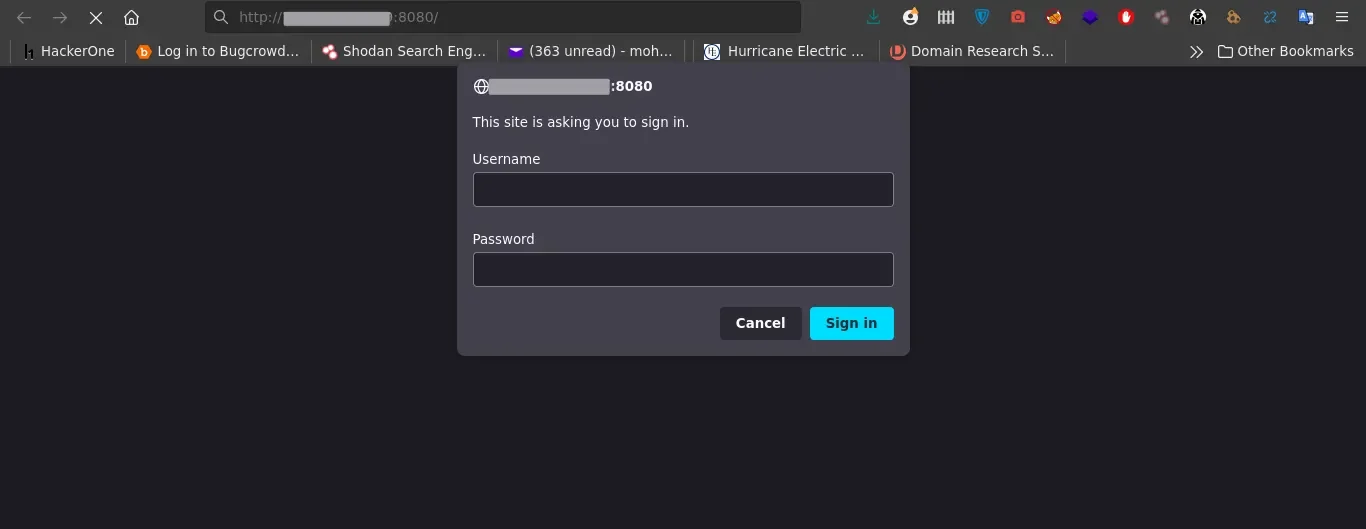
The screenshot shows the Basic Auth dialogue on that host. At this point the researcher had a host behind a Basic Auth prompt, with no credentials.
Exploitation
Step 1: Default credentials
The first attempt was the obvious one, trying default credential pairs:
admin:admin
admin:password
user:user
None of them worked. A search for default credentials for the panel's product name also turned up nothing.
The interesting part is what the failure looked like. The panel returned an authentication failure error:
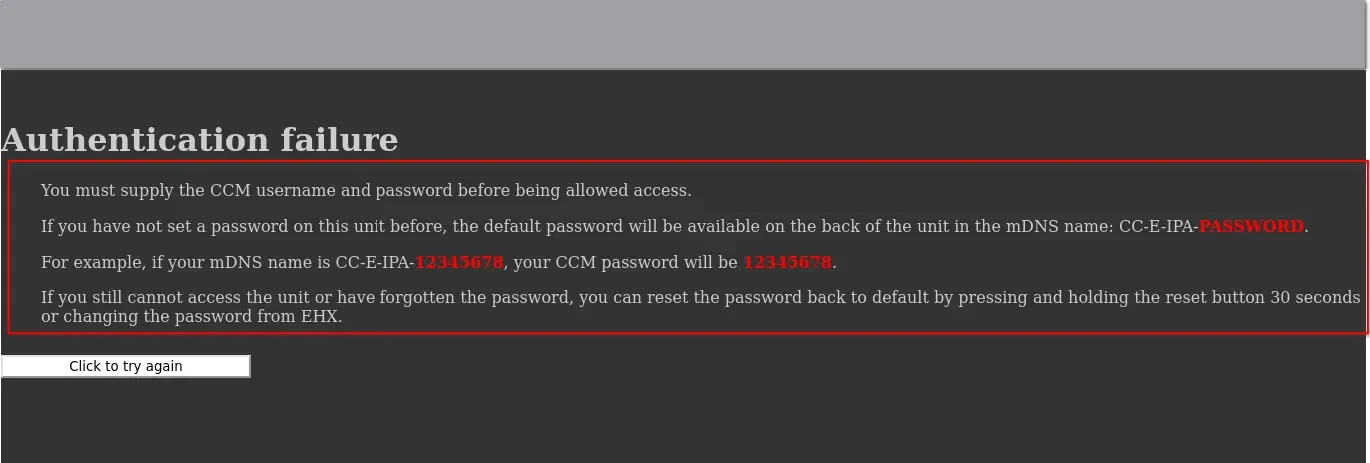
That error led the researcher to a hypothesis: the username and password are defaults that ship with the product or application, in the same way a home WiFi device ships with a default PIN code. In other words, the credentials are probably derived from something printed on or embedded in the device: a PIN code, a serial number, or a product number or version.
Step 2: Directory fuzzing
With no credentials in hand, the next step was FFUF against the host with a custom wordlist. The fuzzing produced some interesting paths:
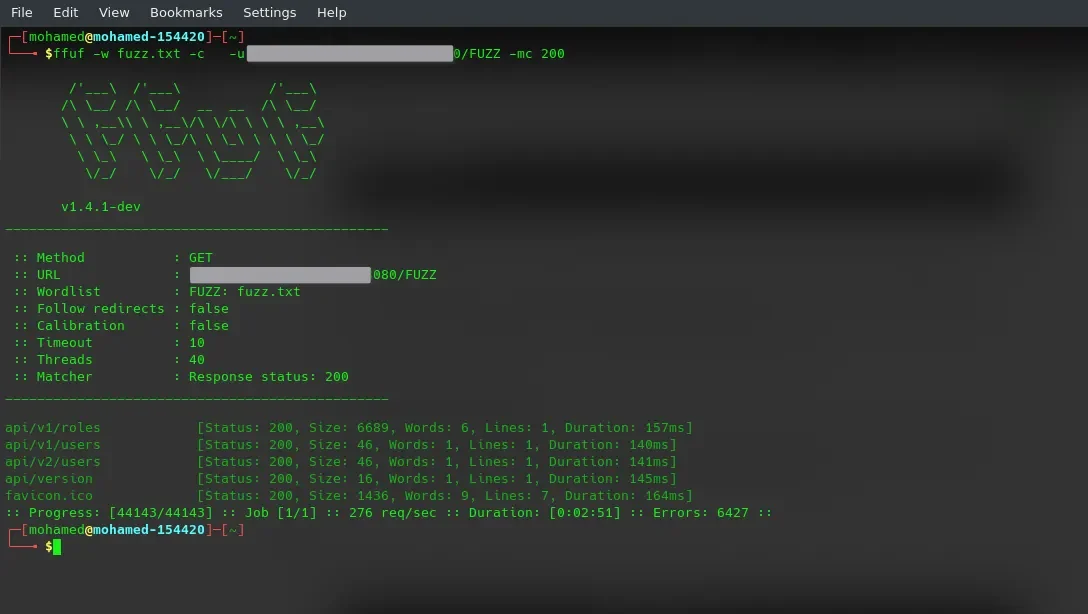
The first paths tried were:
http://<ip>:8080/api/v1/roles/
which returned nothing, and then:
http://<ip>:8080/api/v1/users/
which returned the only username on the panel.
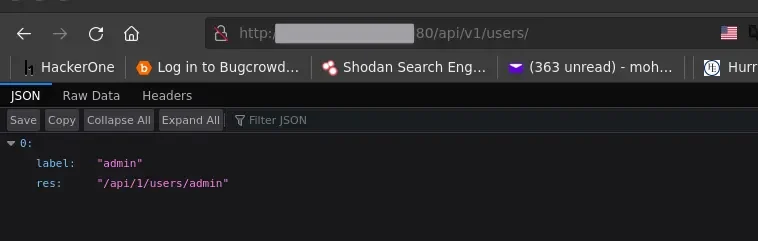
So the username was known. The password was not.
Step 3: Attempting brute force
The next idea was to brute force the login. Burp was used to capture the login request, entering username:admin and password:12345678:
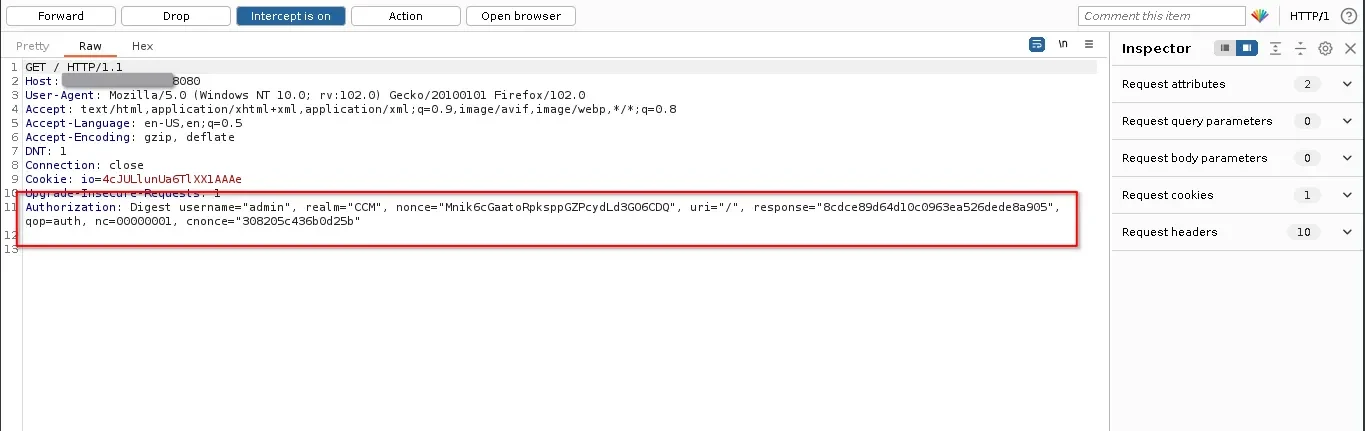
The captured request carried an Authorization header containing the credentials. The username (admin) was visible in the header value, but the password (12345678) that had been typed was not. The application appeared to apply some form of encryption to the password, which the researcher says he did not understand. Because the password could not be predicted in the request, brute forcing was abandoned.
Step 4: More directory fuzzing
Back to FFUF, this time fuzzing under the /api/v1/ directory, which produced new results:
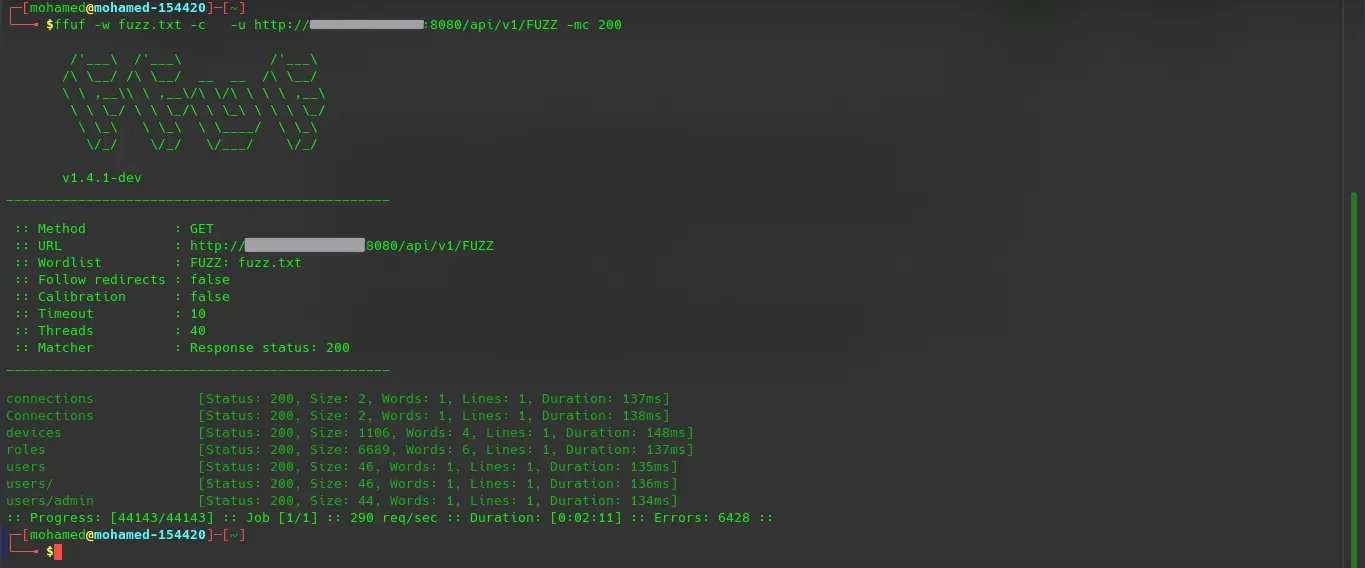
One of the paths was:
http://<ip>:8080/api/v1/devices/
which returned nothing. But the fuzzing also revealed a nested directory, /api/v1/devices/snapshot:
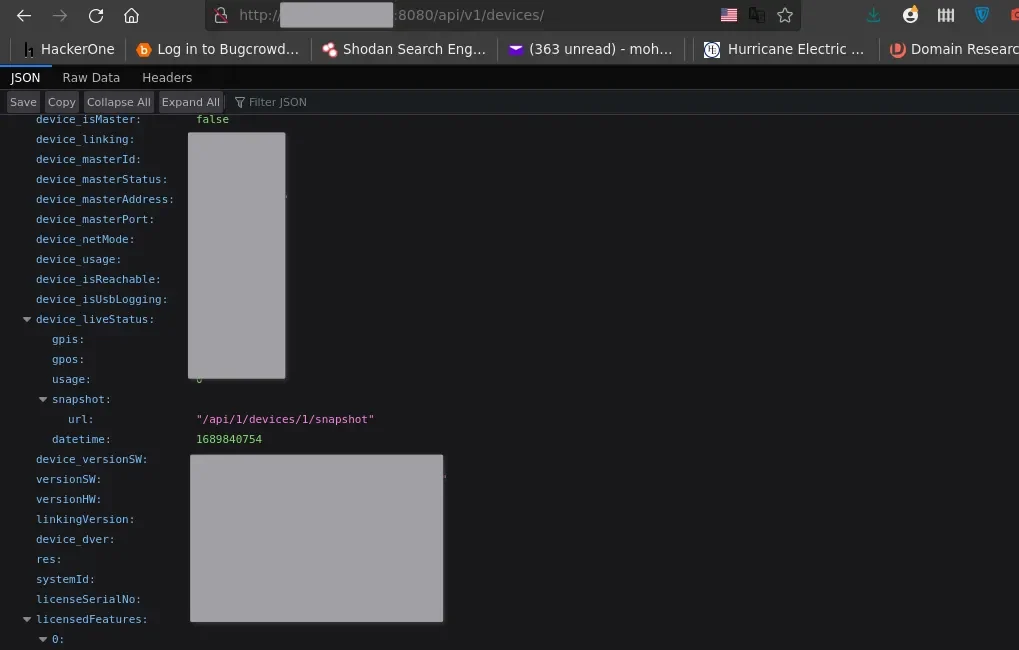
Requesting the snapshot path:
http://<ip>:8080/api/1/devices/1/snapshot
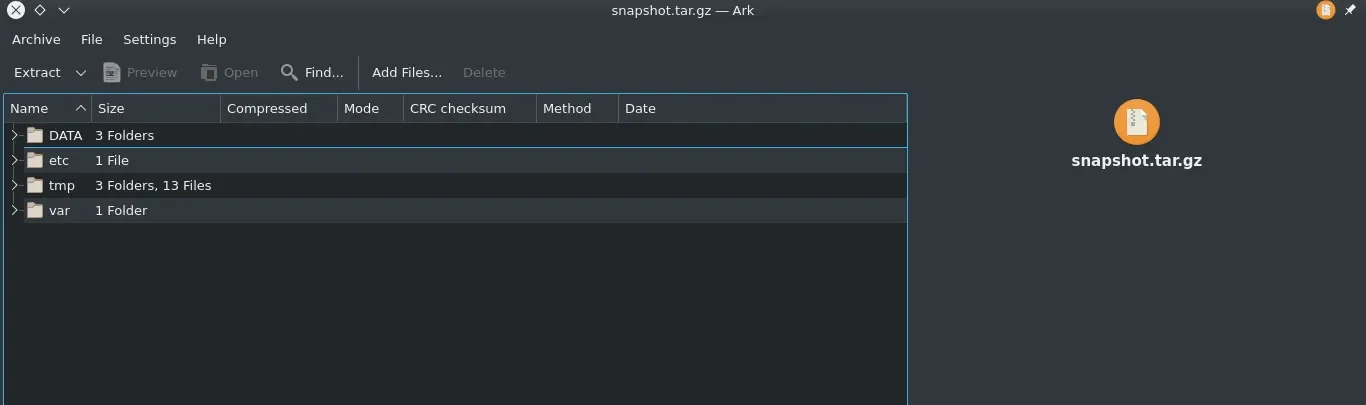
returned a downloaded file, compressed. The researcher opened it and went through its contents.
Step 5: Reading the snapshot
Every file in the archive was opened looking for something useful. One file stood out:
/tmp/hw_info.txt
Judging by its name, it looked like it held information about the product or application:
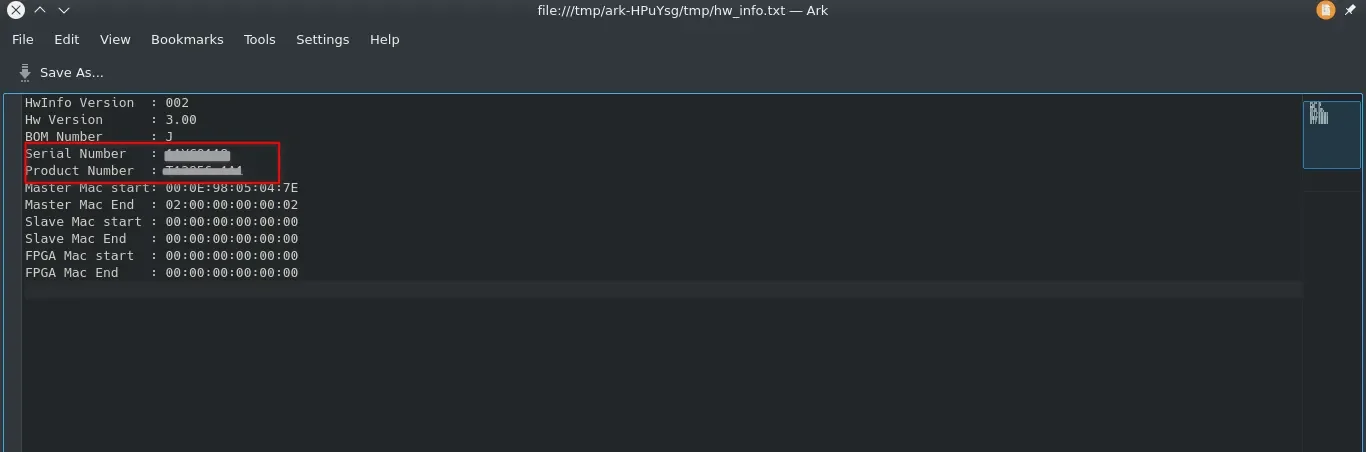
The file contained the Serial Number and the Product Number of the product or application.
Step 6: Using the numbers as the password
This connected back to the hypothesis from step 1: the credentials are derived from numbers that ship with the product. So the numbers from hw_info.txt were tried as the password for the known username admin.
The product number did not work. The serial number did:
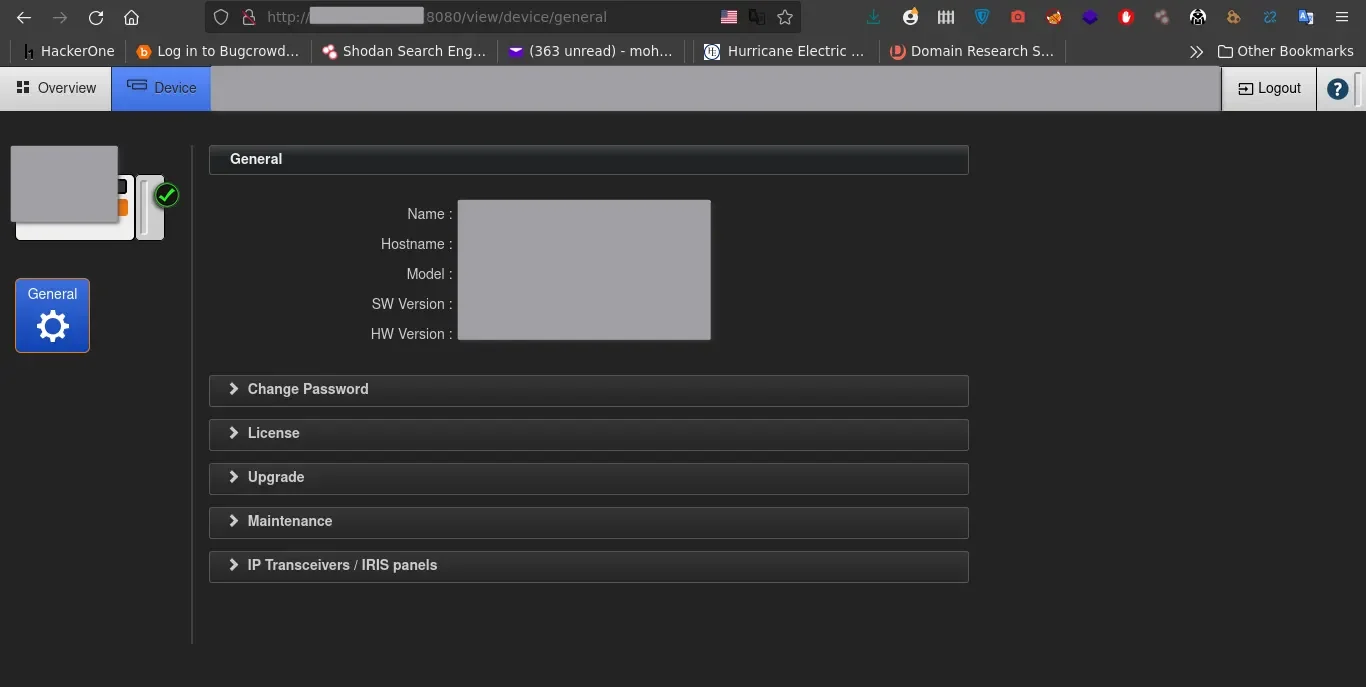
The admin dashboard was reached.
Step 7: Reporting
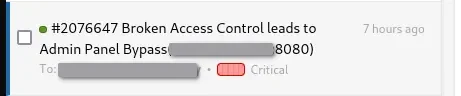
The researcher wrote up the steps and submitted the report to the program on HackerOne. It was not marked as a duplicate, and it was triaged as Resolved (CRITICAL).
Root cause
The chain rests on two weaknesses that compound each other.
First, the admin panel's credentials are predictable: the password is the device's serial number, a value that ships with the product and is not secret. Anyone who can obtain the serial number can log in as admin. The username itself was also discoverable from an unauthenticated API endpoint, /api/v1/users/, which returned the only username on the panel.
Second, the serial number was reachable without authentication. The /api/v1/devices/1/snapshot endpoint served a compressed archive to an unauthenticated caller, and that archive contained /tmp/hw_info.txt with the serial and product numbers. The snapshot download was reachable without credentials.
The password in the login request appeared to be transformed in a way the researcher did not understand, so brute forcing was not attempted. The login was defeated by knowledge, not by guessing.
Impact
An unauthenticated attacker who can reach the host can enumerate the admin username, download a device snapshot, read the serial number from it, and log in to the admin dashboard as admin. The report does not describe what the dashboard allows an authenticated administrator to do, so the concrete post-login capabilities are not stated. The program rated the issue critical.
The conditions are that the panel is exposed on the internet, that the snapshot endpoint is reachable without authentication, and that the serial number is the password for the admin account.
Fix
The report does not describe what the program changed. From the design, the fixes would be: do not derive the admin password from a value that ships with the product, require a password change on first login, require authentication on /api/v1/users/ and on /api/v1/devices/<id>/snapshot, and avoid placing device information such as serial and product numbers in files served to unauthenticated callers.
Variants to test
- Default credentials derived from device identifiers. On any panel that looks like an appliance or IoT management interface, try the serial number, product number, MAC address or PIN as the password for
admin. A positive result is a successful login using a device identifier as the password. - Unauthenticated user enumeration. Fuzz
/api/v1/users/and similar paths. A positive result is a response listing usernames without any session. - Snapshot and backup endpoints. Fuzz for paths like
/api/v1/devices/<id>/snapshot,/backup,/export. A positive result is a downloadable archive containing configuration or hardware information. - Sensitive files inside archives. When an archive is downloadable, grep its contents for names like
hw_info.txt,config,serial,product. A positive result is a file containing identifiers that can be used as credentials. - Basic Auth in front of an API. Check whether the API paths behind a Basic Auth prompt are actually protected, by requesting them directly. A positive result is a response without credentials.
- Password transformation in login requests. When the password in the
Authorizationheader does not match what was typed, the client is transforming it. A positive result is identifying the transformation, which would make brute forcing feasible again.
What happened, in plain words
A security researcher found a host belonging to a public bug bounty program on the internet. The host was behind a Basic Auth prompt, and he did not have the password. Instead of guessing it, he explored the site around the dashboard, found a file that the site served when he requested the snapshot path, read a serial number out of that file, and used the serial number as the password. He got in, reported it, and the program rated the issue critical.
This article walks through the same steps for someone who has never done security testing before. Every tool and term is explained the first time it appears. Nothing here requires more than a browser and a computer to follow along conceptually; the tools are described so you understand what they do, not so you can copy the attack.
The author calls the target redacted.com to keep the program private. That is normal in bug bounty write-ups: the program agrees to let you publish the story, but not the real name or address of the system, so other people cannot go and attack it.
Background concepts before we start
A few ideas come up again and again, so here they are up front.
Bug bounty program. A company puts its systems on a platform (here, HackerOne) and invites independent researchers to look for security problems. If you find one and report it properly, the company may pay you and will fix the issue. The rules say you must not damage anything and must not publish details that would let others attack the live system.
Admin panel (admin dashboard). The private control area of a website or device, where an administrator can change settings, manage users and see data. It is the part of the system you most want to keep strangers out of, because it usually controls everything else.
Port. A computer on the internet is like a large building with many numbered doors. Each door is a port, and a service listens behind it. Web pages normally arrive through port 443 (secure) or port 80 (plain). Port 8080 is a common alternative used by development servers and by devices that run their own small web interface. Seeing a service on 8080 is a hint that it may be an appliance or an internal tool rather than a polished public website.
HTTP Basic Authentication (Basic Auth). A very old, very simple way for a web server to ask for a username and password. When you visit the page, the browser itself pops up a small box asking for credentials, before any page content loads. The browser then sends the username and password with every request. It is like a bouncer at the door of a building who checks your name badge before letting you into the lobby.
API. Short for Application Programming Interface. In web terms, it is the set of addresses a website's own pages use to fetch data from the server, usually returning raw data (often in a format called JSON, which looks like structured text) rather than a pretty web page. Think of the website as a restaurant menu and the API as the kitchen door: the menu is what customers see, but the kitchen door is where the actual orders and ingredients move. If the kitchen door is left open, anyone can walk in even without reading the menu.
Endpoint. One specific address in an API. For example /api/v1/users/ is an endpoint that is supposed to return the list of users.
Recon (reconnaissance). The information-gathering phase before any attack. You look at what exists, what it is called, what ports are open, what software it runs. It is like walking around a building before trying the doors, noting which windows are open and what signs are on the wall.
Shodan. A search engine for internet-connected devices and servers, rather than for web pages. You type a query and it returns machines that match. Security researchers use it to find exposed systems belonging to a company.
Dork. A search query crafted to find something specific. A Shodan dork is such a query typed into Shodan.
Directory fuzzing. Automatically trying a long list of common path names against a website to see which ones exist. A tool sends a request for /admin, then /backup, then /api, and so on, and notes which ones return something other than "not found". It is like trying every key on a big keyring in a lock, quickly, to see which one turns.
Wordlist. The list of words that a fuzzing tool tries. Researchers often build custom wordlists for a target, adding names that seem relevant to the product.
FFUF. A free command-line tool for fuzzing web paths. You give it a URL with a placeholder and a wordlist, and it substitutes each word into the placeholder and reports the responses.
Burp (Burp Suite). A tool that sits between your browser and the website and lets you see and edit every request and response. It is like a transparent proxy that records the conversation so you can inspect it.
Brute forcing. Trying many passwords in sequence until one works. It only works if you can send guesses quickly and the server lets you.
Authorization header. A line inside an HTTP request that carries proof of who you are. With Basic Auth, this header holds the username and password, encoded in a reversible way (not encrypted, just encoded).
Serial number and product number. Identifiers printed on a physical device or stored in its firmware. A serial number is meant to be unique to one unit; a product number identifies the model. Both are often visible on the box, on a sticker, or in the device's own settings pages.
Snapshot. A copy of a device's current state, often packaged as a compressed archive (a single file containing many files, like a zip). Vendors use snapshots for backups and support.
Compressed archive. A single file that contains other files in a packed form. You open it with an archive tool to see the files inside.
Triaged. The stage where the bug bounty program has reviewed a report and confirmed it is a real, valid issue worth acting on.
Duplicate. A report of a bug that someone else already reported. Duplicates usually earn nothing, which is why the author notes with relief that his was not one.
Critical. The highest severity rating a program gives an issue. It means the impact is severe, typically full compromise of an important system.
Finding the panel
The researcher started with Shodan, using queries of this shape:
org:"redacted" || ssl:"redacted.com"
Line by line:
org:"redacted"asks Shodan for devices registered to the organisation with that name. The real name is hidden here for privacy.||means "or". So the query returns devices matching either side.ssl:"redacted.com"asks for devices presenting a TLS certificate for that domain. TLS certificates are what make the padlock appear in your browser; they are tied to a domain name, so searching by certificate is a way to find machines belonging to a company even when their IP addresses are not obvious.
He then added filters such as http.title (the title shown in the browser tab of the page the device serves) and port (which numbered door the service listens on). Combining these narrows the results to machines that look like the target and are reachable.
This surfaced an IP address running on port 8080 that presented a Basic Auth prompt.
The screenshot shows that Basic Auth dialogue: the small browser pop-up asking for a username and password before the page loads. At this point the researcher had found what looked like an admin panel behind a password prompt, and had no credentials for it.
Why start here? Because the first job in any assessment is to know what is exposed. A service on an unusual port, asking for a password, is exactly the kind of thing that is often set up quickly and forgotten.
Step 1: Trying default credentials
The first thing to try on any login is the obvious: default credentials. Many products ship with a built-in account so the buyer can set the device up, and some never force a change. The pairs tried were:
admin:admin
admin:password
user:user
Each line is username:password. So the first attempt was the username admin with the password admin, the second admin with password, and the third user with user. These are the three most common factory defaults in the world.
None of them worked. He also searched online for default credentials for the panel's product name, and found nothing.
What matters next is how the failure looked. The panel returned an authentication failure error:
That error message is the clue. It told the researcher the login was reaching a real application, not just a generic web server, and that the application had its own idea of what a valid username and password were. He formed a hypothesis: the credentials are defaults that ship with the product, in the same way a home WiFi router ships with a default PIN code printed on a sticker. In other words, the password is probably derived from something that comes with the device: a PIN code, a serial number, or a product number or version.
This is the key mental move in the whole story. Instead of guessing harder, he asked what the password might be made of.
Step 2: Directory fuzzing to find the username
With no credentials, the next step was to learn more about the application. He ran FFUF against the host with a custom wordlist, and it produced some interesting paths:
The screenshot shows the fuzzing output: a list of paths that returned responses, which is how you discover parts of a site that are not linked from anywhere.
He then visited the first path:
http://<ip>:8080/api/v1/roles/
Line by line:
http://is the plain (unencrypted) web protocol.<ip>is a placeholder for the server's address, hidden here for privacy.:8080is the port, the numbered door the service listens on./api/v1/roles/is the path.apisays this is the data interface,v1is a version number, androlessuggests it lists user roles (such as administrator or regular user).
That path returned nothing useful. So he tried the next one:
http://<ip>:8080/api/v1/users/
This one returned the only username on the panel.
The screenshot shows the response from the users endpoint, containing the only username on the panel. He still did not know the password.
Why does this matter? Because a login needs two things. If you can find the username for free, half the problem is solved, and you can focus all your effort on the password. An endpoint that lists users without asking for any login is itself a weakness, because it hands attackers a starting point.
Step 3: Trying to brute force, and why it failed
The next idea was to brute force the login: try many passwords quickly. He used Burp to capture the login request. He typed username:admin and password:12345678 into the form and recorded what the browser sent:
The captured request carried an Authorization header containing the credentials. In that header value, the username (admin) was visible, but the password (12345678) that had been typed was not. The application appeared to apply some form of encryption to the password, which the researcher says he did not understand.
Why does that stop brute forcing? Brute forcing depends on being able to send a guess and see whether it worked. If the password in the request is transformed in a way you cannot reproduce, you cannot generate valid requests for each guess. You would be sending garbage. So he abandoned that route.
This is a good example of a control that was not designed as a security measure but still got in the way: the login form was doing something to the password before sending it, and that made automated guessing impractical.
Step 4: More directory fuzzing, deeper this time
Back to FFUF, this time fuzzing under the /api/v1/ directory, which produced new results:
The screenshot shows the second round of fuzzing output, with paths nested under the API version directory. Fuzzing deeper is like finding a corridor behind a door you already opened: the first pass found the corridor, the second pass lists the rooms along it.
One of the paths was:
http://<ip>:8080/api/v1/devices/
This returned nothing. But the fuzzing also revealed a nested directory, /api/v1/devices/snapshot:
The screenshot shows the devices path and the snapshot path discovered beneath it. The word snapshot is a strong hint: it suggests the server can produce a copy of a device's state, and copies of state often contain configuration and identifiers.
He requested the snapshot path:
http://<ip>:8080/api/1/devices/1/snapshot
Line by line:
http://<ip>:8080is the same server and port as before./api/1/is the API path. Note that this one is written1rather thanv1; the report shows it exactly this way.devices/1refers to device number 1, the first device the server knows about./snapshotasks for that device's snapshot.
The server responded with a downloaded file, compressed. He opened it and went through its contents.
The screenshot shows the downloaded compressed archive. The important point is that the server handed this file over without asking for any login. The server handed over the snapshot file when he requested that path.
Step 5: Reading the snapshot
He opened every file in the archive looking for something useful. One file stood out:
/tmp/hw_info.txt
Line by line:
/tmp/is a temporary directory on a Linux system, where programs put files they need only briefly.hw_info.txtis a plain text file. Thehwalmost certainly stands for hardware, andinfofor information.
Judging by its name, it looked like it held information about the product or application:
The screenshot shows the contents of hw_info.txt. It contained the Serial Number and the Product Number of the product or application.
Why is this the turning point? Because it connects back to the hypothesis from step 1. If the password is derived from something that ships with the device, then the serial number and product number are exactly the kind of values to try. And here they were, sitting in a file that anyone could download.
Step 6: Using the numbers as the password
He went back to the login with the known username admin and tried each number as the password:
Line by line:
user:adminmeans the username isadmin.pass:<Product number>means the password is the product number read from the file. The result wasUsername||password is wrong, meaning the login was rejected.pass:<Serial number>means the password is the serial number from the same file. The result wasLogin Successful.
The product number did not work. The serial number did:
The screenshot shows the successful login.
The report does not explain why the serial number worked and the product number did not. The application was using the per-device value as the password.
Step 7: Reporting
He wrote up the steps and submitted the report to the program on HackerOne. It was not marked as a duplicate, and it was triaged as Resolved (CRITICAL).
The screenshot shows the report status: resolved, with a critical severity. That means the program marked the report as resolved and rated the impact as critical.
Why report rather than use it? Because that is the deal in a bug bounty program. You find the problem, you tell the owner privately, they fix it, and you may be rewarded. Using it for yourself would be a crime and would break the program's rules.
Why this worked: the root cause
The chain rests on two weaknesses that compound each other.
First, the admin panel's credentials are predictable. The password is the device's serial number, a value that ships with the product and is not secret. Anyone who can obtain the serial number can log in as admin. The username itself was also discoverable from an unauthenticated API endpoint, /api/v1/users/, which returned the only username on the panel.
Second, the serial number was reachable without authentication. The /api/v1/devices/1/snapshot endpoint served a compressed archive to an unauthenticated caller, and that archive contained /tmp/hw_info.txt with the serial and product numbers. The snapshot download was reachable without credentials.
The password in the login request appeared to be transformed in a way the researcher did not understand, so brute forcing was not attempted. The login was defeated by knowledge, not by guessing.
What an attacker could do
An unauthenticated attacker who can reach the host can enumerate the admin username, download a device snapshot, read the serial number from it, and log in to the admin dashboard as admin. The report does not describe what the dashboard allows an authenticated administrator to do, so the concrete post-login capabilities are not stated. The program rated the issue critical.
The conditions are that the panel is exposed on the internet, that the snapshot endpoint is reachable without authentication, and that the serial number is the password for the admin account.
How it should be fixed
From the design, the fixes would be: do not derive the admin password from a value that ships with the product, require a password change on first login, require authentication on /api/v1/users/ and on /api/v1/devices/<id>/snapshot, and avoid placing device information such as serial and product numbers in files served to unauthenticated callers.
Things to try on other targets
These are the same patterns, generalised, so you know what to look for if you ever test a similar system.
- Default credentials derived from device identifiers. On any panel that looks like an appliance or IoT management interface, try the serial number, product number, MAC address or PIN as the password for
admin. A positive result is a successful login using a device identifier as the password. - Unauthenticated user enumeration. Fuzz
/api/v1/users/and similar paths. A positive result is a response listing usernames without any session. - Snapshot and backup endpoints. Fuzz for paths like
/api/v1/devices/<id>/snapshot,/backup,/export. A positive result is a downloadable archive containing configuration or hardware information. - Sensitive files inside archives. When an archive is downloadable, grep its contents for names like
hw_info.txt,config,serial,product. A positive result is a file containing identifiers that can be used as credentials. - Basic Auth in front of an API. Check whether the API paths behind a Basic Auth prompt are actually protected, by requesting them directly. A positive result is a response without credentials.
- Password transformation in login requests. When the password in the
Authorizationheader does not match what was typed, the client is transforming it. A positive result is identifying the transformation, which would make brute forcing feasible again.
Glossary
- Admin panel (admin dashboard): the private control area of a website or device where an administrator manages settings, users and data.
- API: the set of addresses a website's own pages use to fetch data from the server, usually returning raw structured data rather than a web page.
- Authorization header: a line inside an HTTP request that carries proof of who you are; with Basic Auth it holds the username and password in a reversible encoding.
- Basic Auth (HTTP Basic Authentication): a simple login method where the browser pops up a box asking for a username and password before the page loads, and sends them with every request.
- Bug bounty program: a scheme where a company invites independent researchers to find and privately report security problems, often for a reward.
- Burp (Burp Suite): a tool that sits between your browser and a website so you can see and edit every request and response.
- Compressed archive: a single file that contains other files in a packed form, opened with an archive tool.
- Critical: the highest severity rating a program gives an issue, meaning the impact is severe.
- Directory fuzzing: automatically trying a long list of common path names against a website to discover which ones exist.
- Dork: a search query crafted to find something specific, here a query typed into Shodan.
- Duplicate: a report of a bug that someone else already reported, usually earning nothing.
- Endpoint: one specific address in an API, such as
/api/v1/users/. - FFUF: a free command-line tool for fuzzing web paths using a wordlist.
- JSON: a structured text format used to exchange data between a server and a client.
- Port: a numbered door on a computer through which a service listens; web pages normally use 443 or 80, and 8080 is a common alternative.
- Recon (reconnaissance): the information-gathering phase before any attack, looking at what exists and what it runs.
- Serial number: an identifier meant to be unique to one physical unit of a product.
- Shodan: a search engine for internet-connected devices and servers rather than web pages.
- Snapshot: a copy of a device's current state, often packaged as a compressed archive.
- Triaged: the stage where a bug bounty program has reviewed a report and confirmed it is a real, valid issue.
- Wordlist: the list of words a fuzzing tool tries against a target.

