How I was able to find easy P1 just by doing Recon
 Published on medium.com
To all the readers, this blog post is for beginners, there is nothing special trick here and also this is my first write up, so any suggestions or corrections are always welcomed.
The full write-up lives on its author's site
It belongs to its author, so we link to it rather than copy it. The other two tabs are our own rewrites, checked against it.
Context
This is a beginner-level account of a private Bugcrowd program, referred to throughout as "target.com", whose scope covered every subdomain of the main domain (*.target.com). The researcher does not describe the product or what the application does; the write-up is about the reconnaissance path that led to a file disclosure rather than about a specific feature.
The endpoint that mattered was a host called loadturn002.example.com with port 5080 open, which the researcher identifies as the OnScreen Data Collection Service. Requesting the root of that port returned a "File no Found" error together with some server information. The report does not describe the application further.
Setup
The only precondition mentioned is an invitation to a private program on Bugcrowd. No accounts, roles or credentials were needed for the finding itself. The tools used were:
- Assetfinder, Findomain and Amass for subdomain enumeration
- Aquatone (suggested) or Firefox for reviewing subdomains
- Nmap, or naabu from ProjectDiscovery, for port scanning
- dirsearch for directory bruteforcing
The report gives no versions for any of these tools.
Finding it
Because the scope was a wildcard, the researcher started with subdomain enumeration, running more than two tools as a matter of habit:
assetfinder -subs-only target.com
findomain -t target.com
amass enum passive -d target.com
The report suggests wrapping these in a simple bash script to automate the process, but does not include that script.
Each subdomain was then reviewed manually. Two alternatives are offered for the same step: Aquatone to screenshot all subdomains, or opening them one by one in Firefox with this one-liner:
cat subdomains.txt | while read subs; do firefox $subs; sleep 8; done
Many of the subdomains either would not connect or returned errors. That prompted a port scan to look for other open services such as FTP or SSH. The researcher resolved the IP addresses of all subdomains and scanned them:
nmap -sV -iL ips.txt -oN nmap_scan.txt
naabu is offered as a faster alternative:
cat ips.txt | naabu
Among the nmap results, one subdomain, loadturn002.example.com, had port 5080 open. Browsing to http://loadturn002.example.com:5080 returned a "File no Found" error along with some server information. That error page was the signal to try directory bruteforcing, so dirsearch was run against the host:
The scan surfaced a directory named /etc/passwd. A path that looks like a local filesystem path appearing as a directory on a web server is the anomaly that made the researcher pursue it.
Exploitation
Step 1: Request the discovered path
The researcher opened the browser and requested the path directly:
The researcher labels the finding "Easy LFI" and shows a screenshot of the result in the browser. The screenshot below shows the result in the browser.
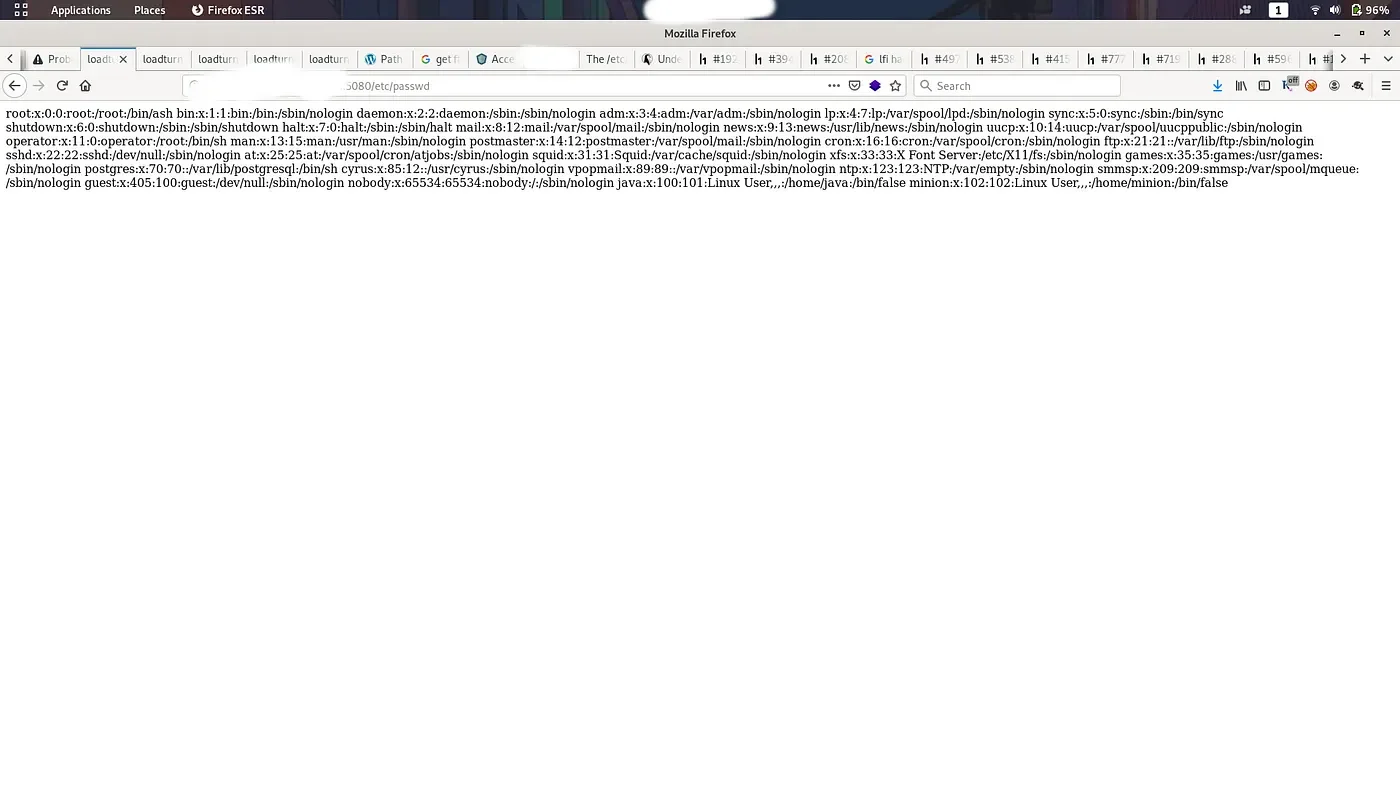
The report does not include the response body, so the exact contents returned are not reproduced here.
Root cause
The report does not analyse the code or configuration behind the endpoint. The report does not analyse the code or configuration behind the endpoint, so the precise mistake is not established here.
Impact
The researcher classifies the bug as P1 (critical). Any wider impact would depend on the privileges of that process and on what other files are reachable, neither of which the report covers.
Fix
Variants to test
- Port scanning hosts that return errors on their normal web ports. A positive result is an open port running a service that was not part of the obvious attack surface, as with port 5080 here.
- Directory bruteforcing against any service that returns a distinctive error page. A positive result is a path in the wordlist that behaves differently from the 403, 404 and 301 responses you excluded.
- Watching for wordlist entries that look like filesystem paths (
/etc/passwdand similar) appearing as directories. A positive result is a response containing file contents rather than an error page. - Requesting the discovered path directly in a browser to confirm the finding manually, rather than relying on the scanner's output alone.
- Running more than two subdomain enumeration tools and reviewing the results manually, since the host in this report came from that review rather than from a single tool.
The researcher's own takeaways are to enumerate as many subdomains as possible, shortlist the ones that look interesting, and then apply hidden parameter search, directory bruteforcing, port scanning, JavaScript file review and CVE search to them. Strong, thorough reconnaissance, in their words, sometimes means an easy win.
What happened, in plain words
A security researcher was invited to a private bug bounty program on Bugcrowd, a platform where companies pay people to look for weaknesses in their systems. Throughout the write-up the company is called "target.com". The company allowed testing on every subdomain of its main domain, written as *.target.com. A subdomain is a smaller address that sits under a main domain, the way shop.example.com sits under example.com.
The researcher did not describe what the company's product does or what any of its applications are for. The story is only about the searching phase, called reconnaissance, and about one host that turned out to hand out a system file to anyone who asked for it.
The host that mattered was called loadturn002.example.com, and it had port 5080 open. A port is a numbered door on a computer: web pages normally arrive through port 80 or 443, but a machine can run other services on other numbers. The researcher identifies port 5080 as the OnScreen Data Collection Service. Opening that port in a browser returned an error saying "File no Found" together with some information about the server. The report does not describe the application behind that port any further.
Setup
The only precondition mentioned is the invitation to the private Bugcrowd program. No accounts, roles or credentials were needed for the finding itself. The tools used were:
- Assetfinder, Findomain and Amass for subdomain enumeration
- Aquatone (suggested) or Firefox for reviewing subdomains
- Nmap, or naabu from ProjectDiscovery, for port scanning
- dirsearch for directory bruteforcing
The report gives no versions for any of these tools.
Finding it
Because the scope was a wildcard, the researcher started with subdomain enumeration, running more than two tools as a matter of habit:
assetfinder -subs-only target.com
findomain -t target.com
amass enum passive -d target.com
Subdomain enumeration means asking public sources which smaller addresses exist under a domain. Think of a company's main address as a building, and the subdomains as all the side doors, service entrances and staff gates that are not printed on the front sign. Each of the three tools above collects those names from different public records, which is why running several of them finds more than running one.
assetfinder -subs-only target.comasks Assetfinder to list only subdomains (-subs-only) oftarget.com.findomain -t target.comasks Findomain for the same thing;-tstands for target.amass enum passive -d target.comasks Amass to enumerate (enum) subdomains for the domain (-d) using passive sources only, meaning it queries public data rather than sending traffic to the company's own machines.
The report suggests wrapping these in a simple bash script to automate the process, but does not include that script. A bash script is just a text file of commands that the computer runs in order, so you do not have to type each one by hand.
Each subdomain was then reviewed manually. Two alternatives are offered for the same step: Aquatone to screenshot all subdomains, or opening them one by one in Firefox with this one-liner:
cat subdomains.txt | while read subs; do firefox $subs; sleep 8; done
This line reads a list of subdomains from a file and opens each one in a browser tab, pausing between them.
cat subdomains.txtprints the contents of the filesubdomains.txt, one subdomain per line.- The vertical bar
|passes that output to the next command instead of printing it on screen. while read subs; do ... donerepeats the part betweendoanddoneonce for every line, storing the current line in a variable calledsubs.firefox $subsopens Firefox at the address held insubs.sleep 8waits eight seconds before the next one, so the tabs do not all load at once.
Many of the subdomains either would not connect or returned errors. That prompted a port scan to look for other open services such as FTP or SSH. FTP is an old protocol for transferring files and SSH is a way to log into a machine remotely; both are common on servers and both are worth knowing about. The researcher resolved the IP addresses of all subdomains and scanned them:
nmap -sV -iL ips.txt -oN nmap_scan.txt
An IP address is the numeric address of a machine on a network, the equivalent of a street address rather than a name. Resolving means looking up which IP address belongs to a hostname.
nmapis the scanner being run.-sVasks nmap to identify the service and version running on each open port, not just whether the port is open.-iL ips.txttells nmap to read its list of targets from the fileips.txt(iLmeans input list).-oN nmap_scan.txtwrites the results in normal text format tonmap_scan.txt.
naabu is offered as a faster alternative:
cat ips.txt | naabu
cat ips.txtprints the list of IP addresses.| naabufeeds that list into naabu, which checks which ports are open on each address. It does the same basic job as nmap but is built to be quicker.
Among the nmap results, one subdomain, loadturn002.example.com, had port 5080 open. Browsing to http://loadturn002.example.com:5080 returned a "File no Found" error along with some server information. The number after the colon in an address is the port, so this address means "the host called loadturn002.example.com, door number 5080". That error page was the signal to try directory bruteforcing, so dirsearch was run against the host:
Directory bruteforcing means guessing the names of pages and folders on a web server by trying thousands of common words and seeing which ones exist. It is like trying every key on a big ring in a door until one turns. A wordlist is simply a text file full of those guesses.
python3 dirsearch.pyruns the dirsearch program with Python 3.-u http://loadturn002.example.comsets the address to test.-e *tells it to try every kind of file extension.-w my_wordlist.txtpoints it at the list of words to try.-t 100uses 100 threads, meaning 100 requests are in flight at once, which makes the scan faster.-x 403,404,301tells it to ignore responses with those status codes. A status code is the short number a web server sends back with every reply: 404 means "not found", 403 means "forbidden", and 301 means "this page has moved". Ignoring them keeps the output focused on paths that behaved differently.
The scan surfaced a directory named /etc/passwd. A path that looks like a local filesystem path appearing as a directory on a web server is the anomaly that made the researcher pursue it. On Linux and similar systems, /etc/passwd is a standard file that lists user accounts on the machine. Seeing that name in a web scan is strange, because it is a file on the server's own disk, not a page anyone should be able to browse to.
Exploitation
Step 1: Request the discovered path
The researcher opened the browser and requested the path directly:
This is a raw HTTP request, the same kind of message a browser sends when you type an address. HTTP is the language browsers and web servers use to talk.
GET /etc/passwd HTTP/1.1says: give me (GET) the resource at the path/etc/passwd, using version 1.1 of the protocol.Host: loadturn002.example.com:5080says which machine and port the request is meant for. Servers can host many sites, so they need to be told which one you want.
The researcher labels the finding "Easy LFI" and shows a screenshot of the result in the browser. LFI stands for Local File Inclusion: the server takes a path you supply and reads a file from its own local disk, instead of only serving pages from the folder it is supposed to serve. The screenshot below shows the result in the browser.
The report does not include the response body, so the exact contents returned are not reproduced here.
Root cause
The report does not analyse the code or configuration behind the endpoint. The report does not analyse the code or configuration behind the endpoint, so the precise mistake is not established here. The web root is the folder a web server is meant to serve pages from; anything outside it should be off limits.
Impact
The researcher classifies the bug as P1 (critical). Bug bounty programs rank findings by severity, and P1 is normally the top of that scale. Any wider impact would depend on the privileges of that process and on what other files are reachable, neither of which the report covers.
Fix
Variants to test
- Port scanning hosts that return errors on their normal web ports. A positive result is an open port running a service that was not part of the obvious attack surface, as with port 5080 here.
- Directory bruteforcing against any service that returns a distinctive error page. A positive result is a path in the wordlist that behaves differently from the 403, 404 and 301 responses you excluded.
- Watching for wordlist entries that look like filesystem paths (
/etc/passwdand similar) appearing as directories. A positive result is a response containing file contents rather than an error page. - Requesting the discovered path directly in a browser to confirm the finding manually, rather than relying on the scanner's output alone.
- Running more than two subdomain enumeration tools and reviewing the results manually, since the host in this report came from that review rather than from a single tool.
The researcher's own takeaways are to enumerate as many subdomains as possible, shortlist the ones that look interesting, and then apply hidden parameter search, directory bruteforcing, port scanning, JavaScript file review and CVE search to them. Strong, thorough reconnaissance, in their words, sometimes means an easy win.
Glossary
- Bug bounty program: an arrangement where a company pays researchers for reporting security weaknesses in its systems.
- Bugcrowd: a platform that hosts bug bounty programs for companies.
- Private program: a bug bounty program that only invited researchers may take part in.
- Scope: the set of systems a researcher is allowed to test.
- Wildcard scope: a scope written with
*, such as*.target.com, meaning every subdomain is in scope. - Subdomain: a smaller address under a main domain, such as
shop.example.comunderexample.com. - Subdomain enumeration: collecting the names of subdomains that exist for a domain, usually from public sources.
- Reconnaissance: the searching and mapping phase before testing, where you learn what exists.
- Port: a numbered door on a machine through which a particular service is reached.
- Port scanning: checking which ports on a machine are open and what service answers on them.
- IP address: the numeric address of a machine on a network.
- Resolving: looking up the IP address that belongs to a hostname.
- FTP: an older protocol for transferring files between machines.
- SSH: a protocol for logging into a machine remotely and running commands on it.
- HTTP: the language browsers and web servers use to exchange requests and responses.
- HTTP request: the message a browser sends to a server asking for something.
- Host header: the part of an HTTP request that says which machine and port the request is for.
- Status code: the short number a server returns with each response, such as 404 (not found), 403 (forbidden) or 301 (moved).
- Web root: the folder a web server is meant to serve pages from.
- Directory bruteforcing: guessing page and folder names on a server by trying many common words.
- Wordlist: a text file of guesses used by a bruteforcing tool.
- Threads: parallel workers a tool uses to send several requests at once.
- LFI (Local File Inclusion): a flaw where a server reads a file from its own disk based on a path supplied in the request.
- P1: the top severity ranking in a bug bounty program, usually meaning critical.
- CVE: a public identifier for a known security vulnerability.
- Bash script: a text file of shell commands that run in order.
- One-liner: a short single command line that does a complete job.



