How I was able to find Reflected XSS | by omarzu
A login page reflected the value of a locale parameter into the page source, and the author found that a closing script tag in the parameter produced reflected code. By supplying a script tag that closed the existing one and opened a new one with an alert, the author achieved reflected cross-site scripting.

medium.com
Published on medium.com
Bug Bounty
The full write-up lives on its author's site
It belongs to its author, so we link to it rather than copy it. The other two tabs are our own rewrites, checked against it.
Context
The target was a small bug bounty scope consisting of just a login page. The report does not name the program or the application. The only feature the researcher describes interacting with is a Locale parameter on that login page.
Setup
No special tooling, accounts or roles are described. The work was manual testing of a single login page: directory brute forcing, then a set of authentication-focused checks, then parameter enumeration, then XSS payloads. The report gives no versions, no proxy setup and no browser details.
Finding it
The researcher started with the obvious approaches against a login page:
- Directory brute force. Nothing was found.
- SQL injection, user enumeration, brute force protection and default credentials. Nothing was found either.
At that point the conclusion was that there might be no vulnerability, and the temptation was to move on.

Instead, the next step was parameter enumeration. That surfaced a parameter called Locale, requested as ?Locale. The researcher then began testing that parameter for XSS, using the PortSwigger Web Security Academy material on cross-site scripting as background.
Exploitation
Step 1: a normal reflection test
The first payload was a simple reflection probe:
">Test
The idea was to see whether the value comes back in the source code. When the researcher tried to open the source code, something got in the way.

Step 2: closing the script context
After further attempts, the researcher found that putting the following into the parameter produced code reflected on the page:
</script>

This showed that the </script> input was reflected on the page, which the researcher took as an interaction with the code. That is the interaction with the code the researcher refers to next.
Step 3: the working payload
With the context confirmed, the payload was extended to break out of the existing script block and open a new one:
</script> <script>alert("omar")</script>
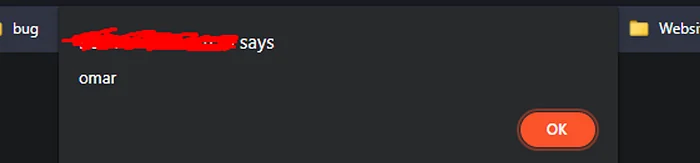
The payload combines a closing </script>, a new <script> element and alert("omar"). The report shows the payload succeeding. The report shows the payload succeeding.

Root cause
The Locale parameter is reflected into the page, and </script> passes through intact, which lets an attacker inject new markup. In particular, </script> is passed through intact, which lets an attacker terminate the script element and inject new markup. The report does not show the server-side code, so the exact escaping routine is not known; likely the value was HTML-encoded for a general context, or not encoded at all, rather than being handled with JavaScript-aware escaping. The initial ">Test probe did not produce a usable result.
Impact
This is reflected XSS: an attacker who can get a victim to open a crafted URL containing the payload in the Locale parameter runs JavaScript in the victim's browser in the context of the login page. The researcher expected the report to be closed as a duplicate, but it was accepted as not a duplicate.
Fix
The appropriate fix is to stop reflecting the Locale value into a script context unescaped: encode or validate the value so that characters such as <, > and " cannot terminate the script element or the surrounding string, and apply a restrictive Content Security Policy as a second layer.
Variants to test
- Enumerate parameters on small scopes, not just the visible form fields. A
Locale,lang,redirector similar parameter that ends up in a script block is the same pattern as here. A positive result is your marker appearing unencoded in the page source inside a<script>element. - When a plain
">Testprobe fails, try context-breaking strings such as</script>before giving up. A positive result is the literal</script>appearing in the response source. - Test the same parameter with a full breakout payload and confirm execution in a browser, not just reflection in the source.
- Revisit login pages after the authentication-focused checks fail. A single reflected parameter is enough, and the report's own lesson is that a small scope is still worth testing.
What happened, in plain words
A security researcher was testing a website as part of a bug bounty. The part of the website he was allowed to test was tiny: just a login page, the screen where you type your username and password.
He tried the usual tricks against a login page and found nothing. He almost gave up. Then he enumerated parameters and found one called Locale. When he put </script> into that setting, the website reflected code back into the page. By crafting that text carefully, he was able to make the page run a small piece of code of his choosing. That kind of flaw is called reflected cross-site scripting, or reflected XSS for short.
He expected the website owners to say "someone already reported this", which is what a duplicate means. Instead they accepted it as a new finding. His own lesson at the end is simple: do not give up, take a break and come back with fresh ideas, and even a small scope is worth testing.
The scope: one login page
The scope is the list of things a researcher is allowed to test. Here it was small: a single login page. The report does not name the company or the application.
So the researcher began with the checks people usually run against a login page.
Step 1: the obvious checks
- Directory brute force. A website is made of files and folders on a server, and some of them are not linked from anywhere but still exist, for example an old admin panel or a backup file. Directory brute forcing means trying a long list of common names one after another to see if any of them exist. The researcher got nothing.
- SQL injection. Many login forms build a database query out of what you type. SQL injection means typing characters that change the meaning of that query, for example so that the password check is skipped. Nothing here.
- User enumeration. This means finding out which usernames exist on the site, usually because the site answers differently for a real user and a fake one. Nothing here.
- Brute force protection. This is a defence that slows down or blocks someone who keeps guessing passwords. The researcher checked whether it was present. Nothing came of it.
- Default credentials. Many products ship with a built-in administrator account and a well-known password, such as
admin/admin. Trying those is a standard first move. Nothing here either.
At that point the natural conclusion was that there might be no vulnerability at all, and the temptation was to move on to another target.
Step 2: looking at the parameters
Instead of leaving, the researcher decided to look at the parameters. A parameter is an extra piece of information added to the end of a web address, after a question mark. In https://example.com/login?Locale=en, the parameter is called Locale and its value is en. Parameters are how a website is told things like which language to show, which page to return to after login, or which item to display.
He enumerated parameters, meaning he tried a list of common parameter names to see which ones the page reacted to. One of them was Locale, written in the address as ?Locale. The page clearly did something with it.
To understand what he was hunting for, he used the PortSwigger Web Security Academy page on cross-site scripting as background reading. XSS is a flaw where a website takes something a visitor supplied and puts it into the page in a way that lets it run as code in the visitor's browser. "Reflected" means the value is echoed straight back in the response to the same request, rather than being stored on the server and shown to other people later.
Step 3: a first, simple test
The first payload was a simple probe:
">Test
A payload is the text you send to try to trigger a flaw. This one contains a double quote, a greater-than sign and the word Test. The idea is to see whether the value comes back in the page source. The page source is the raw HTML the browser receives before it draws anything on screen; you can view it in any browser with "View source". If you can find your own marker word in there, unaltered, the site is copying your input into the page, and that is the starting point for XSS.
When the researcher tried to open the source code, something got in the way.
Step 4: closing the script
After further attempts, he found that putting this into the parameter produced code reflected on the page:
</script>
To see why this matters, you need to know a little about how a web page is built. A page is written in HTML, a language of tags such as <p> for a paragraph or <img> for a picture. JavaScript is the programming language that runs inside the browser and makes pages interactive. It is placed inside a page between a <script> tag and a </script> tag. Everything between those two tags is treated as code, not as text.
So when the researcher sent </script> and saw code reflected on the page, he concluded there was an interaction with the code. Neutralising, or escaping, means replacing dangerous characters with harmless stand-ins so the browser treats them as plain text. If </script> passes through untouched, the browser will believe the script has ended, and anything after it will be read as new HTML that the attacker controls.
That is the "interaction with the code" the researcher refers to.
Step 5: the working payload
With the context confirmed, he extended the payload to break out of the existing script block and open a new one:
</script> <script>alert("omar")</script>
Line by line, in plain words:
</script>closes the script element the application had opened. The browser now thinks the application's JavaScript has finished.<script>opens a brand new script element, this one belonging to the attacker.alert("omar")is a tiny piece of JavaScript that makes the browser show a pop-up box with the textomarin it. It is the standard harmless proof that code is running: it does nothing except appear.</script>closes the attacker's script element, so the rest of the page is parsed normally again.
The report shows the payload succeeding.
Why it worked
The Locale value is copied into the page, and </script> passes through intact, which lets an attacker inject new markup. In particular, </script> passes through intact, which lets an attacker end the script element and inject new markup.
The report does not show the server-side code, so the exact escaping routine is not known. Most likely the value was either not encoded at all, or encoded for ordinary HTML text rather than for the special rules that apply inside a script block. The first probe, ">Test, did not produce a usable result. That is why the second probe, the closing tag, was the one that revealed the context.
What the impact is
This is reflected XSS. An attacker who can persuade a victim to open a crafted web address, with the payload in the Locale parameter, gets JavaScript running in the victim's browser in the context of the login page. "In the context of" means the browser treats the code as coming from that site: it can read what the page can read and act as the page can act.
So the practical consequences beyond script execution in that page are not established here. The researcher expected the report to be closed as a duplicate, but it was accepted as not a duplicate.
How to fix it
The appropriate fix is to stop reflecting the Locale value into a script context unescaped. Encode or validate the value so that characters such as <, > and " cannot end the script element or the surrounding string. As a second layer of defence, apply a restrictive Content Security Policy, which is a set of rules a site sends to the browser saying which scripts it is allowed to run; a strict policy makes injected script blocks fail even when escaping is imperfect.
Things to try on your own targets
- Enumerate parameters on small scopes, not just the visible form fields. A
Locale,lang,redirector similar parameter that ends up in a script block is the same pattern as here. A positive result is your marker appearing unencoded in the page source inside a<script>element. - When a plain
">Testprobe fails, try context-breaking strings such as</script>before giving up. A positive result is the literal</script>appearing in the response source. - Test the same parameter with a full breakout payload and confirm execution in a browser, not just reflection in the source.
- Revisit login pages after the authentication-focused checks fail. A single reflected parameter is enough, and the report's own lesson is that a small scope is still worth testing.
Glossary
- Bug bounty: a programme where an organisation pays researchers for reporting security flaws in its systems.
- Scope: the list of systems and pages a researcher is permitted to test.
- Login page: the screen where a user types a username and password to enter a site.
- Directory brute force: trying a long list of common file and folder names on a server to find ones that exist but are not linked.
- SQL injection: typing characters into a form so that the database query behind it is changed, for example to skip a password check.
- User enumeration: working out which usernames exist on a site, usually from differences in how it responds.
- Brute force protection: a defence that slows or blocks repeated password guesses.
- Default credentials: the built-in username and password a product ships with, often publicly known.
- Parameter: an extra value added to a web address after a question mark, such as
?Locale=en. - Parameter enumeration: trying a list of common parameter names to see which ones the page reacts to.
- Reflected XSS: XSS where the supplied value is echoed straight back in the response to the same request.
- Payload: the text a researcher sends to try to trigger a flaw.
- Page source: the raw HTML the browser receives, viewable with "View source".
- HTML: the tag-based language that describes the structure of a web page.
- JavaScript: the programming language that runs in the browser and makes pages interactive.
<script>tag: the HTML tag that marks the start of a block of JavaScript;</script>marks the end.- Escaping (encoding): replacing dangerous characters with harmless stand-ins so the browser treats them as plain text.
- Script context: the place inside a
<script>block where the browser expects code rather than text. alert(): a JavaScript function that shows a pop-up box, used as harmless proof that code is running.- Duplicate: a report for a flaw that has already been reported.
- Content Security Policy: rules a site sends to the browser saying which scripts it may run, used as a second layer of defence.



