How i was able to hack a Company via watching a YouTube video
A demo video for a dashboard showed a weak password, and the tester guessed employee usernames from public sources and brute-forced simple passwords to gain admin access to the main dashboard, exposing over 100,000 user and order records.
 Published on ahmadmansourr.medium.com
Hello everyone, its Ahmad here, a penetration tester from Lebanon, without wasting time introducing, lets get into details of this bug.
The full write-up lives on its author's site
It belongs to its author, so we link to it rather than copy it. The other two tabs are our own rewrites, checked against it.
Context
Ahmad Mansour, a penetration tester from Lebanon, describes a recent pentest against a company he calls xyz.ae, which handles food deliveries for restaurants. The agreed scope was the company's mobile application and website. The finding is not a code-level bug in the usual sense: it is a weak-credential issue that led to the main dashboard with admin privilege and to the data of 100 000+ users and orders.
The feature involved is the client dashboard. To make the test resemble an attacker's position, the researcher acted as a normal client and asked the company for dashboard access with ordinary client privileges.
Setup
The only precondition was a normal client relationship with the target: the researcher requested dashboard access as a client and received it. The company then sent him a YouTube tutorial explaining how the dashboard works.
The sources for the username list were LinkedIn, Facebook, and simply asking the customer support person for their name, and Burp Suite Intruder was used for the password guessing. The researcher notes that the whole thing was done without any script.
Finding it
The first step of the pentest was ordinary reconnaissance of the website and infrastructure, to understand what the company does and how it works, which later helps in finding bugs and deciding what is worth reporting.
While watching the tutorial as a normal user, the researcher noticed that the person explaining the video had left an email address and a password visible in it. The password was only 3 characters or digits long.
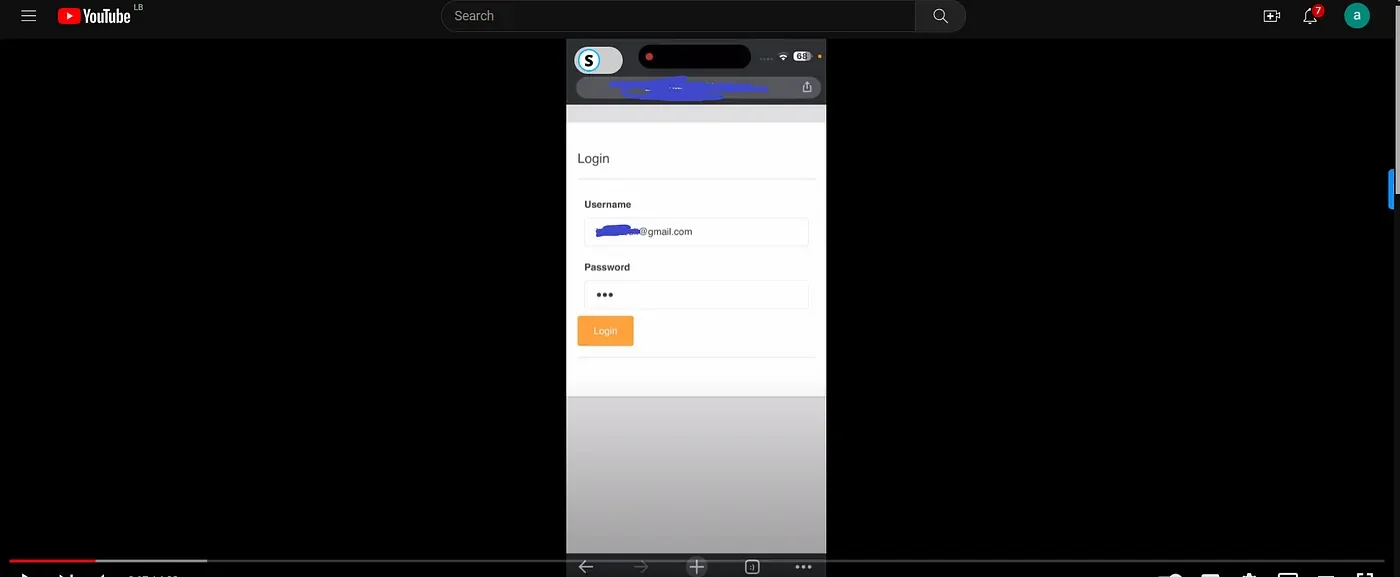
The image sits where the report describes the YouTube tutorial the company sent.
Those credentials did not lead anywhere: they belonged to an empty account created for explanation purposes. The useful observation was different. If an employee uses a weak password for a demo account, that may be a sign that most employees use simple passwords. The researcher assumed the password would be either 123 or abc, as it looked in the video, and that there was no password policy. The remaining problem was the username: admin, manager and similar guesses did not work.
Exploitation
Step 1: Build a username list
With quick searches the researcher collected a list of employee first names and last names. The sources were LinkedIn, Facebook, and simply asking the name of the customer support person he was talking to.
Step 2: Guess passwords with Burp Suite Intruder
Using Burp Suite Intruder, he tried the first names with a mix of simple passwords.
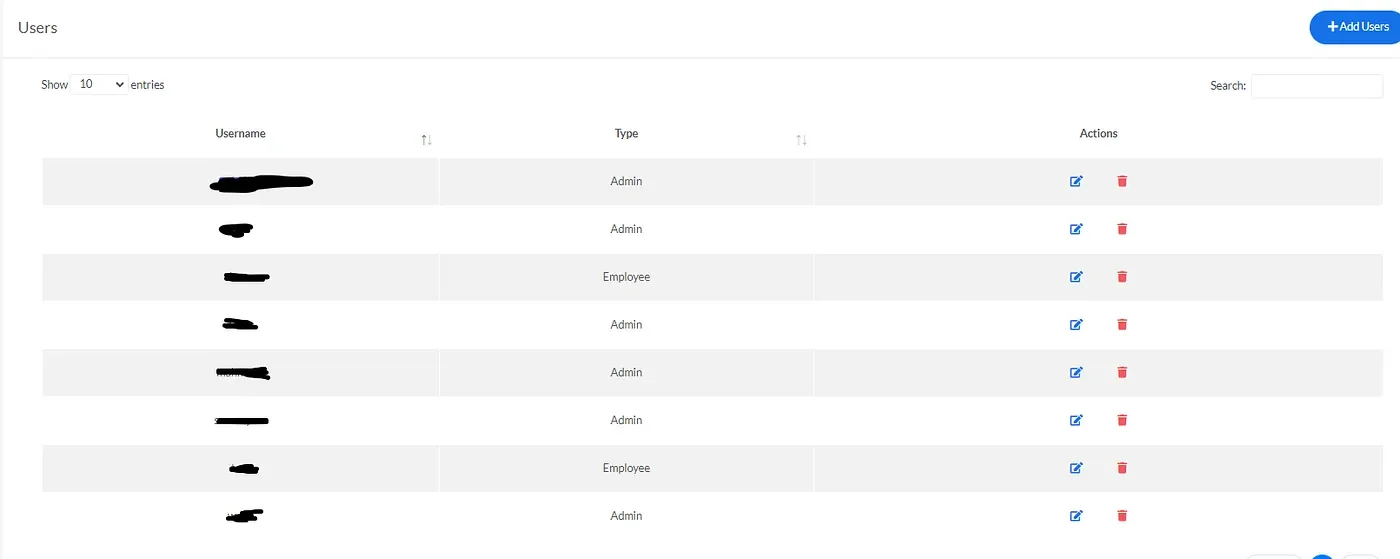
The image sits where the report describes the Intruder attempt and the resulting access.
Step 3: Access the dashboard
The guessed credentials worked and gave access to the main dashboard with admin privilege, and through it to the information of 100 000+ users and orders. The researcher notes that this data was hard to blur because the company name appears nearly everywhere on the dashboard.
Root cause
The researcher's takeaway is that a password policy should be enforced for clients and employees. The demo account in the tutorial used a 3-character password, and the researcher's assumption that employees followed the same habit proved correct: a first name plus a simple password was enough. Because the account reached had admin privilege, the weak credential gave far more than the client-level access the researcher had been granted.
Why existing defences did not stop it is not described in the report. Likely there was no lockout or rate limiting that interfered with the Intruder run, and no requirement on password length or complexity, but the report does not state either.
Impact
An attacker who can guess an employee's first name and simple password reaches the main dashboard with admin privilege and can access the information of 100 000+ users and orders. The condition is that the target has no password policy and that employee usernames are derivable from public sources or from a support conversation. The researcher's own access started at normal client privilege; the guessed account carried admin privilege.
Fix
Enforce a password policy for clients and for employees. The researcher's own takeaway is that brute forcing a password with no policy is one of the easiest attack paths available to an attacker.
The report does not say what the company actually changed.
Variants to test
- Demo and tutorial material. Ask for onboarding videos, walkthroughs and explanations as a normal user, then watch them frame by frame for visible credentials, internal paths and entry points. A positive result is a working login, or a hostname or path that is not linked from the public site.
- Employee username enumeration from public sources. Collect first and last names from LinkedIn, Facebook and support conversations, then run them against the login with a small list of simple passwords. A positive result is a valid session, especially one with more privilege than the account you were given.
- Password policy probing. Test whether short and trivial passwords are accepted at registration and at password change. A positive result is an account created or updated with a 3-character password.
- Privilege of guessed accounts. When a guessed login succeeds, check the role it carries. A positive result is a client-level guess landing on an admin dashboard.
Key takeaways
As a bug bounty hunter:
- Always approach the application as a normal user before trying to pentest it, and ask for as many normal-purpose actions as you can, such as videos and explanations. Most of the time those demos contain useful information.
- Think outside the box instead of spamming random payloads and hoping something works. This was done in a simple way, without any script.
As a company and website owner:
- Ensure a password policy for clients and employees, because brute forcing a password with no policy is an easy attack path.
What happened, in plain words
A penetration tester (someone paid to break into systems with permission, to find weaknesses before criminals do) was hired to test a food-delivery company's mobile app and website. He did not find a clever software bug. Instead, he found that the company's staff used very weak passwords, and that he could guess them. The result: he logged into the company's main dashboard with administrator rights and could see the data of more than 100,000 users and orders.
The surprising part is how he got the clues. He asked the company for normal client access to their dashboard, and they sent him a YouTube tutorial explaining how the dashboard works. In that video, the person recording it had left an email address and a password visible on screen. The password was only three characters long. Those exact credentials did not work (they belonged to an empty demo account), but they told the tester something important: if an employee uses such a weak password for a demo, other employees probably use simple passwords too. He then collected employee first names from public sources and from a support chat, and used a tool called Burp Suite Intruder to try those names with simple passwords. One combination worked, and it gave him admin access to the main dashboard.
This article walks through the same story step by step, explaining every technical term as it appears, so that someone who has only used a browser can follow it.
Context
Ahmad Mansour, a penetration tester from Lebanon, describes a recent pentest (a security test with permission) against a company he calls xyz.ae, which handles food deliveries for restaurants. The agreed scope (the list of systems he was allowed to test) was the company's mobile application and website. The finding is not a code-level bug in the usual sense: it is a weak-credential issue (weak usernames and passwords) that led to the main dashboard with admin privilege and to the data of 100,000+ users and orders.
The feature involved is the client dashboard. A dashboard is a web page where a user, after logging in, sees and manages their information. To make the test resemble an attacker's position, the researcher acted as a normal client and asked the company for dashboard access with ordinary client privileges. Privileges (or permissions) are what a logged-in account is allowed to do; a client account normally sees only its own data, while an admin account can see and change everything.
Setup
The only precondition was a normal client relationship with the target: the researcher requested dashboard access as a client and received it. The company then sent him a YouTube tutorial explaining how the dashboard works. The researcher notes that demo videos of a company dashboard most of the time contain some hidden information, paths and entry points.
The sources for the username list were LinkedIn, Facebook, and simply asking the customer support person for their name, and Burp Suite Intruder was used for the password guessing. Burp Suite is a tool that sits between your browser and a website, letting you capture and modify the requests your browser sends. Intruder is a part of Burp that automatically repeats a request many times, substituting different values (for example, different usernames and passwords) from a list. No scripts were written; the researcher notes that the whole thing was done without any script or technical tooling beyond the intruder.
Finding it
The first step of the pentest was ordinary reconnaissance of the website and infrastructure, to understand what the company does and how it works, which later helps in finding bugs and deciding what is worth reporting. Reconnaissance means gathering information about a target before attacking it, much like a burglar first walks past a house to see which windows are open.
While watching the tutorial as a normal user, the researcher noticed that the person explaining the video had left an email address and a password visible in it. The password was only 3 characters or digits long.
The image sits where the report describes the YouTube tutorial the company sent.
Those credentials did not lead anywhere: they belonged to an empty account created for explanation purposes. The useful observation was different. If an employee uses a weak password for a demo account, that may be a sign that most employees use simple passwords. The researcher assumed the password would be either 123 or abc, as it looked in the video, and that there was no password policy. A password policy is a set of rules a system enforces about passwords, such as a minimum length or a requirement to mix letters and numbers. Without such rules, people tend to choose passwords that are easy to remember, and therefore easy to guess.
The remaining problem was the username. A username is the name you type to identify yourself at login. admin, manager and similar guesses did not work. This is common: many systems do not use generic names like admin for real employee accounts; they use the person's own name or email address.
Exploitation
Exploitation means actually using a weakness to gain access. Here it happened in three steps.
Step 1: Build a username list
With quick searches the researcher collected a list of employee first names and last names. The sources were LinkedIn, Facebook, and simply asking the name of the customer support person he was talking to. This is called open-source intelligence (OSINT): gathering information from publicly available sources. It works because people often publish their names and workplaces on social media, and because a friendly conversation with support can reveal a real employee name.
Step 2: Guess passwords with Burp Suite Intruder
Using Burp Suite Intruder, he tried the first names with a mix of simple passwords. This automated guessing is called brute forcing (or a brute-force attack).
The image sits where the report describes the Intruder attempt and the resulting access.
Step 3: Access the dashboard
The guessed credentials worked and gave access to the main dashboard with admin privilege, and through it to the information of 100,000+ users and orders. The researcher notes that this data was hard to blur because the company name appears nearly everywhere on the dashboard. Blurring is the act of hiding sensitive details in a screenshot before publishing it; here it was difficult because the company name was repeated across the page.
Root cause
The researcher's takeaway is that a password policy should be enforced for clients and employees. The demo account in the tutorial used a 3-character password, and the researcher's assumption that employees followed the same habit proved correct: a first name plus a simple password was enough. Because the account reached had admin privilege, the weak credential gave far more than the client-level access the researcher had been granted.
Why existing defences did not stop it is not described in the report. Likely there was no lockout or rate limiting that interfered with the Intruder run, and no requirement on password length or complexity, but the report does not state either. Lockout means temporarily blocking an account after several failed login attempts; rate limiting means slowing down repeated requests from the same source. Both are common defences against brute forcing.
Impact
An attacker who can guess an employee's first name and simple password reaches the main dashboard with admin privilege and can access the information of 100,000+ users and orders. The condition is that the target has no password policy and that employee usernames are derivable from public sources or from a support conversation. The researcher's own access started at normal client privilege; the guessed account carried admin privilege.
Fix
Enforce a password policy for clients and for employees. The researcher's own takeaway is that brute forcing a password with no policy is one of the easiest attack paths available to an attacker. A password policy might require a minimum length, a mix of character types, and a check against common passwords; it makes guessing far harder.
The report does not say what the company actually changed.
Variants to test
These are the same ideas applied in other situations, useful if you want to look for similar weaknesses.
- Demo and tutorial material. Ask for onboarding videos, walkthroughs and explanations as a normal user, then watch them frame by frame for visible credentials, internal paths and entry points. A positive result is a working login, or a hostname or path that is not linked from the public site. An entry point is any place where a user can send data to the system, such as a login form or an API endpoint.
- Employee username enumeration from public sources. Collect first and last names from LinkedIn, Facebook and support conversations, then run them against the login with a small list of simple passwords. A positive result is a valid session, especially one with more privilege than the account you were given. A session is the period after you log in during which the system remembers who you are, usually by giving your browser a cookie (a small piece of data stored by the browser and sent back with each request).
- Password policy probing. Test whether short and trivial passwords are accepted at registration and at password change. A positive result is an account created or updated with a 3-character password.
- Privilege of guessed accounts. When a guessed login succeeds, check the role it carries. A positive result is a client-level guess landing on an admin dashboard.
Key takeaways
As a bug bounty hunter (someone who looks for bugs in companies' systems and reports them for a reward):
- Always approach the application as a normal user before trying to pentest it, and ask for as many normal-purpose actions as you can, such as videos and explanations. Most of the time those demos contain useful information.
- Think outside the box instead of spamming random payloads and hoping something works. This was done in a simple way, without any script. A payload is the piece of data you send to a system to try to trigger a bug; here the "payloads" were just usernames and passwords.
As a company and website owner:
- Ensure a password policy for clients and employees, because brute forcing a password with no policy is an easy attack path.
Glossary
- Penetration tester: a security professional hired to attack a system with permission, to find weaknesses before criminals do.
- Pentest: a security test performed with permission, simulating an attacker.
- Scope: the list of systems and addresses a tester is allowed to test.
- Weak credentials: usernames and passwords that are easy to guess.
- Dashboard: a web page where a logged-in user sees and manages their information.
- Privilege: what a logged-in account is allowed to do; client privilege is limited, admin privilege is full control.
- Admin privilege: the highest level of access, allowing a user to see and change everything.
- Reconnaissance: gathering information about a target before attacking it.
- Password policy: rules a system enforces about passwords, such as minimum length or required character types.
- Username: the name you type to identify yourself at login.
- Burp Suite: a tool that sits between your browser and a website, letting you capture and modify requests.
- Intruder: the part of Burp Suite that automatically repeats a request with different values from a list.
- Brute forcing: automatically trying many username and password combinations until one works.
- Open-source intelligence (OSINT): gathering information from publicly available sources such as social media.
- Login request: the message your browser sends to a server when you submit a login form.
- Session: the period after login during which the system remembers who you are.
- Cookie: a small piece of data stored by your browser and sent back with each request, often used to identify a session.
- API: a way for programs to talk to each other; for a website, it is the set of addresses (endpoints) the browser calls to fetch or send data.
- Endpoint: a specific address (URL) that a program or browser can call to perform an action.
- Payload: the piece of data you send to a system to try to trigger a bug.
- Lockout: temporarily blocking an account after several failed login attempts.
- Rate limiting: slowing down repeated requests from the same source.
- Blurring: hiding sensitive details in a screenshot before publishing it.
- Bug bounty hunter: someone who looks for bugs in companies' systems and reports them for a reward.

