How I was able to modify and delete any user’s data file (filestack API)
A Filestack API key was exposed in a JavaScript file, and the application used Filestack for file uploads. The attacker could use this key to delete or modify any user's uploaded files by knowing their URLs.
 Published on spideynati.medium.com
So, This is my 2nd blog after nearly two years, yeah yeah I was busy okay doing…. nothing! I found so much to write a blog about but nothing so interesting or rare to actually worth the effort in writing because nearly every info was available on those interesting bugs mostly were access control issue specific to the…
The full write-up lives on its author's site
It belongs to its author, so we link to it rather than copy it. The other two tabs are our own rewrites, checked against it.
Context
This write-up is about a file upload feature on a site referred to only as "The Redacted site". The application used a third-party file uploader API called Filestack, which uploads files to and from different platforms such as S3, Google Drive and OneDrive. The site exposed an endpoint named filestack-upload that pushed user files into an S3 portal owned by the site.
Filestack is normally used to store, transform and manage files. Its API can also delete and edit files, which is what made the exposed key interesting.
Setup
The researcher was doing recon on the domain: collecting subdomains, analysing requests and responses, and collecting and analysing JavaScript files for endpoints. Two Burp Suite extensions were enabled for JS files: BurpJsLinkFinder and JSminer. The report gives no account of accounts, roles or versions.
Finding it
On one subdomain of the site, JSminer collected API keys for PayPal, Datadog and Filestack. The PayPal and Datadog keys were client-side keys, and the Filestack key was initially ignored as well. It caught the researcher's eye only after an interesting endpoint turned up: the site used filestack-upload to upload data, and those uploads went into an S3 portal owned by the site. The question was why the endpoint was named after Filestack at all.
Research showed that Filestack is a file uploader API to and from different platforms such as S3, Google Drive and OneDrive. The API key found by JSminer was then analysed.
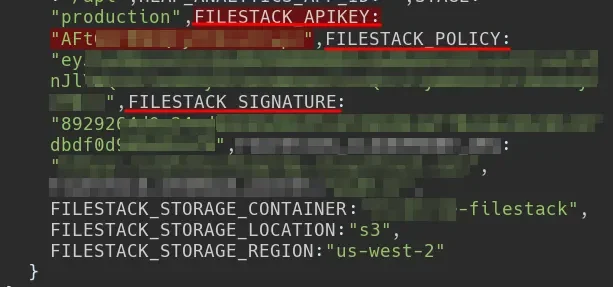
The image is captioned as the secret in the subdomain's JS file.
Exploitation
Step 1: Confirm the key belongs to the application
The Filestack documentation showed that the API can be used to manage and delete files of a website, and that it can be verified with:
curl -X POST \
 — data-binary @filename.png \
 — header “Content-Type:image/png” \
 “https://www.filestackapi.com/api/store/S3?key=MY_API_KEY”
If security measures are in place, a policy and signature are needed to upload, edit and delete files, so the request looks like:
curl -X POST \
 — data-binary @filename.png \
 — header “Content-Type:image/png” \
 “https://www.filestackapi.com/api/store/S3?key=MY_API_KEY&policy=POLICY&signature=SIGN"
This request only uploads, and it verifies that the keys belong to the application. The response is:
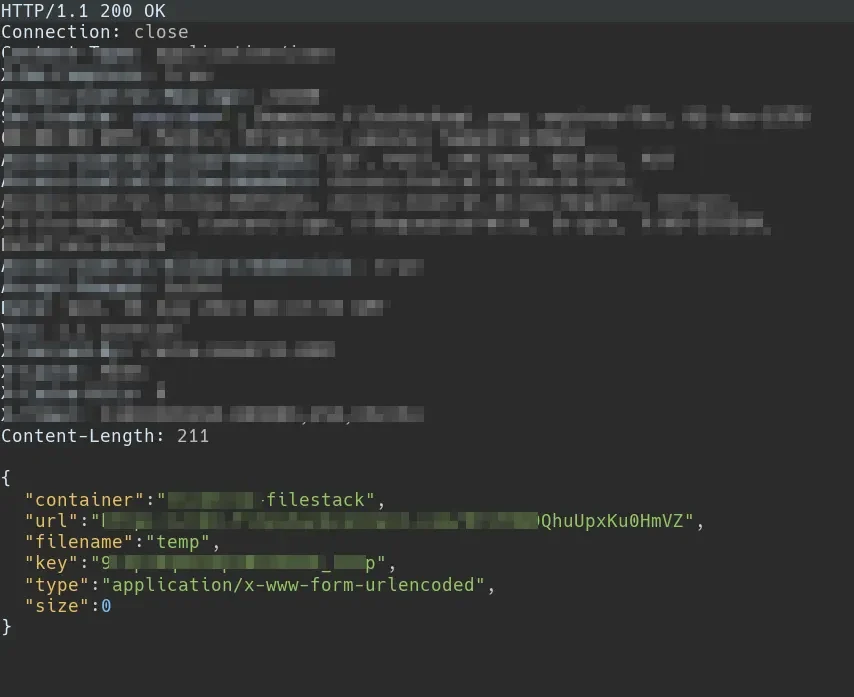
The image is captioned as the Filestack upload response.
Step 2: Understand where the files land
Uploading was possible, but deleting and viewing other users' files was the next question. The researcher went back to the /filestack-upload endpoint and saw the upload URL there:
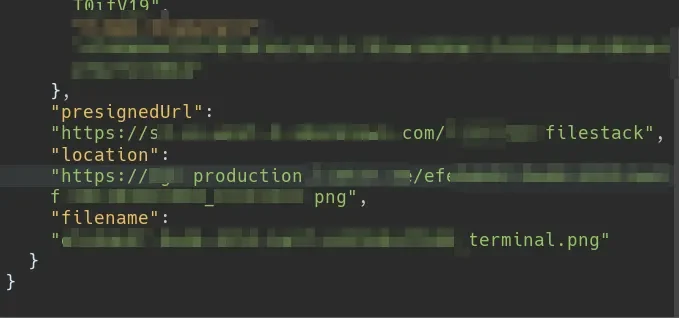
The image is captioned as the location of the file uploaded.
This raised a question: if the site using Filestack uploads files to its own S3 subdomain, how does that work? More documentation reading turned up storage aliases supported by Filestack.
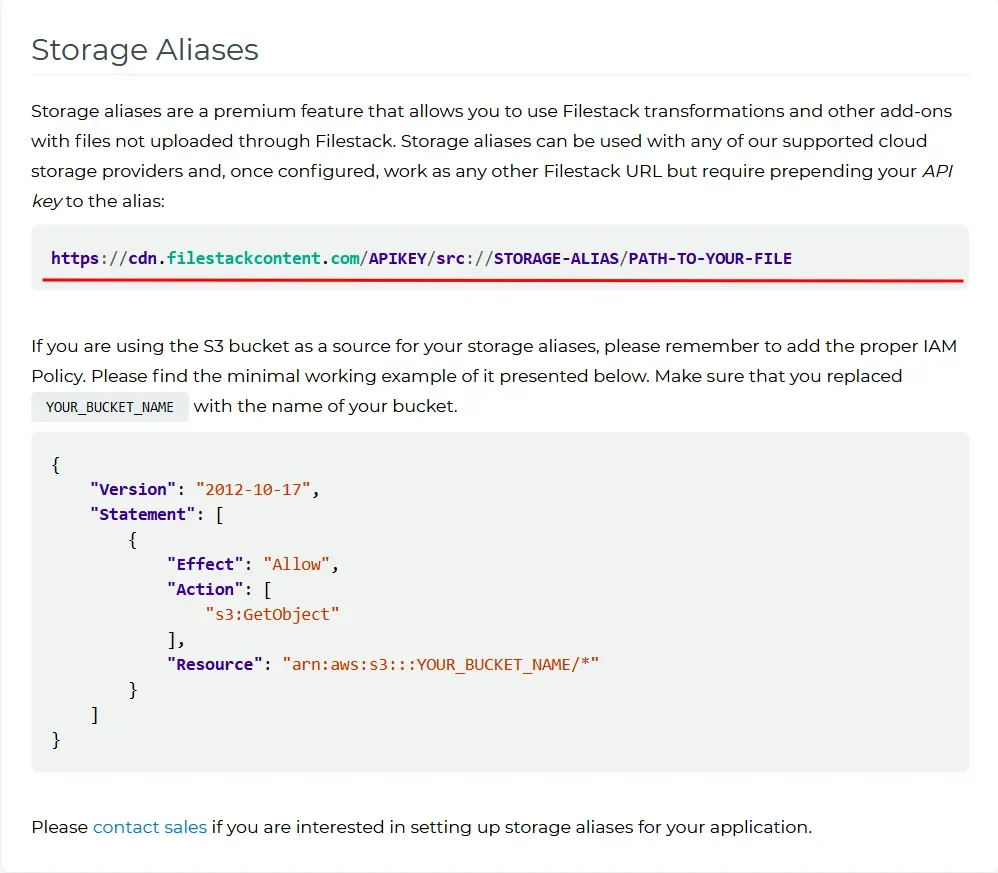
The image is captioned as the storage alias.
The supported storage aliases are Amazon S3, Rackspace, Azure Blob Storage, Dropbox and Google Cloud Storage. A policy and signature have to be included here too, because of security measures, if needed.
Step 3: Fetch files through the Filestack API
With the storage alias and the location from the upload URL, the researcher was able to fetch the files using the Filestack API. S3 was used because the file had been uploaded to S3.
Step 4: Delete and modify files
The Filestack documentation at www.filestack.com/docs/ explains that a DELETE request, with different query parameters modified as per the use case, can delete a file if it was uploaded using Filestack. The same documentation's transformation section covers editing and managing files.
Step 5: Apply it to other users' media
The researcher could fetch the URL of uploaded images in profiles and other sections of the website for any user. All of them returned a URL of the form:
https://___.production.______________//__________.png
That was the same subdomain URL that the media upload returned, as shown in the "location of file upload" image. This meant any image uploaded by a user could be deleted or modified simply by getting the URL of their image.
Step 6: Use the storage as personal cloud storage
Beyond that, any amount of data could be uploaded through the API, no matter how big, using a simple Python script (the report offers it on request by DM or email) to use the company's S3 as personal cloud storage. The researcher notes the obvious caveat of uploading encrypted zip files for privacy reasons.
Root cause
The weakness is a hardcoded API key exposed in a JavaScript file on a subdomain. The key was picked up by JSminer alongside client-side PayPal and Datadog keys, and was initially dismissed for the same reason. The key belonged to the application's Filestack integration, and the uploaded files lived under an S3 subdomain URL that was returned for every user's media. The report does not describe the policy and signature configuration in detail, so whether the key alone or the key together with a policy and signature was sufficient for the delete and modify operations is not stated.
Impact
An attacker who obtains the key can upload files, fetch files, and delete or modify any image uploaded by a user, given the URL of that image. The same access allows the company's S3 to be used as personal cloud storage without a size limit. The report does not give a bounty amount or severity rating.
Fix
Variants to test
- Run JSminer and BurpJsLinkFinder over every JS file on every subdomain and look for third-party uploader keys (Filestack, and similar services). A positive result is a key that the application's own upload endpoint actually accepts.
- Look for endpoints named after a third-party service, such as
filestack-upload, and compare the upload URL they return with the URLs served for user media. A positive result is the same storage subdomain appearing in both. - Take a media URL belonging to another user and try a DELETE request against the Filestack API with the discovered key, adjusting query parameters as per the documentation. A positive result is the file being removed.
- Try the transformation section of the documentation against another user's file URL. A positive result is the file being edited or re-rendered under your control.
- Upload a large file through the API and check whether it is accepted without a size limit. A positive result is the company's storage accepting arbitrary volumes of data.
What happened, in plain words
A security researcher was looking around a website (called only "The Redacted site" in the write-up) to see how it was built. While doing that, he found a key: a long string of characters that lets software talk to an online service. This particular key belonged to a company called Filestack, which is a service that stores and manages files for other websites.
The key had been left inside a JavaScript file, which is a file a website sends to your browser so the page can work. Anyone who opens the website can download that file and read it. Because the key was sitting there in plain sight, the researcher could use it himself. With it, he could upload files to the site's storage, look at files other users had uploaded, and even delete or change other people's images. He could also use the company's storage as if it were his own free online drive, with no limit on how much he uploaded.
This kind of mistake is called a hardcoded API key: a secret that should be kept on the server (the computer that runs the website) but has instead been written directly into something the public can see.
The background: what all these words mean
Before the steps, a few ideas from the write-up need explaining, because the rest of the story depends on them.
- Recon (short for reconnaissance) means exploring a website the way a visitor would, but with the goal of understanding how it is put together: which parts exist, what addresses they live at, and what they send back. It is like walking around a building and noting every door before trying any of them.
- A subdomain is a smaller address inside a main domain. If the main site is
example.com, thenshop.example.comandfiles.example.comare subdomains. Companies often run many of them, and each one can behave slightly differently. - An endpoint is a specific address on a server that does a specific job. Think of a large office building: the building is the website, and each endpoint is a particular desk you can walk up to and ask for something. In this story, one endpoint was named
filestack-upload. - An API (Application Programming Interface) is a way for one piece of software to ask another piece of software to do something. A useful comparison is a restaurant: you do not walk into the kitchen, you tell the waiter what you want, and the waiter brings it. The API is the waiter. Filestack's API is the waiter that takes a file from a website and puts it into storage.
- JavaScript files are text files a website sends to your browser to make the page interactive. Because the browser has to run them, they are public: anyone can open them and read them. That is why secrets should never be placed in them.
- An API key is a password-like string that identifies who is making a request to an API. It is not usually a human password; it is a code that software includes so the service knows which customer is asking. If someone else gets your key, the service cannot tell the difference between you and them.
- A policy and a signature are extra pieces of information that can be attached to a request to prove it was authorised. A policy says what the request is allowed to do, and a signature is a cryptographic stamp proving the policy came from the key's owner. The comparison is a signed permission slip: the policy is the sentence saying "this person may enter", and the signature is the official stamp that makes it believable.
- S3 is Amazon's online storage service. Websites use it to keep files such as images. A company can have its own S3 "bucket", which is like a private locker in Amazon's warehouse.
- A storage alias is Filestack's name for the different storage services it can connect to on your behalf. Instead of the website talking to S3 directly, it talks to Filestack, and Filestack talks to S3. The alias is the label that says which storage service to use.
- Burp Suite is a tool security testers use to watch and change the traffic between a browser and a website. It can be extended with plugins, and two of those plugins appear here: BurpJsLinkFinder and JSminer. Both read JavaScript files and pull out interesting things such as addresses and keys.
Setting up
The researcher was doing recon on the domain. In practice that meant collecting subdomains, watching the requests and responses the site made, and reading JavaScript files to find endpoints. He had two Burp Suite extensions switched on for JavaScript files: BurpJsLinkFinder and JSminer. The report does not describe any accounts, roles or software versions.
Why do this at all? Because a website is rarely one program. It is many pieces, some written by the company and some provided by outside services. The outside services need keys, and keys have a habit of ending up in the wrong place. Reading JavaScript is one of the cheapest ways to find them.
Finding it
On one subdomain of the site, JSminer collected API keys for three services: PayPal, Datadog and Filestack. The PayPal and Datadog keys were client-side keys, meaning they are designed to be visible in the browser and are not very sensitive on their own. The Filestack key was initially ignored for the same reason.
What made the researcher look again was an endpoint with an odd name: the site used filestack-upload to upload data, and those uploads went into an S3 portal owned by the site. The question was simple: why is the endpoint named after Filestack at all? If the site uploads straight to its own S3 storage, the name suggests something else is going on in between.
Research showed that Filestack is a file uploader API that moves files to and from different platforms such as S3, Google Drive and OneDrive. The key that JSminer had found was then examined more closely.
The image is captioned as the secret in the subdomain's JavaScript file.
At this point the researcher had a key and a reason to believe it mattered. The next step was to test whether the key actually worked against the real Filestack service.
Exploitation
Step 1: Confirm the key belongs to the application
The Filestack documentation showed that the API can be used to manage and delete files belonging to a website, and that a key can be verified with this command:
curl -X POST \
 — data-binary @filename.png \
 — header “Content-Type:image/png” \
 “https://www.filestackapi.com/api/store/S3?key=MY_API_KEY”
Line by line, in plain words:
curlis a command-line tool for sending requests to a server. It is the browser's job done by hand, without a page around it.-X POSTsays the request is a POST, which is the kind of request used when you are sending data to a server rather than just asking for a page.— data-binary @filename.pngattaches the contents of a file calledfilename.pngas the body of the request. The@means "read this from a file on disk".— header “Content-Type:image/png”tells the server what kind of file is being sent, here a PNG image.- The address at the end is the Filestack API. The part
store/S3says "store this file in S3", andkey=MY_API_KEYis where the real key would go.
If security measures are in place, a policy and signature are needed to upload, edit and delete files, so the request looks like this instead:
curl -X POST \
 — data-binary @filename.png \
 — header “Content-Type:image/png” \
 “https://www.filestackapi.com/api/store/S3?key=MY_API_KEY&policy=POLICY&signature=SIGN"
The only difference is the end of the address: &policy=POLICY&signature=SIGN adds the permission slip and its stamp. The & simply joins extra settings together in the address. The report says a policy and signature are needed if security measures are in place.
This request only uploads a file. Its real purpose is to check whether the key belongs to the application: if the upload succeeds, the key is live and tied to the site's account.
The image is captioned as the Filestack upload response.
The report says the response verifies that the keys belong to the application.
Step 2: Understand where the files land
Uploading was now possible, but the more interesting question was whether other users' files could be viewed or deleted. To find out, the researcher went back to the /filestack-upload endpoint and looked at the upload URL it returned:
The image is captioned as the location of the file uploaded.
This raised a question. If the site using Filestack uploads files to its own S3 subdomain, how does that work? The answer came from more documentation reading: Filestack supports storage aliases.
The image is captioned as the storage alias.
The supported storage aliases are Amazon S3, Rackspace, Azure Blob Storage, Dropbox and Google Cloud Storage. A policy and signature have to be included here too, because of security measures, if needed. In other words, the alias is how Filestack knows which storage service to hand the file to, and the same permission rules apply whichever service is chosen.
Step 3: Fetch files through the Filestack API
With the storage alias and the location from the upload URL, the researcher was able to fetch files using the Filestack API. S3 was used because the file had been uploaded to S3. The file's location was a URL returned by the upload.
Step 4: Delete and modify files
The Filestack documentation at www.filestack.com/docs/ explains that a DELETE request, with different query parameters adjusted to suit the case, can delete a file if it was uploaded using Filestack. A DELETE request is exactly what it sounds like: the HTTP method that asks a server to remove something. The same documentation's transformation section covers editing and managing files, which means the service can also change a file rather than just remove it.
Step 5: Apply it to other users' media
The researcher could fetch the URL of uploaded images in profiles and other sections of the website for any user. All of them returned a URL of this form:
https://___.production.______________//__________.png
That was the same subdomain URL that the media upload returned, as shown in the "location of file upload" image. This is the moment the pieces fit together: the address where a user's image lives is the same kind of address the upload endpoint hands back. So if you can get the URL of someone's image, you can point the Filestack API at that same location and act on it. Any image uploaded by a user could be deleted or modified simply by getting the URL of their image.
Step 6: Use the storage as personal cloud storage
Beyond that, any amount of data could be uploaded through the API, no matter how big, using a simple Python script (the report offers it on request by direct message or email) to use the company's S3 as personal cloud storage. The researcher notes the obvious caveat of uploading encrypted zip files for privacy reasons: if you are storing your own files in someone else's storage, you probably do not want them readable.
Root cause
The weakness is a hardcoded API key exposed in a JavaScript file on a subdomain. The key was picked up by JSminer alongside client-side PayPal and Datadog keys, and was initially dismissed for the same reason. The key belonged to the application's Filestack integration, and the uploaded files lived under an S3 subdomain URL that was returned for every user's media. The report does not describe the policy and signature configuration in detail, so whether the key alone or the key together with a policy and signature was sufficient for the delete and modify operations is not stated.
Impact
An attacker who obtains the key can upload files, fetch files, and delete or modify any image uploaded by a user, given the URL of that image. The same access allows the company's S3 to be used as personal cloud storage without a size limit.
Fix
In everyday terms: keep the key on the server, where visitors cannot read it, and make every request carry a signed permission slip that the server checks before acting.
Variants to test
- Run JSminer and BurpJsLinkFinder over every JavaScript file on every subdomain and look for third-party uploader keys (Filestack, and similar services). A positive result is a key that the application's own upload endpoint actually accepts.
- Look for endpoints named after a third-party service, such as
filestack-upload, and compare the upload URL they return with the URLs served for user media. A positive result is the same storage subdomain appearing in both. - Take a media URL belonging to another user and try a DELETE request against the Filestack API with the discovered key, adjusting query parameters as per the documentation. A positive result is the file being removed.
- Try the transformation section of the documentation against another user's file URL. A positive result is the file being edited or re-rendered under your control.
- Upload a large file through the API and check whether it is accepted without a size limit. A positive result is the company's storage accepting arbitrary volumes of data.
Glossary
- API: a way for one piece of software to ask another to do something, like a waiter taking your order to the kitchen.
- API key: a password-like string that identifies which customer is making an API request.
- Burp Suite: a tool for watching and changing traffic between a browser and a website.
- BurpJsLinkFinder: a Burp Suite extension that reads JavaScript files and extracts links and endpoints.
- Client-side key: a key that is meant to be visible in the browser and is therefore not very sensitive on its own.
- curl: a command-line tool for sending requests to a server.
- DELETE request: an HTTP request that asks a server to remove something.
- Endpoint: a specific address on a server that performs a specific job.
- Filestack: a third-party service that stores, transforms and manages files for websites, connecting to services such as S3, Google Drive and OneDrive.
- Hardcoded API key: a secret written directly into code or a file that the public can read, instead of being kept on the server.
- JavaScript file: a text file a website sends to the browser to make the page interactive; anyone can read it.
- JSminer: a Burp Suite extension that scans JavaScript files for useful information such as endpoints and keys.
- Policy: a statement attached to a request saying what that request is allowed to do.
- POST request: an HTTP request used to send data to a server.
- Recon: exploring a website to understand how it is built, before trying anything.
- S3: Amazon's online storage service, used by websites to keep files such as images.
- Signature: a cryptographic stamp proving that a policy came from the key's owner.
- Storage alias: Filestack's label for the storage service it should use on your behalf, such as Amazon S3, Rackspace, Azure Blob Storage, Dropbox or Google Cloud Storage.
- Subdomain: a smaller address inside a main domain, such as
files.example.cominsideexample.com. - Transformation: Filestack's feature for editing and re-rendering files through its API.

