How I was able to Regain access to account deleted by Admin leading to $$$
A deleted user account could still be accessed by intercepting the login response and replacing it with a previously captured successful login response. This allowed the attacker to regain access to an account that an admin had deleted.

Hello hackers, I hope you are doing well. Today I’m gonna explain about one of my finding, in which how I was able to access the account that was deleted by Admin.
The full write-up lives on its author's site
It belongs to its author, so we link to it rather than copy it. The other two tabs are our own rewrites, checked against it.
Context
The target was a private Bugcrowd program, so the researcher refers to it throughout as example.com. The application had a large number of features, and the one that mattered here was user invitation: an administrator could invite a user by email from the endpoint example.com/dashboard/setup/user-accounts. The invited person receives an email, follows the invitation link, sets a username and password, and then logs in at example.com/dashboard/login. The administrator can later delete that user's access from the application.
The researcher was able to log in again as an account the administrator had deleted by replacing the failed login response with an earlier successful one.
Setup
The researcher worked with two roles on the same application: an administrator account with access to the dashboard and the user-accounts setup page, and a normal invited user. The invitation was sent to an address the researcher controlled, [redacted]. The tooling was an intercepting proxy, used to capture and modify the login request and its response, plus a text editor (Sublime) to keep a copy of a valid login response. No versions are given in the report.
The precondition for the attack is that the attacker must have obtained a valid login response for the account at some point before the account was deleted, which in this case means having completed the invitation and logged in successfully once.
Finding it
The researcher started from the invitation endpoint and simply tried it, sending an invitation to their own address. The request returned 201 created, which confirmed the invitation flow worked as expected and gave a controlled account to experiment with. After accepting the invitation, setting a password and logging in at example.com/dashboard/login, the login produced a response that the researcher copied and kept. The administrator then deleted the user, and a fresh login with the same credentials failed with a Login failed error, as it should.
The interesting question was what else could be done with the login exchange, given that a valid response from before the deletion was still in hand. That is what led to intercepting the login request and its response.
Exploitation
Step 1: Invite a user from the admin side
On the admin side, the researcher went to example.com/dashboard/setup/user-accounts and entered the email address to send the invitation. The response was 201 created.
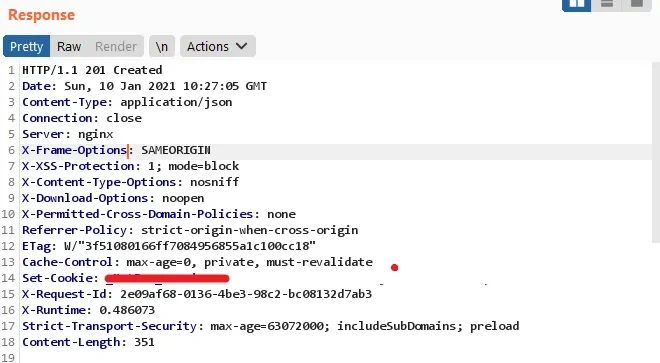
The screenshot shows the invitation request and the 201 response, confirming the invited address was accepted by the application.
Step 2: Accept the invitation and log in
The researcher opened the inbox, accepted the invitation, created a username and password, then visited example.com/dashboard/login and entered those credentials. The login request and its response were generated.
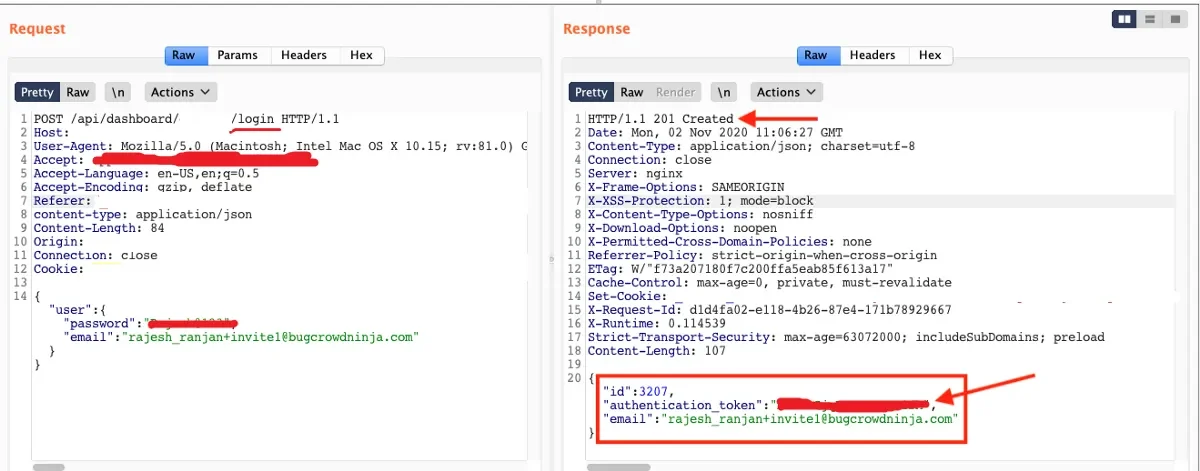
The screenshot shows the login request and the successful response produced at this stage.
Step 3: Keep a copy of the valid response
The researcher copied that response and pasted it into Sublime. This saved response is the artefact the whole attack depends on: it is a valid, successful login response for the account, captured while the account still existed.
Step 4: Delete the user from the admin side
The researcher returned to the admin dashboard and deleted the user's access from the application.
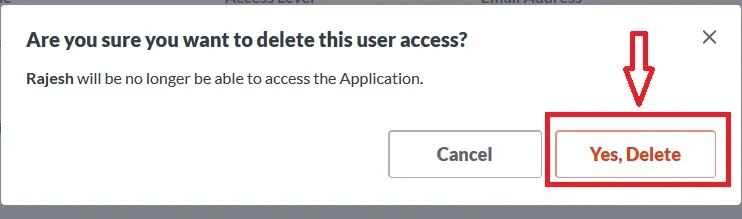
The screenshot shows the deletion of the user in the admin dashboard.
Step 5: Confirm the account is gone
Back at example.com/dashboard/login, logging in with the same old credentials produced the Login failed error, as expected.
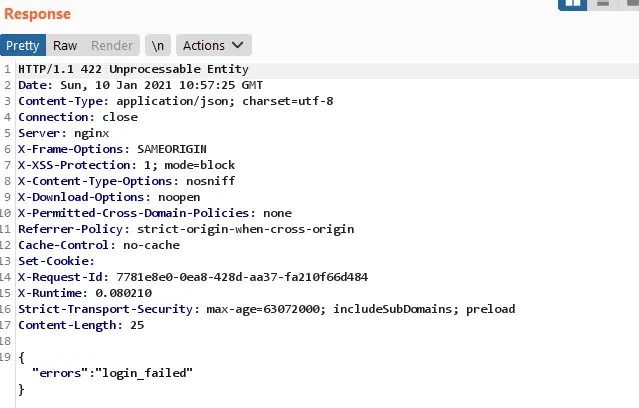
The screenshot shows the failed login after deletion, which establishes that the server does reject the deleted account under normal conditions.
Step 6: Intercept the login request and response
The researcher turned on interception, captured the login request, and intercepted the response.
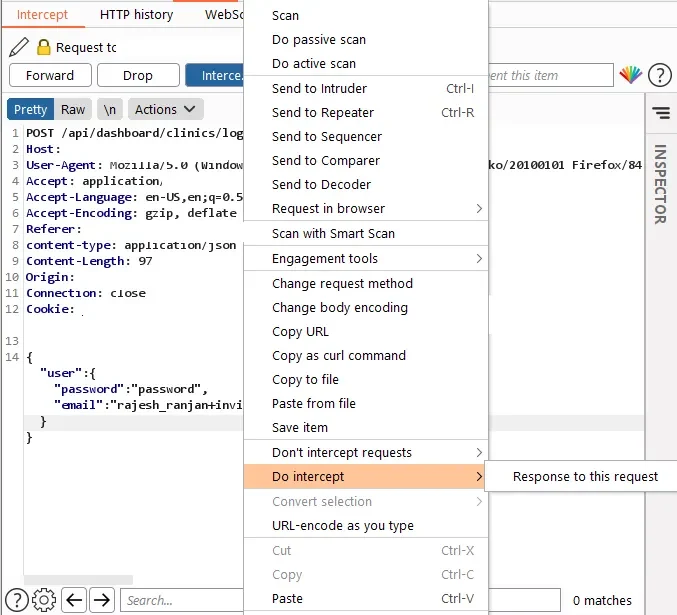
The screenshot shows the intercepted login request and response in the proxy.
Step 7: Replace the response with the saved valid one
The intercepted response was modified from the failed one to the valid response captured in step 3.
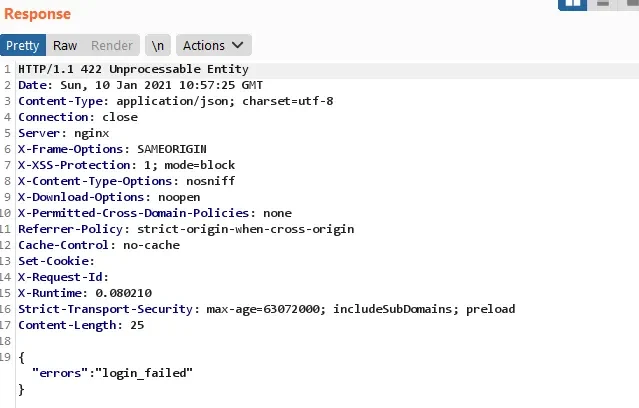
The screenshot shows the original response before modification.
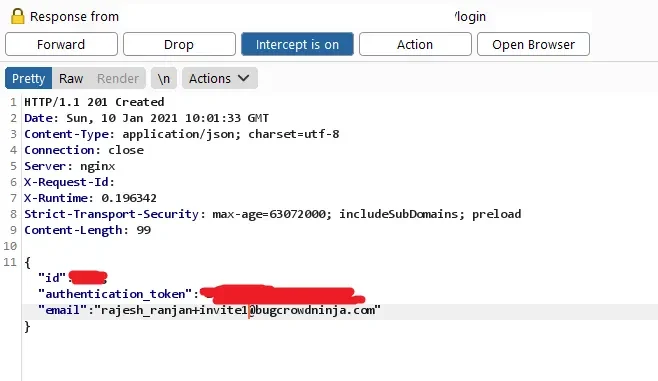
The screenshot shows the modified response, the one taken from the earlier successful login.
Step 8: Forward and observe
The request was forwarded, and the researcher was logged in with that account. The application accepted the replayed response and granted a session for a user the administrator had deleted.
The researcher notes where the valid response came from, in case it is unclear: it is generated at the moment the invitation is accepted, a password is created, and the credentials are entered at example.com/dashboard/login. That step produces the valid response that is later replayed.
Steps to reproduce
Admin side
- Go to example.com/dashboard/setup/user-accounts, and enter the user email to send the invitation
User side
- check inbox, open the invitation link, and then set the password for your account
- now try to login on to example.com/dashboard with the credentials you set in step 1
- Now copy the response, and keep it on Notepad
Admin side
- comeback to admin side, and delete that invited user
user side
- try to login again with the credentials, you'll get login failed error
- intercept the response, and modify it with the earlier one (a valid one), and you'll be logged in successfully
Root cause
The report does not explain why the modified response was accepted. The server refused the deleted account on a normal login, but after the response was replaced with the earlier successful one the researcher was logged in. In other words, the response is treated as authoritative by the client-side flow, and the deletion of the user is not enforced at the point where the session is created.
The report does not describe the server-side implementation, so the exact mechanism is likely a client-side or response-driven login step that does not re-validate the account against the backend after the response is received.
Impact
An attacker who has ever held valid credentials for an account, and who kept a copy of a successful login response, can regain access to that account after an administrator has deleted it. In the reported case this was the researcher's own invited account, used to demonstrate the flaw. In this case, deleting the user did not stop the researcher logging in again with the saved response.
Fix
The fix should be on the server: the login flow must validate the account's current state on the backend at the moment the session is created, and must not accept a client-supplied or replayed response as proof of authentication. Deleting a user should invalidate any outstanding authentication material for that account, and sessions should be tied to a server-side record that is checked on each login.
Variants to test
- Replay a successful login response after account deletion. Invite a user, log in, save the response, delete the user, then replay the saved response during a new login. A positive result is being logged in as the deleted user.
- Replay after a password change or reset. Save a valid login response, change the account password, then replay the response. A positive result is a session established with the old response despite the credential change.
- Replay after account suspension or deactivation. If the application supports suspending rather than deleting users, save a valid response, suspend the account, and replay. A positive result is access being restored to a suspended account.
- Modify other fields in the login response. Beyond swapping the whole response, try altering individual fields in the intercepted response (for example status or user identifiers) and observe whether the client accepts them. A positive result is a session or elevated state granted from a tampered response.
- Test the same pattern on other response-driven flows. Invitation acceptance, password reset completion and role assignment are candidates where a saved valid response might be replayed after the underlying state has changed. A positive result is any flow completing successfully after the server-side state should have blocked it.
Timeline
| Event | Date |
|---|---|
| Reported | 07 Nov 2020 |
| Triaged | 09 Nov 2020 |
| Bounty received | 14 Nov 2020 |
The researcher was rewarded $$$ for the submission within a week of reporting.
What happened, in plain words
A website let an administrator invite people by email and later delete them. The researcher found that if you kept a copy of the successful login reply from before the deletion, you could swap it back in during a later login and get in again, even though the administrator had removed the account. Swapping the failed login reply for an earlier successful one let the researcher log in again. The researcher reported it to the bug bounty program, and it was rewarded.
This article walks through the whole thing slowly, assuming you have never done security testing before. You only need to be comfortable using a browser and a computer.
Some background first
What a bug bounty program is
A company puts its website in front of independent testers and says: if you find a security problem, tell us, and we may pay you. A private program means only invited testers can take part. This one was private, so the researcher hides the real site name and calls it example.com throughout. Everything you see below with that name stands in for the real address.
What an API and an endpoint are
When you click a button on a website, your browser often sends a small message to the company's computer (the server) and gets a message back. That exchange is what people call an API call. Think of a restaurant: you do not walk into the kitchen, you tell the waiter what you want, and the waiter brings a plate back. The browser is you, the server is the kitchen, and the message is the order.
The address the message is sent to is called an endpoint. In this report the important endpoints are:
- example.com/dashboard/setup/user-accounts: the admin page where invitations are sent.
- example.com/dashboard/login: the page where a user signs in.
What a request and a response are
Every one of those messages has two halves. The request is what your browser sends: which page you want, what you typed, and so on. The response is what the server sends back: whether it worked, plus any data. A response carries a status code, a number that says how it went. You will see two in this report:
- 201 created: the server says a new thing was successfully made (here, an invitation).
- A failed login, which the report describes with the message Login failed.
What a cookie or session is
Websites need to remember that you are logged in as you move from page to page. They do this with a session: after you log in, the server gives your browser a small piece of proof (often stored in a cookie), and the browser shows it on every later request. Think of a wristband at an event: you show your ticket once at the door, get the wristband, and after that the staff just look at your wrist. If someone could copy your wristband, they could walk around as you.
What an intercepting proxy is
An intercepting proxy is a tool that sits between your browser and the server. Instead of your message going straight out, it stops in the proxy, where you can read it, change it, and then let it continue. It works in both directions: you can also catch the server's reply before your browser sees it and edit that. The researcher used one here to catch the login request and its response.
What the vulnerability class means
Two labels are used for this bug.
- A logic flaw is a mistake in the rules of the application rather than in its code syntax. The site follows its own instructions, but the instructions are wrong. Here, a login that should have failed succeeded after the reply was replaced.
- Broken authorisation means the site does not properly check whether you are allowed to do something. Here, a deleted account could still be logged into by replaying an old reply.
Put together: a deleted account could be logged into again by whoever had the old credentials and an old successful reply.
What you need before starting
The researcher used two roles on the same site:
- An administrator account, which can reach the dashboard and the user-accounts setup page.
- A normal invited user account.
The invitation was sent to an email address the researcher controlled, [redacted]. The tools were an intercepting proxy (to catch and edit the login exchange) and a text editor, Sublime, to keep a copy of a valid login response. The report gives no software versions.
The one condition for the attack: the attacker must have got a valid login response for the account at some point before it was deleted. In practice that means having accepted the invitation and logged in successfully once.
Finding it
The researcher started at the invitation endpoint and simply tried it, sending an invitation to their own address. The request came back 201 created, which showed the invitation flow worked and gave a controlled account to experiment with. After accepting the invitation, setting a password and logging in at example.com/dashboard/login, the login produced a response that the researcher copied and kept. The administrator then deleted the user, and a fresh login with the same credentials failed with a Login failed error, exactly as it should.
The interesting question was: what else can be done with the login exchange, now that a valid response from before the deletion is still in hand? That is what led to intercepting the login request and its response.
Exploitation, step by step
Step 1: Invite a user from the admin side
On the admin side, the researcher went to example.com/dashboard/setup/user-accounts and entered the email address to send the invitation. The response was 201 created.
The screenshot shows the invitation request and the 201 response, confirming the invited address was accepted by the application.
Why this step: you need an account you control, so that you can log in, keep a valid response, and later watch what happens when it is deleted.
Step 2: Accept the invitation and log in
The researcher opened the inbox, accepted the invitation, created a username and password, then visited example.com/dashboard/login and entered those credentials. The login request and its response were generated.
The screenshot shows the login request and the successful response produced at this stage.
Why this step: this is the moment a valid, successful login response is created. Everything later depends on having a copy of it.
Step 3: Keep a copy of the valid response
The researcher copied that response and pasted it into Sublime. This saved response is the artefact the whole attack depends on: it is a valid, successful login response for the account, captured while the account still existed.
Why this step: after deletion the login failed, so the saved successful response was the one replayed later.
Step 4: Delete the user from the admin side
The researcher returned to the admin dashboard and deleted the user's access from the application.
The screenshot shows the deletion of the user in the admin dashboard.
Why this step: the point of the test is to see whether deleting a user really cuts off access. The administrator is the person who is supposed to be able to revoke it.
Step 5: Confirm the account is gone
Back at example.com/dashboard/login, logging in with the same old credentials produced the Login failed error, as expected.
The screenshot shows the failed login after deletion, which establishes that the server does reject the deleted account under normal conditions.
Why this step: this proves the deletion actually took effect. Without it, a later success would prove nothing, because the account might never have been removed.
Step 6: Intercept the login request and response
The researcher turned on interception, captured the login request, and intercepted the response.
The screenshot shows the intercepted login request and response in the proxy.
Why this step: the proxy is what lets you hold the server's reply in your hands before the browser acts on it. That pause is where the swap happens.
Step 7: Replace the response with the saved valid one
The intercepted response was modified from the failed one to the valid response captured in step 3.
The screenshot shows the original response before modification.
The screenshot shows the modified response, the one taken from the earlier successful login.
Why this step: the failed reply was replaced with the earlier successful one before it was forwarded.
Step 8: Forward and observe
The request was forwarded, and the researcher was logged in with that account. The application accepted the replayed response and granted a session for a user the administrator had deleted.
Why this matters: the deletion was supposed to end access, yet the researcher got back in with the saved response.
The researcher notes where the valid response came from, in case it is unclear: it is generated at the moment the invitation is accepted, a password is created, and the credentials are entered at example.com/dashboard/login. That step produces the valid response that is later replayed.
Steps to reproduce
Admin side
- Go to example.com/dashboard/setup/user-accounts, and enter the user email to send the invitation
User side
- check inbox, open the invitation link, and then set the password for your account
- now try to login on to example.com/dashboard with the credentials you set in step 1
- Now copy the response, and keep it on Notepad
Admin side
- comeback to admin side, and delete that invited user
user side
- try to login again with the credentials, you'll get login failed error
- intercept the response, and modify it with the earlier one (a valid one), and you'll be logged in successfully
Why it worked
The report does not explain why the modified response was accepted. The server refused the deleted account on a normal login, but after the response was replaced with the earlier successful one the researcher was logged in. In other words, the response is treated as authoritative by the client-side flow, and the deletion of the user is not enforced at the point where the session is created.
The report does not describe the server-side implementation, so the exact mechanism is likely a client-side or response-driven login step that does not re-validate the account against the backend after the response is received.
What an attacker could do with it
An attacker who has ever held valid credentials for an account, and who kept a copy of a successful login response, can regain access to that account after an administrator has deleted it. In the reported case this was the researcher's own invited account, used to demonstrate the flaw. In this case, deleting the user did not stop the researcher logging in again with the saved response.
How it should be fixed
The fix should be on the server: the login flow must validate the account's current state on the backend at the moment the session is created, and must not accept a client-supplied or replayed response as proof of authentication. Deleting a user should invalidate any outstanding authentication material for that account, and sessions should be tied to a server-side record that is checked on each login.
Other places to try the same idea
- Replay a successful login response after account deletion. Invite a user, log in, save the response, delete the user, then replay the saved response during a new login. A positive result is being logged in as the deleted user.
- Replay after a password change or reset. Save a valid login response, change the account password, then replay the response. A positive result is a session established with the old response despite the credential change.
- Replay after account suspension or deactivation. If the application supports suspending rather than deleting users, save a valid response, suspend the account, and replay. A positive result is access being restored to a suspended account.
- Modify other fields in the login response. Beyond swapping the whole response, try altering individual fields in the intercepted response (for example status or user identifiers) and observe whether the client accepts them. A positive result is a session or elevated state granted from a tampered response.
- Test the same pattern on other response-driven flows. Invitation acceptance, password reset completion and role assignment are candidates where a saved valid response might be replayed after the underlying state has changed. A positive result is any flow completing successfully after the server-side state should have blocked it.
Timeline
| Event | Date |
|---|---|
| Reported | 07 Nov 2020 |
| Triaged | 09 Nov 2020 |
| Bounty received | 14 Nov 2020 |
The researcher was rewarded $$$ for the submission within a week of reporting.
Glossary
- API: the set of messages a website's browser code and its server use to talk to each other.
- Endpoint: the specific address a message is sent to, such as a login page or an invitation page.
- Request: the message your browser sends to the server.
- Response: the message the server sends back.
- Status code: a number in the response saying how the request went, for example 201 for created.
- 201 created: a status code meaning the server successfully made something new, such as an invitation.
- Session: the server's memory that you are logged in, kept alive by proof your browser sends on each request.
- Cookie: a small piece of data your browser stores for a site and sends back with later requests, often used to carry session proof.
- Intercepting proxy: a tool placed between browser and server that lets you read, pause and edit requests and responses.
- Interception: the proxy pausing a message so you can inspect or change it before it continues.
- Replay: sending again something that was valid earlier, such as an old successful login response.
- Logic flaw: a mistake in the application's rules rather than in its code syntax.
- Broken authorisation: a failure to properly check whether someone is allowed to do something.
- Administrator: a user with extra rights, here the one who can invite and delete users.
- Bug bounty program: a scheme where a company pays independent testers for reporting security problems.
- Private program: a bug bounty program open only to invited testers.
- Triaged: the stage where the program confirms a report is valid and worth working on.
- Bounty: the payment a program gives for a valid report.
- Root cause: the underlying reason a bug is possible.
- Sublime: a text editor, used here to keep a copy of a response.
- Notepad: a simple text editor, mentioned in the reproduction steps for the same purpose.

