How One Identity-Binding Flaw Broke Multiple Response Controls on Google Forms
Google Forms trusted a client-supplied email address in the submission request instead of binding the response to the signed-in account, so a responder could record answers under someone else's identity. This let an attacker bypass verified email collection, the one-response limit, restricted responders, disabled response editing and the response limit, and a later patch could be bypassed with a different parameter representation.
 Published on medium.com
Bug Bounty
The full write-up lives on its author's site
It belongs to its author, so we link to it rather than copy it. The other two tabs are our own rewrites, checked against it.
Context
Google Forms is the survey and data-collection product in Google Workspace. A form owner can configure several response controls, and this write-up is about five of them:
- Verified email collection, which records the respondent's email address with the response.
- Limit to 1 response, which is meant to allow one response per account.
- Restricted responders, an allowlist of accounts that may respond.
- Response editing disabled, which prevents a respondent from changing a submitted response.
- Response limit, a cap on the total number of responses.
All five rest on the same assumption: the identity recorded with a response belongs to the authenticated Google Account that submitted it. The researcher found that this binding could be controlled from the client, and that breaking it broke all five controls at once.
Setup
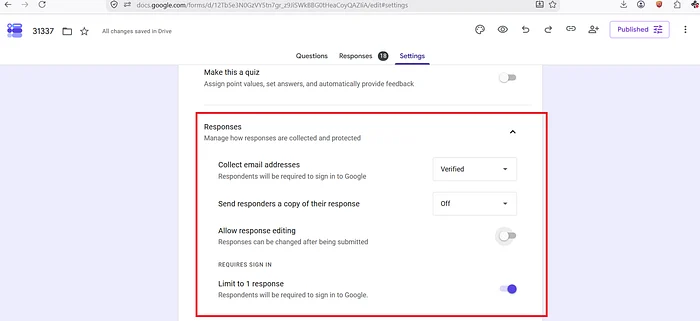
The work started on the researcher's own form, built for an internal phishing-simulation exercise. The form was configured with:
- Limit to 1 response enabled
- Verified Email Collection enabled
- Allow response editing disabled
Requests were intercepted and replayed with a proxy. The researcher used several accounts: an attacker account, a second account (account B) for the restricted-responder tests, and identities such as [redacted], [redacted], [redacted], [redacted] and [redacted] as injected values. One duplicate-response test was repeated on a different form with the same configuration, as noted in the report.
Finding it
The entry point was the request triggered by "Edit your response". On the surface it looked ordinary, but the authenticated user's email appeared twice: once in the emailAddress parameter and again inside the URL-encoded partialResponse JSON. Two client-controlled copies of the same identity value in one request was the anomaly worth following.
entry.560921738=test&entry.1135860221=test&emailAddress=myemail%40gmail.com&fvv=1&partialResponse=%5B%5B%5Bnull%2C1135860221%2C%5B%22test%22%5D%2C0%5D%2C%5Bnull%2C560921738%2C%5B%22test%22%5D%2C0%5D%5D%2Cnull%2C%226996815082697013928%22%2Cnull%2C%[redacted]%22%2C%221789202100465%22%2C%22myemail%40gmail.com%22%2C0%5D&pageHistory=0&[redacted]&tag=[redacted]%3D%3D&fbzx=6996815082697013928&submissionTimestamp=1789202111333
The emailAddress parameter carries the identity in plain form. The partialResponse value is a URL-encoded JSON array; once decoded, its element at index 6 is the same email address. The request also carries the form's answer entries (entry.560921738, entry.1135860221), a token, a tag, fbzx and submissionTimestamp.
Exploitation
Step 1: change both identity values
The researcher changed both copies to an unrelated email address and forwarded the request.
entry.560921738=test&entry.1135860221=test&emailAddress=victim%40gmail.com&fvv=1&partialResponse=%5B%5B%5Bnull%2C1135860221%2C%5B%22test%22%5D%2C0%5D%2C%5Bnull%2C560921738%2C%5B%22test%22%5D%2C0%5D%5D%2Cnull%2C%226996815082697013928%22%2Cnull%2C%[redacted]%22%2C%221789202100465%22%2C%22victim%40gmail.com%22%2C0%5D&pageHistory=0&[redacted]&tag=[redacted]%3D%3D&fbzx=6996815082697013928&submissionTimestamp=1789202111333
Forms accepted it and recorded the response under the new identity, with no re-verification against the signed-in account.

Step 2: check whether editing has to be enabled
The obvious next question was whether this only worked when response editing was enabled. The researcher disabled editing and checked a first-time submission. The partialResponse was nearly empty. The fully populated version, including the embedded email, only appeared after editing an existing response.

Step 3: force the populated array through error recovery
After several failed attempts, the researcher tried a different angle: what happens when a submission is rejected? A first-time submission was sent with the captured emailAddress and a required answer removed. Forms rejected it for the missing required answer and reloaded the form. When the researcher submitted again, the request now contained the fully populated partialResponse array. Forms had generated it through its own error-recovery flow, even though this was still a first submission and editing was disabled.

This is the key precondition for everything that follows: the populated partialResponse, with the identity inside it, can be obtained on a first submission without ever using the edit feature.
Step 4: bypass "Limit to 1 response"
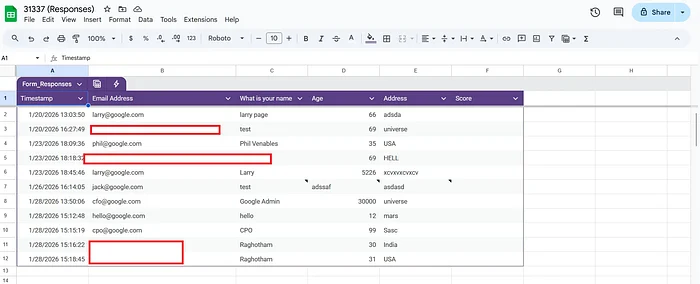
With Limit to 1 response enabled, the researcher used an account that already had a genuine response on record. Forms accepted the new submission as a separate entry, [redacted](1), instead of rejecting or merging it. The spreadsheet showed both responses under the same identity.
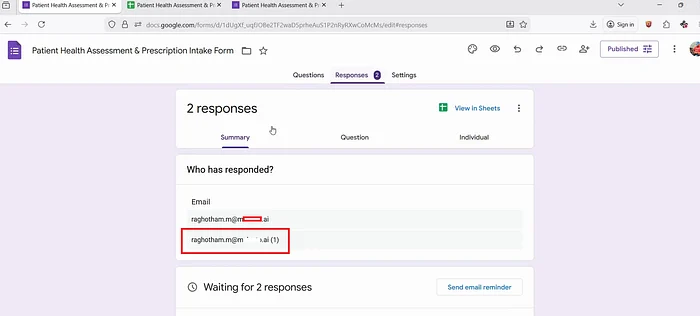
In short, "one response per account" could be bypassed because Forms never properly verified the identity before running the duplicate check. The report notes that this test used a different Google Form with the same configuration enabled.
Step 5: edit a response while editing is disabled
Next the researcher tested whether disabled editing could be bypassed the same way. Using the duplicate [redacted](1) entry, the populated partialResponse was regenerated, both emailAddress and partialResponse[6] were set to the stored identity, and the request was resubmitted. Forms accepted it with "Response successfully edited", despite editing being disabled, and the victim's existing response was modified in the linked spreadsheet.

This suggested the restoration flow relied on literal identity matching rather than the authenticated session, allowing a known identity string to modify another user's response.
Step 6: bypass restricted responders
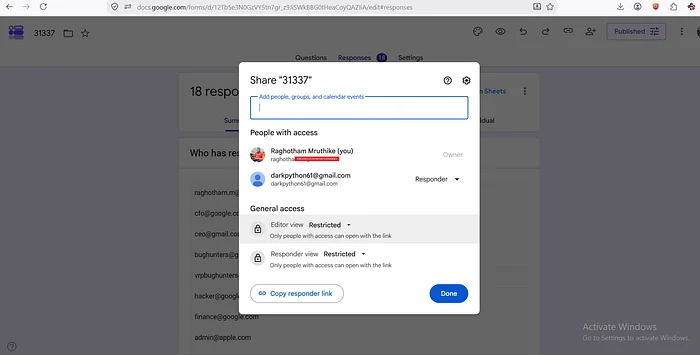
With the form locked to only the researcher's account, emailAddress and partialResponse[6] were changed to [redacted] or an address from another domain. Forms still accepted the submission and recorded it under that identity. The allowlist appeared to be checked when the form loaded, but not again when the response was saved, so an identity that could never access the form could still become the recorded respondent.

Step 7: bypass the patched validation
Google patched the original issue by validating the identity values in the request. After the patch, modifying either value or both values caused the submission to be rejected with HTTP 400. The validation still appeared to depend on the identity values supplied in the request rather than binding the respondent identity directly to the authenticated SSO session.
The researcher then tried a different representation of the same parameter. Instead of sending:
&emailAddress=[redacted]
the request used:
%22emailAddress=[redacted]
The email was no longer sent as a normal &emailAddress= parameter. This changed how the request was parsed while still allowing the identity value to reach the underlying flow. The patched validation rejected the normal modified values, but this alternate representation bypassed that specific validation path.

The request was accepted and the response was again persisted under the injected identity, with the authenticated session unchanged. The fix addressed the specific mismatch pattern used to report the original bug, not the absence of session-derived identity validation underneath it.
Root cause
A first-time submission contains an emailAddress parameter, while partialResponse initially contains only minimal data. After an edit, or after triggering the required-question rejection flow, partialResponse becomes fully populated and contains the responder's email again. The same identity therefore exists in two independently client-controlled fields:
emailAddress = [redacted][6] = [redacted]
Neither value was properly bound to the authenticated SSO session. The server trusted a client-supplied identity instead of deriving the responder identity from the session when the response was written. The required invariant is simple:
Authenticated SSO identity =Verified response identity =Authorized responder =Response owner
Because that invariant was not enforced, the duplicate check, the allowlist check and the edit-authorisation check all operated on attacker-controlled data. The allowlist was checked at form load but not at save time, and the restoration flow matched the identity string literally rather than against the session.
Impact
Five response controls were affected, all through the same identity binding:
- Verified email collection: a response could be recorded under an identity different from the signed-in account.
- Limit to 1 response: the same authenticated session could submit again under a different identity, bypassing the one-response restriction.
- Restricted responders: an identity outside the allowed responder list could be recorded as the respondent.
- Response editing disabled: an existing response could be modified even when editing was disabled, and the linked spreadsheet was updated as well.
- Response limit: the reconstructed submission path could accept additional responses beyond the configured limit.
The report does not describe any impact beyond the form and its linked spreadsheet.
Fix
Google's first fix validated the identity values in the request, rejecting mismatches with HTTP 400. That was bypassed by the alternate %22emailAddress= representation, which reached the same underlying flow while avoiding the validation path.
A durable fix would enforce the authenticated session identity on every path that creates or modifies a response: normal submission, editing and restoration. The identity should be derived from the session rather than accepted from the client.
Timeline
| Date | Event |
|---|---|
| Dec 9th | Issue reported to the vendor |
| March 19th | Panel classifies under Abuse-VRP; reward: $XXXX |
| April 19th | Fixed |
| April 19th | Fix bypassed |
| June 11 | Panel reward for bypass: $XXXX |
Variants to test
- Duplicate identity fields in one request. Look for any request that carries the same identity in a query parameter and inside a JSON or form-encoded blob. A positive result is that changing both copies changes the recorded owner without a session change.
- Error-recovery flows. Submit a request missing a required field and inspect the follow-up request. A positive result is a server-generated payload that is more fully populated than a normal first submission, including identity fields the client did not send.
- Allowlist checked at load only. Load a restricted form with an allowed account, then replay the save request with a disallowed identity. A positive result is a saved response attributed to an identity that could not open the form.
- Edit authorisation by literal identity match. Take a known identity string from a duplicate or restored response and replay an edit with it. A positive result is a successful edit of another account's response while editing is disabled.
- Parser differentials on the identity parameter. Try alternate encodings of the parameter name, such as a leading
%22, a different separator, or duplicated keys. A positive result is that the patched validation rejects the plain form but accepts the alternate representation and still records the injected identity.
What happened, in plain words
Google Forms is the part of Google Workspace that lets anyone build a survey or a sign-up sheet and collect answers. When you create a form, you can switch on a few rules about who may answer and how often. This write-up is about five of those rules, and about a single mistake that made all five stop working at the same time.
The five rules are:
- Verified email collection: the form records the email address of the person who answered, so the owner knows who said what.
- Limit to 1 response: each Google Account may answer only once.
- Restricted responders: only accounts on an approved list may answer at all.
- Response editing disabled: once you submit, you cannot go back and change your answer.
- Response limit: the form stops accepting answers after a set total number.
All five quietly assume the same thing: the email address written next to an answer really belongs to the Google Account that was signed in when the answer was sent. The researcher found that this link could be broken from the browser side. When the link breaks, every rule that depends on it breaks too.
Before going further, two everyday comparisons help.
A web request is the message your browser sends to a website when you click something, and the message the site sends back. Think of it as a filled-in paper form you hand over at a counter: the site reads the boxes and acts on them.
A proxy is a tool that sits between your browser and the website and lets you look at, pause and change those messages before they are delivered. Think of it as intercepting the paper form between your hand and the clerk, reading it, crossing something out and writing something else, then handing it over. The clerk cannot tell the difference.
Setting up the test
The work started on the researcher's own form, built for an internal exercise that simulates a phishing campaign. The form was set up with:
- Limit to 1 response switched on
- Verified Email Collection switched on
- Allow response editing switched off
Requests were captured and replayed with a proxy. Several accounts were used: an attacker account, a second account (called account B) for the restricted-responder tests, and made-up identities such as [redacted], [redacted], [redacted], [redacted] and [redacted] as the values to inject. One duplicate-response test was repeated on a different form with the same settings, and the report says so where it happens.
Finding it
The way in was the request that fires when you click "Edit your response". On the surface it looked ordinary. But the signed-in user's email address appeared twice: once in a field called emailAddress, and again inside a longer field called partialResponse.
partialResponse is a chunk of data in JSON format, which is just a way of writing structured information as text, a bit like a very strict shopping list with brackets. It is URL-encoded, meaning special characters are replaced by codes such as %22 for a double quote and %40 for the @ sign, so the whole thing can travel safely inside a web address. Once you decode it, the element at position 6 (counting from 0) is the same email address again.
Two copies of the same identity value, both coming from the browser, in one request: that was the anomaly worth following.
entry.560921738=test&entry.1135860221=test&emailAddress=myemail%40gmail.com&fvv=1&partialResponse=%5B%5B%5Bnull%2C1135860221%2C%5B%22test%22%5D%2C0%5D%2C%5Bnull%2C560921738%2C%5B%22test%22%5D%2C0%5D%5D%2Cnull%2C%226996815082697013928%22%2Cnull%2C%[redacted]%22%2C%221789202100465%22%2C%22myemail%40gmail.com%22%2C0%5D&pageHistory=0&[redacted]&tag=[redacted]%3D%3D&fbzx=6996815082697013928&submissionTimestamp=1789202111333
Line by line, in plain words:
entry.560921738=testandentry.1135860221=test: these are the answers to the form's questions. Each question has a number, andtestis what was typed into it.emailAddress=myemail%40gmail.com: the identity in plain form.%40is simply the@sign, encoded.fvv=1: a short flag that travels with the request.partialResponse=...: the long encoded JSON blob. Decoded, it holds the answers again plus the email address at position 6.pageHistory=0: another value sent with the request.token=...: a token is a string the site hands your browser so it can recognise the request later. Think of a cloakroom ticket: it proves the request belongs to a session the site started.tag=...: another value generated by the page and sent back with the request.fbzx=6996815082697013928: another value sent with the request.submissionTimestamp=1789202111333: when the submission was made, as a number.
Trying it
Step 1: change both identity values
The researcher changed both copies to an unrelated email address and forwarded the request.
entry.560921738=test&entry.1135860221=test&emailAddress=victim%40gmail.com&fvv=1&partialResponse=%5B%5B%5Bnull%2C1135860221%2C%5B%22test%22%5D%2C0%5D%2C%5Bnull%2C560921738%2C%5B%22test%22%5D%2C0%5D%5D%2Cnull%2C%226996815082697013928%22%2Cnull%2C%[redacted]%22%2C%221789202100465%22%2C%22victim%40gmail.com%22%2C0%5D&pageHistory=0&[redacted]&tag=[redacted]%3D%3D&fbzx=6996815082697013928&submissionTimestamp=1789202111333
What changed, and why it matters:
emailAddress=victim%40gmail.com: the plain copy now says[redacted]instead of the signed-in user's address.partialResponse=...%22victim%40gmail.com%22...: the copy inside the JSON blob was changed to match.%22is an encoded double quote, so the value sits inside quotes exactly as before.- Everything else, including the
token,tag,fbzxand timestamp, was left untouched.
Both copies were changed to the same new address.
Forms accepted it and recorded the response under the new identity, with no re-check against the account that was actually signed in.
Step 2: check whether editing has to be enabled
The obvious next question: does this only work when response editing is switched on? The researcher disabled editing and looked at a first-time submission. The partialResponse was nearly empty. The fully filled-in version, with the email inside it, only appeared after editing an existing response.
That mattered because a form owner who has switched editing off would never expect the filled-in blob to exist at all. If the trick depended on the edit feature, it would be a much narrower bug.
Step 3: force the filled-in array through error recovery
After several failed attempts, the researcher tried a different angle: what happens when a submission is rejected? A first-time submission was sent with the captured emailAddress and one required answer removed. Forms rejected it for the missing required answer and reloaded the form. When the researcher submitted again, the request now contained the fully filled-in partialResponse array. Forms had built it itself, through its own error-recovery flow, even though this was still a first submission and editing was disabled.
This is the key precondition for everything that follows: the filled-in partialResponse, with the identity inside it, can be obtained on a first submission without ever touching the edit feature. The site, in other words, hands you the very data you need in order to tamper with it.
Step 4: get around "Limit to 1 response"
With Limit to 1 response switched on, the researcher used an account that already had a genuine response on record. Forms accepted the new submission as a separate entry, [redacted](1), instead of rejecting it or merging it with the first. The spreadsheet showed both responses under the same identity.
In short, "one response per account" could be bypassed because Forms never properly checked the identity before running the duplicate check. The report notes that this test used a different Google Form with the same settings switched on.
Step 5: edit a response while editing is disabled
Next the researcher tested whether disabled editing could be bypassed the same way. Using the duplicate [redacted](1) entry, the filled-in partialResponse was regenerated, both emailAddress and partialResponse[6] were set to the stored identity, and the request was resubmitted. Forms accepted it with "Response successfully edited", despite editing being disabled, and the victim's existing response was changed in the linked spreadsheet.
This suggested the restoration flow relied on matching the identity string literally rather than checking the signed-in session. In everyday terms: the clerk compared the name written on the paper with the name in the file, saw they matched, and never looked up from the counter to see who was actually standing there.
Step 6: get around restricted responders
With the form locked to only the researcher's account, emailAddress and partialResponse[6] were changed to [redacted] or an address from another domain. Forms still accepted the submission and recorded it under that identity. The allowlist appeared to be checked when the form loaded, but not again when the response was saved, so an identity that could never open the form could still become the recorded respondent.
Step 7: get around the patched validation
Google patched the original issue by checking the identity values in the request. After the patch, changing either value, or both, caused the submission to be rejected with HTTP 400. HTTP 400 is the standard status code a web server returns when it considers a request malformed or invalid, the online equivalent of a clerk handing the paper back and saying "no".
The check still appeared to depend on the identity values supplied in the request rather than tying the respondent identity directly to the signed-in session.
The researcher then tried a different way of writing the same parameter. Instead of sending:
&emailAddress=[redacted]
the request used:
%22emailAddress=[redacted]
What this does, in plain words:
- In a normal request,
&separates one field from the next, so&emailAddress=...is read as "here begins a field called emailAddress". %22is an encoded double quote. Putting it in front means the text no longer starts with a clean&emailAddress=, so the email is not sent as a normal field of that name.- The value still reaches the code that processes the submission, but it arrives by a slightly different route, so the patched check, which was looking for the normal shape, does not see it.
This changed how the request was parsed while still letting the identity value reach the underlying flow. The patched validation rejected the normal modified values, but this alternate representation slipped past that specific check.
The request was accepted and the response was again saved under the injected identity, with the signed-in session unchanged. The fix had addressed the specific mismatch pattern used to report the original bug, not the absence of session-based identity checking underneath it.
Root cause
A first-time submission contains an emailAddress field, while partialResponse initially holds only minimal data. After an edit, or after triggering the required-question rejection flow, partialResponse becomes fully filled in and contains the responder's email again. The same identity therefore exists in two fields that the browser controls independently:
emailAddress = [redacted][6] = [redacted]
Neither value was properly tied to the signed-in session. The server trusted an identity supplied by the client instead of taking the responder identity from the session when the response was written. The rule that should always hold is simple:
Authenticated SSO identity =Verified response identity =Authorized responder =Response owner
SSO, single sign-on, is the mechanism by which one Google sign-in covers many Google products: you log in once and Forms knows who you are. The line above says four things should always be the same person: the account that is signed in, the identity recorded on the answer, the identity allowed to answer, and the owner of the response.
Because that rule was not enforced, the duplicate check, the allowlist check and the edit-permission check all worked on data the attacker controlled. The allowlist was checked when the form loaded but not when the answer was saved, and the restoration flow matched the identity string literally rather than against the session.
Impact
Five response controls were affected, all through the same identity binding:
- Verified email collection: a response could be recorded under an identity different from the signed-in account.
- Limit to 1 response: the same signed-in session could submit again under a different identity, bypassing the one-response restriction.
- Restricted responders: an identity outside the allowed responder list could be recorded as the respondent.
- Response editing disabled: an existing response could be changed even when editing was disabled, and the linked spreadsheet was updated as well.
- Response limit: the reconstructed submission path could accept additional responses beyond the configured limit.
The report does not describe any impact beyond the form and its linked spreadsheet.
Fix
Google's first fix checked the identity values in the request and rejected mismatches with HTTP 400. That was bypassed by the alternate %22emailAddress= representation, which reached the same underlying flow while avoiding the check.
A durable fix would enforce the signed-in session identity on every path that creates or changes a response: normal submission, editing and restoration. The identity should be taken from the session rather than accepted from the client.
Timeline
| Date | Event |
|---|---|
| Dec 9th | Issue reported to the vendor |
| March 19th | Panel classifies under Abuse-VRP; reward: $XXXX |
| April 19th | Fixed |
| April 19th | Fix bypassed |
| June 11 | Panel reward for bypass: $XXXX |
Variants to test
- Duplicate identity fields in one request. Look for any request that carries the same identity in a query parameter and inside a JSON or form-encoded blob. A positive result is that changing both copies changes the recorded owner without a session change.
- Error-recovery flows. Submit a request missing a required field and inspect the follow-up request. A positive result is a server-generated payload that is more fully filled in than a normal first submission, including identity fields the client did not send.
- Allowlist checked at load only. Load a restricted form with an allowed account, then replay the save request with a disallowed identity. A positive result is a saved response attributed to an identity that could not open the form.
- Edit permission by literal identity match. Take a known identity string from a duplicate or restored response and replay an edit with it. A positive result is a successful edit of another account's response while editing is disabled.
- Parser differences on the identity parameter. Try alternate encodings of the parameter name, such as a leading
%22, a different separator, or duplicated keys. A positive result is that the patched validation rejects the plain form but accepts the alternate representation and still records the injected identity.
Glossary
- API: the set of messages a website accepts and understands, the counter where requests are handed in and answers come back.
- Client: the browser and the code running in it, the side you control.
- Server: the machine that receives requests and stores the data.
- Request: the message a browser sends to a website when you click or submit something.
- Parameter / field: one named box in a request, such as
emailAddress=.... - Proxy: a tool that sits between browser and website so you can read, pause and change requests.
- JSON: a text format for structured data, using brackets, quotes and commas.
- URL encoding: replacing special characters with codes such as
%40for@and%22for a double quote, so they can travel inside a web address. - Token: a string the site gives your browser so it can recognise a request later, like a cloakroom ticket.
- Session: the period during which the site remembers that you are signed in.
- SSO (single sign-on): one sign-in that covers many products, so Forms knows who you are from your Google login.
- Authenticated: proven to be signed in as a particular account.
- Identity binding: the link between the account that is signed in and the identity recorded on the data.
- Client-controlled value: a value in the request that the browser, and therefore the user, can freely change.
- Allowlist: a list of accounts that are permitted to do something.
- Duplicate check: the test that decides whether an account has already answered.
- HTTP 400: the status code a server returns when it considers a request invalid.
- Payload: the part of a request that carries the actual data.
- Parser: the part of the server that reads a request and splits it into fields.
- Parser difference: when two ways of writing the same request are read differently by different parts of the system.
- Root cause: the underlying mistake that makes a bug possible, as opposed to its visible symptom.
- Invariant: a rule that must always hold true for the system to be secure.
- Vulnerability: a weakness in a system that lets someone make it behave in a way its owner did not intend.
- Bug bounty: a programme in which companies pay researchers for reporting vulnerabilities.
- VRP: vulnerability reward programme, a company's scheme for paying for reported bugs.
- PoC (proof of concept): a demonstration that a bug is real, usually a recording or a set of steps.
- Bypass: getting around a protection or a fix that is supposed to stop you.

