How Pentesters Hunt for Secrets in Page Source (Real-World Walkthrough Using a Lab)
An HTML comment left in the page source of a fictional literary magazine site exposed a hidden admin path, a hardcoded token and a staff name. An attacker who read the page source could learn the admin location and possibly use the token to access it.

Cybersecurity
The full write-up lives on its author's site
It belongs to its author, so we link to it rather than copy it. The other two tabs are our own rewrites, checked against it.
Context
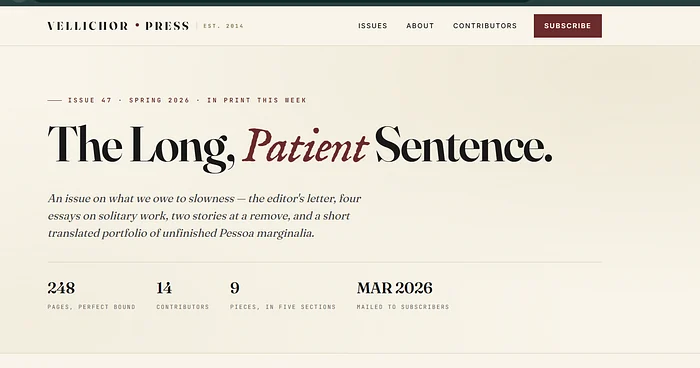
This walkthrough uses an easy WebVerse lab called Marginalia the Developers Left Behind. The target is the website of Vellichor Press, a fictional literary magazine, with Issues, About, Contributors and Subscribe pages. The author is explicit that the lab is a teaching device: practice labs often put a hint in the title, while real targets do not, so the point of the exercise is the repeatable process rather than the flag.
For a brochure-style site like this, the only user input is the mailing list form. The author's reasoning is that the likely weakness is therefore not an exploit but information leaking from the site itself. The lesson stated up front: always ask what the application is exposing before asking how to break it.
Setup
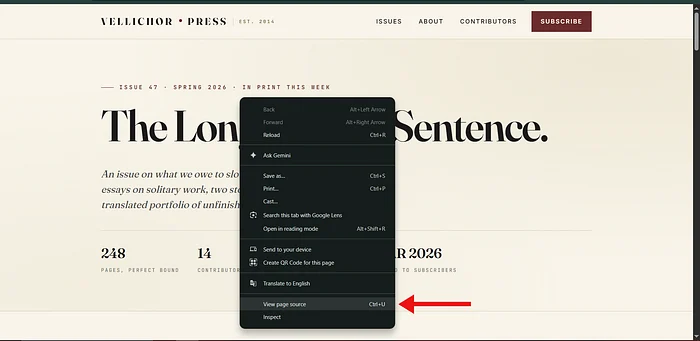
No accounts, roles or product versions are described. The tools named are a browser (right-click, View page source, or Ctrl + U), curl and grep for automation, and Burp Suite for searching the whole proxy history. The precondition is simply that the tester can reach the site and read everything the browser receives, since everything the browser receives is visible to the user.
Finding it
The author maps the attack surface before testing anything:
- What pages and features exist?
- Is there a login, an API, or an admin area?
- What technology is it built with?
The review then proceeds in a fixed order over what the server already hands the client:
- Response headers and cookies for secrets, tokens and version info.
- Page source for comments, hidden fields and internal paths.
- JavaScript files for API endpoints and keys.
robots.txtandsitemap.xmlfor paths the owner did not want indexed.
Headers and cookies were clean here, so the author moved to the page source. Scrolling a long source file by eye is slow and easy to get wrong, so the faster move is to search for <!--.
Exploitation
Step 1: automate the comment search on one page
# list HTML comments on one pagecurl -s https://TARGET/ | tr '
' ' ' | grep -oP ''
curl -s fetches the page quietly, tr '\n' ' ' joins the lines so a comment spanning several lines becomes one line, and grep -oP is meant to print only the matched comment. As reproduced in the report, the pattern between the quotes is empty, so this line as written would not extract comments; the intent is a PCRE pattern matching an HTML comment.
Step 2: repeat for every discovered page
# repeat for every page you discoveredfor p in / /issues /about /contributors; do  echo "== $p"  curl -s "https://TARGET$p" | tr '
' ' ' | grep -oP '<!--.*?-->'
done
This loops over the four paths the author had discovered, prints a separator per path, and applies the same fetch, join and match pipeline. The pattern <!--.*?--> is the non-greedy HTML comment match, so each comment is printed on its own. The author notes the same can be done in Burp Suite with a regex search for <!-- across the whole proxy history, which matters because a comment might exist on a page that was never opened by hand.
Step 3: read the finding
Just above the footer, the author found a developer note.
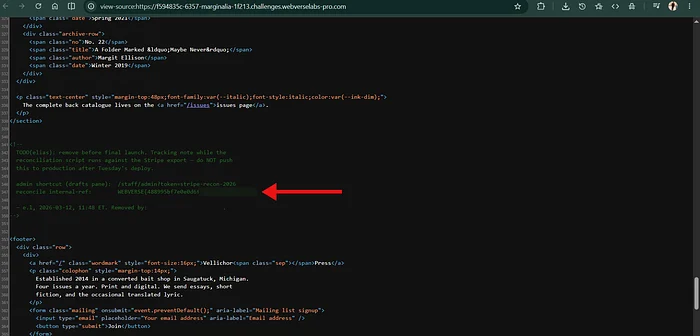
The comment leaked the following, as itemised by the author:
/staff/admin: a hidden admin area that was never meant to be public.- `[redacted] a hardcoded token that may give direct access to that admin area.
- "Stripe export": the admin area likely touches payment-related data.
TODO(elias)ande.l: a staff name and initials, useful for social engineering and username guessing.- A date and time: they show when the note was written, so the token may be old and never rotated.
The lab flag is shown partially masked in the write-up:
WEBVERSE{488995bf7e0e0d6***********}
In the lab the author stopped at the flag, because that was the goal of the lab. On a real engagement the next step would be to check whether the token actually works, and only if the target is in scope and the rules of engagement allow it. If it works, the author would verify access with the smallest possible action, take a screenshot as proof and stop: no browsing payment data, no downloads, no changes. Proving the impact is enough.
Root cause
The mistake is a developer note left in the HTML of the site, carrying an internal admin path, a hardcoded token and an internal tool name. The author frames the class as CWE-615 (Sensitive Information in Source Code Comments), related to CWE-798 (Hardcoded Credentials). Nothing in the report describes a server-side control that failed; the exposure is simply that comments shipped to every visitor, and the admin route may be reachable by a shortcut token in the URL rather than real authentication. The author's fix list recommends stripping comments in builds and adding a CI check for TODO, FIXME or token inside them.
Impact
Impact depends on the token: informational if it is dead, High if it opens an admin panel with payment data. The leaked path gives an attacker a target that was never meant to be public, the token may give direct access to it, the "Stripe export" wording suggests payment-related data sits behind it, and the name, initials and timestamp support social engineering, username guessing and an assessment of whether the credential was ever rotated. All of this is conditional on the token still being valid and on the tester being authorised to use it.
Fix
The author lists the following, as recommendations rather than changes made:
- Strip HTML comments from production builds automatically.
- Never place secrets or internal paths in comments.
- Add a CI check that fails on
TODO,FIXMEortokeninside comments. - Rotate any token that has been exposed, even briefly.
- Protect admin routes with real authentication, not a shortcut token in the URL.
Variants to test
- Run the comment search across every discovered path, not just the home page. A positive result is any
<!-- ... -->block containing a path, credential, hostname or staff identifier. - Search the whole proxy history in Burp with a regex for
<!--. A positive result is a comment on a page you never opened by hand. - Check response headers and cookies first for tokens and version info, then JavaScript files for API endpoints and keys, then
robots.txtandsitemap.xmlfor paths the owner did not want indexed. A positive result is any secret, internal endpoint or unlinked path in those sources. - Where a token is found and the target is in scope, verify with the smallest possible action and stop. A positive result is any confirmation that the token works, proven by a screenshot, with no data browsed, downloaded or changed.
What happened, in plain words
A security researcher walked through a practice website and found a note that a developer had left in the page's code, hidden from normal visitors but readable by anyone who looked. That note contained a secret web address for an admin area, a password-like string (a token), the name of an internal tool, and a staff member's name and initials. The researcher used the lab to show a repeatable method for finding this kind of leak, and stopped at the practice flag rather than going further.
The site in question is a practice lab called Marginalia the Developers Left Behind, part of a training platform called WebVerse. The target inside the lab is the website of Vellichor Press, a fictional literary magazine. It has Issues, About, Contributors and Subscribe pages. The author is clear that the lab is a teaching device: practice labs often put a hint in the title, while real targets do not, so the point of the exercise is the repeatable process rather than the flag.
For a brochure-style site like this, the only place a visitor can type anything is the mailing list form. The author's reasoning is that the likely weakness is therefore not an exploit but information leaking from the site itself. The lesson stated up front: always ask what the application is exposing before asking how to break it.
A quick word on the vocabulary used throughout, since this is written for someone new to security:
- Page source is the raw text a web server sends to your browser. Your browser turns that text into the page you see. Anything in the source is delivered to your computer, so anyone can read it, even if the browser does not display it.
- HTML comment is a note inside the page source that starts with
<!--and ends with-->. Browsers ignore comments when drawing the page, so they are invisible to normal visitors. Developers use them for reminders to themselves or to colleagues. - Token is a short string of characters that acts like a temporary key. If a system accepts the right token, it lets you in without asking for a username and password. Think of it as a cloakroom ticket: whoever holds the ticket can collect the coat.
- Cookie is a small piece of data a website asks your browser to store and send back on every later request, so the site can remember who you are between page loads.
- API (Application Programming Interface) is a way for one piece of software to talk to another, usually over the web, without a human clicking anything. Think of it as a service counter at the back of a shop: you hand over a request, you get data back.
- Admin area is a part of a website meant only for staff, where they can change content, see customer records or manage payments. It is normally behind a login.
- Attack surface is the total set of things an outsider can interact with: pages, forms, logins, APIs, files. The bigger it is, the more places there are to look.
Setup
No accounts, roles or product versions are described. The tools named are a browser (right-click, View page source, or Ctrl + U), curl and grep for automation, and Burp Suite for searching the whole proxy history.
curlis a command-line tool that fetches a web page and prints the raw text to your terminal, without drawing it. It is useful because you see exactly what the server sent.grepis a command-line tool that searches text for a pattern and prints the matching lines. Think of it as the search box in a document, but for a stream of text.- Burp Suite is a tool that sits between your browser and the website, recording every request and response. Its proxy history is a log of everything that passed through during your session.
The precondition is simply that the tester can reach the site and read everything the browser receives, since everything the browser receives is visible to the user.
Finding it
The author maps the attack surface before testing anything:
- What pages and features exist?
- Is there a login, an API, or an admin area?
- What technology is it built with?
Why start here? Because you cannot judge what is unusual until you know what is normal. If you know the site is a simple magazine with four pages and one form, then a hidden admin path in the source stands out immediately. If you had not mapped the site first, you might scroll past it without noticing.
The review then proceeds in a fixed order over what the server already hands the client:
- Response headers and cookies for secrets, tokens and version info.
- Page source for comments, hidden fields and internal paths.
- JavaScript files for API endpoints and keys.
robots.txtandsitemap.xmlfor paths the owner did not want indexed.
A few of those terms, from zero:
- Response headers are short lines of metadata the server sends alongside the page, before the page content. They say things like what kind of file it is, what server software produced it, and what cookies to store. They are not shown on the page but are visible in the browser's developer tools or in
curloutput. - Hidden fields are form inputs that exist in the page source but are not displayed. They carry values the site wants sent back with the form, such as an identifier.
- JavaScript files are the code files that make a page interactive. They often contain the addresses the page calls behind the scenes, and sometimes keys.
robots.txtis a plain text file at the root of a site that tells search engines which paths not to crawl. It is a request, not a lock, so anyone can read it and learn which paths the owner wanted kept quiet.sitemap.xmlis a file listing the site's pages, meant to help search engines index them. It can reveal pages that are not linked from the menu.
Headers and cookies were clean here, so the author moved to the page source. Scrolling a long source file by eye is slow and easy to get wrong, so the faster move is to search for <!--, the opening of an HTML comment.
Exploitation
Step 1: automate the comment search on one page
# list HTML comments on one pagecurl -s https://TARGET/ | tr '
' ' ' | grep -oP ''
Line by line, in plain words:
# list HTML comments on one pageis a comment for the human reader. The#tells the shell to ignore the rest of the line.curl -s https://TARGET/fetches the page at that address. The-smeans silent: no progress bar or extra chatter, just the page text.TARGETis a placeholder for the real site address.|is a pipe. It takes the output of the command on its left and feeds it as input to the command on its right. Think of it as a conveyor belt between two workstations.tr '\n' ' 'replaces every newline character with a space. This matters because an HTML comment can span several lines in the source; joining the lines makes the whole comment sit on one line so a single search can match it.grep -oP ''searches the text for a pattern.-omeans print only the matched part, not the whole line.-Pmeans use Perl-compatible regular expressions, a richer pattern language. As reproduced in the report, the pattern between the quotes is empty, so this line as written would not extract comments; the intent is a PCRE pattern matching an HTML comment.
A regular expression (regex) is a way of describing a pattern of text, so a tool can find it. For example, <!--.*?--> means: the literal characters <!--, then any characters at all, then the literal characters -->.
Step 2: repeat for every discovered page
# repeat for every page you discoveredfor p in / /issues /about /contributors; do  echo "== $p"  curl -s "https://TARGET$p" | tr '\n' ' ' | grep -oP '<!--.*?-->'
done
Line by line:
# repeat for every page you discoveredis again a comment for the reader.for p in / /issues /about /contributors; dostarts a loop. It runs the commands that follow once for each of the four paths, and each time the variablepholds the current path. These are the four pages the author had discovered while mapping the site.echo "== $p"prints a separator line showing which path is being checked, so the output is easy to read.curl -s "https://TARGET$p"fetches that page. The$pis replaced by the current path, so the first pass fetcheshttps://TARGET/, the secondhttps://TARGET/issues, and so on.| tr '\n' ' 'joins the lines, as before.| grep -oP '<!--.*?-->'searches for HTML comments. The pattern<!--.*?-->is the non-greedy HTML comment match:.*?means as few characters as possible, so each comment is printed on its own rather than one giant match swallowing everything between the first<!--and the last-->.donecloses the loop.
Why loop over every page rather than just the home page? Because a comment might exist on a page you never opened by hand. The author notes the same can be done in Burp Suite with a regex search for <!-- across the whole proxy history, which matters for exactly that reason: the proxy history records pages your browser visited automatically, not only the ones you clicked.
Step 3: read the finding
Just above the footer, the author found a developer note.
The comment leaked the following, as itemised by the author:
/staff/admin: a hidden admin area that was never meant to be public.- `[redacted] a hardcoded token that may give direct access to that admin area.
- "Stripe export": the admin area likely touches payment-related data.
TODO(elias)ande.l: a staff name and initials, useful for social engineering and username guessing.- A date and time: they show when the note was written, so the token may be old and never rotated.
A few explanations:
- Hardcoded means the value is written directly into the code or page, rather than stored safely in a configuration system. Anyone who can read the code can read the value.
- Social engineering is manipulating a person rather than a machine: for example, using a real staff name to make a phone call or email sound convincing.
- Username guessing is trying likely account names, such as a first name and initial, against a login page.
- Rotated means replaced with a new value. A token that is never rotated stays valid indefinitely, so an old leak keeps working.
The lab flag is shown partially masked in the write-up:
WEBVERSE{488995bf7e0e0d6***********}
A flag is a unique string placed in a practice lab to prove you reached the intended spot. It is the lab's equivalent of a trophy. The asterisks replace part of the value on purpose, so readers cannot simply copy the answer.
In the lab the author stopped at the flag, because that was the goal of the lab. On a real engagement the next step would be to check whether the token actually works, and only if the target is in scope and the rules of engagement allow it. In scope means the owner has authorised you to test that system. Rules of engagement are the written limits of a test: what you may touch, when, and how far you may go. If the token works, the author would verify access with the smallest possible action, take a screenshot as proof and stop: no browsing payment data, no downloads, no changes. Proving the impact is enough.
Root cause
The mistake is a developer note left in the HTML of the site, carrying an internal admin path, a hardcoded token and an internal tool name. Production means the live site real visitors use, as opposed to a test copy.
The author frames the class as CWE-615 (Sensitive Information in Source Code Comments), related to CWE-798 (Hardcoded Credentials). CWE stands for Common Weakness Enumeration: a public catalogue that gives each kind of software weakness a number and a name, so people can talk about it consistently. CWE-615 is the entry for secrets left in code comments; CWE-798 is the entry for credentials written directly into code.
Nothing in the report describes a server-side control that failed; the exposure is simply that comments shipped to every visitor, and the admin route may be reachable by a shortcut token in the URL rather than real authentication. The author's fix list recommends stripping comments in builds and adding a CI check for TODO, FIXME or token inside them.
- Build step is an automatic stage that turns the source files developers write into the files the live site serves. A build step can remove comments before publishing.
- CI stands for Continuous Integration: an automated system that runs checks on code every time a change is submitted. A CI check can fail a change that contains a forbidden pattern.
Impact
Impact depends on the token: informational if it is dead, High if it opens an admin panel with payment data. Informational and High are severity labels: informational means a finding worth noting but not urgent, High means it needs prompt attention.
The leaked path gives an attacker a target that was never meant to be public, the token may give direct access to it, the "Stripe export" wording suggests payment-related data sits behind it, and the name, initials and timestamp support social engineering, username guessing and an assessment of whether the credential was ever rotated. All of this is conditional on the token still being valid and on the tester being authorised to use it.
Fix
The author lists the following, as recommendations rather than changes made:
- Strip HTML comments from production builds automatically.
- Never place secrets or internal paths in comments.
- Add a CI check that fails on
TODO,FIXMEortokeninside comments. - Rotate any token that has been exposed, even briefly.
- Protect admin routes with real authentication, not a shortcut token in the URL.
Authentication means proving who you are, usually with a username and password, before being allowed in. A token in a URL is weaker because URLs get copied, pasted, saved in browser history and logged by servers along the way.
Variants to test
- Run the comment search across every discovered path, not just the home page. A positive result is any
<!-- ... -->block containing a path, credential, hostname or staff identifier. - Search the whole proxy history in Burp with a regex for
<!--. A positive result is a comment on a page you never opened by hand. - Check response headers and cookies first for tokens and version info, then JavaScript files for API endpoints and keys, then
robots.txtandsitemap.xmlfor paths the owner did not want indexed. A positive result is any secret, internal endpoint or unlinked path in those sources. - Where a token is found and the target is in scope, verify with the smallest possible action and stop. A positive result is any confirmation that the token works, proven by a screenshot, with no data browsed, downloaded or changed.
Glossary
- Admin area: a part of a website meant only for staff, normally behind a login.
- API (Application Programming Interface): a way for software to talk to other software over the web, without a human clicking.
- Attack surface: the total set of things an outsider can interact with on a system.
- Authentication: proving who you are before being allowed in.
- Build step: an automatic stage that turns developers' source files into the files the live site serves.
- Burp Suite: a tool that sits between your browser and a website and records every request and response.
- CI (Continuous Integration): an automated system that runs checks on code whenever a change is submitted.
- Cookie: a small piece of data a site asks your browser to store and send back on later requests, so the site can remember you.
curl: a command-line tool that fetches a web page and prints the raw text.- CWE (Common Weakness Enumeration): a public catalogue giving each kind of software weakness a number and a name.
- Flag: a unique string in a practice lab that proves you reached the intended spot.
grep: a command-line tool that searches text for a pattern and prints the matching lines.- Hardcoded: written directly into code or a page rather than stored in a configuration system.
- Hidden field: a form input present in the page source but not displayed.
- HTML comment: a note in page source between
<!--and-->, ignored by browsers and invisible to normal visitors. - Informational: a severity label meaning worth noting but not urgent.
- In scope: authorised by the owner to be tested.
- JavaScript file: a code file that makes a page interactive, often containing the addresses the page calls behind the scenes.
- Page source: the raw text a web server sends to your browser.
- Production: the live site real visitors use, as opposed to a test copy.
- Regular expression (regex): a way of describing a pattern of text so a tool can find it.
- Response headers: short lines of metadata a server sends alongside a page, not shown on the page itself.
robots.txt: a plain text file at a site's root telling search engines which paths not to crawl.- Rotated: replaced with a new value, as with a token or password.
- Rules of engagement: the written limits of a security test: what may be touched, when, and how far.
sitemap.xml: a file listing a site's pages to help search engines index them.- Social engineering: manipulating a person rather than a machine, for example using a real staff name to sound convincing.
- Token: a short string of characters that acts like a temporary key, letting whoever holds it in without a username and password.
- Username guessing: trying likely account names against a login page.
- High: a severity label meaning a finding needs prompt attention.




