CWE-540 in the Wild: Hardcoded Credentials in a Production Analytics Script
A production analytics JavaScript file contained a hardcoded internal reference token, also exposed in the browser via a global variable. Anyone visiting the site could read the token, though the text does not show what access it granted.

Cybersecurity
The full write-up lives on its author's site
It belongs to its author, so we link to it rather than copy it. The other two tabs are our own rewrites, checked against it.
Context
Pebble & Pine is a small ceramics studio site: two people, a barn, seasonal mug drops. The researcher describes it as minimal and quiet, built with care rather than carelessness, and the site claims it runs no trackers. The feature at the centre of the write-up is the site's analytics script, which lives at a predictable static asset path and is loaded by every visitor's browser.
According to the file's own contents, the script does scroll-depth tracking, outbound click detection, and includes a debounce function so it does not spam events. That is the ordinary part. The problem sits at the end of the file.

Setup
No accounts, roles, tooling or versions are described. The researcher did not use a proxy, a fuzzer or any payloads. The only precondition was reading the site's public journal page and then fetching a public JavaScript file.
Finding it
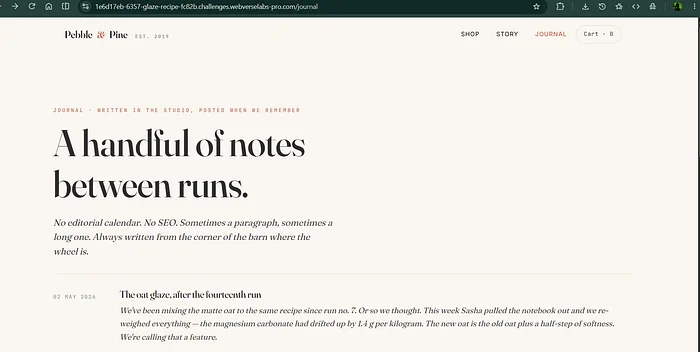
The first stop was the journal page, not the application itself. There the researcher found a post titled "New website, brother-shaped", in which Marit mentions that her brother Felix built the site over a weekend:
"He also wrote the analytics file, which apparently we are supposed to ignore for now. He says he'll come back to it. He always says he'll come back to it."
That is a human hint rather than a technical one: it names the analytics file and explains why it was worth looking at. The researcher's point is that this sentence did more work than any scanner could have.
Finding the file
The obvious guess paid off immediately:
/static/js/analytics.js
Nothing was hidden: no authentication wall and no obscure path, just a predictable static asset location, as is typical for analytics scripts. The top of the file was unremarkable, containing the scroll-depth tracking, outbound click detection and debounce logic described above.
Exploitation
Step 1: read the end of the file
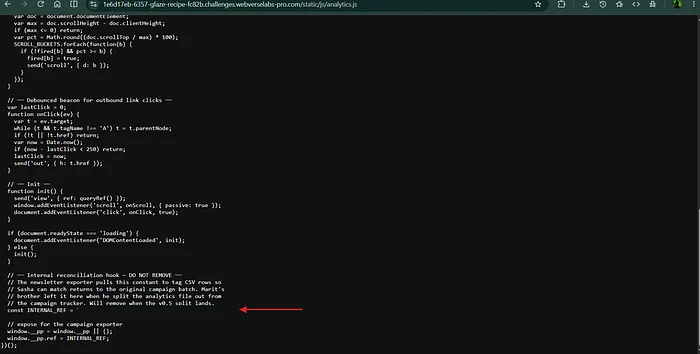
Right after the init() function, the part of the file a developer writes last and reviews least, there was a comment block that did not belong in anything resembling finished code.
Step 2: extract the hardcoded value
The relevant code was:
const INTERNAL_REF = "WEBVERSE{...}";
window.__pp = window.__pp || {};window.__pp.ref = INTERNAL_REF;
The first line defines a hardcoded internal reference token as a constant. The second attaches that constant to a global object, window.__pp.ref, so the value is also readable live in the browser without fetching the file at all.
The comment around the constant was labelled "DO NOT REMOVE" and explained the value away with a version split that, going by the comment's own tone, was never actually coming. Going by the comment's own tone, that split was never actually coming.
Step 3: confirm exposure
No further request was needed. The value ships to every visitor's browser as part of the static asset, and is additionally available at window.__pp.ref in the page context.
Root cause
A secret, an internal reference token, was parked in client-side code behind a comment promising later cleanup. The mistake is one of classification: JavaScript files get treated as "just frontend", something designers touch and security reviewers skip, when in fact a JS file ships to every visitor's browser and anything in it is public permanently from the moment it is deployed.
The report does not describe any server-side control around the file. The report's guidance is to keep internal-only values server-side rather than in a variable the browser can read.
Impact
The token is readable by anyone who loads the site or fetches the static file, and is also exposed in the page's global scope. The report does not state what the token authorises or what an attacker could do with it beyond reading it; it describes the value as an internal reference, and in the remediation section as an example of something internal-only such as a campaign reconciliation ID. The write-up frames the impact in terms of exposure: the value is public, permanently, from deployment onward.
Fix
Its remediation guidance is:
- Treat every static asset, including JS, CSS and source maps, as public, because it is.
- Never park temporary secrets or internal references in client-side code, even behind a comment promising cleanup.
- If something is internal-only, such as a campaign reconciliation ID, keep it server-side, never in a variable the browser can read.
- Treat
window.__anythingholding a real token as a code smell worth flagging in every review.
Variants to test
- Journal and changelog posts. Read public writing by the site's owners for admissions such as "we are supposed to ignore" a file or "he'll come back to it". A positive result is a named file or feature that turns out to be reachable and unfinished.
- Predictable analytics paths. Request common locations such as
/static/js/analytics.jsand read the whole file, especially after the last function. A positive result is a constant, token or internal identifier in a comment block or a global assignment. - Global object assignments. Search shipped JavaScript for patterns like
window.__pp.ref = ...or anywindow.__somethingassigned a real value. A positive result is a token readable from the browser console without any request beyond loading the page. - Comment blocks promising cleanup. Grep bundles for phrases such as "DO NOT REMOVE", "temporary" or "will remove when". A positive result is a live value sitting next to a promise of future removal.
- Source maps and CSS. Apply the same reading to source maps and stylesheets, since the report's guidance covers all static assets. A positive result is an internal identifier or endpoint that only exists in the unminified or mapped output.
What happened, in plain words
A small ceramics studio called Pebble & Pine runs a website. Two people run the studio, from a barn, and they sell mugs in seasonal batches. The site looks calm and carefully made, and it tells visitors that it does not track them.
Every website is made of files that your browser downloads and runs. Some of those files are pages you see, some are pictures, and some are small programs written in a language called JavaScript that make the page do things, like notice how far you have scrolled. Those files are sent to every visitor's browser. Anyone can open them, read them and keep a copy.
One of those files was the site's analytics script. "Analytics" here means code that watches what visitors do on the page, such as how far down they scroll or which links they click, so the owners can learn something about their audience. The script was supposed to be ordinary housekeeping code. Instead, it contained a secret value written directly into the text of the file, plus a comment saying it should not be removed and would be cleaned up later.
A security researcher found it without any special tools. He read a public blog post on the site, where one of the owners mentioned that her brother had written the analytics file and that they were "supposed to ignore" it for now. That sentence pointed him straight at the file. He opened it in his browser, read to the end, and found the value.
The write-up's title names this kind of mistake CWE-540, hardcoded credentials: a secret value written directly into source code instead of being kept somewhere safe. The write-up is a short lesson in why "we'll clean that up later" is a dangerous sentence in software.
The site and the claim
Pebble & Pine is described as a small ceramics studio site: two people, a barn, seasonal mug drops. The researcher calls it minimal and quiet, built with care rather than carelessness. The site claims it runs no trackers.
A tracker is a piece of code, often supplied by an outside company, that follows what you do across pages or across websites, usually for advertising or statistics. Many people dislike them, so "no trackers" is a selling point. The researcher says he has stopped trusting such claims at face value, which is why he went looking. That is the mindset of the whole exercise: a claim is not proof, and the files themselves are the proof.
The feature at the centre of the write-up is the site's analytics script. It lives at a predictable location among the site's static files and is loaded by every visitor's browser.
A static file is a file the web server hands out exactly as stored, without building it fresh for each visitor. Pictures, stylesheets and JavaScript files are usually static. Because the server does not check who is asking, anyone on the internet can download a static file if they know or guess its address.
According to the file's own contents, the script does scroll-depth tracking, outbound click detection, and includes a debounce function so it does not spam events. That is the ordinary part. The problem sits at the end of the file.
- Scroll-depth tracking: recording how far down a page a visitor gets, for example "reached 50 percent".
- Outbound click detection: noticing when a visitor clicks a link that leads to a different website.
- Debounce: a small trick that waits a moment before reacting, so that a burst of rapid events (say, many scroll movements in a second) produces one recorded event instead of hundreds. Think of a door that only closes once you have stopped walking through it.
Setup
No accounts, roles, tooling or versions are described. The researcher did not use a proxy, a fuzzer or any payloads. The only precondition was reading the site's public journal page and then fetching a public JavaScript file.
A few of those words deserve a plain explanation, because they are the everyday tools of this kind of work:
- A proxy (in this context, an intercepting proxy) is software that sits between your browser and the website and lets you pause, read and change the traffic going back and forth. It is the main tool of web security testing, and here it was not needed.
- A fuzzer is a program that fires thousands of variations of an input at a site, hoping one of them causes something interesting. Also not needed.
- A payload is the specific piece of text or code an attacker sends to try to trigger a behaviour, for example a snippet designed to make a page run a script. None were used.
So the entire method was: read a public page, then open a public file. That is worth pausing on. Security problems are not always found by clever attacks; sometimes they are found by reading carefully.
Finding it
The first stop was the journal page, not the application itself. A journal here is the site's blog, a public page of written posts. There the researcher found a post titled "New website, brother-shaped", in which Marit mentions that her brother Felix built the site over a weekend:
"He also wrote the analytics file, which apparently we are supposed to ignore for now. He says he'll come back to it. He always says he'll come back to it."
That is a human hint rather than a technical one: it names the analytics file and explains why it was worth looking at. The researcher's point is that this sentence did more work than any scanner could have.
A scanner is automated software that crawls a site looking for known weaknesses. It is fast but blind to context. A sentence written by a human being, saying which file to look at and admitting it was left unfinished, gives context a scanner cannot have. The owner effectively said: there is a file here that we have not dealt with yet. That is exactly the kind of file worth opening first.
Finding the file
The obvious guess paid off immediately:
/static/js/analytics.js
This is a web address, or path, on the site. Reading it from left to right:
/static/is a folder name that many sites use for files that never change, the static assets. It is a convention, not a rule, but conventions are exactly what a researcher exploits./js/is a folder for JavaScript files.analytics.jsis the file itself. The.jsending tells the browser this is JavaScript.
Nothing was hidden: no authentication wall and no obscure path, just a predictable static asset location, as is typical for analytics scripts. An authentication wall would be a login check before the server hands over the file. There was none, because static files are normally served to anyone who asks. The path was guessable because analytics scripts are almost always named something like this and kept in a folder like this. The researcher did not need to break in; he needed to guess a name, and the name was obvious.
The top of the file was unremarkable, containing the scroll-depth tracking, outbound click detection and debounce logic described above. In other words, the beginning of the file looked like normal, competent work. This matters: if you only skim the first screen of a file, you see nothing wrong. The interesting part was further down.
Exploitation
"Exploitation" sounds dramatic. Here it means: reading the rest of the file and copying out the value. No attack was performed against the server.
Step 1: read the end of the file
Right after the init() function, the part of the file a developer writes last and reviews least, there was a comment block that did not belong in anything resembling finished code.
A function is a named block of instructions in a program. init() is a common name for a function that sets things up when the script starts, short for "initialise". A comment is text in a file that the browser ignores when running the code; it exists for humans to read. Developers use comments to leave notes for themselves and for colleagues. Because comments are ignored by the machine, they are easy to forget, and because they are written for humans, they often say more than the code does.
The researcher's observation is about human behaviour: the end of a file is written last, when a developer is tired and in a hurry, and it is reviewed least, because reviewers tend to start at the top. That is why the end of a file is a good place to look.
Step 2: extract the hardcoded value
The relevant code was:
const INTERNAL_REF = "WEBVERSE{...}";
Line by line:
constdeclares a constant, a named box that holds a value and is not meant to be reassigned later in the script.INTERNAL_REFis the name of that box. The name itself is a hint: "internal" and "ref", short for reference. Something the owners consider internal is being stored here.=assigns the value on the right to the name on the left."WEBVERSE{...}"is the value: a piece of text, in quotes, so JavaScript treats it as text rather than as an instruction. The value is shown in the write-up asWEBVERSE{...}. The braces and the word inside are a common way of writing a token so that it is recognisable as one.
A token is a string of characters that acts like a key or a ticket. You present it to a system and the system treats you as entitled to something, without needing your username and password. Think of a cloakroom ticket: whoever holds the ticket gets the coat. That is why a token in a public file is a problem: anyone who reads the file holds the ticket.
window.__pp = window.__pp || {};window.__pp.ref = INTERNAL_REF;
Line by line:
windowis the global object of a web page in the browser. Every page has one, and anything attached to it can be reached from anywhere else on the page, including from the browser's developer console.window.__pp = window.__pp || {}means: ifwindow.__ppalready exists, keep it; otherwise create it as an empty object. An object here is simply a container that holds named values, like a labelled box with compartments. The||means "or": use the left side if it is usable, otherwise the right side.{}is an empty object.window.__pp.ref = INTERNAL_REFputs the constant into that container under the nameref. So the token is now reachable aswindow.__pp.reffrom the page itself.
The first line defines a hardcoded internal reference token as a constant. The second attaches that constant to a global object, window.__pp.ref, so the value is also readable live in the browser without fetching the file at all.
A global object is a shared noticeboard for the whole page. Anything pinned to it can be read by any other script running on that page, and by a person using the browser's developer tools. The developer console is a panel built into every browser where you can type commands and inspect the page; opening it and typing window.__pp.ref would show the value. You do not need to be a programmer to open it; it is a menu item in the browser.
The comment around the constant was labelled "DO NOT REMOVE" and explained the value away with a version split that, going by its own tone, was never actually coming. Going by the comment's own tone, that split was never actually coming.
A version is a numbered release of software, like v0.5 meaning version 0.5, an early one. A version split would be a planned reorganisation of the code into separate parts. The comment says, in effect: this value is here temporarily, and it will be removed when the reorganisation happens. The researcher reads the tone and concludes the reorganisation was not really on its way. Whether or not that is fair, the practical point stands: the value was still there, in production, when he looked.
Production means the live version of the site that real visitors use, as opposed to a test copy on a developer's machine. A mistake in production is visible to the world.
Step 3: confirm exposure
No further request was needed. The value ships to every visitor's browser as part of the static asset, and is additionally available at window.__pp.ref in the page context.
"Ships to every visitor's browser" is the key phrase. You did not have to be logged in, you did not have to be on a list, and you did not have to do anything unusual. Loading the page was enough. The page context means the running state of the page inside your browser, as opposed to the file sitting on the server. The value existed in both places at once.
Root cause
A secret, an internal reference token, was parked in client-side code behind a comment promising later cleanup. The mistake is one of classification: JavaScript files get treated as "just frontend", something designers touch and security reviewers skip, when in fact a JS file ships to every visitor's browser and anything in it is public permanently from the moment it is deployed.
Client-side means code that runs in the visitor's browser, as opposed to server-side code that runs on the website's own computers where visitors cannot see it. Frontend is the everyday word for the client side: the part people see and interact with. Deployed means published to the live site.
The classification mistake is easy to understand with a comparison. A restaurant kitchen is server-side: customers do not wander in, and you can keep things there that guests should not see. The dining room is client-side: everything in it is visible to every guest, all evening. Putting a secret in a JavaScript file is like taping the safe combination under a dining table. It does not matter that the table is out of the way or that a note says the tape will be removed later. The guests can read it.
The report does not describe any server-side control around the file. The only defence that would have worked is not putting the value in the file in the first place.
That last sentence is the heart of the lesson. You cannot lock a public file. You can only decide what goes into it.
Impact
The token is readable by anyone who loads the site or fetches the static file, and is also exposed in the page's global scope. The report does not state what the token authorises or what an attacker could do with it beyond reading it; it describes the value as an internal reference, and in the remediation section as an example of something internal-only such as a campaign reconciliation ID.
A campaign reconciliation ID is an identifier used internally to match up records, for example tying together the parts of a marketing campaign so the numbers add up at the end. It is bookkeeping, not a password. That distinction matters for judging severity: a leaked bookkeeping label is less dangerous than a leaked password, but it is still something the owners meant to keep to themselves, and the report does not claim to know what else it might unlock.
The write-up frames the impact in terms of exposure: the value is public, permanently, from deployment onward. Permanently is the word to hold on to. A secret in a public file cannot be un-seen. Even after the file is fixed, copies exist in browser caches, in archives, and in anyone's notes. The report's remediation is to keep such values server-side and never in client-side code.
Fix
Its remediation guidance is:
- Treat every static asset, including JS, CSS and source maps, as public, because it is.
- Never park temporary secrets or internal references in client-side code, even behind a comment promising cleanup.
- If something is internal-only, such as a campaign reconciliation ID, keep it server-side, never in a variable the browser can read.
- Treat
window.__anythingholding a real token as a code smell worth flagging in every review.
A few terms in that list:
- CSS is the language that describes how a page looks: colours, spacing, fonts. It is a static file too, and people sometimes leave notes in it.
- A source map is an extra file that maps compressed, machine-friendly code back to the readable original. Developers use it for debugging. If it is published, it can reveal the original code, comments included.
- A variable is a named box in a program that holds a value, like the
constabove. - A code smell is a pattern that is not a bug by itself but usually signals one nearby. It is the software equivalent of a faint burning smell in a kitchen: nothing is on fire yet, but you go and check.
Variants to test
These are the general lessons the researcher draws out, written as things to try on other sites. They are included because they turn one finding into a method.
- Journal and changelog posts. Read public writing by the site's owners for admissions such as "we are supposed to ignore" a file or "he'll come back to it". A positive result is a named file or feature that turns out to be reachable and unfinished. A changelog is a page listing what changed in each release; it often mentions work in progress.
- Predictable analytics paths. Request common locations such as
/static/js/analytics.jsand read the whole file, especially after the last function. A positive result is a constant, token or internal identifier in a comment block or a global assignment. - Global object assignments. Search shipped JavaScript for patterns like
window.__pp.ref = ...or anywindow.__somethingassigned a real value. A positive result is a token readable from the browser console without any request beyond loading the page. - Comment blocks promising cleanup. Grep bundles for phrases such as "DO NOT REMOVE", "temporary" or "will remove when". A positive result is a live value sitting next to a promise of future removal. To grep is to search text for a pattern; a bundle is several JavaScript files merged into one for faster loading.
- Source maps and CSS. Apply the same reading to source maps and stylesheets, since the report's guidance covers all static assets. A positive result is an internal identifier or endpoint that only exists in the unminified or mapped output. An endpoint is a specific address on a server that a program talks to. Unminified means not compressed for delivery, so still readable by a human.
Takeaway
The researcher's closing image is that the glaze recipes were not the only thing being refined at Pebble & Pine; so was the excuse for leaving a secret in production. "We'll come back to it" is rarely a plan. It is usually just the sentence right before someone else finds it first.
For a beginner, the practical lessons are short. Files your browser downloads are public, all of them, always. A comment saying something is temporary is not a lock. And reading carefully, starting with what the owners themselves have written in public, is a real technique, not a lesser one.
Glossary
- Analytics script: code that records what visitors do on a page, such as scrolling and clicking.
- Authentication wall: a login check that stops people from reaching a file or page without signing in.
- Bundle: several JavaScript files merged into one for faster loading.
- Campaign reconciliation ID: an internal identifier used to match up records, for example across a marketing campaign.
- Changelog: a public page listing what changed in each release of a product.
- Client-side: code that runs in the visitor's browser, where the visitor can read it.
- Code smell: a pattern that is not a bug by itself but usually signals one nearby.
- Comment: text in a code file that the machine ignores and humans read.
- Constant: a named box in a program holding a value that is not meant to change.
- CSS: the language describing how a page looks, such as colours and spacing.
- CWE-540: the standard catalogue entry for hardcoded credentials, secrets written directly into source code.
- Debounce: waiting briefly before reacting, so a burst of events produces one recorded event.
- Deployed: published to the live site that real visitors use.
- Developer console: a panel in every browser for inspecting a page and typing commands.
- Endpoint: a specific address on a server that a program talks to.
- Frontend: the everyday word for the client side, the part visitors see and interact with.
- Function: a named block of instructions in a program.
- Fuzzer: software that fires many variations of an input at a site hoping to trigger something.
- Global object: a shared noticeboard for a whole page, reachable from any script on it.
- Grep: to search text for a pattern.
- Hardcoded credentials: a password, key or token written directly into source code instead of stored safely.
- JavaScript: the programming language that makes web pages do things in the browser.
- Object: a container in a program holding named values, like a box with labelled compartments.
- Outbound click detection: noticing when a visitor clicks a link leading to another website.
- Page context: the running state of a page inside the browser, as opposed to the file on the server.
- Payload: the specific text or code sent to try to trigger a behaviour.
- Production: the live version of a site that real visitors use.
- Proxy: software sitting between browser and website that lets you read and change the traffic.
- Scanner: automated software that crawls a site looking for known weaknesses.
- Scroll-depth tracking: recording how far down a page a visitor gets.
- Server-side: code that runs on the website's own computers, out of sight of visitors.
- Source map: an extra file mapping compressed code back to the readable original.
- Static file: a file the server hands out as stored, without checking who is asking.
- Token: a string of characters that acts like a key or ticket, granting whatever it is presented for.
- Tracker: code, often from an outside company, that follows what you do across pages or sites.
- Unminified: not compressed for delivery, so still readable by a human.
- Variable: a named box in a program that holds a value.
- Version: a numbered release of software, such as v0.5.
- Version split: a planned reorganisation of code into separate parts.




